Load Balancer 502, 503 and 504 Errors
-
Phase 0: Before you start
-
Phase 1: The foundation
-
Phase 2: Operations and security
-
Phase 3: SQL Server on AWS
-
Phase 4: Troubleshooting step by step
-
Phase 5: Final project and career
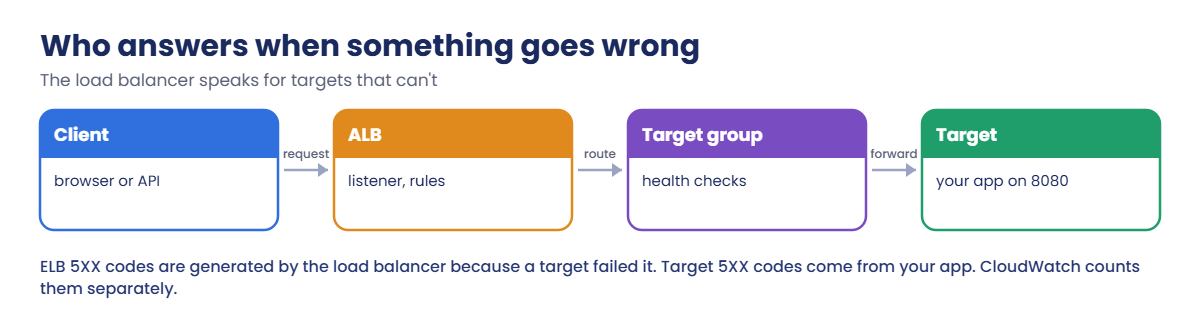
When a website behind a load balancer fails, users see 502, 503 or 504, and each one points somewhere different. Fixing an ALB 502 bad gateway, a 503 or a 504 starts with knowing who generated the error: the Application Load Balancer speaking for a target that failed it, or your app itself.
You’ll build a small app behind an ALB with endpoints that misbehave on purpose, produce each code and read the evidence, then break target health twice: a wrong health check path and a blocked security group, including the surprise of an ALB that keeps serving when every target is unhealthy.
| Time | You need | By the end you can |
|---|---|---|
| 60 minutes | Lessons 8 to 10 and 20 done (saat-vpc, WebSg allowing 80 from the internet, AppSg allowing 8080 from WebSg), signed in as saat-admin. Cost: about USD 0.10 (an ALB and two t3.micro instances for under an hour). | Tell ELB and target 5XX codes apart, reproduce 502, 503 and 504, read TargetHealth reasons, set idle timeouts, understand fail-open, and fix health check and security group problems. |
What it is, in one line
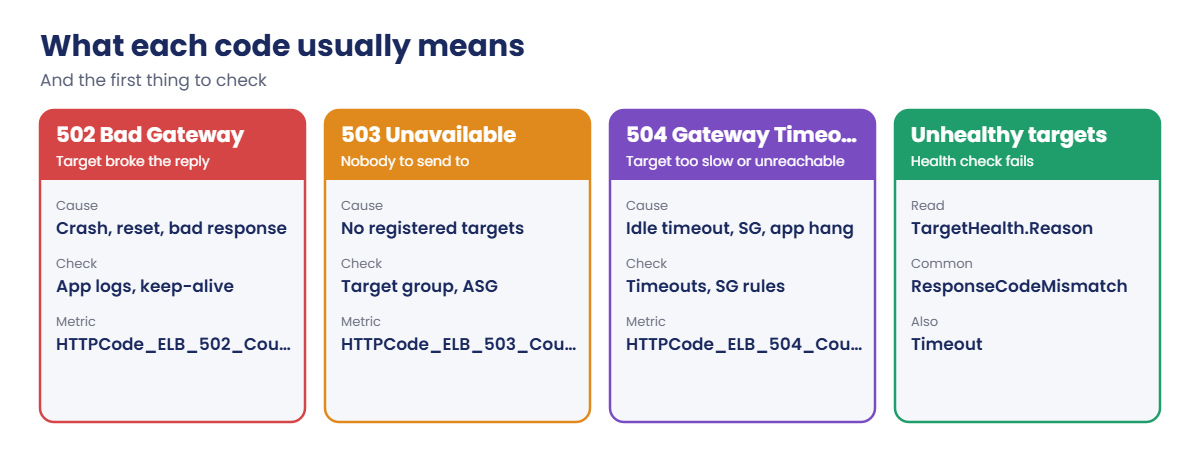
An ALB 502 bad gateway means the load balancer got an invalid or no response from a target; 503 means it had no target to send to; 504 means the target didn’t answer in time.
In Simple Words
The restaurant waiter
You order through a waiter (the load balancer). A dropped plate brings back “sorry, something went wrong” (502), no cooks on shift means “kitchen closed” (503), and a cook who takes forever makes the waiter give up (504).
The waiter also checks every few minutes that each cook is alive (health checks). A cook who doesn’t answer the check stops getting orders.
Odd rule: if every single cook fails the check, the waiter sends orders to all of them anyway, hoping one copes. That’s “fail open”.
Engineer's View
How ALB errors and health checks work
CloudWatch separates codes the ALB generated (HTTPCode_ELB_502_Count, _503_, _504_) from codes your targets returned (HTTPCode_Target_5XX_Count). 502: the target closed or reset the connection, sent a malformed response, or its keep-alive timeout is shorter than the ALB idle timeout. 503: no registered targets in the group. 504: the target didn’t respond before the idle timeout (60 seconds by default), or the ALB couldn’t open a connection within 10 seconds, often a security group or NACL.
Health checks run per target group on a path, port, interval and thresholds; describe-target-health gives a reason such as Target.ResponseCodeMismatch, Target.Timeout or Target.FailedHealthChecks. If every target in all enabled AZs is unhealthy, the ALB fails open and routes to all of them.
Access logs in S3 record elb_status_code and target_status_code per request; a “-” target code next to 502 means the target never sent a valid response. Auto Scaling can use ELB health checks to replace failing instances.
How it works, step by step
Here is how to read an error from a load-balanced app.
1ELB or target?
Compare HTTPCode_ELB_5XX with HTTPCode_Target_5XX. If the target returned 500, look at the app. If the ELB made the error, keep reading.
2Which code?
502 points at how the target answered, 503 at the target group being empty, 504 at time or reachability.
3Target health and reasons
describe-target-health tells you which targets are failing and why, in AWS’s words.
4Know the codes
Each code has a short list of usual causes:
Never “fix” a 502 by raising every timeout. Find out why the target broke the reply first.
✅ Checkpoint: You can say whether the ALB or the app generated a 5XX, and the usual causes of 502, 503 and 504.
Hands-on lab: produce every ALB error and fix target health
Sign in and set names:
cd C:\aws-lab
aws login --profile saat-admin
$env:AWS_PROFILE = 'saat-admin'
$v = Get-Content C:\aws-lab\saat-vpc.json | ConvertFrom-Json1Launch two app servers with a misbehaving app
Paste this whole block. The app answers / and /health, sleeps on /slow, and drops the connection on /crash:
$ud = @'
#!/bin/bash
cat > /opt/app.py <<'EOF'
import http.server, socket, time
class H(http.server.BaseHTTPRequestHandler):
def do_GET(self):
if self.path == '/crash':
self.connection.shutdown(socket.SHUT_RDWR)
return
if self.path == '/slow':
time.sleep(15)
if self.path not in ('/', '/health', '/slow'):
self.send_error(404)
return
body = ('hello from ' + socket.gethostname() + '\n').encode()
self.send_response(200)
self.send_header('Content-Length', str(len(body)))
self.end_headers()
self.wfile.write(body)
def log_message(self, *args):
pass
http.server.ThreadingHTTPServer(('', 8080), H).serve_forever()
EOF
systemd-run --unit=app8080 python3 /opt/app.py
'@
$ud = $ud.Replace([string][char]13, '')
$ami = aws ssm get-parameter --name /aws/service/ami-amazon-linux-latest/al2023-ami-kernel-default-x86_64 --query Parameter.Value --output text
$ids = foreach ($s in @(@('web66a', $v.PrivateA), @('web66b', $v.PrivateB))) {
aws ec2 run-instances --image-id $ami --instance-type t3.micro --subnet-id $s[1] --security-group-ids $v.AppSg --metadata-options HttpTokens=required --user-data $ud --tag-specifications "ResourceType=instance,Tags=[{Key=Name,Value=$($s[0])},{Key=course,Value=saatvedha-aws},{Key=lesson,Value=66}]" --query "Instances[0].InstanceId" --output text
}
aws ec2 wait instance-running --instance-ids $ids
$ids -join ' 'You should see something like this:
i-0a1b2c3d4e5f60718 i-0b2c3d4e5f6a70819The servers sit in private subnets with AppSg, which accepts 8080 only from WebSg, the load balancer’s group. The [char]13 line strips Windows line endings, which would break the script (Lesson 11).
2Put an ALB in front and check health
Paste this whole block. The idle timeout is set to 10 seconds so the 504 test is quick:
$tg = aws elbv2 create-target-group --name saat-tg66 --protocol HTTP --port 8080 --vpc-id $v.VpcId --target-type instance --health-check-path /health --health-check-interval-seconds 10 --healthy-threshold-count 2 --unhealthy-threshold-count 2 --query "TargetGroups[0].TargetGroupArn" --output text
aws elbv2 register-targets --target-group-arn $tg --targets "Id=$($ids[0])" "Id=$($ids[1])"
$alb = aws elbv2 create-load-balancer --name saat-alb66 --type application --subnets $v.PublicA $v.PublicB --security-groups $v.WebSg --tags Key=course,Value=saatvedha-aws --query "LoadBalancers[0].LoadBalancerArn" --output text
aws elbv2 modify-load-balancer-attributes --load-balancer-arn $alb --attributes Key=idle_timeout.timeout_seconds,Value=10 | Out-Null
aws elbv2 create-listener --load-balancer-arn $alb --protocol HTTP --port 80 --default-actions "Type=forward,TargetGroupArn=$tg" | Out-Null
aws elbv2 wait load-balancer-available --load-balancer-arns $alb
aws elbv2 wait target-in-service --target-group-arn $tg --targets "Id=$($ids[0])" "Id=$($ids[1])"
$dns = aws elbv2 describe-load-balancers --load-balancer-arns $alb --query "LoadBalancers[0].DNSName" --output text
function Get-Code([string]$Path) {
$sw = [Diagnostics.Stopwatch]::StartNew()
try { $r = Invoke-WebRequest "http://$dns$Path" -UseBasicParsing -TimeoutSec 30; $code = $r.StatusCode; $body = $r.Content.Trim() } catch { $code = [int]$_.Exception.Response.StatusCode; $body = '' }
'{0,-8} {1} {2:N1} s {3}' -f $Path, $code, $sw.Elapsed.TotalSeconds, $body
}
function Get-Health { aws elbv2 describe-target-health --target-group-arn $tg --query "TargetHealthDescriptions[].[Target.Id,TargetHealth.State,TargetHealth.Reason]" --output text }
Get-Health
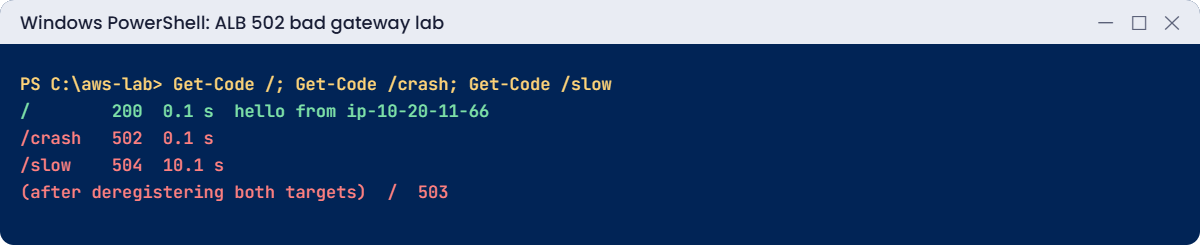
Get-Code /You should see something like this:
i-0a1b2c3d4e5f60718 healthy None
i-0b2c3d4e5f6a70819 healthy None
/ 200 0.1 s hello from ip-10-20-11-66.ap-south-1.compute.internal
3Produce 502, 504 and 503
Paste this whole block:
Get-Code /crash
Get-Code /slow
aws elbv2 deregister-targets --target-group-arn $tg --targets "Id=$($ids[0])" "Id=$($ids[1])"
Start-Sleep 70
Get-Code /
aws elbv2 register-targets --target-group-arn $tg --targets "Id=$($ids[0])" "Id=$($ids[1])"
aws elbv2 wait target-in-service --target-group-arn $tg --targets "Id=$($ids[0])" "Id=$($ids[1])"
$lbDim = ($alb -split ':loadbalancer/')[1]
$e = (Get-Date).ToUniversalTime(); $s = $e.AddMinutes(-15)
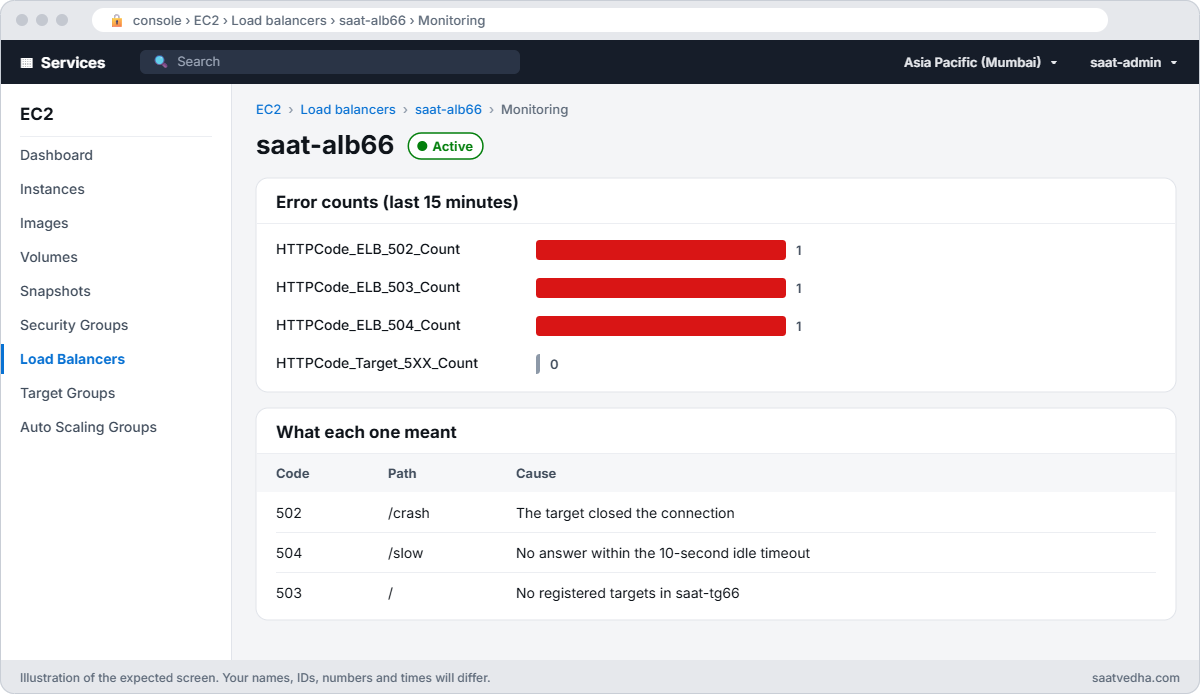
foreach ($m in 'HTTPCode_ELB_502_Count', 'HTTPCode_ELB_503_Count', 'HTTPCode_ELB_504_Count', 'HTTPCode_Target_5XX_Count') { "$m = $(aws cloudwatch get-metric-statistics --namespace AWS/ApplicationELB --metric-name $m --dimensions Name=LoadBalancer,Value=$lbDim --start-time $s.ToString('o') --end-time $e.ToString('o') --period 900 --statistics Sum --query 'Datapoints[0].Sum' --output text)" }You should see something like this:
/crash 502 0.1 s
/slow 504 10.1 s
/ 503 0.0 s
HTTPCode_ELB_502_Count = 1.0
HTTPCode_ELB_503_Count = 1.0
HTTPCode_ELB_504_Count = 1.0
HTTPCode_Target_5XX_Count = NoneAll three errors came from the load balancer, not the app (Target_5XX is empty): 502 when the target dropped the connection, 504 when it took longer than the 10-second idle timeout, 503 when there were no targets (after a 60-second deregistration delay).
✅ Checkpoint: Both targets are healthy, / returns 200, /crash gives 502, /slow gives 504 after 10 seconds, an empty target group gives 503, and the ELB metrics count each one.
Break It, Then Fix It
Two health problems you’ll see in real deployments.
1Break it: the health check path changes
A configuration change points the health check at /healthz, a path the app doesn’t serve:
aws elbv2 modify-target-group --target-group-arn $tg --health-check-path /healthz | Out-Null
Start-Sleep 40
Get-Health
Get-Code /You’ll get something like this:
i-0a1b2c3d4e5f60718 unhealthy Target.ResponseCodeMismatch
i-0b2c3d4e5f6a70819 unhealthy Target.ResponseCodeMismatch
/ 200 0.1 s hello from ip-10-20-12-23.ap-south-1.compute.internalBoth targets are unhealthy, the health check gets 404, yet the site still works.
With every target failing, the ALB fails open and sends traffic to all of them. That hides the problem until one target really breaks, or until Auto Scaling, using ELB health, replaces every instance in a loop. Fix: point the check at the real path:
aws elbv2 modify-target-group --target-group-arn $tg --health-check-path /health | Out-Null
aws elbv2 wait target-in-service --target-group-arn $tg --targets "Id=$($ids[0])" "Id=$($ids[1])"
Get-HealthYou should see something like this:
i-0a1b2c3d4e5f60718 healthy None
i-0b2c3d4e5f6a70819 healthy None2Break it: the security group stops the ALB
Remove AppSg’s rule for 8080 from the load balancer’s group:
aws ec2 revoke-security-group-ingress --group-id $v.AppSg --ip-permissions "IpProtocol=tcp,FromPort=8080,ToPort=8080,UserIdGroupPairs=[{GroupId=$($v.WebSg)}]" | Out-Null
Start-Sleep 40
Get-Health
Get-Code /You’ll get something like this:
i-0a1b2c3d4e5f60718 unhealthy Target.Timeout
i-0b2c3d4e5f6a70819 unhealthy Target.Timeout
/ 504 10.0 s
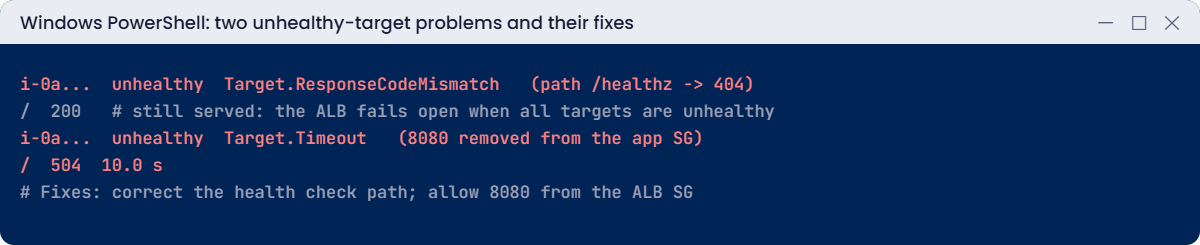
Target.Timeout means health checks never got a connection. Failing open doesn’t help this time: the ALB can’t connect either, gives up after 10 seconds and returns 504.
Security group “tidy-ups” cause this regularly. Fix: allow 8080 from the load balancer’s group again:
aws ec2 authorize-security-group-ingress --group-id $v.AppSg --ip-permissions "IpProtocol=tcp,FromPort=8080,ToPort=8080,UserIdGroupPairs=[{GroupId=$($v.WebSg),Description=8080-from-web-sg}]" | Out-Null
aws elbv2 wait target-in-service --target-group-arn $tg --targets "Id=$($ids[0])" "Id=$($ids[1])"
Get-Code /You should see something like this:
/ 200 0.1 s hello from ip-10-20-11-66.ap-south-1.compute.internalNow clean up:
aws elbv2 delete-load-balancer --load-balancer-arn $alb
aws elbv2 wait load-balancers-deleted --load-balancer-arns $alb
aws elbv2 delete-target-group --target-group-arn $tg
aws ec2 terminate-instances --instance-ids $ids | Out-Null
aws ec2 wait instance-terminated --instance-ids $ids✅ Checkpoint: You fixed a health check path mismatch (hidden by fail-open) and a security group that blocked the ALB. The ALB, target group and both instances are gone, and AppSg has its 8080 rule back.
This happened at work
The 502s that came every 60 seconds
A travel booking API behind an ALB returned a few 502s every minute, never in testing, always under real traffic. The app logs showed no errors at all, so the team blamed AWS.
Access logs showed the 502s had a target status code of “-“: the target never answered. The app server’s keep-alive timeout was 5 seconds, shorter than the ALB’s 60-second idle timeout. The app closed idle connections just as the ALB reused them for new requests.
Raising the app’s keep-alive timeout to 65 seconds, above the ALB’s, removed the 502s completely. It’s now a line in their server template, with a comment explaining why.
Common mistakes and troubleshooting
| Mistake | What happens | What to do |
|---|---|---|
| Treating every 5XX as an app bug | Hours in app logs that show nothing | Compare ELB and Target 5XX metrics first |
| App keep-alive shorter than ALB idle timeout | Random 502s under load | Keep-alive longer than the idle timeout |
| Health check on a path that doesn’t exist | All unhealthy, fail-open hides it | Check describe-target-health reasons |
| Health check that tests too much | Healthy apps marked down when a dependency blips | Keep /health shallow and fast |
| Security group not allowing the ALB group | Target.Timeout and 504 | Allow the ALB SG on the app port |
| Raising timeouts to hide slow requests | Users wait longer, 504s move elsewhere | Find why the request is slow |
Interview questions
Click a question to open it. Each one is written the way an interviewer would ask it. Under it you will see why they ask it and one way you could answer, in your own words.
Fresher level
1. Can you explain the difference between a 502, a 503 and a 504 from an ALB?
Why they ask this: They want to check that you can read the error code and know where to look first, because each one points to a different problem.
How you might answer: A 502 means the target sent back an invalid response, or none at all. A 503 means there are no registered targets to send the request to.
A 504 means the target didn’t answer in time, or the ALB couldn’t reach it.
2. The target group shows a target as unhealthy. How do you find out why?
Why they ask this: They want to see that you know the command that gives the real reason, instead of guessing from the console colour.
How you might answer: I run aws elbv2 describe-target-health for the target group. It shows the State and a Reason for each target.
Reasons like Target.ResponseCodeMismatch or Target.Timeout tell me if the app is returning the wrong code or is too slow.
3. What is the ALB idle timeout, and why does it matter?
Why they ask this: They want to know you understand a setting that often causes strange errors when it doesn’t match the app.
How you might answer: It’s how long a connection can stay idle, with no data, before the ALB closes it. It’s 60 seconds by default, and you can change it.
It matters because it has to work with the app’s keep-alive setting, or you get random errors.
2–5 years experience
4. You see random 502 errors, but only when the site is under heavy load. What would you check?
Why they ask this: They want to see that you know the common causes of load-related 502s and how to prove which one it is.
How you might answer: First I compare the app’s keep-alive timeout with the ALB idle timeout, since a mismatch causes resets. Then I look for app crashes, worker limits and connection resets.
I also check the response format, and search the access logs for target_status_code set to “-“, which means the target never sent a proper response.
5. Every target shows as unhealthy, yet the site still works. How can that be?
Why they ask this: They want to see if you know how the ALB behaves when everything fails, so you don’t panic or misread the situation.
How you might answer: The ALB fails open. When all targets in all enabled AZs are unhealthy, it sends traffic to all of them anyway.
So the site works, but it’s a warning sign: the health check is probably wrong, or every target really has a problem.
6. How do ELB health checks work together with Auto Scaling?
Why they ask this: They want to see that you understand the link between the two, and the risk of a bad health check.
How you might answer: If the Auto Scaling group uses ELB health checks, any target the load balancer marks unhealthy gets replaced.
That’s useful, but a broken health check path can cause a loop where new instances keep getting killed and replaced.
Senior level
7. You’re designing health checks for a microservice behind an ALB. How would you set them up?
Why they ask this: They want to see that you know the difference between a check that decides routing and a check that only raises an alarm.
How you might answer: For the ALB I’d use a shallow /health endpoint that only says the process is up and can serve. Deeper readiness checks, like checking the database, would feed alerts, not routing.
I’d set sensible thresholds and grace periods, and monitor HealthyHostCount along with the ELB and target 5XX counts.
8. Right after a deployment, 504 errors spike. How would you investigate?
Why they ask this: They want to see a clear incident approach that finds the cause quickly and keeps rollback as an option.
How you might answer: I’d check the target response time and health metrics first. Then I’d split the access logs by target and path, and look at the app logs for slow endpoints.
I’d also check CloudTrail for recent security group or NACL changes. If the cause isn’t clear quickly, I’d roll back.
Quick quiz
Q1. What does an ALB 503 usually mean?
- App crashed
- No registered targets
- Timeout
- DNS
Show answer
B — Nothing to route to.
Q2. Which metric counts 502s made by the ALB?
- HTTPCode_Target_5XX_Count
- HTTPCode_ELB_502_Count
- RequestCount
- TargetResponseTime
Show answer
B — ELB-generated codes are separate.
Q3. Why did the site still work with all targets unhealthy?
- Caching
- Fail-open
- DNS
- Bug
Show answer
B — The ALB routes to all targets.
Q4. What does Target.Timeout point to?
- Wrong path
- Can’t connect, often a security group
- App returned 500
- High CPU
Show answer
B — Health checks got no connection.
Q5. Random 502s under load are often caused by?
- Keep-alive shorter than idle timeout
- Too many targets
- Big instances
- HTTPS
Show answer
A — The app closes connections the ALB reuses.
Quick recap
- ELB 5XX codes are the load balancer speaking for failing targets; Target 5XX come from the app.
- 502 = bad or no reply, 503 = no targets, 504 = too slow or unreachable.
- describe-target-health reasons tell you why targets fail.
- All-unhealthy targets fail open; don’t let that hide broken checks.
- Keep app keep-alive above the ALB idle timeout.
Next lesson
Lesson 67: CloudFormation stack failures, rollbacks and drift → You’ll read stack events, recover from UPDATE_ROLLBACK_FAILED, and detect drift.
Further reading: ALB 502 bad gateway
Want to go deeper into ALB 502 bad gateway? Read Troubleshoot your Application Load Balancers and Health checks for Application Load Balancer target groups. You can also see the full plan for this course on the AWS Cloud Administration course page.
