Containers on ECS with Fargate

More and more apps arrive as container images, and someone has to run them. This ECS Fargate tutorial shows how: Amazon ECS schedules containers and keeps them healthy, and Fargate runs them without any EC2 instances for you to patch or scale.

You’ll create a cluster, a task definition for nginx, and a service of two tasks behind the load balancer from Lesson 20, then read the container logs. Then you’ll fix the most common ECS ticket, CannotPullContainerError, and a task definition Fargate refuses to accept.

TimeYou needBy the end you can
60 minutes (load balancer and two small Fargate tasks for under an hour)saat-vpc with saat-web-sg (Lessons 8 to 10), your laptop signed in as saat-admin. Cost: about USD 0.15 (two 0.25 vCPU tasks, their public IPv4 addresses and the load balancer for an hour).Create an ECS cluster, task execution role, task definition and Fargate service with a load balancer and deployment circuit breaker, read container logs, and troubleshoot image pull and task definition errors.

What it is, in one line

Amazon ECS runs and manages containers; with Fargate, AWS provides the compute for each task, so you never manage the servers underneath.

In Simple Words

The dabbawala system

Mumbai’s dabbawalas deliver thousands of lunch boxes every day. Each box is packed the same way at home (the container image), and a card says what goes in it and where (the task definition).

The dabbawala service makes sure the right number of boxes reach the right offices every day; if one goes missing, another is sent. That is the ECS service. With Fargate, you don’t own any bicycles or trains; you just say how many boxes, and the transport appears.

But if the box never leaves home because the road is closed, nothing reaches the office. That is CannotPullContainerError.

Engineer's View

How ECS and Fargate really work

A task definition is a versioned JSON recipe: images, CPU and memory, port mappings, environment variables, secrets, log configuration, and two roles. The execution role lets ECS pull images and write logs; the task role is what your app’s code uses to call AWS. A service keeps a desired number of tasks running, registers them with load balancer target groups (type ip for Fargate), and deploys new revisions with rolling updates; the deployment circuit breaker rolls back a deployment whose tasks keep failing.

Fargate tasks use awsvpc networking: each task has its own ENI, private IP and security groups. To pull images, a task needs a route to the registry: a public IP in a public subnet, a NAT gateway, or VPC endpoints for ECR (ecr.api, ecr.dkr and the S3 gateway) plus logs. Fargate supports fixed CPU and memory pairs, such as 0.25 vCPU with 0.5 to 2 GB.

Logs go to CloudWatch Logs through the awslogs driver. ECS Exec gives a shell inside a running container through Session Manager, and Container Insights adds task-level metrics.

How it works, step by step

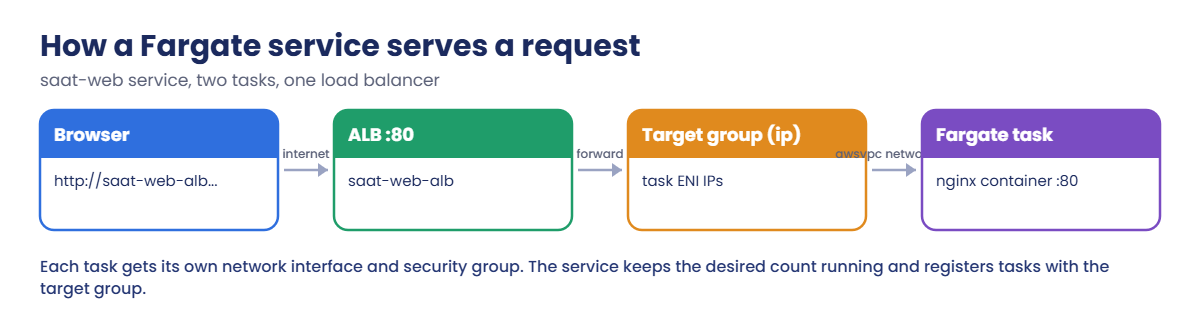
Here is how a request reaches nginx in this lab.

1The ALB receives the request

saat-web-alb listens on port 80 in the public subnets, just like Lesson 20.

ECS Fargate request flow: browser, ALB, IP target group, Fargate task

2The target group holds task IPs

For Fargate the target type is ip. When the service starts a task, ECS registers the task’s private IP; when it stops a task, ECS drains and removes it.

3The task answers

Each task’s security group allows port 80 only from saat-web-sg. nginx logs every request to CloudWatch Logs.

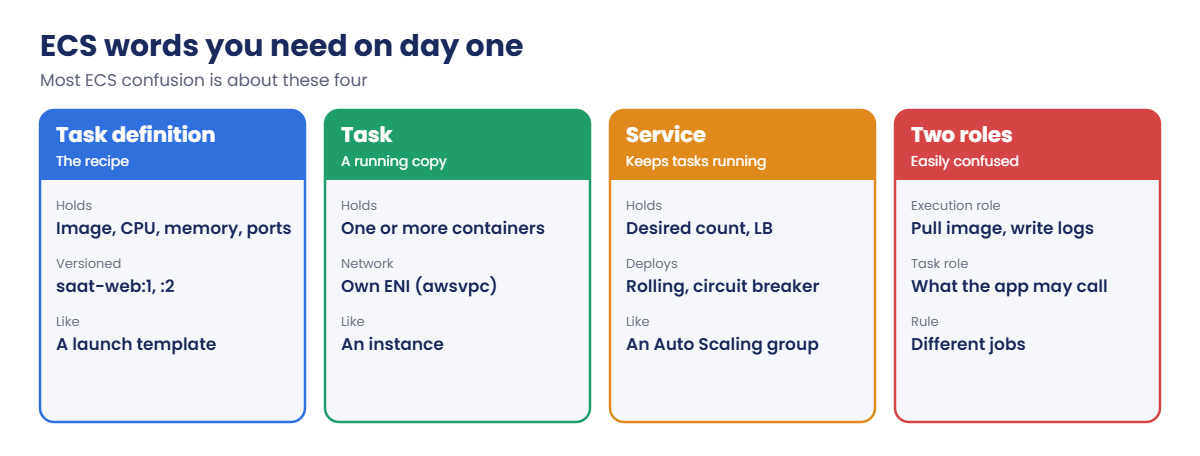
4Learn the four words

Almost every ECS conversation uses these:

ECS concepts: task definition, task, service, execution role and task role

If you know Lesson 21, a service is to tasks what an Auto Scaling group is to instances, and a task definition revision is like a launch template version.

✅ Checkpoint: You can explain task definition, task, service, the two roles, and what a Fargate task needs to pull its image.

Hands-on lab: an ECS Fargate tutorial behind a load balancer

Sign in and load saat-vpc:

cd C:\aws-lab
aws login --profile saat-admin
$env:AWS_PROFILE = 'saat-admin'
$v = Get-Content C:\aws-lab\saat-vpc.json | ConvertFrom-Json

1Create the cluster, role, logs and task definition

Paste this whole block:

aws ecs create-cluster --cluster-name saat-ecs --tags key=course,value=saatvedha-aws --query cluster.status --output text
'{ "Version": "2012-10-17", "Statement": [ { "Effect": "Allow", "Principal": { "Service": "ecs-tasks.amazonaws.com" }, "Action": "sts:AssumeRole" } ] }' | Set-Content ecs-trust.json
$execRole = aws iam create-role --role-name saat-ecs-exec-role --assume-role-policy-document file://ecs-trust.json --query Role.Arn --output text
aws iam attach-role-policy --role-name saat-ecs-exec-role --policy-arn arn:aws:iam::aws:policy/service-role/AmazonECSTaskExecutionRolePolicy
aws logs create-log-group --log-group-name /ecs/saat-web
aws logs put-retention-policy --log-group-name /ecs/saat-web --retention-in-days 7
@'
{
  "family": "saat-web",
  "networkMode": "awsvpc",
  "requiresCompatibilities": [ "FARGATE" ],
  "cpu": "256",
  "memory": "512",
  "runtimePlatform": { "operatingSystemFamily": "LINUX", "cpuArchitecture": "X86_64" },
  "executionRoleArn": "EXEC_ROLE_ARN",
  "containerDefinitions": [
    {
      "name": "web",
      "image": "public.ecr.aws/nginx/nginx:stable-alpine",
      "essential": true,
      "portMappings": [ { "containerPort": 80, "protocol": "tcp" } ],
      "logConfiguration": {
        "logDriver": "awslogs",
        "options": { "awslogs-group": "/ecs/saat-web", "awslogs-region": "ap-south-1", "awslogs-stream-prefix": "web" }
      }
    }
  ],
  "tags": [ { "key": "course", "value": "saatvedha-aws" } ]
}
'@ -replace 'EXEC_ROLE_ARN', $execRole | Set-Content taskdef.json
Start-Sleep 10
aws ecs register-task-definition --cli-input-json file://taskdef.json --query "taskDefinition.[family,revision,cpu,memory]" --output text

You should see this:

ACTIVE
saat-web        1       256     512

Revision 1 of saat-web is the recipe: nginx from Amazon ECR Public, 0.25 vCPU and 0.5 GB, logs to /ecs/saat-web. Every change creates a new revision, so you can always roll back.

2Create the load balancer and the task security group

Paste this whole block (about three minutes):

$taskSg = aws ec2 create-security-group --group-name saat-ecs-task-sg --description "Fargate tasks, 80 from the ALB" --vpc-id $v.VpcId --query GroupId --output text
aws ec2 authorize-security-group-ingress --group-id $taskSg --protocol tcp --port 80 --source-group $v.WebSg | Out-Null
$tg = aws elbv2 create-target-group --name saat-ecs-tg --protocol HTTP --port 80 --vpc-id $v.VpcId --target-type ip --health-check-path / --health-check-interval-seconds 10 --healthy-threshold-count 2 --query "TargetGroups[0].TargetGroupArn" --output text
aws elbv2 modify-target-group-attributes --target-group-arn $tg --attributes Key=deregistration_delay.timeout_seconds,Value=30 | Out-Null
$alb, $dns = (aws elbv2 create-load-balancer --name saat-web-alb --type application --scheme internet-facing --subnets $v.PublicA $v.PublicB --security-groups $v.WebSg --tags Key=course,Value=saatvedha-aws --query "LoadBalancers[0].[LoadBalancerArn,DNSName]" --output text) -split '\s+'
aws elbv2 wait load-balancer-available --load-balancer-arns $alb
aws elbv2 create-listener --load-balancer-arn $alb --protocol HTTP --port 80 --default-actions "Type=forward,TargetGroupArn=$tg" | Out-Null
$dns

You should see something like this:

saat-web-alb-1234567890.ap-south-1.elb.amazonaws.com

3Run the service

Paste this whole block (the service usually becomes stable in two to four minutes):

aws ecs create-service --cluster saat-ecs --service-name saat-web --task-definition saat-web --desired-count 2 --launch-type FARGATE --network-configuration "awsvpcConfiguration={subnets=[$($v.PublicA),$($v.PublicB)],securityGroups=[$taskSg],assignPublicIp=ENABLED}" --load-balancers "targetGroupArn=$tg,containerName=web,containerPort=80" --deployment-configuration "deploymentCircuitBreaker={enable=true,rollback=true},maximumPercent=200,minimumHealthyPercent=100" --health-check-grace-period-seconds 30 --propagate-tags SERVICE --tags key=course,value=saatvedha-aws | Out-Null
aws ecs wait services-stable --cluster saat-ecs --services saat-web
aws ecs describe-services --cluster saat-ecs --services saat-web --query "services[0].[status,desiredCount,runningCount]" --output text
(Invoke-WebRequest -UseBasicParsing "http://$dns/").Content | Select-String -Pattern "<title>"

You should see something like this:

ACTIVE  2       2
<title>Welcome to nginx!</title>

Two containers are running on Fargate with no EC2 instance anywhere in your account. The tasks sit in public subnets with public IPs only so they can pull the image from the internet; their security group still allows nothing but the load balancer.
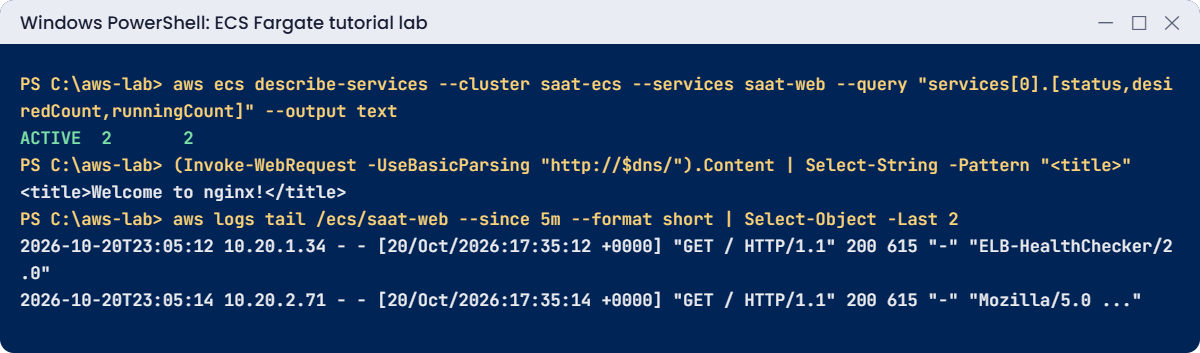
ECS Fargate tutorial lab output: service running, nginx page, container logs
Service running, the nginx page and container logs. Something like this.

4Read the container logs

Paste this whole block:

1..3 | ForEach-Object { Invoke-WebRequest -UseBasicParsing "http://$dns/" | Out-Null }
Start-Sleep 10
aws logs tail /ecs/saat-web --since 5m --format short | Select-Object -Last 2

You should see something like this:

2026-10-20T23:05:12 10.20.1.34 - - [20/Oct/2026:17:35:12 +0000] "GET / HTTP/1.1" 200 615 "-" "ELB-HealthChecker/2.0"
2026-10-20T23:05:14 10.20.2.71 - - [20/Oct/2026:17:35:14 +0000] "GET / HTTP/1.1" 200 615 "-" "Mozilla/5.0 (Windows NT; Windows NT 10.0; en-IN) WindowsPowerShell/5.1"

Each task writes to its own stream under the web prefix. The health checker’s requests come from the load balancer’s private IPs. Open ECS in the console to see the service, its tasks and deployments.
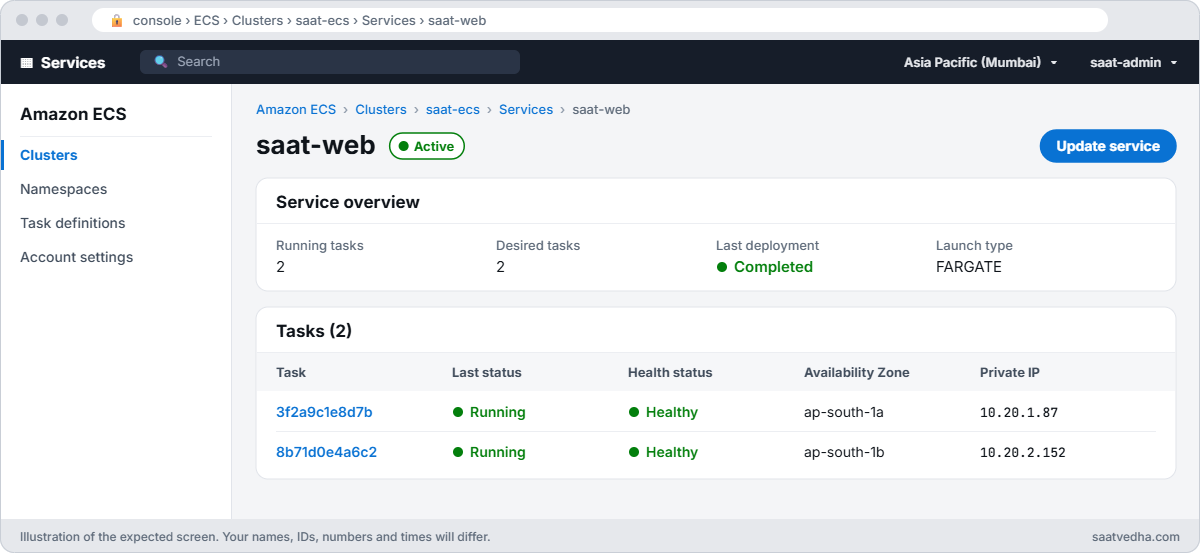
Amazon ECS service saat-web with two running healthy Fargate tasks in two Availability Zones
The saat-web service in ECS: two Fargate tasks running and healthy, one in each zone.

✅ Checkpoint: saat-web is ACTIVE with 2 of 2 tasks running, the load balancer returns the nginx page, and container logs are in /ecs/saat-web. Keep everything for the break lab.

Break It, Then Fix It

The ECS failure you’ll see most often, and a task definition Fargate won’t accept.

1Break it: tasks that can’t reach the registry

Deploy the service without public IPs, wait two minutes, and read why new tasks stopped:

aws ecs update-service --cluster saat-ecs --service saat-web --network-configuration "awsvpcConfiguration={subnets=[$($v.PublicA),$($v.PublicB)],securityGroups=[$taskSg],assignPublicIp=DISABLED}" --force-new-deployment | Out-Null
Start-Sleep 120
$stopped = aws ecs list-tasks --cluster saat-ecs --service-name saat-web --desired-status STOPPED --query "taskArns[0]" --output text
aws ecs describe-tasks --cluster saat-ecs --tasks $stopped --query "tasks[0].stoppedReason" --output text
(Invoke-WebRequest -UseBasicParsing "http://$dns/").StatusCode

You should see something like this:

CannotPullContainerError: pull image manifest has been retried 7 time(s): failed to resolve ref public.ecr.aws/nginx/nginx:stable-alpine: failed to do request: Head "https://public.ecr.aws/v2/nginx/nginx/manifests/stable-alpine": dial tcp 99.83.145.10:443: i/o timeout
200
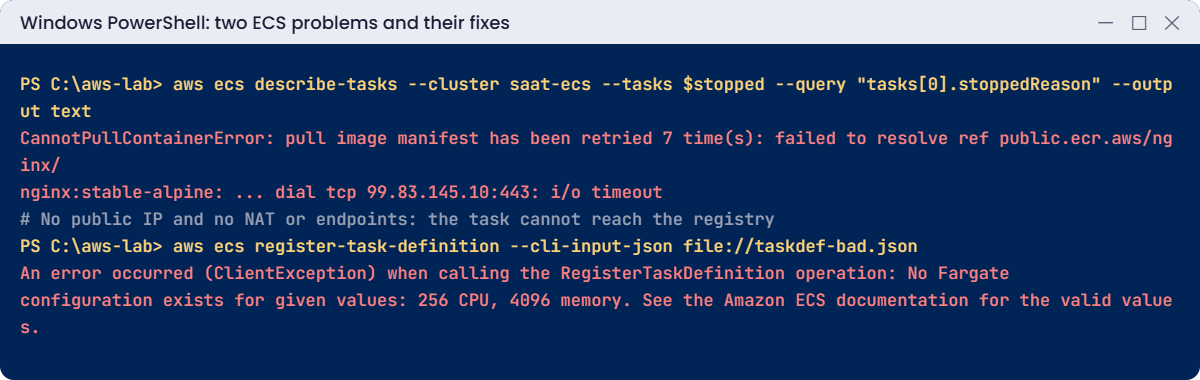
ECS problems: CannotPullContainerError i/o timeout and invalid Fargate CPU memory combination
Both problems and their fixes. Something like this.

Without a public IP, NAT gateway or VPC endpoints, the new tasks have no road to the registry. The site still answers 200 because the old tasks keep running: the service only replaces them once new ones are healthy. Left alone for about ten minutes, the circuit breaker would mark this deployment FAILED and roll back.

Fix: give tasks a path to the registry. Here, put the public IP back; in production, use private subnets with ECR and logs endpoints or a NAT gateway:

aws ecs update-service --cluster saat-ecs --service saat-web --network-configuration "awsvpcConfiguration={subnets=[$($v.PublicA),$($v.PublicB)],securityGroups=[$taskSg],assignPublicIp=ENABLED}" --force-new-deployment | Out-Null
aws ecs wait services-stable --cluster saat-ecs --services saat-web
aws ecs describe-services --cluster saat-ecs --services saat-web --query "services[0].deployments[].[status,rolloutState,runningCount]" --output text

You should see something like this:

PRIMARY COMPLETED       2

2Break it: a CPU and memory pair Fargate doesn’t offer

Try to register a revision with 0.25 vCPU and 4 GB of memory:

(Get-Content taskdef.json -Raw) -replace '"memory": "512"', '"memory": "4096"' | Set-Content taskdef-bad.json
aws ecs register-task-definition --cli-input-json file://taskdef-bad.json

You’ll get this error:

An error occurred (ClientException) when calling the RegisterTaskDefinition operation: No Fargate configuration exists for given values: 256 CPU, 4096 memory. See the Amazon ECS documentation for the valid values.

Fargate sells fixed sizes: 0.25 vCPU allows 0.5, 1 or 2 GB; 4 GB needs at least 0.5 vCPU. Teams hit this when someone raises memory for an out-of-memory app and forgets CPU. Fix: pick a valid pair, for example cpu 512 with memory 4096, or keep 256 with 2048.

Now clean up. The service must go before the cluster, and the load balancer before the target group:

aws ecs update-service --cluster saat-ecs --service saat-web --desired-count 0 | Out-Null
aws ecs delete-service --cluster saat-ecs --service saat-web --force | Out-Null
aws ecs wait services-inactive --cluster saat-ecs --services saat-web
aws ecs list-task-definitions --family-prefix saat-web --query taskDefinitionArns --output text | ForEach-Object { $_ -split '\s+' } | Where-Object { $_ } | ForEach-Object { aws ecs deregister-task-definition --task-definition $_ | Out-Null }
aws ecs delete-cluster --cluster saat-ecs | Out-Null
aws elbv2 delete-load-balancer --load-balancer-arn $alb
aws elbv2 wait load-balancers-deleted --load-balancer-arns $alb
Start-Sleep 30
aws elbv2 delete-target-group --target-group-arn $tg
aws ec2 delete-security-group --group-id $taskSg
aws iam detach-role-policy --role-name saat-ecs-exec-role --policy-arn arn:aws:iam::aws:policy/service-role/AmazonECSTaskExecutionRolePolicy
aws iam delete-role --role-name saat-ecs-exec-role
aws logs delete-log-group --log-group-name /ecs/saat-web
Remove-Item ecs-trust.json, taskdef.json, taskdef-bad.json
.\Find-Waste.ps1
.\Find-LabResources.ps1

✅ Checkpoint: You read a CannotPullContainerError from a stopped task and fixed the network path, and saw Fargate refuse an invalid CPU and memory pair. The service, cluster, load balancer, roles and logs are gone.

This happened at work

The deployment that pulled from Docker Hub

A travel company’s ECS services pulled base images straight from Docker Hub through a NAT gateway. One Monday morning, a scaling event during a sale launched 60 new tasks across services at once.

Docker Hub’s anonymous pull rate limit kicked in. New tasks failed with CannotPullContainerError mentioning “toomanyrequests”, the services couldn’t scale, and checkout slowed for 40 minutes. The NAT gateway’s data processing charges that month were also surprisingly high from repeated image pulls.

They now copy images into private Amazon ECR repositories (with ECR pull-through cache for public images), pull through ECR VPC endpoints from private subnets, scan images on push, and alarm on ECS service events that mention CannotPullContainerError.

Common mistakes and troubleshooting

MistakeWhat happensWhat to do
No route from tasks to the registryCannotPullContainerError: i/o timeoutPublic IP, NAT gateway, or ECR and logs endpoints
Pulling from Docker Hub at scaleRate limits during scale-outPrivate ECR with pull-through cache
Confusing execution role and task roleImage pull or app API calls failExecution role for ECS, task role for your code
Invalid CPU and memory pairClientException: No Fargate configuration existsUse a supported pair
No circuit breakerBroken deployments loop foreverEnable deploymentCircuitBreaker with rollback
Task security group open to the internetContainers reachable directlyAllow only the load balancer’s security group

Interview questions

Click a question to open it. Each one is written the way an interviewer would ask it. Under it you will see why they ask it and one way you could answer, in your own words.

Fresher level

1. What’s the difference between running ECS on EC2 and running it on Fargate, and when would you pick each?

Why they ask this: They want to know you understand who manages what in each option. It affects how much patching and scaling work your team does.

How you might answer: With the EC2 launch type, I manage the container instances myself, including patching and scaling them. With Fargate, AWS gives each task its own isolated compute, and I only define CPU, memory and networking.

If the team doesn’t want to look after servers, I’d pick Fargate.

2. Can you explain in simple words what a task definition is?

Why they ask this: They are checking that you know the core building block of ECS. You can’t run or troubleshoot a container without reading one.

How you might answer: A task definition is a versioned JSON description of how to run my containers. It lists the images, CPU, memory, ports, environment variables, secrets, logging and IAM roles.

I think of it as the recipe ECS follows every time it starts a task.

3. A new team member is confused about the execution role and the task role in ECS. How would you explain the difference?

Why they ask this: They want to see that you understand container permissions clearly. Mixing up these two roles is one of the most common ECS mistakes.

How you might answer: I’d say the execution role is used by ECS itself, to pull the image and send logs. The task role is used by the application inside the container when it calls AWS services, like reading from S3.

So if the image won’t pull, I check the execution role, and if the app gets AccessDenied, I check the task role.

2–5 years experience

4. Your tasks keep stopping with CannotPullContainerError. What would you check?

Why they ask this: They want to see a logical troubleshooting order. This error has several common causes, and they want to know you check the network first.

How you might answer: First I’d check the network path: the task needs a public IP, a NAT gateway, or ECR endpoints plus the S3 gateway endpoint. Then I’d check the image name and tag are correct.

After that I’d look at the execution role’s registry permissions, the ECR repository policy, and registry rate limits if the image comes from a public registry.

5. Walk me through how an ECS service rolls out a new version without taking the app down.

Why they ask this: They want to know you understand safe deployments. A bad rollout is one of the main causes of outages.

How you might answer: By default ECS does a rolling update, controlled by minimum healthy percent and maximum percent, and it uses load balancer health checks to decide if new tasks are good. I’d turn on the deployment circuit breaker with rollback, so a broken version rolls back on its own.

For higher-risk apps, I’d use blue/green deployments, with CodeDeploy or ECS native blue/green.

6. You need to look inside a running Fargate container to debug a problem. How would you get a shell?

Why they ask this: They are checking that you know how to debug without SSH. Fargate has no server you can log in to, so this tests practical experience.

How you might answer: I’d use ECS Exec. I’d enable it on the service, give the task role the SSM messages permissions, and then run aws ecs execute-command.

It uses Session Manager under the hood, so I don’t need to open any ports.

Senior level

7. Say you’re asked to build a container platform for 40 microservices. How would you design it?

Why they ask this: They want to see platform thinking across networking, security, scaling and delivery. They are checking that you design something teams can run day to day.

How you might answer: I’d run ECS on Fargate in private subnets across three zones, with an ALB doing host or path routing. Images would live in ECR with scanning and a pull-through cache, and VPC endpoints would keep traffic private.

Each service gets its own task role and reads secrets from Secrets Manager. I’d add service auto scaling, circuit breakers, Container Insights, central logs, and CI/CD that promotes images between environments.

8. An ECS service keeps replacing its tasks every few minutes. How would you investigate?

Why they ask this: They want to see deep troubleshooting skills. Restart loops have several possible causes, and they want to know you check the evidence before guessing.

How you might answer: I’d read the service events and the stopped task reasons first, then check the container exit codes and logs. Next I’d compare the load balancer health check settings with how long the app takes to start, because a short grace period kills tasks that are still booting.

I’d also check memory limits for OOM kills, and whether the app fails because a dependency isn’t ready at startup.

Quick quiz

Q1. What does a Fargate task need to pull a public image?

  1. Nothing
  2. A route to the internet or registry (public IP, NAT or endpoints)
  3. An EC2 instance
  4. A key pair
Show answer

B — No route means CannotPullContainerError.

Q2. Which role does ECS use to pull images and write logs?

  1. Task role
  2. Execution role
  3. Instance role
  4. Service-linked role only
Show answer

B — The execution role is for ECS itself.

Q3. Why did the site keep answering during the bad deployment?

  1. Caching
  2. Old tasks kept running until new ones were healthy
  3. The ALB served a copy
  4. Fargate retried forever
Show answer

B — Minimum healthy percent 100 keeps old tasks.

Q4. What does the deployment circuit breaker do?

  1. Stops the cluster
  2. Fails and rolls back deployments whose tasks keep failing
  3. Limits CPU
  4. Blocks traffic
Show answer

B — It prevents endless failed deployments.

Q5. Why was 256 CPU with 4096 memory refused?

  1. Too cheap
  2. Fargate only offers fixed CPU and memory pairs
  3. Wrong Region
  4. The image was too big
Show answer

B — 4 GB needs at least 0.5 vCPU.

Quick recap

  • Task definition is the recipe, a task is a running copy, a service keeps tasks running.
  • The execution role pulls images and writes logs; the task role is for your app.
  • Fargate tasks need a path to the registry: public IP, NAT or endpoints.
  • Use the deployment circuit breaker and load balancer health checks.
  • Fargate supports fixed CPU and memory pairs.

Next lesson

Lesson 40: RDS vs EC2 for SQL Server → Phase 3 starts: you’ll compare running SQL Server on RDS and on EC2 and choose the right one for real workloads.

Further reading: ECS Fargate tutorial

Want to go deeper into ECS Fargate tutorial? Read What is Amazon Elastic Container Service? and Amazon ECS stopped task error messages. You can also see the full plan for this course on the AWS Cloud Administration course page.

Scroll to Top