Private subnets, NAT gateway and VPC endpoints
-
Phase 0: Before you start
-
Phase 1: The foundation
-
Phase 2: Operations and security
-
Phase 3: SQL Server on AWS
-
Phase 4: Troubleshooting step by step
-
Phase 5: Final project and career
App servers should sit in private subnets with no public IP, but they still need to download updates and call outside APIs. An AWS NAT gateway gives them a way out without letting anyone in. It is also one of the most common surprise lines on an AWS bill, so this lesson covers the cheaper option too: VPC endpoints.
You’ll test from CloudShell running inside your private subnet: no internet first, then internet through the NAT gateway. The NAT gateway runs for less than an hour and is deleted at the end.
| Time | You need | By the end you can |
|---|---|---|
| 60 minutes (NAT gateway running for under an hour) | saat-vpc from Lesson 8 and C:\aws-lab\saat-vpc.json, your laptop signed in with aws login --profile saat-admin. Cost: about USD 0.10 if you finish and clean up within an hour. | Give private subnets outbound internet through a NAT gateway, keep database subnets fully private, add a no-charge S3 gateway endpoint, and clean up NAT resources without leaving charges behind. |
What it is, in one line
An AWS NAT gateway lets servers in private subnets start connections to the internet, while nothing on the internet can start a connection to them.
In Simple Words
The building’s outgoing post office
In an office building, staff on the upper floors don’t have their own street door. When they need to send a letter, they drop it at the reception desk. Reception sends it out with the building’s own address on it, and when replies come back, reception knows whose letter it was and takes it upstairs.
Strangers outside can send letters to the building, but reception won’t take them upstairs unless someone inside started the conversation. The NAT gateway is that reception desk.
For letters to one very busy neighbour (S3), the building builds a private corridor. No stamps, no queue at reception. That corridor is a gateway endpoint.
Engineer's View
How NAT and endpoints work
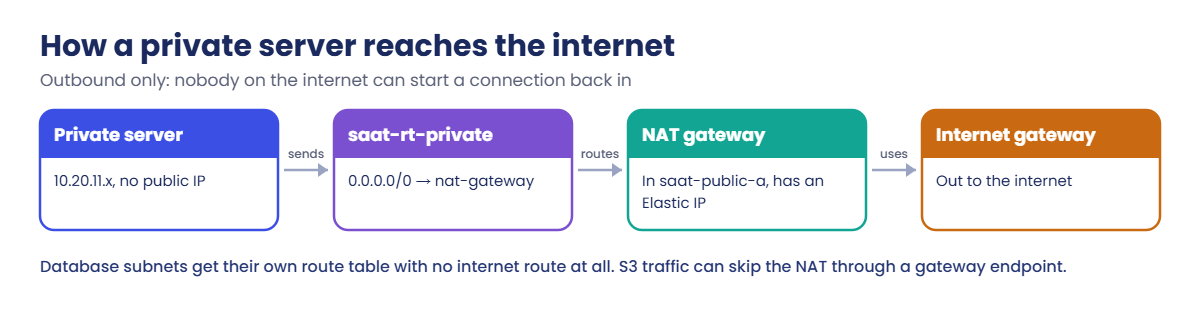
A public NAT gateway lives in a public subnet and has an Elastic IP address. Private subnets route 0.0.0.0/0 to it. It rewrites the source address of outgoing packets to its Elastic IP and tracks connections, so only replies come back in.
It scales automatically and is highly available inside its zone, so production designs use one NAT gateway per zone (or the newer regional NAT gateway mode).
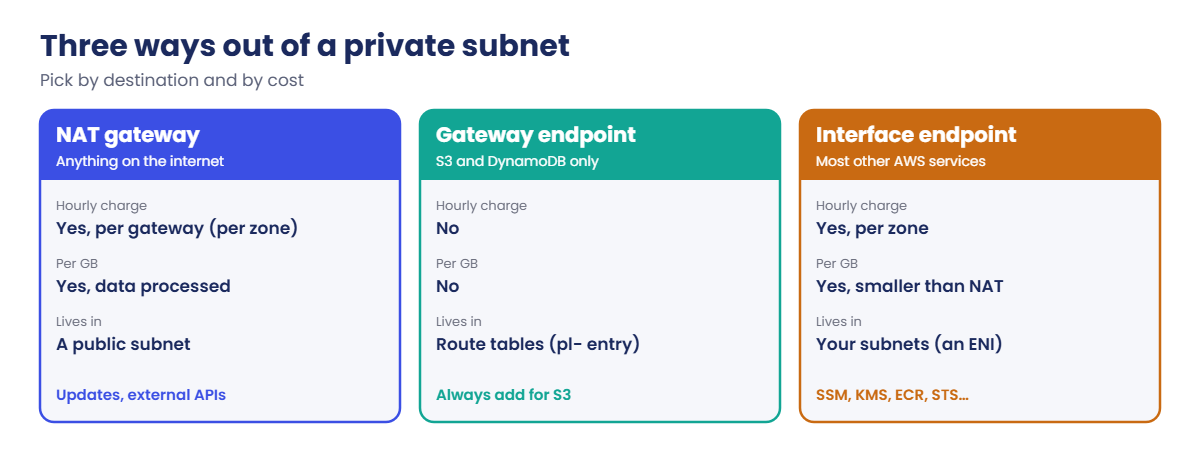
You pay per hour for each NAT gateway, per GB of data it processes, and for its public IPv4 address. In Mumbai that is roughly USD 0.05 to 0.06 an hour plus a similar amount per GB; check the Amazon VPC pricing page for today’s numbers. The per-GB part is what surprises people.
Gateway endpoints (S3 and DynamoDB only) add a route to a prefix list (pl-...) in the route tables you choose. Traffic to S3 then goes straight to S3, not through the NAT, and gateway endpoints have no charge. Interface endpoints (AWS PrivateLink) put a network interface in your subnets for services like SSM, KMS or STS; they charge per hour per zone and per GB, but less per GB than NAT.
Database subnets get their own route table with no internet route. Databases receive connections from app servers; they don’t need to reach out.
How it works, step by step
This is how traffic flows once the lab is finished.
1Split the route tables
Private subnets keep saat-rt-private. Database subnets move to a new saat-rt-db with only the local route, before any internet route exists.
2Place the NAT gateway in a public subnet
It needs a path to the internet gateway itself, so it must sit in saat-public-a, not in the private subnet it serves.
3Point the private route table at it
0.0.0.0/0 → NAT gateway in saat-rt-private. The local route still handles traffic inside the VPC.
4Add the S3 shortcut
An S3 gateway endpoint on both private route tables, so large S3 transfers never touch the NAT gateway.
Here is how the three options compare.
A simple rule: S3 and DynamoDB always get a gateway endpoint. Heavy traffic to one AWS service gets an interface endpoint. The NAT gateway handles whatever is left, and you watch its data processed metric.
✅ Checkpoint: You can say where a NAT gateway must live, what it charges for, and why S3 traffic should use a gateway endpoint.
Hands-on lab: an AWS NAT gateway tested from CloudShell
Start as usual and load the network IDs:
cd C:\aws-lab
aws login --profile saat-admin
$env:AWS_PROFILE = 'saat-admin'
$v = Get-Content C:\aws-lab\saat-vpc.json | ConvertFrom-Json1Give the database subnets their own route table
Paste this whole block:
$rtDb = aws ec2 create-route-table --vpc-id $v.VpcId --tag-specifications 'ResourceType=route-table,Tags=[{Key=Name,Value=saat-rt-db},{Key=course,Value=saatvedha-aws},{Key=lesson,Value=09}]' --query RouteTable.RouteTableId --output text
foreach ($s in $v.DbA, $v.DbB) {
$assoc = aws ec2 describe-route-tables --filters "Name=association.subnet-id,Values=$s" --query "RouteTables[0].Associations[?SubnetId=='$s'].RouteTableAssociationId" --output text
aws ec2 replace-route-table-association --association-id $assoc --route-table-id $rtDb | Out-Null
}
$v | Add-Member -NotePropertyName RtDb -NotePropertyValue $rtDb -Force
$v | ConvertTo-Json | Set-Content C:\aws-lab\saat-vpc.json
$rtDbYou should see something like this:
rtb-0c9d8e7f6a5b4c3d22Create a security group for CloudShell
Run this (it has no inbound rules and allows all outbound traffic):
$sgCs = aws ec2 create-security-group --group-name saat-cloudshell-sg --description "CloudShell VPC environment" --vpc-id $v.VpcId --tag-specifications 'ResourceType=security-group,Tags=[{Key=Name,Value=saat-cloudshell-sg},{Key=course,Value=saatvedha-aws},{Key=lesson,Value=09}]' --query GroupId --output text
$v | Add-Member -NotePropertyName CloudShellSg -NotePropertyValue $sgCs -Force
$v | ConvertTo-Json | Set-Content C:\aws-lab\saat-vpc.json3Open CloudShell inside the private subnet
In the console (Mumbai), open CloudShell. Choose the + menu, then Create VPC environment. Name it saat-private, choose saat-vpc, subnet saat-private-a and security group saat-cloudshell-sg.
A VPC environment has no saved home folder, so anything you create in it disappears when you close it.
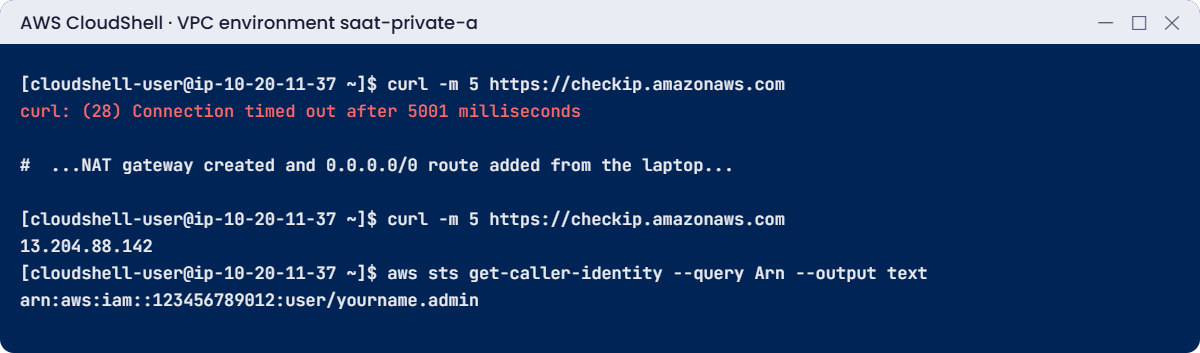
Type this at the CloudShell prompt:
curl -m 5 https://checkip.amazonaws.comYou’ll get this error (something like this):
curl: (28) Connection timed out after 5001 millisecondsThat is correct: the private subnet has no route out yet.
4Create the NAT gateway (the clock starts now)
Back in PowerShell, paste this whole block. The wait line takes one to three minutes:
$eip = aws ec2 allocate-address --domain vpc --tag-specifications 'ResourceType=elastic-ip,Tags=[{Key=Name,Value=saat-nat-eip},{Key=course,Value=saatvedha-aws},{Key=lesson,Value=09}]' --query AllocationId --output text
$nat = aws ec2 create-nat-gateway --subnet-id $v.PublicA --allocation-id $eip --tag-specifications 'ResourceType=natgateway,Tags=[{Key=Name,Value=saat-nat-a},{Key=course,Value=saatvedha-aws},{Key=lesson,Value=09}]' --query NatGateway.NatGatewayId --output text
aws ec2 wait nat-gateway-available --nat-gateway-ids $nat
aws ec2 create-route --route-table-id $v.RtPrivate --destination-cidr-block 0.0.0.0/0 --nat-gateway-id $nat
aws ec2 describe-addresses --allocation-ids $eip --query 'Addresses[0].PublicIp' --output textYou should see something like this:
{
"Return": true
}
13.204.88.1425Test again from CloudShell
In the CloudShell VPC environment, run:
curl -m 5 https://checkip.amazonaws.com
aws sts get-caller-identity --query Arn --output textYou should see something like this:
13.204.88.142
arn:aws:iam::123456789012:user/yourname.adminThe address the internet sees is the NAT gateway’s Elastic IP, not anything inside your VPC. The CLI works too, because it can now reach the STS endpoint.
6Add the S3 gateway endpoint (no charge, keep it)
Paste this whole block in PowerShell:
$vpce = aws ec2 create-vpc-endpoint --vpc-id $v.VpcId --vpc-endpoint-type Gateway --service-name com.amazonaws.ap-south-1.s3 --route-table-ids $v.RtPrivate $rtDb --tag-specifications 'ResourceType=vpc-endpoint,Tags=[{Key=Name,Value=saat-s3-endpoint},{Key=course,Value=saatvedha-aws},{Key=lesson,Value=09}]' --query VpcEndpoint.VpcEndpointId --output text
aws ec2 describe-route-tables --route-table-ids $rtDb --query "RouteTables[].Routes[].[DestinationPrefixListId,GatewayId]" --output textYou should see something like this:
None local
pl-78a54011 vpce-0f9e8d7c6b5a43210The pl- route sends S3 traffic straight to S3 from both private route tables.
7Clean up the NAT gateway
Do this through the Break It lab below: it shows what happens when cleanup is done in the wrong order, then finishes it properly. Close the CloudShell VPC environment now (Actions, then Delete).
✅ Checkpoint: CloudShell in the private subnet timed out before the NAT and showed the Elastic IP after it, saat-rt-db has no internet route, and the S3 endpoint appears as a pl- route.
Break It, Then Fix It
NAT gateways are deleted every day by people in a hurry. These two leftovers are what they forget, and this break lab is also your cleanup.
1Break it: delete only the NAT gateway
Run this:
aws ec2 delete-nat-gateway --nat-gateway-id $nat
aws ec2 wait nat-gateway-deleted --nat-gateway-ids $nat
aws ec2 describe-route-tables --route-table-ids $v.RtPrivate --query "RouteTables[].Routes[?DestinationCidrBlock=='0.0.0.0/0'].[NatGatewayId,State]" --output text
aws ec2 describe-addresses --filters Name=tag:lesson,Values=09 --query "Addresses[].[PublicIp,AssociationId]" --output textYou should see something like this:
nat-0a1b2c3d4e5f60718 blackhole
13.204.88.142 None
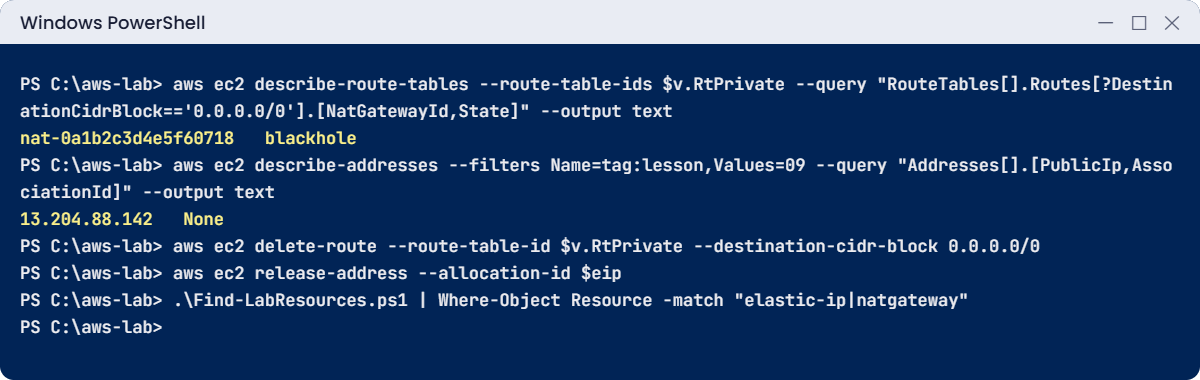
Two problems. The route now points at nothing (blackhole), so private servers fail with timeouts that look like “the internet is down”. And the Elastic IP is no longer attached to anything but still costs money every hour.
2Fix it: remove the route and release the address
Run this:
aws ec2 delete-route --route-table-id $v.RtPrivate --destination-cidr-block 0.0.0.0/0
aws ec2 release-address --allocation-id $eip
.\Find-LabResources.ps1 | Where-Object Resource -match 'elastic-ip|natgateway'The last command should print nothing. The full finder will still list the things you keep on purpose: saat-rt-db, saat-cloudshell-sg and the S3 endpoint, all with no charge.
✅ Checkpoint: No 0.0.0.0/0 route remains in saat-rt-private, no Elastic IP is left, and the NAT gateway is gone.
This happened at work
The NAT bill that beat the servers
A fintech company ran nightly jobs in private subnets that read customer statements from S3, processed them and wrote results back. Everything went through one NAT gateway, because “that’s how private subnets reach the internet”.
The jobs moved about 30 TB a month to and from S3. At Mumbai’s per-GB NAT processing charge, that came to well over USD 1,500 a month, more than all the EC2 instances doing the work. Nobody noticed for three months, because the bill line just said “NatGateway-Bytes”.
The fix took ten minutes: an S3 gateway endpoint on the private route tables. The NAT charge dropped by more than 90% the next day, with no code change. The team now adds S3 and DynamoDB gateway endpoints to every new VPC by default and has a CloudWatch alarm on the NAT gateway’s BytesOutToDestination metric.
Common mistakes and troubleshooting
| Mistake | What happens | What to do |
|---|---|---|
| NAT gateway placed in a private subnet | It has no way out; everything times out | Always put it in a public subnet |
| S3 traffic through NAT | Large per-GB charges | Add an S3 gateway endpoint (no charge) |
| One NAT gateway for all zones in production | A zone failure cuts every private subnet off the internet | One per zone, or the regional NAT mode |
| Deleting the NAT but not the route | Blackhole route, confusing timeouts | Delete the 0.0.0.0/0 route too |
| Forgetting the Elastic IP | Hourly charge for an unused address | Release it; run Find-LabResources.ps1 |
| Giving database subnets internet access | Bigger attack surface for no reason | Separate route table with only the local route |
Interview questions
Click a question to open it. Each one is written the way an interviewer would ask it. Under it you will see why they ask it and one way you could answer, in your own words.
Fresher level
1. Can you explain in simple words what a NAT gateway does for servers in a private subnet?
Why they ask this: They want to check you understand the basic purpose of NAT. It’s the reason private servers can still get updates.
How you might answer: A NAT gateway lets servers in private subnets start connections out to the internet, for things like updates and external APIs.
But it blocks any connection that starts from the internet, so the servers stay private.
2. You created a NAT gateway, but private servers still can’t reach the internet. Where should the NAT gateway have been placed?
Why they ask this: They want to see that you avoid a very common beginner mistake. Putting NAT in the wrong subnet breaks outbound access completely.
How you might answer: It has to sit in a public subnet, one whose route table goes to an internet gateway. Then the private subnets route 0.0.0.0/0 to the NAT gateway.
If it’s in a private subnet, its own traffic has nowhere to go.
3. Your private servers read a lot from S3. Is there a cheaper way than sending that traffic through the NAT gateway?
Why they ask this: They want to know you’re aware of the cheap alternative. Many teams pay NAT charges they don’t need to.
How you might answer: Yes, I’d add a gateway endpoint for S3. It’s a route-table entry that sends S3 traffic straight to the service inside AWS, without the NAT gateway or internet gateway.
It works for S3 and DynamoDB, and it has no charge.
2–5 years experience
4. Your app runs in three Availability Zones. How would you make outbound internet access survive a zone failure?
Why they ask this: They want to see production design thinking. A single NAT gateway is a hidden single point of failure.
How you might answer: I’d put a NAT gateway in each zone’s public subnet, and give each zone its own private route table pointing at its own NAT. Then a zone failure only affects that zone.
Another option is the regional NAT gateway mode, which spans zones.
5. Finance asks why the NAT gateway charges jumped this month. How would you find the cause?
Why they ask this: They want to see methodical cost troubleshooting. They also want to hear how you’d fix it, not just find it.
How you might answer: First I’d look at the NAT gateway’s CloudWatch metrics for bytes, to see when it jumped. Then I’d use VPC Flow Logs to find which instances and destinations send the most data.
Often it’s S3 or another AWS service, which I’d fix with gateway or interface endpoints. Sometimes it’s an unexpected download loop.
6. What’s the difference between a gateway endpoint and an interface endpoint, and when would you pick each?
Why they ask this: They want to check you know both endpoint types and their costs. Picking the right one saves money and solves on-premises access.
How you might answer: A gateway endpoint is a route, only for S3 and DynamoDB, and it has no charge. An interface endpoint is a network interface in my subnets with a private IP, and it covers most other services.
Interface endpoints are charged per hour and per GB, but they also work from on-premises over VPN.
Senior level
7. The security team says private subnets must have no internet access at all. How do servers still get patches and use AWS services?
Why they ask this: They want to see that you can design a fully private environment. It’s common in banks and other strict industries.
How you might answer: I’d add interface endpoints for SSM, SSM messages, EC2 messages, CloudWatch Logs, KMS, STS and ECR, plus a gateway endpoint for S3. Patch baselines point at repositories reachable through S3 or an internal mirror.
For the few approved external sites, traffic goes through a proxy or Network Firewall that filters it.
8. Say an auditor asks what your private servers talk to on the internet. How would you control that and prove it?
Why they ask this: They want to see egress control and auditing skills. Senior engineers need to answer these questions with logs, not guesses.
How you might answer: I’d route outbound traffic through AWS Network Firewall or a proxy with domain allow-lists, log everything, and alert on new destinations.
VPC Flow Logs and Route 53 Resolver DNS query logging then show exactly who talked to what.
Quick quiz
Q1. In which kind of subnet must a NAT gateway be created?
- Private
- Public
- Database
- Any subnet
Show answer
B — The NAT gateway needs a route to the internet gateway, which only public subnets have.
Q2. Which services can use a gateway endpoint?
- All AWS services
- S3 and DynamoDB
- EC2 and RDS
- Only STS
Show answer
B — Gateway endpoints exist only for S3 and DynamoDB.
Q3. After deleting a NAT gateway, the route shows “blackhole”. What does that mean?
- The route works but slowly
- The route points at something that no longer exists
- The route is encrypted
- AWS deleted the route table
Show answer
B — A blackhole route drops traffic because its target is gone. Delete or replace it.
Q4. What keeps charging after a NAT gateway is deleted, if you forget it?
- The route table
- The Elastic IP address
- The subnet
- The VPC
Show answer
B — An unattached Elastic IP still has an hourly charge until you release it.
Q5. Why do database subnets get their own route table without 0.0.0.0/0?
- To make them faster
- They don’t need outbound internet, so removing it shrinks the attack surface
- AWS requires it
- To save IP addresses
Show answer
B — Databases receive connections; they don’t need to reach the internet.
Quick recap
- A NAT gateway lives in a public subnet with an Elastic IP and gives private subnets outbound-only internet.
- It charges per hour and per GB processed, so watch it.
- S3 and DynamoDB should go through gateway endpoints, which have no charge.
- Database subnets now use saat-rt-db with no internet route.
- Clean up in order: NAT gateway, then the 0.0.0.0/0 route, then release the Elastic IP.
Next lesson
Lesson 10: Security groups and network ACLs → You’ll control which traffic may reach each server, and learn why “it works from my laptop” isn’t proof.
Further reading: AWS NAT gateway
Want to go deeper into AWS NAT gateway? Read NAT gateways and Gateway endpoints for Amazon S3 in the AWS documentation. You can also see the full plan for this course on the AWS Cloud Administration course page.
