IAM AccessDenied Decoded

“AccessDenied” is the error every AWS engineer sees daily, and the one most often “fixed” by adding AdministratorAccess. Fixing an AWS access denied error properly takes three things: read which layer the message names, decode the details when they’re encoded, and test the fix with a dry run or the policy simulator before anyone touches production.

You’ll create a role that may launch only t3.micro instances, trigger an encoded denial, decode it, prove the fix with the simulator, and see an SCP denial from your sandbox account. Then you’ll meet an explicit deny and a permissions boundary, the two layers people forget.

TimeYou needBy the end you can
60 minutesLessons 5 to 7 and 33 done (IAM policies, the saat-sandbox profile and its SCPs), signed in as saat-admin. Cost: nothing; every launch is a dry run.Read modern AccessDenied messages, decode EC2 authorization failures, use --dry-run and simulate-principal-policy, and fix identity policies, explicit denies, permissions boundaries and SCPs at the right layer.

What it is, in one line

An AWS access denied error means no policy allowed the request, or a policy explicitly denied it, in one of the layers AWS checks: identity policies, resource policies, permissions boundaries, session policies or SCPs.

In Simple Words

The office building with many locks

To reach a meeting room, you pass the building gate (the company’s rules for everyone), your floor’s door (your department’s limit), and the room door (your own key card). Any one of them can stop you.

A “No entry” sign on any door beats every key you hold. And if your key card simply doesn’t list that room, the door stays shut without any sign at all.

Good guards tell you which door stopped you. Modern AWS error messages do the same; you just have to read them.

Engineer's View

How policy evaluation works

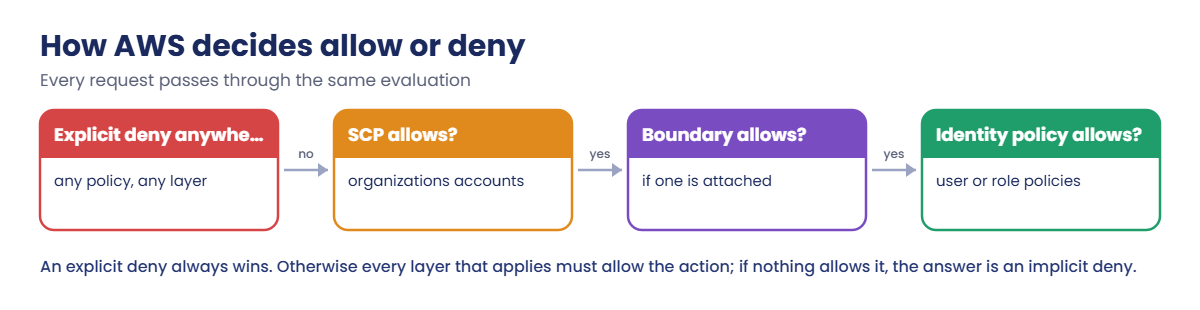
AWS evaluates every request the same way, and an explicit Deny in any applicable policy wins. Otherwise, every layer that applies must allow the action: SCPs (and RCPs) for accounts in an organization, a permissions boundary if the user or role has one, session policies for assumed sessions, and the identity policy, or a resource policy that grants access. No allow anywhere means an implicit deny.

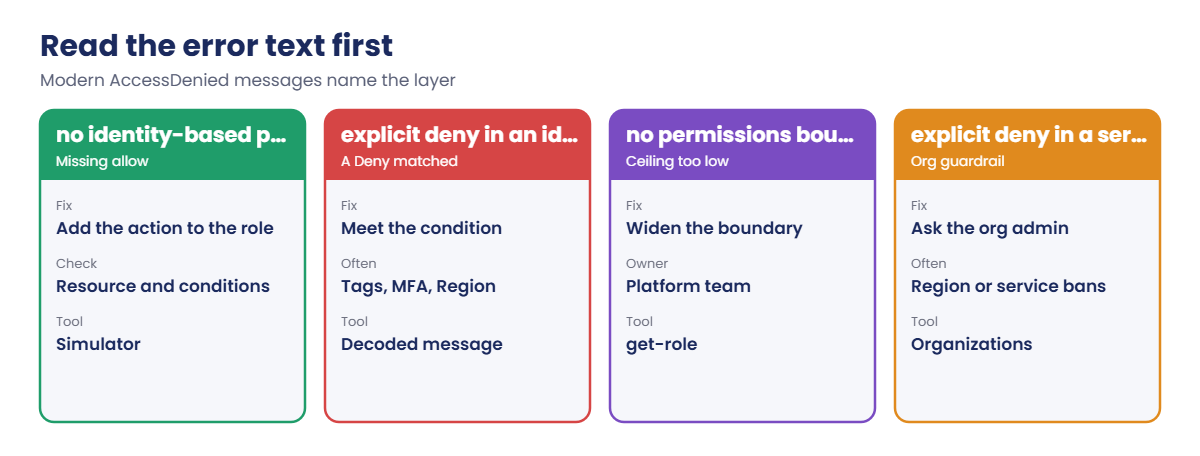
Many services now say which layer denied you: “no identity-based policy allows”, “explicit deny in an identity-based policy”, “no permissions boundary allows”, “explicit deny in a service control policy”. EC2 adds an encoded authorization failure message that aws sts decode-authorization-message turns into JSON with allowed, explicitDeny, matched statements and the full request context, such as the instance type.

--dry-run on EC2 checks permissions without creating anything. aws iam simulate-principal-policy evaluates a user’s or role’s policies, including boundaries, against actions, resources and context keys. CloudTrail records denied calls with errorCode AccessDenied or UnauthorizedOperation.

How it works, step by step

Here is the order to work through a denial.

1Read the message

Find who was denied (the ARN), the action, the resource, and the layer named in the text. That alone solves most cases.

How AWS policy evaluation decides allow or deny across layers

2Decode and reproduce

Decode encoded messages to see the request context. Reproduce safely with --dry-run or the simulator, never by trying the real action again and again.

3Fix the right layer, narrowly

Add the one action, resource or condition that’s missing, in the layer that denied it. Then test again before handing back.

4Map the message to the layer

The wording tells you who owns the fix:

AWS AccessDenied message wording and the layer each one points to

Never answer AccessDenied with AdministratorAccess. It hides the real cause and creates a bigger problem than the one you started with.

✅ Checkpoint: You can list the layers AWS evaluates, explain why an explicit deny wins, and say what each AccessDenied wording points to.

Hands-on lab: decode and fix four kinds of denial

Sign in and set names:

cd C:\aws-lab
aws login --profile saat-admin
$env:AWS_PROFILE = 'saat-admin'
$v = Get-Content C:\aws-lab\saat-vpc.json | ConvertFrom-Json
$acct = aws sts get-caller-identity --query Account --output text
$ami = aws ssm get-parameter --name /aws/service/ami-amazon-linux-latest/al2023-ami-kernel-default-x86_64 --query Parameter.Value --output text

1Create a role that may launch only t3.micro

Paste this whole block:

@{ Version = '2012-10-17'; Statement = @(@{ Effect = 'Allow'; Principal = @{ AWS = "arn:aws:iam::$($acct):root" }; Action = 'sts:AssumeRole' }) } | ConvertTo-Json -Depth 5 | Set-Content ops-trust.json
@{ Version = '2012-10-17'; Statement = @(
  @{ Sid = 'RunMicroOnly'; Effect = 'Allow'; Action = 'ec2:RunInstances'; Resource = "arn:aws:ec2:ap-south-1:$($acct):instance/*"; Condition = @{ StringEquals = @{ 'ec2:InstanceType' = 't3.micro' } } },
  @{ Sid = 'RunOtherResources'; Effect = 'Allow'; Action = 'ec2:RunInstances'; Resource = @('arn:aws:ec2:ap-south-1::image/*', "arn:aws:ec2:ap-south-1:$($acct):subnet/*", "arn:aws:ec2:ap-south-1:$($acct):network-interface/*", "arn:aws:ec2:ap-south-1:$($acct):security-group/*", "arn:aws:ec2:ap-south-1:$($acct):volume/*") },
  @{ Sid = 'TagOnLaunch'; Effect = 'Allow'; Action = 'ec2:CreateTags'; Resource = '*'; Condition = @{ StringEquals = @{ 'ec2:CreateAction' = 'RunInstances' } } },
  @{ Sid = 'Read'; Effect = 'Allow'; Action = 'ec2:Describe*'; Resource = '*' }) } | ConvertTo-Json -Depth 6 | Set-Content ops-policy.json
$roleArn = aws iam create-role --role-name saat-lab-ops --assume-role-policy-document file://ops-trust.json --query Role.Arn --output text
aws iam put-role-policy --role-name saat-lab-ops --policy-name run-micro --policy-document file://ops-policy.json
aws configure set profile.saat-ops.role_arn $roleArn
aws configure set profile.saat-ops.source_profile saat-admin
aws configure set profile.saat-ops.role_session_name ops-test
aws configure set profile.saat-ops.region ap-south-1
Start-Sleep 15
function Get-Decoded([string]$ErrText) {
  $enc = [regex]::Match($ErrText, 'Encoded authorization failure message: (\S+)').Groups[1].Value
  aws sts decode-authorization-message --encoded-message $enc --query DecodedMessage --output text | ConvertFrom-Json
}
function Test-Launch([string]$Type, [switch]$Tag) {
  $tagArgs = if ($Tag) { @('--tag-specifications', 'ResourceType=instance,Tags=[{Key=course,Value=saatvedha-aws}]') } else { @() }
  aws ec2 run-instances --dry-run --image-id $ami --instance-type $Type --subnet-id $v.PrivateA @tagArgs --profile saat-ops 2>&1 | Out-String
}
Test-Launch t3.micro

You should see this:

An error occurred (DryRunOperation) when calling the RunInstances operation: Request would have succeeded, but DryRun flag is set.

“Would have succeeded” is the success message for a dry run: the permissions are fine and nothing was created. Use this every time you change an EC2 policy.

2Trigger and decode an encoded denial

Ask for a bigger instance, then decode the message:

$err = Test-Launch t3.small
$err.Substring(0, [Math]::Min(330, $err.Length))
$dec = Get-Decoded $err
$dec.allowed; $dec.explicitDeny; $dec.context.action
($dec.context.conditions.items | Where-Object { $_.key -eq 'ec2:InstanceType' }).values.items.value

You should see something like this:

An error occurred (UnauthorizedOperation) when calling the RunInstances operation: You are not authorized to perform this operation. User: arn:aws:sts::111122223333:assumed-role/saat-lab-ops/ops-test is not authorized to perform: ec2:RunInstances on resource: arn:aws:ec2:ap-south-1:111122223333:instance/* because no identity-based policy allows the ec2:RunInstances action. Enco
False
False
ec2:RunInstances
t3.small

The text already says “no identity-based policy allows”. The decoded message adds the context: explicitDeny is False (so it’s a missing allow, not a deny), and the request asked for t3.small, which the RunMicroOnly condition doesn’t match. Decoding needs sts:DecodeAuthorizationMessage, which is why you run it as saat-admin.
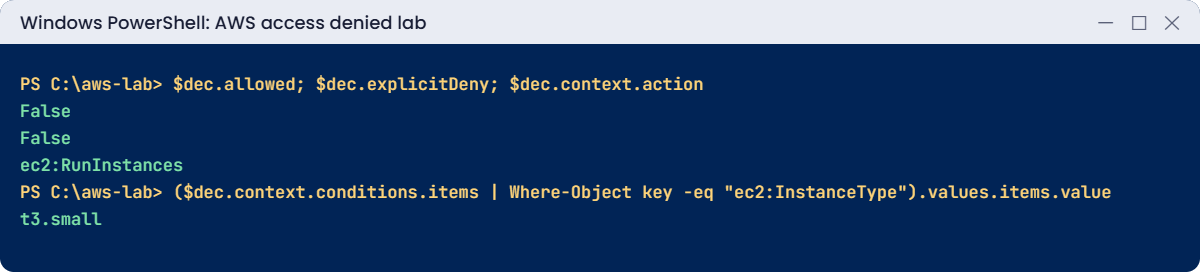
AWS access denied lab output: decoded authorization message
The decoded authorization message. Something like this.

3Prove the policy with the simulator

Paste this whole block:

foreach ($t in 't3.micro', 't3.small') {
  $r = aws iam simulate-principal-policy --policy-source-arn $roleArn --action-names ec2:RunInstances --resource-arns "arn:aws:ec2:ap-south-1:$($acct):instance/*" --context-entries "ContextKeyName=ec2:InstanceType,ContextKeyValues=$t,ContextKeyType=string" --query "EvaluationResults[0].[EvalDecision,MatchedStatements[0].SourcePolicyId]" --output text
  "$t  $r"
}

You should see something like this:

t3.micro  allowed run-micro
t3.small  implicitDeny  None

The simulator agrees and names the policy that matched. In a change request, this output is the proof that a policy does what you say, before it’s deployed.

4See an SCP denial

If you built the sandbox account in Lesson 33, try a Region its SCP blocks:

$scp = aws ec2 describe-vpcs --region us-east-1 --profile saat-sandbox 2>&1 | Out-String
$scp.Substring(0, [Math]::Min(300, $scp.Length))

You should see something like this:

An error occurred (UnauthorizedOperation) when calling the DescribeVpcs operation: You are not authorized to perform this operation. User: arn:aws:sts::444455556666:assumed-role/OrganizationAccountAccessRole/... is not authorized to perform: ec2:DescribeVpcs with an explicit deny in a service control policy

No policy in the sandbox account can override this. The fix, if one is needed, belongs to whoever runs the organization.
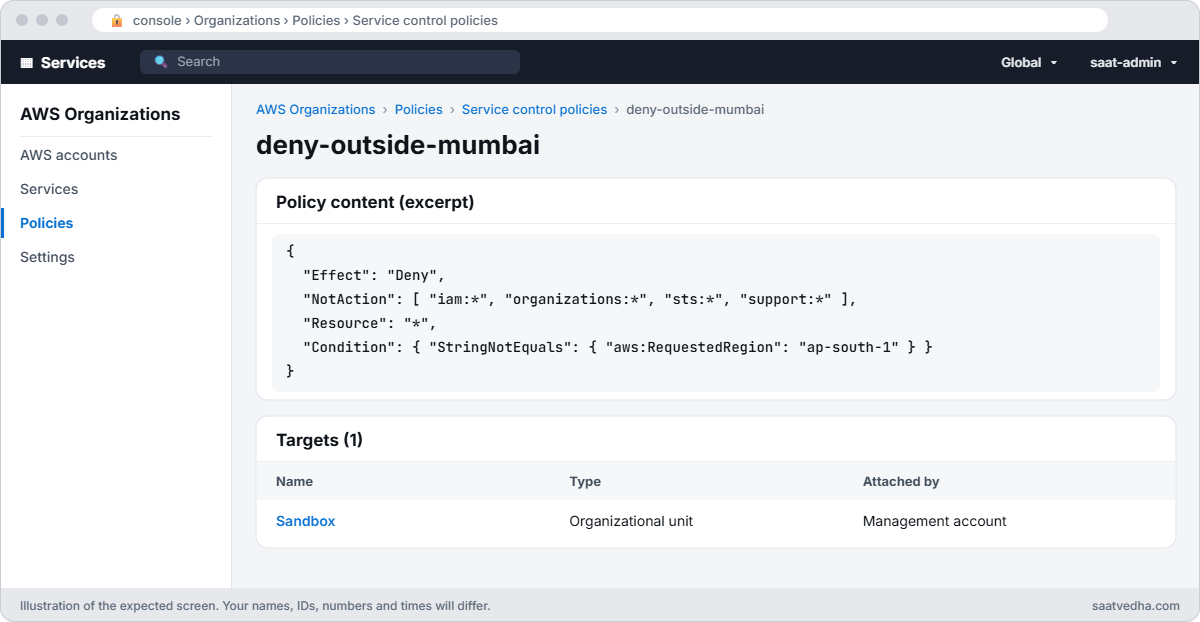
AWS Organizations service control policy deny-outside-mumbai attached to the Sandbox OU
The policy that won: an SCP attached to the Sandbox OU. No policy inside the account can override it.

✅ Checkpoint: t3.micro dry run says “would have succeeded”, t3.small is denied with a decodable message showing t3.small, the simulator shows allowed vs implicitDeny, and the sandbox call names an SCP.

Break It, Then Fix It

Two denials that confuse people because the identity policy looks fine.

1Break it: an explicit deny for missing tags

Add a company-style rule: no launch without a course tag. Then try the launch that worked before:

@{ Version = '2012-10-17'; Statement = @(@{ Sid = 'RequireCourseTag'; Effect = 'Deny'; Action = 'ec2:RunInstances'; Resource = 'arn:aws:ec2:*:*:instance/*'; Condition = @{ Null = @{ 'aws:RequestTag/course' = 'true' } } }) } | ConvertTo-Json -Depth 6 | Set-Content ops-deny.json
aws iam put-role-policy --role-name saat-lab-ops --policy-name require-course-tag --policy-document file://ops-deny.json
Start-Sleep 15
$err = Test-Launch t3.micro
($err -split 'Encoded')[0]
(Get-Decoded $err).explicitDeny

You’ll get something like this:

An error occurred (UnauthorizedOperation) when calling the RunInstances operation: You are not authorized to perform this operation. User: arn:aws:sts::111122223333:assumed-role/saat-lab-ops/ops-test is not authorized to perform: ec2:RunInstances on resource: arn:aws:ec2:ap-south-1:111122223333:instance/* with an explicit deny in an identity-based policy.
True

The allow is still there, but a Deny matched, and a Deny always wins. Tag rules like this are common, and people “fix” them by asking for more permissions, which can never help. Fix: meet the condition by adding the tag:

Test-Launch t3.micro -Tag

You should see this:

An error occurred (DryRunOperation) when calling the RunInstances operation: Request would have succeeded, but DryRun flag is set.

2Break it: a permissions boundary

Give the role a boundary that only allows Describe calls, then try the tagged launch:

'{ "Version": "2012-10-17", "Statement": [ { "Effect": "Allow", "Action": "ec2:Describe*", "Resource": "*" } ] }' | Set-Content boundary-v1.json
$bArn = aws iam create-policy --policy-name saat-ops-boundary --policy-document file://boundary-v1.json --query Policy.Arn --output text
aws iam put-role-permissions-boundary --role-name saat-lab-ops --permissions-boundary $bArn
Start-Sleep 15
$err = Test-Launch t3.micro -Tag
($err -split 'Encoded')[0]

You’ll get something like this:

An error occurred (UnauthorizedOperation) when calling the RunInstances operation: You are not authorized to perform this operation. User: arn:aws:sts::111122223333:assumed-role/saat-lab-ops/ops-test is not authorized to perform: ec2:RunInstances on resource: arn:aws:ec2:ap-south-1:111122223333:instance/* because no permissions boundary allows the ec2:RunInstances action.
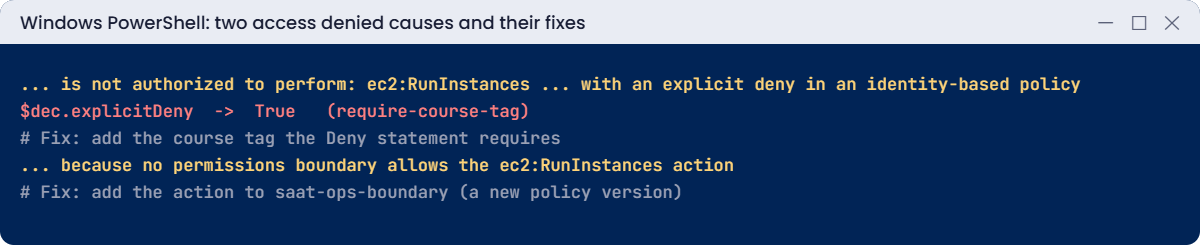
Access denied causes: explicit deny needing a tag and a permissions boundary
Both causes and their fixes. Something like this.

The boundary is a ceiling: the role gets only what both its policy and its boundary allow. Platform teams use boundaries so developers can create roles without escalating, and then forget to widen them. Fix: add a new boundary version with the actions the role needs:

'{ "Version": "2012-10-17", "Statement": [ { "Effect": "Allow", "Action": ["ec2:Describe*", "ec2:RunInstances", "ec2:CreateTags"], "Resource": "*" } ] }' | Set-Content boundary-v2.json
aws iam create-policy-version --policy-arn $bArn --policy-document file://boundary-v2.json --set-as-default | Out-Null
Start-Sleep 15
Test-Launch t3.micro -Tag

You should see this:

An error occurred (DryRunOperation) when calling the RunInstances operation: Request would have succeeded, but DryRun flag is set.

Now clean up:

aws iam delete-role-permissions-boundary --role-name saat-lab-ops
$old = aws iam list-policy-versions --policy-arn $bArn --query 'Versions[?IsDefaultVersion==`false`].VersionId' --output text
foreach ($ver in ($old -split '\s+')) { if ($ver) { aws iam delete-policy-version --policy-arn $bArn --version-id $ver } }
aws iam delete-policy --policy-arn $bArn
aws iam delete-role-policy --role-name saat-lab-ops --policy-name run-micro
aws iam delete-role-policy --role-name saat-lab-ops --policy-name require-course-tag
aws iam delete-role --role-name saat-lab-ops
Remove-Item ops-trust.json, ops-policy.json, ops-deny.json, boundary-v1.json, boundary-v2.json

Also delete the [profile saat-ops] section from your %USERPROFILE%\.aws\config file.

✅ Checkpoint: You fixed an explicit deny by meeting its tag condition and a boundary denial with a new boundary version. The role, its policies, the boundary policy and its versions are gone.

This happened at work

The admin rights that didn’t help

A developer at a fintech couldn’t launch build servers from the CI pipeline: UnauthorizedOperation. Under pressure, the platform team attached AdministratorAccess to the pipeline role. The error stayed exactly the same.

Someone finally decoded the message: explicitDeny was true. A security policy denied RunInstances without a cost-center tag, and the pipeline’s launch template had lost its tags in a refactor. No amount of Allow could beat that Deny.

They restored the tags and removed AdministratorAccess the same afternoon. The team’s runbook now starts every AccessDenied ticket with “read the layer in the message, then decode”.

Common mistakes and troubleshooting

MistakeWhat happensWhat to do
Attaching AdministratorAccessExplicit denies still win; risk goes upFix the one missing permission
Ignoring the message textFixing the wrong layerRead: identity, boundary, SCP, explicit deny
Not decoding EC2 messagesGuessing at conditionssts decode-authorization-message
Testing with real launchesCosts and clutter--dry-run and simulate-principal-policy
Forgetting boundariesRole “has” permissions it can’t useCheck get-role PermissionsBoundary
Editing member accounts for SCP denialsNothing changesOrg admins change SCPs

Interview questions

Click a question to open it. Each one is written the way an interviewer would ask it. Under it you will see why they ask it and one way you could answer, in your own words.

Fresher level

1. Can you explain in simple words what an “explicit deny” means in AWS?

Why they ask this: They want to check that you understand the most important rule of IAM policy evaluation.

How you might answer: It means a Deny statement matched the request. A Deny always wins, so it overrides any Allow in any policy.

I explain it like a parent saying no: it doesn’t matter how many other people said yes.

2. An EC2 call fails and gives you a long encoded authorization message. What do you do with it?

Why they ask this: They want to see that you know how to get the real reason behind an error instead of guessing.

How you might answer: I decode it with aws sts decode-authorization-message --encoded-message and paste the message in. The output shows which action and resource were denied, and why.

My identity needs the sts:DecodeAuthorizationMessage permission to run that command.

3. How can you check if you’re allowed to launch an EC2 instance without actually launching one?

Why they ask this: They want to see that you test permissions safely, without creating resources or cost.

How you might answer: I add --dry-run to the command. If I get DryRunOperation, I’m allowed; if I get UnauthorizedOperation, I’m denied.

Nothing gets created either way, so it’s safe to run anytime.

2–5 years experience

4. A role has AdministratorAccess attached, but it still gets AccessDenied. How is that possible?

Why they ask this: They want to see that you know all the layers that can block a request, not just the identity policy.

How you might answer: Something above or around the identity policy is blocking it. It could be an explicit deny in an identity policy, a resource policy or an SCP.

It could also be a permissions boundary or a session policy. AdministratorAccess only allows; it can’t beat any of these.

5. How would you explain a permissions boundary to a new team member?

Why they ask this: They want to know you understand how boundaries limit what a role can do, even when its policies allow more.

How you might answer: I’d say a boundary is a managed policy that sets the most an IAM user or role can ever do. It doesn’t give any permission by itself.

What the role can really do is the overlap between the boundary and its identity policies.

6. How does the IAM policy simulator help you when you’re debugging permissions?

Why they ask this: They want to see that you use tools to test policies before and after changes, rather than trial and error in production.

How you might answer: The simulator checks a principal’s policies, including boundaries, against the actions, resources and context keys I choose. It shows allowed, implicitDeny or explicitDeny.

It also shows the matching statement, so I know exactly which line to fix.

Senior level

7. You have 30 teams in AWS. How would you set up a least-privilege process that doesn’t slow everyone down?

Why they ask this: They want to see that you balance security with speed, and use guardrails and automation instead of manual reviews only.

How you might answer: I’d give access through permission sets in Identity Center, and require boundaries on roles the teams create. SCPs act as guardrails at the top.

IAM Access Analyzer would find unused access and help generate policies. I’d add simulator checks in CI, and alerts on AccessDenied from CloudTrail.

8. Right after a deployment, AccessDenied errors spike. How would you investigate?

Why they ask this: They want to see a fast, evidence-based response that fixes the problem without opening up too much access.

How you might answer: I’d query CloudTrail for errorCode AccessDenied or UnauthorizedOperation, grouped by principal and action. Then I’d decode any encoded messages.

Next I compare the policy versions in IaC from before and after the release. Then I either roll back, or make a narrow fix for just the missing permission.

Quick quiz

Q1. Which wins: an Allow or an explicit Deny?

  1. Allow
  2. Explicit Deny
  3. Whichever is newer
  4. Neither
Show answer

B — Deny always wins.

Q2. What does DryRunOperation mean?

  1. Denied
  2. Would have succeeded
  3. Instance launched
  4. Throttled
Show answer

B — Permissions are fine.

Q3. What decodes EC2 authorization messages?

  1. iam simulate
  2. sts decode-authorization-message
  3. kms decrypt
  4. base64
Show answer

B — It returns the evaluation JSON.

Q4. “No permissions boundary allows” means?

  1. Missing identity allow
  2. The boundary ceiling blocks it
  3. SCP deny
  4. Wrong Region
Show answer

B — Widen the boundary.

Q5. Who fixes an SCP denial?

  1. The developer
  2. The organization admins
  3. AWS Support
  4. Nobody
Show answer

B — SCPs are set at org level.

Quick recap

  • Read the layer in the message: identity, boundary, SCP or explicit deny.
  • Decode EC2 messages with sts decode-authorization-message.
  • Test with --dry-run and the policy simulator, not real actions.
  • Explicit denies win; boundaries are ceilings; SCPs belong to the org admins.
  • Fix narrowly; never answer AccessDenied with AdministratorAccess.

Next lesson

Lesson 60: S3 403 and access problems → You’ll fix S3 403s caused by bucket policies, KMS keys, object ownership and Block Public Access.

Further reading: AWS access denied error

Want to go deeper into AWS access denied error? Read Troubleshoot access denied error messages and Policy evaluation logic. You can also see the full plan for this course on the AWS Cloud Administration course page.

Scroll to Top