Native Backup and Restore with S3

Snapshots copy a whole RDS instance, but most real requests are about one database: “copy production to test”, “send this database to the vendor”, “move our on-premises database to RDS”. RDS SQL Server native backup restore handles all of these with ordinary .bak files stored in Amazon S3.

You’ll turn on the backup option for saat-sql, back up SaatShop to S3, then restore it as a new database using a full plus differential backup chain. After that you’ll break it twice, the same way people do at work.

TimeYou needBy the end you can
75 minutesLessons 42 to 44 done (saat-sql, Start-SqlLab.ps1, Stop-SqlLab.ps1), your laptop signed in as saat-admin. Cost: a few cents (saat-sql running for an hour plus a few KB in S3). The bucket, role and option stay for later lessons and cost almost nothing.Add SQLSERVER_BACKUP_RESTORE with a safe IAM role, run rds_backup_database and rds_restore_database, track tasks with rds_task_status, restore a full plus differential chain, and know the limits before a migration.

What it is, in one line

RDS SQL Server native backup restore lets you back up a single database to a .bak file in S3 and restore .bak files from S3, using stored procedures in msdb.

In Simple Words

Photocopying one file

An RDS snapshot is like photocopying the entire filing cabinet. Great for disasters, but useless when someone asks for just one folder to take to another office.

A native backup is a photocopy of one folder, placed in a shared locker (S3). Anyone with the key can take it to any office and put it into their own cabinet.

On RDS you can’t walk up to the cabinet yourself. You fill in a request slip (a stored procedure), and a clerk does the copying in the background while you check the status board.

Engineer's View

How native backup and restore works on RDS

You add the SQLSERVER_BACKUP_RESTORE option to the instance’s option group, with an IAM_ROLE_ARN setting. That role trusts rds.amazonaws.com (limit it with aws:SourceArn and aws:SourceAccount) and allows s3:ListBucket, s3:GetBucketLocation, s3:GetObject, s3:PutObject, s3:GetObjectAttributes, s3:ListMultipartUploadParts and s3:AbortMultipartUpload. For encrypted backups, add the KMS actions and pass @kms_master_key_arn with a symmetric key.

msdb.dbo.rds_backup_database and msdb.dbo.rds_restore_database queue a task and return at once; msdb.dbo.rds_task_status shows progress and errors, and rds_cancel_task stops one. Up to two tasks run at a time.

FULL and DIFFERENTIAL backups are supported, and @with_norecovery=1 leaves a database ready for the next restore in a chain. Native log backups are not.

Limits worth memorising: the bucket must be in the same Region, each file can be up to 5 TB and a backup can be split across up to 10 files with @number_of_files, restores go up to 64 TiB (10 GB on Express), you can’t restore over an existing database name, and a native backup that overlaps the automated backup window is cancelled. To upload large on-premises .bak files from far away, S3 Transfer Acceleration speeds up the upload; RDS then reads from the bucket in its own Region.

How it works, step by step

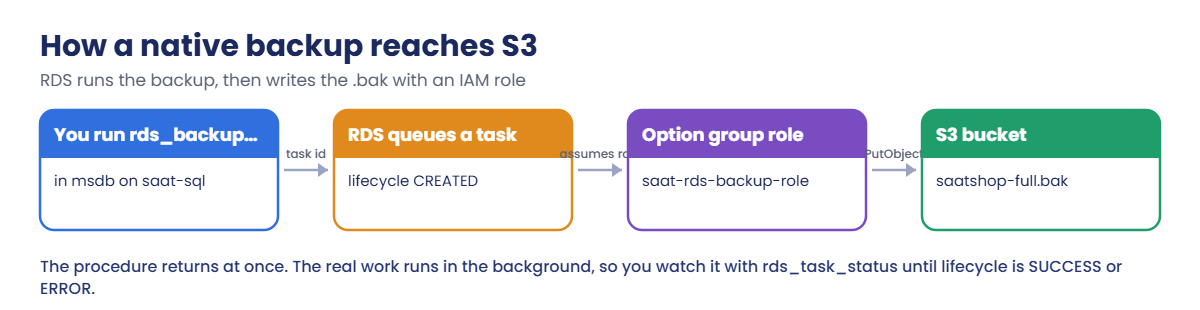
Here is what happens when you back up SaatShop.

1You queue a task

You call rds_backup_database with the database name and an S3 ARN. RDS replies with a task ID and returns straight away.

How an RDS SQL Server native backup is written to S3 with an IAM role

2RDS writes the .bak with the role

In the background, RDS runs the backup and writes the file to S3 using the role in the option group. If the role or bucket policy is wrong, the task ends in ERROR with the reason in task_info.

3You watch the status

rds_task_status shows % complete and a lifecycle of CREATED, IN_PROGRESS, SUCCESS, ERROR or CANCELLED.

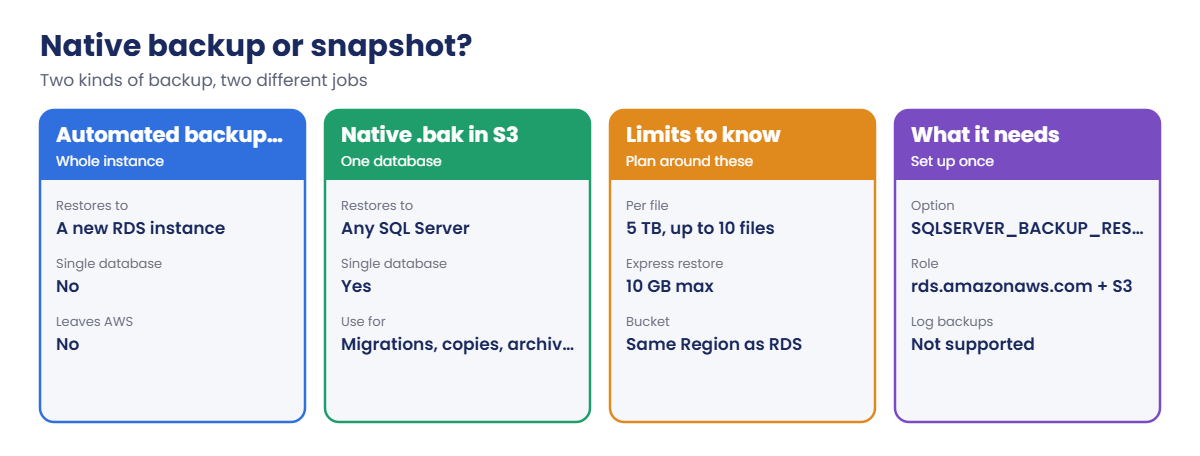
4Choose the right kind of backup

Native backups don’t replace automated backups. They do a different job:

Native backup files compared with RDS snapshots, plus limits and requirements

Keep automated backups for point-in-time recovery of the instance (Lesson 52). Use native backups for single databases, migrations and copies that must leave RDS.

✅ Checkpoint: You can explain what the option group, the IAM role and the three msdb procedures each do, and when a .bak beats a snapshot.

Hands-on lab: back up SaatShop to S3 and restore it

Sign in, start the SQL lab and set names:

cd C:\aws-lab
aws login --profile saat-admin
$env:AWS_PROFILE = 'saat-admin'
.\Start-SqlLab.ps1
$acct = aws sts get-caller-identity --query Account --output text
$bak = "saat-sqlbak-$acct-ap-south-1-an"

1Create the bucket and the backup role

Paste this whole block:

aws s3api create-bucket --bucket $bak --bucket-namespace account-regional --region ap-south-1 --create-bucket-configuration LocationConstraint=ap-south-1 | Out-Null
aws s3api put-bucket-tagging --bucket $bak --tagging 'TagSet=[{Key=course,Value=saatvedha-aws},{Key=lesson,Value=46}]'
$trust = @{ Version = '2012-10-17'; Statement = @(@{ Effect = 'Allow'; Principal = @{ Service = 'rds.amazonaws.com' }; Action = 'sts:AssumeRole'; Condition = @{ StringEquals = @{ 'aws:SourceAccount' = $acct; 'aws:SourceArn' = @("arn:aws:rds:ap-south-1:$($acct):db:saat-sql", "arn:aws:rds:ap-south-1:$($acct):og:saat-sqlserver-ex-16-og") } } }) }
$trust | ConvertTo-Json -Depth 6 | Set-Content rds-backup-trust.json
$perm = @{ Version = '2012-10-17'; Statement = @(
  @{ Effect = 'Allow'; Action = @('s3:ListBucket', 's3:GetBucketLocation'); Resource = "arn:aws:s3:::$bak" },
  @{ Effect = 'Allow'; Action = @('s3:GetObjectAttributes', 's3:GetObject', 's3:PutObject', 's3:ListMultipartUploadParts', 's3:AbortMultipartUpload'); Resource = "arn:aws:s3:::$bak/*" }) }
$perm | ConvertTo-Json -Depth 6 | Set-Content rds-backup-s3.json
$roleArn = aws iam create-role --role-name saat-rds-backup-role --assume-role-policy-document file://rds-backup-trust.json --query Role.Arn --output text
aws iam put-role-policy --role-name saat-rds-backup-role --policy-name saat-sqlbak-s3 --policy-document file://rds-backup-s3.json
$roleArn

You should see something like this:

arn:aws:iam::111122223333:role/saat-rds-backup-role

The role can only be used by saat-sql and its option group, and only on this one bucket. That’s tighter than the console’s auto-created role, which is the point.

2Add the backup option to saat-sql

Paste this whole block. The option group change applies in a few minutes:

Start-Sleep 15
aws rds add-option-to-option-group --option-group-name saat-sqlserver-ex-16-og --options "OptionName=SQLSERVER_BACKUP_RESTORE,OptionSettings=[{Name=IAM_ROLE_ARN,Value=$roleArn}]" --apply-immediately --query "OptionGroup.Options[].OptionName" --output text
Start-Sleep 30
aws rds wait db-instance-available --db-instance-identifier saat-sql
aws rds describe-db-instances --db-instance-identifier saat-sql --query "DBInstances[0].OptionGroupMemberships[0].[OptionGroupName,Status]" --output text

You should see something like this:

SQLSERVER_BACKUP_RESTORE
saat-sqlserver-ex-16-og in-sync

Adding this option doesn’t need a reboot. It creates the rds_ procedures in msdb that the next steps use.

3Back up SaatShop: full, then differential

Paste this whole block. It adds a status helper, takes a full backup, adds an order, then takes a differential:

function Wait-RdsTask([string]$Db) {
  do {
    Start-Sleep 15
    $rows = sqlcmd -S "127.0.0.1,11433" -U saatadmin -C -h -1 -W -s "|" -Q "SET NOCOUNT ON; exec msdb.dbo.rds_task_status @db_name='$Db'" | Where-Object { $_ -match '\|' }
    $f = ($rows | Sort-Object { [int](($_ -split '\|')[0]) } | Select-Object -Last 1) -split '\|'
  } until ($f[5] -in 'SUCCESS', 'ERROR', 'CANCELLED')
  "$($f[1]) $($f[2]) $($f[3])% $($f[5]) $($f[6])"
}
sqlcmd -S "127.0.0.1,11433" -U saatadmin -C -Q "exec msdb.dbo.rds_backup_database @source_db_name='SaatShop', @s3_arn_to_backup_to='arn:aws:s3:::$bak/saatshop-full.bak', @overwrite_s3_backup_file=1, @type='FULL';" | Out-Null
Wait-RdsTask SaatShop
sqlcmd -S "127.0.0.1,11433" -U saatadmin -C -d SaatShop -Q "INSERT dbo.Orders (Customer, Amount) VALUES (N'Kiran', 999.00);"
sqlcmd -S "127.0.0.1,11433" -U saatadmin -C -Q "exec msdb.dbo.rds_backup_database @source_db_name='SaatShop', @s3_arn_to_backup_to='arn:aws:s3:::$bak/saatshop-diff.bak', @overwrite_s3_backup_file=1, @type='DIFFERENTIAL';" | Out-Null
Wait-RdsTask SaatShop
aws s3 ls "s3://$bak/"

You should see something like this:

BACKUP_DB SaatShop 100% SUCCESS Task execution has completed successfully.

(1 rows affected)
BACKUP_DB_DIFFERENTIAL SaatShop 100% SUCCESS Task execution has completed successfully.
2026-10-20 10:12:41    3215360 saatshop-full.bak
2026-10-20 10:14:02     118784 saatshop-diff.bak

The full backup has everything; the differential has only what changed since, which is why it’s so small. In real work you might take a full on Sunday and differentials each night before a migration weekend.
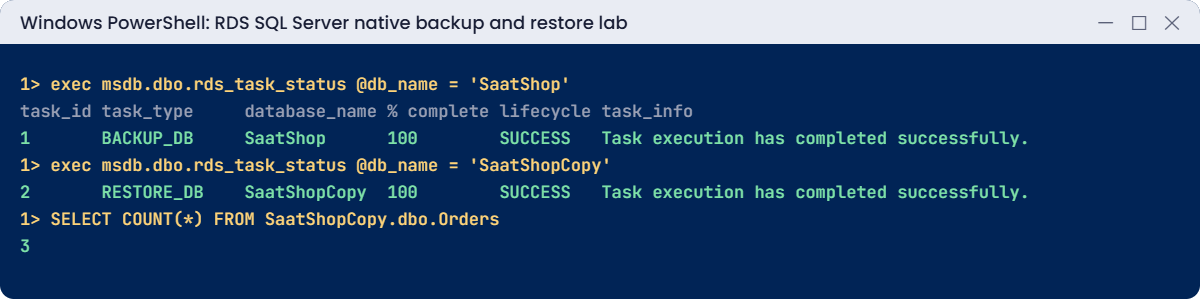
RDS SQL Server native backup restore lab output: backup and restore tasks succeeded
Backup and restore tasks finishing. Something like this.

4Restore the chain as a new database

Paste this whole block:

sqlcmd -S "127.0.0.1,11433" -U saatadmin -C -Q "exec msdb.dbo.rds_restore_database @restore_db_name='SaatShopCopy', @s3_arn_to_restore_from='arn:aws:s3:::$bak/saatshop-full.bak', @with_norecovery=1, @type='FULL';" | Out-Null
Wait-RdsTask SaatShopCopy
sqlcmd -S "127.0.0.1,11433" -U saatadmin -C -Q "SELECT name, state_desc FROM sys.databases WHERE name = 'SaatShopCopy'"
sqlcmd -S "127.0.0.1,11433" -U saatadmin -C -Q "exec msdb.dbo.rds_restore_database @restore_db_name='SaatShopCopy', @s3_arn_to_restore_from='arn:aws:s3:::$bak/saatshop-diff.bak', @with_norecovery=0, @type='DIFFERENTIAL';" | Out-Null
Wait-RdsTask SaatShopCopy
sqlcmd -S "127.0.0.1,11433" -U saatadmin -C -Q "SELECT COUNT(*) AS orders FROM SaatShopCopy.dbo.Orders"

You should see something like this:

RESTORE_DB SaatShopCopy 100% SUCCESS Task execution has completed successfully.
name          state_desc
------------- ----------
SaatShopCopy  RESTORING
RESTORE_DB_DIFFERENTIAL SaatShopCopy 100% SUCCESS Task execution has completed successfully.
orders
------
     4

After the full restore the copy waits in RESTORING, ready for more. The differential brought in Kiran’s order and opened the database. This is exactly how you move an on-premises database with a short outage: full backup days before, differential during the cutover.
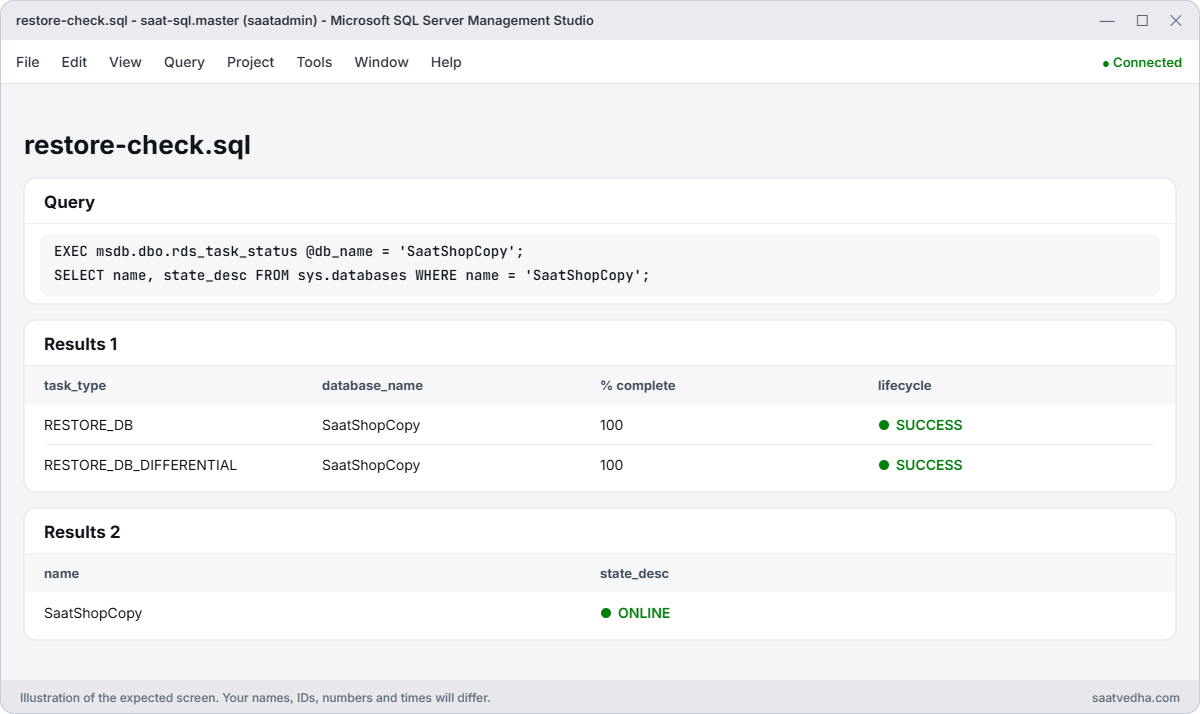
SSMS output of rds_task_status showing full and differential restores of SaatShopCopy with SUCCESS
rds_task_status after both restores: full and differential SUCCESS, and SaatShopCopy is ONLINE.

Want the file on your laptop? aws s3 cp "s3://$bak/saatshop-full.bak" . downloads it, and any SQL Server 2022 or later can restore it.

✅ Checkpoint: rds_task_status shows SUCCESS for both backups and both restores, the bucket holds saatshop-full.bak and saatshop-diff.bak, and SaatShopCopy has 4 orders.

Break It, Then Fix It

Two errors you’ll meet in real migrations.

1Break it: run a backup without the option

Remove the option, wait, then try a backup:

aws rds remove-option-from-option-group --option-group-name saat-sqlserver-ex-16-og --options SQLSERVER_BACKUP_RESTORE --apply-immediately | Out-Null
Start-Sleep 30
aws rds wait db-instance-available --db-instance-identifier saat-sql
sqlcmd -S "127.0.0.1,11433" -U saatadmin -C -Q "exec msdb.dbo.rds_backup_database @source_db_name='SaatShop', @s3_arn_to_backup_to='arn:aws:s3:::$bak/test.bak', @type='FULL';"

You’ll get an error like this:

Msg 2812, Level 16, State 62, Server EC2AMAZ-ABC123, Line 1
Could not find stored procedure 'msdb.dbo.rds_backup_database'.

The procedures only exist while the option is on the instance’s option group. New instances often get the default option group, so this is the first error on most migration projects. Fix: add the option back, then check the procedure exists:

aws rds add-option-to-option-group --option-group-name saat-sqlserver-ex-16-og --options "OptionName=SQLSERVER_BACKUP_RESTORE,OptionSettings=[{Name=IAM_ROLE_ARN,Value=$roleArn}]" --apply-immediately | Out-Null
Start-Sleep 30
aws rds wait db-instance-available --db-instance-identifier saat-sql
sqlcmd -S "127.0.0.1,11433" -U saatadmin -C -h -1 -Q "SET NOCOUNT ON; SELECT name FROM msdb.sys.procedures WHERE name = 'rds_backup_database'"

You should see this:

rds_backup_database

2Break it: restore over an existing database

Try to restore the full backup as SaatShop:

sqlcmd -S "127.0.0.1,11433" -U saatadmin -C -Q "exec msdb.dbo.rds_restore_database @restore_db_name='SaatShop', @s3_arn_to_restore_from='arn:aws:s3:::$bak/saatshop-full.bak', @type='FULL';"

You’ll get an error like this:

Msg 50000, Level 16, State 1, Procedure msdb.dbo.rds_restore_database
Database 'SaatShop' already exists. Two databases that differ only by case or accent are not allowed. Choose a different database name.
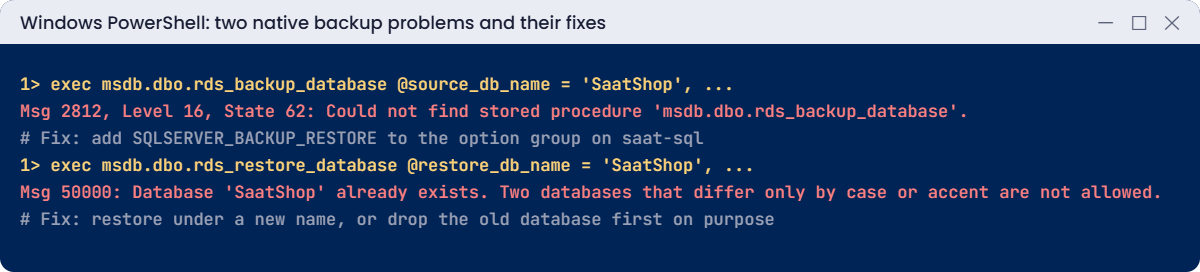
Native backup problems: stored procedure not found and database already exists
Both problems and their fixes. Something like this.

RDS has no WITH REPLACE. That protects you from overwriting live data by mistake, but it surprises people who want to refresh a test database.

Fix: restore under a new name, or, if you really mean to replace it, drop the old database first. Here you’ll drop the copy and restore it fresh:

sqlcmd -S "127.0.0.1,11433" -U saatadmin -C -Q "DROP DATABASE SaatShopCopy;"
sqlcmd -S "127.0.0.1,11433" -U saatadmin -C -Q "exec msdb.dbo.rds_restore_database @restore_db_name='SaatShopCopy', @s3_arn_to_restore_from='arn:aws:s3:::$bak/saatshop-full.bak', @type='FULL';" | Out-Null
Wait-RdsTask SaatShopCopy

You should see something like this:

RESTORE_DB SaatShopCopy 100% SUCCESS Task execution has completed successfully.

Now clean up. Keep the bucket, the role and the option: Lessons 50, 52 and 63 use them, and a few KB in S3 costs almost nothing.

sqlcmd -S "127.0.0.1,11433" -U saatadmin -C -Q "DROP DATABASE SaatShopCopy;"
sqlcmd -S "127.0.0.1,11433" -U saatadmin -C -d SaatShop -Q "DELETE dbo.Orders WHERE Customer = N'Kiran';"
Remove-Item rds-backup-trust.json, rds-backup-s3.json
.\Stop-SqlLab.ps1

✅ Checkpoint: You fixed a missing stored procedure by adding the option back and a name clash by restoring under a dropped name. SaatShopCopy is gone, SaatShop has its 3 orders, and saat-sql is stopping.

This happened at work

The test refresh that took down sales reporting

A retail company refreshed its UAT database from production every Friday with native backup and restore. A new DBA wrote a script that dropped the target database and restored the latest .bak, to get around the “already exists” error.

One Friday the script’s variables were swapped. It dropped SalesDW on the production reporting instance and started restoring a UAT backup in its place. Reports were down for six hours while they restored the real database from the previous night’s native backup.

Afterwards they restored into a new name with a date suffix, checked it, and only then renamed. The drop step needed a second person to approve it, and the production role lost DROP DATABASE.

Common mistakes and troubleshooting

MistakeWhat happensWhat to do
Instance on the default option groupMsg 2812, procedure not foundCustom option group with SQLSERVER_BACKUP_RESTORE
Bucket in another RegionTask failsBucket in the same Region as the instance
Role missing ListBucket or GetBucketLocationERROR with access denied in task_infoBucket-level and object-level actions on the right ARNs
Expecting WITH REPLACEDatabase already existsRestore to a new name, or drop first with care
Backup during the backup windowNative task cancelledSchedule outside the automated backup window
Huge database in one fileHits the 5 TB per-file limitSplit with @number_of_files (up to 10)

Interview questions

Click a question to open it. Each one is written the way an interviewer would ask it. Under it you will see why they ask it and one way you could answer, in your own words.

Fresher level

1. A developer asks you for a backup of just one database from RDS SQL Server. How would you do that?

Why they ask this: They want to know you can take a native backup on RDS, where you don’t have normal server access. It’s a common day-to-day request.

How you might answer: First I’d add the SQLSERVER_BACKUP_RESTORE option to the instance’s option group, with an IAM role that can write to the S3 bucket. Then I’d run msdb.dbo.rds_backup_database, which writes a .bak file to S3.

2. You started a native backup on RDS. How would you check whether it’s finished and worked?

Why they ask this: They are checking that you know how to follow a task you can’t watch on screen. RDS backups and restores run in the background.

How you might answer: I’d run exec msdb.dbo.rds_task_status with @db_name or @task_id. I’d read the lifecycle, the percent complete and task_info, which shows any error message if it failed.

3. Someone deleted data in one database, and you only want to bring back that database. Would you use a native backup or a snapshot?

Why they ask this: They want to see that you know which recovery tool fits which problem. Picking wrong can mean restoring a whole instance for one database.

How you might answer: I’d use a native .bak backup, because it restores a single database. A snapshot restores a whole new instance, which is too much when only one database is affected.

2–5 years experience

4. A restore task on RDS ends in ERROR with access denied. What would you check?

Why they ask this: They want to see a careful order of permission checks. This error has several causes, and they want to know you check them all.

How you might answer: First I’d check the role ARN in the option group, and its trust policy and conditions. Then I’d confirm it has s3:ListBucket and GetBucketLocation on the bucket, GetObject on the file, and KMS permissions if the backup is encrypted.

I’d also check that the bucket is in the same Region as the instance.

5. You need to move a 2 TB on-premises database to RDS, and the business only allows a short outage. How would you plan it?

Why they ask this: They want to see migration planning that keeps downtime low. They are checking that you know more than one approach.

How you might answer: Days before cutover, I’d take a full backup to S3, split into multiple files and uploaded with Transfer Acceleration, and restore it WITH NORECOVERY. At cutover I’d take a differential, restore it with recovery, and switch the app over.

If they need near-zero downtime, I’d use DMS with CDC instead.

6. What are the limits of native backup and restore on RDS that you’d warn a team about?

Why they ask this: They are checking that you know where native backup stops working. Hitting these limits in the middle of a migration causes delays.

How you might answer: It can’t take log backups, it can’t restore over a database with an existing name, and it can’t use a bucket in another Region. It also doesn’t work for FILESTREAM databases, and on Express edition you can’t restore anything above 10 GB.

Senior level

7. The test team wants a fresh copy of 20 production databases in UAT every week. How would you design that?

Why they ask this: They want to see automation with safety built in. They are checking that you protect sensitive data and keep production safe.

How you might answer: I’d schedule a job with EventBridge plus Lambda or SSM Automation that runs native backups and restores them to dated names in UAT. It would then mask sensitive data and swap the names only after checks pass.

The job’s permissions would only allow changes in UAT, and every run would leave an audit trail.

8. Compliance wants native backups kept as an archive that nobody can tamper with. How would you protect them?

Why they ask this: They want to see data protection thinking against mistakes and attackers. They are checking that production can’t destroy its own archive.

How you might answer: I’d encrypt the backups with KMS and store them in an S3 bucket with versioning, Object Lock and lifecycle rules to Glacier, plus cross-Region replication. The bucket would live in a separate account that production can write to but not delete from.

Quick quiz

Q1. Which option enables native backup on RDS SQL Server?

  1. SQLSERVER_AUDIT
  2. SQLSERVER_BACKUP_RESTORE
  3. TDE
  4. SSIS
Show answer

B — It adds the rds_ procedures and links the IAM role.

Q2. What does rds_backup_database return?

  1. The finished file
  2. A queued task
  3. Nothing until done
  4. A snapshot
Show answer

B — The work runs in the background; check rds_task_status.

Q3. Why did restoring as SaatShop fail?

  1. No permission
  2. The database already exists
  3. The bucket was empty
  4. TLS
Show answer

B — RDS can’t restore over an existing name.

Q4. Where must the S3 bucket be?

  1. Any Region
  2. The same Region as the instance
  3. us-east-1
  4. On premises
Show answer

B — Cross-Region buckets aren’t supported.

Q5. Which restore leaves the database ready for a differential?

  1. @with_norecovery=1
  2. @type=’LOG’
  3. @overwrite=1
  4. @number_of_files=2
Show answer

A — The database stays in RESTORING.

Quick recap

  • SQLSERVER_BACKUP_RESTORE plus a tight IAM role enables native backups to S3.
  • rds_backup_database and rds_restore_database queue tasks; rds_task_status tracks them.
  • Full plus differential with NORECOVERY gives short-outage migrations.
  • No log backups, no WITH REPLACE, same-Region bucket, 5 TB per file, 10 GB restores on Express.
  • Use native .bak for single databases; snapshots for whole instances.

Next lesson

Lesson 47: AWS DMS: replication instance, endpoints and full load → You’ll copy SaatShop to a new target with AWS Database Migration Service and see what it moves, and what it doesn’t.

Further reading: RDS SQL Server native backup restore

Want to go deeper into RDS SQL Server native backup restore? Read Importing and exporting SQL Server databases using native backup and restore and Support for native backup and restore in SQL Server. You can also see the full plan for this course on the AWS Cloud Administration course page.

Scroll to Top