AWS Organizations and SCPs

IAM decides what a user can do inside one account. Service control policies (SCPs) decide what anyone can do in a whole group of accounts, including account administrators and even the root user. They’re how companies make rules like “nothing outside Mumbai” or “nobody turns off CloudTrail” stick.

You’ll turn your lab account into the management account of a new organization, create a sandbox member account, lock it to Mumbai with an SCP, and set up IAM Identity Center sign-in for it, as promised in Lesson 6. Then you’ll break IAM with a careless SCP and lock the sandbox out completely, and fix both.

TimeYou needBy the end you can
90 minutesYour laptop signed in as saat-admin, an email address that can receive mail for a second account (a plus address such as you+saat-sandbox@gmail.com works with Gmail and Outlook), and a browser. Cost: Organizations, SCPs and IAM Identity Center have no charge. Read the warning at the start of the lab first.Create an organization, OU and member account, write and attach SCPs, understand how they combine with IAM, enable IAM Identity Center with a permission set, and troubleshoot SCP denials.

What it is, in one line

Service control policies are AWS Organizations policies that set the maximum permissions for every user and role in member accounts; they never grant access by themselves.

In Simple Words

School rules and class rules

Each class teacher makes rules for their class: who sits where, who can use the computer. That is IAM inside one account.

The school also has rules that apply to every class: no one leaves the campus during school hours, no phones in exams. A class teacher can’t override them, however much they want to. Those are SCPs.

The principal’s own office isn’t covered by those school rules, which is why principals should be very careful. That is the management account: SCPs never apply to it.

Engineer's View

How Organizations and SCPs really work

An organization has one management account (the one that created it, which pays the bill) and member accounts grouped into organizational units (OUs) under a root. With all features enabled you can use policies: SCPs, resource control policies (RCPs), tag policies, backup policies and others.

An SCP uses IAM policy syntax but only filters. A request in a member account succeeds only if every SCP from the root down to the account allows it (no explicit Deny, and an Allow at each level, which FullAWSAccess provides by default) and the account’s IAM policies allow it. SCPs apply to all principals in member accounts, including their root users, but not to service-linked roles or the management account.

Global services such as IAM, STS (global endpoint), Route 53, CloudFront and Organizations are served from us-east-1, so Region-restriction SCPs must exempt them with NotAction. IAM Identity Center uses the organization to give people single sign-on into any member account through permission sets, which become roles named AWSReservedSSO_... in each account.

How it works, step by step

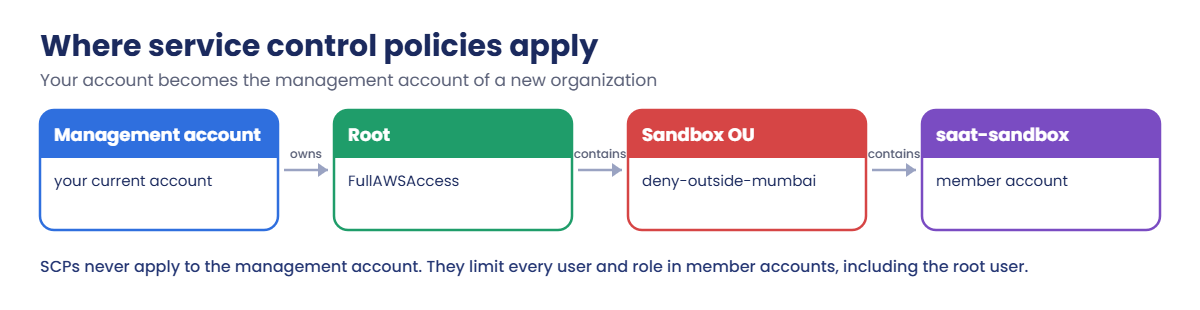
Here is where each piece sits after this lab.

1Your account becomes the management account

Creating the organization changes nothing in your account’s resources, but from now on it owns the organization and pays for every member account.

Where service control policies apply: management account, root, Sandbox OU, member account

2A member account joins an OU

saat-sandbox is created by the organization and placed in the Sandbox OU. You reach it by assuming OrganizationAccountAccessRole from the management account.

3SCPs filter everything in that OU

deny-outside-mumbai on the Sandbox OU means that even the sandbox account’s own administrator can’t create anything in us-east-1.

4People sign in through Identity Center

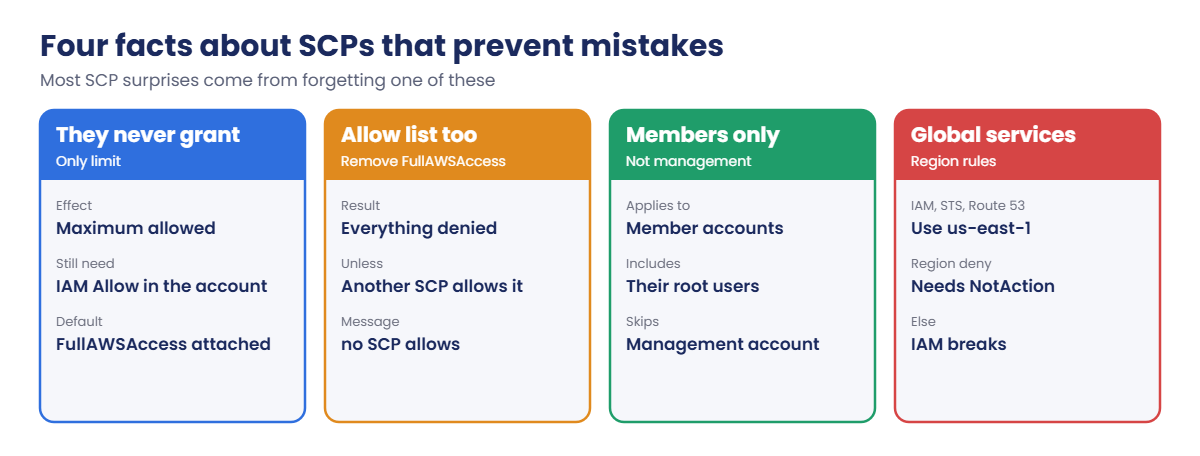
Instead of IAM users in every account, a person gets one sign-in and a permission set per account. These facts explain most SCP surprises:

Four facts about service control policies: never grant, allow list, members only, global services

In real companies the management account holds almost nothing: no workloads, very few people. Security, logging and workloads live in member accounts, where SCPs protect them.

✅ Checkpoint: You can explain management versus member accounts, why SCPs never grant, how they combine with IAM, and why Region SCPs need NotAction.

Hands-on lab: an organization with service control policies

Before you start: read this

AWS’s Free Tier terms say that once an account enrolls in AWS Organizations, it can no longer use or earn Free Tier credits. If you still have credits you want to keep, read this lesson without running steps 1 to 4 now, and come back when your credits are used up or nearly expired. If you moved to the Paid plan in Lesson 2 and are happy to stop using credits, carry on.

The sandbox account is a real AWS account. You can keep it at no cost for later lessons; when you finish the course, close it with aws organizations close-account. Closed accounts stay suspended for 90 days before they are removed.

Sign in and set the sandbox email address:

cd C:\aws-lab
aws login --profile saat-admin
$env:AWS_PROFILE = 'saat-admin'
$sandboxEmail = 'you+saat-sandbox@gmail.com'
$ssoUser = 'yourname'

1Create the organization and a Sandbox OU

Paste this whole block:

$org = aws organizations create-organization --feature-set ALL --query Organization.Id --output text
$root = aws organizations list-roots --query "Roots[0].Id" --output text
aws organizations enable-policy-type --root-id $root --policy-type SERVICE_CONTROL_POLICY | Out-Null
$ou = aws organizations create-organizational-unit --parent-id $root --name Sandbox --query OrganizationalUnit.Id --output text
aws organizations list-policies-for-target --target-id $ou --filter SERVICE_CONTROL_POLICY --query "Policies[].Name" --output text
"$org $root $ou"

You should see something like this:

FullAWSAccess
o-a1b2c3d4e5 r-ab12 ou-ab12-c3d4e5f6

Every new OU and account inherits FullAWSAccess, the “allow everything” SCP. That is why turning SCPs on doesn’t break anything until you add a Deny. AWS also sends an email asking you to verify the management account’s address; do it, as some organization features need it.

2Create the sandbox account and reach it

Paste this whole block (account creation takes a few minutes):

$req = aws organizations create-account --email $sandboxEmail --account-name saat-sandbox --query CreateAccountStatus.Id --output text
do { Start-Sleep 15; $st, $member = (aws organizations describe-create-account-status --create-account-request-id $req --query "CreateAccountStatus.[State,AccountId]" --output text) -split '\s+' } until ($st -ne 'IN_PROGRESS')
"$st $member"
aws organizations move-account --account-id $member --source-parent-id $root --destination-parent-id $ou
aws configure set role_arn "arn:aws:iam::$($member):role/OrganizationAccountAccessRole" --profile saat-sandbox
aws configure set source_profile saat-admin --profile saat-sandbox
aws configure set region ap-south-1 --profile saat-sandbox
Start-Sleep 30
aws sts get-caller-identity --profile saat-sandbox --query Arn --output text

You should see something like this:

SUCCEEDED 444455556666
arn:aws:sts::444455556666:assumed-role/OrganizationAccountAccessRole/botocore-session-1760975678

The organization created the account with a role that trusts the management account. That role has AdministratorAccess in the sandbox, which is exactly why the management account must be protected so carefully.

3Lock the sandbox to Mumbai

Paste this whole block:

@'
{
  "Version": "2012-10-17",
  "Statement": [
    {
      "Sid": "DenyOutsideMumbai",
      "Effect": "Deny",
      "NotAction": [
        "iam:*", "organizations:*", "sts:*", "sso:*", "identitystore:*", "account:*",
        "support:*", "budgets:*", "ce:*", "billing:*", "pricing:*", "health:*", "trustedadvisor:*",
        "cloudfront:*", "route53:*", "route53domains:*", "globalaccelerator:*", "waf:*",
        "s3:GetAccountPublicAccessBlock", "s3:ListAllMyBuckets"
      ],
      "Resource": "*",
      "Condition": { "StringNotEquals": { "aws:RequestedRegion": [ "ap-south-1" ] } }
    }
  ]
}
'@ | Set-Content scp-regions.json
@'
{
  "Version": "2012-10-17",
  "Statement": [
    {
      "Sid": "ProtectBaseline",
      "Effect": "Deny",
      "Action": [ "organizations:LeaveOrganization", "cloudtrail:StopLogging", "cloudtrail:DeleteTrail", "guardduty:DeleteDetector" ],
      "Resource": "*"
    }
  ]
}
'@ | Set-Content scp-protect.json
$scpRegions = aws organizations create-policy --name deny-outside-mumbai --type SERVICE_CONTROL_POLICY --description "Only ap-south-1, except global services" --content file://scp-regions.json --query Policy.PolicySummary.Id --output text
$scpProtect = aws organizations create-policy --name protect-baseline --type SERVICE_CONTROL_POLICY --description "Keep CloudTrail, GuardDuty and org membership" --content file://scp-protect.json --query Policy.PolicySummary.Id --output text
aws organizations attach-policy --policy-id $scpRegions --target-id $ou
aws organizations attach-policy --policy-id $scpProtect --target-id $ou
Start-Sleep 30
aws ec2 describe-vpcs --region ap-south-1 --profile saat-sandbox --query "length(Vpcs)"
aws ec2 describe-vpcs --region us-east-1 --profile saat-sandbox
aws ec2 describe-vpcs --region us-east-1 --query "length(Vpcs)"

You should see something like this:

1
An error occurred (UnauthorizedOperation) when calling the DescribeVpcs operation: You are not authorized to perform this operation. User: arn:aws:sts::444455556666:assumed-role/OrganizationAccountAccessRole/botocore-session-1760975678 is not authorized to perform: ec2:DescribeVpcs with an explicit deny in a service control policy
1

Three results tell the whole story: the sandbox can use Mumbai, the sandbox’s own administrator role is refused in us-east-1 by the SCP, and your management account (the last line) is not affected at all.
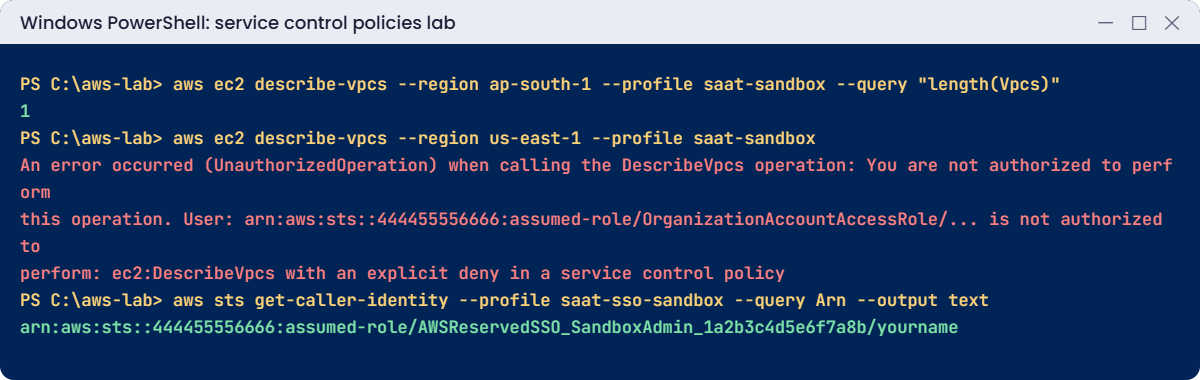
Service control policies lab output: Mumbai allowed, us-east-1 denied by SCP, SSO role
Mumbai allowed, us-east-1 denied by the SCP, and the Identity Center role. Something like this.

4Sign in to the sandbox with IAM Identity Center

Enabling the organization instance of Identity Center and creating your first user are done in the console:

  1. Open IAM Identity Center in ap-south-1 and choose Enable, keeping the organization instance option.
  2. Choose Users, then Add user. Use the username you set in $ssoUser and an email you can open, and send the invitation.
  3. Accept the invitation email, set a password and register an MFA device.
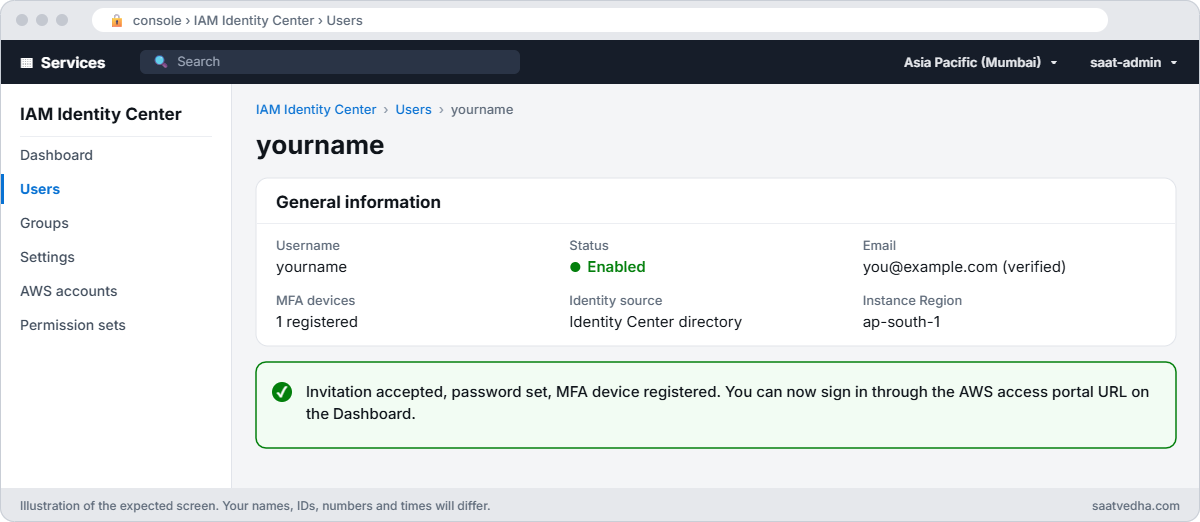
IAM Identity Center user page showing an enabled user with a verified email and one MFA device
Your new Identity Center user after accepting the invitation: enabled, email verified, one MFA device registered.

Then paste this whole block to give that user admin access to the sandbox only:

$inst, $idStore = (aws sso-admin list-instances --query "Instances[0].[InstanceArn,IdentityStoreId]" --output text) -split '\s+'
$userId = aws identitystore get-user-id --identity-store-id $idStore --alternate-identifier "UniqueAttribute={AttributePath=userName,AttributeValue=$ssoUser}" --query UserId --output text
$ps = aws sso-admin create-permission-set --instance-arn $inst --name SandboxAdmin --session-duration PT1H --query PermissionSet.PermissionSetArn --output text
aws sso-admin attach-managed-policy-to-permission-set --instance-arn $inst --permission-set-arn $ps --managed-policy-arn arn:aws:iam::aws:policy/AdministratorAccess
aws sso-admin create-account-assignment --instance-arn $inst --target-id $member --target-type AWS_ACCOUNT --permission-set-arn $ps --principal-type USER --principal-id $userId --query AccountAssignmentCreationStatus.Status --output text
"Start URL: https://$idStore.awsapps.com/start"

You should see something like this:

IN_PROGRESS
Start URL: https://d-9a8b7c6d5e.awsapps.com/start

Now create an SSO profile. Answer the prompts with the start URL above, Region ap-south-1, and pick saat-sandbox and SandboxAdmin when asked:

aws configure sso --profile saat-sso-sandbox
aws sts get-caller-identity --profile saat-sso-sandbox --query Arn --output text
aws ec2 describe-vpcs --region us-east-1 --profile saat-sso-sandbox --query "length(Vpcs)"

You should see something like this (the last command is refused by the SCP, as before):

arn:aws:sts::444455556666:assumed-role/AWSReservedSSO_SandboxAdmin_1a2b3c4d5e6f7a8b/yourname
An error occurred (UnauthorizedOperation) when calling the DescribeVpcs operation: ... with an explicit deny in a service control policy

A person, one sign-in with MFA, temporary credentials for one hour, and an SCP that applies whatever permission set they have. This is how most companies run AWS access. Use aws sso login --profile saat-sso-sandbox when the session expires.

The rest of the course keeps using saat-admin in your main account so earlier lessons stay valid.

✅ Checkpoint: Your organization has a Sandbox OU with saat-sandbox, the sandbox is refused in us-east-1 by an SCP while your management account is not, and you can sign in to the sandbox through Identity Center. Keep everything for the break lab.

Break It, Then Fix It

Two SCP mistakes that lock people out of things they need.

1Break it: a Region rule without exemptions

Replace the Region SCP with a simpler version that denies every action outside Mumbai:

(Get-Content scp-regions.json -Raw) -replace '(?s)"NotAction": \[.*?\],', '"Action": "*",' | Set-Content scp-regions-naive.json
aws organizations update-policy --policy-id $scpRegions --content file://scp-regions-naive.json | Out-Null
Start-Sleep 30
aws iam list-roles --profile saat-sandbox --max-items 1

You’ll get an error like this:

An error occurred (AccessDenied) when calling the ListRoles operation: User: arn:aws:sts::444455556666:assumed-role/OrganizationAccountAccessRole/botocore-session-1760975678 is not authorized to perform: iam:ListRoles on resource: arn:aws:iam::444455556666:role/ with an explicit deny in a service control policy

IAM is a global service whose requests are treated as us-east-1, so “deny everything outside Mumbai” also denies all of IAM, Route 53, billing and support. Teams usually find this when someone can’t create a role for a new app. Fix: put back the version with NotAction exemptions:

aws organizations update-policy --policy-id $scpRegions --content file://scp-regions.json | Out-Null
Start-Sleep 30
aws iam list-roles --profile saat-sandbox --max-items 1 --query "Roles[0].RoleName" --output text

You should see something like this:

AWSReservedSSO_SandboxAdmin_1a2b3c4d5e6f7a8b

2Break it: remove FullAWSAccess from the OU

Someone tidies up the Sandbox OU by detaching the “allow everything” policy:

aws organizations detach-policy --policy-id p-FullAWSAccess --target-id $ou
Start-Sleep 30
aws s3api list-buckets --profile saat-sandbox

You’ll get an error like this:

An error occurred (AccessDenied) when calling the ListBuckets operation: User: arn:aws:sts::444455556666:assumed-role/OrganizationAccountAccessRole/botocore-session-1760975678 is not authorized to perform: s3:ListAllMyBuckets because no service control policy allows the s3:ListAllMyBuckets action
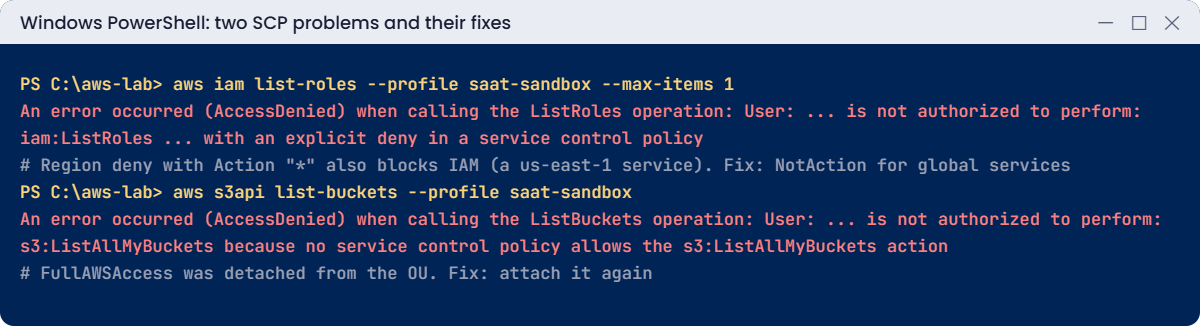
SCP problems: Region deny blocks IAM, no SCP allows after FullAWSAccess detached
Both SCP problems and their fixes. Something like this.

Note the wording: “no service control policy allows”, not “explicit deny”. SCPs also work as an allow list: every level from the root down must allow an action, and the OU now has only Deny statements. Everything in the sandbox stops, including its administrators.

Fix: attach FullAWSAccess again (or a deliberate allow-list SCP):

aws organizations attach-policy --policy-id p-FullAWSAccess --target-id $ou
Start-Sleep 30
aws s3api list-buckets --profile saat-sandbox --query "length(Buckets)"

You should see this:

0

Keep the organization, the Sandbox OU, both SCPs, the sandbox account and Identity Center; none of them cost anything, and later lessons can use them. Just tidy the local files:

Remove-Item scp-regions-naive.json
aws organizations list-policies-for-target --target-id $ou --filter SERVICE_CONTROL_POLICY --query "Policies[].Name" --output text

You should see something like this:

FullAWSAccess   deny-outside-mumbai     protect-baseline

✅ Checkpoint: You fixed a Region SCP that blocked IAM by adding NotAction exemptions, and an OU locked out by a missing FullAWSAccess. The Sandbox OU has FullAWSAccess, deny-outside-mumbai and protect-baseline.

This happened at work

The SCP that stopped every deployment

A retail group added a Region-restriction SCP to its production OU on a Tuesday afternoon, copied from a blog post. It denied * outside two Regions with no exemptions. It was tested by creating an EC2 instance in a blocked Region, which failed as expected.

That evening, every deployment pipeline failed. The pipelines created IAM roles for new services, and IAM calls were now denied. Route 53 record changes for a marketing launch failed too.

On-call engineers spent two hours checking IAM permissions in each account before someone thought of the organization.

The team now tests SCPs in a sandbox OU with a checklist of common calls (IAM, STS, Route 53, CloudFront, support, billing), rolls them out OU by OU, and keeps a break-glass role excluded with aws:PrincipalArn conditions.

Common mistakes and troubleshooting

MistakeWhat happensWhat to do
Region SCP without NotAction for global servicesIAM, Route 53, billing calls deniedExempt global services with NotAction
Detaching FullAWSAccess without another allowEverything in the OU is deniedKeep FullAWSAccess unless you design an allow list
Expecting SCPs to protect the management accountRules don’t apply thereKeep workloads and people out of the management account
Expecting SCPs to grant accessUsers still get AccessDeniedGrant in IAM; SCPs only limit
Testing SCPs in production firstPipelines and teams breakTest in a sandbox OU, then roll out OU by OU
No break-glass exceptionAdmins can’t fix a bad SCP quicklyExclude a break-glass role by aws:PrincipalArn

Interview questions

Click a question to open it. Each one is written the way an interviewer would ask it. Under it you will see why they ask it and one way you could answer, in your own words.

Fresher level

1. Can you explain in simple words what an SCP is?

Why they ask this: They want to know you understand how companies put limits on many AWS accounts at once. It’s the base of multi-account security.

How you might answer: An SCP, or service control policy, is an Organizations policy that sets the maximum permissions for users and roles in member accounts. It never gives access by itself.

I explain it like a fence: IAM decides where you can walk, but you can never walk past the fence the SCP puts up.

2. If you attach a deny SCP at the root of the organization, does it also limit the management account?

Why they ask this: They are checking that you know exactly where SCPs apply. Getting this wrong leads to false confidence about what is protected.

How you might answer: No. SCPs apply only to member accounts, including their root users. They don’t affect the management account or service-linked roles.

That’s one reason I keep no workloads in the management account.

3. You open Organizations and see a policy called FullAWSAccess attached everywhere. What is it, and should you remove it?

Why they ask this: They want to see that you understand how SCPs work by default. Removing this policy without a plan can block everything in an account.

How you might answer: FullAWSAccess is the default SCP attached to the root, every OU and every account, and it allows all actions. It means turning on SCPs doesn’t block anything until I add deny statements.

I usually leave it in place and add my own deny SCPs on top, because removing it without a replacement allow would block access.

2–5 years experience

4. A user with AdministratorAccess gets AccessDenied. How would you tell if an SCP is the cause?

Why they ask this: They want to see that you read the error carefully before guessing. SCP issues confuse people because the IAM policy looks fine.

How you might answer: First I’d read the error message: if it says “explicit deny in a service control policy” or “no service control policy allows”, it points to an SCP. Then I’d check the SCPs on the account, its OUs and the root.

I can also test with the IAM policy simulator, which can include SCPs for accounts in the organization.

5. Your company wants all work to stay in two AWS Regions. How would you enforce that without breaking things?

Why they ask this: They want to see careful policy design. A Region-limit SCP done badly can block global services like IAM.

How you might answer: I’d write a deny SCP with a condition on aws:RequestedRegion, and use NotAction to leave out global services. I’d also exclude break-glass roles, so we can still get in during an emergency.

I’d test it in a sandbox OU first. Another option is the AWS Control Tower Region deny control, which AWS maintains for you.

6. What’s the difference between SCPs and RCPs, and when would you use each?

Why they ask this: They are checking that you know the newer controls and what problem each one solves. This shows you keep your knowledge up to date.

How you might answer: SCPs limit what the users and roles in my accounts can do. Resource control policies, or RCPs, limit what can be done to the resources in my accounts, including by principals outside my organization.

So I’d use SCPs to stop my own people doing risky things, and RCPs to build a data perimeter around my resources.

Senior level

7. A 300-person company runs everything in one AWS account. How would you design their account structure and guardrails?

Why they ask this: They want to see multi-account strategy: separation, guardrails and access. They are checking that you design for safety and for people’s daily work.

How you might answer: I’d keep the management account empty of workloads, and create OUs for Security, Infrastructure, Workloads split into prod and non-prod, Sandbox and Suspended. I’d use Control Tower or a similar baseline.

SCPs would limit Regions, protect logging and security services, and deny root user actions, with RCPs for a data perimeter. People would sign in through Identity Center with permission sets per job role.

8. A new SCP just went live and production is breaking right now. What do you do?

Why they ask this: They want to see that you restore service first and fix the policy later. They are also checking that you learn from the mistake.

How you might answer: First I’d use the management account, or a delegated policy admin, to detach or roll back the SCP at the affected OU straight away, and confirm things recover. Then I’d fix the policy and test it in a sandbox OU.

Finally I’d add the calls we missed to our test checklist, so the next SCP change catches them.

Quick quiz

Q1. Which account is never affected by SCPs?

  1. Member accounts
  2. The management account
  3. Sandbox accounts
  4. Accounts in the root
Show answer

B — SCPs apply only to member accounts.

Q2. Why did iam:ListRoles fail with the simpler Region SCP?

  1. IAM was disabled
  2. IAM requests count as us-east-1
  3. The role was deleted
  4. FullAWSAccess was missing
Show answer

B — Global services need NotAction exemptions.

Q3. What does “no service control policy allows” mean?

  1. An explicit deny
  2. No SCP in the path allows the action
  3. The IAM policy is missing
  4. The Region is wrong
Show answer

B — FullAWSAccess or another allow was missing at some level.

Q4. Can an SCP give a user permissions they don’t have in IAM?

  1. Yes
  2. No, SCPs only limit
  3. Only for root
  4. Only in the management account
Show answer

B — IAM must still allow the action.

Q5. What does IAM Identity Center create in each member account?

  1. IAM users
  2. AWSReservedSSO roles from permission sets
  3. Access keys
  4. SCPs
Show answer

B — Permission sets become roles people sign in to.

Quick recap

  • An organization has one management account and member accounts in OUs.
  • SCPs set maximum permissions for member accounts; they never grant.
  • Region SCPs must exempt global services with NotAction.
  • Removing FullAWSAccess turns SCPs into an allow list and can lock out an OU.
  • IAM Identity Center gives people one sign-in and permission sets per account.

Next lesson

Lesson 34: CloudFormation: infrastructure as code → You’ll describe infrastructure in a template, deploy and update it with change sets, and roll back safely.

Further reading: service control policies

Want to go deeper into service control policies? Read Service control policies (SCPs) and What is IAM Identity Center?. You can also see the full plan for this course on the AWS Cloud Administration course page.

Scroll to Top