The AWS Troubleshooting Workflow: What Changed?
-
Phase 0: Before you start
-
Phase 1: The foundation
-
Phase 2: Operations and security
-
Phase 3: SQL Server on AWS
-
Phase 4: Troubleshooting step by step
-
Phase 5: Final project and career
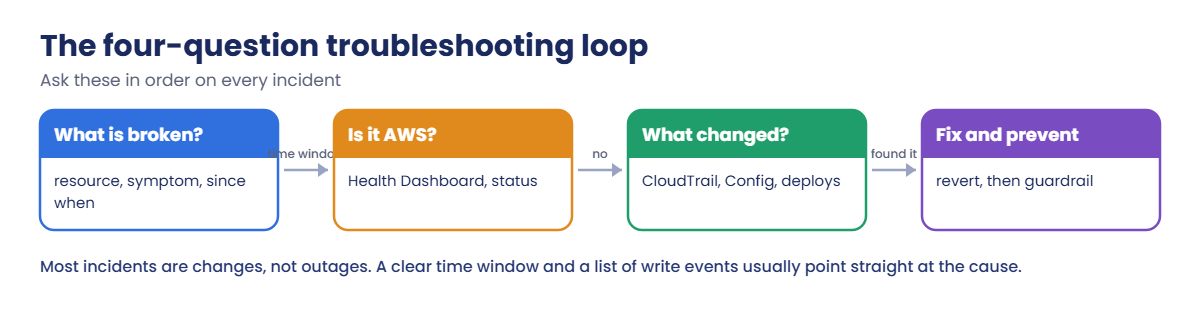
Phase 4 is about the problems people actually search for at 2 a.m. It starts with the method behind all of them. AWS troubleshooting goes faster when you ask the same four questions every time: what exactly is broken, is it AWS, what changed, and how do we fix it and stop it happening again.
You’ll stage a small incident (a teammate’s role quietly changes three things), then investigate it as the on-call engineer with CloudTrail, instance state and parameter history. You’ll also build Get-RecentChanges.ps1, a script you’ll use in every lesson of this phase.
| Time | You need | By the end you can |
|---|---|---|
| 60 minutes | Lessons 1 to 25 done (saat-vpc, saat-trail logging in every Region), your laptop signed in as saat-admin. Cost: a few cents (one t3.micro for under an hour). | Scope an incident, check AWS Health, list recent write events from CloudTrail, read StateTransitionReason and parameter history, revert changes, and avoid the timing traps that hide evidence. |
What it is, in one line
AWS troubleshooting is a repeatable loop: define what is broken and since when, rule AWS in or out, find what changed, then fix it and add a guardrail.
In Simple Words
The doctor’s questions
A good doctor doesn’t start with a scan. They ask: where does it hurt, since when, is anyone else at home sick, and what changed, a new food, a new medicine?
Most of the time the answer is in “what changed”. The scan comes later, only if the questions don’t explain it.
On AWS, CloudTrail is the record of everything anyone changed. If you know since when it hurts, you can read exactly what changed just before.
Engineer's View
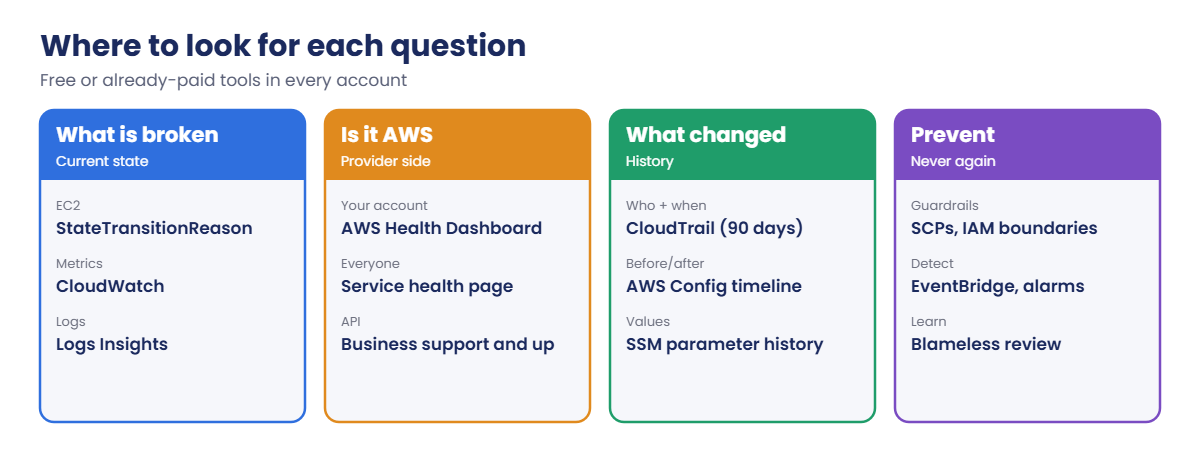
The tools behind each question
Scope: resource, symptom, start time, blast radius. EC2’s StateTransitionReason, CloudWatch metrics and logs say what happened and when.
Is it AWS? The AWS Health Dashboard shows events affecting your account and resources; the Health API needs Business support or higher, and the public service health page covers everyone.
What changed? CloudTrail event history keeps 90 days of management events per Region; lookup-events filters by user, resource, event name or ReadOnly=false for writes. Events usually appear within about 5 minutes, and times are in UTC.
AWS Config (Lesson 26) adds before-and-after resource configurations, and services like Systems Manager Parameter Store keep their own version history.
Fix and prevent: revert the change, then add a guardrail: tighter IAM, an SCP, an EventBridge rule that alerts on risky API calls, or a pipeline so changes aren’t made by hand. Write it up as a blameless review.
How it works, step by step
Here is the loop you’ll run in the lab.
1Scope it
Write down the resource, the symptom and the time it started, in UTC. Without a time window, every other tool drowns you in data.
2Rule AWS in or out
Check the Health Dashboard for your account. Real AWS events happen, but far less often than changes made by people or pipelines.
3Find what changed
List write events in the window, then filter by resource or user. Compare before and after with Config or the service’s own history.
4Know where each answer lives
These tools are already in your account:
Lead with the questions, not the tools. The tools change; the questions don’t.
✅ Checkpoint: You can name the four questions in order and the AWS tool that answers each one.
Hands-on lab: investigate a staged incident
Sign in and set names:
cd C:\aws-lab
aws login --profile saat-admin
$env:AWS_PROFILE = 'saat-admin'
$v = Get-Content C:\aws-lab\saat-vpc.json | ConvertFrom-Json
$acct = aws sts get-caller-identity --query Account --output text1Build the app and a teammate’s role
Paste this whole block. It creates app01 with a security group rule and a config parameter, plus a limited role that a “teammate” can use:
$sg = aws ec2 create-security-group --group-name saat-app01-sg --description "app01 HTTPS from web tier" --vpc-id $v.VpcId --query GroupId --output text
aws ec2 authorize-security-group-ingress --group-id $sg --ip-permissions "IpProtocol=tcp,FromPort=443,ToPort=443,UserIdGroupPairs=[{GroupId=$($v.WebSg),Description=443-from-web}]" | Out-Null
$ami = aws ssm get-parameter --name /aws/service/ami-amazon-linux-latest/al2023-ami-kernel-default-x86_64 --query Parameter.Value --output text
$app = aws ec2 run-instances --image-id $ami --instance-type t3.micro --subnet-id $v.PrivateA --security-group-ids $sg --metadata-options HttpTokens=required --tag-specifications 'ResourceType=instance,Tags=[{Key=Name,Value=app01},{Key=course,Value=saatvedha-aws},{Key=lesson,Value=56}]' --query "Instances[0].InstanceId" --output text
aws ssm put-parameter --name /saat/app01/db-endpoint --type String --value 'saat-sql.internal:1433' --overwrite | Out-Null
@{ Version = '2012-10-17'; Statement = @(@{ Effect = 'Allow'; Principal = @{ AWS = "arn:aws:iam::$($acct):root" }; Action = 'sts:AssumeRole' }) } | ConvertTo-Json -Depth 5 | Set-Content intern-trust.json
@{ Version = '2012-10-17'; Statement = @(
@{ Effect = 'Allow'; Action = @('ec2:Describe*', 'ec2:StopInstances', 'ec2:RevokeSecurityGroupIngress'); Resource = '*' },
@{ Effect = 'Allow'; Action = 'ssm:PutParameter'; Resource = "arn:aws:ssm:ap-south-1:$($acct):parameter/saat/app01/*" }) } | ConvertTo-Json -Depth 5 | Set-Content intern-policy.json
$roleArn = aws iam create-role --role-name saat-lab-intern --assume-role-policy-document file://intern-trust.json --query Role.Arn --output text
aws iam put-role-policy --role-name saat-lab-intern --policy-name intern-ops --policy-document file://intern-policy.json
aws configure set profile.saat-intern.role_arn $roleArn
aws configure set profile.saat-intern.source_profile saat-admin
aws configure set profile.saat-intern.role_session_name priya-intern
aws configure set profile.saat-intern.region ap-south-1
aws ec2 wait instance-running --instance-ids $app
"$app $sg"You should see something like this:
i-0b2c3d4e5f6a70819 sg-0c1d2e3f4a5b6c7d8The saat-intern profile assumes saat-lab-intern with the session name priya-intern, which is what CloudTrail will record. Using named sessions like this is why real teams can tell people apart in CloudTrail.
2Stage the incident
Run these as the teammate. Then pretend you know nothing about them:
Start-Sleep 20
aws ec2 revoke-security-group-ingress --group-id $sg --ip-permissions "IpProtocol=tcp,FromPort=443,ToPort=443,UserIdGroupPairs=[{GroupId=$($v.WebSg)}]" --profile saat-intern | Out-Null
aws ssm put-parameter --name /saat/app01/db-endpoint --value 'old-sql.internal:1433' --overwrite --profile saat-intern | Out-Null
aws ec2 stop-instances --instance-ids $app --profile saat-intern | Out-Null
"Incident staged at $((Get-Date).ToUniversalTime().ToString('HH:mm')) UTC"You should see something like this:
Incident staged at 05:01 UTCThe ticket you’d get says only: “app01 is down since about 10:30”. Now work it like the on-call engineer.
3Scope it, check AWS, and list what changed
Paste this whole block. It saves Get-RecentChanges.ps1 (you’ll reuse it all through Phase 4), then runs the first three questions:
$grc = @'
param([int]$Minutes = 60, [string]$Region = 'ap-south-1', [string]$Who = '')
$start = (Get-Date).ToUniversalTime().AddMinutes(-$Minutes).ToString('o')
$raw = aws cloudtrail lookup-events --region $Region --lookup-attributes AttributeKey=ReadOnly,AttributeValue=false --start-time $start --max-results 200 --query "Events[].CloudTrailEvent" --output json | ConvertFrom-Json
$rows = foreach ($r in $raw) {
$e = $r | ConvertFrom-Json
if ($e.userIdentity.type -eq 'AWSService') { continue }
[pscustomobject]@{
Time = ([datetime]$e.eventTime).ToLocalTime().ToString('HH:mm:ss')
Who = ($e.userIdentity.arn -split '/')[-1]
Action = ($e.eventSource -replace '\.amazonaws\.com$', '') + '/' + $e.eventName
Error = $e.errorCode
}
}
if ($Who) { $rows = $rows | Where-Object { $_.Who -like "*$Who*" } }
if ($rows) { $rows | Format-Table -AutoSize } else { "No write events in the last $Minutes minutes in $Region." }
'@
$grc | Set-Content C:\aws-lab\Get-RecentChanges.ps1
aws ec2 describe-instances --instance-ids $app --query "Reservations[0].Instances[0].[State.Name,StateTransitionReason]" --output text
Start-Sleep 300
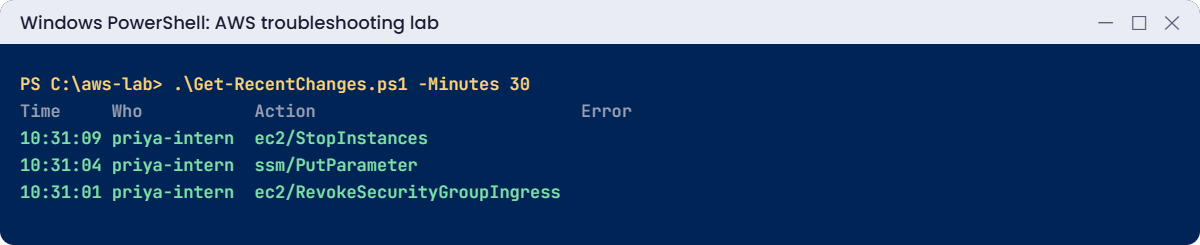
.\Get-RecentChanges.ps1 -Minutes 30 -Who internYou should see something like this:
stopped User initiated (2026-10-20 05:01:09 GMT)
Time Who Action Error
---- --- ------ -----
10:31:09 priya-intern ec2/StopInstances
10:31:04 priya-intern ssm/PutParameter
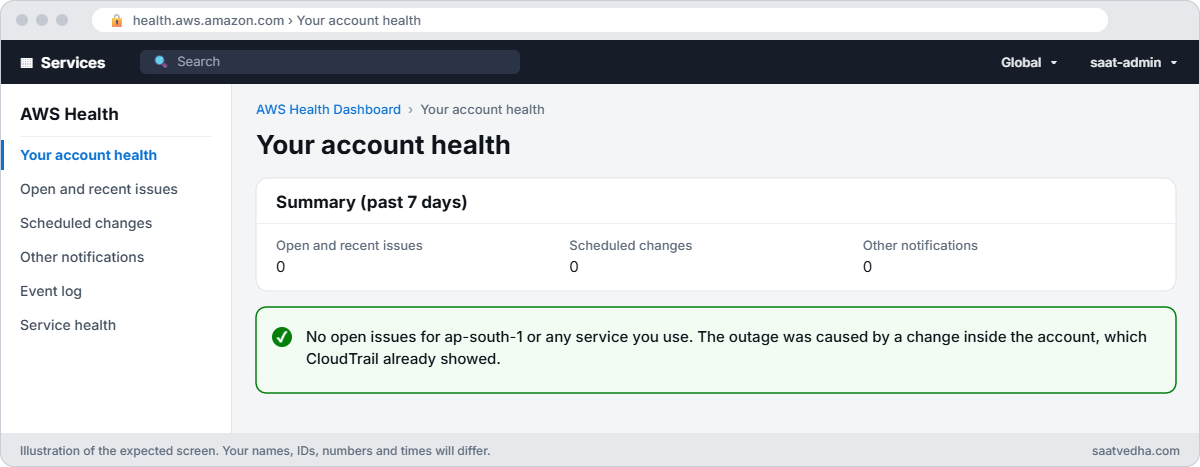
10:31:01 priya-intern ec2/RevokeSecurityGroupIngress“User initiated” tells you it wasn’t a hardware failure. CloudTrail tells you who, what and when, in local time thanks to the script. For question 2, open AWS Health Dashboard > Your account health: no open issues means AWS isn’t the cause.
4Fix it and see the old values
Paste this whole block. Parameter history shows what the value used to be:
aws ssm get-parameter-history --name /saat/app01/db-endpoint --query "Parameters[].[Version,Value,LastModifiedUser]" --output text
aws ssm put-parameter --name /saat/app01/db-endpoint --value 'saat-sql.internal:1433' --overwrite | Out-Null
aws ec2 authorize-security-group-ingress --group-id $sg --ip-permissions "IpProtocol=tcp,FromPort=443,ToPort=443,UserIdGroupPairs=[{GroupId=$($v.WebSg),Description=443-from-web}]" | Out-Null
aws ec2 start-instances --instance-ids $app | Out-Null
aws ec2 wait instance-running --instance-ids $app
aws ec2 describe-instances --instance-ids $app --query "Reservations[0].Instances[0].State.Name" --output textYou should see something like this:
1 saat-sql.internal:1433 arn:aws:sts::111122223333:assumed-role/AWSReservedSSO_.../saat-admin
2 old-sql.internal:1433 arn:aws:sts::111122223333:assumed-role/saat-lab-intern/priya-intern
runningAll three changes are reverted. The “prevent” part is a conversation, not a command: why could this role stop production instances, and should changes like these go through a pipeline?
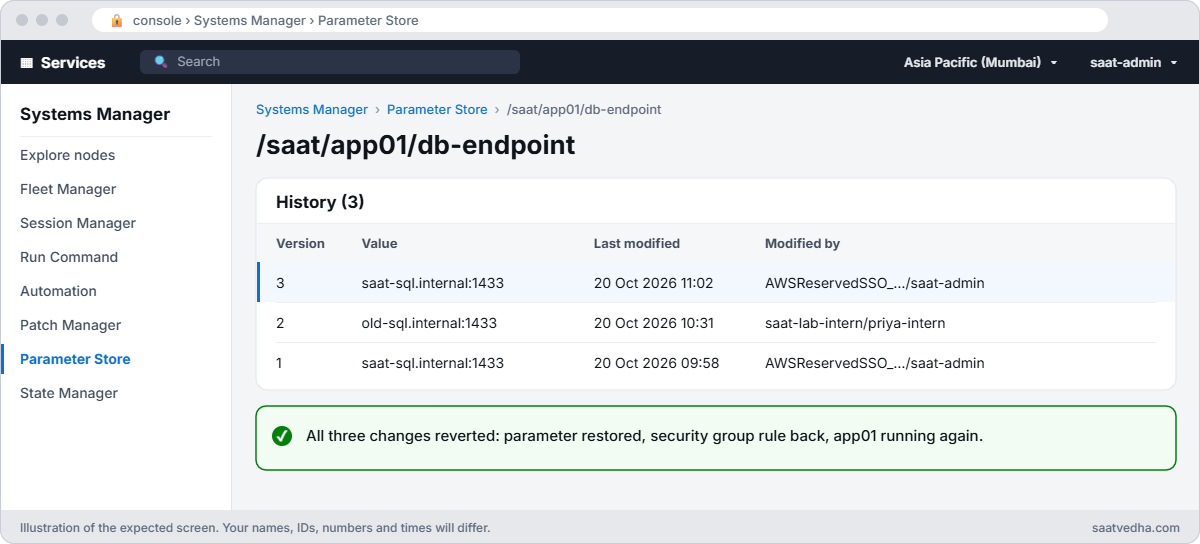
✅ Checkpoint: StateTransitionReason says User initiated, Get-RecentChanges.ps1 lists the three priya-intern events, parameter history shows version 2 by priya-intern, and app01 is running with its rule and value restored.
Break It, Then Fix It
Two traps that make people say “nothing changed” when something did.
1Break it: looking too soon
Make another change as the teammate, then look straight away:
aws ssm put-parameter --name /saat/app01/db-endpoint --value 'typo.internal:1433' --overwrite --profile saat-intern | Out-Null
.\Get-RecentChanges.ps1 -Minutes 2 -Who internYou’ll get something like this:
No write events in the last 2 minutes in ap-south-1.CloudTrail usually takes a few minutes to show an event in event history. On a busy incident call, someone checks immediately, sees nothing and rules out a change. Fix: wait and widen the window before concluding anything:
Start-Sleep 300
.\Get-RecentChanges.ps1 -Minutes 10 -Who internYou should see something like this:
Time Who Action Error
---- --- ------ -----
10:52:40 priya-intern ssm/PutParameter2Break it: searching in the wrong time zone
The ticket says “around 10:30” in India time. Search for exactly that:
$today = (Get-Date).ToString('yyyy-MM-dd')
aws cloudtrail lookup-events --lookup-attributes AttributeKey=Username,AttributeValue=priya-intern --start-time "$($today)T10:25:00" --end-time "$($today)T10:40:00" --query "Events[].EventName" --output textYou’ll get nothing back, or events from a different part of the day.
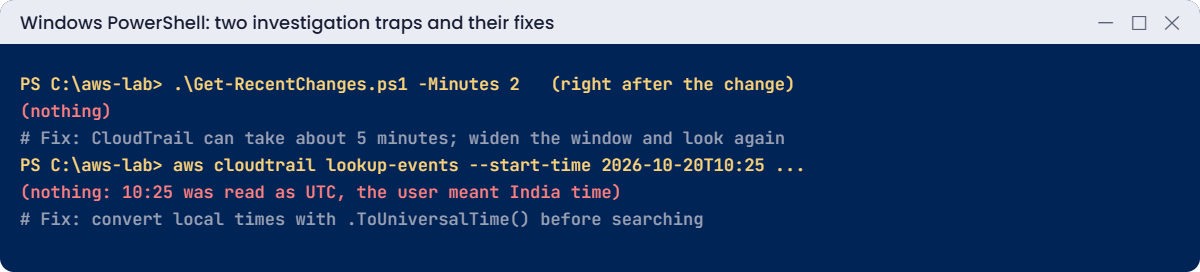
Times without a zone are read as UTC, and 10:25 UTC is 15:55 in India. Half the world’s teams lose time to this. Fix: convert local times to UTC first:
$s = (Get-Date "$($today) 10:25").ToUniversalTime().ToString('o')
$e = (Get-Date "$($today) 10:40").ToUniversalTime().ToString('o')
aws cloudtrail lookup-events --lookup-attributes AttributeKey=Username,AttributeValue=priya-intern --start-time $s --end-time $e --query "Events[].EventName" --output textYou should see something like this:
StopInstances PutParameter RevokeSecurityGroupIngressIf your incident happened at a different time, use that time instead of 10:25.
Now clean up. Get-RecentChanges.ps1 stays in C:\aws-lab:
aws ec2 terminate-instances --instance-ids $app | Out-Null
aws ec2 wait instance-terminated --instance-ids $app
aws ec2 delete-security-group --group-id $sg
aws ssm delete-parameter --name /saat/app01/db-endpoint
aws iam delete-role-policy --role-name saat-lab-intern --policy-name intern-ops
aws iam delete-role --role-name saat-lab-intern
Remove-Item intern-trust.json, intern-policy.jsonAlso delete the [profile saat-intern] section from your %USERPROFILE%\.aws\config file.
✅ Checkpoint: You beat CloudTrail’s delay by waiting and widening the window, and the time zone trap by converting to UTC. app01, its security group, the parameter and the role are gone.
This happened at work
The outage that “had no changes”
An online pharmacy’s checkout failed for 40 minutes one Saturday. The first engineer checked the deployment pipeline: no releases that day. He checked CloudTrail at 09:10 for events around “09:00” and found nothing, so the team spent half an hour chasing a possible AWS issue.
A second engineer converted the customer report’s time to UTC and searched again. At 03:28 UTC, a contractor’s role had changed the payment service’s security group “to tidy up unused rules”, directly in the console.
The rule went back in two minutes. Afterwards they added an EventBridge rule that posts every security group change in production to the on-call channel, and removed console write access for contractors.
Common mistakes and troubleshooting
| Mistake | What happens | What to do |
|---|---|---|
| Jumping to tools before scoping | Hours of searching everything | Write down resource, symptom and UTC start time |
| Blaming AWS first | Waiting for a fix that never comes | Check the Health Dashboard, then look for changes |
| Checking CloudTrail too soon | “Nothing changed” when something did | Wait a few minutes and widen the window |
| Searching in local time | Empty results | Convert to UTC with ToUniversalTime() |
| Shared roles without session names | Can’t tell who did it | Named sessions (SSO users, role_session_name) |
| Fixing without a guardrail | Same incident next month | Tighter IAM, SCPs or EventBridge alerts |
Interview questions
Click a question to open it. Each one is written the way an interviewer would ask it. Under it you will see why they ask it and one way you could answer, in your own words.
Fresher level
1. A user says “AWS is broken”. What are the first questions you’d ask before touching anything?
Why they ask this: They want to see that you scope a problem before you start clicking around. A clear scope saves hours.
How you might answer: I’d ask which resource it is, what exactly they see, since when, and who is affected. I always note the time in UTC so it matches the logs.
Then I check AWS Health for any service issue, and look at what changed recently.
2. One of your EC2 instances stopped and nobody admits doing it. How would you find out who stopped it?
Why they ask this: They want to know you can use CloudTrail to get a real answer instead of asking around.
How you might answer: First I check the StateTransitionReason on the instance, which tells me if it was a user or AWS. Then I go to CloudTrail event history and search for StopInstances on that instance ID.
The userIdentity part of the event shows who made the call.
3. How far back can you look in CloudTrail event history, and what would you do if you need more?
Why they ask this: They want to check that you know the limit before an audit or incident forces you to find out.
How you might answer: Event history keeps 90 days of management events in each Region. For anything longer, I set up a trail that writes to S3, or use CloudTrail Lake.
I’d set that up on day one, because you can’t get old events back later.
2–5 years experience
4. You search CloudTrail for the time of an incident and find nothing. What could be going wrong?
Why they ask this: They want to see that you know the common traps with CloudTrail, and that not every change shows up as an API call.
How you might answer: It might be too soon, because events take a little while to show up. I also check I’m in the right Region, remembering that global services log in us-east-1, and that my time zone is right.
Data events may not be logged at all. Or the change happened inside the instance or the app, not through an AWS API call.
5. Someone asks what a security group looked like yesterday before it was changed. How would you find out?
Why they ask this: They want to know you can see the history of a resource, not just its current state.
How you might answer: If AWS Config is recording security groups, I open the resource timeline and see each version. That’s the easiest way.
If Config isn’t recording it, I rebuild the history from the CloudTrail AuthorizeSecurityGroupIngress and RevokeSecurityGroupIngress events.
6. How would you set up an account so the question “who changed this?” is easy to answer next time?
Why they ask this: They want to see that you prevent problems, not just solve them, and that you understand why shared logins hurt investigations.
How you might answer: I’d give everyone their own identity through IAM Identity Center, and use named role sessions so the name shows in the logs. Then I’d turn on a multi-Region trail and AWS Config.
Finally I’d add alerts on risky changes, so we hear about them as they happen.
Senior level
7. You’re responsible for 50 AWS accounts. How would you design change visibility across all of them?
Why they ask this: They want to see how you build central logging and alerting at scale, and how you connect it to team learning.
How you might answer: I’d create an organization trail into a central log account, and query it with CloudTrail Lake or Athena. A Config aggregator would show resource history across all accounts.
EventBridge rules would send sensitive API calls to a central bus, with dashboards on top. After incidents we’d hold blameless reviews and turn the lessons into new guardrails.
8. An outage was caused by someone making a manual change in the console. What would you change afterwards?
Why they ask this: They want to see how you handle people and process after an incident, without blaming one person.
How you might answer: First I’d run a blameless review, because the goal is to fix the system, not punish someone. Then I’d move that resource into IaC.
After that I’d restrict console write access, add drift detection and alerts, and write the runbook down.
Quick quiz
Q1. What is the first troubleshooting question?
- Who to blame
- What is broken and since when
- Which tool to buy
- How to scale up
Show answer
B — A time window drives everything else.
Q2. Where do you check if AWS itself has an issue for your account?
- CloudTrail
- AWS Health Dashboard
- S3
- IAM
Show answer
B — It shows account-specific events.
Q3. Why did the first lookup find nothing?
- No permission
- CloudTrail takes a few minutes
- Wrong edition
- Bucket deleted
Show answer
B — Events appear after a short delay.
Q4. How are times without a zone read by the AWS CLI?
- Local time
- UTC
- India time
- Random
Show answer
B — Convert local times first.
Q5. Which service kept the old parameter value?
- CloudTrail
- Parameter Store history
- EBS
- Route 53
Show answer
B — get-parameter-history shows versions.
Quick recap
- Ask four questions: what is broken, is it AWS, what changed, how to fix and prevent.
- StateTransitionReason and metrics scope the problem; Health rules AWS in or out.
- CloudTrail write events show who changed what; wait a few minutes and use UTC.
- Service histories (Parameter Store, Config) show old values.
- Every fix ends with a guardrail.
Next lesson
Lesson 57: Can’t connect to EC2 → You’ll fix SSH, RDP and Session Manager failures step by step, including status check failures and the serial console.
Further reading: AWS troubleshooting
Want to go deeper into AWS troubleshooting? Read Working with CloudTrail event history and What is AWS Health?. You can also see the full plan for this course on the AWS Cloud Administration course page.
