Run Command, Automation and State Manager

Logging in to twenty servers one by one to check disk space, restart a service or fix a setting is slow and error-prone. AWS Systems Manager automation tools do it for you: Run Command for one-off jobs across many servers, Automation runbooks for repeatable fixes, and State Manager to keep settings from drifting.

You’ll check disk and uptime on two servers with one command, write a runbook that cleans old temp files and tags the server, and use State Manager to bring a stopped service back by itself. Then you’ll fix two Run Command mistakes that waste a lot of time on real teams.

TimeYou needBy the end you can
60 minutes (two small instances and the Session Manager endpoints for under an hour)saat-vpc, Start-SsmEndpoints.ps1 and Stop-SsmEndpoints.ps1, saat-ec2-ssm-profile, your laptop signed in as saat-admin. Cost: about USD 0.10. Run Command and State Manager have no extra charge on EC2; Automation includes a monthly allowance of steps.Run commands across servers by tag with rate control, write and run a custom Automation runbook, keep settings in place with a State Manager association, and read per-instance command results.

What it is, in one line

AWS Systems Manager automation means running commands, runbooks and scheduled associations on your servers through Systems Manager, without SSH or RDP.

In Simple Words

The school announcement system

The principal doesn’t walk to every classroom to say “exams start at ten”. One announcement on the speaker reaches every room at once. That is Run Command.

For fire drills there’s a written plan: ring the bell, open the doors, count the children, report to the office. Anyone can follow it the same way every time. That is an Automation runbook.

And the caretaker checks every evening that all windows are locked, and locks any that aren’t. Nobody has to ask. That is State Manager.

Engineer's View

How the three tools really work

All three run SSM documents. Run Command sends a Command document (such as AWS-RunShellScript or AWS-RunPowerShellScript) to targets chosen by instance ID or tag, with max concurrency and max errors for rate control. Each instance returns status, exit code and the first 24,000 characters of output (send more to S3 or CloudWatch Logs).

Automation runs Automation documents (runbooks, schema 0.3) made of steps such as aws:runCommand, aws:executeAwsApi, aws:createTags, aws:approve and aws:branch. AWS publishes hundreds of runbooks (AWS-RestartEC2Instance, AWSSupport-TroubleshootSSH). A runbook runs with your permissions unless you pass an AutomationAssumeRole, which lets you give people a safe button instead of broad IAM rights.

State Manager creates associations: a document, targets and a schedule (at least every 30 minutes) that keep instances in a defined state, and report association compliance. Patch Manager and the CloudWatch agent setup are often run through associations.

How it works, step by step

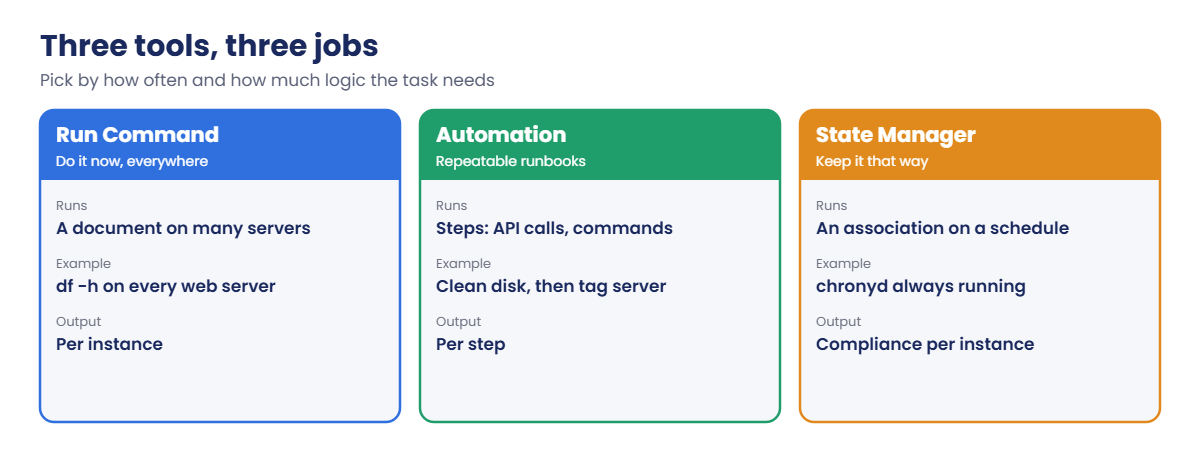
Choose the tool by the job:

Run Command vs Automation vs State Manager: what each Systems Manager tool is for

1Run Command for now

“Show me disk space on every web server” is a Run Command job: one document, many targets, results in seconds.

2Automation for a procedure

“Clean old temp files, then record that we did it” has steps and order, so it belongs in a runbook.

3State Manager for always

“chronyd must always be running” isn’t a one-time job. An association checks every 30 minutes and fixes drift.

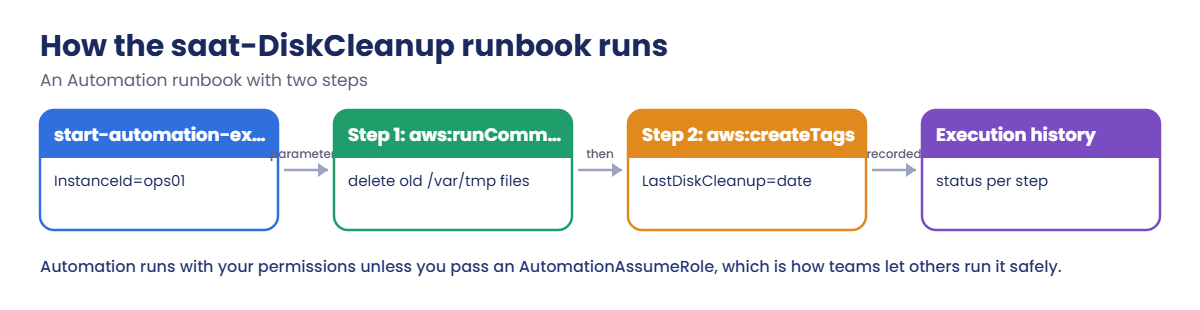
Here is the runbook you’ll build in the lab:

AWS Systems Manager automation runbook flow: run command step, create tags step

A good habit: when you run the same Run Command a third time, turn it into a runbook; when you run a runbook on a schedule, consider an association.

✅ Checkpoint: You can say which tool fits a one-off check, a multi-step fix and a setting that must stay in place, and how rate control limits damage.

Hands-on lab: AWS Systems Manager automation without SSH

Start as usual:

cd C:\aws-lab
aws login --profile saat-admin
$env:AWS_PROFILE = 'saat-admin'
$v = Get-Content C:\aws-lab\saat-vpc.json | ConvertFrom-Json
.\Start-SsmEndpoints.ps1

1Launch two web servers

Paste this whole block:

$base = aws ssm get-parameter --name /aws/service/ami-amazon-linux-latest/al2023-ami-kernel-default-x86_64 --query Parameter.Value --output text
$ids = foreach ($s in @(@('ops01', $v.PrivateA), @('ops02', $v.PrivateB))) {
  aws ec2 run-instances --image-id $base --instance-type t3.micro --subnet-id $s[1] --security-group-ids $v.AppSg --iam-instance-profile Name=saat-ec2-ssm-profile --metadata-options HttpTokens=required --tag-specifications "ResourceType=instance,Tags=[{Key=Name,Value=$($s[0])},{Key=Role,Value=web},{Key=course,Value=saatvedha-aws},{Key=lesson,Value=28}]" --query "Instances[0].InstanceId" --output text
}
foreach ($i in $ids) { do { Start-Sleep 20; $p = aws ssm describe-instance-information --filters "Key=InstanceIds,Values=$i" --query "InstanceInformationList[0].PingStatus" --output text } until ($p -eq 'Online') }
aws ssm describe-instance-information --filters "Key=tag:Role,Values=web" --query "InstanceInformationList[].[InstanceId,PingStatus,PlatformName]" --output text

You should see something like this:

i-0b1c2d3e4f5a60051      Online  Amazon Linux
i-0b1c2d3e4f5a60052      Online  Amazon Linux

2One command, every web server

Paste this whole block:

'{ "commands": [ "df -h /", "uptime" ] }' | Set-Content rc-params.json
$cmd = aws ssm send-command --document-name AWS-RunShellScript --targets "Key=tag:Role,Values=web" --parameters file://rc-params.json --max-concurrency 50% --max-errors 1 --comment "disk check" --query Command.CommandId --output text
Start-Sleep 15
foreach ($i in $ids) { aws ssm get-command-invocation --command-id $cmd --instance-id $i --query StandardOutputContent --output text }

You should see something like this, once per server:

Filesystem      Size  Used Avail Use% Mounted on
/dev/nvme0n1p1  8.0G  1.7G  6.3G  21% /
 19:42:10 up 12 min,  0 users,  load average: 0.00, 0.02, 0.01

Writing the parameters to a file avoids Windows PowerShell 5.1 stripping the inner quotes. --max-concurrency 50% runs on half the servers at a time, and --max-errors 1 stops sending to new servers after a second failure, so a bad command can’t hit the whole fleet.

3Write and run a runbook

Paste this whole block:

@'
description: Delete temp files older than 7 days and tag the instance
schemaVersion: '0.3'
parameters:
  InstanceId:
    type: String
    description: The instance to clean
mainSteps:
  - name: cleanTmp
    action: aws:runCommand
    inputs:
      DocumentName: AWS-RunShellScript
      InstanceIds:
        - '{{ InstanceId }}'
      Parameters:
        commands:
          - find /var/tmp -type f -mtime +7 -print -delete
          - df -h /
  - name: tagInstance
    action: aws:createTags
    inputs:
      ResourceType: EC2
      ResourceIds:
        - '{{ InstanceId }}'
      Tags:
        - Key: LastDiskCleanup
          Value: '{{ global:DATE }}'
'@ | Set-Content saat-diskcleanup.yaml
aws ssm create-document --name saat-DiskCleanup --document-type Automation --document-format YAML --content file://saat-diskcleanup.yaml --tags Key=course,Value=saatvedha-aws --query "DocumentDescription.Status" --output text
Start-Sleep 5
$ae = aws ssm start-automation-execution --document-name saat-DiskCleanup --parameters "InstanceId=$($ids[0])" --query AutomationExecutionId --output text
do { Start-Sleep 10; $st = aws ssm get-automation-execution --automation-execution-id $ae --query AutomationExecution.AutomationExecutionStatus --output text } until ($st -notin 'Pending', 'InProgress', 'Waiting')
aws ssm get-automation-execution --automation-execution-id $ae --query "AutomationExecution.StepExecutions[].[StepName,StepStatus]" --output text
aws ec2 describe-tags --filters "Name=resource-id,Values=$($ids[0])" "Name=key,Values=LastDiskCleanup" --query "Tags[0].Value" --output text

You should see something like this:

Creating
cleanTmp        Success
tagInstance     Success
2026-10-20

Two steps, in order, with a record of each. Anyone on the team can run the same runbook from the console without knowing the commands inside it. Open Systems Manager, then Automation, to see the execution and each step’s output.
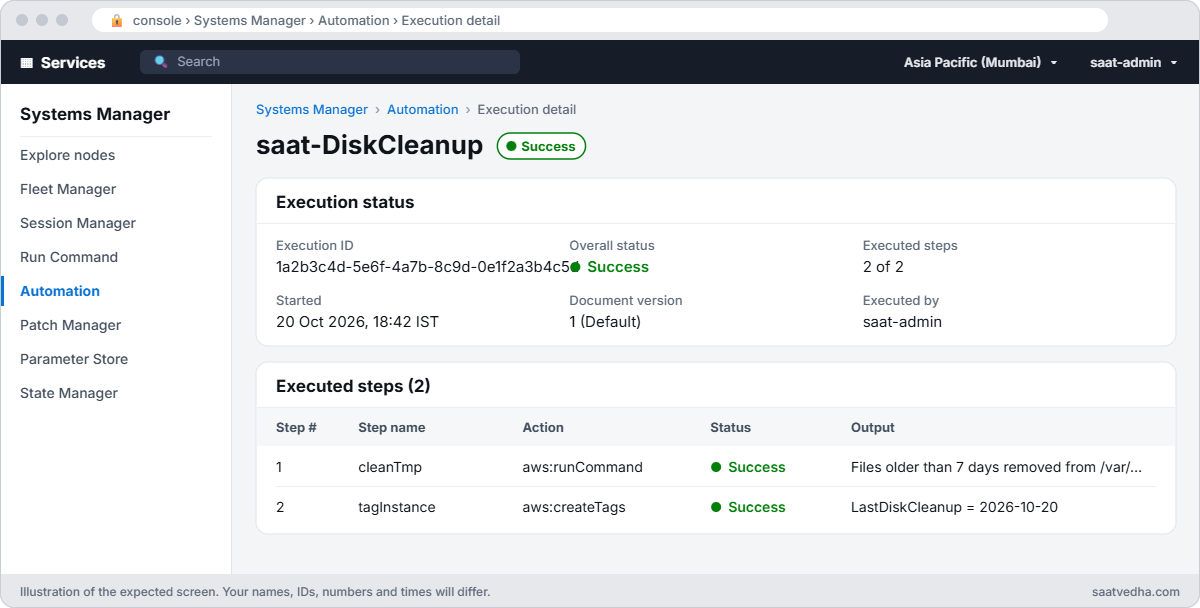
Systems Manager Automation execution of saat-DiskCleanup with two successful steps
The runbook’s execution in Systems Manager: two steps, both Success, with each step’s output one click away.
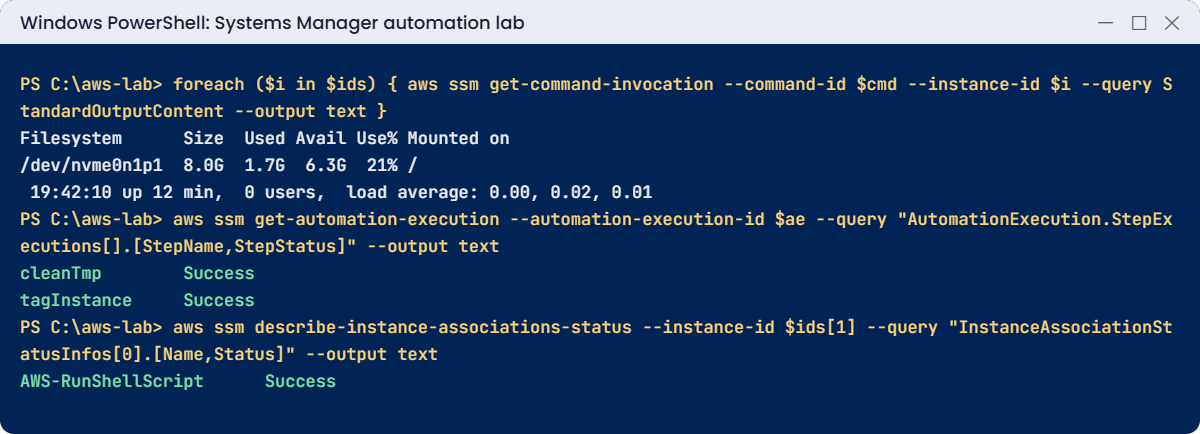
Systems Manager automation lab output: command output, runbook steps, association status
Command output, runbook steps and association status. Something like this.

4Keep a service running with State Manager

Paste this whole block. It creates an association, stops chronyd on ops02 to cause drift, then lets the association fix it:

'{ "commands": [ "systemctl is-active --quiet chronyd || systemctl restart chronyd", "systemctl is-active chronyd" ] }' | Set-Content assoc-params.json
$assoc = aws ssm create-association --association-name saat-keep-chrony --name AWS-RunShellScript --targets "Key=tag:Role,Values=web" --parameters file://assoc-params.json --schedule-expression "rate(30 minutes)" --query AssociationDescription.AssociationId --output text
'{ "commands": [ "systemctl stop chronyd", "systemctl is-active chronyd || true" ] }' | Set-Content stop-params.json
$stop = aws ssm send-command --document-name AWS-RunShellScript --instance-ids $ids[1] --parameters file://stop-params.json --query Command.CommandId --output text
Start-Sleep 15
aws ssm get-command-invocation --command-id $stop --instance-id $ids[1] --query StandardOutputContent --output text
aws ssm start-associations-once --association-ids $assoc
Start-Sleep 60
aws ssm describe-instance-associations-status --instance-id $ids[1] --query "InstanceAssociationStatusInfos[0].[Name,Status]" --output text

You should see something like this:

inactive
AWS-RunShellScript      Success

chronyd was stopped, and the association started it again. Normally you wouldn’t trigger it by hand; within 30 minutes it would have run by itself. This is how teams keep agents, time sync and security settings in place on servers people still log in to.

✅ Checkpoint: Run Command returned disk and uptime from both servers, saat-DiskCleanup ran both steps and tagged ops01, and saat-keep-chrony brought chronyd back on ops02. Keep everything for the break lab.

Break It, Then Fix It

Two Run Command mistakes: one runs on nobody, the other fails on everybody.

1Break it: a tag value with the wrong case

Send the disk check to Role=Web:

$cmd = aws ssm send-command --document-name AWS-RunShellScript --targets "Key=tag:Role,Values=Web" --parameters file://rc-params.json --query Command.CommandId --output text
Start-Sleep 20
aws ssm list-commands --command-id $cmd --query "Commands[0].[TargetCount,CompletedCount]" --output text

You should see this:

0       0

No error. The command was accepted and ran on zero servers, because tag values are case-sensitive. In a real incident, someone says “I restarted it everywhere” and nothing changed.

Fix: check what the target matches before trusting the result:

aws ssm describe-instance-information --filters "Key=tag:Role,Values=Web" --query "length(InstanceInformationList)"
aws ssm describe-instance-information --filters "Key=tag:Role,Values=web" --query "length(InstanceInformationList)"

You should see this:

0
2

2Break it: restart a service that isn’t there

Ask both servers to restart nginx:

'{ "commands": [ "systemctl restart nginx" ] }' | Set-Content nginx-params.json
$cmd = aws ssm send-command --document-name AWS-RunShellScript --targets "Key=tag:Role,Values=web" --parameters file://nginx-params.json --query Command.CommandId --output text
Start-Sleep 20
aws ssm list-commands --command-id $cmd --query "Commands[0].[Status,ErrorCount]" --output text
aws ssm get-command-invocation --command-id $cmd --instance-id $ids[0] --query "[Status,ResponseCode,StandardErrorContent]" --output text

You should see something like this:

Failed  2
Failed  5       Failed to restart nginx.service: Unit nginx.service not found.
failed to run commands: exit status 5
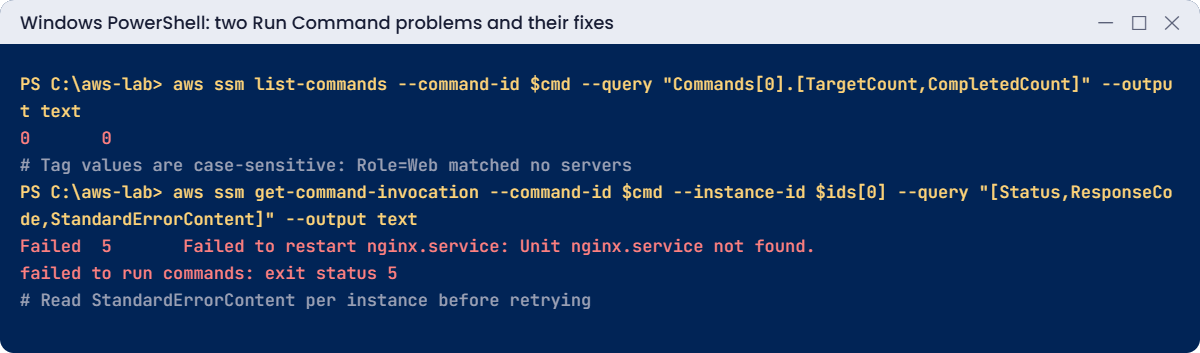
Run Command problems: tag matched no targets, failed command read from stderr
Both problems and their fixes. Something like this.

The overall status only says Failed. The reason is in each instance’s StandardErrorContent and exit code: these servers don’t run nginx at all. Teams often retry a failed command three times before anyone reads the error.

Fix: read the per-instance error first, then send the right command. Here, the real web service doesn’t exist, so the right action is to fix the inventory or the runbook, not to retry.

Clean up:

aws ssm delete-association --association-id $assoc
aws ssm delete-document --name saat-DiskCleanup
aws ec2 terminate-instances --instance-ids $ids | Out-Null
aws ec2 wait instance-terminated --instance-ids $ids
.\Stop-SsmEndpoints.ps1
Remove-Item rc-params.json, assoc-params.json, stop-params.json, nginx-params.json, saat-diskcleanup.yaml
.\Find-LabResources.ps1

✅ Checkpoint: You caught a command that matched zero targets and read a real failure from StandardErrorContent. The association, runbook and both servers are gone.

This happened at work

The cleanup command that ran everywhere

A media company had a Run Command script that freed disk space on transcoding servers by deleting old files in /data/tmp. An engineer adapted it for log servers, changed the path, and targeted tag:Env=prod instead of tag:Role=transcoder, with default concurrency.

The path variable was empty on most servers, so the script deleted from /data/ instead. It reached 140 production servers within a minute, including database replicas, before anyone noticed. Several services were restored from snapshots over the next six hours.

The team moved the job into an Automation runbook with an aws:approve step for production, a dry-run step that prints what would be deleted, max concurrency of 5 percent with max errors 1, and an AutomationAssumeRole that can only touch servers tagged for that job.

Common mistakes and troubleshooting

MistakeWhat happensWhat to do
Tag value with the wrong caseCommand runs on zero servers, no errorCheck the target with describe-instance-information first
Default concurrency on destructive commandsEvery server breaks at onceUse small max concurrency and max errors 1
Retrying failed commands blindlySame failure, wasted timeRead StandardErrorContent and ResponseCode per instance
Inline JSON parameters in Windows PowerShell 5.1Quotes stripped, invalid JSONWrite parameters to a file and use file://
Giving people broad IAM rights to run fixesToo much power for one taskRunbooks with an AutomationAssumeRole
One-off commands for settings that must stayDrift returns next weekState Manager associations on a schedule

Interview questions

Click a question to open it. Each one is written the way an interviewer would ask it. Under it you will see why they ask it and one way you could answer, in your own words.

Fresher level

1. Your manager asks you to restart a service on 30 servers right now. How could Run Command help you with that?

Why they ask this: They want to know you can work on many servers at once without logging in to each one. It also shows you know the basic Systems Manager tools.

How you might answer: With Run Command I’d pick an SSM document, like a shell or PowerShell script, and target the 30 servers by instance ID or by tag. It runs on all of them at once, without SSH or RDP.

Then I’d check the output and status for each instance in the console to confirm the restart worked everywhere.

2. Can you explain in simple words what an Automation runbook is?

Why they ask this: They are checking that you understand how to turn a manual procedure into something repeatable. That habit matters a lot in operations teams.

How you might answer: An Automation runbook is an SSM document with steps in order. A step can run a command, call an AWS API, wait for someone’s approval, or branch based on a result.

I think of it as a written procedure that actually runs itself, so every person does the task the same way.

3. What does State Manager do, and why would you use it instead of a one-time Run Command?

Why they ask this: They want to see that you understand configuration drift. Servers change over time, and they want to know you can keep them in a known state.

How you might answer: State Manager applies an association, which is a document on a set of targets on a schedule. It keeps instances in the state I defined and reports compliance.

Run Command fixes something once, but State Manager keeps checking, so if someone changes a setting later, it gets put back.

2–5 years experience

4. You need to run a risky script on all production servers. How would you make sure a mistake doesn’t hit everything at once?

Why they ask this: They want to see that you think about blast radius before you press run. Careful people limit the damage a bad script can do.

How you might answer: I’d target the servers carefully, and first test the command on one instance. Then I’d set max concurrency, as a number or a percent, and max errors so it stops if failures start piling up.

For production, I’d rather wrap it in a runbook with an approval step, so a second person checks it.

5. Why would you set an AutomationAssumeRole on a runbook instead of letting people run it with their own permissions?

Why they ask this: They are checking that you understand safe delegation. They want to know you can let people do a task without giving them broad access.

How you might answer: With an AutomationAssumeRole, the runbook acts through a narrowly scoped role, so the person running it doesn’t need those permissions themselves. For example, a support engineer can restart an app through the runbook without having admin rights on EC2.

Every execution is logged, so we still know who ran what.

6. A Run Command you sent shows Failed in the console. Walk me through how you’d troubleshoot it.

Why they ask this: They want to see a clear order of checks. Failed commands are common, and they want to know you can find the reason quickly.

How you might answer: I’d open the status for each instance and look at the ResponseCode and StandardErrorContent. I’d also check that the instance was Online, and that the document parameters, timeout and permissions were right.

If the output is long, I’d send it to S3 or CloudWatch Logs next time, because the console only shows part of it.

Senior level

7. Fifteen app teams keep asking your ops team to do routine tasks for them. How would you design self-service so they can do it safely themselves?

Why they ask this: They want to see platform thinking: safe automation, permissions and approvals. They are checking that you can scale an ops team without losing control.

How you might answer: I’d build a library of tested Automation runbooks, each with an assume role scoped by tags, so a team can only touch its own resources. Production runs would need an approval step or Change Manager.

Output would go to CloudWatch Logs, common alarms would trigger runbooks through EventBridge, and State Manager associations would keep the baseline settings in place.

8. Servers keep running out of disk space and waking people up at night. How would you remediate a full disk alarm automatically?

Why they ask this: They want to see event-driven automation with safety built in. They are checking that you think about what happens if the automation itself goes wrong.

How you might answer: I’d put a CloudWatch alarm on disk_used_percent and send it to EventBridge, which starts a runbook. The runbook collects diagnostics, cleans known safe paths, and if the disk is still above the threshold, extends the EBS volume.

It then notifies the team. I’d also add rate limits so it can’t get stuck in a loop.

Quick quiz

Q1. Which tool keeps a setting in place on a schedule?

  1. Run Command
  2. Automation
  3. State Manager
  4. Patch Manager
Show answer

C — Associations reapply the desired state regularly.

Q2. Why did the Role=Web command run on zero servers?

  1. The servers were offline
  2. Tag values are case-sensitive
  3. The document was wrong
  4. Concurrency was 0
Show answer

B — The tag value is web, in lowercase.

Q3. Where do you find why a command failed on one server?

  1. CloudTrail only
  2. StandardErrorContent and ResponseCode for that instance
  3. The AMI
  4. The VPC
Show answer

B — get-command-invocation shows per-instance errors.

Q4. What does --max-errors 1 do?

  1. Allows one server only
  2. Stops sending to new targets after errors exceed 1
  3. Retries once
  4. Ignores errors
Show answer

B — It limits damage from a bad command.

Q5. How does a runbook act with permissions you don’t have?

  1. It can’t
  2. Through an AutomationAssumeRole
  3. With root keys
  4. By using the instance role
Show answer

B — The assume role lets people run it safely.

Quick recap

  • Run Command: one document, many servers, results per instance.
  • Automation runbooks make multi-step fixes repeatable and safe.
  • State Manager associations fix drift on a schedule.
  • Use rate control and check targets before running.
  • Read StandardErrorContent before retrying a failed command.

Next lesson

Lesson 29: AWS Backup: plans, vaults, restore tests → You’ll back up EC2 and EBS with a backup plan, lock a vault and, most importantly, prove a restore works.

Further reading: AWS Systems Manager automation

Want to go deeper into AWS Systems Manager automation? Read AWS Systems Manager Run Command and AWS Systems Manager Automation. You can also see the full plan for this course on the AWS Cloud Administration course page.

Scroll to Top