CloudFormation Stack Failures, Rollbacks and Drift

Infrastructure as code is great until a stack is stuck and the deploy pipeline is blocked. Most CloudFormation rollback failed problems, and their cousins ROLLBACK_COMPLETE and drift, come down to two skills: finding the first real failure in the stack events, and knowing which stuck state needs which command.

You’ll deploy a small stack, preview a change, watch a create fail and roll back, then break a stack into UPDATE_ROLLBACK_FAILED the way it happens in real teams, by changing a resource outside CloudFormation. You’ll unblock it, then find and fix drift.

TimeYou needBy the end you can
60 minutesLessons 34 and 56 done (CloudFormation basics, Get-RecentChanges.ps1), signed in as saat-admin. Cost: nothing that lasts; the stacks only create a bucket, a parameter, a security group and roles, all deleted at the end.Read stack events to find the root failure, preview updates with change sets, recover from ROLLBACK_COMPLETE and UPDATE_ROLLBACK_FAILED, skip resources safely, and detect and fix drift.

What it is, in one line

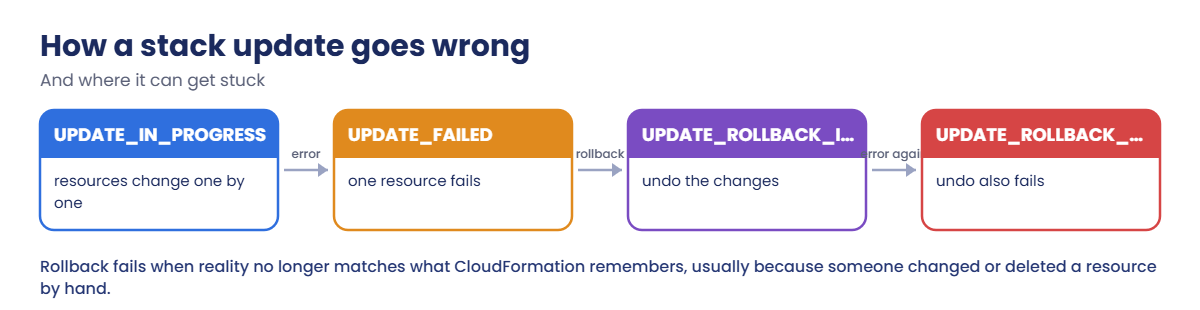
CloudFormation rollback failed means a failed stack update couldn’t be undone, usually because a resource was changed or deleted outside CloudFormation, leaving the stack in UPDATE_ROLLBACK_FAILED until you continue the rollback.

In Simple Words

Rearranging furniture with a list

You rearrange a room following a written plan, and keep a note of where everything was. If one heavy cupboard won’t move, you put everything back where it was. That’s a rollback.

But if someone threw away the old chair while you were working, you can’t put it back. You’re stuck halfway, with the room in neither state. That’s UPDATE_ROLLBACK_FAILED.

The way out is to say “forget the chair”, finish putting the rest back, then buy a new chair so the room matches your notes again.

Engineer's View

How stack failures work

When a resource fails, CloudFormation stops and rolls back by default. A failed create ends in ROLLBACK_COMPLETE: the stack can’t be updated, only deleted and created again (use --disable-rollback or --retain-except-on-create while debugging). The first CREATE_FAILED event in time order is the cause; later ones usually say “Resource creation cancelled”.

A failed update rolls back to the last good configuration. If the rollback itself fails, often because a resource was deleted or changed by hand, the stack enters UPDATE_ROLLBACK_FAILED. Fix the cause if you can, then run continue-update-rollback, optionally with --resources-to-skip; skipped resources are then out of step with the template until you fix them.

Pre-deployment validation and change sets catch many mistakes before anything changes.

Drift detection compares live resources with the template and lists property differences. Drift is how hand-made changes become future rollback failures, so find it and either revert it or put the change into the template.

How it works, step by step

Here is how to handle a broken stack.

1Read the status

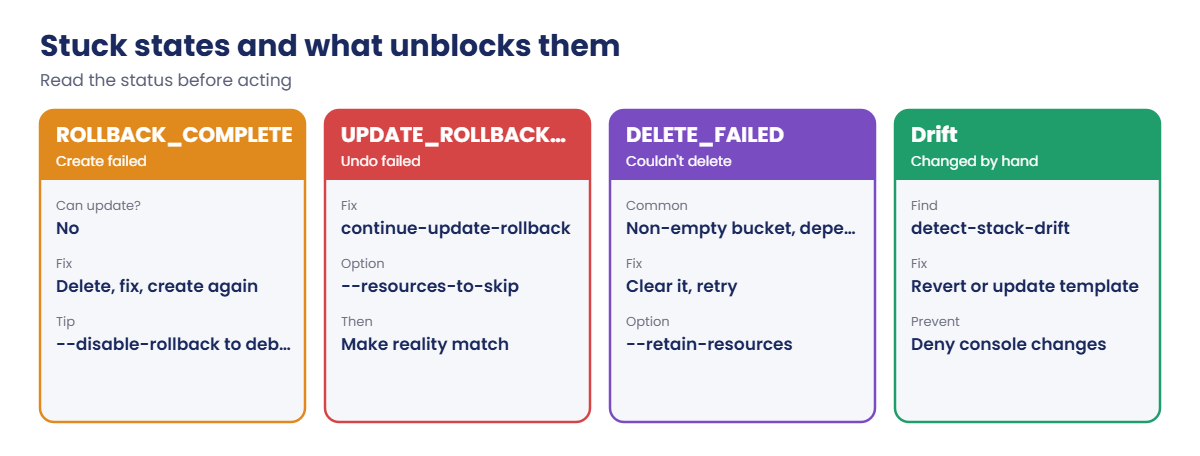
ROLLBACK_COMPLETE, UPDATE_ROLLBACK_FAILED, DELETE_FAILED and drift each have a different way out.

How a CloudFormation stack update ends in UPDATE_ROLLBACK_FAILED

2Find the first failure

Sort the stack events by time and take the first FAILED one that isn’t “cancelled”. That’s the cause; the rest are consequences.

3Unblock, then make reality match

Delete and recreate, continue the rollback, or retain a resource, then fix the drift between the template and what really exists.

4Know the stuck states

The common ones and their fixes:

CloudFormation stuck states and what unblocks each one

Most rollback failures start with a “quick fix in the console”. Make the template the only way production changes.

✅ Checkpoint: You can name the way out of ROLLBACK_COMPLETE and UPDATE_ROLLBACK_FAILED, and explain how hand-made changes cause rollback failures.

Hands-on lab: fail, unstick and realign a stack

Sign in, save the template and helpers:

cd C:\aws-lab
aws login --profile saat-admin
$env:AWS_PROFILE = 'saat-admin'
$v = Get-Content C:\aws-lab\saat-vpc.json | ConvertFrom-Json
$tpl = @'
AWSTemplateFormatVersion: '2010-09-09'
Description: SaatVedha Lesson 67 stack
Parameters:
  VpcId:
    Type: AWS::EC2::VPC::Id
  RoleDescription:
    Type: String
    Default: Lesson 67 app role
Resources:
  LogBucket:
    Type: AWS::S3::Bucket
    DeletionPolicy: Delete
  AppParam:
    Type: AWS::SSM::Parameter
    Properties:
      Name: /saat/cfn67/env
      Type: String
      Value: prod
  AppSg:
    Type: AWS::EC2::SecurityGroup
    Properties:
      GroupName: saat-cfn67-sg
      GroupDescription: Lesson 67 app tier
      VpcId: !Ref VpcId
      SecurityGroupIngress:
        - IpProtocol: tcp
          FromPort: 443
          ToPort: 443
          CidrIp: 10.20.0.0/16
  AppRole:
    Type: AWS::IAM::Role
    Properties:
      RoleName: saat-cfn67-role
      Description: !Ref RoleDescription
      AssumeRolePolicyDocument:
        Version: '2012-10-17'
        Statement:
          - Effect: Allow
            Principal:
              Service: ec2.amazonaws.com
            Action: sts:AssumeRole
Outputs:
  BucketName:
    Value: !Ref LogBucket
'@
$tpl | Set-Content cfn67.yaml
function Wait-Stack([string]$Stack) {
  do { Start-Sleep 10; $s = aws cloudformation describe-stacks --stack-name $Stack --query "Stacks[0].StackStatus" --output text } until ($s -notmatch 'IN_PROGRESS$')
  $s
}
function Get-StackFailure([string]$Stack) {
  $ev = aws cloudformation describe-stack-events --stack-name $Stack --query "StackEvents[?ends_with(ResourceStatus, 'FAILED')].[Timestamp,LogicalResourceId,ResourceStatus,ResourceStatusReason]" --output json | ConvertFrom-Json
  $ev | Sort-Object { $_[0] } | Where-Object { $_[3] -notmatch 'cancelled' } | Select-Object -First 1 | ForEach-Object { "$($_[1]) $($_[2]): $($_[3])" }
}
function Get-Drift([string]$Stack) {
  $id = aws cloudformation detect-stack-drift --stack-name $Stack --query StackDriftDetectionId --output text
  do { Start-Sleep 5; $st = aws cloudformation describe-stack-drift-detection-status --stack-drift-detection-id $id --query "[DetectionStatus,StackDriftStatus]" --output text } until ($st -notmatch 'DETECTION_IN_PROGRESS')
  $st
  aws cloudformation describe-stack-resource-drifts --stack-name $Stack --stack-resource-drift-status-filters MODIFIED DELETED --query "StackResourceDrifts[].[LogicalResourceId,StackResourceDriftStatus,PropertyDifferences[0].PropertyPath,PropertyDifferences[0].DifferenceType]" --output text
}
aws cloudformation validate-template --template-body file://cfn67.yaml --query "Parameters[].ParameterKey" --output text

You should see this:

VpcId   RoleDescription

1Deploy the stack

Paste this whole block:

aws cloudformation create-stack --stack-name saat-cfn67 --template-body file://cfn67.yaml --parameters "ParameterKey=VpcId,ParameterValue=$($v.VpcId)" --capabilities CAPABILITY_NAMED_IAM --tags Key=course,Value=saatvedha-aws | Out-Null
Wait-Stack saat-cfn67
aws cloudformation describe-stack-resources --stack-name saat-cfn67 --query "StackResources[].[LogicalResourceId,ResourceStatus]" --output text

You should see something like this:

CREATE_COMPLETE
AppParam        CREATE_COMPLETE
AppRole CREATE_COMPLETE
AppSg   CREATE_COMPLETE
LogBucket       CREATE_COMPLETE

2Preview a change with a change set

Before changing anything, see what CloudFormation would do:

aws cloudformation create-change-set --stack-name saat-cfn67 --change-set-name desc-v2 --use-previous-template --parameters "ParameterKey=VpcId,UsePreviousValue=true" "ParameterKey=RoleDescription,ParameterValue=Lesson 67 app role v2" --capabilities CAPABILITY_NAMED_IAM | Out-Null
aws cloudformation wait change-set-create-complete --stack-name saat-cfn67 --change-set-name desc-v2
aws cloudformation describe-change-set --stack-name saat-cfn67 --change-set-name desc-v2 --query "Changes[].ResourceChange.[LogicalResourceId,Action,Replacement]" --output text
aws cloudformation delete-change-set --stack-name saat-cfn67 --change-set-name desc-v2

You should see this:

AppRole Modify  False

Only the role changes, in place, with no replacement. Change sets are how you avoid surprises such as a database being replaced because one property changed. You deleted it for now; you’ll make this change later.
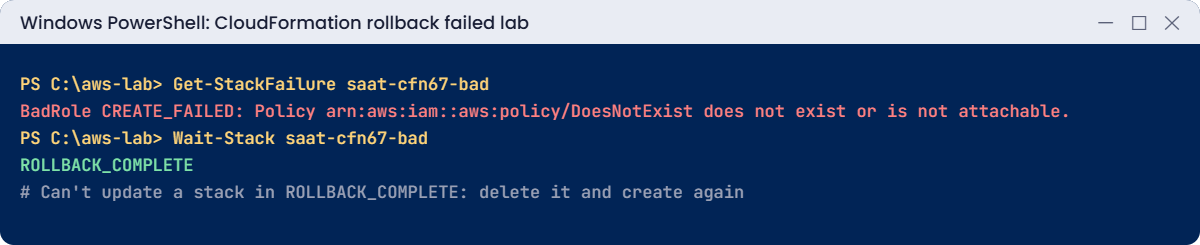
CloudFormation lab output: first failure event and ROLLBACK_COMPLETE
The first failure event and the stack status. Something like this.

3Watch a create fail and roll back

Paste this whole block. The second template refers to a managed policy that doesn’t exist:

$bad = @'
AWSTemplateFormatVersion: '2010-09-09'
Description: SaatVedha Lesson 67 failing stack
Resources:
  BadParam:
    Type: AWS::SSM::Parameter
    Properties:
      Name: /saat/cfn67/bad
      Type: String
      Value: created-first
  BadRole:
    Type: AWS::IAM::Role
    Properties:
      RoleName: saat-cfn67-bad-role
      ManagedPolicyArns:
        - arn:aws:iam::aws:policy/DoesNotExist
      AssumeRolePolicyDocument:
        Version: '2012-10-17'
        Statement:
          - Effect: Allow
            Principal:
              Service: ec2.amazonaws.com
            Action: sts:AssumeRole
'@
$bad | Set-Content cfn67-bad.yaml
aws cloudformation create-stack --stack-name saat-cfn67-bad --template-body file://cfn67-bad.yaml --capabilities CAPABILITY_NAMED_IAM | Out-Null
Wait-Stack saat-cfn67-bad
Get-StackFailure saat-cfn67-bad
aws ssm get-parameter --name /saat/cfn67/bad --query Parameter.Value --output text 2>&1 | Select-Object -First 1
aws cloudformation delete-stack --stack-name saat-cfn67-bad
aws cloudformation wait stack-delete-complete --stack-name saat-cfn67-bad

You should see something like this:

ROLLBACK_COMPLETE
BadRole CREATE_FAILED: Policy arn:aws:iam::aws:policy/DoesNotExist does not exist or is not attachable. (Service: Iam, Status Code: 404, Request ID: ...)
An error occurred (ParameterNotFound) when calling the GetParameter operation:

The parameter was created first, then removed by the rollback, so nothing was left half-built. A stack in ROLLBACK_COMPLETE can’t be updated: you fix the template, delete the stack and create it again.
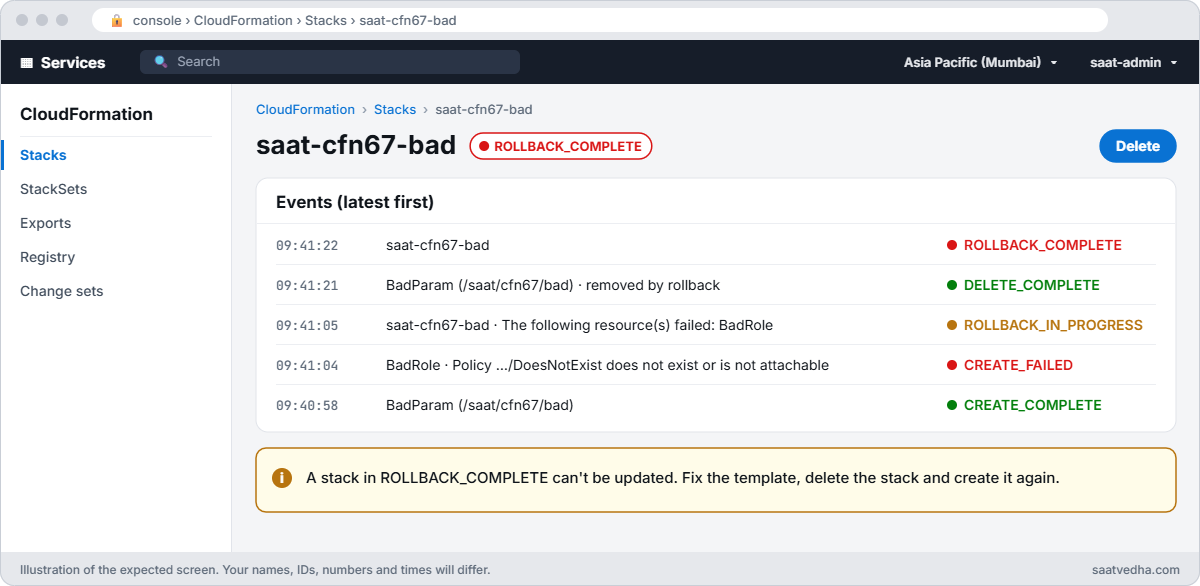
CloudFormation events for saat-cfn67-bad showing BadRole CREATE_FAILED and ROLLBACK_COMPLETE
saat-cfn67-bad’s events: BadRole failed, CloudFormation removed the parameter it had made, and the stack ended in ROLLBACK_COMPLETE.

✅ Checkpoint: saat-cfn67 is CREATE_COMPLETE, the change set showed AppRole Modify with no replacement, and saat-cfn67-bad failed on BadRole, rolled back cleanly and was deleted.

Break It, Then Fix It

Two problems that start with someone changing things outside CloudFormation.

1Break it: UPDATE_ROLLBACK_FAILED

Someone deletes the role by hand (“it looked unused”). Then the pipeline runs the description change you previewed:

aws iam delete-role --role-name saat-cfn67-role
aws cloudformation update-stack --stack-name saat-cfn67 --use-previous-template --parameters "ParameterKey=VpcId,UsePreviousValue=true" "ParameterKey=RoleDescription,ParameterValue=Lesson 67 app role v2" --capabilities CAPABILITY_NAMED_IAM | Out-Null
Wait-Stack saat-cfn67
Get-StackFailure saat-cfn67

You’ll get something like this:

UPDATE_ROLLBACK_FAILED
AppRole UPDATE_FAILED: The role with name saat-cfn67-role cannot be found. (Service: Iam, Status Code: 404, Request ID: ...)

The update failed because the role is gone, and the rollback failed for the same reason: CloudFormation can’t put back a role that no longer exists. The stack is now blocked; no updates can run until it’s unstuck. Fix: skip that resource to finish the rollback, then recreate the role so reality matches what CloudFormation remembers:

aws cloudformation continue-update-rollback --stack-name saat-cfn67 --resources-to-skip AppRole
Wait-Stack saat-cfn67
'{ "Version": "2012-10-17", "Statement": [ { "Effect": "Allow", "Principal": { "Service": "ec2.amazonaws.com" }, "Action": "sts:AssumeRole" } ] }' | Set-Content role-trust.json
aws iam create-role --role-name saat-cfn67-role --description "Lesson 67 app role" --assume-role-policy-document file://role-trust.json --query Role.RoleName --output text
aws cloudformation update-stack --stack-name saat-cfn67 --use-previous-template --parameters "ParameterKey=VpcId,UsePreviousValue=true" "ParameterKey=RoleDescription,ParameterValue=Lesson 67 app role v2" --capabilities CAPABILITY_NAMED_IAM | Out-Null
Wait-Stack saat-cfn67

You should see something like this:

UPDATE_ROLLBACK_COMPLETE
saat-cfn67-role
UPDATE_COMPLETE

The stack is healthy and the change you wanted went through. Skipping without recreating would have left a stack that fails on every future update to that role.

2Break it: drift from a console change

Someone opens SSH to the world on the stack’s security group “just for a minute”, then you check drift:

$sg = aws cloudformation describe-stack-resource --stack-name saat-cfn67 --logical-resource-id AppSg --query "StackResourceDetail.PhysicalResourceId" --output text
aws ec2 authorize-security-group-ingress --group-id $sg --protocol tcp --port 22 --cidr 0.0.0.0/0 | Out-Null
Get-Drift saat-cfn67

You’ll get something like this:

DETECTION_COMPLETE      DRIFTED
AppSg   MODIFIED        /SecurityGroupIngress/1 ADD

CloudFormation problems: update rollback failed and stack drift
Both problems and their fixes. Something like this.

Drift detection found the rule that isn’t in the template. Left alone, the next stack update might remove it silently, or a later rollback might trip over it. Fix: revert it (or, if it’s really needed, add it to the template), then check again:

aws ec2 revoke-security-group-ingress --group-id $sg --protocol tcp --port 22 --cidr 0.0.0.0/0 | Out-Null
Get-Drift saat-cfn67

You should see this:

DETECTION_COMPLETE      IN_SYNC

Now clean up:

aws cloudformation delete-stack --stack-name saat-cfn67
aws cloudformation wait stack-delete-complete --stack-name saat-cfn67
Remove-Item cfn67.yaml, cfn67-bad.yaml, role-trust.json

✅ Checkpoint: You recovered from UPDATE_ROLLBACK_FAILED with continue-update-rollback plus a recreated role, and found and reverted drift. Both stacks are deleted.

This happened at work

The pipeline that was blocked for a day

A media company’s deploy pipeline failed one morning: the main network stack was in UPDATE_ROLLBACK_FAILED. Nobody had changed the template in weeks.

Stack events showed the rollback failing on a security group that “could not be found”. During an incident the night before, an engineer had deleted and recreated it by hand under the same name. CloudFormation still held the old ID, and every update tried to touch a group that no longer existed.

They skipped the resource in continue-update-rollback, imported the new group into the stack, and ran drift detection on every production stack. Console write access for networking was removed, and a nightly drift check now posts to the team channel.

Common mistakes and troubleshooting

MistakeWhat happensWhat to do
Reading the last event instead of the firstChasing “creation cancelled” messagesSort by time, take the first FAILED
Trying to update a ROLLBACK_COMPLETE stackError: can’t updateDelete and create again
Changing stack resources by handDrift, then rollback failuresChange only through the template
Skipping resources and moving onStack and reality disagree foreverRecreate, import or remove them properly
Updating without a change setSurprise replacementsPreview with create-change-set
Never checking driftHidden risks until an updateScheduled detect-stack-drift with alerts

Interview questions

Click a question to open it. Each one is written the way an interviewer would ask it. Under it you will see why they ask it and one way you could answer, in your own words.

Fresher level

1. You create a new stack and it ends in ROLLBACK_COMPLETE. What does that mean, and what can you do with it?

Why they ask this: They want to check that you know this state, because people often waste time trying to update a stack that can only be deleted.

How you might answer: It means the create failed and CloudFormation rolled everything back. A stack in this state can only be deleted, not updated.

So I find the reason in the events, fix the template, delete the stack and create it again.

2. A stack has failed. How do you find the real reason?

Why they ask this: They want to see that you can find the root cause in a long list of events, not just the last error on the screen.

How you might answer: I run describe-stack-events and sort by time. I look for the first FAILED event that isn’t “Resource creation cancelled”.

Those cancelled ones are just side effects; the first real failure is the cause.

3. How would you explain a change set to a new team member?

Why they ask this: They want to know you preview changes before applying them, especially changes that replace resources.

How you might answer: I’d say a change set is a preview of what an update will do, before you run it. It shows what will be added, changed or removed.

Most important, it shows replacements, so you don’t delete and recreate a database by accident.

2–5 years experience

4. It’s late at night and a production stack is stuck in UPDATE_ROLLBACK_FAILED. How do you get it working again?

Why they ask this: They want to see a calm recovery process, and that you know skipping resources leaves work to clean up afterwards.

How you might answer: First I find the failing resource in the events and fix the cause if I can. Then I run continue-update-rollback, using --resources-to-skip if a resource still can’t roll back.

After that, I make the skipped resources match the template again, so the stack and reality agree.

5. What is stack drift, and how would you find it?

Why they ask this: They want to see that you know manual changes break the link between code and reality, and how to detect them.

How you might answer: Drift is when the live resources no longer match the template, usually because someone changed them by hand.

I find it with detect-stack-drift, then describe-stack-resource-drifts to see exactly which properties changed.

6. Someone built a resource by hand, and now you want CloudFormation to manage it. How would you do that?

Why they ask this: They want to know you can bring existing resources into IaC without deleting and recreating them.

How you might answer: I’d use resource import. I add the resource to the template with a DeletionPolicy, then create a change set of type IMPORT.

Once that runs, the resource is part of the stack and changes go through the template from then on.

Senior level

7. Your teams keep getting stacks stuck in bad states. What guardrails would you put in place?

Why they ask this: They want to see how you prevent problems with process and controls, not just fix them one by one.

How you might answer: I’d run all changes through pipelines with change sets and approvals, and add stack policies on critical resources. Console changes to stack-managed resources would be denied using tags and SCPs.

I’d also schedule drift detection, turn on termination protection, and give the team runbooks for the stuck states.

8. A stack delete fails with DELETE_FAILED because the S3 bucket isn’t empty. How do you handle it?

Why they ask this: They want to see that you can finish the delete safely, and then fix the template so it doesn’t happen again.

How you might answer: I either empty the bucket, or keep it with --retain-resources, and then delete the stack again.

In the template I’d make a clear choice, using DeletionPolicy: Retain or lifecycle rules on purpose, so the next delete behaves as we expect.

Quick quiz

Q1. What can you do with a stack in ROLLBACK_COMPLETE?

  1. Update it
  2. Delete it and create again
  3. Nothing ever
  4. Import into it
Show answer

B — It can’t be updated.

Q2. Which event shows the real cause?

  1. The last one
  2. The first FAILED that isn’t “cancelled”
  3. Any COMPLETE
  4. The stack event
Show answer

B — Later failures are consequences.

Q3. What caused UPDATE_ROLLBACK_FAILED here?

  1. Bad YAML
  2. The role was deleted by hand
  3. No permissions
  4. Wrong Region
Show answer

B — Rollback couldn’t restore it.

Q4. Which command unblocks UPDATE_ROLLBACK_FAILED?

  1. update-stack
  2. continue-update-rollback
  3. delete-change-set
  4. validate-template
Show answer

B — Optionally with --resources-to-skip.

Q5. What found the extra SSH rule?

  1. CloudTrail
  2. Drift detection
  3. Change set
  4. Stack policy
Show answer

B — detect-stack-drift.

Quick recap

  • Find the first FAILED event; the rest are consequences.
  • ROLLBACK_COMPLETE: delete and create again.
  • UPDATE_ROLLBACK_FAILED: fix or skip with continue-update-rollback, then realign.
  • Preview updates with change sets; detect drift regularly.
  • Change stack resources only through the template.

Next lesson

Lesson 68: Billing surprises: find what is costing money → You’ll trace unexpected charges to the service, resource and person behind them, and stop them.

Further reading: CloudFormation rollback failed

Want to go deeper into CloudFormation rollback failed? Read Troubleshooting CloudFormation and Detect unmanaged configuration changes with drift detection. You can also see the full plan for this course on the AWS Cloud Administration course page.

Scroll to Top