SQL Server licensing on AWS

On most SQL Server workloads, the licence costs more than the server it runs on. Getting SQL Server licensing on AWS right, License Included or bring your own, which edition, how many vCPUs, can cut a database bill in half without changing a line of code.

You’ll price the same server with no SQL Server, Web, Standard and Enterprise to see the licence part on its own, find the right Windows+SQL images, and check how Optimize CPU lowers the vCPU count you pay licences for on RDS and EC2. Then you’ll fix an image lookup that fails silently and an over-licensed server.

TimeYou needBy the end you can
40 minutesLesson 40 done, saat-vpc, your laptop signed in as saat-admin. Cost: nothing; this lesson uses price lookups, describe calls and a dry run only. This lesson is general guidance, not licensing advice; check your agreements with Microsoft or a licensing specialist.Explain License Included, BYOL with License Mobility, BYOM on RDS and Dedicated Hosts, calculate the licence share of an hourly price, find Windows+SQL AMIs, and use Optimize CPU to reduce licensed vCPUs.

What it is, in one line

SQL Server licensing on AWS means choosing whether AWS includes the SQL Server licence in the hourly price or you bring licences you already own, and sizing vCPUs so you don’t pay for cores you don’t need.

In Simple Words

Renting a car with or without a driver

You can rent a car with a driver included: one price per hour, no paperwork. Or, if you already employ a driver, you rent just the car and bring your own driver. That’s License Included versus bring your own licence.

The driver is paid per seat in the car, even empty seats. A seven-seater for two people wastes money. SQL Server is licensed per core, so a server with more vCPUs than the database needs pays for empty seats.

Optimize CPU is folding down the extra seats: same boot space (memory), fewer seats to pay for.

Engineer's View

How SQL Server licensing really works on AWS

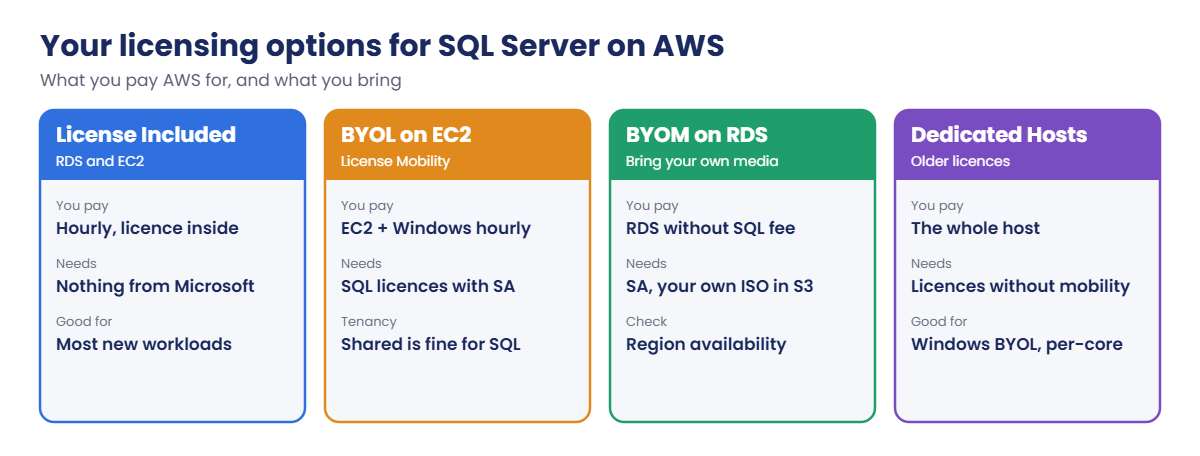
License Included (LI): on RDS (all editions) and on EC2 Windows+SQL AMIs (Web, Standard, Enterprise), AWS charges for SQL Server per vCPU-hour inside the price. No Microsoft agreement needed. Express and Developer editions have no licence charge.

Bring your own licence: SQL Server licences with active Software Assurance can move to EC2 shared tenancy through License Mobility. On RDS, BYOM (bring your own media, license model bring-your-own-media) runs Standard and Enterprise 2019 to 2025 without the AWS SQL fee, using your own installation ISO; check which Regions offer it. Windows Server licences and SQL licences without mobility need Dedicated Hosts and have date and agreement conditions.

AWS License Manager tracks usage.

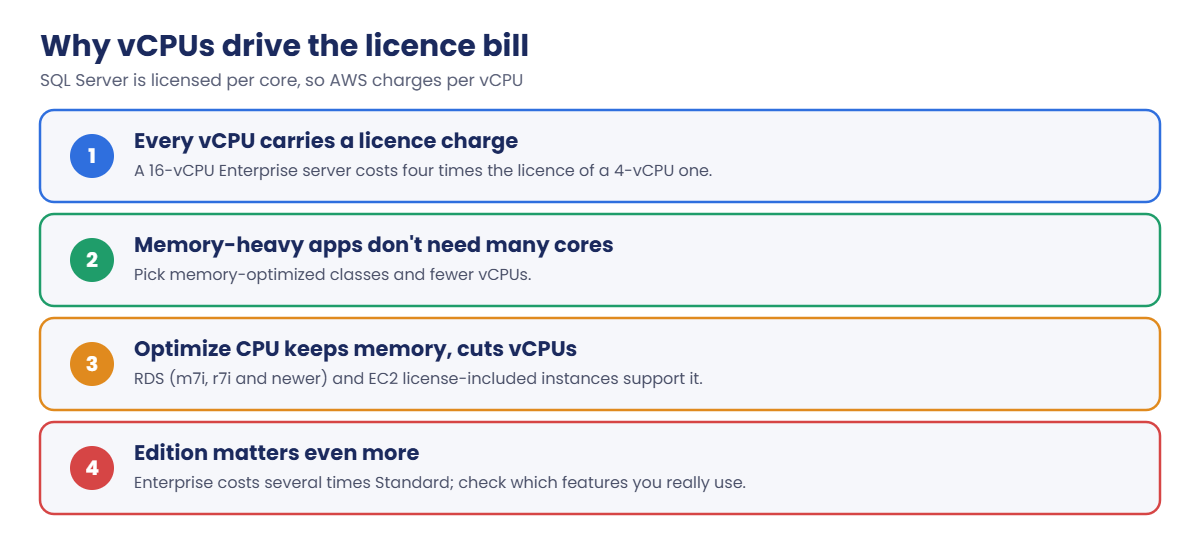
Because licensing follows vCPUs, Optimize CPU matters: on EC2 you set CoreCount and ThreadsPerCore (and since October 2025 license-included instances are billed on the vCPUs you configure); on RDS for SQL Server, classes such as m7i, r7i, m8i and r8i support coreCount and threadsPerCore. Standard edition also uses at most 24 cores and 128 GB of memory on SQL Server 2019 and 2022 (SQL Server 2025 raises this to 32 cores and 256 GB).

How it works, step by step

There are four main ways to license:

SQL Server licensing on AWS options: License Included, BYOL on EC2, BYOM on RDS, Dedicated Hosts

1Start with License Included

It’s the default for most new workloads: nothing to track, and you can stop paying any hour you stop the server.

2Bring licences you already own

If you have Software Assurance and spare licences, BYOL on EC2 or BYOM on RDS removes the SQL charge, but you must keep compliance records.

3Then right-size the vCPUs

Whatever the model, cores drive the bill:

Why vCPUs drive SQL Server licensing cost on AWS and how Optimize CPU helps

A memory-optimized class with half its cores disabled often runs a database just as fast, because many databases are limited by memory and I/O, not CPU. Measure first (Lesson 51), then trim.

✅ Checkpoint: You can explain License Included, License Mobility, BYOM and Dedicated Hosts, and why vCPU count drives SQL Server licence cost.

Hands-on lab: price and size SQL Server licensing on AWS

Sign in and load the price helper from Lesson 40:

cd C:\aws-lab
aws login --profile saat-admin
$env:AWS_PROFILE = 'saat-admin'
$v = Get-Content C:\aws-lab\saat-vpc.json | ConvertFrom-Json
function Get-OnDemandPrice([string]$Service, [string[]]$Filters) {
  $f = $Filters | ForEach-Object { $k, $val = $_ -split '=', 2; "Type=TERM_MATCH,Field=$k,Value=$val" }
  $list = aws pricing get-products --region us-east-1 --service-code $Service --filters $f --max-items 1 --query PriceList --output json | ConvertFrom-Json
  if (-not $list) { return $null }
  $p = $list[0] | ConvertFrom-Json
  $od = @($p.terms.OnDemand.PSObject.Properties.Value)[0]
  [double](@($od.priceDimensions.PSObject.Properties.Value)[0].pricePerUnit.USD)
}

1Find the licence share of an EC2 price

Paste this whole block. It prices one size with each SQL edition:

$common = @('regionCode=ap-south-1', 'instanceType=r6i.xlarge', 'operatingSystem=Windows', 'tenancy=Shared', 'capacitystatus=Used', 'licenseModel=No License required')
$base = Get-OnDemandPrice AmazonEC2 ($common + 'preInstalledSw=NA')
$prices = foreach ($sw in 'NA', 'SQL Web', 'SQL Std', 'SQL Ent') {
  $p = Get-OnDemandPrice AmazonEC2 ($common + "preInstalledSw=$sw")
  $label = if ($sw -eq 'NA') { 'Windows only' } else { "Windows + $sw" }
  [pscustomobject]@{ Option = "EC2 r6i.xlarge $label"; USDPerHour = [math]::Round($p, 3); SqlLicencePerHour = [math]::Round($p - $base, 3) }
}
$prices | Format-Table -AutoSize

You should see something like this (prices change over time):

Option                         USDPerHour SqlLicencePerHour
------                         ---------- -----------------
EC2 r6i.xlarge Windows only         0.436             0
EC2 r6i.xlarge Windows + SQL Web    0.528         0.092
EC2 r6i.xlarge Windows + SQL Std    0.916          0.48
EC2 r6i.xlarge Windows + SQL Ent    1.936           1.5

On 4 vCPUs, Standard roughly doubles the Windows price and Enterprise more than quadruples it. The licence part grows with every vCPU, so a server twice as big doubles that column too. Run the same idea for RDS to see similar gaps between editions.

2Find the right Windows+SQL images

Paste this whole block. AWS publishes license-included images as public parameters:

aws ssm get-parameters-by-path --path /aws/service/ami-windows-latest --query "Parameters[?contains(Name, 'Server-2022-English-Full-SQL_2022')].Name" --output text

You should see something like this:

/aws/service/ami-windows-latest/Windows_Server-2022-English-Full-SQL_2022_Enterprise
/aws/service/ami-windows-latest/Windows_Server-2022-English-Full-SQL_2022_Express
/aws/service/ami-windows-latest/Windows_Server-2022-English-Full-SQL_2022_Standard
/aws/service/ami-windows-latest/Windows_Server-2022-English-Full-SQL_2022_Web

Launching from one of these images is what makes an EC2 instance license-included for SQL Server; the billing follows the image. For BYOL you’d start from a plain Windows image and install your own media.

3Check Optimize CPU options on RDS and EC2

Paste this whole block:

$v22 = aws rds describe-db-engine-versions --engine sqlserver-se --query "DBEngineVersions[?starts_with(EngineVersion, '16.00')] | [-1].EngineVersion" --output text
aws rds describe-orderable-db-instance-options --engine sqlserver-se --engine-version $v22 --db-instance-class db.r7i.4xlarge --query "OrderableDBInstanceOptions[0].AvailableProcessorFeatures[?Name=='coreCount'].AllowedValues" --output text
aws ec2 describe-instance-types --instance-types r7i.4xlarge --query "InstanceTypes[0].[VCpuInfo.DefaultVCpus,MemoryInfo.SizeInMiB,join(',', to_array(VCpuInfo.ValidCores[].to_string(@)))]" --output text

You should see something like this:

1,2,3,4,5,6,7,8
16      131072  1,2,3,4,5,6,7,8

Both RDS and EC2 let an r7i.4xlarge run with fewer cores while keeping its full 128 GiB of memory. With 2 cores and 2 threads per core you license 4 vCPUs instead of 16.
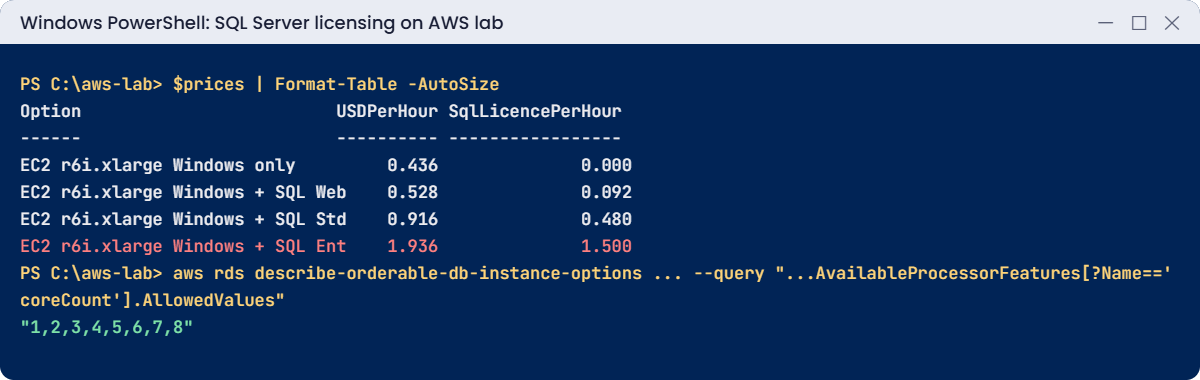
SQL Server licensing on AWS lab output: hourly prices by edition and allowed core counts
Prices by edition and allowed core counts. Something like this.

4Write down the decision

For each database, record: edition really needed (Enterprise features in use?), licence model, vCPUs actually needed, and whether Optimize CPU applies. Here’s a quick check of Enterprise-only features to run on a source server, saved for later:

@'
-- Edition-features.sql: Enterprise-only features each database uses
SELECT feature_name, feature_id FROM sys.dm_db_persisted_sku_features;
'@ | Set-Content C:\aws-lab\Edition-features.sql
Get-Content C:\aws-lab\Edition-features.sql | Select-Object -Last 1

You should see this:

SELECT feature_name, feature_id FROM sys.dm_db_persisted_sku_features;

Run it in each database (for example with sqlcmd -d DBNAME). No rows means nothing in that database ties it to Enterprise, and Standard may be enough.
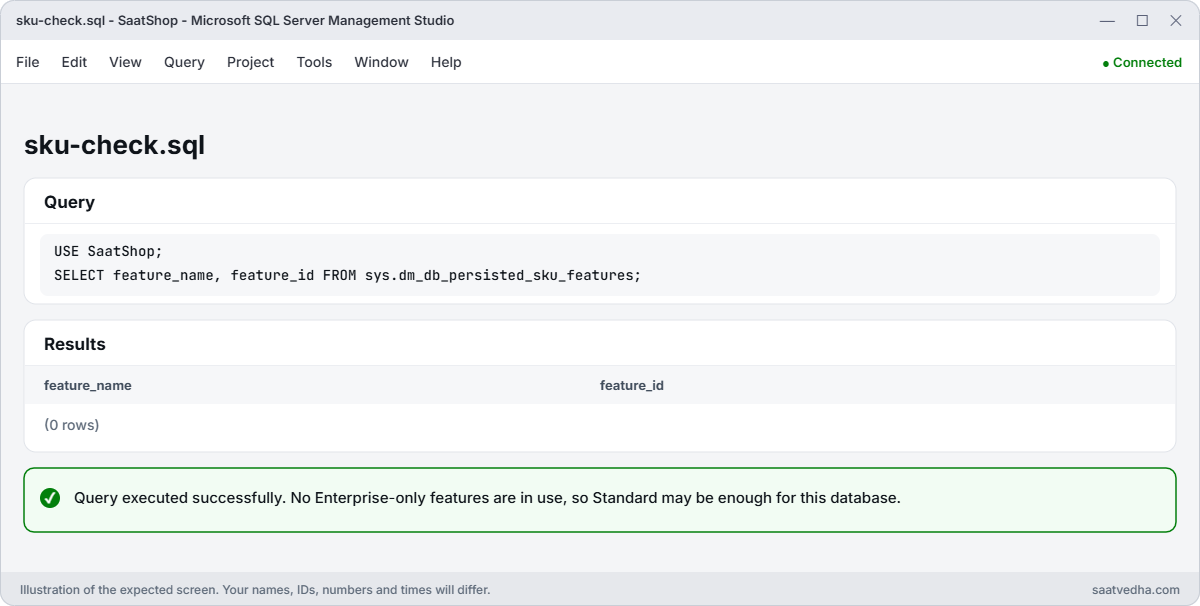
SSMS query of sys.dm_db_persisted_sku_features returning no rows
No rows from sys.dm_db_persisted_sku_features: nothing in this database needs Enterprise.

✅ Checkpoint: You calculated the SQL licence share for each edition, found the license-included image names, saw the allowed core counts for Optimize CPU, and saved Edition-features.sql.

Break It, Then Fix It

A silent lookup failure and a licence bill four times bigger than needed.

1Break it: guess an image parameter name

Ask for the Standard image with a shortened name:

aws ssm get-parameters --names /aws/service/ami-windows-latest/Windows_Server-2022-English-Full-SQL_2022_Std --output json

You should see this:

{
    "Parameters": [],
    "InvalidParameters": [
        "/aws/service/ami-windows-latest/Windows_Server-2022-English-Full-SQL_2022_Std"
    ]
}

get-parameters doesn’t fail; it just returns nothing and lists the name as invalid. A script that then launches with an empty image ID fails later with a confusing error, or worse, falls back to an old hard-coded image. Fix: find exact names with get-parameters-by-path (step 2), and stop scripts when InvalidParameters isn’t empty:

$ami = aws ssm get-parameter --name /aws/service/ami-windows-latest/Windows_Server-2022-English-Full-SQL_2022_Standard --query Parameter.Value --output text
$ami

You should see something like this:

ami-0a1b2c3d4e5f60111

2Break it: license 16 vCPUs for a 4-vCPU workload

A memory-hungry database needs 128 GiB but only 4 vCPUs of CPU. Compare the full r7i.4xlarge price with Optimize CPU, using a dry run that creates nothing:

$full = Get-OnDemandPrice AmazonEC2 @('regionCode=ap-south-1', 'instanceType=r7i.4xlarge', 'operatingSystem=Windows', 'preInstalledSw=SQL Ent', 'tenancy=Shared', 'capacitystatus=Used', 'licenseModel=No License required')
"r7i.4xlarge Windows + SQL Ent, 16 vCPUs: {0:N2} USD/h, about {1:N0} USD/month" -f $full, ($full * 730)
aws ec2 run-instances --image-id $ami --instance-type r7i.4xlarge --subnet-id $v.PrivateA --security-group-ids $v.AppSg --cpu-options CoreCount=2,ThreadsPerCore=2 --dry-run 2>&1 | Select-Object -Last 1

You should see something like this:

r7i.4xlarge Windows + SQL Ent, 16 vCPUs: 7.84 USD/h, about 5,723 USD/month
An error occurred (DryRunOperation) when calling the RunInstances operation: Request would have succeeded, but DryRun flag is set.
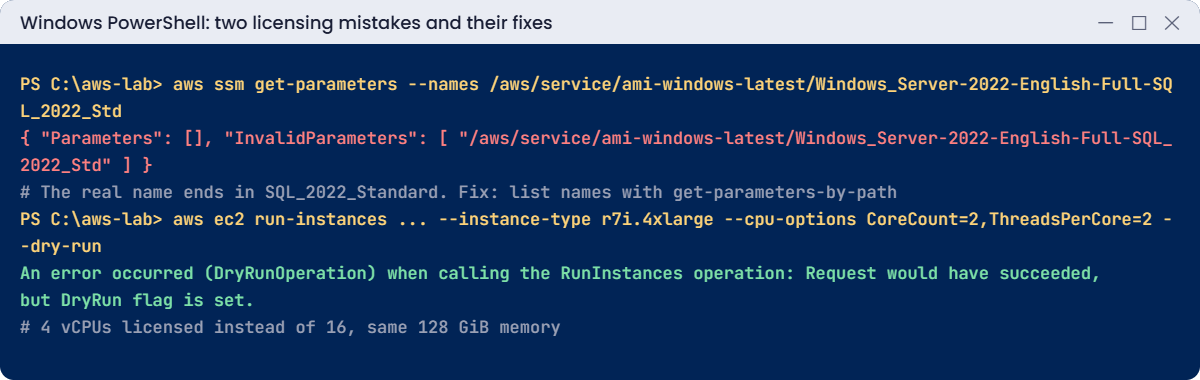
Licensing mistakes: wrong AMI parameter name and over-licensed vCPUs fixed with Optimize CPU
Both mistakes and their fixes. Something like this.

“DryRunOperation” means the request is valid; nothing was launched. Running that server with 4 vCPUs licensed instead of 16 cuts the SQL Enterprise part of the bill to a quarter while keeping the memory. Fix: measure CPU need, then use Optimize CPU on RDS (--processor-features) or EC2 (--cpu-options), and question Enterprise if Edition-features.sql finds nothing.

Nothing was created in this lesson. Keep Edition-features.sql and Check-RdsReadiness.sql together for migration planning.

✅ Checkpoint: You caught a silent InvalidParameters lookup and validated an Optimize CPU launch with a dry run that cuts licensed vCPUs from 16 to 4.

This happened at work

The audit after the lift-and-shift

A manufacturing company moved 14 SQL Server VMs to EC2 by copying their sizes: the on-premises hosts had 16 cores, so every EC2 instance got 16 vCPUs, with license-included SQL Enterprise images. Nobody checked which edition features the databases used.

Six months later, finance asked why the AWS bill was double the business case. Database Insights showed most servers averaged under 15 percent CPU, and the edition check found only two databases using Enterprise-only features.

They moved 12 servers to Standard, used Optimize CPU to cut vCPUs on memory-heavy ones, and moved a few small databases to RDS. The SQL licence part of the bill fell by about 60 percent, with no performance complaints.

Common mistakes and troubleshooting

MistakeWhat happensWhat to do
Copying on-premises core countsPaying licences for idle coresMeasure CPU, then size; use Optimize CPU
Defaulting to EnterpriseSeveral times the Standard licence costCheck sys.dm_db_persisted_sku_features first
BYOL without Software AssuranceNon-compliant licensingCheck License Mobility rights before moving
Guessing image parameter namesEmpty lookups, wrong or no AMIList names with get-parameters-by-path
Express for anything growing10 GB per database limitStart with Standard if growth is expected
Forgetting Standard’s limitsExtra cores or memory unusedStandard uses up to 24 cores and 128 GB (32 cores and 256 GB on SQL Server 2025)

Interview questions

Click a question to open it. Each one is written the way an interviewer would ask it. Under it you will see why they ask it and one way you could answer, in your own words.

Fresher level

1. Can you explain in simple words what License Included means for SQL Server on AWS?

Why they ask this: They want to know you understand the simplest licensing option. Licensing is a big part of SQL Server cost, so admins need to know the basics.

How you might answer: License Included means the SQL Server licence is part of the hourly price, on RDS or on EC2 Windows plus SQL images. You don’t need any agreement with Microsoft.

And when you stop the server, you stop paying for the licence too.

2. Your company already owns SQL Server licences. Can you use them on EC2?

Why they ask this: They are checking that you know the rules for bringing your own licences. Getting this wrong can cause a costly audit finding.

How you might answer: Yes, in two main ways, always subject to Microsoft’s terms. With active Software Assurance, we can use License Mobility on shared tenancy.

For licences without mobility rights, we’d need Dedicated Hosts.

3. Which SQL Server editions don’t have a licence fee, and where can you use them?

Why they ask this: They want to see that you know how to save money on non-production systems. Using a paid edition for dev and test is a common waste.

How you might answer: Express and Developer have no licence fee. Developer edition is only for non-production, so it’s a good fit for dev and test servers, but never for production.

2–5 years experience

4. The team wants to double the vCPUs on a SQL Server instance. What would you tell them about the cost?

Why they ask this: They want to know you understand what drives SQL Server cost on AWS. Many people only look at the instance price and miss the licence part.

How you might answer: SQL Server is licensed per core, so AWS charges the licence per vCPU, and doubling the vCPUs doubles the licence part of the bill. Before agreeing, I’d check if they really need more CPU or just more memory.

If it’s memory, Optimize CPU lets me reduce the vCPU count while keeping the memory of a bigger instance.

5. How would you decide whether a database needs Enterprise edition or can run on Standard?

Why they ask this: They want to see that you check the facts before paying for Enterprise. The price gap between the editions is large.

How you might answer: First I’d check which Enterprise-only features the database actually uses, with sys.dm_db_persisted_sku_features. Then I’d look at Standard’s hardware limits (24 cores and 128 GB on 2019 and 2022, 32 cores and 256 GB on 2025), and at the high availability needs.

In my experience many workloads fit Standard fine once you check.

6. What is BYOM on RDS for SQL Server, and when would you use it?

Why they ask this: They are checking that you know how to use your own licences on a managed service. It shows you know RDS options beyond the default.

How you might answer: BYOM means Bring Your Own Media. It lets us run Standard or Enterprise on RDS with our own licences through License Mobility, by uploading our installation media.

AWS then doesn’t charge the SQL licence fee, so I’d use it when we already own licences with Software Assurance.

Senior level

7. Your company spends USD 80,000 a month on SQL Server licences on AWS. How would you bring that down?

Why they ask this: They want to see a structured cost plan backed by data. They are checking that you find savings without breaking anything.

How you might answer: I’d start with an inventory of editions and the features each database really uses, and downgrade from Enterprise where it’s safe. Then I’d right-size vCPUs using Optimize CPU and Database Insights data, and consolidate small databases.

Where we own licences with Software Assurance, I’d look at BYOL or BYOM. I’d move dev and test to Developer edition and stop non-production servers at night.

8. If your company brings its own SQL Server licences to AWS, how would you make sure you stay compliant?

Why they ask this: They want to see governance thinking. Licence audits can be expensive, and they want to know you can prove what you’re running.

How you might answer: I’d use AWS License Manager, with license configurations and rules attached to the AMIs or launch templates, so usage is counted automatically. Where we need Dedicated Hosts, I’d manage them through it too.

I’d also tag servers by licence pool and run regular reports, so we always know where we stand.

Quick quiz

Q1. Why does vCPU count matter for SQL Server cost?

  1. It doesn’t
  2. SQL Server is licensed per core, charged per vCPU on AWS
  3. Only for Express
  4. Only on RDS
Show answer

B — More vCPUs means more licence charges.

Q2. Which edition has no licence fee and suits labs?

  1. Standard
  2. Enterprise
  3. Express
  4. Web
Show answer

C — Express (and Developer for non-production).

Q3. What did get-parameters return for the wrong name?

  1. An error
  2. An empty list plus InvalidParameters
  3. The latest AMI
  4. A default image
Show answer

B — Check InvalidParameters in scripts.

Q4. What does a DryRunOperation error mean?

  1. The request failed
  2. The request would have succeeded; nothing was created
  3. Missing permissions
  4. Wrong Region
Show answer

B — Dry runs validate without launching.

Q5. What does Optimize CPU keep while cutting vCPUs?

  1. Licences
  2. Memory, network and storage performance
  3. Nothing
  4. Only disk
Show answer

B — You keep memory and reduce licensed cores.

Quick recap

  • License Included puts the SQL licence in the hourly price on RDS and EC2.
  • BYOL needs Software Assurance (License Mobility) or Dedicated Hosts; RDS offers BYOM.
  • SQL Server cost follows vCPUs; Optimize CPU cuts vCPUs and keeps memory.
  • Check Enterprise-only features before paying for Enterprise.
  • Find image names with get-parameters-by-path and validate launches with --dry-run.

Next lesson

Lesson 42: Create RDS for SQL Server → You’ll build saat-sql on RDS, connect to it from your laptop through a secure tunnel, and set up parameter and option groups.

Further reading: SQL Server licensing on AWS

Want to go deeper into SQL Server licensing on AWS? Read Licensing Microsoft SQL Server on Amazon RDS and Optimize CPUs for RDS for SQL Server instances. You can also see the full plan for this course on the AWS Cloud Administration course page.

Scroll to Top