
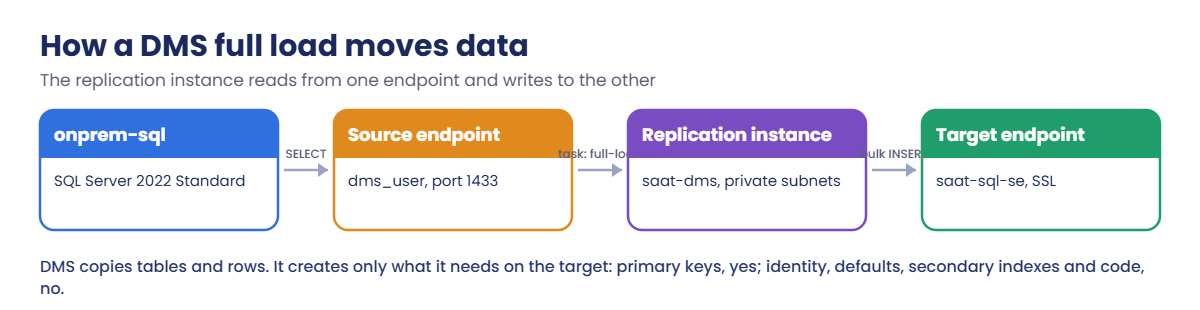
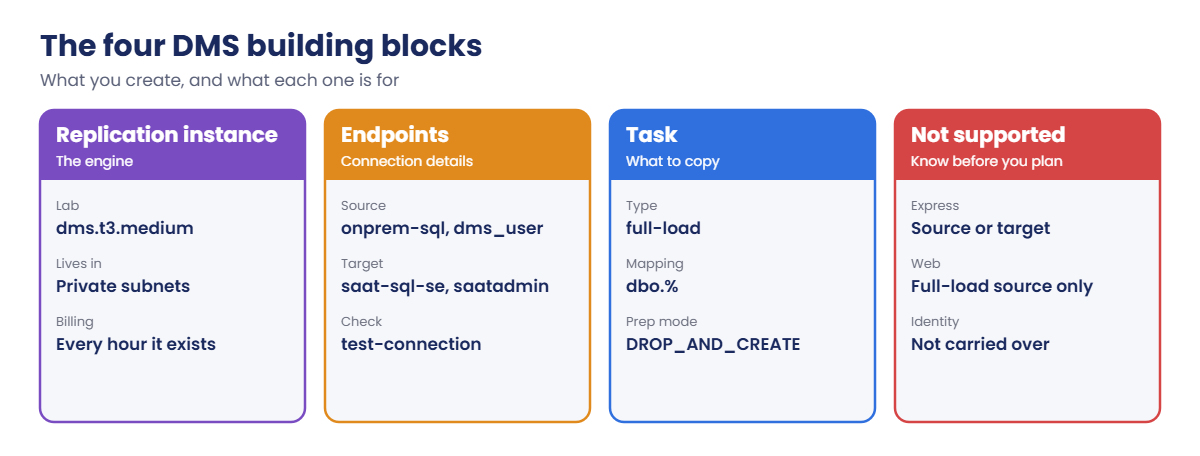
Sign in and set names. The first command creates the target, which takes 20 minutes or so, so start it right away:
cd C:\aws-lab
aws login --profile saat-admin
$env:AWS_PROFILE = 'saat-admin'
$v = Get-Content C:\aws-lab\saat-vpc.json | ConvertFrom-Json
$acct = aws sts get-caller-identity --query Account --output text
$bak = "saat-sqlbak-$acct-ap-south-1-an"
aws rds create-db-instance --db-instance-identifier saat-sql-se --engine sqlserver-se --license-model license-included --db-instance-class db.m6i.large --allocated-storage 20 --storage-type gp3 --storage-encrypted --master-username saatadmin --manage-master-user-password --db-subnet-group-name saat-db-subnets --vpc-security-group-ids $v.DbSg --no-publicly-accessible --backup-retention-period 0 --tags Key=course,Value=saatvedha-aws Key=lesson,Value=47 --query "DBInstance.DBInstanceStatus" --output text
.\Start-SqlLab.ps1 -Db saat-sql-se -LocalPort 11434
sqlcmd -S "127.0.0.1,11434" -U saatadmin -C -Q "CREATE DATABASE SaatShop; SELECT SERVERPROPERTY('Edition') AS edition"
You should see something like this:
creating
Tunnel ready on 127.0.0.1,11434 for saatadmin (password is in SQLCMDPASSWORD for this window)
edition
--------------------------
Standard Edition (64-bit)
saat-sql-se is the target, with an empty SaatShop database. Backup retention is 0 to make creation faster; never do that in production.
1Build the “on-premises” SQL Server
Paste this whole block. It launches SQL Server 2022 Standard on EC2 (standing in for a server in your data centre) and lets it read your backup bucket:
$srcSg = aws ec2 create-security-group --group-name saat-onprem-sql-sg --description "Pretend on-prem SQL Server" --vpc-id $v.VpcId --query GroupId --output text
@{ Version = '2012-10-17'; Statement = @(@{ Effect = 'Allow'; Action = 's3:GetObject'; Resource = "arn:aws:s3:::$bak/*" }) } | ConvertTo-Json -Depth 5 | Set-Content read-bak.json
aws iam put-role-policy --role-name saat-ec2-ssm-role --policy-name saat-read-sqlbak --policy-document file://read-bak.json
$sqlAmi = aws ssm get-parameter --name /aws/service/ami-windows-latest/Windows_Server-2022-English-Full-SQL_2022_Standard --query Parameter.Value --output text
$src = aws ec2 run-instances --image-id $sqlAmi --instance-type t3.xlarge --subnet-id $v.PrivateA --security-group-ids $srcSg --iam-instance-profile Name=saat-ec2-ssm-profile --metadata-options HttpTokens=required --tag-specifications 'ResourceType=instance,Tags=[{Key=Name,Value=onprem-sql},{Key=course,Value=saatvedha-aws},{Key=lesson,Value=47}]' --query "Instances[0].InstanceId" --output text
do { Start-Sleep 30; $p = aws ssm describe-instance-information --filters "Key=InstanceIds,Values=$src" --query "InstanceInformationList[0].PingStatus" --output text } until ($p -eq 'Online')
$srcIp = aws ec2 describe-instances --instance-ids $src --query "Reservations[0].Instances[0].PrivateIpAddress" --output text
"$src $srcIp"
You should see something like this:
i-0a1b2c3d4e5f60718 10.20.11.143The security group has no inbound rules yet. You’ll open 1433 only to DMS in step 3.
2Load SaatShop and create the DMS user on the source
Paste this whole block. Run Command restores your Lesson 46 backup, adds 50,000 orders and an index, and creates dms_user (about 5 minutes):
$dmsPw = aws secretsmanager get-random-password --password-length 20 --exclude-punctuation --require-each-included-type --query RandomPassword --output text
$setup = @'
$inst = (Get-ItemProperty 'HKLM:\SOFTWARE\Microsoft\Microsoft SQL Server\Instance Names\SQL').MSSQLSERVER
$reg = "HKLM:\SOFTWARE\Microsoft\Microsoft SQL Server\$inst\MSSQLServer"
Set-ItemProperty $reg -Name LoginMode -Value 2
Set-ItemProperty "$reg\SuperSocketNetLib\Tcp" -Name Enabled -Value 1
New-NetFirewallRule -DisplayName 'SQL Server 1433' -Direction Inbound -Protocol TCP -LocalPort 1433 -Action Allow | Out-Null
Stop-Service MSSQLSERVER -Force
net start MSSQLSERVER /mSQLCMD | Out-Null
Start-Sleep 15
sqlcmd -S . -E -C -b -Q "IF SUSER_ID('NT AUTHORITY\SYSTEM') IS NULL CREATE LOGIN [NT AUTHORITY\SYSTEM] FROM WINDOWS; ALTER SERVER ROLE sysadmin ADD MEMBER [NT AUTHORITY\SYSTEM];" | Out-Null
Stop-Service MSSQLSERVER -Force
Start-Service MSSQLSERVER
Set-Service SQLSERVERAGENT -StartupType Automatic
Start-Service SQLSERVERAGENT
New-Item C:\sqlbak -ItemType Directory -Force | Out-Null
Read-S3Object -BucketName 'BAK_HERE' -Key saatshop-full.bak -File C:\sqlbak\saatshop-full.bak | Out-Null
$dataDir = @(sqlcmd -S . -E -C -h -1 -W -Q "SET NOCOUNT ON; SELECT CAST(SERVERPROPERTY('InstanceDefaultDataPath') AS nvarchar(260))")[0].Trim()
$files = sqlcmd -S . -E -C -h -1 -W -s "|" -Q "SET NOCOUNT ON; RESTORE FILELISTONLY FROM DISK = 'C:\sqlbak\saatshop-full.bak'" | Where-Object { $_ -match '\|' }
$moves = foreach ($l in $files) { $p = $l -split '\|'; $ext = if ($p[2] -eq 'L') { 'ldf' } else { 'mdf' }; "MOVE '$($p[0])' TO '$dataDir$($p[0]).$ext'" }
sqlcmd -S . -E -C -b -Q "RESTORE DATABASE SaatShop FROM DISK = 'C:\sqlbak\saatshop-full.bak' WITH $($moves -join ', '), RECOVERY" | Out-Null
sqlcmd -S . -E -C -b -d SaatShop -Q "INSERT dbo.Orders (Customer, Amount) SELECT TOP (50000) CONCAT(N'Customer ', ROW_NUMBER() OVER (ORDER BY (SELECT NULL))), CAST(ABS(CHECKSUM(NEWID())) % 500000 / 100.0 AS decimal(10,2)) FROM sys.all_objects a CROSS JOIN sys.all_objects b; CREATE INDEX IX_Orders_Customer ON dbo.Orders (Customer);" | Out-Null
sqlcmd -S . -E -C -b -Q "CREATE LOGIN dms_user WITH PASSWORD = 'PW_HERE', CHECK_POLICY = ON; GRANT VIEW SERVER STATE TO dms_user;" | Out-Null
sqlcmd -S . -E -C -b -d SaatShop -Q "CREATE USER dms_user FOR LOGIN dms_user; ALTER ROLE db_datareader ADD MEMBER dms_user; GRANT VIEW DATABASE STATE TO dms_user; GRANT VIEW DEFINITION TO dms_user;" | Out-Null
sqlcmd -S . -E -C -h -1 -W -Q "SET NOCOUNT ON; SELECT CONCAT(SERVERPROPERTY('Edition'), ' | ', (SELECT COUNT(*) FROM SaatShop.dbo.Orders), ' orders | dms_user ', CASE WHEN SUSER_ID('dms_user') IS NULL THEN 'missing' ELSE 'ready' END)"
'@
$script = $setup -replace 'BAK_HERE', $bak -replace 'PW_HERE', $dmsPw
@{ commands = @($script -split "`r?`n"); executionTimeout = @('1800') } | ConvertTo-Json | Set-Content src-setup.json
$cmd = aws ssm send-command --document-name AWS-RunPowerShellScript --instance-ids $src --parameters file://src-setup.json --query Command.CommandId --output text
do { Start-Sleep 20; $st = aws ssm get-command-invocation --command-id $cmd --instance-id $src --query Status --output text 2>$null } until ($st -in 'Success', 'Failed', 'TimedOut')
aws ssm get-command-invocation --command-id $cmd --instance-id $src --query StandardOutputContent --output text
You should see something like this:
Standard Edition (64-bit) | 50003 orders | dms_user readyThe script turns on SQL authentication and TCP, opens the Windows firewall for 1433, and briefly starts SQL Server in single-user mode so Run Command can make itself sysadmin. That last trick is also how you get back into a SQL Server when nobody knows an admin password. dms_user gets only the read rights a full load needs.
3Create the replication instance and endpoints
Paste this whole block. The replication instance takes about 10 minutes:
'{ "Version": "2012-10-17", "Statement": [ { "Effect": "Allow", "Principal": { "Service": "dms.amazonaws.com" }, "Action": "sts:AssumeRole" } ] }' | Set-Content dms-trust.json
foreach ($r in @(@('dms-vpc-role', 'AmazonDMSVPCManagementRole'), @('dms-cloudwatch-logs-role', 'AmazonDMSCloudWatchLogsRole'))) {
  aws iam get-role --role-name $r[0] 2>$null | Out-Null
  if ($LASTEXITCODE -ne 0) { aws iam create-role --role-name $r[0] --assume-role-policy-document file://dms-trust.json | Out-Null; aws iam attach-role-policy --role-name $r[0] --policy-arn "arn:aws:iam::aws:policy/service-role/$($r[1])" }
}
Start-Sleep 15
$dmsSg = aws ec2 create-security-group --group-name saat-dms-sg --description "DMS replication instance" --vpc-id $v.VpcId --query GroupId --output text
aws ec2 authorize-security-group-ingress --group-id $srcSg --ip-permissions "IpProtocol=tcp,FromPort=1433,ToPort=1433,UserIdGroupPairs=[{GroupId=$dmsSg,Description=1433-from-dms}]" | Out-Null
aws ec2 authorize-security-group-ingress --group-id $v.DbSg --ip-permissions "IpProtocol=tcp,FromPort=1433,ToPort=1433,UserIdGroupPairs=[{GroupId=$dmsSg,Description=1433-from-dms}]" | Out-Null
aws dms create-replication-subnet-group --replication-subnet-group-identifier saat-dms-subnets --replication-subnet-group-description "saat-vpc private subnets" --subnet-ids $v.PrivateA $v.PrivateB | Out-Null
$ri = aws dms create-replication-instance --replication-instance-identifier saat-dms --replication-instance-class dms.t3.medium --allocated-storage 20 --replication-subnet-group-identifier saat-dms-subnets --vpc-security-group-ids $dmsSg --no-publicly-accessible --no-multi-az --tags Key=course,Value=saatvedha-aws Key=lesson,Value=47 --query ReplicationInstance.ReplicationInstanceArn --output text
aws dms wait replication-instance-available --filters "Name=replication-instance-arn,Values=$ri"
$seHost = aws rds describe-db-instances --db-instance-identifier saat-sql-se --query "DBInstances[0].Endpoint.Address" --output text
$srcEp = aws dms create-endpoint --endpoint-identifier saat-onprem-src --endpoint-type source --engine-name sqlserver --server-name $srcIp --port 1433 --database-name SaatShop --username dms_user --password $dmsPw --query Endpoint.EndpointArn --output text
$tgtEp = aws dms create-endpoint --endpoint-identifier saat-rds-se-tgt --endpoint-type target --engine-name sqlserver --server-name $seHost --port 1433 --database-name SaatShop --username saatadmin --password $env:SQLCMDPASSWORD --ssl-mode require --query Endpoint.EndpointArn --output text
foreach ($ep in $srcEp, $tgtEp) { aws dms test-connection --replication-instance-arn $ri --endpoint-arn $ep | Out-Null }
foreach ($ep in $srcEp, $tgtEp) { aws dms wait test-connection-succeeds --filters "Name=endpoint-arn,Values=$ep" }
aws dms describe-connections --filters "Name=replication-instance-arn,Values=$ri" --query "Connections[].[EndpointIdentifier,Status]" --output text
You should see something like this:
saat-onprem-src successful
saat-rds-se-tgt successful
Both endpoints connect. The target uses SSL; the source doesn’t here, but a real on-premises source over VPN should use it too. In production, endpoints read passwords from Secrets Manager instead of the command line.
4Run the full-load task and check the result
Paste this whole block:
'{ "rules": [ { "rule-type": "selection", "rule-id": "1", "rule-name": "dbo-all", "object-locator": { "schema-name": "dbo", "table-name": "%" }, "rule-action": "include" } ] }' | Set-Content mappings.json
'{ "Logging": { "EnableLogging": true }, "FullLoadSettings": { "TargetTablePrepMode": "DROP_AND_CREATE" } }' | Set-Content task.json
$task = aws dms create-replication-task --replication-task-identifier saat-shop-full --source-endpoint-arn $srcEp --target-endpoint-arn $tgtEp --replication-instance-arn $ri --migration-type full-load --table-mappings file://mappings.json --replication-task-settings file://task.json --query ReplicationTask.ReplicationTaskArn --output text
aws dms wait replication-task-ready --filters "Name=replication-task-arn,Values=$task"
aws dms start-replication-task --replication-task-arn $task --start-replication-task-type start-replication | Out-Null
aws dms wait replication-task-stopped --filters "Name=replication-task-arn,Values=$task"
aws dms describe-replication-tasks --filters "Name=replication-task-arn,Values=$task" --query "ReplicationTasks[0].[Status,StopReason]" --output text
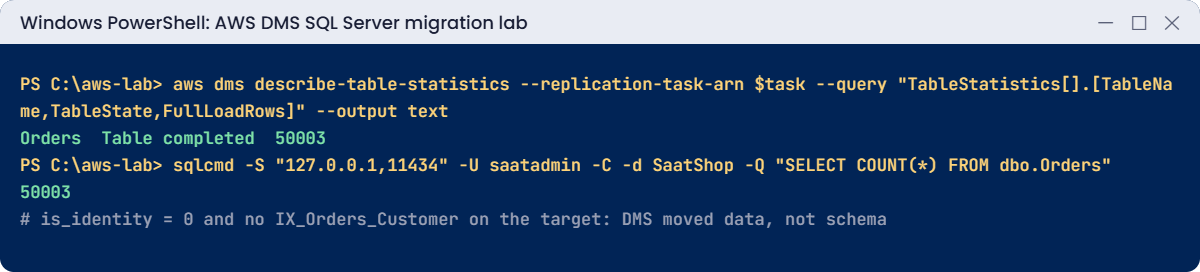
aws dms describe-table-statistics --replication-task-arn $task --query "TableStatistics[].[TableName,TableState,FullLoadRows]" --output text
sqlcmd -S "127.0.0.1,11434" -U saatadmin -C -d SaatShop -Q "SELECT COUNT(*) AS orders FROM dbo.Orders; SELECT name, is_identity FROM sys.columns WHERE object_id = OBJECT_ID('dbo.Orders') AND name = 'OrderId'; SELECT name FROM sys.indexes WHERE object_id = OBJECT_ID('dbo.Orders') AND name IS NOT NULL"
You should see something like this:
stopped Stop Reason FULL_LOAD_ONLY_FINISHED
Orders  Table completed 50003
orders
------
 50003
name     is_identity
-------- -----------
OrderId            0
name
---------------------------
PK__Orders__C3905BCF1A2B3C4D
All 50,003 rows arrived. But look closer: OrderId is no longer an identity column, the default on CreatedAt is gone, and IX_Orders_Customer wasn’t created.
If an app wrote to this table now, inserts would fail or run slowly. That’s why the schema comes first in real migrations (Lesson 49).
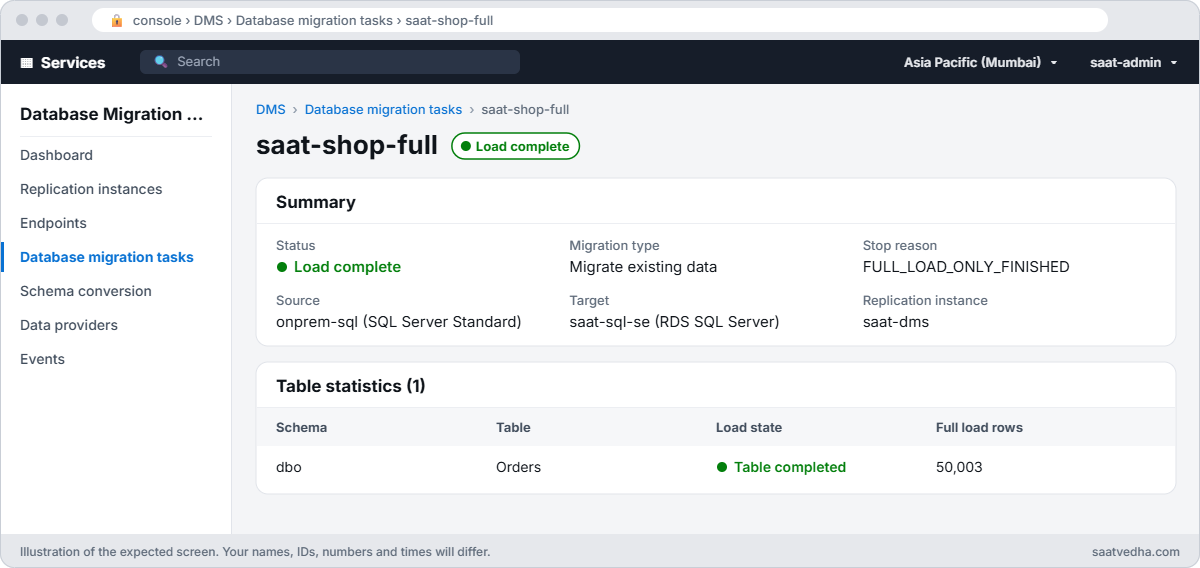
✅ Checkpoint: Both endpoints test successful, the task stopped with FULL_LOAD_ONLY_FINISHED, Orders shows Table completed with 50,003 rows, and the target has the rows but no identity or secondary index.
Two problems that stop most first DMS tasks.
1Break it: the source blocks DMS
Remove the 1433 rule from the source security group, then test the source endpoint:
aws ec2 revoke-security-group-ingress --group-id $srcSg --ip-permissions "IpProtocol=tcp,FromPort=1433,ToPort=1433,UserIdGroupPairs=[{GroupId=$dmsSg}]" | Out-Null
aws dms test-connection --replication-instance-arn $ri --endpoint-arn $srcEp | Out-Null
do { Start-Sleep 15; $cs = aws dms describe-connections --filters "Name=endpoint-arn,Values=$srcEp" --query "Connections[0].Status" --output text } until ($cs -ne 'testing')
aws dms describe-connections --filters "Name=endpoint-arn,Values=$srcEp" --query "Connections[0].[Status,LastFailureMessage]" --output text
You’ll get something like this:
failed Test Endpoint failed: Application-Status: 1020912, Application-Message: Cannot connect to ODBC provider Network error has occurred, Application-Detailed-Message: RetCode: SQL_ERROR SqlState: HYT00 NativeError: 0 Message: [unixODBC][Microsoft][ODBC Driver for SQL Server]Login timeout expired“Login timeout expired” sounds like a password problem, but it means the network never answered. Wrong passwords give “Login failed for user” instead.
With an on-premises source, also check the firewall, the VPN routes and the server’s own firewall. Fix: allow 1433 from the DMS security group again and retest:
aws ec2 authorize-security-group-ingress --group-id $srcSg --ip-permissions "IpProtocol=tcp,FromPort=1433,ToPort=1433,UserIdGroupPairs=[{GroupId=$dmsSg,Description=1433-from-dms}]" | Out-Null
aws dms test-connection --replication-instance-arn $ri --endpoint-arn $srcEp | Out-Null
aws dms wait test-connection-succeeds --filters "Name=endpoint-arn,Values=$srcEp"
aws dms describe-connections --filters "Name=endpoint-arn,Values=$srcEp" --query "Connections[0].Status" --output text
You should see this:
successful2Break it: reload into a table that already has the rows
Switch the task to DO_NOTHING and reload the target:
'{ "FullLoadSettings": { "TargetTablePrepMode": "DO_NOTHING" } }' | Set-Content task-nothing.json
aws dms modify-replication-task --replication-task-arn $task --replication-task-settings file://task-nothing.json | Out-Null
aws dms wait replication-task-ready --filters "Name=replication-task-arn,Values=$task"
aws dms start-replication-task --replication-task-arn $task --start-replication-task-type reload-target | Out-Null
aws dms wait replication-task-stopped --filters "Name=replication-task-arn,Values=$task"
aws dms describe-table-statistics --replication-task-arn $task --query "TableStatistics[].[TableName,TableState,FullLoadRows]" --output text
You’ll get something like this:
Orders Table error 0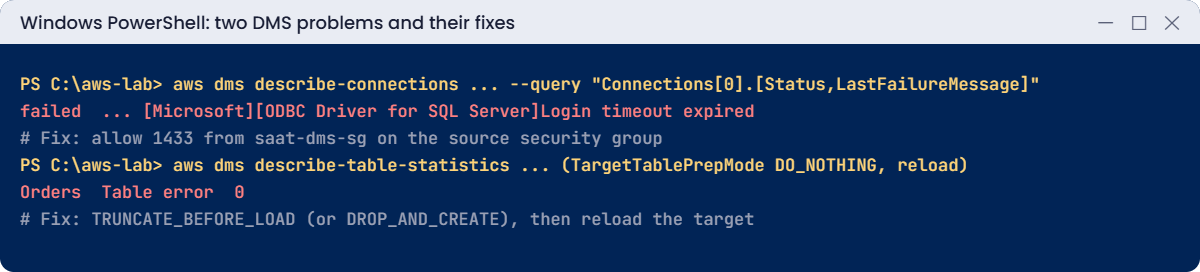
DO_NOTHING leaves the existing 50,003 rows in place, so every insert hits a primary key that already exists. The task log in CloudWatch Logs shows “Violation of PRIMARY KEY constraint”. Teams set DO_NOTHING to protect a schema they built, then forget the tables already have data from a test run.
Fix: use TRUNCATE_BEFORE_LOAD, which keeps your table design but empties it, then reload:
'{ "FullLoadSettings": { "TargetTablePrepMode": "TRUNCATE_BEFORE_LOAD" } }' | Set-Content task-truncate.json
aws dms modify-replication-task --replication-task-arn $task --replication-task-settings file://task-truncate.json | Out-Null
aws dms wait replication-task-ready --filters "Name=replication-task-arn,Values=$task"
aws dms start-replication-task --replication-task-arn $task --start-replication-task-type reload-target | Out-Null
aws dms wait replication-task-stopped --filters "Name=replication-task-arn,Values=$task"
aws dms describe-table-statistics --replication-task-arn $task --query "TableStatistics[].[TableName,TableState,FullLoadRows]" --output text
You should see something like this:
Orders Table completed 50003Now clean up. The replication instance bills every hour, so it goes. The endpoints, subnet group, security groups, onprem-sql and saat-sql-se stay (stopped) for Lesson 48:
aws dms delete-replication-task --replication-task-arn $task | Out-Null
aws dms wait replication-task-deleted --filters "Name=replication-task-arn,Values=$task"
aws dms delete-replication-instance --replication-instance-arn $ri | Out-Null
aws ec2 stop-instances --instance-ids $src | Out-Null
aws iam delete-role-policy --role-name saat-ec2-ssm-role --policy-name saat-read-sqlbak
Remove-Item read-bak.json, src-setup.json, dms-trust.json, mappings.json, task.json, task-nothing.json, task-truncate.json
.\Stop-SqlLab.ps1 -Db saat-sql-se
RDS starts a stopped instance again after 7 days. If you won’t do Lesson 48 this week, delete the target now with aws rds delete-db-instance --db-instance-identifier saat-sql-se --skip-final-snapshot; Lesson 48 shows how to recreate it.
✅ Checkpoint: You fixed a login timeout with a security group rule and a table error with TRUNCATE_BEFORE_LOAD. The task and replication instance are deleted, onprem-sql is stopping, and saat-sql-se is stopping.