What an AWS cloud engineer really does

Welcome to the AWS Cloud Administration course. Before you click anything in AWS, it helps to know what the job looks like. An AWS cloud engineer builds, runs and fixes a company’s systems on Amazon Web Services, and most of the work is not where people expect it.

In this lesson you’ll see a normal working day, learn who is responsible for what (you or AWS), and do your first real task in PowerShell. You don’t need an AWS account yet. That comes in Lesson 2.

TimeYou needBy the end you can
45 minutesA Windows laptop with Windows PowerShell 5.1 (it is built in) and an internet connection. No AWS account, nothing to pay.Describe the four kinds of daily work, explain the shared responsibility model, and read AWS’s public IP ranges to answer a real question: “Is this IP address from AWS?”

What it is, in one line

An AWS cloud engineer sets up, runs and fixes a company’s systems on AWS, and keeps them safe and sensibly priced.

In Simple Words

A flat in a big apartment building

Think of AWS as a huge apartment building. The builder owns the walls, the lifts, the water pipes and the security guard at the gate. You rent a flat.

Inside your flat, everything is your job. You decide who gets a key, you lock the door, you fix the leaking tap and you pay the electricity bill.

An AWS cloud engineer is the person who looks after the flat for the family. They set up the rooms, keep the doors locked, check the meter every morning and run to fix things when the tap bursts at night.

Engineer's View

What the job really is

Everything in AWS is an API call. Clicking “Launch instance” in the console, typing aws ec2 run-instances in a terminal and running a CloudFormation template all end up as the same kind of request to AWS. That is why every change can be logged (in CloudTrail) and why the job leans more and more on the command line and code.

Your work lives in three layers:

  • Accounts and access: who can do what (IAM, MFA, roles).
  • Resources in a Region: networks (VPC), servers (EC2), disks (EBS), files (S3), databases (RDS).
  • Operations around them: monitoring (CloudWatch), audit (CloudTrail, Config), patching and automation (Systems Manager), backup (AWS Backup) and cost (Budgets, Cost Explorer).

The key rule is the shared responsibility model. AWS is responsible for security of the cloud: buildings, hardware, the hypervisor and the software of managed services. You are responsible for security in the cloud: identities, network rules, the operating system on your servers, your data and how it is encrypted.

Job titleWhat they mostly doWhere this course helps
Cloud support engineerAnswers tickets, checks why something can’t connect or log in, escalatesPhase 1 and Phase 4 (troubleshooting)
Cloud engineer / CloudOps engineerBuilds and runs servers, networks, backups, patching and monitoringThe whole course
DevOps engineerAutomates builds and deployments, writes infrastructure as codePhase 2 (CloudFormation, CDK, Lambda)
Site reliability engineer (SRE)Keeps services fast and available, owns alarms and incident reviewsPhase 2 and Phase 4
Cloud architectDesigns the setup and makes the big choices (cost, security, regions)Every “Engineer’s View” box

How it works, step by step

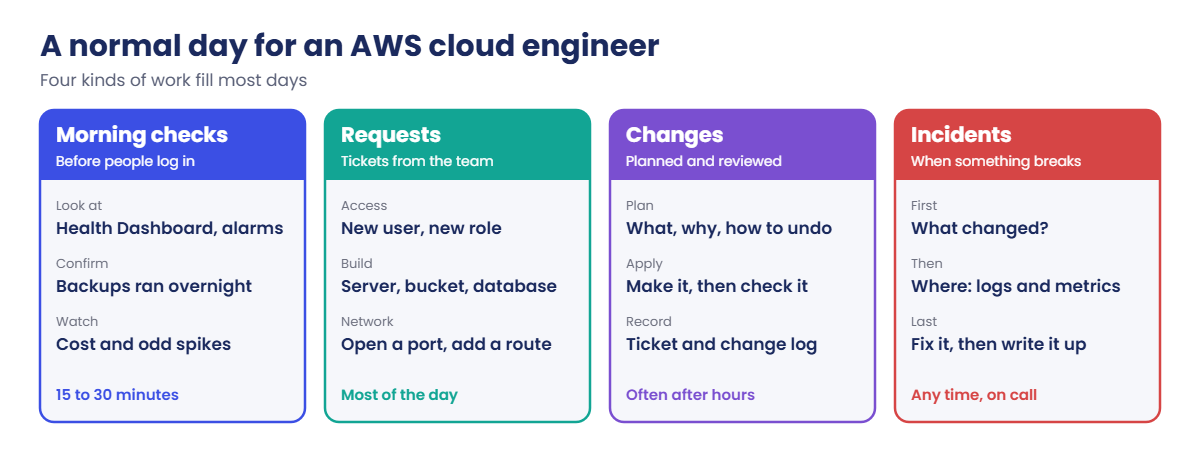
Here is how a normal day goes. It is the same pattern in a small startup and in a bank; only the size changes.

1Morning checks

Before people start work, you look at four things: the AWS Health Dashboard (is AWS itself having a problem in your Region?), your CloudWatch alarms, last night’s backup jobs, and yesterday’s cost. This takes 15 to 30 minutes and catches most problems before users notice.

AWS cloud engineer day: morning checks, requests, changes and incidents

2Requests

Most of the day is tickets: “give the new developer access”, “we need a test server”, “open port 443 to the partner”. Each request is small, but each one changes security or cost. A good engineer asks “why?” and “until when?” before saying yes.

3Changes

Bigger work goes through a change: what you will do, why, how you will check it worked and how you will undo it. Teams that are doing well make changes with code (CloudFormation, CDK, Terraform) that a colleague reviews first. The console is fine for looking and learning, but code is easier to repeat and to undo.

4Incidents

When something breaks, the first question is always “what changed?”. Every change in AWS leaves a record, so you check CloudTrail and AWS Config before you guess. Then you look where the symptom is (metrics, logs, network paths), fix it, and write a short note so the next person learns from it.

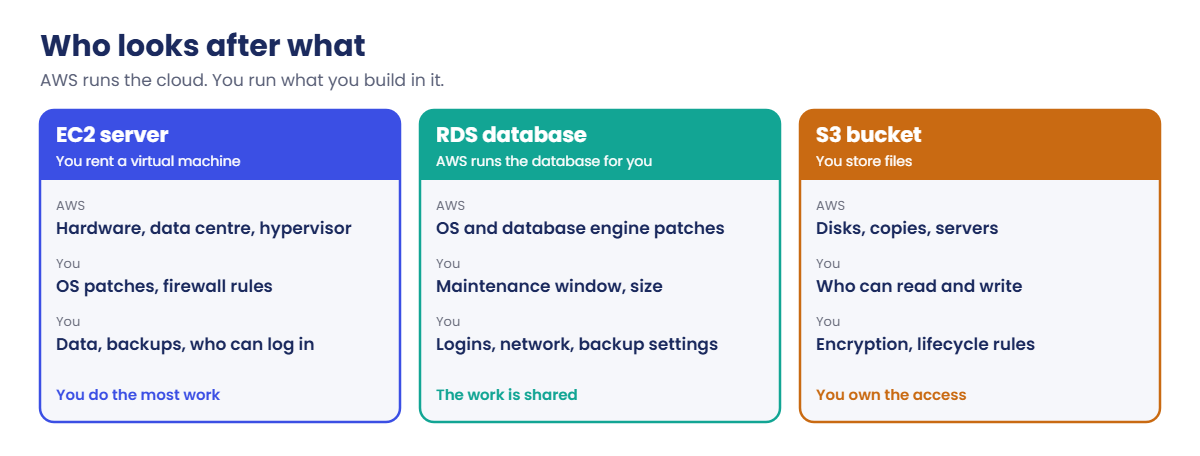
Through all four steps, you work inside the shared responsibility model below. The less AWS manages for you, the more you have to patch, back up and watch yourself.

AWS cloud engineer shared responsibility: what AWS and you look after for EC2, RDS and S3

Look at the EC2 card: on a server you rent, the operating system is yours, so Windows and Linux patches are your job. On RDS, AWS patches the database engine, but you still choose when (the maintenance window) and who can log in. On S3, AWS keeps your files safe from disk failure, but if you make a bucket public by mistake, that is on you.

✅ Checkpoint: You can name the four kinds of daily work and say who patches the operating system on EC2 (you) and on RDS (AWS).

Hands-on lab: your first AWS cloud engineer task

A real task that lands on cloud engineers every week: a firewall or web server log shows a strange IP address, and someone asks “Is that from AWS? Which Region?” AWS publishes every IP range it uses in one public JSON file. You’ll read it with PowerShell, the same way you’ll later read AWS CLI output.

1Make a lab folder

Open Windows PowerShell from the Start menu and run this:

New-Item -ItemType Directory -Path C:\aws-lab -Force | Out-Null
Set-Location C:\aws-lab
$PSVersionTable.PSVersion

You should see something like this:

Major  Minor  Build  Revision
-----  -----  -----  --------
5      1      26100  4202

Any 5.1 build is fine. We use C:\aws-lab for every lab in this course.

2Download AWS’s IP ranges

Run this:

$aws = Invoke-RestMethod -Uri 'https://ip-ranges.amazonaws.com/ip-ranges.json'
$aws.createDate
$aws.prefixes.Count

You should see something like this (AWS updates the file several times a week, so your date and count will be a little different):

2026-10-19-17-07-05
10654

Invoke-RestMethod downloads the file and turns the JSON into PowerShell objects. Each item in prefixes has four fields: ip_prefix, region, network_border_group and service.

3List the Regions in the file

Run this:

$regions = $aws.prefixes.region | Sort-Object -Unique
$regions.Count
$regions | Select-Object -First 8

You should see something like this:

43
af-south-1
ap-east-1
ap-east-2
ap-northeast-1
ap-northeast-2
ap-northeast-3
ap-south-1
ap-south-2

Careful: 43 is not “the number of Regions you can use”. The list includes GLOBAL (services like CloudFront that aren’t in one Region), China Regions (cn-) and GovCloud (us-gov-), which need separate accounts. Mumbai is ap-south-1; Hyderabad is ap-south-2.

4Which AWS services use Mumbai’s ranges?

Paste this whole block:

$aws.prefixes | Where-Object region -eq 'ap-south-1' |
    Group-Object service | Sort-Object Count -Descending |
    Select-Object -First 5 Count, Name

You should see something like this:

Count Name
----- ----
  166 AMAZON
   55 EC2
   18 ROUTE53_RESOLVER
   14 S3
    8 API_GATEWAY

AMAZON is the full list; every other service’s ranges are also inside it. EC2 ranges are where public IPs of EC2 servers come from, so that is the list you check when an unknown IP hits your firewall.

5Write a small “is this AWS?” checker

Paste this whole block:

function Test-AwsIp {
    param([Parameter(Mandatory)][string]$Ip)
    $b = ([System.Net.IPAddress]$Ip).GetAddressBytes()
    [int64]$n = ($b[0] * 16777216) + ($b[1] * 65536) + ($b[2] * 256) + $b[3]
    foreach ($p in $aws.prefixes) {
        $net, $bits = $p.ip_prefix -split '/'
        $nb = ([System.Net.IPAddress]$net).GetAddressBytes()
        [int64]$netNum = ($nb[0] * 16777216) + ($nb[1] * 65536) + ($nb[2] * 256) + $nb[3]
        [int64]$size = [math]::Pow(2, 32 - [int]$bits)
        if ([math]::Floor($n / $size) -eq [math]::Floor($netNum / $size)) { $p }
    }
}
Test-AwsIp 13.204.0.25
Test-AwsIp 8.8.8.8

You should see something like this:

ip_prefix     region     network_border_group service
---------     ------     -------------------- -------
13.204.0.0/14 ap-south-1 ap-south-1           AMAZON
13.204.0.0/14 ap-south-1 ap-south-1           EC2

The first IP sits inside an EC2 range in Mumbai, so it came from a server that someone runs on AWS in Mumbai. The second IP (Google’s public DNS) prints nothing, because it isn’t in any AWS range. The function works out the network part of each address: two addresses are in the same range when they give the same result after dividing by the range size.
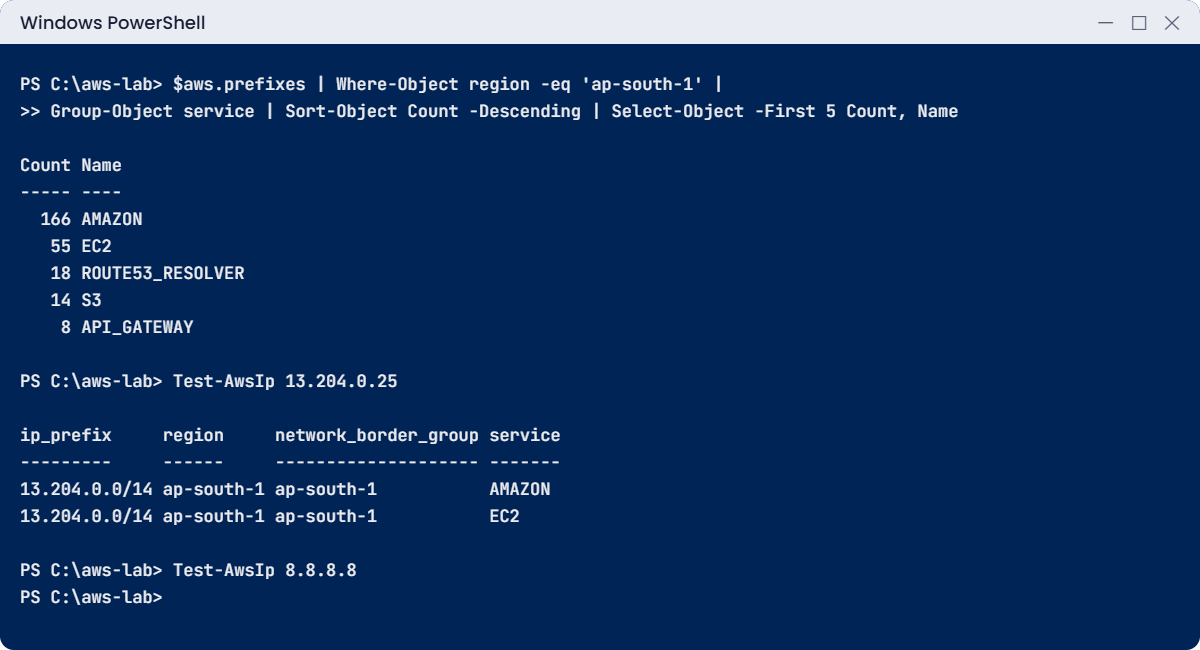
AWS cloud engineer lab: Mumbai IP ranges by service and the Test-AwsIp check
Example output. Your counts will be a little different because AWS updates the file often.

6Save Mumbai’s ranges for later

Run this:

$aws.prefixes | Where-Object region -eq 'ap-south-1' |
    Export-Csv C:\aws-lab\mumbai-ranges.csv -NoTypeInformation
(Import-Csv C:\aws-lab\mumbai-ranges.csv).Count

You should see something like this:

301

✅ Checkpoint: C:\aws-lab\mumbai-ranges.csv exists, Test-AwsIp 13.204.0.25 returns two lines for ap-south-1, and Test-AwsIp 8.8.8.8 returns nothing.

Break It, Then Fix It

Two ways this goes wrong at work. The first one shouts at you. The second one stays quiet, which is much worse.

1Break it: a typo in the address

Run this (note the missing “s” in ip-range):

$aws = Invoke-RestMethod -Uri 'https://ip-range.amazonaws.com/ip-ranges.json'

You’ll get this error (something like this):

Invoke-RestMethod : The remote name could not be resolved: 'ip-range.amazonaws.com'
At line:1 char:8
+ $aws = Invoke-RestMethod -Uri 'https://ip-range.amazonaws.com/ip-rang ...
+        ~~~~~~~~~~~~~~~~~~~~~~~~~~~~~~~~~~~~~~~~~~~~~~~~~~~~~~~~~~~~~~~
    + CategoryInfo          : InvalidOperation: (System.Net.HttpWebRequest:HttpWebRequest) [Invoke-RestMethod], WebException
    + FullyQualifiedErrorId : WebCmdletWebResponseException,Microsoft.PowerShell.Commands.InvokeRestMethodCommand

Fix: “could not be resolved” means DNS found no such name. Check the spelling of the host first, then your internet connection. Run the step 2 command again with the correct address.

2Break it: a typo that gives no error

Run this (the Region name is missing a dash):

$mumbai = $aws.prefixes | Where-Object region -eq 'ap-south1'
$mumbai.Count

You should see this:

0

No error, just nothing. PowerShell did exactly what you asked: it found no item whose Region is ap-south1, because that Region doesn’t exist.

Find the real name, then run it again:

$regions -contains 'ap-south1'
$regions | Where-Object { $_ -like 'ap-south*' }
$mumbai = $aws.prefixes | Where-Object region -eq 'ap-south-1'
$mumbai.Count

You should see something like this:

False
ap-south-1
ap-south-2
301
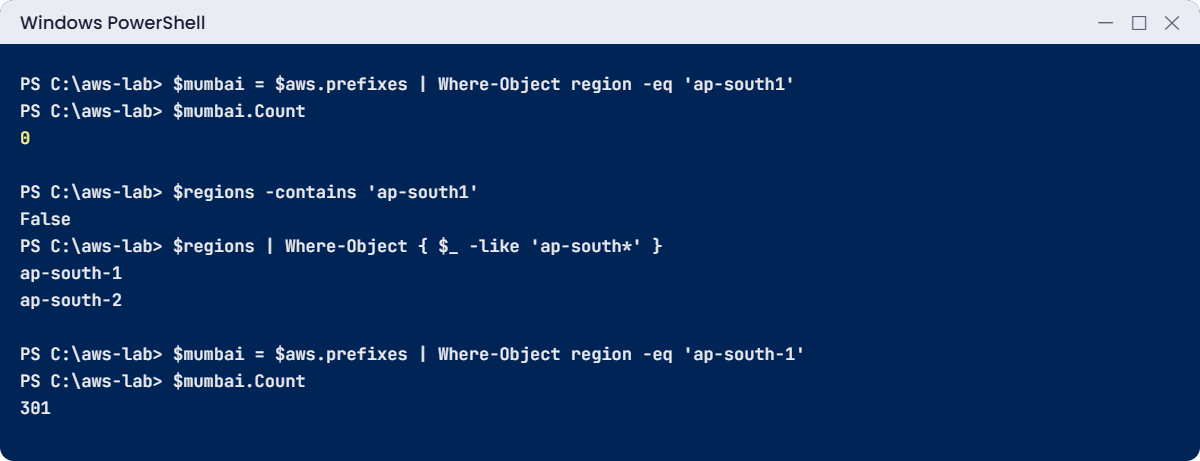
AWS cloud engineer break lab: a region typo returns nothing and no error
A silent typo: 0 results and no error, then the fix. This output is exact for the file used in this lesson.

Remember this feeling. The AWS console and CLI behave the same way: if you look in the wrong Region, you don’t get an error, you get an empty list. “My server disappeared!” is very often “I’m looking at the wrong Region.”

✅ Checkpoint: You caused one loud error and one silent empty result, and fixed both by checking the name you typed against the real list.

This happened at work

The server that “vanished” on a Monday

A support team at an online shop got a call at 9:10 on a Monday: “Our order server is gone from AWS!” A new engineer opened the EC2 console, saw zero instances and raised a top-priority incident. Two senior people were pulled off their work, and someone started restoring last night’s backup to a new server.

Forty minutes later, a third engineer asked one question: “Which Region are you looking at?” The console had remembered N. Virginia from a training session the week before. The order server was running fine in Mumbai the whole time.

The restore was cancelled, but the half-built server cost money until someone deleted it that afternoon.

The team made three changes. The incident checklist now starts with “Which account and which Region?”. Every resource gets an owner and app tag, so a search by tag finds it in any Region.

And new engineers learn to run aws ec2 describe-instances --region ap-south-1 instead of trusting what the screen remembers.

Common mistakes and troubleshooting

MistakeWhat you seeWhat to do
Looking in the wrong RegionEmpty list, “my server is gone”Check the Region selector (top right of the console) or pass --region on every CLI command
Thinking AWS patches your EC2 serverOld Windows or Linux updates, security findingsOn EC2 the OS is yours: patch it (Lesson 27, Patch Manager)
Saying yes to every requestOpen ports, too many admins, a growing billAsk “why?” and “until when?”, and write the answer in the ticket
Fixing before asking “what changed?”Hours spent guessingCheck CloudTrail and AWS Config first (Lessons 25 and 26)
Treating 43 as the number of usable RegionsWrong numbers in reportsThe IP file also has GLOBAL, China and GovCloud entries
Silent typo in a filter0 results, no errorCompare your value with the real list (-contains, -like) before you trust an empty result

Interview questions

Click a question to open it. Each one is written the way an interviewer would ask it. Under it you will see why they ask it and one way you could answer, in your own words.

Fresher level

1. So tell me, what do you think an AWS cloud engineer actually does on a normal day?

Why they ask this: They want to know you understand the real job, not only the exciting building part. Checks, requests, changes and incidents take up most of the day.

How you might answer: I’d start the day with checks: service health, alarms, backups and cost. Then most of the day goes on requests for access and resources, and on planned changes that always have a way to undo them.

When something breaks, I fix it by first asking what changed. Building new things is part of the job, but only one part.

2. Can you explain the shared responsibility model in simple words, with one example?

Why they ask this: They want to see that you know where AWS’s work stops and yours starts. Many security problems come from people who think AWS handles everything.

How you might answer: I’d say AWS secures the cloud itself, like the data centres, the hardware and the hypervisor. I secure what I put inside it.

For example, on an EC2 instance AWS looks after the physical server, but I patch the operating system and I set the security group rules.

3. The console is right there and easy to click. Why would you bother using the CLI?

Why they ask this: They want to see that you value work that is repeatable and can be scripted. It also shows whether you think about leaving a clear record of what you did.

How you might answer: The CLI is faster for checks, and I can save the commands in a script so they give the same result every time. It’s also easy to paste the command and output into a ticket.

So I use the console to explore, and the CLI or code when I actually make changes.

2–5 years experience

4. A user calls you and says, “My EC2 instance has disappeared.” What do you check first?

Why they ask this: They want to see a calm, ordered approach instead of panic. They also want to know you check the simple things before you assume the worst.

How you might answer: First I’d check the obvious things: are we in the right account and the right Region, and is there a filter on the console list. Most of the time that’s the answer.

If it’s really gone, I’d search CloudTrail for TerminateInstances or StopInstances events on that instance ID. Only after I know what happened would I think about restoring anything.

5. Your team is moving SQL Server from EC2 to RDS. How does your job change after the move?

Why they ask this: They want to see that you understand what a managed service takes off your plate and what it doesn’t. People often think RDS means they have nothing left to do.

How you might answer: On EC2 I patch Windows and SQL Server myself, and I set up backups and high availability myself. On RDS, AWS patches the OS and the engine and takes automated backups.

But I still pick the maintenance window, the instance size, network access, logins and backup retention. And I have to accept that I don’t get sysadmin or OS access on RDS.

6. You see a strange IP address in your logs. How would you find out if it belongs to AWS?

Why they ask this: They want to see that you use real data instead of guessing. They also check that you know the limits of what that data can tell you.

How you might answer: AWS publishes a file called ip-ranges.json with every prefix, Region and service. I’d download it and check if the IP falls inside any of those prefixes.

The service field tells me whether it’s an EC2 address, S3, CloudFront and so on. But it only proves the IP is from AWS, not which customer is using it.

Senior level

7. Say you join a team where people make risky changes straight in the console. How would you stop that without slowing everyone down?

Why they ask this: They want to see that you think about process and guardrails, not about one hero fixing things. They also want to know you can bring a team along with you.

How you might answer: I’d move changes into code with review, using CloudFormation, CDK or Terraform. People get read-only access by default and switch to a role with more rights only when they need it.

Service control policies block the worst actions, and CloudTrail plus AWS Config show me any drift. The console stays for viewing and for emergencies.

8. You’re the new cloud engineer for an AWS setup someone else built. What would your first 30 days look like?

Why they ask this: They want to know you learn what exists before you change it. They also want to see how you rank risks and pick the quick wins.

How you might answer: In the first week I’d list the accounts, the Regions in use, who has admin, and what’s tagged. Then I’d check that backups actually restore, alarms reach a real person, root has MFA, and what we spend per service.

I’d write down the biggest risks with an owner for each. I’d fix the quick ones like MFA, open ports and missing backups before I suggest any redesign.

Quick quiz

Q1. On an EC2 instance, who installs Windows security updates?

  1. AWS, automatically
  2. You (the customer)
  3. Nobody, EC2 doesn’t need updates
  4. Microsoft, through AWS
Show answer

B — On EC2 the operating system is yours. AWS looks after the hardware and hypervisor below it.

Q2. You run a filter for Region “ap-south1” and get 0 results with no error. What is the most likely cause?

  1. AWS deleted the ranges
  2. The Region name has a typo
  3. PowerShell is too old
  4. You need an AWS account
Show answer

B — The real name is ap-south-1. A wrong name doesn’t cause an error, it just matches nothing.

Q3. What is the first question to ask when something breaks in AWS?

  1. Who is to blame?
  2. What changed?
  3. Should we restore from backup?
  4. Can we make the server bigger?
Show answer

B — Most incidents follow a change. CloudTrail and AWS Config show what changed and when.

Q4. In ip-ranges.json, which service value contains every AWS range?

  1. EC2
  2. GLOBAL
  3. AMAZON
  4. S3
Show answer

C — AMAZON is the complete list. Other services, such as EC2 and S3, are subsets of it.

Q5. Why do cloud teams prefer making changes with code that someone reviews?

  1. It is the only way AWS allows changes
  2. It is easier to repeat, check and undo
  3. The console costs extra
  4. Code changes are not logged
Show answer

B — Code can be reviewed before it runs, repeated in another account and rolled back. The console is still useful for looking.

Quick recap

  • An AWS cloud engineer spends the day on morning checks, requests, changes and incidents.
  • Shared responsibility: AWS secures the cloud, you secure what you put in it. On EC2 you patch the OS; on RDS AWS patches the engine.
  • Every action in AWS is an API call, so every change can be logged and checked.
  • A wrong Region or a typo in a filter gives an empty result, not an error. Check names before you panic.
  • You read ip-ranges.json in PowerShell and built Test-AwsIp to answer “Is this IP from AWS?”

Next lesson

Lesson 2: Set up your AWS account safely → You’ll create your lab account, lock the root user with MFA and set a budget alert before launching anything.

Further reading: AWS cloud engineer

Want to go deeper into AWS cloud engineer? AWS explains who looks after what in the Shared Responsibility Model, and the IP file you used is documented in AWS IP address ranges. You can also see the full plan for this course on the AWS Cloud Administration course page.

Scroll to Top