AWS Backup: plans, vaults, restore tests

Everyone has backups until they need one. An AWS Backup plan takes backups on a schedule, keeps them for as long as your policy says, and stores them in a vault you control. But the part that matters most at work is the restore, so this lesson spends as much time restoring as backing up.

You’ll create a vault, a daily plan that picks servers by tag, take an on-demand backup of a server holding “order” data, and restore it as a new server in another zone. Then you’ll check the data line by line, and fix the two problems that make restores fail when people are already under pressure.

TimeYou needBy the end you can
75 minutes (two small instances and the Session Manager endpoints for about an hour)saat-vpc, Start-SsmEndpoints.ps1 and Stop-SsmEndpoints.ps1, saat-ec2-ssm-profile, your laptop signed in as saat-admin. Cost: about USD 0.15 (an 8 GiB snapshot for an hour, instances and endpoints).Create a backup vault, plan and tag-based selection, run and monitor a backup job, restore an EC2 instance with the right IAM permissions, verify the data, and clean up recovery points.

What it is, in one line

An AWS Backup plan defines when resources are backed up, which resources by tag or ID, which vault stores the recovery points, and how long they are kept.

In Simple Words

Photocopies in a fire-proof cabinet

A small shop keeps its sales register. Every night at closing, the owner photocopies the day’s pages and puts them in a fire-proof cabinet. After five weeks, old copies are shredded.

That routine is a backup plan, and the cabinet is the vault.

But a photocopy that is too faint to read is useless. Once a month, the owner takes out a copy and checks they can actually read every line. That is a restore test.

And the cabinet key matters: if only one person has it and they are on holiday, the copies may as well not exist.

Engineer's View

How AWS Backup really works

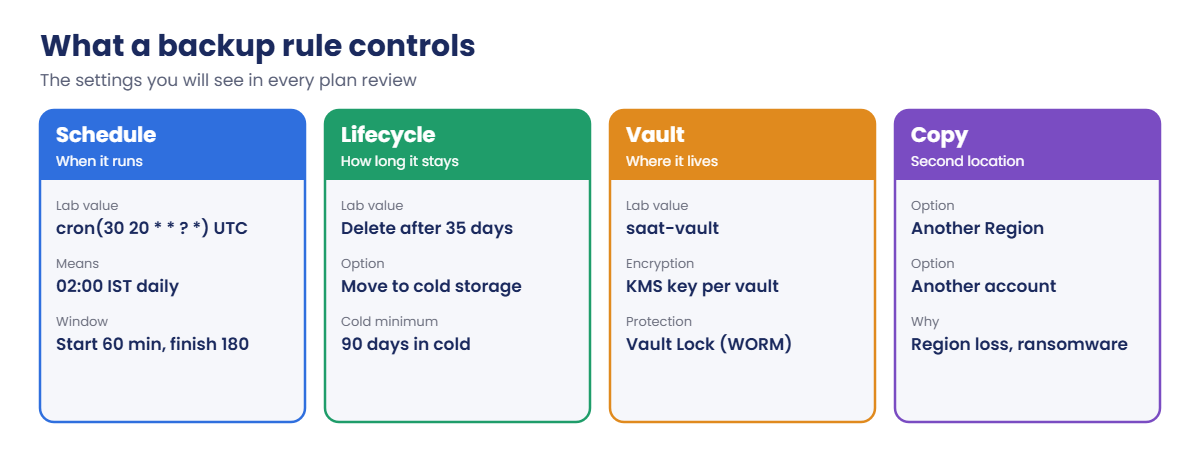
A backup plan has rules: schedule (cron in UTC or a set time zone), start and completion windows, lifecycle (delete after N days, or move to cold storage) and optional copies to another Region or account. A selection assigns resources by tag, ARN or both, using an IAM role that AWS Backup assumes. Recovery points live in a vault, encrypted with a KMS key; Vault Lock adds write-once retention that even administrators can’t shorten in compliance mode.

For EC2, a recovery point is an AMI plus EBS snapshots; for EBS, RDS, EFS, DynamoDB and S3 it is the service’s own backup format, managed in one place. Backups are crash-consistent by default; Windows VSS gives application-consistent backups for SQL Server on EC2.

Restores create new resources from metadata you can override, such as subnet, security groups and instance type. Restoring an instance with its IAM instance profile needs iam:PassRole on that role, which the managed restore policy doesn’t give. Restore testing can run scheduled, automated restores and validation.

How it works, step by step

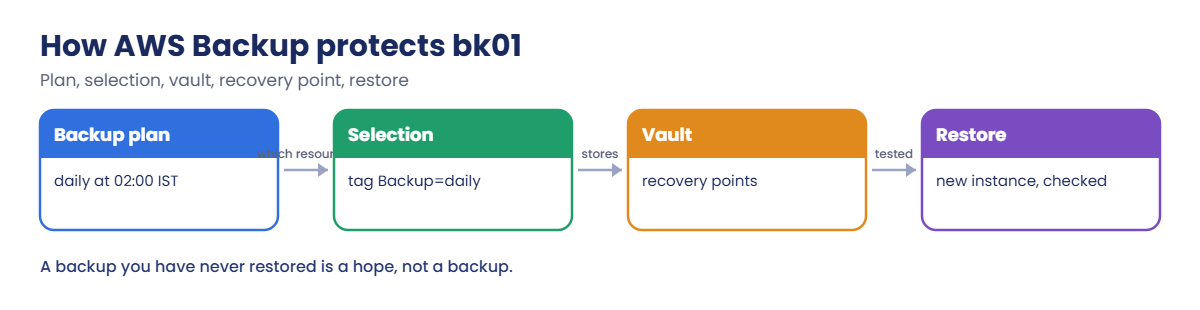
Here is what protects bk01 in this lab.

1The plan says when

Rule daily-35d runs at 20:30 UTC (02:00 IST), must start within an hour and finish within three, and keeps each recovery point for 35 days.

AWS Backup plan flow: plan, tag selection, vault, restore

2The selection says what

Any resource tagged Backup=daily is included. New servers with that tag are protected automatically, which is why tag-based selection beats lists of IDs.

3The vault stores it

Each backup becomes a recovery point in saat-vault: for EC2, an AMI with its snapshots.

4A restore proves it

You restore into a different zone and read the data back. The rule settings you’ll review in every plan look like this:

AWS Backup plan rule settings: schedule, lifecycle, vault and copies

Copies to another Region or account protect against the two worst cases: losing a Region, or an attacker with admin rights in your account deleting the backups too.

✅ Checkpoint: You can explain plan, rule, selection, vault and recovery point, and why restores need iam:PassRole for instance roles.

Hands-on lab: an AWS Backup plan and a real restore test

Start as usual:

cd C:\aws-lab
aws login --profile saat-admin
$env:AWS_PROFILE = 'saat-admin'
$v = Get-Content C:\aws-lab\saat-vpc.json | ConvertFrom-Json
$acct = aws sts get-caller-identity --query Account --output text
.\Start-SsmEndpoints.ps1

1Create the backup role and vault

Paste this whole block:

'{ "Version": "2012-10-17", "Statement": [ { "Effect": "Allow", "Principal": { "Service": "backup.amazonaws.com" }, "Action": "sts:AssumeRole" } ] }' | Set-Content backup-trust.json
$role = aws iam create-role --role-name saat-backup-role --assume-role-policy-document file://backup-trust.json --tags Key=course,Value=saatvedha-aws --query Role.Arn --output text
aws iam attach-role-policy --role-name saat-backup-role --policy-arn arn:aws:iam::aws:policy/service-role/AWSBackupServiceRolePolicyForBackup
aws iam attach-role-policy --role-name saat-backup-role --policy-arn arn:aws:iam::aws:policy/service-role/AWSBackupServiceRolePolicyForRestores
aws backup create-backup-vault --backup-vault-name saat-vault --backup-vault-tags course=saatvedha-aws --query BackupVaultName --output text

You should see this:

saat-vault

The vault uses the AWS managed key for AWS Backup. Companies often use a customer managed KMS key per vault (Lesson 30) so access to backups can be controlled separately.

2Launch a server with data and a backup tag

Paste this whole block:

$ud = @'
#!/bin/bash
mkdir -p /opt/saat
printf "order 1001 paid 2499\norder 1002 paid 1850\n" > /opt/saat/orders.txt
sync
'@
[IO.File]::WriteAllText('C:\aws-lab\bk-userdata.sh', ($ud -replace "`r`n", "`n"))
$base = aws ssm get-parameter --name /aws/service/ami-amazon-linux-latest/al2023-ami-kernel-default-x86_64 --query Parameter.Value --output text
$i = aws ec2 run-instances --image-id $base --instance-type t3.micro --subnet-id $v.PrivateA --security-group-ids $v.AppSg --iam-instance-profile Name=saat-ec2-ssm-profile --metadata-options HttpTokens=required --user-data file://bk-userdata.sh --tag-specifications 'ResourceType=instance,Tags=[{Key=Name,Value=bk01},{Key=Backup,Value=daily},{Key=course,Value=saatvedha-aws},{Key=lesson,Value=29}]' --query "Instances[0].InstanceId" --output text
do { Start-Sleep 20; $p = aws ssm describe-instance-information --filters "Key=InstanceIds,Values=$i" --query "InstanceInformationList[0].PingStatus" --output text } until ($p -eq 'Online')
aws ssm start-session --target $i --document-name AWS-StartInteractiveCommand --parameters command="cat /opt/saat/orders.txt"

You should see something like this (session lines left out):

order 1001 paid 2499
order 1002 paid 1850

3Create the plan and take a backup now

Paste this whole block (the backup usually takes 5 to 15 minutes):

@'
{
  "BackupPlanName": "saat-daily",
  "Rules": [
    {
      "RuleName": "daily-35d",
      "TargetBackupVaultName": "saat-vault",
      "ScheduleExpression": "cron(30 20 * * ? *)",
      "StartWindowMinutes": 60,
      "CompletionWindowMinutes": 180,
      "Lifecycle": { "DeleteAfterDays": 35 }
    }
  ]
}
'@ | Set-Content backup-plan.json
$plan = aws backup create-backup-plan --backup-plan file://backup-plan.json --backup-plan-tags course=saatvedha-aws --query BackupPlanId --output text
@'
{ "SelectionName": "tag-backup-daily", "IamRoleArn": "ROLE_ARN", "ListOfTags": [ { "ConditionType": "STRINGEQUALS", "ConditionKey": "Backup", "ConditionValue": "daily" } ] }
'@ -replace 'ROLE_ARN', $role | Set-Content backup-selection.json
$sel = aws backup create-backup-selection --backup-plan-id $plan --backup-selection file://backup-selection.json --query SelectionId --output text
Start-Sleep 15
$job = aws backup start-backup-job --backup-vault-name saat-vault --resource-arn "arn:aws:ec2:ap-south-1:$($acct):instance/$i" --iam-role-arn $role --lifecycle DeleteAfterDays=7 --query BackupJobId --output text
do { Start-Sleep 30; $st = aws backup describe-backup-job --backup-job-id $job --query State --output text; $st } until ($st -in 'COMPLETED', 'FAILED', 'ABORTED', 'EXPIRED')
aws backup describe-backup-job --backup-job-id $job --query "[State,PercentDone,BackupSizeInBytes]" --output text
$rp = aws backup describe-backup-job --backup-job-id $job --query RecoveryPointArn --output text

You should see something like this:

CREATED
RUNNING
RUNNING
COMPLETED
COMPLETED       100.0   8589934592

The plan will also back up bk01 every night because of its tag; the on-demand job just means you don’t have to wait until 2 a.m. The size is the full 8 GiB volume, though only changed blocks are stored after the first snapshot.
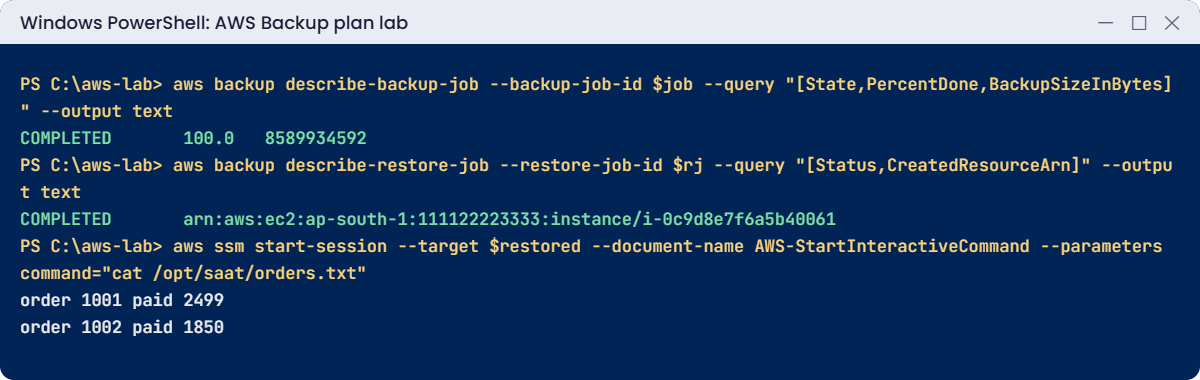
AWS Backup plan lab output: backup completed, restore completed, data checked
Backup completed, restore completed and the data checked. Something like this.

4Restore into another zone and check the data

Paste this whole block (the restore takes 5 to 10 minutes):

@'
{ "Version": "2012-10-17", "Statement": [ { "Effect": "Allow", "Action": "iam:PassRole", "Resource": "arn:aws:iam::ACCT:role/saat-ec2-ssm-role" } ] }
'@ -replace 'ACCT', $acct | Set-Content passrole.json
aws iam put-role-policy --role-name saat-backup-role --policy-name pass-instance-role --policy-document file://passrole.json
@{ InstanceType = 't3.micro'; SubnetId = $v.PrivateB; SecurityGroupIds = (ConvertTo-Json @($v.AppSg) -Compress); IamInstanceProfileName = 'saat-ec2-ssm-profile'; RequireIMDSv2 = 'true' } | ConvertTo-Json | Set-Content restore-meta.json
Start-Sleep 10
$rj = aws backup start-restore-job --recovery-point-arn $rp --iam-role-arn $role --metadata file://restore-meta.json --resource-type EC2 --query RestoreJobId --output text
do { Start-Sleep 30; $st = aws backup describe-restore-job --restore-job-id $rj --query Status --output text } until ($st -in 'COMPLETED', 'FAILED', 'ABORTED')
aws backup describe-restore-job --restore-job-id $rj --query "[Status,CreatedResourceArn]" --output text
$restored = (aws backup describe-restore-job --restore-job-id $rj --query CreatedResourceArn --output text) -split '/' | Select-Object -Last 1
do { Start-Sleep 20; $p = aws ssm describe-instance-information --filters "Key=InstanceIds,Values=$restored" --query "InstanceInformationList[0].PingStatus" --output text } until ($p -eq 'Online')
aws ssm start-session --target $restored --document-name AWS-StartInteractiveCommand --parameters command="cat /opt/saat/orders.txt"

You should see something like this:

COMPLETED       arn:aws:ec2:ap-south-1:111122223333:instance/i-0c9d8e7f6a5b40061
order 1001 paid 2499
order 1002 paid 1850

A new server, in ap-south-1b, with the same data, reachable through Session Manager because its instance role came back too. That is a tested backup. Write down how long the restore took; that number is your real recovery time, whatever the plan document says.

✅ Checkpoint: saat-daily selects servers tagged Backup=daily, an on-demand backup COMPLETED, and the restored server in ap-south-1b shows both order lines. Keep everything for the break lab.

Break It, Then Fix It

Two problems that hit at the worst moment: during a restore, and during cleanup.

1Break it: restore without iam:PassRole

Remove the PassRole policy, then restore again:

aws iam delete-role-policy --role-name saat-backup-role --policy-name pass-instance-role
Start-Sleep 10
$rj2 = aws backup start-restore-job --recovery-point-arn $rp --iam-role-arn $role --metadata file://restore-meta.json --resource-type EC2 --query RestoreJobId --output text
do { Start-Sleep 20; $st = aws backup describe-restore-job --restore-job-id $rj2 --query Status --output text } until ($st -in 'COMPLETED', 'FAILED', 'ABORTED')
$msg = aws backup describe-restore-job --restore-job-id $rj2 --query StatusMessage --output text
"$st $($msg.Substring(0, [Math]::Min(100, $msg.Length)))"

You should see something like this:

FAILED You are not authorized to perform this operation. Encoded authorization failure message: cqfTYjk8Ynp2c
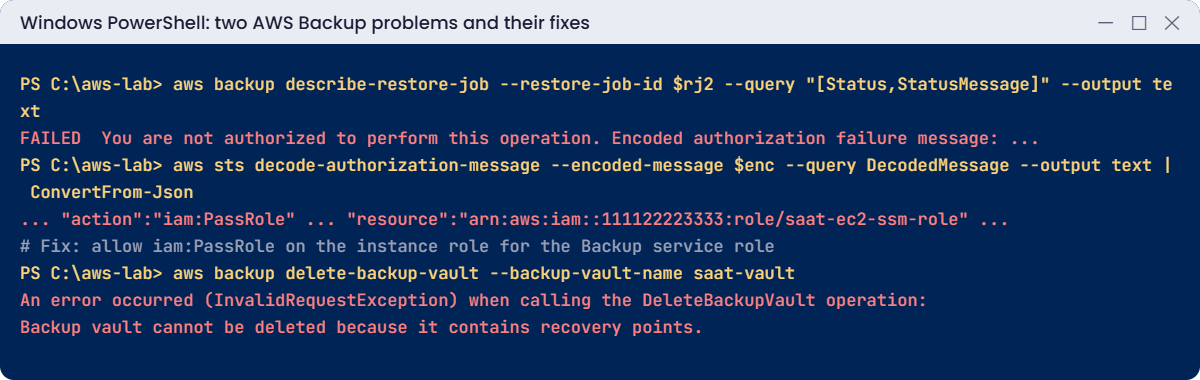
AWS Backup problems: restore fails on iam:PassRole, vault with recovery points
Both problems and their fixes. Something like this.

The message hides the reason in an encoded string. Decode it to see which permission was missing:

$enc = $msg -replace '.*failure message: ', ''
$dm = aws sts decode-authorization-message --encoded-message $enc --query DecodedMessage --output text | ConvertFrom-Json
"$($dm.context.action) on $($dm.context.resource)"

You should see something like this:

iam:PassRole on arn:aws:iam::111122223333:role/saat-ec2-ssm-role

AWS Backup’s managed restore policy doesn’t let it hand your instance role to a new server, on purpose, to prevent privilege escalation. Teams discover this during their first real incident. Fix: grant PassRole on exactly the instance roles you restore with (or restore without a profile), and test restores before you need them:

aws iam put-role-policy --role-name saat-backup-role --policy-name pass-instance-role --policy-document file://passrole.json

2Break it: delete a vault that still holds backups

Try to delete saat-vault:

aws backup delete-backup-vault --backup-vault-name saat-vault

You’ll get an error like this:

An error occurred (InvalidRequestException) when calling the DeleteBackupVault operation: Backup vault cannot be deleted because it contains recovery points.

A good safety net: vaults can’t be removed while they hold recovery points. With Vault Lock in compliance mode, even deleting the recovery points is refused until their retention ends. Fix: delete the recovery points first (for EC2 this also removes the AMI and snapshots), then the vault, plan and role:

aws backup list-recovery-points-by-backup-vault --backup-vault-name saat-vault --query "RecoveryPoints[].RecoveryPointArn" --output text | ForEach-Object { $_ -split '\s+' } | Where-Object { $_ } | ForEach-Object { aws backup delete-recovery-point --backup-vault-name saat-vault --recovery-point-arn $_ }
do { Start-Sleep 20; $n = aws backup list-recovery-points-by-backup-vault --backup-vault-name saat-vault --query "length(RecoveryPoints)" --output text } until ($n -eq '0')
aws backup delete-backup-selection --backup-plan-id $plan --selection-id $sel
aws backup delete-backup-plan --backup-plan-id $plan | Out-Null
aws backup delete-backup-vault --backup-vault-name saat-vault
aws ec2 terminate-instances --instance-ids $i $restored | Out-Null
aws ec2 wait instance-terminated --instance-ids $i $restored
aws iam delete-role-policy --role-name saat-backup-role --policy-name pass-instance-role
aws iam detach-role-policy --role-name saat-backup-role --policy-arn arn:aws:iam::aws:policy/service-role/AWSBackupServiceRolePolicyForBackup
aws iam detach-role-policy --role-name saat-backup-role --policy-arn arn:aws:iam::aws:policy/service-role/AWSBackupServiceRolePolicyForRestores
aws iam delete-role --role-name saat-backup-role
.\Stop-SsmEndpoints.ps1
Remove-Item backup-*.json, passrole.json, restore-meta.json, bk-userdata.sh
.\Find-LabResources.ps1

✅ Checkpoint: You decoded a failed restore to iam:PassRole and fixed it, and emptied a vault before deleting it. The plan, vault, recovery points, role and both servers are gone.

This happened at work

The backups that had never been restored

A manufacturing company had nightly AWS Backup jobs for its ERP servers for two years, all green. When ransomware encrypted the application volumes, the team started a restore at 9 a.m. with the whole company waiting.

The first restore failed on iam:PassRole. The second came up in a subnet with no route to the database. The third worked, but the app needed a license file kept on a second volume that had been added later and never tagged for backup.

The ERP was back the next afternoon instead of in two hours.

They now run AWS Backup restore testing every week for each critical app, with a validation script that checks the app responds and key files exist, copy backups to a separate account with Vault Lock, and select resources by application tag so new volumes are covered automatically.

Common mistakes and troubleshooting

MistakeWhat happensWhat to do
Never testing restoresFailures found during the real incidentScheduled restore tests with validation
Restoring with an instance profile, no PassRoleRestore FAILED: not authorizedGrant iam:PassRole on the instance role
Selecting resources by IDNew volumes and servers are missedSelect by tag and enforce the tag
Backups only in the same accountAn attacker with admin deletes them tooCopy to another account; use Vault Lock
Plan schedule in UTC without thinkingBackups run during business hoursConvert times, or set the schedule time zone
Deleting vaults or plans in the wrong orderErrors and leftover snapshotsRecovery points first, then selection, plan and vault

Interview questions

Click a question to open it. Each one is written the way an interviewer would ask it. Under it you will see why they ask it and one way you could answer, in your own words.

Fresher level

1. Can you explain in simple words what AWS Backup is and why a team would use it?

Why they ask this: They want to know you understand how backups are managed in AWS. Backups are something every admin is responsible for.

How you might answer: AWS Backup is a managed service that puts backups for many services in one place, like EC2, EBS, RDS, EFS, DynamoDB and S3. You control it with backup plans, vaults and policies.

Without it, each team sets up snapshots its own way, and it’s hard to know what is really protected.

2. What is a backup vault, and what would you set on one?

Why they ask this: They are checking that you know where recovery points live and how they are protected. This matters a lot when someone tries to delete backups.

How you might answer: A backup vault is a container for recovery points. It’s encrypted with a KMS key and has its own access policy.

I can also turn on Vault Lock, which stops anyone from deleting recovery points before their retention ends.

3. Developers keep launching new servers and forgetting to add them to backups. How would you fix that?

Why they ask this: They want to see that you design backups so they don’t depend on people remembering. Forgotten servers are a very common gap.

How you might answer: I’d use a tag-based selection in the backup plan, for example Backup=daily, so any resource with that tag is backed up. Then I’d make sure new servers get the tag automatically through launch templates or tag policies.

2–5 years experience

4. You try to restore an EC2 instance from AWS Backup and it fails with “not authorized”. What would you check?

Why they ask this: They want to see that you can troubleshoot a restore under pressure. Restores usually happen during an incident, so knowing the common causes saves time.

How you might answer: First I’d decode the authorization message to see which action was denied. The usual causes are a missing iam:PassRole for the instance profile role, or missing KMS key permissions for encrypted snapshots.

I’d also check that the restore role is allowed to use the target subnet and security group.

5. How would you explain RPO and RTO to a business manager, and where does AWS Backup fit in?

Why they ask this: They want to know you can talk about recovery in business terms. They are also checking that you understand a plan on paper is not proof.

How you might answer: I’d say RPO is how much data we can afford to lose, and that comes from how often we back up, so daily backups mean we could lose up to 24 hours. RTO is how long it takes to get things running again.

I’d also tell them RTO only comes from real restore tests, not from what the plan says.

6. Your security team is worried that ransomware could delete your backups too. How would you protect them?

Why they ask this: They want to see that you think about attackers who already have access to the account. Backups are only useful if they survive the attack.

How you might answer: I’d copy backups to a separate account and turn on Vault Lock in compliance mode, so nobody can delete them early. I’d use separate KMS keys and strict vault access policies.

On top of that, I’d add SCPs that block backup deletion and set up alerts for any deletion attempts.

Senior level

7. You’re asked to design backup and recovery for 200 servers and 30 databases. How would you approach it?

Why they ask this: They want to see a design that covers policy, isolation, consistency and testing. They are checking that you think about recovery, not only about taking backups.

How you might answer: I’d use organization backup policies by tag tier, for example daily kept for 35 days and monthly kept for 1 year. Backups would be copied to a central backup account and another Region, with Vault Lock on.

For databases I’d use application-consistent backups. I’d run restore testing for each tier with validation, and put job failures on a dashboard.

8. An auditor asks you to prove your backups actually work. What would you show them?

Why they ask this: They want to see that you collect real evidence, not only say backups are running. Auditors want proof that recovery is possible.

How you might answer: I’d show AWS Backup Audit Manager frameworks and reports, plus restore testing results with timestamps and validation status. I’d also share job success rates.

Most importantly, I’d show the RTO numbers we measured during real restore tests, so they see how long recovery actually takes.

Quick quiz

Q1. What decides which resources a backup plan protects?

  1. The vault
  2. The selection, for example by tag
  3. The KMS key
  4. The schedule
Show answer

B — Selections pick resources by tag or ARN.

Q2. Why did the second restore fail?

  1. The vault was locked
  2. The Backup role lacked iam:PassRole for the instance role
  3. The snapshot was deleted
  4. The subnet was wrong
Show answer

B — Restoring with an instance profile needs PassRole.

Q3. What does a restore create?

  1. It overwrites the original
  2. A new resource from the recovery point
  3. Only a snapshot
  4. Nothing
Show answer

B — Restores create new resources.

Q4. Why can’t you delete a vault with recovery points?

  1. Vaults can’t be deleted
  2. It protects backups from accidental deletion
  3. The plan is attached
  4. The KMS key is in use
Show answer

B — Delete recovery points first.

Q5. What is the best proof that backups work?

  1. Green job status
  2. A tested restore with validated data
  3. A large backup size
  4. A long retention
Show answer

B — Only a restore proves recoverability.

Quick recap

  • A backup plan has rules (schedule, lifecycle, copies); a selection picks resources by tag.
  • Recovery points live in a vault encrypted with KMS, optionally locked.
  • Restores create new resources; instance profiles need iam:PassRole.
  • Test restores and measure the real recovery time.
  • Delete recovery points before vaults; copy backups to another account for safety.

Next lesson

Lesson 30: KMS encryption keys → You’ll create customer managed keys, control who can use them with key policies, and see what happens when a key is disabled.

Further reading: AWS Backup plan

Want to go deeper into AWS Backup plan? Read Backup plans and Restore an Amazon EC2 instance. You can also see the full plan for this course on the AWS Cloud Administration course page.

Scroll to Top