CloudFormation: infrastructure as code
-
Phase 0: Before you start
-
Phase 1: The foundation
-
Phase 2: Operations and security
-
Phase 3: SQL Server on AWS
-
Phase 4: Troubleshooting step by step
-
Phase 5: Final project and career
Clicking through the console works once. The second time, someone forgets a setting; the third time, nobody remembers why a rule exists. This AWS CloudFormation tutorial shows how teams describe infrastructure in a template, review every change before it happens, and get automatic rollback when something fails.
You’ll write a template for a log bucket, a security group and a parameter, deploy it, change it through a change set, and then hit the two problems every CloudFormation user meets: a resource that needs replacing, and drift made by hand in the console.
| Time | You need | By the end you can |
|---|---|---|
| 50 minutes | saat-vpc (Lesson 8), your laptop signed in as saat-admin, a text editor. Cost: nothing beyond a few cents of S3 requests; CloudFormation itself has no charge for AWS resources. | Write a CloudFormation template with parameters and outputs, deploy and update stacks with change sets, read the Replacement column, understand rollback, detect drift and delete stacks cleanly. |
What it is, in one line
AWS CloudFormation creates and updates AWS resources from a template file, treating them as one stack that can be reviewed, rolled back and deleted together.
In Simple Words
A house plan instead of instructions shouted at builders
You can build a house by shouting “put a wall here, a door there” at builders every day. Or you can give them a drawn plan. With a plan, a second house comes out the same, and anyone can see what was meant.
Before builders change anything, a good contractor shows you what will happen: “we’ll add a window here; but to move this door, we have to knock down the whole wall.” That is a change set, and the knocked-down wall is a replacement.
If someone secretly adds a shelf that isn’t on the plan, the house no longer matches the drawing. That is drift.
Engineer's View
How CloudFormation really works
A template (YAML or JSON) has Parameters, Resources, Outputs and optional Conditions, Mappings and Rules. Intrinsic functions such as !Ref, !GetAtt and !Sub connect resources. A stack is one deployed copy; CloudFormation works out dependencies and creates resources in the right order, in parallel where it can.
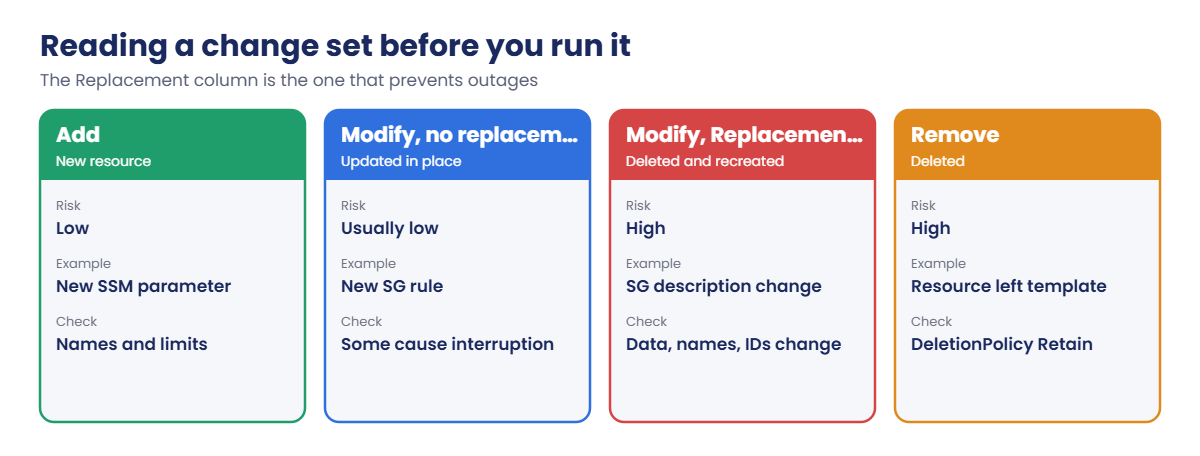
Updates go through a change set that lists each resource as Add, Modify or Remove, and for Modify whether replacement is needed. Some properties update in place; others (such as a security group’s description or name) force a new resource. Custom-named resources can’t be replaced, because the new one would need the same name.
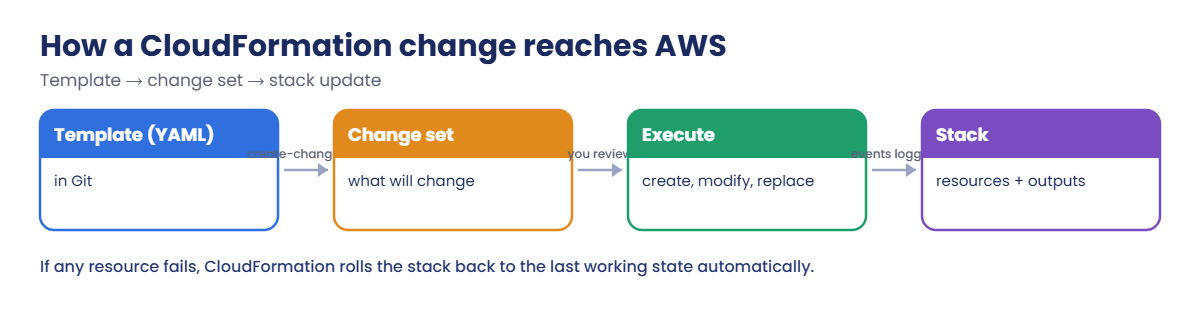
On failure, CloudFormation rolls back to the previous working state; DeletionPolicy: Retain keeps data resources when a stack is deleted.
Drift detection compares real resources with the template. Pre-deployment validation (since 2025 and on all operations since June 2026) catches unsupported properties and name conflicts before anything is created. aws cloudformation deploy wraps create-change-set and execute in one command.
How it works, step by step
Here is the path from a template to real resources.
1The template lives in Git
Every change is a pull request someone can review. The template, not the console, is the source of truth.
2A change set shows the impact
CloudFormation compares the new template and parameters with the stack and lists exactly what will be added, modified, replaced or removed.
3Execution is tracked
Each resource step is an event. If one fails, CloudFormation undoes the others, so you never end up half-deployed.
4Read the change set like a reviewer
The most important column is Replacement:
Replacement True on a database, a bucket with data, or anything other systems point to by ID needs a plan, not just an approval click.
✅ Checkpoint: You can explain templates, stacks and change sets, why Replacement matters, and what rollback and drift mean.
Hands-on lab: an AWS CloudFormation tutorial with change sets
Sign in and load saat-vpc:
cd C:\aws-lab
aws login --profile saat-admin
$env:AWS_PROFILE = 'saat-admin'
$v = Get-Content C:\aws-lab\saat-vpc.json | ConvertFrom-Json1Write and validate the template
Paste this whole block. It saves the template and asks CloudFormation to check it:
@'
AWSTemplateFormatVersion: '2010-09-09'
Description: SaatVedha lesson 34 demo stack
Parameters:
VpcId:
Type: AWS::EC2::VPC::Id
Env:
Type: String
AllowedValues: [dev, prod]
Default: dev
RetentionDays:
Type: Number
Default: 30
Resources:
LogBucket:
Type: AWS::S3::Bucket
Properties:
BucketEncryption:
ServerSideEncryptionConfiguration:
- ServerSideEncryptionByDefault:
SSEAlgorithm: AES256
PublicAccessBlockConfiguration:
BlockPublicAcls: true
BlockPublicPolicy: true
IgnorePublicAcls: true
RestrictPublicBuckets: true
LifecycleConfiguration:
Rules:
- Id: expire-logs
Status: Enabled
ExpirationInDays: !Ref RetentionDays
Tags:
- Key: course
Value: saatvedha-aws
WebSg:
Type: AWS::EC2::SecurityGroup
Properties:
GroupName: !Sub saat-cfn-${Env}-web-sg
GroupDescription: Web tier for the demo stack
VpcId: !Ref VpcId
SecurityGroupIngress:
- IpProtocol: tcp
FromPort: 443
ToPort: 443
CidrIp: 0.0.0.0/0
Tags:
- Key: course
Value: saatvedha-aws
BucketParam:
Type: AWS::SSM::Parameter
Properties:
Name: !Sub /saat/${Env}/log-bucket
Type: String
Value: !Ref LogBucket
Outputs:
LogBucketName:
Value: !Ref LogBucket
WebSgId:
Value: !GetAtt WebSg.GroupId
'@ | Set-Content saat-cfn-demo.yaml
aws cloudformation validate-template --template-body file://saat-cfn-demo.yaml --query "Parameters[].[ParameterKey,DefaultValue]" --output textYou should see something like this:
VpcId None
Env dev
RetentionDays 30validate-template checks the YAML and structure, not whether every property is right. Property checks happen when you deploy, before anything is created.
2Deploy the stack
Paste this whole block (about two minutes):
aws cloudformation deploy --template-file saat-cfn-demo.yaml --stack-name saat-cfn-demo --parameter-overrides VpcId=$($v.VpcId) Env=dev --tags course=saatvedha-aws lesson=34
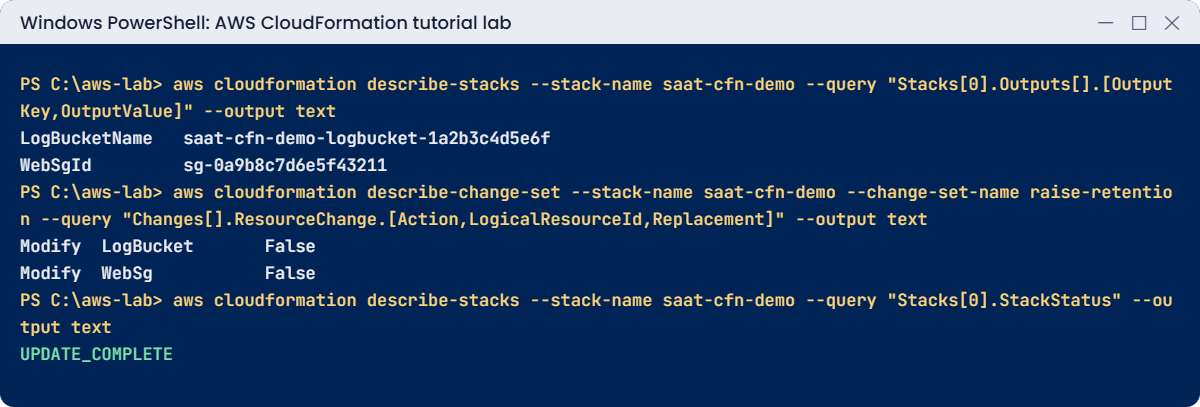
aws cloudformation describe-stacks --stack-name saat-cfn-demo --query "Stacks[0].Outputs[].[OutputKey,OutputValue]" --output text
aws ssm get-parameter --name /saat/dev/log-bucket --query Parameter.Value --output textYou should see something like this:
Waiting for changeset to be created..
Waiting for stack create/update to complete
Successfully created/updated stack - saat-cfn-demo
LogBucketName saat-cfn-demo-logbucket-1a2b3c4d5e6f
WebSgId sg-0a9b8c7d6e5f43211
saat-cfn-demo-logbucket-1a2b3c4d5e6fThree resources, created in the right order: the parameter needed the bucket’s name, so CloudFormation made the bucket first. Run the same deploy again and it says there’s nothing to change, which is exactly what you want from infrastructure code.
3Change it through a change set
Add an HTTP rule to the template, raise retention to 60 days, and review before running:
(Get-Content saat-cfn-demo.yaml -Raw) -replace ' CidrIp: 0.0.0.0/0', " CidrIp: 0.0.0.0/0`n - IpProtocol: tcp`n FromPort: 80`n ToPort: 80`n CidrIp: 0.0.0.0/0" | Set-Content saat-cfn-demo.yaml
aws cloudformation create-change-set --stack-name saat-cfn-demo --change-set-name raise-retention --template-body file://saat-cfn-demo.yaml --parameters ParameterKey=VpcId,UsePreviousValue=true ParameterKey=Env,UsePreviousValue=true ParameterKey=RetentionDays,ParameterValue=60 | Out-Null
aws cloudformation wait change-set-create-complete --stack-name saat-cfn-demo --change-set-name raise-retention
aws cloudformation describe-change-set --stack-name saat-cfn-demo --change-set-name raise-retention --query "Changes[].ResourceChange.[Action,LogicalResourceId,Replacement]" --output textYou should see this:
Modify LogBucket False
Modify WebSg FalseTwo in-place changes, no replacement, and the parameter isn’t listed because its value didn’t change. This is the screen a reviewer approves. Now run it:
aws cloudformation execute-change-set --stack-name saat-cfn-demo --change-set-name raise-retention
aws cloudformation wait stack-update-complete --stack-name saat-cfn-demo
aws cloudformation describe-stacks --stack-name saat-cfn-demo --query "Stacks[0].StackStatus" --output textYou should see this:
UPDATE_COMPLETE
4Protect the stack
Turn on termination protection, as you would for any production stack:
aws cloudformation update-termination-protection --stack-name saat-cfn-demo --enable-termination-protection | Out-Null
aws cloudformation describe-stacks --stack-name saat-cfn-demo --query "Stacks[0].EnableTerminationProtection"You should see this:
trueNow a careless delete-stack is refused until someone deliberately turns protection off. You can see every event of this stack under CloudFormation in the console.
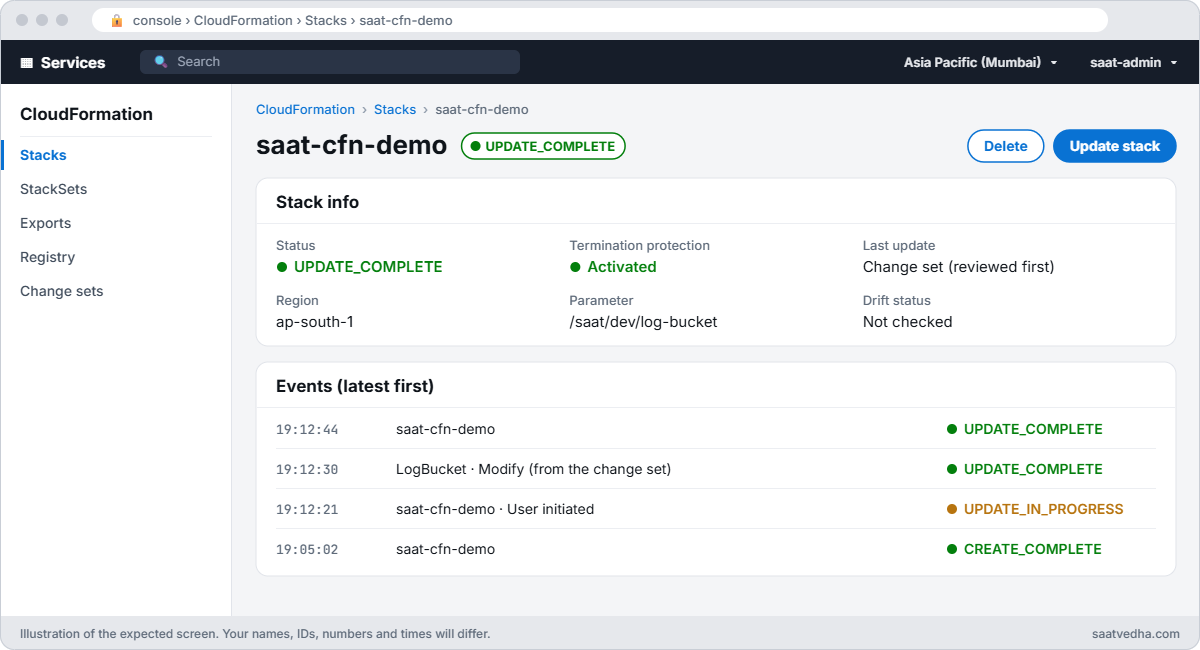
✅ Checkpoint: saat-cfn-demo is UPDATE_COMPLETE with an HTTPS and an HTTP rule, 60-day retention and termination protection, and you reviewed the change set before running it. Keep the stack for the break lab.
Break It, Then Fix It
Two CloudFormation lessons people usually learn the hard way.
1Break it: change something that forces replacement
Change the security group’s description, review, then execute anyway:
(Get-Content saat-cfn-demo.yaml -Raw) -replace 'GroupDescription: Web tier for the demo stack', 'GroupDescription: Web tier (HTTPS and HTTP)' | Set-Content saat-cfn-demo.yaml
aws cloudformation create-change-set --stack-name saat-cfn-demo --change-set-name new-description --template-body file://saat-cfn-demo.yaml --parameters ParameterKey=VpcId,UsePreviousValue=true ParameterKey=Env,UsePreviousValue=true ParameterKey=RetentionDays,UsePreviousValue=true | Out-Null
aws cloudformation wait change-set-create-complete --stack-name saat-cfn-demo --change-set-name new-description
aws cloudformation describe-change-set --stack-name saat-cfn-demo --change-set-name new-description --query "Changes[].ResourceChange.[Action,LogicalResourceId,Replacement]" --output text
aws cloudformation execute-change-set --stack-name saat-cfn-demo --change-set-name new-description
aws cloudformation wait stack-update-complete --stack-name saat-cfn-demo 2>$null
aws cloudformation describe-stack-events --stack-name saat-cfn-demo --query "StackEvents[?ResourceStatus=='UPDATE_FAILED'] | [0].ResourceStatusReason"
aws cloudformation describe-stacks --stack-name saat-cfn-demo --query "Stacks[0].StackStatus" --output textYou should see something like this:
Modify WebSg True
"CloudFormation cannot update a stack when a custom-named resource requires replacing. Rename saat-cfn-dev-web-sg and update the stack again."
UPDATE_ROLLBACK_COMPLETEThe change set warned you with True. A security group’s description can’t change in place, so CloudFormation must create a new group, but a new group can’t have the same name while the old one exists. The update failed and rolled back safely.
(With CloudFormation’s newer pre-deployment validation, the change set itself may instead show FAILED with AWS::EarlyValidation::ResourceExistenceCheck and refuse to run; the cause and the fix are the same.) Fix: revert the description, or remove GroupName so CloudFormation generates names, which makes replacements possible:
(Get-Content saat-cfn-demo.yaml -Raw) -replace 'GroupDescription: Web tier \(HTTPS and HTTP\)', 'GroupDescription: Web tier for the demo stack' | Set-Content saat-cfn-demo.yaml
aws cloudformation deploy --template-file saat-cfn-demo.yaml --stack-name saat-cfn-demoYou should see this:
Waiting for changeset to be created..
No changes to deploy. Stack saat-cfn-demo is up to date2Break it: a change made by hand
Someone adds SSH from the console (here, from the CLI), then you check for drift and redeploy:
$sg = aws cloudformation describe-stacks --stack-name saat-cfn-demo --query "Stacks[0].Outputs[?OutputKey=='WebSgId'].OutputValue" --output text
aws ec2 authorize-security-group-ingress --group-id $sg --protocol tcp --port 22 --cidr 0.0.0.0/0 | Out-Null
$drift = aws cloudformation detect-stack-drift --stack-name saat-cfn-demo --query StackDriftDetectionId --output text
do { Start-Sleep 5; $ds = aws cloudformation describe-stack-drift-detection-status --stack-drift-detection-id $drift --query DetectionStatus --output text } until ($ds -ne 'DETECTION_IN_PROGRESS')
aws cloudformation describe-stack-resource-drifts --stack-name saat-cfn-demo --stack-resource-drift-status-filters MODIFIED --query "StackResourceDrifts[].[LogicalResourceId,StackResourceDriftStatus]" --output text
aws cloudformation deploy --template-file saat-cfn-demo.yaml --stack-name saat-cfn-demoYou should see something like this:
WebSg MODIFIED
Waiting for changeset to be created..
No changes to deploy. Stack saat-cfn-demo is up to date
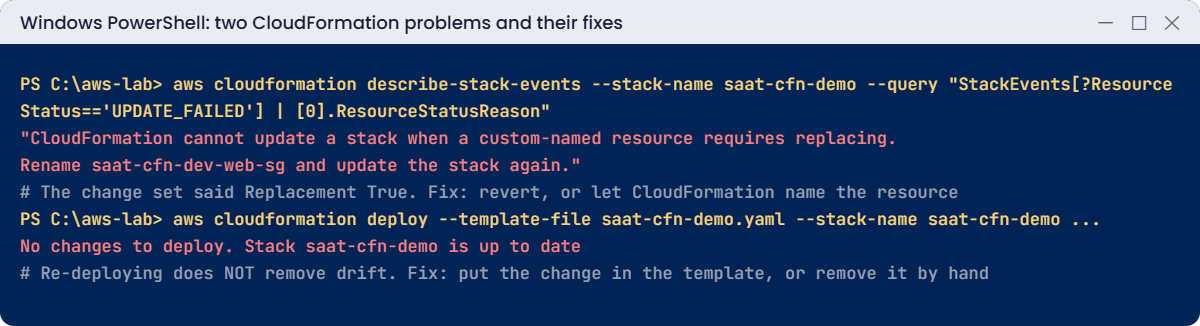
CloudFormation sees the drift, but redeploying doesn’t remove it: it only changes what differs between the old and new template, and the template didn’t change. SSH stays open to the world. Fix: decide whether the change belongs.
If not, remove it by hand; if yes, add it to the template so the code tells the truth:
aws ec2 revoke-security-group-ingress --group-id $sg --protocol tcp --port 22 --cidr 0.0.0.0/0 | Out-Null
$drift = aws cloudformation detect-stack-drift --stack-name saat-cfn-demo --query StackDriftDetectionId --output text
do { Start-Sleep 5; $ds = aws cloudformation describe-stack-drift-detection-status --stack-drift-detection-id $drift --query "[DetectionStatus,StackDriftStatus]" --output text } until ($ds -notmatch 'IN_PROGRESS')
$dsYou should see this:
DETECTION_COMPLETE IN_SYNCNow clean up. Termination protection must be turned off first:
aws cloudformation update-termination-protection --stack-name saat-cfn-demo --no-enable-termination-protection | Out-Null
aws cloudformation delete-stack --stack-name saat-cfn-demo
aws cloudformation wait stack-delete-complete --stack-name saat-cfn-demo
Remove-Item saat-cfn-demo.yaml
.\Find-LabResources.ps1✅ Checkpoint: You saw a Replacement True change fail and roll back on a custom-named resource, and learned that redeploying does not fix drift. The stack and its resources are deleted.
This happened at work
The security group that came back every night
A payments team managed its security groups in CloudFormation. During an incident, an engineer opened port 5432 to a vendor’s IP range from the console to let them debug. The incident was closed; the rule stayed.
Three months later, an audit found the open port. The team “fixed” it by redeploying the stack and reported it closed, but the port stayed open because redeploying doesn’t touch drift. A second audit found it again and escalated it as a repeat finding.
They now run drift detection nightly on every stack with an alarm on DRIFTED, use an SCP that denies security group changes outside CloudFormation’s role except for a break-glass role, and treat any console change during an incident as a ticket to update the template afterwards.
Common mistakes and troubleshooting
| Mistake | What happens | What to do |
|---|---|---|
| Executing change sets without reading Replacement | Resources deleted and recreated, IDs and data lost | Review every Replacement True |
| Custom names on resources that may be replaced | Update fails: custom-named resource requires replacing | Let CloudFormation generate names where possible |
| Fixing drift by redeploying | “No changes to deploy”; drift remains | Revert by hand or put the change in the template |
| No DeletionPolicy on data resources | Deleting the stack deletes the data | DeletionPolicy and UpdateReplacePolicy Retain or Snapshot |
| Console changes to stack resources | Template and reality disagree | All changes through the template; detect drift regularly |
| No termination protection on production stacks | One command deletes everything | Enable termination protection |
Interview questions
Click a question to open it. Each one is written the way an interviewer would ask it. Under it you will see why they ask it and one way you could answer, in your own words.
Fresher level
1. Can you explain in simple words what CloudFormation is and why teams use it?
Why they ask this: They want to know you understand infrastructure as code. Most companies expect admins to build resources from templates, not by clicking.
How you might answer: CloudFormation creates and manages AWS resources from a template, and it groups them into a stack. It works out the order and dependencies for me, and handles updates and rollback.
Teams use it because the same template builds the same environment every time, and the template shows exactly what exists.
2. Before you update a stack in production, how would you check what the update is going to change?
Why they ask this: They are checking for a safe habit. Updating a stack blind is how people replace a database by accident.
How you might answer: I’d create a change set first. It shows what will happen to each resource, whether it’s added, modified or removed, and whether it needs replacement.
Only after I’ve read it and I’m happy would I execute it.
3. What happens if a stack update fails halfway through?
Why they ask this: They want to know you understand rollback. It tells them whether you’d panic or know what to expect when an update fails.
How you might answer: CloudFormation rolls the stack back to its last working state on its own. When it’s done, the stack shows UPDATE_ROLLBACK_COMPLETE, and I can read the stack events to see which resource caused the failure.
2–5 years experience
4. Someone changed a security group by hand in the console, and the stack doesn’t know about it. What is this called, and how would you fix it?
Why they ask this: They want to see that you understand drift and how to handle it properly. Many people think redeploying the template fixes it, which it doesn’t.
How you might answer: That’s drift: the real resource no longer matches the template. I’d run drift detection to see exactly what’s different.
Then I’d either revert the manual change, or update the template to include it. Just redeploying the same unchanged template won’t fix the drift.
5. A stack update fails with “custom-named resource requires replacing”. What does that mean, and what would you do?
Why they ask this: They want to see that you understand replacement rules. This error confuses many people the first time they see it.
How you might answer: It means the change needed CloudFormation to create a new resource, but the template fixes the resource’s name, and two resources can’t share the same name. So the update can’t create the new one.
I’d either change the name as part of the same update, or avoid custom names on resources that might need replacing.
6. How would you make sure a stack delete or an update doesn’t wipe out your database or bucket?
Why they ask this: They want to see that you protect data on purpose. Losing a database to a template change is a classic and painful mistake.
How you might answer: On databases, buckets and volumes I’d set DeletionPolicy and UpdateReplacePolicy to Retain or Snapshot. I’d also turn on termination protection for the stack.
For the most critical resources, I’d add a stack policy that blocks updates to them.
Senior level
7. Say you join a company where 20 teams all write CloudFormation their own way. How would you structure it?
Why they ask this: They want to see IaC thinking at scale: structure, reuse, review and guardrails. They are checking that you can bring order without slowing teams down.
How you might answer: I’d split stacks by lifecycle, like network, shared services and apps, and pass outputs with cross-stack references or SSM parameters. StackSets would push organization-wide baselines.
Changes would go through CI/CD that creates change sets and needs review, with checks like cfn-lint and cfn-guard. I’d also run drift detection and add guardrails that stop changes in the console.
8. A production stack is stuck in UPDATE_ROLLBACK_FAILED. How would you get it out?
Why they ask this: They want to see that you can recover a broken stack calmly. They are checking that you understand the risk of skipping resources.
How you might answer: I’d look at the stack events to find the resource that couldn’t roll back. Then I’d fix the cause outside CloudFormation, for example a dependency someone deleted or a missing permission.
After that I’d run continue-update-rollback. I’d only skip resources if I fully understand what that leaves behind.
Quick quiz
Q1. What does Replacement True mean in a change set?
- Updated in place
- The resource will be deleted and recreated
- Nothing changes
- The stack is deleted
Show answer
B — Replacement creates a new resource with a new ID.
Q2. Why did redeploying not close the SSH rule?
- CloudFormation was down
- Deploy only applies template differences; the template didn’t change
- The rule was retained
- Termination protection
Show answer
B — Drift must be reverted or added to the template.
Q3. What does CloudFormation do when an update fails?
- Leaves resources half-changed
- Rolls back to the previous state
- Deletes the stack
- Retries forever
Show answer
B — Automatic rollback keeps the stack consistent.
Q4. Which setting prevents accidental stack deletion?
- DeletionPolicy
- Termination protection
- Change sets
- Outputs
Show answer
B — delete-stack is refused while it is on.
Q5. What does !Ref LogBucket return for an S3 bucket?
- The ARN
- The bucket name
- The Region
- The owner
Show answer
B — For AWS::S3::Bucket, Ref returns the bucket name.
Quick recap
- A template describes resources; a stack is one deployed copy.
- Change sets show Add, Modify, Remove and Replacement before you run them.
- Failed updates roll back automatically.
- Custom-named resources can’t be replaced; prefer generated names.
- Redeploying doesn’t fix drift; detect it and fix the template or the resource.
Next lesson
Lesson 35: AWS CDK for operations teams → You’ll write the same kind of stack in code with the AWS CDK, synthesize it to CloudFormation and deploy it.
Further reading: AWS CloudFormation tutorial
Want to go deeper into AWS CloudFormation tutorial? Read What is AWS CloudFormation? and Update CloudFormation stacks using change sets. You can also see the full plan for this course on the AWS Cloud Administration course page.