Patching and Upgrades for RDS SQL Server
-
Phase 0: Before you start
-
Phase 1: The foundation
-
Phase 2: Operations and security
-
Phase 3: SQL Server on AWS
-
Phase 4: Troubleshooting step by step
-
Phase 5: Final project and career
RDS patches SQL Server for you, but “for you” still means a restart in a window you choose, and a major version jump only happens when you start it. An RDS SQL Server upgrade done well is boring: planned window, tested on a copy, groups ready, rollback snapshot in place.
You’ll check saat-sql’s maintenance settings and pending actions, set a sensible window, then build a small SQL Server 2019 “legacy” instance and take it to 2022 the safe way: snapshot, test copy, upgrade, check, then production. Along the way you’ll hit the two errors almost every team sees on its first major upgrade.
| Time | You need | By the end you can |
|---|---|---|
| 120 minutes (mostly waiting for upgrades) | Lessons 42 to 52 done (saat-sql, saat-sqlserver-ex-16 parameter group and saat-sqlserver-ex-16-og option group, Start-SqlLab.ps1), your laptop signed in as saat-admin. Cost: under USD 1 (two small Express instances for about two hours). Everything you create is deleted at the end. | Read maintenance windows and pending actions, choose an auto minor upgrade policy, find valid upgrade targets, rehearse a major upgrade on a snapshot copy, handle parameter and option groups, and manage compatibility levels. |
What it is, in one line
An RDS SQL Server upgrade moves an instance to a newer minor version (a cumulative update) or a newer major version, during a maintenance window or straight away.
In Simple Words
Servicing a car
A small service, like an oil change, happens often and quickly; the garage does it at a time you book. That’s a minor version update.
Changing the engine for a newer model is a big job. You try the new engine in a spare car first, check every switch still works, and only then do your own car. That’s a major version upgrade, tested on a copy.
The new engine needs its own parts list. Using the old parts list is exactly the error most people get on their first major upgrade.
Engineer's View
How RDS SQL Server maintenance works
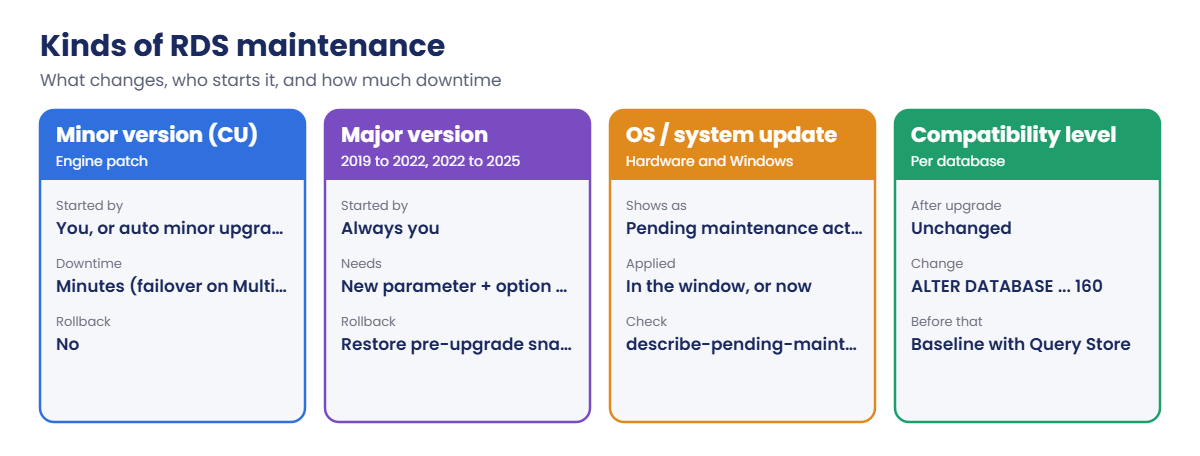
Every instance has a weekly maintenance window (30 minutes or more) and a daily backup window; they shouldn’t overlap. Minor versions (cumulative updates) are applied by you, or automatically in the window when AutoMinorVersionUpgrade is on. OS and hardware updates appear as pending maintenance actions that you can apply now or let run in the window.
Major versions (2019 to 2022, 2022 to 2025) only happen when you ask, with --allow-major-version-upgrade. If the instance uses custom parameter or option groups, you must give new ones for the target family (sqlserver-ex-16.0, option group major version 16.00).
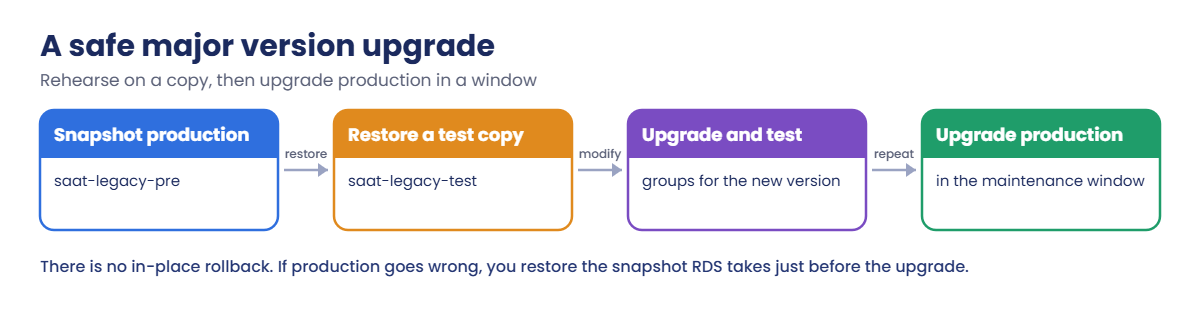
RDS takes a snapshot before and after; there is no in-place rollback, only restoring the pre-upgrade snapshot. Multi-AZ upgrades are rolling, so the outage is about one failover.
describe-db-engine-versions lists valid targets for your current version. Databases keep their compatibility level after an upgrade; raise it later, with Query Store on to catch plan regressions. Always rehearse on a restored snapshot first.
How it works, step by step
Here is the safe path for a major upgrade.
1Rehearse on a copy
Snapshot production, restore it as a test instance, and upgrade the copy with the new groups. Time it, so you know how long production will take.
2Test what matters
Run the app’s key queries, jobs and reports against the copy. Check logins, linked servers and options. Raise the compatibility level only after testing at the old one.
3Upgrade production in the window
Use the same command, the same groups and a fresh snapshot. If it goes wrong, restore the pre-upgrade snapshot and point the app at it.
4Know the kinds of maintenance
Not all maintenance is the same:
Most surprise outages come from maintenance nobody looked at: auto minor upgrades and pending OS updates applied in a window nobody remembered setting.
✅ Checkpoint: You can explain the maintenance window, minor vs major upgrades, why custom groups need replacing, and why compatibility level stays the same.
Hands-on lab: take a 2019 instance to 2022 safely
Sign in and start the SQL lab (an instance must be running to change its settings):
cd C:\aws-lab
aws login --profile saat-admin
$env:AWS_PROFILE = 'saat-admin'
$v = Get-Content C:\aws-lab\saat-vpc.json | ConvertFrom-Json
.\Start-SqlLab.ps11Check saat-sql’s maintenance settings
Paste this whole block:
$cur = aws rds describe-db-instances --db-instance-identifier saat-sql --query "DBInstances[0].EngineVersion" --output text
aws rds describe-db-instances --db-instance-identifier saat-sql --query "DBInstances[0].[EngineVersion,AutoMinorVersionUpgrade,PreferredMaintenanceWindow,PreferredBackupWindow]" --output text
aws rds describe-pending-maintenance-actions --filters "Name=db-instance-id,Values=saat-sql" --query "PendingMaintenanceActions[].PendingMaintenanceActionDetails[].[Action,Description]" --output text
aws rds describe-db-engine-versions --engine sqlserver-ex --engine-version $cur --query "DBEngineVersions[0].ValidUpgradeTarget[].[EngineVersion,IsMajorVersionUpgrade]" --output text
aws rds modify-db-instance --db-instance-identifier saat-sql --preferred-maintenance-window sun:19:30-sun:20:30 --query "DBInstance.PreferredMaintenanceWindow" --output textYou should see something like this:
16.00.4265.3.v1 True thu:21:16-thu:21:46 18:30-19:00
system-update New Operating System update is available
16.00.4275.1.v1 False
sun:19:30-sun:20:30RDS picked a random Thursday window when saat-sql was created. Now it’s Monday 1:00 to 2:00 India time, after the backup window. There’s one newer minor version and a pending OS update; with auto minor upgrade on, the minor version would arrive in a future window on its own.
2Build a “legacy” SQL Server 2019 instance
Paste this whole block. It creates 2019 groups and a 2019 Express instance with a small database (about 20 minutes):
$v19 = aws rds describe-db-engine-versions --engine sqlserver-ex --query "DBEngineVersions[?starts_with(EngineVersion, '15.00')].EngineVersion | [-1]" --output text
aws rds create-db-parameter-group --db-parameter-group-name saat-sqlserver-ex-15 --db-parameter-group-family sqlserver-ex-15.0 --description "Legacy 2019 parameters" | Out-Null
aws rds create-option-group --option-group-name saat-sqlserver-ex-15-og --engine-name sqlserver-ex --major-engine-version 15.00 --option-group-description "Legacy 2019 options" | Out-Null
aws rds create-db-instance --db-instance-identifier saat-legacy --engine sqlserver-ex --engine-version $v19 --license-model license-included --db-instance-class db.t3.micro --allocated-storage 20 --storage-type gp3 --storage-encrypted --master-username saatadmin --manage-master-user-password --db-subnet-group-name saat-db-subnets --vpc-security-group-ids $v.DbSg --no-publicly-accessible --db-parameter-group-name saat-sqlserver-ex-15 --option-group-name saat-sqlserver-ex-15-og --backup-retention-period 1 --tags Key=course,Value=saatvedha-aws Key=lesson,Value=53 --query "DBInstance.DBInstanceStatus" --output text
.\Start-SqlLab.ps1 -Db saat-legacy -LocalPort 11436
sqlcmd -S "127.0.0.1,11436" -U saatadmin -C -Q "CREATE DATABASE LegacyShop;"
sqlcmd -S "127.0.0.1,11436" -U saatadmin -C -d LegacyShop -Q "CREATE TABLE dbo.Invoices (InvoiceId int IDENTITY PRIMARY KEY, Customer nvarchar(100), Total decimal(10,2)); INSERT dbo.Invoices (Customer, Total) VALUES (N'Asha', 1200.00), (N'Ravi', 860.50); SELECT SERVERPROPERTY('ProductVersion') AS version, (SELECT compatibility_level FROM sys.databases WHERE name = 'LegacyShop') AS compat;"You should see something like this:
creating
Tunnel ready on 127.0.0.1,11436 for saatadmin (password is in SQLCMDPASSWORD for this window)
version compat
---------------- ------
15.0.4430.1 150This stands in for the old instance every company has: SQL Server 2019, custom groups, a database at compatibility level 150. It has backups on, so RDS can take its pre-upgrade snapshot later.
3Rehearse the upgrade on a snapshot copy
Paste this whole block. It snapshots saat-legacy, restores a test copy and upgrades the copy to the newest 2022 target (about 40 minutes):
aws rds create-db-snapshot --db-instance-identifier saat-legacy --db-snapshot-identifier saat-legacy-pre --query "DBSnapshot.Status" --output text
aws rds wait db-snapshot-available --db-snapshot-identifier saat-legacy-pre
aws rds restore-db-instance-from-db-snapshot --db-instance-identifier saat-legacy-test --db-snapshot-identifier saat-legacy-pre --db-instance-class db.t3.micro --db-subnet-group-name saat-db-subnets --vpc-security-group-ids $v.DbSg --no-publicly-accessible --db-parameter-group-name saat-sqlserver-ex-15 --option-group-name saat-sqlserver-ex-15-og --manage-master-user-password --query "DBInstance.DBInstanceStatus" --output text
aws rds wait db-instance-available --db-instance-identifier saat-legacy-test
$target = aws rds describe-db-engine-versions --engine sqlserver-ex --engine-version $v19 --query "DBEngineVersions[0].ValidUpgradeTarget[?IsMajorVersionUpgrade && starts_with(EngineVersion, '16.00')].EngineVersion | [-1]" --output text
$start = Get-Date
aws rds modify-db-instance --db-instance-identifier saat-legacy-test --engine-version $target --allow-major-version-upgrade --db-parameter-group-name saat-sqlserver-ex-16 --option-group-name saat-sqlserver-ex-16-og --apply-immediately --query "DBInstance.PendingModifiedValues.EngineVersion" --output text
Start-Sleep 60
aws rds wait db-instance-available --db-instance-identifier saat-legacy-test
"upgrade took $([int]((Get-Date) - $start).TotalMinutes) minutes"You should see something like this:
creating
creating
16.00.4275.1.v1
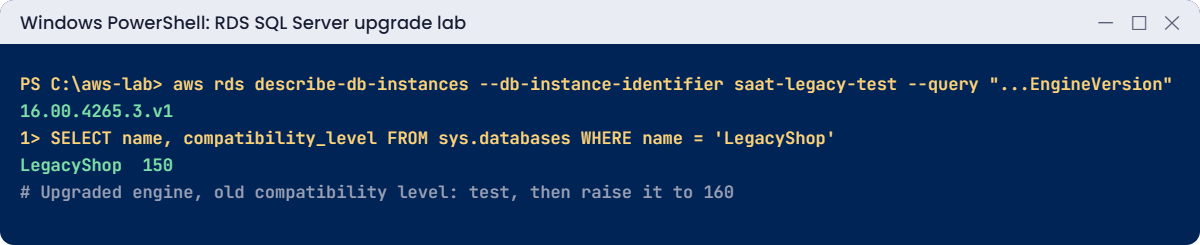
upgrade took 24 minutesThe copy is upgraded, and you now know production will need roughly the same time plus a margin. It’s on the 2022 groups you built for saat-sql, so it also gets forced TLS and your backup option.
4Test the copy, then raise the compatibility level
Paste this whole block:
.\Start-SqlLab.ps1 -Db saat-legacy-test -LocalPort 11437
sqlcmd -S "127.0.0.1,11437" -U saatadmin -C -d LegacyShop -Q "SELECT SERVERPROPERTY('ProductVersion') AS version, (SELECT compatibility_level FROM sys.databases WHERE name = 'LegacyShop') AS compat, (SELECT COUNT(*) FROM dbo.Invoices) AS invoices;"
sqlcmd -S "127.0.0.1,11437" -U saatadmin -C -Q "ALTER DATABASE LegacyShop SET QUERY_STORE = ON; ALTER DATABASE LegacyShop SET COMPATIBILITY_LEVEL = 160; SELECT name, compatibility_level FROM sys.databases WHERE name = 'LegacyShop';"You should see something like this:
version compat invoices
---------------- ------ --------
16.0.4275.1 150 2
name compatibility_level
----------- -------------------
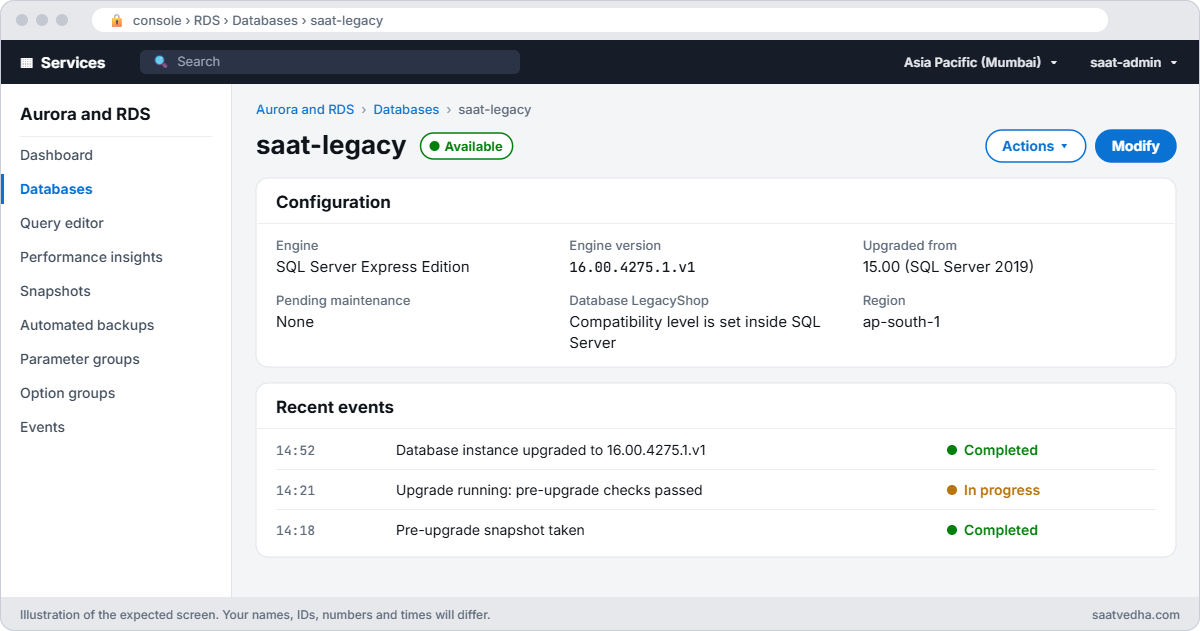
LegacyShop 160The engine is 2022 but the database stayed at 150 until you changed it, exactly as documented. In real life you’d run the app’s workload at 150 first, capture a baseline in Query Store, then switch to 160 and compare.
✅ Checkpoint: saat-sql’s maintenance window is sun:19:30-sun:20:30, saat-legacy runs 2019, the test copy runs 2022 with LegacyShop at 160, and you know how long the upgrade took.
Break It, Then Fix It
Now upgrade “production” (saat-legacy). The first two attempts fail the way they do for most teams.
1Break it: upgrade without a new parameter group
Try the upgrade with only the version:
aws rds modify-db-instance --db-instance-identifier saat-legacy --engine-version $target --allow-major-version-upgrade --apply-immediatelyYou’ll get an error like this:
An error occurred (InvalidParameterCombination) when calling the ModifyDBInstance operation: Current Parameter Group (saat-sqlserver-ex-15) is non-default. You need to explicitly specify a new Parameter Group in this case (default or custom)A parameter group belongs to one family (sqlserver-ex-15.0), so it can’t follow the instance to 2022. RDS won’t guess which settings you want there. Fix: give a group for the new family; you’ll add it in the next step.
2Break it: the old option group
Try again with a 2022 parameter group but no option group:
aws rds modify-db-instance --db-instance-identifier saat-legacy --engine-version $target --allow-major-version-upgrade --db-parameter-group-name saat-sqlserver-ex-16 --apply-immediatelyYou’ll get an error like this:
An error occurred (InvalidParameterCombination) when calling the ModifyDBInstance operation: The option group saat-sqlserver-ex-15-og is not valid for the requested engine version. Specify an option group for major engine version 16.00.
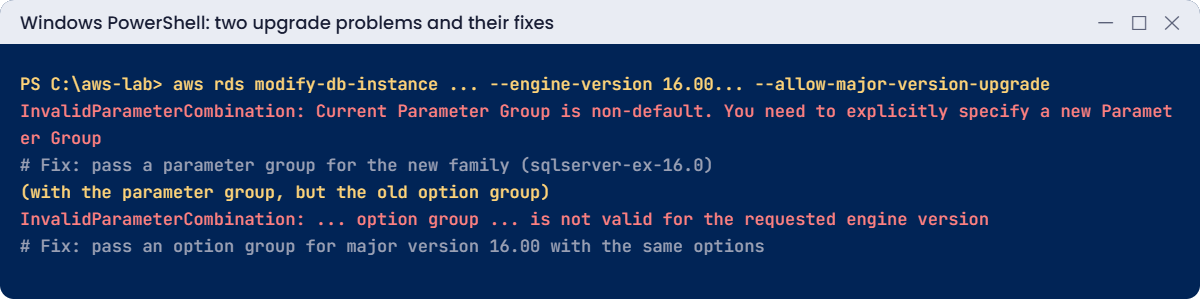
Option groups are tied to a major version too. Teams with native backup, TDE or SSRS options must rebuild the same options in a 16.00 group before the window. Fix: pass both groups, then wait for the upgrade:
aws rds modify-db-instance --db-instance-identifier saat-legacy --engine-version $target --allow-major-version-upgrade --db-parameter-group-name saat-sqlserver-ex-16 --option-group-name saat-sqlserver-ex-16-og --apply-immediately --query "DBInstance.PendingModifiedValues.EngineVersion" --output text
Start-Sleep 60
aws rds wait db-instance-available --db-instance-identifier saat-legacy
aws rds describe-db-instances --db-instance-identifier saat-legacy --query "DBInstances[0].[EngineVersion,DBParameterGroups[0].DBParameterGroupName,OptionGroupMemberships[0].OptionGroupName]" --output text
aws rds describe-db-snapshots --db-instance-identifier saat-legacy --snapshot-type automated --query "DBSnapshots[].[DBSnapshotIdentifier,EngineVersion]" --output textYou should see something like this:
16.00.4275.1.v1
16.00.4275.1.v1 saat-sqlserver-ex-16 saat-sqlserver-ex-16-og
rds:saat-legacy-2026-10-20-13-41 15.00.4430.1.v1
rds:saat-legacy-2026-10-20-14-08 16.00.4275.1.v1Production is on 2022, and RDS kept a snapshot from just before (still on 15.00) as your way back. Restoring that snapshot to a new instance is the only rollback.
Now clean up. saat-sql keeps its new maintenance window:
aws rds delete-db-instance --db-instance-identifier saat-legacy-test --skip-final-snapshot --delete-automated-backups | Out-Null
aws rds delete-db-instance --db-instance-identifier saat-legacy --skip-final-snapshot --delete-automated-backups | Out-Null
aws rds delete-db-snapshot --db-snapshot-identifier saat-legacy-pre | Out-Null
aws rds wait db-instance-deleted --db-instance-identifier saat-legacy-test
aws rds wait db-instance-deleted --db-instance-identifier saat-legacy
aws rds delete-option-group --option-group-name saat-sqlserver-ex-15-og
aws rds delete-db-parameter-group --db-parameter-group-name saat-sqlserver-ex-15
.\Stop-SqlLab.ps1✅ Checkpoint: You fixed both upgrade errors by giving 2022 parameter and option groups, and saat-legacy is on 2022 with a 15.00 snapshot taken before. Both legacy instances, the manual snapshot and the 2019 groups are gone, and saat-sql is stopping.
This happened at work
The Sunday upgrade that ran into Monday
A retailer planned a SQL Server 2017 to 2019 upgrade on RDS for a Sunday at 2 a.m. They had tested it on a copy weeks earlier, and it took 25 minutes.
On the night, the command failed: the production instance had a custom option group with the SSRS option, added after the rehearsal. Building a new 2019 option group with SSRS, its certificate and its settings took three hours. The upgrade itself then took 25 minutes, finishing as the first stores opened.
Their checklist now compares production’s parameter and option groups with the rehearsal copy the day before, and the new groups are created and checked before the window, not during it.
Common mistakes and troubleshooting
| Mistake | What happens | What to do |
|---|---|---|
| Ignoring the default maintenance window | Restart at a random busy time | Set a quiet window that doesn’t overlap backups |
| No new parameter group | InvalidParameterCombination: non-default group | Create a group for the new family first |
| Old option group | Upgrade refused | Recreate the options in a group for the new major version |
| No rehearsal on a copy | Unknown duration, surprises in production | Snapshot, restore, upgrade, time it |
| Raising compatibility level at once | Plan regressions on day one | Test at the old level, use Query Store, then raise |
| Backup retention 0 | No pre-upgrade snapshot, no way back | Keep backups on; take a manual snapshot too |
Interview questions
Click a question to open it. Each one is written the way an interviewer would ask it. Under it you will see why they ask it and one way you could answer, in your own words.
Fresher level
1. Can you explain the difference between a minor and a major upgrade on RDS SQL Server?
Why they ask this: They want to check that you know which upgrades are routine and which ones need planning and testing.
How you might answer: A minor upgrade is a cumulative update inside the same version, and RDS can apply it automatically. A major upgrade moves you to a new version, like 2019 to 2022.
RDS never does a major upgrade on its own. You have to start it, with --allow-major-version-upgrade in the CLI.
2. What is the maintenance window on RDS, and how would you pick a time for it?
Why they ask this: They want to see that you understand when RDS can touch your instance, and that you think about users and backups when choosing the time.
How you might answer: It’s a weekly period when RDS applies pending updates, like OS patches or automatic minor upgrades. I pick a quiet time for the business, for example early Sunday morning.
I also make sure it doesn’t overlap the backup window.
3. A major upgrade went badly. Can you roll it back?
Why they ask this: They want to know you understand the risk before you start, and that you know the real way back.
How you might answer: Not in place, there’s no undo button. RDS takes a snapshot before the upgrade, and I usually take my own as well.
To go back, I restore that snapshot to a new instance and point the app to it.
2–5 years experience
4. Your major upgrade fails with “Current Parameter Group is non-default”. What’s going on?
Why they ask this: They want to see if you understand that parameter groups are tied to a version family. This error catches many people on their first upgrade.
How you might answer: Custom parameter groups belong to one engine family, so the old one can’t be used on the new version. I create a new parameter group for the target family with the same settings.
Then I pass it in the upgrade command, together with an option group for the new major version.
5. You’ve upgraded RDS SQL Server to a new version. What happens to the compatibility level of the databases?
Why they ask this: They want to know you understand that the engine version and the database behaviour are two separate steps, and how to change them safely.
How you might answer: The databases keep their old compatibility level, so the query behaviour stays the same at first. I raise the level only after testing.
Before I raise it, I let Query Store capture a baseline. If a query gets slower afterwards, I can see it and fix it quickly.
6. You see pending OS updates on several RDS instances. How do you handle them?
Why they ask this: They want to see that you know the commands and that you warn people about the short failover on Multi-AZ.
How you might answer: First I list them with describe-pending-maintenance-actions. Then I either let them run in the maintenance window, or apply them straight away with apply-pending-maintenance-action.
On Multi-AZ instances I expect a failover, so I let the app team know about the short blip.
Senior level
7. You find 40 RDS SQL Server instances still on 2017. How would you plan their upgrades?
Why they ask this: They want to see that you can run an upgrade programme across many teams, with testing, waves and a rollback plan.
How you might answer: I’d start with an inventory of versions, features and parameter and option groups, then build the target groups in IaC. Each app gets a rehearsal on a snapshot copy, and we record how long it takes.
Then I schedule waves by how critical the apps are, use Multi-AZ to reduce downtime, and agree a rollback plan. Compatibility level changes are tracked as a separate step.
8. How would you keep RDS minor versions up to date without surprising anyone?
Why they ask this: They want to see a clear, repeatable patch policy that catches problems before they reach production.
How you might answer: I turn on auto minor upgrade in non-production first. Production follows a week or two later, in fixed maintenance windows.
Everyone gets notifications from RDS events, and each production upgrade has a change record.
Quick quiz
Q1. Which flag is needed for a major upgrade?
--force--allow-major-version-upgrade--apply-later--no-reboot
Show answer
B — Major upgrades must be explicit.
Q2. Why did the first upgrade attempt fail?
- Wrong password
- Custom parameter group for the old family
- Express edition
- No snapshot
Show answer
B — Give a group for sqlserver-ex-16.0.
Q3. What happens to a database’s compatibility level after upgrade?
- Raised automatically
- Stays the same
- Set to 100
- Database is dropped
Show answer
B — You raise it yourself.
Q4. What is the rollback for a major upgrade?
- Downgrade command
- Restore the pre-upgrade snapshot
- Reboot
- Change the option group
Show answer
B — No in-place rollback.
Q5. Where do OS updates show up?
- CloudTrail
- Pending maintenance actions
- S3
- SQL error log
Show answer
B — describe-pending-maintenance-actions.
Quick recap
- Set a quiet maintenance window that doesn’t overlap backups.
- Minor versions can be automatic; major ones are always yours to start.
- Major upgrades need parameter and option groups for the new version.
- Rehearse on a snapshot copy and time it; rollback means restoring the snapshot.
- Compatibility level stays the same until you raise it after testing.
Next lesson
Lesson 54: High availability: RDS Multi-AZ for SQL Server → You’ll see how Multi-AZ fails over, how long it takes, and what clients need to survive it.
Further reading: RDS SQL Server upgrade
Want to go deeper into RDS SQL Server upgrade? Read Upgrading the Microsoft SQL Server DB engine and Maintaining a DB instance. You can also see the full plan for this course on the AWS Cloud Administration course page.
