Native Restore Failures on RDS SQL Server
-
Phase 0: Before you start
-
Phase 1: The foundation
-
Phase 2: Operations and security
-
Phase 3: SQL Server on AWS
-
Phase 4: Troubleshooting step by step
-
Phase 5: Final project and career
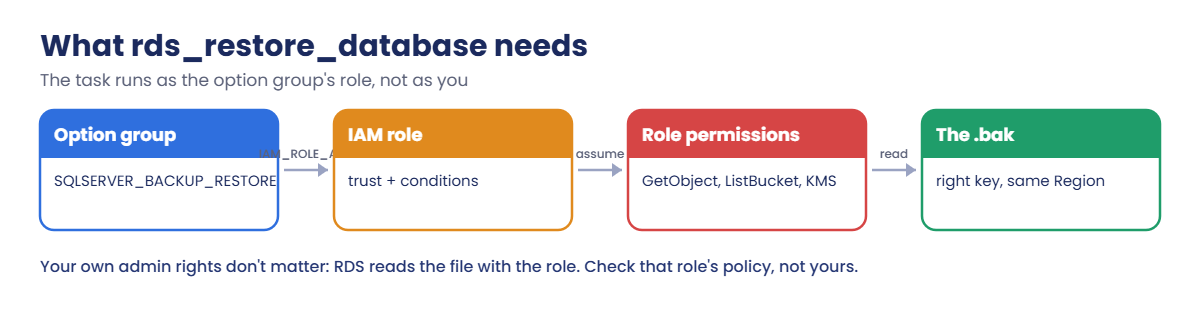
Native restores fail in the middle of migrations, usually at night, with a task that just says ERROR. Solving an RDS restore database error is about remembering that RDS reads your .bak file using the option group’s IAM role, not your permissions, and then checking that role, its trust, the file and the bucket in order.
You’ll build Test-NativeRestore.ps1, which checks everything rds_restore_database needs, restore a database successfully, and read the full task_info. Then you’ll break the restore twice, with a role that can’t read the file and a key with a typo, and fix both from the evidence.
| Time | You need | By the end you can |
|---|---|---|
| 60 minutes | Lesson 46 done (saat-rds-backup-role, the SQLSERVER_BACKUP_RESTORE option, saatshop-full.bak in your backup bucket), Start-SqlLab.ps1, Windows PowerShell 5.1, signed in as saat-admin. Cost: a few cents for saat-sql running about an hour. | Read rds_task_status in full, check the option group role, its trust conditions and S3 permissions with the policy simulator, confirm the backup file and its Region, and fix Access Denied and missing-key restore failures. |
What it is, in one line
An RDS restore database error is a failed rds_restore_database task, almost always because the option group’s role can’t read the backup file, the file path is wrong, or something about the database or option is missing.
In Simple Words
Sending a courier
You don’t fetch the parcel yourself; you send a courier with a letter of permission. If the warehouse doesn’t accept the courier’s letter, the parcel doesn’t come, however important you are.
The courier also needs the exact shelf number. “Shelf B-12” when it’s really “B-21” means a wasted trip.
RDS’s restore task is that courier. The IAM role is its letter, and the S3 key is the shelf number.
Engineer's View
What the restore task depends on
The instance’s option group must include SQLSERVER_BACKUP_RESTORE with an IAM_ROLE_ARN. That role must trust rds.amazonaws.com; if the trust uses aws:SourceArn, it must list this instance or its option group (a restored copy with a new name often isn’t listed). Its policy needs s3:GetObject on the file, s3:ListBucket and s3:GetBucketLocation on the bucket, plus kms:Decrypt if the file is SSE-KMS or was backed up with @kms_master_key_arn.
The bucket must be in the instance’s Region, and the key must match exactly, including case (or use * for multi-file backups). Database-level rules still apply: no existing database with that name, Express restores up to 10 GB, no FILESTREAM, and a backup no newer than the instance’s SQL Server version.
rds_task_status shows task_info with the reason, often over several lines; reading it through a tool that keeps line breaks saves time. IAM’s policy simulator can test the role’s permissions on the exact object ARN.
How it works, step by step
Here is the order to work through a failed restore.
1Read the whole task_info
“Access Denied”, “does not exist” and version messages each point somewhere different. Don’t stop at the word ERROR.
2Check the role, not yourself
Find the role in the option group, check its trust and conditions, then simulate its S3 permissions on the exact file.
3Check the file and the database
Exact key, same Region, encryption, size limits, and whether the target database name already exists.
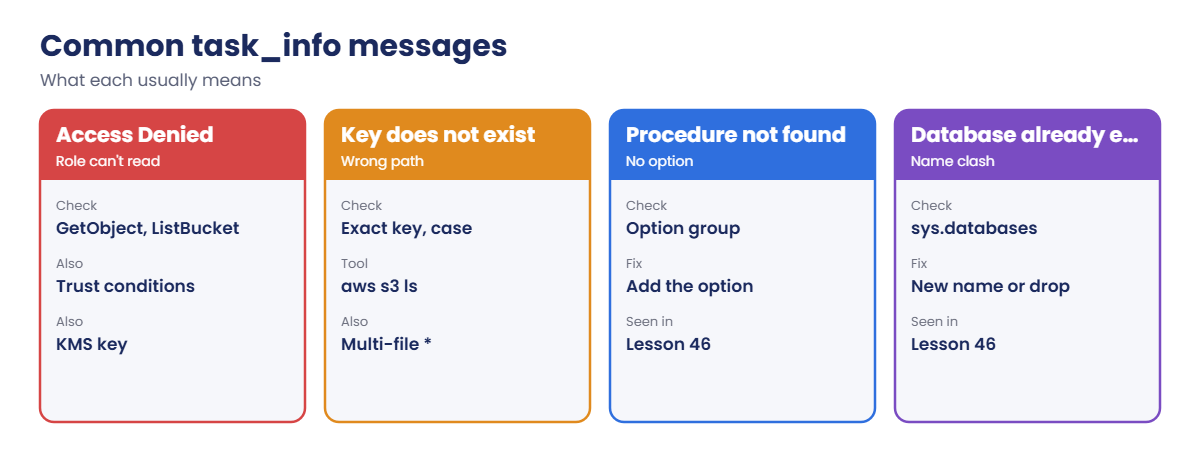
4Know the common messages
Most failures fall into a few groups:
Keep a checklist script for this. Restores fail most often during migrations, when people are tired and in a hurry.
✅ Checkpoint: You can explain why the option group’s role matters more than your permissions, and list what the role needs for SSE-S3 and SSE-KMS backups.
Hands-on lab: pre-flight, restore, break, fix
Sign in, start the SQL lab and add the helpers. Wait-Restore reads rds_task_status through .NET so task_info keeps all its lines:
cd C:\aws-lab
aws login --profile saat-admin
$env:AWS_PROFILE = 'saat-admin'
.\Start-SqlLab.ps1
$acct = aws sts get-caller-identity --query Account --output text
$bak = "saat-sqlbak-$acct-ap-south-1-an"
function Get-SqlPw([string]$Db) {
$a = aws rds describe-db-instances --db-instance-identifier $Db --query "DBInstances[0].MasterUserSecret.SecretArn" --output text
(aws secretsmanager get-secret-value --secret-id $a --query SecretString --output text | ConvertFrom-Json).password
}
$csb = New-Object System.Data.SqlClient.SqlConnectionStringBuilder
$csb['Data Source'] = '127.0.0.1,11433'; $csb['User ID'] = 'saatadmin'; $csb['Password'] = (Get-SqlPw saat-sql); $csb['Encrypt'] = $true; $csb['TrustServerCertificate'] = $true
function Wait-Restore([string]$Db) {
do {
Start-Sleep 15
$cn = New-Object System.Data.SqlClient.SqlConnection $csb.ConnectionString; $cn.Open()
$cm = $cn.CreateCommand(); $cm.CommandText = 'exec msdb.dbo.rds_task_status @db_name = @db'; [void]$cm.Parameters.AddWithValue('@db', $Db)
$t = New-Object System.Data.DataTable; $t.Load($cm.ExecuteReader()); $cn.Close()
$row = $t.Rows | Sort-Object { [int]$_.task_id } | Select-Object -Last 1
} until ($row.lifecycle -in 'SUCCESS', 'ERROR', 'CANCELLED')
"$($row.task_type) $($row.lifecycle)"
($row.task_info -replace '\s+', ' ').Trim()
}
function Start-Restore([string]$Key, [string]$Name) {
sqlcmd -S "127.0.0.1,11433" -U saatadmin -C -Q "exec msdb.dbo.rds_restore_database @restore_db_name='$Name', @s3_arn_to_restore_from='arn:aws:s3:::$bak/$Key';" | Out-Null
Wait-Restore $Name
}
aws s3 ls "s3://$bak/" | Select-String '\.bak'You should see something like this:
2026-10-20 10:12:41 3215360 saatshop-full.bak
2026-10-20 10:14:02 118784 saatshop-diff.bak1Check everything the restore needs
Paste this whole block. Test-NativeRestore.ps1 stays in C:\aws-lab:
$tnr = @'
param([string]$Db = 'saat-sql', [Parameter(Mandatory)][string]$S3Arn)
function Show([bool]$Ok, [string]$Text) { if ($Ok) { "[ OK ] $Text" } else { "[FAIL] $Text" } }
$bucket, $key = ($S3Arn -replace '^arn:aws:s3:::', '') -split '/', 2
$r = aws rds describe-db-instances --db-instance-identifier $Db --query "DBInstances[0]" --output json | ConvertFrom-Json
$region = ($r.DBInstanceArn -split ':')[3]
$og = $r.OptionGroupMemberships[0].OptionGroupName
$roleArn = aws rds describe-option-groups --option-group-name $og --query "OptionGroupsList[0].Options[?OptionName=='SQLSERVER_BACKUP_RESTORE'] | [0].OptionSettings[?Name=='IAM_ROLE_ARN'] | [0].Value" --output text
Show ($roleArn -and $roleArn -ne 'None') "Option group $og has SQLSERVER_BACKUP_RESTORE with role $roleArn"
if (-not $roleArn -or $roleArn -eq 'None') { return }
$roleName = ($roleArn -split '/')[-1]
$trust = aws iam get-role --role-name $roleName --query Role.AssumeRolePolicyDocument --output json | ConvertFrom-Json
$st = @($trust.Statement | Where-Object { $_.Principal.Service -contains 'rds.amazonaws.com' -and $_.Effect -eq 'Allow' })
Show ($st.Count -gt 0) "Role trusts rds.amazonaws.com"
$src = @($st.Condition.StringEquals.'aws:SourceArn' | Where-Object { $_ })
$ogArn = "arn:aws:rds:$($region):$(($r.DBInstanceArn -split ':')[4]):og:$og"
Show (($src.Count -eq 0) -or ($src -contains $r.DBInstanceArn) -or ($src -contains $ogArn)) "Trust condition covers this instance or its option group"
$loc = aws s3api get-bucket-location --bucket $bucket --query LocationConstraint --output text 2>$null
Show ($loc -eq $region) "Bucket $bucket is in $loc (instance is in $region)"
$head = aws s3api head-object --bucket $bucket --key $key --output json 2>$null | ConvertFrom-Json
Show ([bool]$head) "Object $key exists ($([math]::Round($head.ContentLength / 1MB, 1)) MB, encryption $($head.ServerSideEncryption))"
foreach ($t in @(@('s3:GetObject', "arn:aws:s3:::$bucket/$key"), @('s3:ListBucket', "arn:aws:s3:::$bucket"), @('s3:GetBucketLocation', "arn:aws:s3:::$bucket"))) {
$d = aws iam simulate-principal-policy --policy-source-arn $roleArn --action-names $t[0] --resource-arns $t[1] --query "EvaluationResults[0].EvalDecision" --output text
Show ($d -eq 'allowed') "Role policy: $($t[0]) is $d"
}
if ($head.ServerSideEncryption -eq 'aws:kms') { " KMS-encrypted object: the role also needs kms:Decrypt on $($head.SSEKMSKeyId)" }
'@
$tnr | Set-Content C:\aws-lab\Test-NativeRestore.ps1
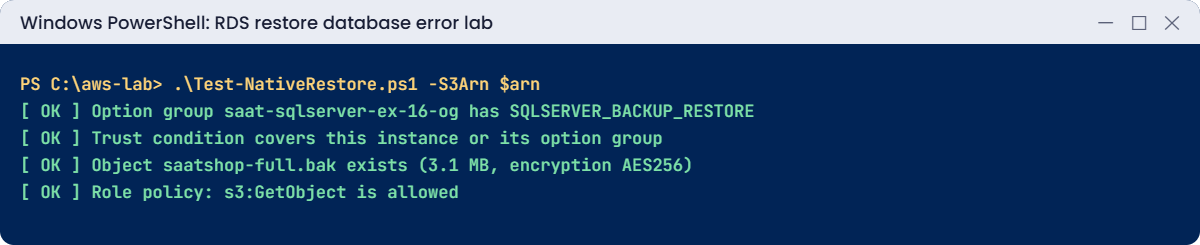
.\Test-NativeRestore.ps1 -S3Arn "arn:aws:s3:::$bak/saatshop-full.bak"You should see something like this:
[ OK ] Option group saat-sqlserver-ex-16-og has SQLSERVER_BACKUP_RESTORE with role arn:aws:iam::111122223333:role/saat-rds-backup-role
[ OK ] Role trusts rds.amazonaws.com
[ OK ] Trust condition covers this instance or its option group
[ OK ] Bucket saat-sqlbak-111122223333-ap-south-1-an is in ap-south-1 (instance is in ap-south-1)
[ OK ] Object saatshop-full.bak exists (3.1 MB, encryption AES256)
[ OK ] Role policy: s3:GetObject is allowed
[ OK ] Role policy: s3:ListBucket is allowed
[ OK ] Role policy: s3:GetBucketLocation is allowedEvery link in the chain checks out before you run anything. The simulator tests the role you built in Lesson 46, the one RDS will actually use.
2Restore and read the full task_info
Paste this whole block:
Start-Restore 'saatshop-full.bak' 'SaatShopTest'
sqlcmd -S "127.0.0.1,11433" -U saatadmin -C -h -1 -Q "SET NOCOUNT ON; SELECT COUNT(*) FROM SaatShopTest.dbo.Orders"You should see something like this:
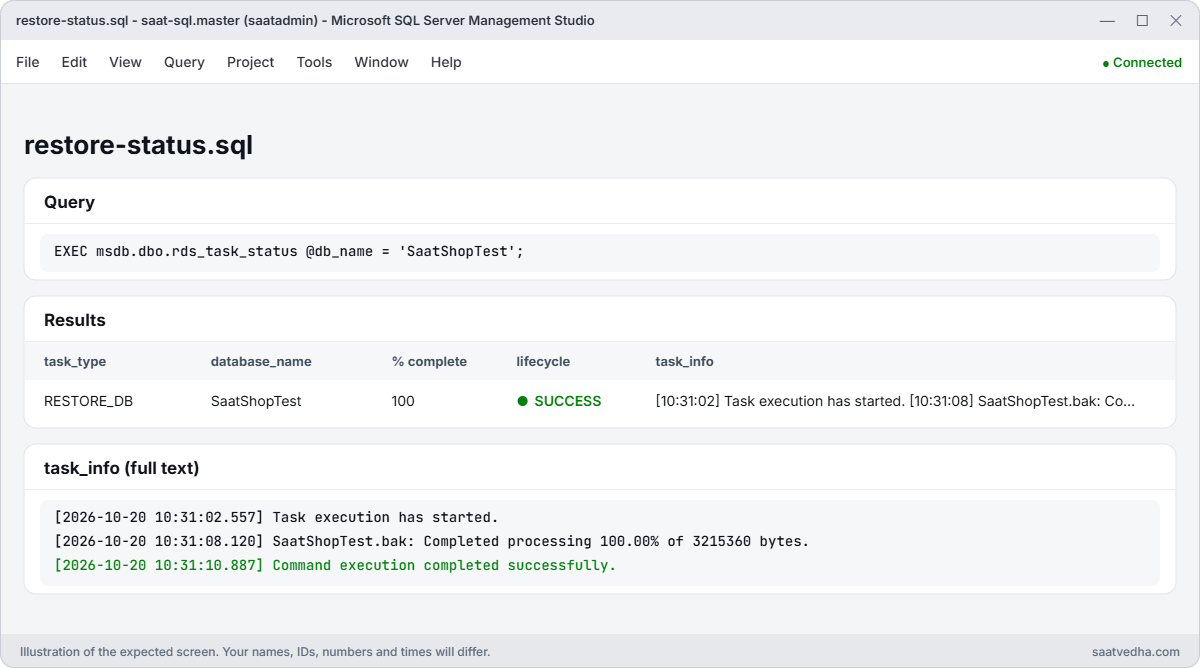
RESTORE_DB SUCCESS
[2026-10-20 10:31:02.557] Task execution has started. [2026-10-20 10:31:08.120] SaatShopTest.bak: Completed processing 100.00% of 3215360 bytes. [2026-10-20 10:31:10.887] Command execution completed successfully.
3task_info is a small log, with time stamps for each stage. When a restore fails, the last lines say why.
3Clean the test database
Drop it so the name is available for the breaks:
sqlcmd -S "127.0.0.1,11433" -U saatadmin -C -Q "DROP DATABASE SaatShopTest;"You should see no output.
✅ Checkpoint: Test-NativeRestore.ps1 shows all OK, the restore of SaatShopTest succeeded with 3 orders, and the full task_info shows each stage.
Break It, Then Fix It
Two failures you’ll see in real migrations.
1Break it: the role can’t read the file
Replace the role’s policy with one that forgot s3:GetObject, as a hurried “least privilege” edit might, then restore:
@{ Version = '2012-10-17'; Statement = @(
@{ Effect = 'Allow'; Action = @('s3:ListBucket', 's3:GetBucketLocation'); Resource = "arn:aws:s3:::$bak" },
@{ Effect = 'Allow'; Action = @('s3:PutObject', 's3:ListMultipartUploadParts', 's3:AbortMultipartUpload'); Resource = "arn:aws:s3:::$bak/*" }) } | ConvertTo-Json -Depth 5 | Set-Content rds-backup-s3.json
aws iam put-role-policy --role-name saat-rds-backup-role --policy-name saat-sqlbak-s3 --policy-document file://rds-backup-s3.json
Start-Sleep 20
Start-Restore 'saatshop-full.bak' 'SaatShopTest'
.\Test-NativeRestore.ps1 -S3Arn "arn:aws:s3:::$bak/saatshop-full.bak" | Select-String 'FAIL'You’ll get something like this:
RESTORE_DB ERROR
[2026-10-20 10:40:15.003] Task execution has started. [2026-10-20 10:40:16.441] Aborted the task because of a task failure or a concurrent RESTORE_DB request. [2026-10-20 10:40:16.502] Task has been aborted [2026-10-20 10:40:16.503] Access Denied
[FAIL] Role policy: s3:GetObject is implicitDeny“Access Denied” comes from S3, refusing the role. You, as admin, could read the file all day; it makes no difference.
Backups keep working with this policy (PutObject is still there), which is why this breaks only when someone finally needs a restore. Fix: put back the full policy, then restore:
@{ Version = '2012-10-17'; Statement = @(
@{ Effect = 'Allow'; Action = @('s3:ListBucket', 's3:GetBucketLocation'); Resource = "arn:aws:s3:::$bak" },
@{ Effect = 'Allow'; Action = @('s3:GetObjectAttributes', 's3:GetObject', 's3:PutObject', 's3:ListMultipartUploadParts', 's3:AbortMultipartUpload'); Resource = "arn:aws:s3:::$bak/*" }) } | ConvertTo-Json -Depth 5 | Set-Content rds-backup-s3.json
aws iam put-role-policy --role-name saat-rds-backup-role --policy-name saat-sqlbak-s3 --policy-document file://rds-backup-s3.json
Start-Sleep 20
Start-Restore 'saatshop-full.bak' 'SaatShopTest'You should see something like this (first line):
RESTORE_DB SUCCESS2Break it: a typo in the key
Drop the test database, then restore with one letter missing from the file name:
sqlcmd -S "127.0.0.1,11433" -U saatadmin -C -Q "DROP DATABASE SaatShopTest;"
Start-Restore 'saatshop-ful.bak' 'SaatShopTest'
.\Test-NativeRestore.ps1 -S3Arn "arn:aws:s3:::$bak/saatshop-ful.bak" | Select-String 'FAIL'You’ll get something like this:
RESTORE_DB ERROR
[2026-10-20 10:52:40.112] Task execution has started. [2026-10-20 10:52:41.020] Aborted the task because of a task failure or a concurrent RESTORE_DB request. [2026-10-20 10:52:41.077] Task has been aborted [2026-10-20 10:52:41.078] The specified key does not exist.
[FAIL] Object saatshop-ful.bak exists (0 MB, encryption )
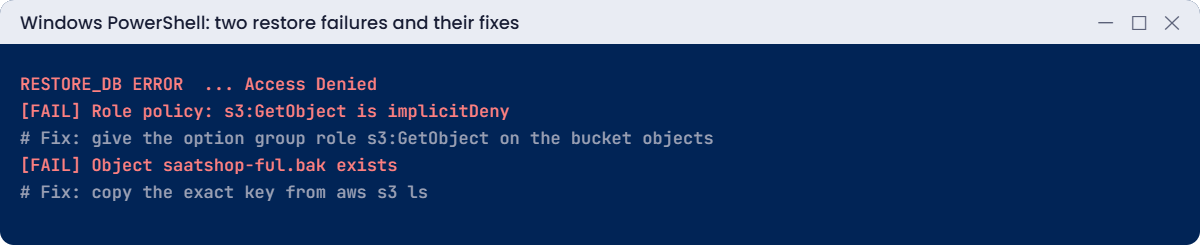
Keys are exact and case-sensitive; “SaatShop-Full.bak” fails the same way. Because the role has ListBucket, S3 can say “does not exist” instead of a vaguer Access Denied. Fix: copy the key from a listing, then restore:
$key = (aws s3api list-objects-v2 --bucket $bak --prefix saatshop-f --query "Contents[0].Key" --output text)
Start-Restore $key 'SaatShopTest'You should see something like this (first line):
RESTORE_DB SUCCESSNow clean up. The bucket, role and option stay as they were in Lesson 46:
sqlcmd -S "127.0.0.1,11433" -U saatadmin -C -Q "DROP DATABASE SaatShopTest;"
Remove-Item rds-backup-s3.json
.\Stop-SqlLab.ps1✅ Checkpoint: You fixed an Access Denied restore by restoring s3:GetObject to the option group role and a missing-key restore by copying the exact key. SaatShopTest is gone, the role policy is back to full, and saat-sql is stopping.
This happened at work
The migration weekend that failed at 2 a.m.
A school group was moving 40 databases to RDS with native backups. All test restores had worked. At 2 a.m. on the migration night, every restore failed with Access Denied.
The backups had been taken by the on-premises team using a new customer managed KMS key, at the security team’s request, two days earlier. The option group’s role could read the bucket but had no kms:Decrypt on the new key. The DBAs spent an hour checking bucket policies, because the restore task’s message didn’t mention KMS.
Adding kms:Decrypt for the role took two minutes and the migration finished by morning. Their runbook now has a pre-flight checklist run against the real files the day before, including the encryption and key of every backup.
Common mistakes and troubleshooting
| Mistake | What happens | What to do |
|---|---|---|
| Checking your own permissions | Everything looks fine; restore still fails | Check the option group role |
| Role without s3:GetObject | Access Denied (backups may still work) | GetObject on bucket objects |
| Missing kms:Decrypt for KMS backups | Access Denied with no KMS hint | Grant kms:Decrypt on the key to the role |
| Trust SourceArn not covering a new instance | Role can’t be assumed | List the instance or option group ARN |
| Typos or wrong case in the key | Key does not exist | Copy keys from aws s3 ls |
| Reading only the first line of task_info | Missing the actual reason | Read every line; use a tool that keeps them |
Interview questions
Click a question to open it. Each one is written the way an interviewer would ask it. Under it you will see why they ask it and one way you could answer, in your own words.
Fresher level
1. When you run rds_restore_database, whose permissions does RDS use to read the backup from S3?
Why they ask this: They want to check that you know RDS reads S3 with its own role, which is the key to fixing most restore errors.
How you might answer: RDS uses the IAM role set in the SQLSERVER_BACKUP_RESTORE option, in the option group attached to the instance. It never uses my own login or permissions.
So when a restore fails on access, that role is the first thing I look at.
2. A native restore on RDS failed. Where would you look to find out why?
Why they ask this: They want to see that you know where RDS keeps the details of a restore, instead of guessing from a short error.
How you might answer: I run exec msdb.dbo.rds_task_status and read the task_info column. It logs each stage of the task and the exact error.
Most of the time, the reason is written right there in plain words.
3. What S3 permissions does the restore role need?
Why they ask this: They want to see that you can write a working policy for the role, including the encryption part people often forget.
How you might answer: The role needs s3:GetObject on the backup files, and s3:ListBucket and s3:GetBucketLocation on the bucket.
If the backups are encrypted with KMS, it also needs kms:Decrypt on the key.
2–5 years experience
4. A restore fails with Access Denied, but you can download the same backup file yourself. What’s going on?
Why they ask this: They want to see that you understand your own access has nothing to do with what RDS can reach.
How you might answer: RDS reads the file with the option group role, so my own access doesn’t matter here. I check that role’s policy, the conditions in its trust policy like aws:SourceArn, and the KMS permissions.
Usually one of those three is missing something.
5. Restores work fine on saat-sql, but fail on a copy you restored from a snapshot. What would you suspect?
Why they ask this: They want to see if you understand trust policy conditions, a subtle cause that catches people after they clone an instance.
How you might answer: I’d suspect the role’s trust policy. It uses aws:SourceArn and lists only the original instance, so the new copy isn’t trusted.
The fix is to add the new instance or option group ARN to that condition.
6. Before a migration with native backups, which restore limits would you check?
Why they ask this: They want to see that you plan ahead and catch blockers before the night of the migration.
How you might answer: I check the bucket is in the same Region, and each file is at most 5 TB, with up to 10 files. The total must stay under 64 TiB, or 10 GB on Express, and FILESTREAM isn’t supported.
I also check version compatibility, that database names are unique, and that only two tasks can run at once.
Senior level
7. You have to migrate 100 databases with native backups. How would you design a pre-flight check?
Why they ask this: They want to see that you can automate checks at scale and remove surprises before cutover.
How you might answer: I’d write a script that checks every file: the option, role and trust policy, simulated permissions, and that the object exists. It would also compare sizes with the edition limits, check encryption and KMS grants, the Region, and name clashes.
I’d run it the day before and again just before cutover.
8. How would you automate native restores safely?
Why they ask this: They want to see that you build automation with good error handling and clear limits on what it is allowed to do.
How you might answer: I’d use Step Functions or SSM Automation to call rds_restore_database over a secure connection, then poll rds_task_status. It would read task_info for errors and alert us when something fails.
One rule I’d never break: the automation must not drop an existing database on its own.
Quick quiz
Q1. Whose permissions does RDS use to read the .bak?
- Yours
- The option group role
- The bucket owner
- AWS Support
Show answer
B — IAM_ROLE_ARN in the option.
Q2. Backups work but restores fail with Access Denied. Likely cause?
- Wrong Region
- Role lacks s3:GetObject
- Database exists
- Express limit
Show answer
B — PutObject is enough for backups.
Q3. Where do you read the restore failure reason?
- CloudTrail
- task_info in rds_task_status
- S3 access logs
- The SQL error log only
Show answer
B — It logs each stage.
Q4. What does “The specified key does not exist” mean?
- Bad role
- Wrong file path or case
- KMS
- Option missing
Show answer
B — Keys are exact.
Q5. Which tool tests the role’s permission on the exact file?
- aws s3 ls
- iam simulate-principal-policy
- sqlcmd
- ping
Show answer
B — Use the object ARN.
Quick recap
- RDS reads backups with the option group’s role, not with your rights.
- The role needs trust, GetObject, ListBucket, GetBucketLocation and maybe kms:Decrypt.
- Read every line of task_info; the reason is near the end.
- Keys are exact and case-sensitive; the bucket must be in the same Region.
- Run a pre-flight check against the real files before migration night.
Next lesson
Lesson 64: DMS task stuck or failing during CDC → You’ll diagnose DMS tasks that stall or fail during CDC: log truncation, duplicate keys and table preparation settings.
Further reading: RDS restore database error
Want to go deeper into RDS restore database error? Read Using native backup and restore and Troubleshooting native backup and restore. You can also see the full plan for this course on the AWS Cloud Administration course page.
