Always On Availability Groups Across AZs on EC2

When RDS Multi-AZ isn’t enough (you need a readable secondary, a third replica in another Region, or full control of the cluster), you build a SQL Server Always On AWS setup yourself: two or more EC2 instances, a Windows failover cluster, an availability group and a listener, spread across Availability Zones.

You’ll deploy a two-node, multi-subnet availability group with AWS Launch Wizard using SQL Server 2022 Developer edition, then check its health, fail it over by hand, and see the two problems that hit EC2 availability groups in real life: slow listener connections and logins that don’t follow the database.

TimeYou needBy the end you can
3 to 4 hours (Launch Wizard needs a few hours to build; you can step away)Lessons 45 and 54 done (you know Managed AD and Multi-AZ), signed in to the console as saat-admin. Cost: about USD 4 if you delete it the same day: Developer edition has no SQL license charge, so you pay for Windows instances, the directory and the Remote Desktop gateway. Launch Wizard builds its own VPC, so saat-vpc isn’t touched.Explain WSFC, availability groups, listeners and multi-subnet failover, deploy an AG with Launch Wizard, check replica health, fail over manually, and keep logins and connection strings working across replicas.

What it is, in one line

SQL Server Always On on AWS means running a Windows failover cluster and an availability group on EC2 instances in different Availability Zones, with a listener that clients connect to.

In Simple Words

Two kitchens, one phone number

A restaurant opens a second kitchen in another building. Every order written in the main kitchen is copied to the second one at the same moment. Customers call one phone number, and the call is put through to whichever kitchen is in charge today.

If the main kitchen floods, the manager says “the second kitchen is in charge now”, and the phone number points there. Customers notice a short pause, not a closed restaurant.

But the staff list at the door is kept by each kitchen separately. If a new waiter is added only at the main kitchen, the second one won’t let them in. That’s the login problem you’ll fix.

Engineer's View

How an availability group works on EC2

A Windows Server Failover Cluster (WSFC) joins the nodes, with a witness (file share or cloud) for quorum. The availability group replicates user databases from the primary replica to secondaries; synchronous commit between AZs gives no data loss with automatic failover, asynchronous suits other Regions. Enterprise and Developer editions allow readable secondaries and several databases per group; Standard has Basic AGs (one database, no reads).

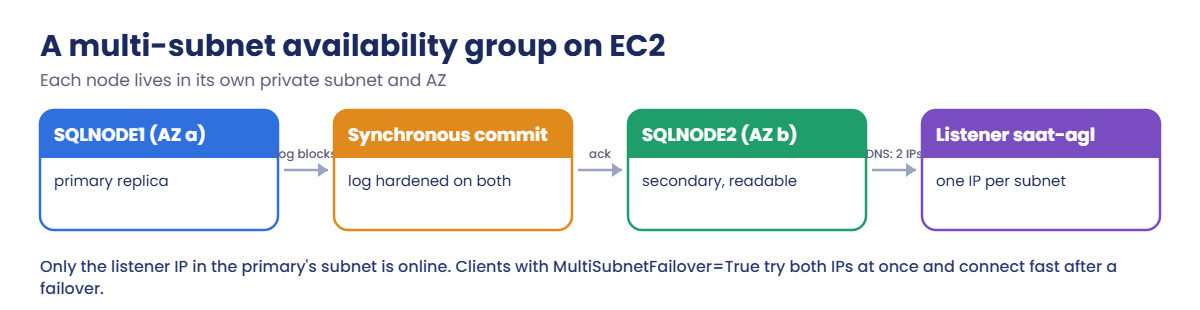
On EC2, each node sits in its own subnet, so the cluster and the listener need one secondary private IP per subnet, and only the IP in the primary’s subnet is online. DNS returns both IPs, so clients should use MultiSubnetFailover=True to try them in parallel. A domain is usually AWS Managed Microsoft AD.

The AG copies only what’s inside user databases. Logins, Agent jobs, linked servers and credentials live in master and msdb, so you must create them on every replica; SQL logins need the same SID. AWS Launch Wizard builds the whole stack from a form, using CloudFormation and Systems Manager.

How it works, step by step

Here is what happens when the primary fails or you fail over.

1The cluster notices

WSFC health checks fail on the primary node, or you run a manual failover from the secondary.

Multi-subnet SQL Server availability group on EC2 with a two-IP listener

2The secondary becomes primary

Because commits were synchronous, the secondary has every committed transaction. It takes over and starts accepting writes.

3The listener moves subnets

The listener IP in the old subnet goes offline and the one in the new subnet comes online. Clients reconnect to the listener name.

4Choose between EC2 and RDS

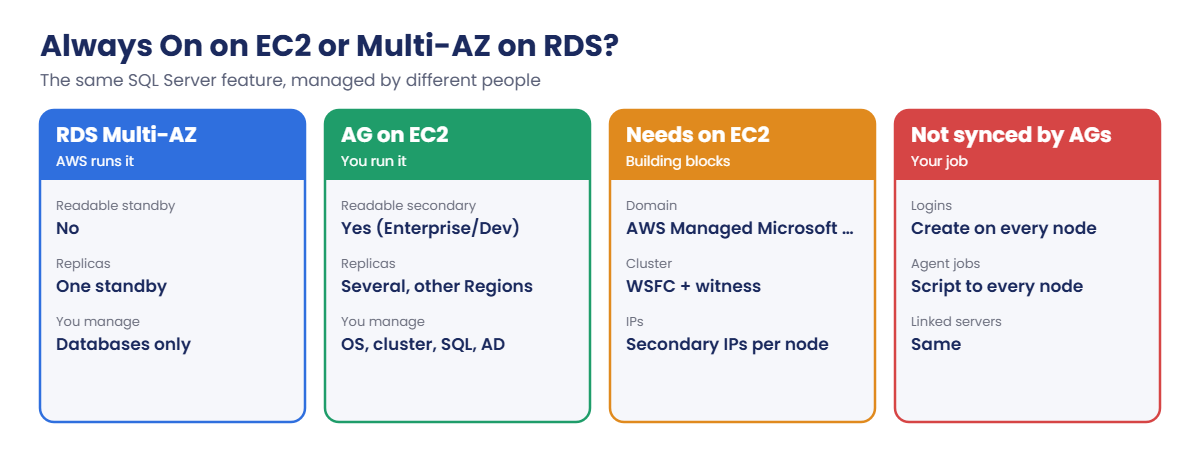
Same feature, different owner:

Always On on EC2 compared with RDS Multi-AZ, building blocks and gaps

If RDS Multi-AZ meets your needs, use it. Build AGs on EC2 when you need what only EC2 gives, and accept that you now run Windows, the cluster and AD too.

✅ Checkpoint: You can explain WSFC, the AG, synchronous vs asynchronous commit, and why a multi-subnet listener has two IPs.

Hands-on lab: deploy and fail over a two-node AG

1Deploy the availability group with Launch Wizard

In the console, open AWS Launch Wizard in ap-south-1, choose Microsoft SQL Server, then Create deployment. Use these settings and leave the rest at their defaults:

  • Deployment type: Always On availability groups, on Windows.
  • Application name: saat-ag; turn on SNS notifications to saat-alerts if you like.
  • Infrastructure: create a new VPC across two Availability Zones, and a new AWS Managed Microsoft AD with domain corp.saatvedha.lab and NetBIOS name SAAT.
  • SQL Server: SQL Server 2022 Developer on Windows Server 2022, two nodes, availability group name saat-ag, listener saat-agl, and a database named AgShop if the form offers one.
  • Instance size: the smallest the form allows (for example m6i.large) with gp3 volumes.

Review the cost estimate, deploy, and come back in a couple of hours. When it shows Completed, connect to the first SQL node with Fleet Manager Remote Desktop (or the Remote Desktop Gateway it built) as the domain admin, and open PowerShell as administrator.
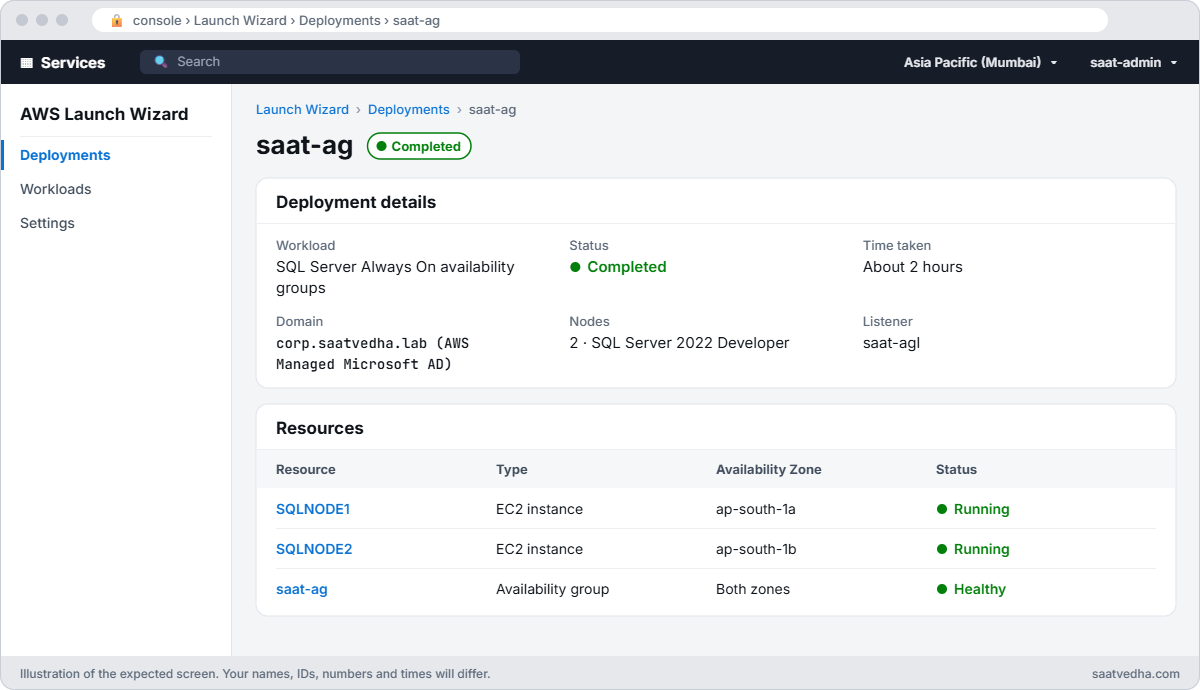
AWS Launch Wizard deployment saat-ag completed with two SQL Server nodes and an availability group listener
The Launch Wizard deployment when it finishes: two SQL Server nodes in two zones, the domain, the AG and its listener.

2Check the cluster, the AG and the listener

On SQLNODE1, paste this whole block (use your node names if Launch Wizard named them differently):

$n1 = 'SQLNODE1'; $n2 = 'SQLNODE2'
Get-ClusterNode | Select-Object Name, State
Get-ClusterResource | Where-Object ResourceType -eq 'IP Address' | Select-Object Name, State
sqlcmd -S $n1 -E -W -Q "SELECT ar.replica_server_name, rs.role_desc, rs.synchronization_health_desc, ar.availability_mode_desc FROM sys.dm_hadr_availability_replica_states rs JOIN sys.availability_replicas ar ON ar.replica_id = rs.replica_id"

You should see something like this:

Name     State
----     -----
SQLNODE1    Up
SQLNODE2    Up

Name                 State
----                 -----
Cluster IP 10.0.1.100   Online
Cluster IP 10.0.3.100  Offline
saat-ag_10.0.1.200      Online
saat-ag_10.0.3.200     Offline

replica_server_name role_desc synchronization_health_desc availability_mode_desc
------------------- --------- --------------------------- ----------------------
SQLNODE1            PRIMARY   HEALTHY                     SYNCHRONOUS_COMMIT
SQLNODE2            SECONDARY HEALTHY                     SYNCHRONOUS_COMMIT

Two nodes in two subnets, synchronous commit, and for each cluster name and the listener, one IP online (the primary’s subnet) and one offline. That offline IP is normal, and it’s the reason for Break 1.

3Add a database and data

If AgShop isn’t in the group yet, this block creates it and adds it with automatic seeding; if it is, it just adds rows:

sqlcmd -S $n1 -E -Q "IF DB_ID('AgShop') IS NULL BEGIN CREATE DATABASE AgShop; ALTER DATABASE AgShop SET RECOVERY FULL; BACKUP DATABASE AgShop TO DISK = 'NUL'; END"
sqlcmd -S $n1 -E -Q "IF NOT EXISTS (SELECT 1 FROM sys.availability_databases_cluster WHERE database_name = 'AgShop') BEGIN ALTER AVAILABILITY GROUP [saat-ag] MODIFY REPLICA ON N'$n2' WITH (SEEDING_MODE = AUTOMATIC); ALTER AVAILABILITY GROUP [saat-ag] ADD DATABASE AgShop; END"
sqlcmd -S $n2 -E -Q "ALTER AVAILABILITY GROUP [saat-ag] GRANT CREATE ANY DATABASE"
Start-Sleep 30
sqlcmd -S saat-agl -E -d AgShop -Q "IF OBJECT_ID('dbo.Orders') IS NULL CREATE TABLE dbo.Orders (OrderId int IDENTITY PRIMARY KEY, Customer nvarchar(100), Amount decimal(10,2)); INSERT dbo.Orders (Customer, Amount) VALUES (N'Asha', 2499.00), (N'Ravi', 1850.00), (N'Meena', 3200.00);" -M
sqlcmd -S $n2 -E -W -Q "SELECT DB_NAME(database_id) AS db, synchronization_state_desc FROM sys.dm_hadr_database_replica_states WHERE is_local = 1"

You should see something like this:

db     synchronization_state_desc
------ --------------------------
AgShop SYNCHRONIZED

AgShop was seeded to SQLNODE2 automatically, with no backup files to copy, and is SYNCHRONIZED. The -M switch tells sqlcmd to use MultiSubnetFailover when it connects to the listener.
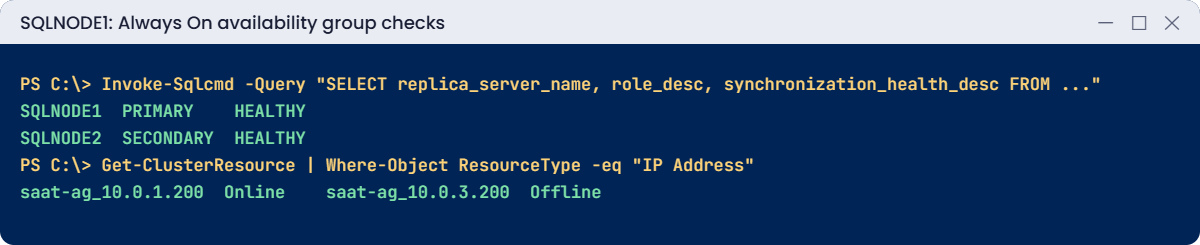
SQL Server Always On AWS lab output: replica roles and listener IP resources
Cluster nodes, listener IPs and replica health. Something like this.

4Fail over by hand

Run the failover on the secondary, then check the roles:

sqlcmd -S $n2 -E -Q "ALTER AVAILABILITY GROUP [saat-ag] FAILOVER;"
Start-Sleep 20
sqlcmd -S $n2 -E -W -Q "SELECT ar.replica_server_name, rs.role_desc FROM sys.dm_hadr_availability_replica_states rs JOIN sys.availability_replicas ar ON ar.replica_id = rs.replica_id"
sqlcmd -S saat-agl -E -M -d AgShop -W -Q "SELECT @@SERVERNAME AS now_serving, COUNT(*) AS orders FROM dbo.Orders"

You should see something like this:

replica_server_name role_desc
------------------- ---------
SQLNODE1            SECONDARY
SQLNODE2            PRIMARY
now_serving orders
----------- ------
SQLNODE2         3

SQLNODE2 is primary, the listener followed it to the other subnet, and the data is all there. A planned failover like this is how you patch Windows and SQL Server on AG nodes one at a time with only seconds of interruption.
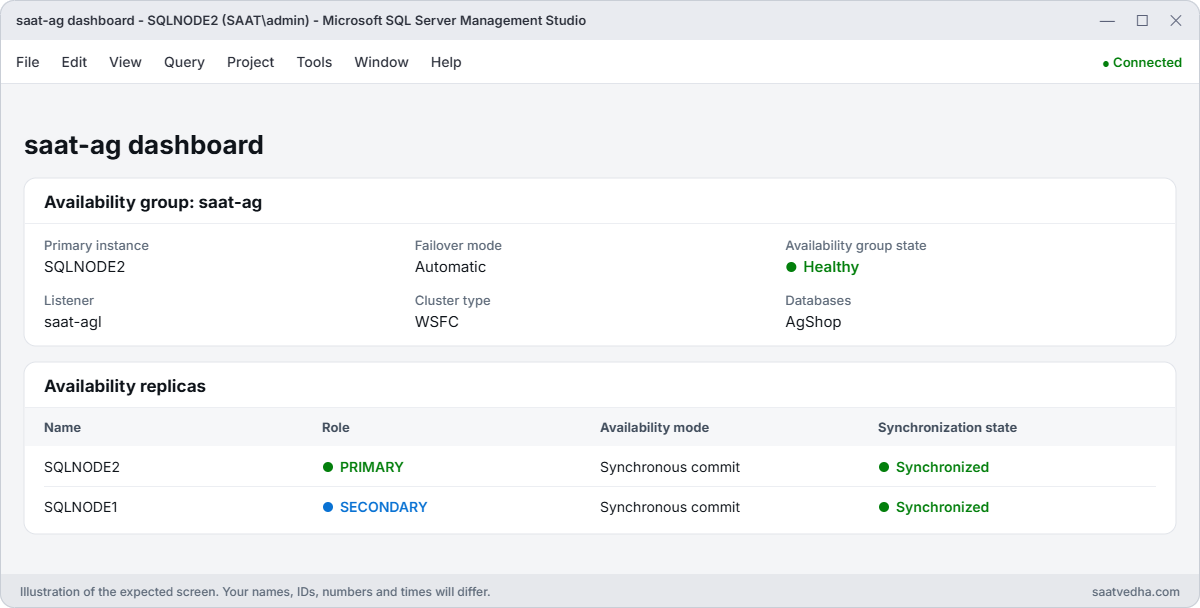
SSMS availability group dashboard showing SQLNODE2 as primary and both replicas synchronized
The AG dashboard in SSMS after the planned failover: SQLNODE2 is primary and both replicas are synchronized.

✅ Checkpoint: Both cluster nodes are Up, the AG is HEALTHY and synchronous, AgShop is SYNCHRONIZED on SQLNODE2, and after a manual failover SQLNODE2 serves the listener with 3 orders.

Break It, Then Fix It

Two problems that turn up once real apps connect.

1Break it: clients without MultiSubnetFailover

After the failover, the listener’s online IP is in the second subnet. Connect a few times with and without the setting:

function Test-Listener([bool]$Msf) {
  $cs = "Server=saat-agl;Database=AgShop;Integrated Security=SSPI;Connect Timeout=30;TrustServerCertificate=True;MultiSubnetFailover=$Msf"
  $sw = [Diagnostics.Stopwatch]::StartNew()
  $cn = New-Object System.Data.SqlClient.SqlConnection $cs
  try { $cn.Open(); 'connected in {0:N1} s (MultiSubnetFailover={1})' -f $sw.Elapsed.TotalSeconds, $Msf } catch { 'failed after {0:N1} s: {1}' -f $sw.Elapsed.TotalSeconds, $_.Exception.InnerException.Message } finally { $cn.Close() }
}
1..3 | ForEach-Object { Test-Listener $false }
1..3 | ForEach-Object { Test-Listener $true }

You’ll get something like this:

connected in 21.3 s (MultiSubnetFailover=False)
connected in 0.1 s (MultiSubnetFailover=False)
connected in 21.2 s (MultiSubnetFailover=False)
connected in 0.1 s (MultiSubnetFailover=True)

DNS returns both listener IPs. Without the setting, the client tries them one at a time, and when the offline IP comes first it waits about 21 seconds for TCP to give up.

With shorter timeouts, apps simply fail now and then, which is very hard to debug. Fix: put MultiSubnetFailover=True in every connection string (sqlcmd -M, JDBC multiSubnetFailover=true). For old clients that can’t, set the listener’s RegisterAllProvidersIP to 0 and lower its DNS TTL.

2Break it: a login that only exists on one replica

Create a domain user, give it a login on the current primary only, and test before and after failing back:

Add-Type -AssemblyName System.Web
$pw = [System.Web.Security.Membership]::GeneratePassword(20, 3)
net user saatapp $pw /add /domain | Out-Null
$cred = New-Object System.Management.Automation.PSCredential('SAAT\saatapp', (ConvertTo-SecureString $pw -AsPlainText -Force))
sqlcmd -S $n2 -E -Q "CREATE LOGIN [SAAT\saatapp] FROM WINDOWS; USE AgShop; CREATE USER [SAAT\saatapp] FOR LOGIN [SAAT\saatapp]; ALTER ROLE db_datareader ADD MEMBER [SAAT\saatapp];"
function Test-AppLogin {
  $job = Start-Job -Credential $cred -ScriptBlock {
    $cn = New-Object System.Data.SqlClient.SqlConnection 'Server=saat-agl;Database=AgShop;Integrated Security=SSPI;TrustServerCertificate=True;MultiSubnetFailover=True'
    try { $cn.Open(); $cm = $cn.CreateCommand(); $cm.CommandText = "SELECT SUSER_NAME() + ' reads ' + CAST(COUNT(*) AS varchar(10)) + ' rows on ' + @@SERVERNAME FROM dbo.Orders"; $cm.ExecuteScalar() }
    catch { $_.Exception.Message } finally { $cn.Close() }
  }
  $job | Wait-Job -Timeout 60 | Receive-Job
}
Test-AppLogin
sqlcmd -S $n1 -E -Q "ALTER AVAILABILITY GROUP [saat-ag] FAILOVER;"
Start-Sleep 20
Test-AppLogin

You’ll get something like this:

SAAT\saatapp reads 3 rows on SQLNODE2
Login failed for user 'SAAT\saatapp'.
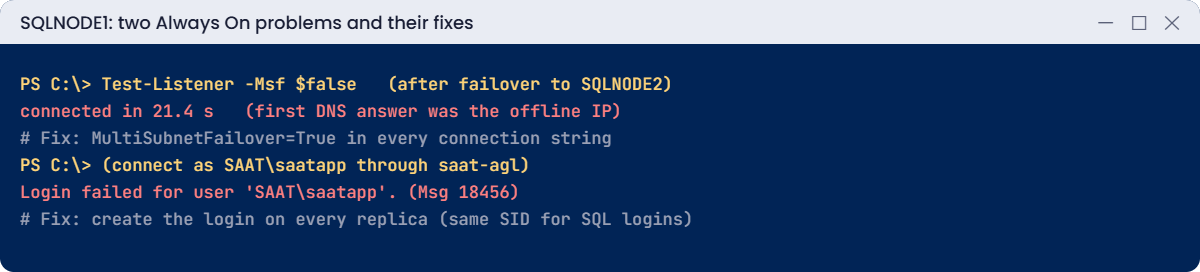
Always On problems: slow listener connects and missing login after failover
Both problems and their fixes. Something like this.

The database user came across with AgShop, but the login lives in master on SQLNODE2 only. After failing back to SQLNODE1, the app can’t log in at all.

This is the most common surprise after a team’s first real failover. Fix: create the login on the other replica too:

sqlcmd -S $n1 -E -Q "CREATE LOGIN [SAAT\saatapp] FROM WINDOWS;"
Test-AppLogin

You should see something like this:

SAAT\saatapp reads 3 rows on SQLNODE1

Windows logins map by their AD SID, so the user matches at once. SQL logins must be created with the same SID on every replica (sp_help_revlogin, or dbatools’ Copy-DbaLogin); jobs, linked servers and credentials need the same treatment.

Now clean up. In Launch Wizard > Deployments, select saat-ag and choose Delete. When it finishes, check nothing was left behind:

aws cloudformation list-stacks --stack-status-filter CREATE_COMPLETE UPDATE_COMPLETE DELETE_FAILED --query "StackSummaries[?contains(StackName, 'saat-ag')].[StackName,StackStatus]" --output text
aws ds describe-directories --query "DirectoryDescriptions[?Name=='corp.saatvedha.lab'].[DirectoryId,Stage]" --output text
aws ec2 describe-addresses --query "Addresses[?AssociationId==null].PublicIp" --output text

You should see nothing printed by any of the three commands.

✅ Checkpoint: You fixed slow listener connections with MultiSubnetFailover and a failed login by creating it on every replica. The Launch Wizard deployment, its stacks, the directory and any spare Elastic IPs are gone.

This happened at work

The 21-second login nobody could reproduce

A logistics company moved its tracking database to an availability group across two AZs on EC2. A week after a routine failover, drivers’ handheld app started timing out “randomly”, about half the time, but never when developers tested from their laptops.

The handhelds used an old driver without MultiSubnetFailover and a 15-second connection timeout. DNS returned both listener IPs in rotating order; whenever the offline one came first, the connection timed out. Developers’ tools had the setting on by default, so they never saw it.

A one-line connection string change fixed it. They also set RegisterAllProvidersIP to 0 for one legacy app that couldn’t be changed, and added “connect through the listener after a failover” to their failover test script.

Common mistakes and troubleshooting

MistakeWhat happensWhat to do
No MultiSubnetFailover in connection stringsRandom 21-second connects or timeoutsMultiSubnetFailover=True everywhere
Logins created on one replicaLogin failed after failoverCreate on all replicas; same SID for SQL logins
Jobs and linked servers on one nodeThey stop after failoverScript to every replica, make jobs AG-aware
Asynchronous commit between AZsData loss possible on failoverSynchronous inside a Region
No witnessCluster loses quorumFile share or cloud witness
Building AGs when RDS would doExtra work running Windows, AD and the clusterUse RDS Multi-AZ unless you need EC2-only features

Interview questions

Click a question to open it. Each one is written the way an interviewer would ask it. Under it you will see why they ask it and one way you could answer, in your own words.

Fresher level

1. Can you explain in simple words what an Always On availability group is?

Why they ask this: They want to check that you understand the basic building block of SQL Server HA, and what it sits on top of.

How you might answer: It’s a SQL Server feature that copies a set of user databases from a primary replica to one or more secondaries. If the primary fails, a secondary can take over.

It runs on top of a Windows failover cluster, which handles the health checks and the failover decision.

2. How would you explain an availability group listener to a new team member?

Why they ask this: They want to see that you understand how clients connect to an AG without caring which node is primary.

How you might answer: I’d say the listener is like a front door name that never changes. It’s a virtual network name with its own IPs, and it always points to the current primary.

So the app connects to the listener, and after a failover it reaches the new primary without any config change.

3. What’s the difference between synchronous and asynchronous commit, and when would you use each?

Why they ask this: They want to know you understand the trade-off between data safety and speed, and can match it to distance.

How you might answer: With synchronous commit, the primary waits until the secondary has hardened the log. You lose no data, but each write is a little slower, so I use it between AZs in the same Region.

Asynchronous commit doesn’t wait, so it’s faster but you can lose some data on failover. I use it for a replica in another Region.

2–5 years experience

4. Apps on AWS randomly take about 20 seconds to connect to the AG listener. What’s causing it?

Why they ask this: They want to see if you know how multi-subnet listeners behave on AWS. This is one of the most common AG issues in the cloud.

How you might answer: On AWS the nodes sit in different subnets, so the listener has two IPs and one is always offline. Clients without MultiSubnetFailover=True sometimes try the offline IP first and wait for it to time out.

The best fix is to add MultiSubnetFailover=True to the connection strings. If an old app can’t do that, I set RegisterAllProvidersIP=0 with a low TTL.

5. Right after a failover, a user calls and says they can’t log in anymore. What happened?

Why they ask this: They want to see that you know logins live outside the AG databases, and how to keep them in step across replicas.

How you might answer: The login probably exists only on the old primary. Logins live in master, and master isn’t part of the availability group.

I create the login on every replica, and for SQL logins I use the same SID, so the database users stay linked to them.

6. Walk me through how you’d patch the nodes of an availability group with very little downtime.

Why they ask this: They want to see a safe, rolling patch process where you check health before each step.

How you might answer: I patch the secondary first, then fail over to it, so users only see a short blip. Next I patch the old primary, and fail back if we need to.

Between every step I check that synchronization health is good before moving on.

Senior level

7. Design SQL Server HA and DR on EC2 with no data loss inside the Region and only minutes of loss across Regions.

Why they ask this: They want to see how you combine sync and async replicas, and whether you cover the cluster, identity, clients and testing too.

How you might answer: I’d build an AG with synchronous replicas in two AZs for zero data loss, and an asynchronous replica in another Region for DR. The cluster gets a cloud or file share witness, and identity comes from Managed AD with trusts.

Clients use a multi-subnet listener, and server objects are scripted. I’d monitor AG health and redo queues, and test failover and DR regularly.

8. When would you choose Basic availability groups on Standard edition instead of Enterprise?

Why they ask this: They want to see that you can balance licensing cost against features and explain what the team gives up.

How you might answer: I’d choose Basic AGs when one database per AG is fine, nobody needs a readable secondary, and Enterprise licensing is too expensive.

If we need more than that, I’d look at Enterprise, or at RDS Multi-AZ if its limits work for us.

Quick quiz

Q1. What does a multi-subnet listener on AWS have?

  1. One IP
  2. One IP per subnet
  3. No IP
  4. A public IP
Show answer

B — Only the primary subnet’s IP is online.

Q2. Which setting stops slow listener connections?

  1. Pooling=False
  2. MultiSubnetFailover=True
  3. Encrypt=False
  4. ApplicationIntent=ReadOnly
Show answer

B — It tries all IPs in parallel.

Q3. Why did SAAT\saatapp fail after failback?

  1. Wrong password
  2. Login missing on that replica
  3. Database offline
  4. DNS
Show answer

B — Logins live in master on each node.

Q4. Which commit mode gives no data loss between AZs?

  1. Asynchronous
  2. Synchronous
  3. Delayed
  4. Bulk
Show answer

B — It waits for the secondary.

Q5. What did Launch Wizard save you from doing by hand?

  1. Nothing
  2. Building AD, cluster, AG and listener
  3. Writing SQL
  4. Paying for EC2
Show answer

B — It builds the whole stack.

Quick recap

  • Always On on EC2 = WSFC + availability group + listener across AZs.
  • Multi-subnet listeners have one IP per subnet; use MultiSubnetFailover=True.
  • Logins, jobs and linked servers don’t move with the AG: create them on every replica.
  • Planned failovers let you patch nodes one at a time.
  • Prefer RDS Multi-AZ unless you need what only EC2 gives.

Next lesson

Lesson 56: The AWS troubleshooting workflow → Phase 4 begins: you’ll learn one repeatable way to find what changed, where, and who changed it.

Further reading: SQL Server Always On AWS

Want to go deeper into SQL Server Always On AWS? Read AWS Launch Wizard for SQL Server and Connect to an Always On availability group listener. You can also see the full plan for this course on the AWS Cloud Administration course page.

Scroll to Top