S3 versioning, lifecycle rules and replication

Someone deletes a folder by mistake. A script overwrites last month’s config. The storage bill keeps climbing.

S3 lifecycle rules, versioning and replication are how you handle all three without buying extra tools.

You’ll turn on versioning, recover a deleted file, write lifecycle rules that move and expire data, and replicate a bucket from Mumbai to Singapore. You’ll also build a cleanup script for versioned buckets that you’ll reuse for the rest of the course.

TimeYou needBy the end you can
60 minutesLessons 16 and 17 done, your laptop signed in as saat-admin. Cost: well under USD 0.01 (a few KB copied across Regions).Use versioning to undo deletes and overwrites, write lifecycle rules for tiering and cleanup, set up Cross-Region Replication, and fully delete a versioned bucket.

What it is, in one line

S3 lifecycle rules move or delete objects automatically by age, versioning keeps every old copy of an object, and replication copies new objects to another bucket.

In Simple Words

A notebook that never loses a page

Imagine a notebook where you never erase. When you change a page, you write a new page and keep the old one behind it. If you tear out a page, a sticky note says “removed”, but the page is still there.

Pull off the sticky note and it’s back. That is versioning.

Old notebooks fill your shelf, so you make a rule: after a month, move them to the cupboard; after three months, to the storeroom; after a year, shred them. That rule is a lifecycle rule.

Replication is a friend in another city who photocopies every new page you write, so a fire at your house doesn’t lose everything.

Engineer's View

How the three features really work

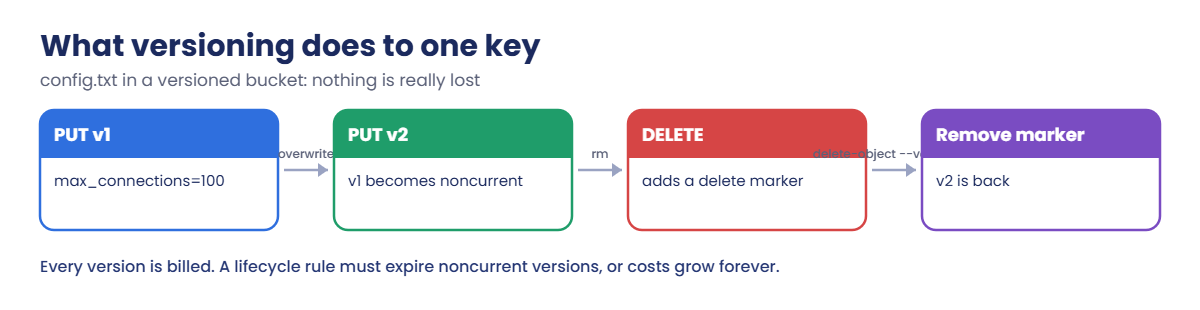
Versioning is per bucket: unversioned, enabled or suspended (never back to unversioned). Each PUT creates a new version ID; the newest is current and older ones are noncurrent. A simple DELETE adds a delete marker, and deleting that marker by version ID restores the object.

Every version is stored and billed.

Lifecycle rules filter by prefix, tags or size and run transitions (for example Standard-IA after at least 30 days), expirations, noncurrent version expirations and incomplete multipart upload cleanup. S3 applies them asynchronously, about once a day. Since September 2024, transitions skip objects under 128 KB by default.

Replication (Cross-Region or Same-Region) needs versioning on both buckets and an IAM role S3 can assume. It copies only objects written after the rule exists; existing objects need S3 Batch Replication. Delete markers are not replicated unless you turn that on, and deletes of specific versions are never replicated, which protects the copy from a malicious delete.

How it works, step by step

Here is what happens to one key in a versioned bucket.

1Each upload adds a version

The second upload of config.txt doesn’t replace the first. Version 1 becomes noncurrent and stays readable with its version ID.

S3 versioning flow: two versions, a delete marker and recovery

2A delete only adds a marker

aws s3 rm hides the object behind a delete marker. aws s3 ls shows nothing, but both versions are still there.

3Removing the marker restores it

Delete the marker by its version ID and the newest real version is current again.

4Lifecycle keeps the cost in check

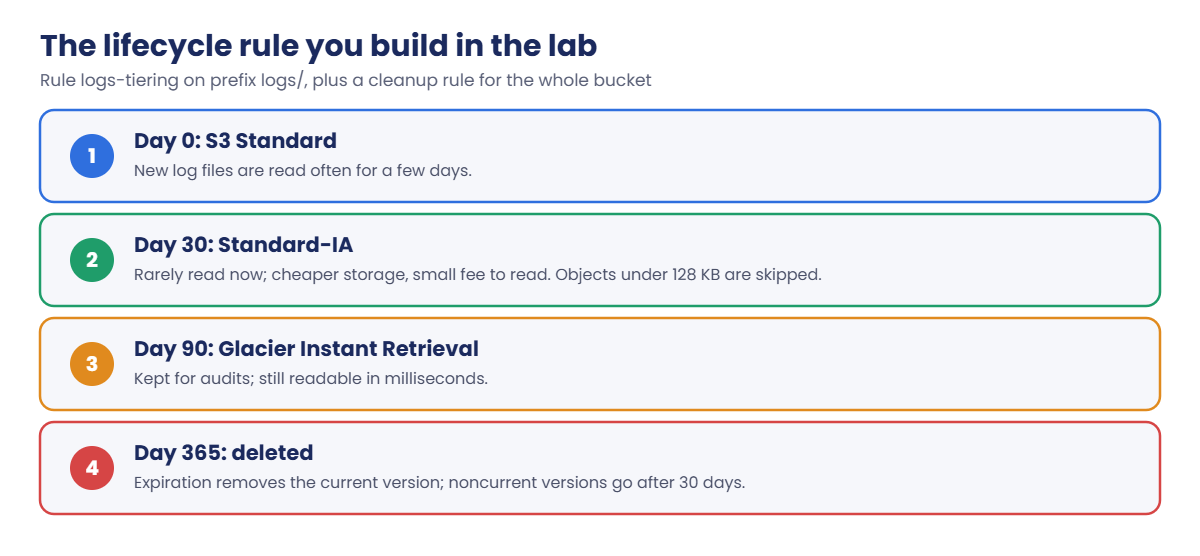
Without a rule, noncurrent versions pile up forever. The lab’s rules look like this:

S3 lifecycle rules timeline: Standard, Standard-IA, Glacier Instant Retrieval, expiration

The cleanup-versions rule matters more than the tiering rule in most real buckets. It expires noncurrent versions after 30 days (keeping the newest three), removes expired delete markers and aborts multipart uploads left half-finished for 7 days.

✅ Checkpoint: You can explain a delete marker, why noncurrent versions need a lifecycle rule, and what replication does and does not copy.

Hands-on lab: versioning, S3 lifecycle rules and replication

Sign in and set up names for a source bucket in Mumbai and a destination in Singapore:

cd C:\aws-lab
aws login --profile saat-admin
$env:AWS_PROFILE = 'saat-admin'
$acct = aws sts get-caller-identity --query Account --output text
$src = "saat-src-$acct-ap-south-1-an"
$dst = "saat-dst-$acct-ap-southeast-1-an"
aws s3api create-bucket --bucket $src --bucket-namespace account-regional --region ap-south-1 --create-bucket-configuration LocationConstraint=ap-south-1 | Out-Null
aws s3api put-bucket-versioning --bucket $src --versioning-configuration Status=Enabled
aws s3api get-bucket-versioning --bucket $src --query Status --output text

You should see this:

Enabled

1Overwrite a file and read the old version

Paste this whole block:

Set-Content config.txt "max_connections=100"
aws s3 cp config.txt "s3://$src/config.txt" | Out-Null
Set-Content config.txt "max_connections=500"
aws s3 cp config.txt "s3://$src/config.txt" | Out-Null
aws s3api list-object-versions --bucket $src --prefix config.txt --query "Versions[].[VersionId,IsLatest,Size]" --output text
$old = aws s3api list-object-versions --bucket $src --prefix config.txt --query 'Versions[?IsLatest==`false`].VersionId | [0]' --output text
aws s3api get-object --bucket $src --key config.txt --version-id $old old-config.txt | Out-Null
Get-Content old-config.txt

You should see something like this:

Xb8n3Lq2Vt7Rw1Zp9Ks4Mc6Jd0Hf5Ga.  True    21
0pQ7Tz4Wn9Lk2Rs6Vb1Xm8Yc3Jd5Hf0E   False   21
max_connections=100

The overwrite didn’t lose anything. Version 1 is still there and you just downloaded it by its version ID.

2Delete the file, then bring it back

Paste this whole block:

aws s3 rm "s3://$src/config.txt"
aws s3 ls "s3://$src/"
aws s3api list-object-versions --bucket $src --prefix config.txt --query "DeleteMarkers[].[VersionId,IsLatest]" --output text
$marker = aws s3api list-object-versions --bucket $src --prefix config.txt --query "DeleteMarkers[0].VersionId" --output text
aws s3api delete-object --bucket $src --key config.txt --version-id $marker | Out-Null
aws s3 ls "s3://$src/"

You should see something like this (the first ls prints nothing):

delete: s3://saat-src-111122223333-ap-south-1-an/config.txt
mQ3tVq8Lp0aZ.4kXvR9sTn2YbWc6HdEf      True
2026-10-20 16:02:18         21 config.txt

The “deleted” file is back. This is the five-minute fix for most “I deleted the wrong thing” calls, but only on buckets where versioning was on before the delete.

3Add lifecycle rules

Paste this whole block:

@'
{
  "Rules": [
    {
      "ID": "logs-tiering",
      "Status": "Enabled",
      "Filter": { "Prefix": "logs/" },
      "Transitions": [
        { "Days": 30, "StorageClass": "STANDARD_IA" },
        { "Days": 90, "StorageClass": "GLACIER_IR" }
      ],
      "Expiration": { "Days": 365 }
    },
    {
      "ID": "cleanup-versions",
      "Status": "Enabled",
      "Filter": {},
      "NoncurrentVersionExpiration": { "NoncurrentDays": 30, "NewerNoncurrentVersions": 3 },
      "Expiration": { "ExpiredObjectDeleteMarker": true },
      "AbortIncompleteMultipartUpload": { "DaysAfterInitiation": 7 }
    }
  ]
}
'@ | Set-Content lifecycle.json
aws s3api put-bucket-lifecycle-configuration --bucket $src --lifecycle-configuration file://lifecycle.json
aws s3api get-bucket-lifecycle-configuration --bucket $src --query "Rules[].[ID,Status]" --output text

You should see this:

logs-tiering    Enabled
cleanup-versions        Enabled

Nothing moves today: the rules act on objects as they age, and S3 checks about once a day. In a real bucket you’d see the transitions in Storage Lens or the bill after a month.
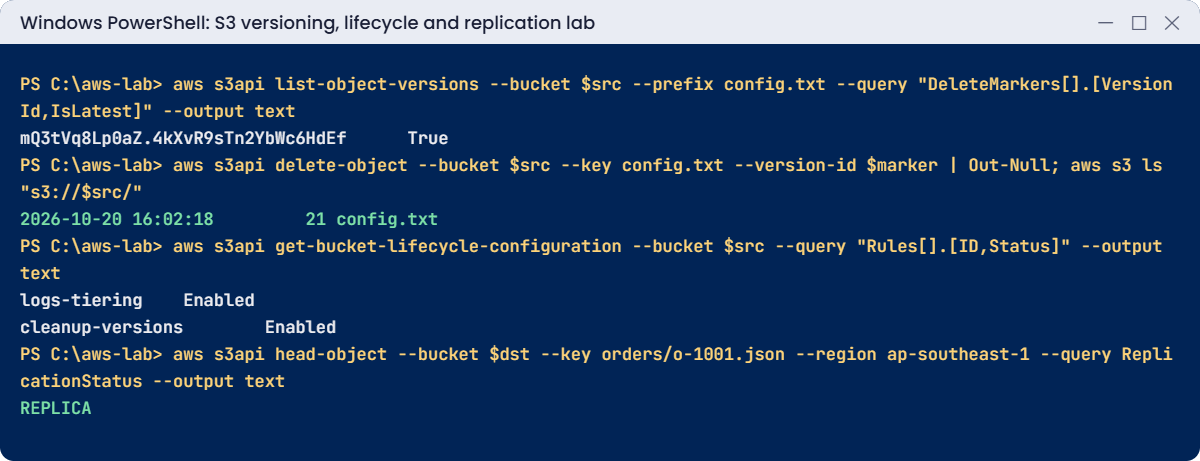
S3 lifecycle rules lab output: delete marker removed, rules enabled, replica confirmed
Delete marker removed, lifecycle rules enabled and a replica in Singapore. Something like this.

4Replicate to Singapore

Paste this whole block. It creates the destination bucket with versioning, a replication role and the rule:

aws s3api create-bucket --bucket $dst --bucket-namespace account-regional --region ap-southeast-1 --create-bucket-configuration LocationConstraint=ap-southeast-1 | Out-Null
aws s3api put-bucket-versioning --bucket $dst --region ap-southeast-1 --versioning-configuration Status=Enabled
'{ "Version": "2012-10-17", "Statement": [ { "Effect": "Allow", "Principal": { "Service": "s3.amazonaws.com" }, "Action": "sts:AssumeRole" } ] }' | Set-Content repl-trust.json
@'
{
  "Version": "2012-10-17",
  "Statement": [
    { "Effect": "Allow", "Action": ["s3:GetReplicationConfiguration", "s3:ListBucket"], "Resource": "arn:aws:s3:::SRC" },
    { "Effect": "Allow", "Action": ["s3:GetObjectVersionForReplication", "s3:GetObjectVersionAcl", "s3:GetObjectVersionTagging"], "Resource": "arn:aws:s3:::SRC/*" },
    { "Effect": "Allow", "Action": ["s3:ReplicateObject", "s3:ReplicateDelete", "s3:ReplicateTags"], "Resource": "arn:aws:s3:::DST/*" }
  ]
}
'@ -replace 'SRC', $src -replace 'DST', $dst | Set-Content repl-policy.json
$roleArn = aws iam create-role --role-name saat-s3-replication --assume-role-policy-document file://repl-trust.json --query Role.Arn --output text
aws iam put-role-policy --role-name saat-s3-replication --policy-name replicate --policy-document file://repl-policy.json
@'
{
  "Role": "ROLE_ARN",
  "Rules": [
    {
      "ID": "all-to-singapore",
      "Status": "Enabled",
      "Priority": 1,
      "Filter": {},
      "DeleteMarkerReplication": { "Status": "Disabled" },
      "Destination": { "Bucket": "arn:aws:s3:::DST" }
    }
  ]
}
'@ -replace 'ROLE_ARN', $roleArn -replace 'DST', $dst | Set-Content replication.json
Start-Sleep 15
aws s3api put-bucket-replication --bucket $src --replication-configuration file://replication.json
'{ "order": "o-1001", "amount": 2499 }' | Set-Content o-1001.json
aws s3 cp o-1001.json "s3://$src/orders/o-1001.json" | Out-Null
do { Start-Sleep 10; $st = aws s3api head-object --bucket $src --key orders/o-1001.json --query ReplicationStatus --output text } until ($st -ne 'PENDING')
$st
aws s3api head-object --bucket $dst --key orders/o-1001.json --region ap-southeast-1 --query ReplicationStatus --output text

You should see this (usually within a minute):

COMPLETED
REPLICA

The source says COMPLETED and the copy in Singapore says REPLICA. Now check config.txt, which existed before the rule:

aws s3 ls "s3://$dst/" --region ap-southeast-1 --recursive

You should see something like this:

2026-10-20 16:09:44         39 orders/o-1001.json

Only the new object is there. Replication never copies objects that existed before the rule; for those you’d run S3 Batch Replication.

✅ Checkpoint: You restored an overwritten and a deleted file from versions, two lifecycle rules are Enabled, and orders/o-1001.json is REPLICA in Singapore. Keep everything for the break lab.

Break It, Then Fix It

Two errors from real change requests: a lifecycle rule that is “too aggressive”, and a DR bucket someone tried to save money on.

1Break it: move logs to Standard-IA after 7 days

Try a cheaper-looking rule:

(Get-Content lifecycle.json -Raw) -replace '"Days": 30', '"Days": 7' | Set-Content lifecycle-bad.json
aws s3api put-bucket-lifecycle-configuration --bucket $src --lifecycle-configuration file://lifecycle-bad.json

You’ll get this error:

An error occurred (InvalidArgument) when calling the PutBucketLifecycleConfiguration operation: 'Days' in Transition action must be greater than or equal to 30 for storageClass 'STANDARD_IA'

S3 refuses the whole configuration, so your good rules stay. Standard-IA bills at least 30 days anyway, so moving sooner would never save money. Fix: keep 30 days or more for Standard-IA, or use Intelligent-Tiering if you don’t know how data will be read.

2Break it: suspend versioning on the DR copy

Someone suspends versioning on the destination “to save cost”, then the replication rule is redeployed:

aws s3api put-bucket-versioning --bucket $dst --region ap-southeast-1 --versioning-configuration Status=Suspended
aws s3api put-bucket-replication --bucket $src --replication-configuration file://replication.json

You’ll get this error:

An error occurred (InvalidRequest) when calling the PutBucketReplication operation: Destination bucket must have versioning enabled.
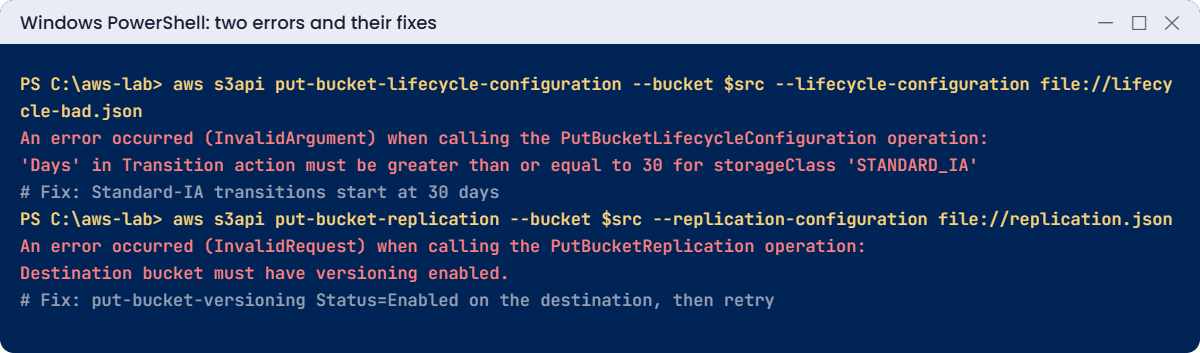
S3 lifecycle and replication errors: Days under 30 and destination versioning, with fixes
Both errors and their fixes. Something like this.

Replication depends on versions on both sides. A pipeline that redeploys bucket settings will fail at this step, and DR copies stop being trustworthy. Fix: turn versioning back on and redeploy:

aws s3api put-bucket-versioning --bucket $dst --region ap-southeast-1 --versioning-configuration Status=Enabled
aws s3api put-bucket-replication --bucket $src --replication-configuration file://replication.json
aws s3api get-bucket-replication --bucket $src --query "ReplicationConfiguration.Rules[0].Status" --output text

You should see this:

Enabled

Now clean up. aws s3 rb --force can’t empty a versioned bucket, because it only removes current versions. Save this script; you’ll use it in later lessons:

@'
param([Parameter(Mandatory)][string]$Bucket, [string]$Region = 'ap-south-1')
$v = aws s3api list-object-versions --bucket $Bucket --region $Region --output json | ConvertFrom-Json
$objs = @(@($v.Versions) + @($v.DeleteMarkers) | Where-Object { $_ } | ForEach-Object { @{ Key = $_.Key; VersionId = $_.VersionId } })
if ($objs.Count -gt 0) {
  @{ Objects = $objs; Quiet = $true } | ConvertTo-Json -Depth 5 | Set-Content "$env:TEMP\del.json"
  aws s3api delete-objects --bucket $Bucket --region $Region --delete "file://$env:TEMP\del.json" | Out-Null
}
aws s3api delete-bucket --bucket $Bucket --region $Region
"Removed $($objs.Count) versions and markers, then deleted $Bucket"
'@ | Set-Content C:\aws-lab\Remove-LabBucket.ps1
.\Remove-LabBucket.ps1 -Bucket $src
.\Remove-LabBucket.ps1 -Bucket $dst -Region ap-southeast-1
aws iam delete-role-policy --role-name saat-s3-replication --policy-name replicate
aws iam delete-role --role-name saat-s3-replication
Remove-Item config.txt, old-config.txt, lifecycle*.json, repl-*.json, replication.json, o-1001.json
.\Find-LabResources.ps1

You should see something like this:

Removed 3 versions and markers, then deleted saat-src-111122223333-ap-south-1-an
Removed 1 versions and markers, then deleted saat-dst-111122223333-ap-southeast-1-an

✅ Checkpoint: You saw the 30-day Standard-IA rule enforced and fixed replication after versioning was suspended. Both buckets and the replication role are gone, and Remove-LabBucket.ps1 is saved.

This happened at work

The bucket that cost more every month

A logistics company turned on versioning for its tracking bucket after an accidental delete scare. A device service rewrote a status file for each of 40,000 trucks every five minutes. Nobody added a lifecycle rule.

Each rewrite kept the old copy. Within eight months the bucket held over 90 million noncurrent versions, and its storage line on the bill had grown tenfold. The finance team noticed before the engineers did.

The fix took one afternoon: a lifecycle rule to expire noncurrent versions after 7 days (keeping the newest two), plus a check in their bucket template that refuses versioning without a noncurrent expiration rule. The bill dropped back within a month, because S3 removed the old versions in the background.

Common mistakes and troubleshooting

MistakeWhat happensWhat to do
Versioning without a noncurrent expiration ruleOld versions are billed foreverAlways pair versioning with NoncurrentVersionExpiration
Expecting replication to copy existing objectsThe DR bucket is missing old dataRun S3 Batch Replication for existing objects
Using aws s3 rb --force on a versioned bucketBucketNotEmpty; versions remainDelete all versions and markers first (Remove-LabBucket.ps1)
Moving tiny objects to Standard-IA or GlacierMinimum size and duration charges cost moreFilter by size or keep them in Standard
Suspending versioning on a replica bucketReplication changes fail; DR is not trustworthyKeep versioning enabled on both sides
Forgetting incomplete multipart uploadsInvisible parts keep costing moneyAdd AbortIncompleteMultipartUpload to every bucket

Interview questions

Click a question to open it. Each one is written the way an interviewer would ask it. Under it you will see why they ask it and one way you could answer, in your own words.

Fresher level

1. Can you explain in simple words what S3 versioning does?

Why they ask this: They want to check you understand basic data protection in S3. Versioning is behind most S3 recovery stories.

How you might answer: Versioning is a bucket setting that keeps every version of every object. When someone overwrites a file, S3 keeps the old one as a version. When someone deletes it, S3 just adds a delete marker.

So I can always go back and recover older data.

2. A user deleted an important file by mistake, and the bucket has versioning on. How do you get it back?

Why they ask this: They want to see practical recovery skills. Knowing how delete markers work makes this a two-minute fix.

How you might answer: I’d find the delete marker with list-object-versions, then delete that marker by its version ID. The previous version becomes the current one again, and the file is back.

3. How would you explain a lifecycle rule to a manager who wants a smaller S3 bill?

Why they ask this: They want to see cost basics and the ability to explain them to non-engineers. Lifecycle rules are often the first S3 saving.

How you might answer: I’d say it’s a rule on the bucket that moves objects to cheaper storage classes, or deletes them, after a number of days. It can target objects by prefix, tags or size, so we only touch the data we choose.

2–5 years experience

4. You’re asked to set up Cross-Region Replication. What needs to be in place for it to work?

Why they ask this: They want to check you know the replication setup. Missing one piece means replication silently does nothing.

How you might answer: Both buckets need versioning on. S3 needs an IAM role it can assume, with read permissions on the source and replicate permissions on the destination.

If the objects use SSE-KMS, the role also needs KMS permissions.

5. A versioned bucket gets more expensive every month, even though the team says they don’t add much data. What’s going on?

Why they ask this: They want to see cost troubleshooting. Old versions are the hidden cost of versioning.

How you might answer: Most likely noncurrent versions are piling up, often from frequent overwrites. I’d confirm it with Storage Lens or list-object-versions.

Then I’d add a lifecycle rule with NoncurrentVersionExpiration, and maybe NewerNoncurrentVersions to keep only a few old versions.

6. If someone deletes a file in the source bucket, does replication delete it in the destination too?

Why they ask this: They want to check you know the replication details. This decides whether your copy actually protects you.

How you might answer: Delete markers are replicated only if I turn on delete marker replication. Deletes of a specific version are never replicated.

That protects the destination from someone permanently deleting data, by accident or on purpose.

Senior level

7. Your company is worried about ransomware or a rogue admin wiping S3 data. How would you protect it?

Why they ask this: They want to see defence in depth. Protection has to hold even when someone with admin rights is the problem.

How you might answer: For critical data I’d use versioning plus Object Lock in compliance mode, and replicate to a separate account with a different owner, without delete marker replication. SCPs block changes to lifecycle and versioning settings.

I’d also turn on MFA delete for root, and use AWS Backup for S3 with a locked vault.

8. You have 2 PB of mixed data in S3 and need to cut costs. How would you plan the lifecycle rules?

Why they ask this: They want to see cost engineering at large scale. At this size, a careless rule can cost more than it saves.

How you might answer: I’d use Storage Lens and access logs to group the data by access pattern and object size. Where the pattern is unknown, I’d use Intelligent-Tiering, and I’d move large cold objects by age but skip small ones.

Before applying anything to billions of objects, I’d work out the transition request costs.

Quick quiz

Q1. What does a simple DELETE do in a versioned bucket?

  1. Removes all versions
  2. Adds a delete marker
  3. Suspends versioning
  4. Moves the object to Glacier
Show answer

B — The object is hidden behind a delete marker; versions remain.

Q2. What is the minimum age for a Standard-IA lifecycle transition?

  1. 1 day
  2. 7 days
  3. 30 days
  4. 90 days
Show answer

C — S3 requires at least 30 days for STANDARD_IA transitions.

Q3. Which objects does a new replication rule copy?

  1. All existing objects
  2. Only objects written after the rule exists
  3. Only deleted objects
  4. Only tagged objects
Show answer

B — Existing objects need S3 Batch Replication.

Q4. What must the destination bucket have for replication?

  1. Public access
  2. Versioning enabled
  3. Lifecycle rules
  4. The same Region
Show answer

B — Both source and destination need versioning.

Q5. Why didn’t aws s3 rb --force work on a versioned bucket?

  1. Versions and delete markers remain
  2. The bucket was encrypted
  3. Replication was on
  4. The CLI was old
Show answer

A — You must delete every version and marker first.

Quick recap

  • Versioning keeps every version; a delete only adds a marker you can remove.
  • Always pair versioning with a noncurrent version expiration rule.
  • Standard-IA transitions need at least 30 days, and tiny objects are skipped by default.
  • Replication needs versioning on both sides and copies only new objects.
  • Remove-LabBucket.ps1 deletes every version before deleting a bucket.

Next lesson

Lesson 19: Route 53 DNS → You’ll create hosted zones and records, use private DNS inside saat-vpc and troubleshoot name resolution.

Further reading: S3 lifecycle rules

Want to go deeper into S3 lifecycle rules? Read Managing the lifecycle of objects and Replicating objects within and across Regions. You can also see the full plan for this course on the AWS Cloud Administration course page.

Scroll to Top