KMS encryption keys
-
Phase 0: Before you start
-
Phase 1: The foundation
-
Phase 2: Operations and security
-
Phase 3: SQL Server on AWS
-
Phase 4: Troubleshooting step by step
-
Phase 5: Final project and career
Encryption is only as strong as control over the key. AWS KMS keys are where that control lives: who can encrypt, who can decrypt, when keys rotate, and a log of every single use. S3, EBS, RDS, Secrets Manager and AWS Backup all call KMS behind the scenes.
You’ll create a customer managed key, encrypt and decrypt a secret by hand, see envelope encryption at work, make an S3 bucket use your key, and turn on rotation. Then you’ll disable the key to feel what that does, and fix the most common KMS error: S3 access without kms:Decrypt.
| Time | You need | By the end you can |
|---|---|---|
| 45 minutes | Lessons 17 and 25 done (S3 security, saat-trail), your laptop signed in as saat-admin. Cost: a customer managed key costs about USD 1 a month, charged by the hour, plus a few cents of requests; you schedule it for deletion at the end. | Create and alias a customer managed key, read its key policy, encrypt and decrypt with the CLI, use the key for S3 SSE-KMS, enable rotation, and troubleshoot disabled keys and missing kms:Decrypt. |
What it is, in one line
AWS KMS keys are encryption keys managed by AWS Key Management Service; they never leave KMS, and every use is controlled by key policies and IAM and logged in CloudTrail.
In Simple Words
The bank locker key held at the counter
Your locker is in the bank vault, but the key never leaves the bank. When you want something, you show your ID at the counter, the bank checks you’re on the approved list, opens the locker, and writes in a book that you came at 3:15 p.m.
KMS works like that counter. Your data can be anywhere, but the key that opens it stays inside KMS. The key policy is the approved list, and CloudTrail is the book.
If the bank freezes your locker key, nobody gets in, not even you, until it’s unfrozen. That is a disabled key.
Engineer's View
How KMS really works
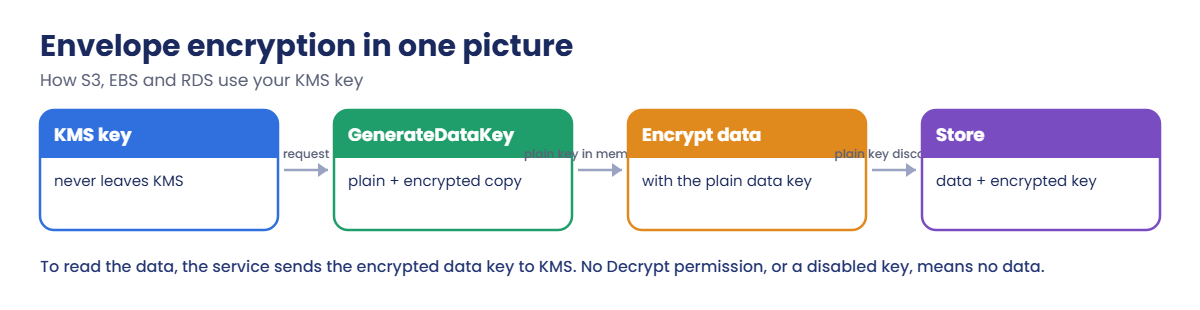
A KMS key (formerly CMK) is a logical key backed by hardware security modules; its key material never leaves KMS unencrypted. Direct Encrypt works on up to 4 KB, so services use envelope encryption: GenerateDataKey returns a plaintext data key (used in memory and discarded) and the same key encrypted under your KMS key (stored with the data). Reading the data means asking KMS to decrypt that small encrypted key.
Access is controlled first by the key policy. The default policy gives the account root principal full access, which lets IAM policies grant use of the key. Without that statement, IAM policies alone don’t work.
Grants give temporary, narrow permissions to services. Callers need kms:Decrypt (and often kms:GenerateDataKey) in addition to S3, EBS or RDS permissions.
Automatic rotation creates new key material on a schedule (90 to 2,560 days, default 365) while old material stays available to decrypt old data. Disabling a key blocks all use immediately; deletion is scheduled with a 7 to 30 day waiting period because deleted keys make data unrecoverable.
How it works, step by step
Here is what happens when S3 stores an object with your key.
1S3 asks KMS for a data key
On upload, S3 calls GenerateDataKey with alias/saat-data. KMS checks the key policy and your IAM permissions, then returns two copies of a fresh data key.
2The data is encrypted locally
S3 encrypts the object with the plaintext data key, throws that key away, and stores the encrypted data key next to the object.
3Reading needs KMS again
On download, S3 sends the encrypted data key to KMS to decrypt. No kms:Decrypt for the caller, or a disabled key, and the download fails even though S3 permissions are fine.
4Pick the right kind of key
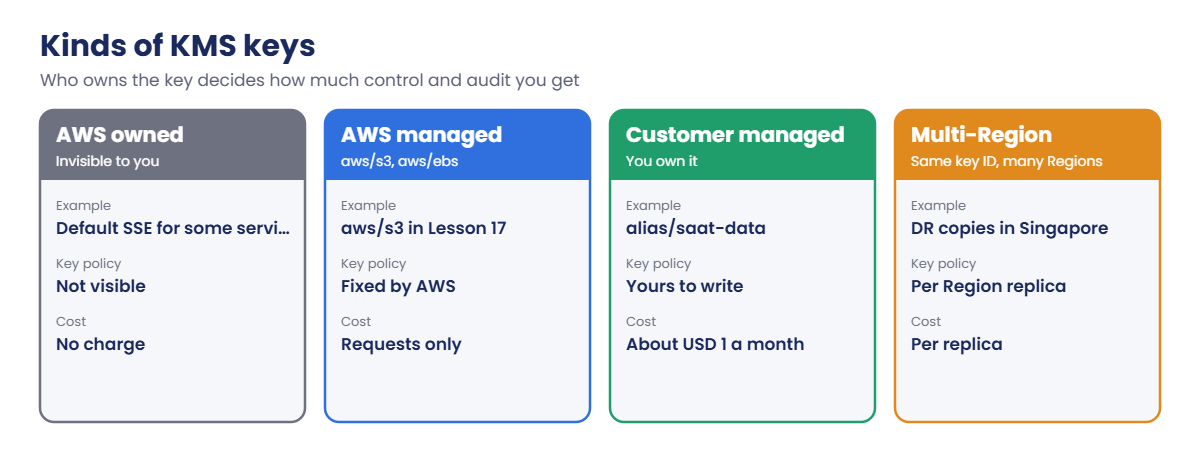
Not every key gives you the same control:
Use customer managed keys where you need to control who decrypts (payroll, customer data, backups), separate access per team, or prove usage to auditors. AWS managed keys are fine for low-risk data.
✅ Checkpoint: You can explain envelope encryption, the role of the key policy’s root statement, and why S3 access alone isn’t enough to read SSE-KMS objects.
Hands-on lab: create and control AWS KMS keys
Sign in and set up names:
cd C:\aws-lab
aws login --profile saat-admin
$env:AWS_PROFILE = 'saat-admin'
$acct = aws sts get-caller-identity --query Account --output text
$myArn = aws sts get-caller-identity --query Arn --output text
$bucket = "saat-kms-$acct-ap-south-1-an"1Create a key and read its policy
Paste this whole block:
$key = aws kms create-key --description "saat lab data key" --tags TagKey=course,TagValue=saatvedha-aws --query KeyMetadata.KeyId --output text
$keyArn = aws kms describe-key --key-id $key --query KeyMetadata.Arn --output text
aws kms create-alias --alias-name alias/saat-data --target-key-id $key
(aws kms get-key-policy --key-id $key --policy-name default --query Policy --output text | ConvertFrom-Json).Statement | Select-Object Sid, Effect, @{n='Principal';e={$_.Principal.AWS}}, ActionYou should see something like this:
Sid Effect Principal Action
--- ------ --------- ------
Enable IAM User Permissions Allow arn:aws:iam::111122223333:root kms:*That single statement means “this account’s IAM policies decide who can use the key”. Remove it, and only principals named in the key policy can use the key, whatever IAM says.
2Encrypt and decrypt a secret
Paste this whole block:
Set-Content -NoNewline secret.txt "db_password=Saat-Lab-Not-Real-123"
$ct = aws kms encrypt --key-id alias/saat-data --plaintext fileb://secret.txt --query CiphertextBlob --output text
[IO.File]::WriteAllBytes("$PWD\secret.enc", [Convert]::FromBase64String($ct))
Remove-Item secret.txt
$pt = aws kms decrypt --ciphertext-blob fileb://secret.enc --query Plaintext --output text
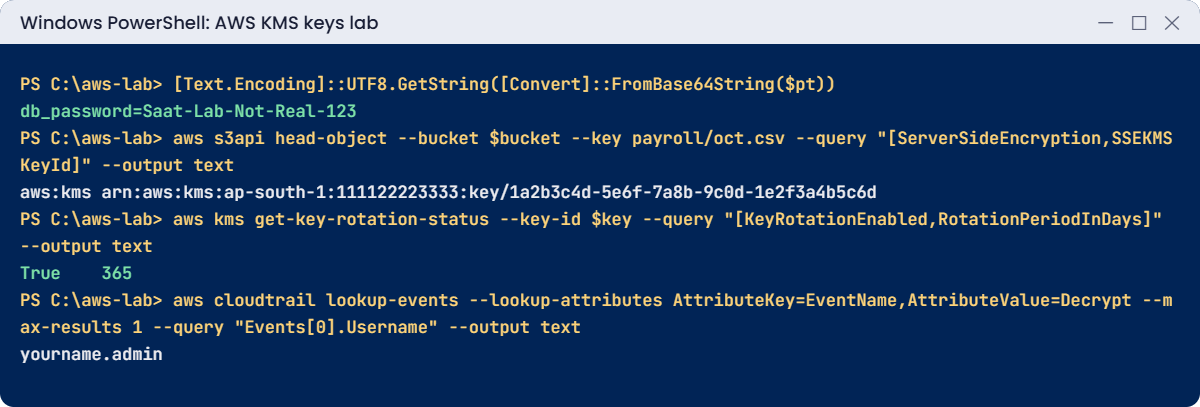
[Text.Encoding]::UTF8.GetString([Convert]::FromBase64String($pt))
$dk = aws kms generate-data-key --key-id alias/saat-data --key-spec AES_256 --output json | ConvertFrom-Json
"plaintext data key: $([Convert]::FromBase64String($dk.Plaintext).Length) bytes, encrypted copy: $([Convert]::FromBase64String($dk.CiphertextBlob).Length) bytes"
Remove-Variable dkYou should see something like this:
db_password=Saat-Lab-Not-Real-123
plaintext data key: 32 bytes, encrypted copy: 184 bytesDecrypt didn’t need the key ID: the ciphertext records which key made it. The data key is what S3 and EBS use; you’d encrypt a file with the 32-byte key, store the 184-byte encrypted copy beside it, and forget the plaintext.
3Use the key for an S3 bucket
Paste this whole block:
aws s3api create-bucket --bucket $bucket --bucket-namespace account-regional --region ap-south-1 --create-bucket-configuration LocationConstraint=ap-south-1 | Out-Null
'{ "Rules": [ { "ApplyServerSideEncryptionByDefault": { "SSEAlgorithm": "aws:kms", "KMSMasterKeyID": "KEY_ARN" }, "BucketKeyEnabled": true } ] }' -replace 'KEY_ARN', $keyArn | Set-Content kms-enc.json
aws s3api put-bucket-encryption --bucket $bucket --server-side-encryption-configuration file://kms-enc.json
Set-Content oct.csv "employee,net_pay"
aws s3 cp oct.csv "s3://$bucket/payroll/oct.csv" | Out-Null
aws s3api head-object --bucket $bucket --key payroll/oct.csv --query "[ServerSideEncryption,SSEKMSKeyId]" --output text
aws kms enable-key-rotation --key-id $key --rotation-period-in-days 365
aws kms get-key-rotation-status --key-id $key --query "[KeyRotationEnabled,RotationPeriodInDays]" --output textYou should see something like this:
aws:kms arn:aws:kms:ap-south-1:111122223333:key/1a2b3c4d-5e6f-7a8b-9c0d-1e2f3a4b5c6d
True 365The payroll object is now protected by your key, not the AWS managed aws/s3 key from Lesson 17. Rotation will create new key material every year; nothing changes for the bucket or the apps.
4See every use in CloudTrail
Paste this whole block. KMS events usually appear within five minutes:
do { Start-Sleep 30; $e = aws cloudtrail lookup-events --lookup-attributes "AttributeKey=ResourceName,AttributeValue=$keyArn" --max-results 20 --query "Events[].EventName" --output text } until ($e -match 'Decrypt')
$eYou should see something like this:
GenerateDataKey Decrypt GenerateDataKey Encrypt EnableKeyRotation CreateAlias CreateKeyEvery encrypt, decrypt and data key request is a CloudTrail event naming the caller. That is why auditors like customer managed keys: you can prove who read the payroll data.
✅ Checkpoint: alias/saat-data exists with the root statement in its policy, you decrypted the secret, payroll/oct.csv uses your key, rotation is True at 365 days, and CloudTrail shows the KMS calls. Keep everything for the break lab.
Break It, Then Fix It
Two KMS problems: one breaks everything at once, the other breaks one user quietly.
1Break it: disable the key
Disable the key, then try to decrypt:
aws kms disable-key --key-id $key
aws kms decrypt --ciphertext-blob fileb://secret.enc --query Plaintext --output textYou’ll get this error:
An error occurred (DisabledException) when calling the Decrypt operation: arn:aws:kms:ap-south-1:111122223333:key/1a2b3c4d-5e6f-7a8b-9c0d-1e2f3a4b5c6d is disabled.In real life this key might protect an RDS database, EBS volumes and a backup vault. Disabling it is an instant outage for all of them: instances can’t start, databases can’t read their storage, restores fail. Teams sometimes disable “unused” keys during a cleanup without checking CloudTrail.
Fix: enable it, and check a key’s recent use before disabling or deleting:
aws kms enable-key --key-id $key
$pt = aws kms decrypt --ciphertext-blob fileb://secret.enc --query Plaintext --output text
[Text.Encoding]::UTF8.GetString([Convert]::FromBase64String($pt))You should see this:
db_password=Saat-Lab-Not-Real-1232Break it: S3 access without kms:Decrypt
Create a reader role that can read the bucket but has no KMS permission, then download as that role:
'{ "Version": "2012-10-17", "Statement": [ { "Effect": "Allow", "Principal": { "AWS": "MY_ARN" }, "Action": "sts:AssumeRole" } ] }' -replace 'MY_ARN', $myArn | Set-Content reader-trust.json
$roleArn = aws iam create-role --role-name saat-kms-reader --assume-role-policy-document file://reader-trust.json --query Role.Arn --output text
'{ "Version": "2012-10-17", "Statement": [ { "Effect": "Allow", "Action": [ "s3:GetObject", "s3:ListBucket" ], "Resource": [ "arn:aws:s3:::BUCKET", "arn:aws:s3:::BUCKET/*" ] } ] }' -replace 'BUCKET', $bucket | Set-Content reader-s3.json
aws iam put-role-policy --role-name saat-kms-reader --policy-name read-payroll --policy-document file://reader-s3.json
aws configure set role_arn $roleArn --profile saat-kms-reader
aws configure set source_profile saat-admin --profile saat-kms-reader
aws configure set region ap-south-1 --profile saat-kms-reader
Start-Sleep 15
aws s3 cp "s3://$bucket/payroll/oct.csv" - --profile saat-kms-readerYou’ll get an error like this:
download failed: s3://saat-kms-111122223333-ap-south-1-an/payroll/oct.csv to - An error occurred (AccessDenied) when calling the GetObject operation: User: arn:aws:sts::111122223333:assumed-role/saat-kms-reader/botocore-session-1760971234 is not authorized to perform: kms:Decrypt on resource: arn:aws:kms:ap-south-1:111122223333:key/1a2b3c4d-5e6f-7a8b-9c0d-1e2f3a4b5c6d because no identity-based policy allows the kms:Decrypt action
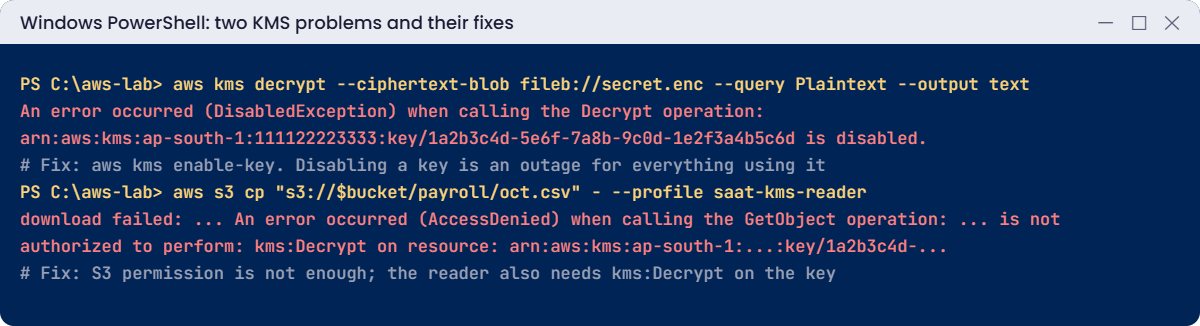
S3 said yes; KMS said no. In Lesson 17 the reader didn’t need this because the AWS managed key allows anyone in the account to use it through S3. Your own key follows your rules.
Fix: allow kms:Decrypt on this key for the reader:
'{ "Version": "2012-10-17", "Statement": [ { "Effect": "Allow", "Action": [ "s3:GetObject", "s3:ListBucket" ], "Resource": [ "arn:aws:s3:::BUCKET", "arn:aws:s3:::BUCKET/*" ] }, { "Effect": "Allow", "Action": "kms:Decrypt", "Resource": "KEY_ARN" } ] }' -replace 'BUCKET', $bucket -replace 'KEY_ARN', $keyArn | Set-Content reader-s3.json
aws iam put-role-policy --role-name saat-kms-reader --policy-name read-payroll --policy-document file://reader-s3.json
Start-Sleep 10
aws s3 cp "s3://$bucket/payroll/oct.csv" - --profile saat-kms-readerYou should see this:
employee,net_payNow clean up. A key can’t be deleted at once; you schedule deletion with a waiting period, and can cancel during it:
aws s3 rm "s3://$bucket" --recursive | Out-Null
aws s3 rb "s3://$bucket"
aws iam delete-role-policy --role-name saat-kms-reader --policy-name read-payroll
aws iam delete-role --role-name saat-kms-reader
aws kms delete-alias --alias-name alias/saat-data
aws kms schedule-key-deletion --key-id $key --pending-window-in-days 7 --query "[KeyState,DeletionDate]" --output text
Remove-Item secret.enc, oct.csv, kms-enc.json, reader-trust.json, reader-s3.json
notepad $HOME\.aws\configThe schedule command shows something like this:
PendingDeletion 2026-10-27T20:15:00+05:30In Notepad, delete the lines under [profile saat-kms-reader] and save.
✅ Checkpoint: You saw DisabledException stop every use of the key, and fixed a read that S3 allowed but KMS refused. The bucket, role and alias are gone, and the key is pending deletion.
This happened at work
The cleanup that took down the database
A fintech company’s security team ran a quarterly review of KMS keys and found one with a vague name, “temp-migration-key”, created two years earlier. Nobody remembered it, so they disabled it on a Thursday evening as the first step towards deletion.
Within minutes, the reporting database (restored from a migration snapshot two years earlier, still encrypted with that key) went into an inaccessible state, and three batch servers failed to start because their EBS volumes used it too. Reports for regulators were late the next morning.
They re-enabled the key and recovered. Their process now requires checking CloudTrail for the key’s use in the last 90 days and listing resources that reference it before disabling, keys must have owner and purpose tags, and deletion always uses the full 30-day waiting period with an alarm on any use of a pending-deletion key.
Common mistakes and troubleshooting
| Mistake | What happens | What to do |
|---|---|---|
| Granting S3 access but not kms:Decrypt | AccessDenied on GetObject for SSE-KMS objects | Grant kms:Decrypt on the key to readers |
| Disabling or deleting a key without checking use | Databases, volumes and restores fail | Check CloudTrail and resource references first |
| Removing the root statement from the key policy | IAM policies stop working; possible lockout | Keep it unless you deliberately manage access in the key policy |
| One key for everything | No separation of who can decrypt what | Keys per data class or team |
| Short deletion window on important keys | Data lost forever after 7 days | Use 30 days and alarm on use of pending keys |
| Forgetting cross-account KMS access | Shared snapshots or backups can’t be used | Allow the other account in the key policy and its IAM |
Interview questions
Click a question to open it. Each one is written the way an interviewer would ask it. Under it you will see why they ask it and one way you could answer, in your own words.
Fresher level
1. Can you explain in simple words what AWS KMS is?
Why they ask this: They want to know you understand how encryption keys are managed in AWS. Almost every service you touch uses KMS somewhere.
How you might answer: KMS is a managed service where you create and control encryption keys. The keys never leave KMS unencrypted, so nobody can copy them out.
Every time a key is used, KMS checks the key policy and IAM, and the call is logged in CloudTrail. So I always know who used which key.
2. What’s the difference between an AWS managed key and a customer managed key, and when would you pick each?
Why they ask this: They are checking that you know how much control each key type gives you. That choice affects sharing, auditing and cost.
How you might answer: An AWS managed key, like aws/s3, is created and controlled by AWS with a fixed policy. A customer managed key is mine: I write the key policy and control rotation and lifecycle, and I pay a monthly fee for it.
For simple cases the AWS managed key is fine, but if I need to share data with another account or control exactly who can decrypt, I pick a customer managed key.
3. How would you explain envelope encryption to a new team member?
Why they ask this: They want to see that you understand how KMS works under the hood. This explains why KMS can encrypt large data quickly.
How you might answer: I’d explain it like this: the data is encrypted with a data key, and then that data key is encrypted with the KMS key. Only the small encrypted data key goes back to KMS when you need to decrypt.
It’s like locking your valuables in a box, and then locking the box key in a safe that only KMS can open.
2–5 years experience
4. A user tells you they can list a bucket but get AccessDenied when they download an object. What’s likely going on?
Why they ask this: They want to see that you think beyond S3 permissions. Missing KMS access is one of the most common causes of this confusing error.
How you might answer: I’d check how the objects are encrypted. If they use SSE-KMS with a customer managed key, the user also needs kms:Decrypt on that key, not only S3 read permission.
That permission has to come from the key policy, or from IAM if the key policy delegates to IAM.
5. Your security team asks you to turn on key rotation. Will that break any applications?
Why they ask this: They are checking that you understand what rotation actually changes. People often worry about rotation without knowing how it works.
How you might answer: No, it shouldn’t. When a KMS key rotates, KMS creates new key material and uses it for new encryption, but it keeps the old material to decrypt older data.
The key ID and ARN stay the same, so applications don’t need any changes.
6. Another team needs a copy of an encrypted EBS snapshot from your account. How would you share it with them?
Why they ask this: They want to see that you know cross-account sharing needs both the snapshot and the key. They also want to know if you understand the limits of AWS managed keys.
How you might answer: I’d share the snapshot with their account, and update the customer managed key’s policy so their account can use it, with Decrypt, CreateGrant and DescribeKey.
If the snapshot was encrypted with aws/ebs, it can’t be shared, so I’d first copy it and re-encrypt it with a customer managed key.
Senior level
7. You join a regulated company with no clear plan for encryption keys. How would you design a KMS key strategy?
Why they ask this: They want to see governance thinking: separation of duties, protection against mistakes, and auditing. They are checking that you can design for regulators, not only for engineers.
How you might answer: I’d create keys per data classification and environment, with key policies that separate key administrators from key users, and rotation turned on. Keys for shared data would live in a security account, and every key gets tags for owner and purpose.
I’d add SCPs so only a break-glass role can delete keys, and CloudTrail alerts on DisableKey and ScheduleKeyDeletion.
8. You find out someone has scheduled a production KMS key for deletion. What do you do?
Why they ask this: They want to see a calm, fast incident response. They are checking that you stop the damage first and then prevent it from happening again.
How you might answer: First I’d cancel the deletion straight away with cancel-key-deletion, and re-enable the key so everything using it works again. Then I’d find every resource that uses the key through CloudTrail and resource configurations.
After that I’d find out who did it and why, and add guardrails like SCPs and alarms so it can’t happen quietly again.
Quick quiz
Q1. Why did the reader fail to download the payroll file?
- No S3 permission
- No kms:Decrypt on the key
- The bucket was public
- The key was rotated
Show answer
B — SSE-KMS objects need both S3 and KMS permissions.
Q2. What does disabling a KMS key do?
- Nothing until deletion
- Immediately blocks all use of the key
- Deletes the data
- Rotates the key
Show answer
B — It is an instant outage for anything using the key.
Q3. What does the default key policy’s root statement do?
- Gives root user only
- Lets IAM policies in the account grant access
- Makes the key public
- Disables rotation
Show answer
B — It delegates access control to IAM.
Q4. What is the minimum waiting period for key deletion?
- None
- 1 day
- 7 days
- 90 days
Show answer
C — 7 to 30 days, so mistakes can be cancelled.
Q5. In envelope encryption, what is stored next to the data?
- The plaintext data key
- The encrypted data key
- The KMS key
- Nothing
Show answer
B — The encrypted data key is decrypted by KMS when needed.
Quick recap
- KMS keys never leave KMS; services use envelope encryption with data keys.
- The key policy’s root statement lets IAM grant key use.
- Reading SSE-KMS data needs kms:Decrypt as well as S3 permissions.
- Disabling a key is an instant outage; check use before you do it.
- Rotation keeps the same key ID; deletion waits 7 to 30 days.
Next lesson
Lesson 31: Secrets Manager and Parameter Store → You’ll store database passwords and settings properly, read them from a server, and rotate a secret without downtime.
Further reading: AWS KMS keys
Want to go deeper into AWS KMS keys? Read AWS Key Management Service and Key policies in AWS KMS. You can also see the full plan for this course on the AWS Cloud Administration course page.
