Backups and DR for RDS SQL Server

Sooner or later someone runs a DELETE without a WHERE clause on production. RDS SQL Server backup features turn that from a disaster into a 40-minute task: automated backups let you restore to any second in the retention period, and cross-Region backups protect you if a whole Region has a bad day.

You’ll set a proper retention and backup window, start copying saat-sql’s backups to Singapore, delete rows “by accident”, get them back with point-in-time restore, and then run a real DR restore in Singapore. Then you’ll hit two problems teams usually find during their first real recovery.

TimeYou needBy the end you can
150 minutes (much of it waiting for restores)Lessons 42 to 51 done (saat-sql with 100,003 orders, Start-SqlLab.ps1, Stop-SqlLab.ps1), Windows PowerShell 5.1 on your laptop, signed in as saat-admin. Cost: about USD 1 (two small extra instances for an hour or so, plus a little cross-Region transfer). The copies are deleted at the end.Set backup retention and windows, restore to a point in time, copy lost rows back with SqlBulkCopy, replicate automated backups to another Region, run and check a DR restore, and avoid the gaps that break real recoveries.

What it is, in one line

RDS SQL Server backup uses daily snapshots plus 5-minute transaction log backups, so you can restore to any second in the retention period, in the same Region or in another one.

In Simple Words

The CCTV recording

A shop’s CCTV keeps the last seven days. If something goes missing, you rewind to the minute before and see exactly what was there.

Point-in-time restore is that rewind. But you can’t rewind the real shop; you get a second shop that looks exactly as the first did at that minute. You walk over, pick up what was lost, and bring it back.

A copy of the recordings in another city (cross-Region backups) helps if the first shop burns down. And it’s only useful if you’ve practised opening that second shop.

Engineer's View

How RDS backups work

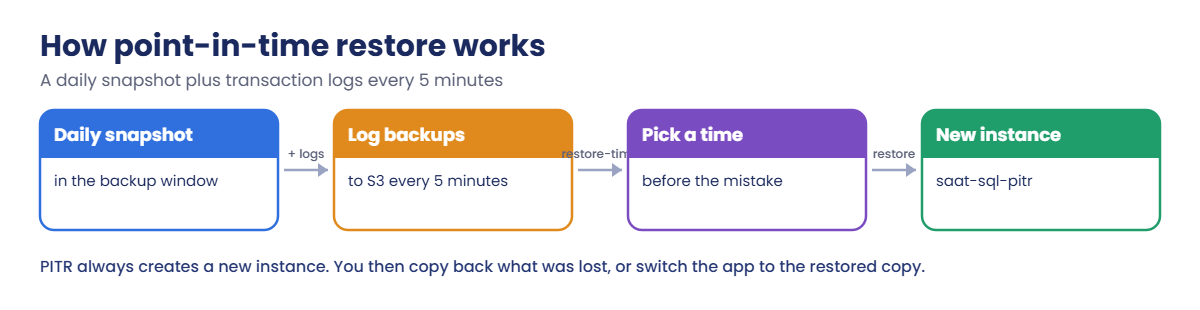
With backup retention set to 1 to 35 days, RDS takes a daily storage snapshot in the backup window and uploads transaction log backups to S3 every 5 minutes. LatestRestorableTime is usually within 5 minutes of now.

A point-in-time restore always creates a new instance; it never overwrites the existing one. Pass the subnet group, security groups, parameter group and option group explicitly, or you get defaults.

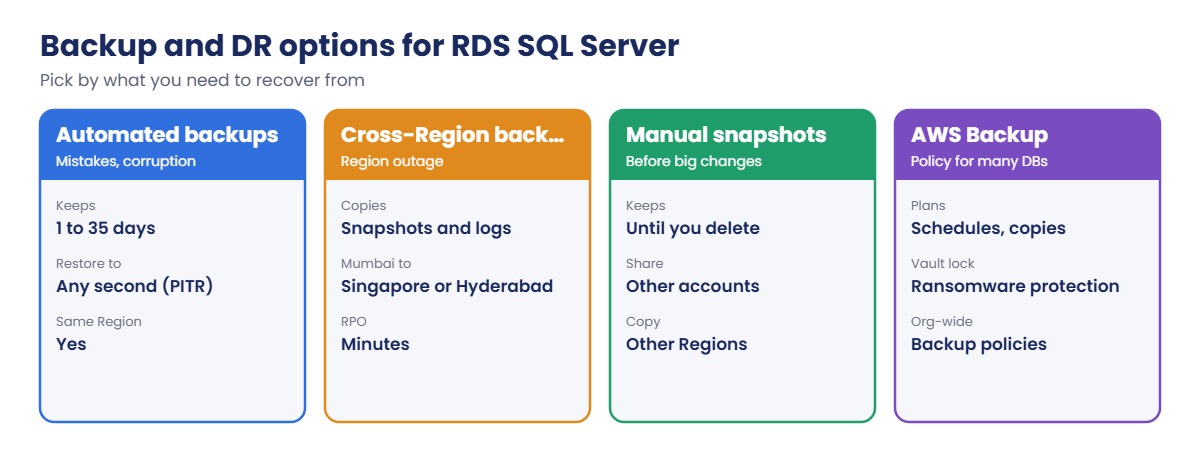
Cross-Region automated backups copy snapshots and logs to another Region (from Mumbai: Singapore or Hyderabad, which is an opt-in Region), so you can restore to a point in time there. Encrypted instances need a KMS key in the destination. You pay for cross-Region transfer and storage, and you need a DB subnet group, security groups and matching parameter and option groups ready in that Region.

Manual snapshots stay until deleted and can be copied or shared, which makes them useful before upgrades. AWS Backup adds plans, cross-Region and cross-account copies, Vault Lock and org-wide backup policies (Lesson 29).

Native .bak files (Lesson 46) cover single databases. Setting retention to 0 turns automated backups off and removes them, so treat that change as dangerous.

How it works, step by step

Here is what happens during a point-in-time restore.

1Pick a time

You choose a second between the earliest restorable time and LatestRestorableTime, ideally just before the mistake.

How RDS point-in-time restore uses snapshots and 5-minute log backups

2RDS builds a new instance

RDS restores the snapshot taken before that time, then replays log backups up to the exact second, and brings up a new instance with a new endpoint.

3Recover what was lost

Copy the missing rows back into production, or, if the damage is wide, move the app to the restored instance.

4Choose the right protection

Each option covers a different kind of disaster:

RDS SQL Server backup and DR options: automated, cross-Region, snapshots, AWS Backup

A backup you’ve never restored is a hope, not a plan. Put a restore test on the calendar, in both Regions.

✅ Checkpoint: You can explain how snapshots and 5-minute log backups give point-in-time restore, why it creates a new instance, and what cross-Region backups add.

Hands-on lab: undo a DELETE and restore saat-sql in Singapore

Sign in and start the SQL lab:

cd C:\aws-lab
aws login --profile saat-admin
$env:AWS_PROFILE = 'saat-admin'
$v = Get-Content C:\aws-lab\saat-vpc.json | ConvertFrom-Json
.\Start-SqlLab.ps1

1Set retention and start cross-Region backups

Paste this whole block. Retention goes from 1 to 7 days, the backup window moves to midnight India time, and backups start copying to Singapore:

aws rds modify-db-instance --db-instance-identifier saat-sql --backup-retention-period 7 --preferred-backup-window 18:30-19:00 --apply-immediately --query "DBInstance.DBInstanceStatus" --output text
Start-Sleep 30
aws rds wait db-instance-available --db-instance-identifier saat-sql
$srcArn = aws rds describe-db-instances --db-instance-identifier saat-sql --query "DBInstances[0].DBInstanceArn" --output text
$drKey = aws kms describe-key --key-id alias/aws/rds --region ap-southeast-1 --query KeyMetadata.Arn --output text
aws rds start-db-instance-automated-backups-replication --region ap-southeast-1 --source-region ap-south-1 --source-db-instance-arn $srcArn --kms-key-id $drKey --backup-retention-period 7 --query "DBInstanceAutomatedBackup.Status" --output text
aws rds describe-db-instances --db-instance-identifier saat-sql --query "DBInstances[0].[BackupRetentionPeriod,PreferredBackupWindow,LatestRestorableTime]" --output text

You should see something like this:

modifying
pending
7       18:30-19:00     2026-10-20T10:55:00+00:00

18:30 UTC is midnight in India, when SaatShop is quiet. Changing retention between two non-zero values causes no outage. The Singapore copy takes a while to build its first snapshot; you’ll use it in step 4.

2Make the mistake, then restore to just before it

Paste this whole block. It notes the time, deletes almost every order, then restores a copy from before the DELETE (about 30 minutes):

Start-Sleep 60
$t = (Get-Date).ToUniversalTime().ToString('yyyy-MM-ddTHH:mm:ssZ')
Start-Sleep 60
sqlcmd -S "127.0.0.1,11433" -U saatadmin -C -d SaatShop -Q "DELETE dbo.Orders WHERE OrderId > 100; SELECT COUNT(*) AS left_over FROM dbo.Orders;"
do { Start-Sleep 60; $lrt = aws rds describe-db-instances --db-instance-identifier saat-sql --query "DBInstances[0].LatestRestorableTime" --output text } until ([datetime]$lrt -gt [datetime]$t)
aws rds restore-db-instance-to-point-in-time --source-db-instance-identifier saat-sql --target-db-instance-identifier saat-sql-pitr --restore-time $t --db-instance-class db.t3.micro --db-subnet-group-name saat-db-subnets --vpc-security-group-ids $v.DbSg --no-publicly-accessible --db-parameter-group-name saat-sqlserver-ex-16 --option-group-name saat-sqlserver-ex-16-og --manage-master-user-password --tags Key=course,Value=saatvedha-aws Key=lesson,Value=52 --query "DBInstance.DBInstanceStatus" --output text
aws rds wait db-instance-available --db-instance-identifier saat-sql-pitr
"restored to $t"

You should see something like this:

left_over
-----------
        100
creating
restored to 2026-10-20T11:02:41Z

Production lost 99,903 orders, and saat-sql-pitr is a copy of saat-sql as it was a minute before the DELETE. The restore was given the same subnet group, security group, parameter group and option group, so it’s set up exactly like production.

3Copy the lost rows back

Paste this whole block. It opens a second tunnel to the copy, then streams the missing rows into saat-sql with SqlBulkCopy, keeping their original IDs:

.\Start-SqlLab.ps1 -Db saat-sql-pitr -LocalPort 11435
function Get-SqlPw([string]$Db) {
  $a = aws rds describe-db-instances --db-instance-identifier $Db --query "DBInstances[0].MasterUserSecret.SecretArn" --output text
  (aws secretsmanager get-secret-value --secret-id $a --query SecretString --output text | ConvertFrom-Json).password
}
function New-Cs([int]$Port, [string]$Db) {
  $b = New-Object System.Data.SqlClient.SqlConnectionStringBuilder
  $b['Data Source'] = "127.0.0.1,$Port"; $b['Initial Catalog'] = 'SaatShop'; $b['User ID'] = 'saatadmin'; $b['Password'] = (Get-SqlPw $Db)
  $b['Encrypt'] = $true; $b['TrustServerCertificate'] = $true
  $b.ConnectionString
}
function Get-Rows([int]$Port) {
  $db = if ($Port -eq 11433) { 'saat-sql' } else { 'saat-sql-pitr' }
  $cn = New-Object System.Data.SqlClient.SqlConnection (New-Cs $Port $db); $cn.Open()
  $cm = $cn.CreateCommand(); $cm.CommandText = 'SELECT COUNT(*) FROM dbo.Orders'; $n = $cm.ExecuteScalar(); $cn.Close(); $n
}
"saat-sql $(Get-Rows 11433)  pitr $(Get-Rows 11435)"
$src = New-Object System.Data.SqlClient.SqlConnection (New-Cs 11435 'saat-sql-pitr'); $src.Open()
$cmd = $src.CreateCommand(); $cmd.CommandText = 'SELECT OrderId, Customer, Amount, CreatedAt FROM dbo.Orders WHERE OrderId > 100'
$rdr = $cmd.ExecuteReader()
$bulk = New-Object System.Data.SqlClient.SqlBulkCopy((New-Cs 11433 'saat-sql'), [System.Data.SqlClient.SqlBulkCopyOptions]::KeepIdentity)
$bulk.DestinationTableName = 'dbo.Orders'; $bulk.BulkCopyTimeout = 600
foreach ($col in 'OrderId', 'Customer', 'Amount', 'CreatedAt') { [void]$bulk.ColumnMappings.Add($col, $col) }
$bulk.WriteToServer($rdr); $rdr.Close(); $src.Close()
"saat-sql $(Get-Rows 11433)"

You should see something like this:

Tunnel ready on 127.0.0.1,11435 for saatadmin (password is in SQLCMDPASSWORD for this window)
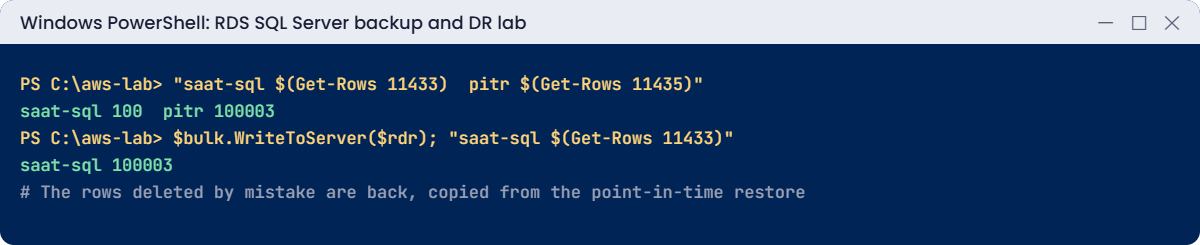
saat-sql 100  pitr 100003
saat-sql 100003

All 99,903 rows are back with their original OrderIds, and nothing written to production after the mistake was lost. This “restore aside, copy back” approach is what DBAs use when only some data is damaged.
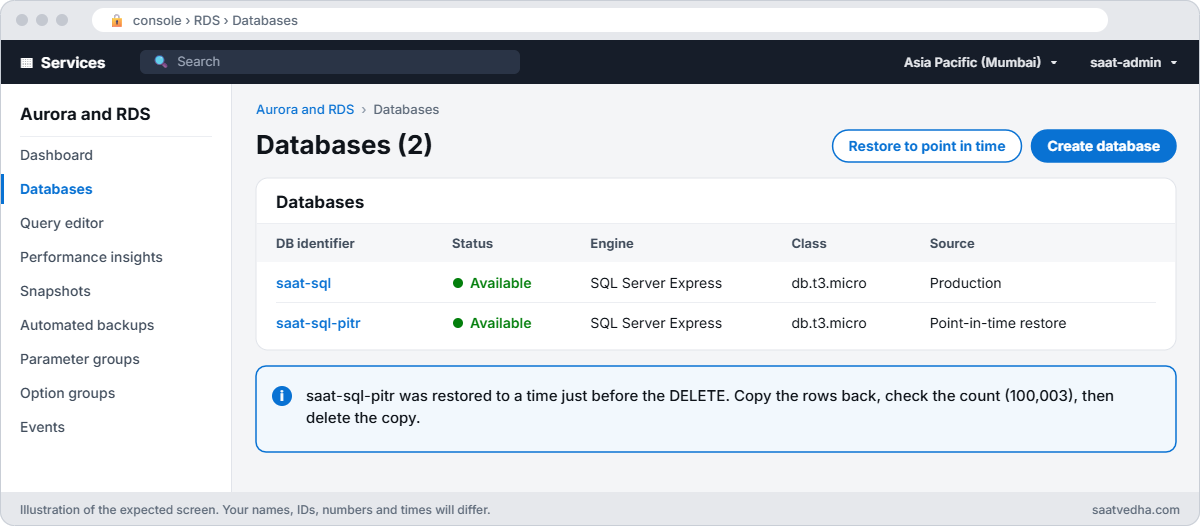
RDS console with saat-sql and the point-in-time restored copy saat-sql-pitr both available
The RDS console during the fix: saat-sql-pitr, restored to just before the DELETE, sits beside production while you copy the rows back.
RDS SQL Server backup lab output: rows recovered from point-in-time restore
Rows copied back from the restored instance. Something like this.

4Run a DR restore in Singapore

Paste this whole block. It waits until the Singapore copy can be restored, then restores it (allow up to an hour):

do { Start-Sleep 120; $ab = aws rds describe-db-instance-automated-backups --region ap-southeast-1 --db-instance-identifier saat-sql --query "DBInstanceAutomatedBackups[0].[DBInstanceAutomatedBackupsArn,Status,RestoreWindow.LatestTime]" --output text; $ab } until ($ab -match 'replicating' -and $ab -notmatch 'None$')
$abArn = ($ab -split '\s+')[0]
aws rds restore-db-instance-to-point-in-time --region ap-southeast-1 --source-db-instance-automated-backups-arn $abArn --target-db-instance-identifier saat-sql-dr --use-latest-restorable-time --db-instance-class db.t3.micro --no-publicly-accessible --manage-master-user-password --tags Key=course,Value=saatvedha-aws Key=lesson,Value=52 --query "DBInstance.DBInstanceStatus" --output text
aws rds wait db-instance-available --region ap-southeast-1 --db-instance-identifier saat-sql-dr
aws rds describe-db-instances --region ap-southeast-1 --db-instance-identifier saat-sql-dr --query "DBInstances[0].[DBInstanceStatus,Endpoint.Address,StorageEncrypted]" --output text

You should see something like this:

arn:aws:rds:ap-southeast-1:111122223333:auto-backup:ab-abc123def456  replicating  2026-10-20T11:58:00+00:00
creating
available       saat-sql-dr.c7d8e9f0a1b2.ap-southeast-1.rds.amazonaws.com      True

You now have a working copy of saat-sql in another country, restored from replicated backups, encrypted with Singapore’s key. Its RPO was minutes. In a real DR you’d also need the app, DNS and networking in that Region.
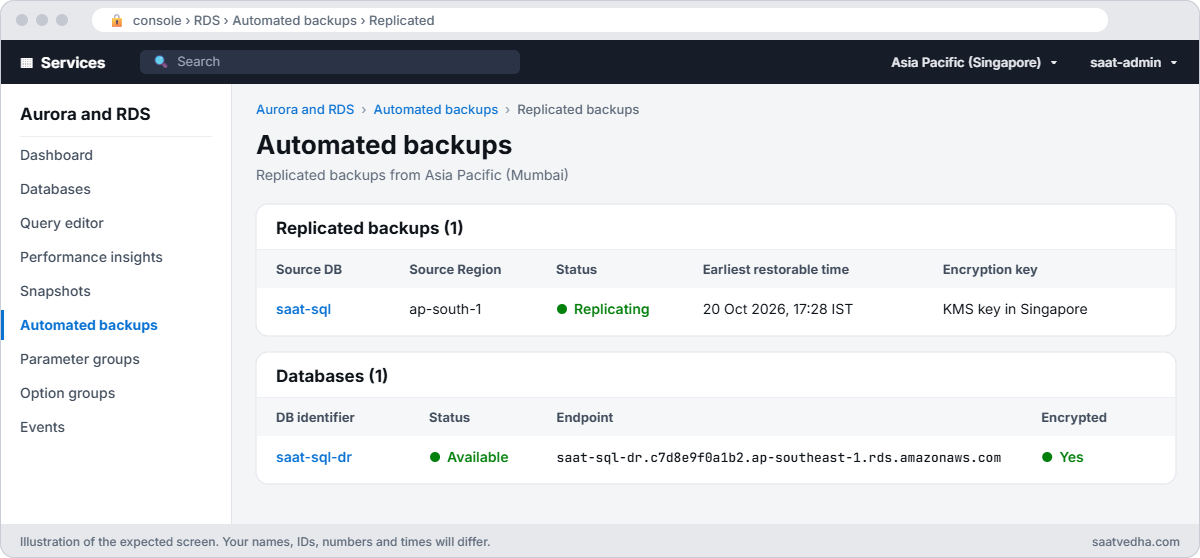
RDS console in the Singapore Region showing replicated backups of saat-sql and the restored saat-sql-dr instance
The Singapore Region: saat-sql’s backups replicating from Mumbai, and saat-sql-dr restored from them and available.

✅ Checkpoint: saat-sql keeps 7 days of backups, saat-sql-pitr was restored from before the DELETE, saat-sql is back to 100,003 orders, and saat-sql-dr is available in ap-southeast-1.

Break It, Then Fix It

Two problems teams usually discover in the middle of a real recovery.

1Break it: restore to “now”

Ask for a restore at the current time:

$now = (Get-Date).ToUniversalTime().ToString('yyyy-MM-ddTHH:mm:ssZ')
aws rds restore-db-instance-to-point-in-time --source-db-instance-identifier saat-sql --target-db-instance-identifier saat-sql-now --restore-time $now --db-subnet-group-name saat-db-subnets

You’ll get an error like this:

An error occurred (InvalidRestoreFault) when calling the RestoreDBInstanceToPointInTime operation: The restore time must be before the latest restorable time.

Logs reach S3 every 5 minutes, so the newest few minutes can’t be restored yet. During an incident, people often type the time the alert fired, which can be too recent. Fix: check LatestRestorableTime and pick a time at or before it, or use --use-latest-restorable-time:

aws rds describe-db-instances --db-instance-identifier saat-sql --query "DBInstances[0].LatestRestorableTime" --output text

You should see something like this:

2026-10-20T12:05:00+00:00

2Break it: the DR copy isn’t configured like production

Compare the Singapore copy’s groups with production:

aws rds describe-db-instances --db-instance-identifier saat-sql --query "DBInstances[0].[DBParameterGroups[0].DBParameterGroupName,OptionGroupMemberships[0].OptionGroupName]" --output text
aws rds describe-db-instances --region ap-southeast-1 --db-instance-identifier saat-sql-dr --query "DBInstances[0].[DBParameterGroups[0].DBParameterGroupName,OptionGroupMemberships[0].OptionGroupName]" --output text

You’ll get something like this:

saat-sqlserver-ex-16    saat-sqlserver-ex-16-og
default.sqlserver-ex-16.0       default:sqlserver-ex-16-00
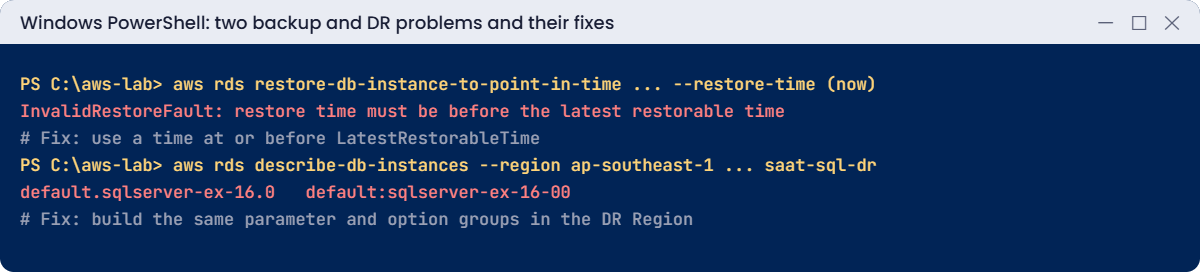
Backup and DR problems: restore time too recent and default groups in DR
Both problems and their fixes. Something like this.

The DR copy came up with default groups, because your custom ones only exist in Mumbai. TLS isn’t forced, ad hoc plan caching is off, and native backups wouldn’t work. Nobody notices until an auditor or an app complains, usually during a real DR.

Fix: create the same parameter group in Singapore, attach it and reboot (in real life you’d build these with CloudFormation in both Regions ahead of time, along with the option group):

'[{"ParameterName":"rds.force_ssl","ParameterValue":"1","ApplyMethod":"pending-reboot"},{"ParameterName":"optimize for ad hoc workloads","ParameterValue":"1","ApplyMethod":"immediate"}]' | Set-Content dr-params.json
aws rds create-db-parameter-group --region ap-southeast-1 --db-parameter-group-name saat-sqlserver-ex-16 --db-parameter-group-family sqlserver-ex-16.0 --description "Same as Mumbai" | Out-Null
aws rds modify-db-parameter-group --region ap-southeast-1 --db-parameter-group-name saat-sqlserver-ex-16 --parameters file://dr-params.json | Out-Null
aws rds modify-db-instance --region ap-southeast-1 --db-instance-identifier saat-sql-dr --db-parameter-group-name saat-sqlserver-ex-16 --apply-immediately | Out-Null
Start-Sleep 60
aws rds wait db-instance-available --region ap-southeast-1 --db-instance-identifier saat-sql-dr
aws rds reboot-db-instance --region ap-southeast-1 --db-instance-identifier saat-sql-dr | Out-Null
Start-Sleep 60
aws rds wait db-instance-available --region ap-southeast-1 --db-instance-identifier saat-sql-dr
aws rds describe-db-instances --region ap-southeast-1 --db-instance-identifier saat-sql-dr --query "DBInstances[0].DBParameterGroups[0].[DBParameterGroupName,ParameterApplyStatus]" --output text

You should see something like this:

saat-sqlserver-ex-16    in-sync

Now clean up. saat-sql keeps 7-day retention; the copies, the replication and the Singapore parameter group go:

aws rds delete-db-instance --db-instance-identifier saat-sql-pitr --skip-final-snapshot --delete-automated-backups | Out-Null
aws rds delete-db-instance --region ap-southeast-1 --db-instance-identifier saat-sql-dr --skip-final-snapshot --delete-automated-backups | Out-Null
aws rds stop-db-instance-automated-backups-replication --region ap-southeast-1 --source-db-instance-arn $srcArn | Out-Null
aws rds wait db-instance-deleted --region ap-southeast-1 --db-instance-identifier saat-sql-dr
Start-Sleep 120
$abArn = aws rds describe-db-instance-automated-backups --region ap-southeast-1 --db-instance-identifier saat-sql --query "DBInstanceAutomatedBackups[0].DBInstanceAutomatedBackupsArn" --output text
if ($abArn -and $abArn -ne 'None') { aws rds delete-db-instance-automated-backup --region ap-southeast-1 --db-instance-automated-backups-arn $abArn | Out-Null }
aws rds delete-db-parameter-group --region ap-southeast-1 --db-parameter-group-name saat-sqlserver-ex-16
Remove-Item dr-params.json
.\Stop-SqlLab.ps1 -Db saat-sql-pitr -KeepDbRunning
.\Stop-SqlLab.ps1

✅ Checkpoint: You fixed a too-recent restore time with LatestRestorableTime and a misconfigured DR copy with a matching parameter group. saat-sql-pitr, saat-sql-dr, the replicated backups and the Singapore parameter group are gone, and saat-sql is stopping with 7-day retention.

This happened at work

The restore that took two days instead of two hours

A payroll company had cross-Region backups for its RDS SQL Server databases and a DR plan on paper. When a bad release corrupted data in Mumbai, they decided to restore in the DR Region from the replicated backups.

The restore itself took 40 minutes. Then the trouble began: no DB subnet group in that Region, no security groups for the app, a default parameter group without forced TLS so the app’s driver refused to connect, and no option group for the SSIS packages they relied on.

It took two days to rebuild by hand what should have been ready. Now all of it is in CloudFormation for both Regions, and a DR restore test runs every quarter with a timer on the wall.

Common mistakes and troubleshooting

MistakeWhat happensWhat to do
Retention left at 1 dayMistakes found on Monday can’t be undone7 to 35 days for production
Restoring without groupsCopy comes up with defaultsPass subnet, SG, parameter and option groups
Picking a time after LatestRestorableTimeInvalidRestoreFaultCheck LatestRestorableTime first
DR Region not preparedHours or days rebuilding networking and groupsIaC for both Regions, tested quarterly
Setting retention to 0Automated backups deletedNever on production; protect with SCPs
Never testing restoresBackups that don’t work when neededScheduled restore tests with measured times

Interview questions

Click a question to open it. Each one is written the way an interviewer would ask it. Under it you will see why they ask it and one way you could answer, in your own words.

Fresher level

1. Can you explain in simple words what point-in-time restore means on RDS?

Why they ask this: They want to check that you understand how RDS backups work underneath, not just that a restore button exists.

How you might answer: It lets you restore a database to any second inside the retention window. RDS does this by combining the daily snapshot with the transaction log backups it takes every 5 minutes.

So if something goes wrong at 3:10, I can go back to 3:09.

2. If you do a point-in-time restore, what happens to the instance that’s running now?

Why they ask this: They want to make sure you won’t be surprised during an incident, because the restore behaves differently from what many people expect.

How you might answer: Nothing happens to it. A point-in-time restore always creates a new instance with a new endpoint.

That means I have to point the app to the new endpoint, or copy the data I need back to the original.

3. A manager asks you to keep automated RDS backups for a full year. What would you tell them?

Why they ask this: They want to see that you know the retention limit and can offer the right option when a request goes past it.

How you might answer: I’d explain that automated backups can be kept for 35 days at most. For a year, we need manual snapshots or a plan in AWS Backup.

AWS Backup is my choice, because it handles the schedule and the deletion for us.

2–5 years experience

4. A user deleted some rows by mistake two hours ago. Walk me through how you’d get them back.

Why they ask this: They want to see a calm, safe recovery process that doesn’t overwrite good data written since the mistake.

How you might answer: First I find the exact time of the delete from the app logs. Then I restore a new instance to a point just before it, using the same parameter, option and security groups.

I compare the data and copy only the missing rows back, using SqlBulkCopy, a native backup or SSIS. After I validate the result, I delete the restored copy.

5. What’s the difference between cross-Region automated backups and simply copying snapshots to another Region?

Why they ask this: They want to know you understand what each option gives you in a real disaster, especially how much data you could lose.

How you might answer: Cross-Region automated backups copy the snapshots and the transaction logs continuously. That means I can restore to a point in time in the DR Region.

A snapshot copy only gives me the moment the snapshot was taken, so I could lose everything written after it.

6. Your team says DR is ready because backups go to another Region. What else would you check is already built there?

Why they ask this: They want to see that you think about everything the database needs to run, not just the data. Many DR plans fail on this.

How you might answer: I’d check the VPC, subnets, DB subnet group and security groups exist there, along with the parameter and option groups. KMS keys and secrets must be in that Region too.

The app infrastructure and DNS failover also have to be ready. Ideally it all comes from the same IaC as production, so nothing is forgotten.

Senior level

7. Design backup and DR for a payments database where you can lose at most 5 minutes of data and must be back within an hour.

Why they ask this: They want to see how you map RPO and RTO to real AWS features, and whether you include testing and protection of the backups themselves.

How you might answer: I’d use Multi-AZ for local failures and keep 35 days of retention. For a Region failure I’d use cross-Region automated backups, or a cross-Region read replica where it’s supported.

AWS Backup would add copies to another account with Vault Lock. The DR Region would be ready from IaC, and we’d run timed DR tests every quarter with written runbooks.

8. How would you protect your database backups from ransomware or a rogue admin?

Why they ask this: They want to see that you plan for attacks from inside as well as outside, and that you know backups are often the first target.

How you might answer: I’d use AWS Backup Vault Lock in compliance mode, so nobody can delete the backups early. Copies would go to a separate account.

On top of that I’d add SCPs that deny backup deletion and retention changes, tight KMS key policies, and alerts whenever someone changes a backup setting.

Quick quiz

Q1. How often does RDS upload transaction log backups?

  1. Every hour
  2. Every 5 minutes
  3. Daily
  4. Never
Show answer

B — That is why LatestRestorableTime is a few minutes behind.

Q2. What does point-in-time restore create?

  1. An overwrite
  2. A new instance
  3. A .bak file
  4. A snapshot only
Show answer

B — You recover from the copy.

Q3. Why did restoring to “now” fail?

  1. No permission
  2. It was after LatestRestorableTime
  3. Wrong edition
  4. No KMS key
Show answer

B — The last minutes aren’t restorable yet.

Q4. Why did saat-sql-dr have default groups?

  1. A bug
  2. Custom groups didn’t exist in Singapore
  3. Express edition
  4. Encryption
Show answer

B — Groups are Regional.

Q5. Which tool kept the original OrderIds when copying back?

  1. sqlcmd
  2. SqlBulkCopy with KeepIdentity
  3. Excel
  4. DMS
Show answer

B — KeepIdentity preserves identity values.

Quick recap

  • Automated backups plus 5-minute logs give point-in-time restore for 1 to 35 days.
  • PITR creates a new instance; pass all groups explicitly.
  • Copy back only what was lost, or switch to the restored copy.
  • Cross-Region automated backups protect against Region problems.
  • Prepare and test the DR Region before you need it.

Next lesson

Lesson 53: Patching and upgrades for RDS SQL Server → You’ll manage maintenance windows and minor versions, and test a major upgrade on a snapshot copy.

Further reading: RDS SQL Server backup

Want to go deeper into RDS SQL Server backup? Read Restoring a DB instance to a specified time and Replicating automated backups to another AWS Region. You can also see the full plan for this course on the AWS Cloud Administration course page.

Scroll to Top