Regions, Availability Zones and how AWS bills you

Every resource you create lives in one place, and that place decides how fast it is, what happens when something fails and what it costs. This lesson explains AWS regions and availability zones, then shows how AWS turns your usage into a bill.

You’ll also write the cleanup script you’ll run at the end of every lab from now on. It finds anything tagged for this course in every Region, so nothing is left running by mistake.

TimeYou needBy the end you can
50 minutesYour laptop with the AWS CLI from Lesson 3, signed in with aws login --profile saat-root.Explain Regions, Availability Zones and zone IDs, read the four kinds of AWS charges, tag resources, and find every tagged lab resource across all Regions with one script.

What it is, in one line

AWS regions and availability zones are the “where” of AWS: a Region is a city-sized area, and each Region has several separate zones of data centres.

In Simple Words

A bank with branches in one city

Think of a bank in a big city. The city is the Region. The bank has three branches in different neighbourhoods; those are the Availability Zones.

Each branch has its own power and its own locks. If one branch floods, the other two still open. Branches are close enough that a courier gets between them in minutes.

You pay the bank for the lockers you rent (storage), for how long you use a meeting room (compute), for each form you fill in (requests) and for every parcel you send out of the bank (data transfer).

Engineer's View

How the pieces fit

A Region (for example ap-south-1, Mumbai) is a separate geographic area with its own copy of most AWS services. Data doesn’t leave a Region unless you move it. You pick a Region for latency to your users, data laws, service availability and price, which differs a little between Regions.

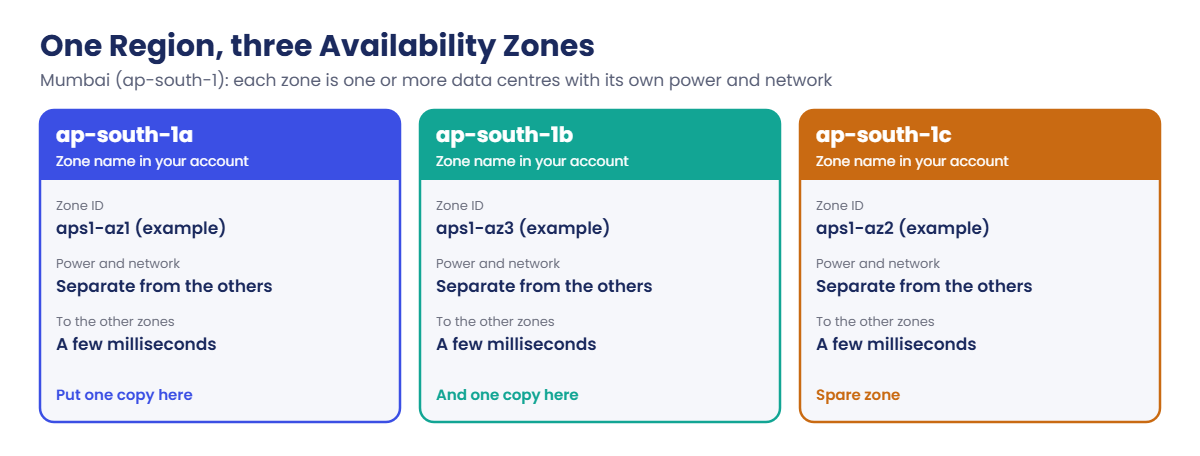
Each Region has at least three Availability Zones (AZs). A zone is one or more data centres with separate power, cooling and networking, connected to the other zones by fast private links. You survive a zone failure by running copies in two or more zones; that is the idea behind Multi-AZ databases and load balancers in later lessons.

Zone names are per account. Your ap-south-1a may be a different physical zone from someone else’s ap-south-1a. The zone ID (like aps1-az1) is the same for everyone, so use zone IDs when two accounts must line up.

Regions launched after March 2019, like Hyderabad (ap-south-2), are opt-in: they are off until you enable them. Fewer Regions turned on means fewer places for someone to hide a resource.

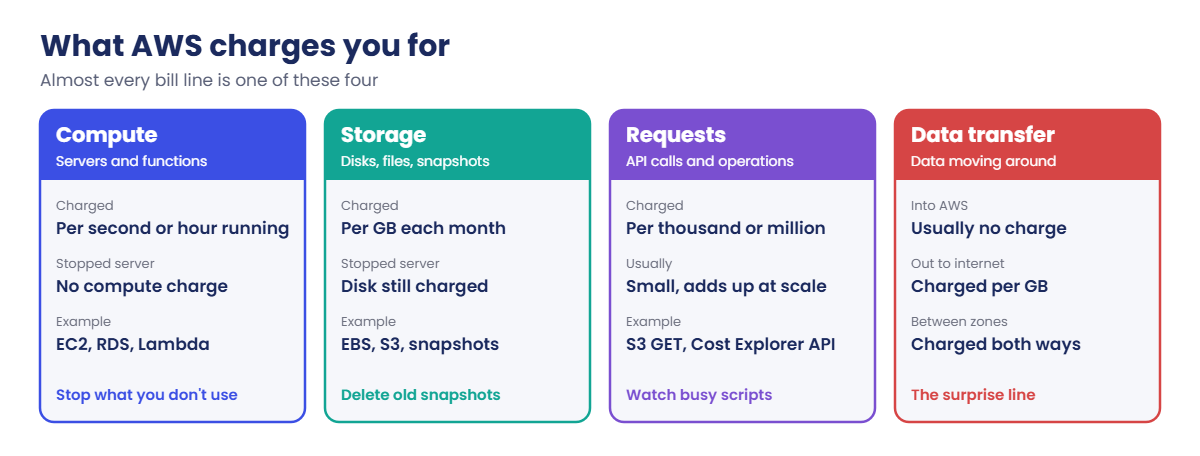
Billing is per account, per month, built from usage records: compute time, storage per GB-month, request counts and data transfer. Data coming into AWS is usually not charged; data going out to the internet is, and data moving between AZs is charged in both directions. Tags (key and value pairs) let you split that bill by project once you activate them as cost allocation tags.

How it works, step by step

Here is how location and cost connect when you build something.

1Pick the Region

Choose it once per project: close to users, allowed by any data rules, and with the services you need. This course uses Mumbai.

AWS regions and availability zones: the Mumbai Region with three zones

2Spread across zones

Anything that must stay up (web servers, databases) gets at least two copies in two zones. Anything for a quick test can sit in one zone.

3Tag everything

Every resource gets course=saatvedha-aws and lesson=NN tags in this course. At work you’d use tags like app, owner, env and cost-centre.

Then AWS meters what you use. Nearly every line on the bill falls into one of these four groups.

AWS regions and availability zones billing: compute, storage, requests and data transfer

4Check and clean up

Look at cost by service every week, and after each lab search all Regions for anything still tagged. The two “quiet” costs are storage that stays after a server is stopped, and data transfer you didn’t plan for.

✅ Checkpoint: You can say why zone IDs exist, which Regions are opt-in, and name the four kinds of charges.

Hands-on lab: AWS regions and availability zones, tags and cleanup

Sign in first and set the profile for this window, so you don’t have to type it on every command:

aws login --profile saat-root
$env:AWS_PROFILE = 'saat-root'
cd C:\aws-lab

1See which Regions are on

Run this:

aws ec2 describe-regions --all-regions --query "Regions[?starts_with(RegionName,'ap-south')].[RegionName,OptInStatus]" --output text

You should see this (unless you enabled Hyderabad):

ap-south-1      opt-in-not-required
ap-south-2      not-opted-in

Mumbai is on by default. Hyderabad is an opt-in Region and stays off. Leave it off; you don’t need it for this course.

2Compare zone names and zone IDs

Run this:

aws ec2 describe-availability-zones --query 'AvailabilityZones[].[ZoneName,ZoneId,State]' --output text

You should see something like this (your name-to-ID pairs may differ):

ap-south-1a     aps1-az1        available
ap-south-1b     aps1-az3        available
ap-south-1c     aps1-az2        available

3Create two tagged resources that cost nothing

A security group and a standard Systems Manager parameter don’t cost anything, so they are good for practising tags.

Paste this whole block:

$sg = aws ec2 create-security-group --group-name lab04-tag-test --description "Lesson 4 tag test" --tag-specifications 'ResourceType=security-group,Tags=[{Key=course,Value=saatvedha-aws},{Key=lesson,Value=04}]' --query GroupId --output text
$sg
aws ssm put-parameter --name /lab/04/note --type String --value "tag test" --tags Key=course,Value=saatvedha-aws Key=lesson,Value=04

You should see something like this:

sg-0a1b2c3d4e5f67890
{
    "Version": 1,
    "Tier": "Standard"
}

4Write the lab finder script

Run this to create C:\aws-lab\Find-LabResources.ps1:

@'
param([string]$Tag = 'saatvedha-aws')
$regions = aws ec2 describe-regions --query 'Regions[].RegionName' --output text
foreach ($r in ($regions -split '\s+')) {
    $arns = aws resourcegroupstaggingapi get-resources --region $r --tag-filters "Key=course,Values=$Tag" --query 'ResourceTagMappingList[].ResourceARN' --output text
    foreach ($a in ($arns -split '\s+')) {
        if ($a -and $a -ne 'None') { [pscustomobject]@{ Region = $r; Resource = $a } }
    }
}
'@ | Set-Content C:\aws-lab\Find-LabResources.ps1
.\Find-LabResources.ps1

After a minute or so, you should see something like this:

Region     Resource
------     --------
ap-south-1 arn:aws:ec2:ap-south-1:123456789012:security-group/sg-0a1b2c3d4e5f67890
ap-south-1 arn:aws:ssm:ap-south-1:123456789012:parameter/lab/04/note

The script asks every Region that is turned on, so it also catches resources created in the wrong Region by mistake. If PowerShell refuses to run the script, run Set-ExecutionPolicy -Scope CurrentUser RemoteSigned once.
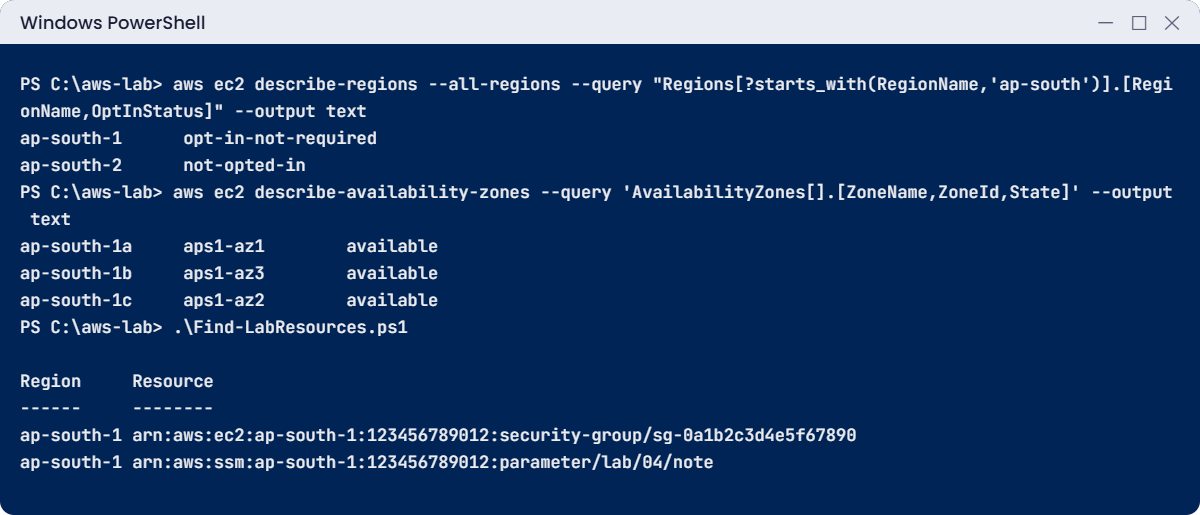
AWS regions and availability zones lab: opt-in status, zone IDs and tagged resources
Example output. Your zone ID pairs, group ID and account number will be different.

5Activate the cost allocation tags

In the console, open Billing and Cost Management, then Cost allocation tags. Find course and lesson under user-defined tags and choose Activate. New tag keys can take up to 24 hours to appear in this list, so come back tomorrow if they aren’t there yet.

Open Cost Explorer once too; AWS turns it on the first time you open it.

6Look at this month’s cost from the CLI

Run this (each Cost Explorer API call costs USD 0.01, so don’t put it in a loop):

$start = (Get-Date -Day 1).ToString('yyyy-MM-dd')
$end = (Get-Date).AddDays(1).ToString('yyyy-MM-dd')
aws ce get-cost-and-usage --region us-east-1 --time-period "Start=$start,End=$end" --granularity MONTHLY --metrics UnblendedCost --query 'ResultsByTime[0].Total.UnblendedCost'

You should see something like this:

{
    "Amount": "0",
    "Unit": "USD"
}

7Clean up

Run this:

aws ec2 delete-security-group --group-id $sg
aws ssm delete-parameter --name /lab/04/note
.\Find-LabResources.ps1

The finder may still list the deleted items for a few minutes while the tagging index catches up. Run it again until it prints nothing.

✅ Checkpoint: Find-LabResources.ps1 exists in C:\aws-lab, it listed your two tagged resources, and after cleanup it prints nothing.

Break It, Then Fix It

Two location mistakes that waste real time at work.

1Break it: call a Region that is turned off

Run this:

aws ec2 describe-availability-zones --region ap-south-2

You’ll get this error (something like this):

An error occurred (AuthFailure) when calling the DescribeAvailabilityZones operation: AWS was not able to validate the provided access credentials

The message talks about credentials, so people reset passwords and keys. The real cause is that the Region is opt-in and not enabled for this account.

Fix: check OptInStatus (step 1 of the lab). Enable the Region in Account settings only if you truly need it, and wait a few minutes for it to activate.

2Break it: a tag key with the wrong case

Create the security group again, then search with a capital C:

$sg = aws ec2 create-security-group --group-name lab04-tag-test --description "Lesson 4 tag test" --tag-specifications 'ResourceType=security-group,Tags=[{Key=course,Value=saatvedha-aws}]' --query GroupId --output text
aws resourcegroupstaggingapi get-resources --tag-filters Key=Course,Values=saatvedha-aws

You should see this:

{
    "ResourceTagMappingList": []
}
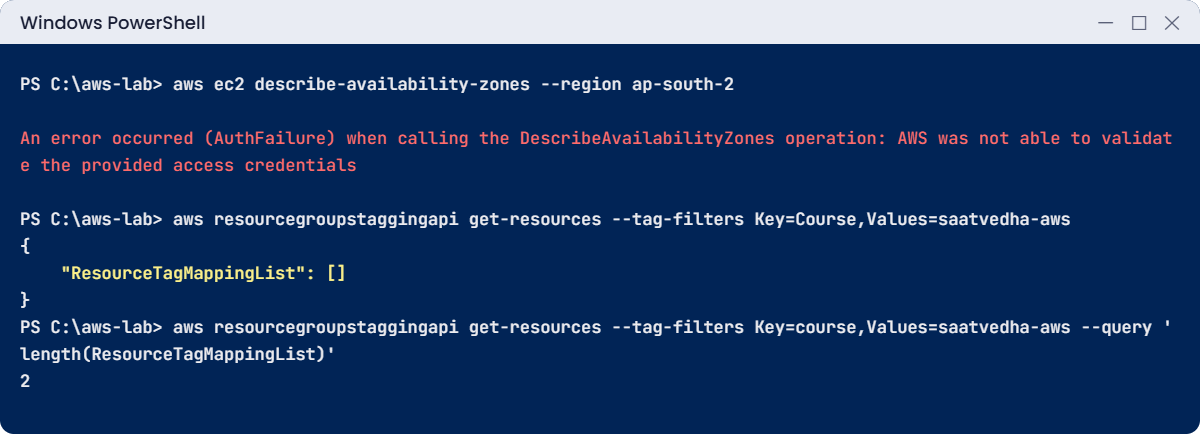
AWS regions and availability zones break lab: disabled Region and tag key case
Both problems in one session. The error text is something like this; the empty list is exact.

Tag keys and values are case-sensitive. Course and course are two different tags, and on the bill they show up as two different groups. That is why teams write their tag rules down and check them with AWS Config or tag policies.

Search with the right key, then clean up:

aws resourcegroupstaggingapi get-resources --tag-filters Key=course,Values=saatvedha-aws --query 'length(ResourceTagMappingList)'
aws ec2 delete-security-group --group-id $sg

The first command should print 1 (or 2 if the deleted parameter is still in the index for a few minutes).

✅ Checkpoint: You saw that a disabled Region looks like a credentials problem, and that a tag search is case-sensitive. Nothing tagged for this course is left running.

This happened at work

The bill line nobody planned for

An e-commerce team moved its app to AWS in Mumbai. For “high availability” the app servers ran in ap-south-1a and the database in ap-south-1b. The app was chatty: every page made dozens of small database calls, and a reporting job pulled whole tables every hour.

The first full month showed a line almost nobody had read before: data transfer between zones. About 40 TB had crossed between the two zones, charged in both directions at around USD 0.01 per GB each way, which came to roughly USD 800 a month, more than the database itself.

The fix was not to drop high availability. They put app servers in both zones, kept each server talking to the database endpoint, moved the hourly report to a read replica in the same zone as the reporting server and cached the most common queries. Data transfer between zones fell by about 80%.

They also added a monthly check of the DataTransfer-Regional-Bytes usage type in Cost Explorer.

Common mistakes and troubleshooting

MistakeWhat happensWhat to do
Assuming ap-south-1a is the same zone in every accountTwo accounts “in the same zone” are not; latency and charges differUse zone IDs (aps1-az1) when accounts must line up
Everything in one zoneOne zone problem takes the whole app downPut anything important in at least two zones
Ignoring data transferA big, surprising line on the billKeep chatty parts in the same zone where possible; check Cost Explorer by usage type
Stopping a server and thinking it costs nothingEBS disks and snapshots still charge every monthDelete disks and snapshots you don’t need
Inconsistent tag keys (Course, course, COURSE)Cost reports split into several groupsWrite a tag standard and enforce it
Enabling every opt-in Region “just in case”More places to watch and to forget resourcesEnable only the Regions you use

Interview questions

Click a question to open it. Each one is written the way an interviewer would ask it. Under it you will see why they ask it and one way you could answer, in your own words.

Fresher level

1. How would you explain the difference between a Region and an Availability Zone to a new team member?

Why they ask this: They want to check you know the basic AWS building blocks. Everything about high availability is built on this idea.

How you might answer: I’d say a Region is a geographic area, like Mumbai, with its own set of services. Each Region has at least three Availability Zones, which are separate groups of data centres with their own power and network, but close enough for fast links.

To stay up when one zone has a problem, I run my workload across several zones in the same Region.

2. Your company is launching an app for users in India. How would you pick the Region?

Why they ask this: They want to see that you weigh real factors, not just pick the first Region in the list. It shows you think about users, rules and cost together.

How you might answer: I’d look at latency to users, data residency rules, whether the services I need exist in that Region, and price. For an Indian user base, Mumbai or Hyderabad usually wins on latency.

3. In simple words, what are the main things AWS charges you for?

Why they ask this: They want to see basic billing awareness. Engineers who know where money goes build cheaper systems.

How you might answer: Mostly compute time, storage per GB per month, requests, and data transfer, especially out to the internet and between zones.

Some services also charge by the hour just for existing, like NAT gateways and load balancers. Those are easy to forget in a lab.

2–5 years experience

4. Two accounts both put a server in ap-south-1a, but the latency between them is higher than expected. What might be going on?

Why they ask this: They want to know if you understand that zone names are mapped differently in each account. It’s a detail that only shows up in real multi-account work.

How you might answer: AWS maps zone names like ap-south-1a to physical zones differently for each account. So the two servers may be in different physical zones.

The zone ID, like aps1-az1, is the real physical zone. When accounts share subnets or need the same zone for latency or data transfer cost, I compare zone IDs, not names.

5. A command works fine in Mumbai but returns AuthFailure in another Region. What do you suspect before touching credentials?

Why they ask this: They want to see whether you know about opt-in Regions. They also like candidates who rule out simple causes before resetting keys.

How you might answer: My first guess is that it’s an opt-in Region that isn’t enabled for the account. I’d run aws ec2 describe-regions --all-regions and look at OptInStatus.

Only if the Region is enabled would I start looking at credentials.

6. Your manager asks which project is driving the AWS bill. How would you find out?

Why they ask this: They want to see that you know tagging and the cost tools. Answering money questions quickly builds trust with managers.

How you might answer: I’d rely on a tag standard, such as app, owner and env, applied to every resource and activated as cost allocation tags. Then I’d open Cost Explorer and group by those tags and by service.

Untagged spend gets its own report, so someone is responsible for fixing it.

Senior level

7. You’re asked to design a tagging strategy for a company with 30 teams. How would you make sure it actually sticks?

Why they ask this: They want to see governance that holds up over time, not a wiki page nobody reads. Enforcement and reporting matter as much as the tag list.

How you might answer: I’d keep a short list of required keys, like app, owner, env and cost-centre, with allowed values. I’d enforce them at creation with tag policies in AWS Organizations and defaults in our infrastructure code, and check them with AWS Config rules.

Cost allocation tags get activated so finance sees spend by team. A weekly report flags untagged resources to an owner.

8. Finance tells you the data transfer bill doubled this month. Walk me through how you’d investigate.

Why they ask this: They want to see a methodical approach to cost problems. They also want to hear that you’d fix the pattern, not just explain the number.

How you might answer: I’d filter Cost Explorer to data transfer and group by usage type, like internet out, inter-AZ, inter-Region and NAT gateway, then by resource where possible. VPC Flow Logs then show which instances talk across zones or to the internet.

Then I’d fix the pattern. That could mean caching, keeping traffic in one zone, VPC endpoints for S3 instead of the NAT gateway, or CloudFront for public downloads.

Quick quiz

Q1. How many Availability Zones does every AWS Region have at least?

  1. One
  2. Two
  3. Three
  4. Six
Show answer

C — Each Region has at least three Availability Zones.

Q2. Why would you compare zone IDs instead of zone names between two accounts?

  1. Zone IDs are shorter
  2. Names like ap-south-1a can point to different physical zones in each account
  3. Zone names change every day
  4. Zone IDs are cheaper
Show answer

B — AWS maps zone names separately for each account. Zone IDs are the same everywhere.

Q3. A command fails with AuthFailure only in ap-south-2. What is the likely cause?

  1. Wrong password
  2. The opt-in Region is not enabled
  3. The CLI is too old
  4. You have no budget
Show answer

B — Hyderabad is an opt-in Region. Calls to a disabled Region fail with AuthFailure.

Q4. Which of these is charged in both directions?

  1. Data from the internet into AWS
  2. Data between two Availability Zones
  3. Data inside one zone using private IPs
  4. None of these
Show answer

B — Data transfer between Availability Zones is charged on both sides.

Q5. Your tag search for Key=Course returns nothing, but resources have course=saatvedha-aws. Why?

  1. Tags take a week to work
  2. Tag keys are case-sensitive
  3. Security groups can’t be tagged
  4. The tagging API only works in us-east-1
Show answer

B — Course and course are different keys.

Quick recap

  • A Region is a separate area (Mumbai is ap-south-1). Each Region has at least three Availability Zones with separate power and networks.
  • Zone names are per account; zone IDs (aps1-az1) are the same for everyone. Opt-in Regions stay off until you enable them.
  • You pay for compute, storage, requests and data transfer. Data between zones is charged both ways.
  • Tags are case-sensitive. Activate cost allocation tags to see cost by tag.
  • Find-LabResources.ps1 lists every resource tagged course=saatvedha-aws in every enabled Region. Run it after each lab.

Next lesson

Lesson 5: IAM basics: users, groups, roles and policies → You’ll stop using root on the CLI and build your first users, groups and roles.

Further reading: AWS regions and availability zones

Want to go deeper into AWS regions and availability zones? Read AWS Regions and Availability Zone IDs for your AWS resources in the AWS documentation. You can also see the full plan for this course on the AWS Cloud Administration course page.

Scroll to Top