S3 security: Block Public Access, bucket policies, encryption

Most S3 data leaks are not clever hacks. Someone opened a bucket “for a minute”, or a policy allowed more than anyone meant. An S3 bucket policy is where you write the rules for a bucket: who may read, who may write, and what is refused no matter what.

You’ll turn on Block Public Access for the whole account, refuse plain HTTP, switch the bucket to SSE-KMS, and give a reader role access to one prefix only. Then you’ll hit the two errors everyone meets while writing these policies.

TimeYou needBy the end you can
50 minutesLesson 16 done, your laptop signed in as saat-admin, a recent AWS CLI. Cost: well under USD 0.01 (a few KMS and S3 requests).Set account-level Block Public Access, write a bucket policy that enforces TLS and grants prefix-level access to a role, use SSE-KMS by default, and read the difference between 403 and 404.

What it is, in one line

An S3 bucket policy is a JSON document attached to a bucket that allows or denies actions on it and its objects, for any principal you name.

In Simple Words

The rules on the locker room door

In Lesson 16 your bucket was a bank locker. A bucket policy is the notice pinned on the locker room door. It can say “Ravi from accounts may take files from the reports shelf” and “nobody enters without showing ID at the desk”.

Block Public Access is the bank manager’s rule above everything else: “No locker is ever open to the street, whatever the notice says.” Even if someone pins a careless notice, the manager’s rule wins.

Encryption is the lock on each item. With KMS, the bank keeps the key in a separate safe and writes down every time it is used.

Engineer's View

How S3 authorization really works

A bucket policy is a resource-based policy: it has a Principal, unlike IAM identity policies. S3 combines the caller’s IAM policies, the bucket policy, Block Public Access, SCPs (Lesson 33) and, for SSE-KMS objects, the KMS key policy. An explicit Deny anywhere wins.

Inside one account, an Allow in either the IAM policy or the bucket policy is enough. Across accounts, both sides must allow. Bucket-level actions such as s3:ListBucket use the ARN arn:aws:s3:::bucket; object actions such as s3:GetObject use arn:aws:s3:::bucket/*.

Mixing them up is the most common policy error.

Useful condition keys: aws:SecureTransport (refuse HTTP), aws:SourceVpce (only through your VPC endpoint), aws:PrincipalOrgID (only your organization) and s3:prefix (limit listing). Without s3:ListBucket, S3 returns 403 instead of 404 for a missing key, so callers can’t probe which keys exist.

How it works, step by step

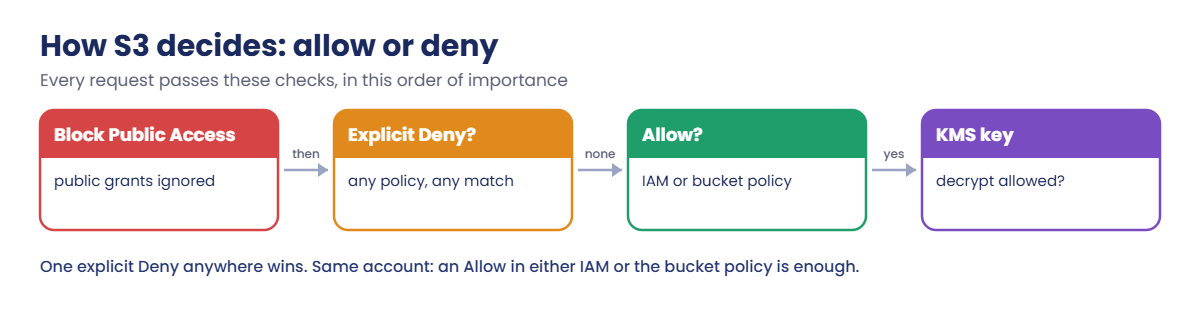
Here is what S3 checks when a request arrives.

1Block Public Access first

If a policy or ACL would make data public, Block Public Access refuses to save it or ignores it. Set it at account level so no single bucket can slip.

S3 bucket policy evaluation flow: Block Public Access, explicit deny, allow, KMS

2Look for an explicit Deny

S3 gathers every policy that applies. One matching Deny, such as “refuse when aws:SecureTransport is false”, ends the request with AccessDenied.

3Look for an Allow

No Allow means an implicit deny. In this lab the reader role has no IAM policy at all, so its only Allow comes from the bucket policy.

4Check the KMS key

For SSE-KMS objects, S3 asks KMS to decrypt. The AWS managed key aws/s3 lets any principal in your account use it through S3; a customer managed key needs its own policy (Lesson 30).

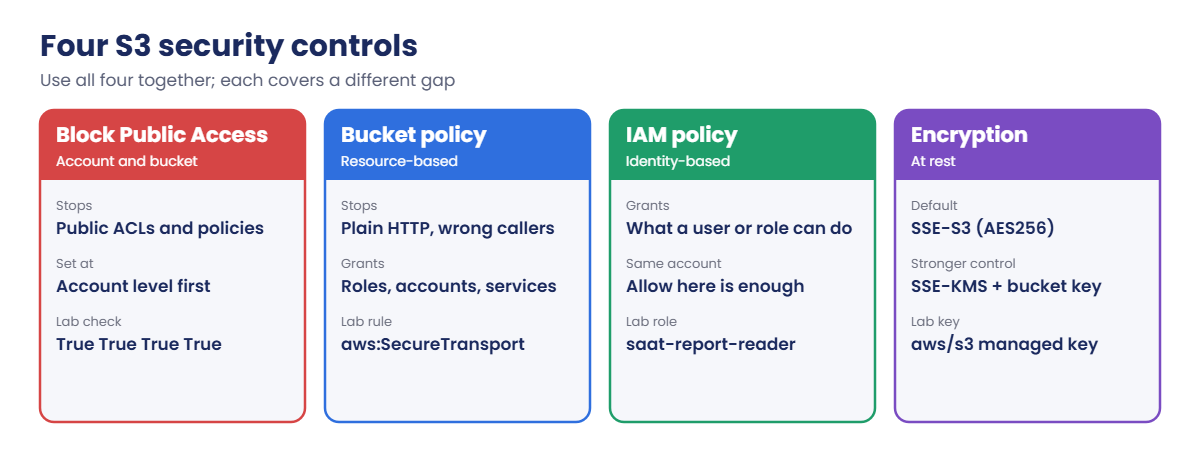
The four controls work together like this:

Four S3 security controls: Block Public Access, bucket policy, IAM policy, encryption

No single control is enough. A perfect bucket policy doesn’t help if someone later adds a public statement, and Block Public Access doesn’t stop an over-broad grant to another role.

✅ Checkpoint: You can explain why an explicit Deny wins, which ARN goes with ListBucket and which with GetObject, and why a missing key can return 403.

Hands-on lab: write an S3 bucket policy that holds

Sign in and set up variables:

cd C:\aws-lab
aws login --profile saat-admin
$env:AWS_PROFILE = 'saat-admin'
$acct = aws sts get-caller-identity --query Account --output text
$myArn = aws sts get-caller-identity --query Arn --output text
$bucket = "saat-sec-$acct-ap-south-1-an"

1Block Public Access for the whole account

Paste this whole block:

aws s3control put-public-access-block --account-id $acct --public-access-block-configuration BlockPublicAcls=true,IgnorePublicAcls=true,BlockPublicPolicy=true,RestrictPublicBuckets=true
aws s3control get-public-access-block --account-id $acct --query PublicAccessBlockConfiguration --output text

You should see this:

True    True    True    True

Now no bucket in this account can be made public, even by mistake. Real companies set this on day one, usually through an SCP so nobody can switch it off.

2Create the bucket with SSE-KMS by default

Paste this whole block:

aws s3api create-bucket --bucket $bucket --bucket-namespace account-regional --region ap-south-1 --create-bucket-configuration LocationConstraint=ap-south-1 | Out-Null
aws s3api put-bucket-tagging --bucket $bucket --tagging 'TagSet=[{Key=course,Value=saatvedha-aws},{Key=lesson,Value=17}]'
'{ "Rules": [ { "ApplyServerSideEncryptionByDefault": { "SSEAlgorithm": "aws:kms" }, "BucketKeyEnabled": true } ] }' | Set-Content enc.json
aws s3api put-bucket-encryption --bucket $bucket --server-side-encryption-configuration file://enc.json
Set-Content -NoNewline q3.csv "quarter,revenue`nQ3,1825000`n"
Set-Content salaries.csv "name,salary"
aws s3 cp q3.csv "s3://$bucket/reports/q3.csv"
aws s3 cp salaries.csv "s3://$bucket/private/salaries.csv"
aws s3api head-object --bucket $bucket --key reports/q3.csv --query "[ServerSideEncryption,BucketKeyEnabled]" --output text

You should see something like this:

upload: .\q3.csv to s3://saat-sec-111122223333-ap-south-1-an/reports/q3.csv
upload: .\salaries.csv to s3://saat-sec-111122223333-ap-south-1-an/private/salaries.csv
aws:kms True

Leaving out a key ID means S3 uses the AWS managed key aws/s3. The bucket key cuts KMS requests (and their cost) by using one short-lived data key per bucket instead of one KMS call per object.

3Create a reader role with no permissions

Paste this whole block:

@'
{
  "Version": "2012-10-17",
  "Statement": [ { "Effect": "Allow", "Principal": { "AWS": "MY_ARN" }, "Action": "sts:AssumeRole" } ]
}
'@ -replace 'MY_ARN', $myArn | Set-Content reader-trust.json
$roleArn = aws iam create-role --role-name saat-report-reader --assume-role-policy-document file://reader-trust.json --tags Key=course,Value=saatvedha-aws Key=lesson,Value=17 --query Role.Arn --output text
aws configure set role_arn $roleArn --profile saat-reader
aws configure set source_profile saat-admin --profile saat-reader
aws configure set region ap-south-1 --profile saat-reader
Start-Sleep 15
aws sts get-caller-identity --profile saat-reader --query Arn --output text

You should see something like this:

arn:aws:sts::111122223333:assumed-role/saat-report-reader/botocore-session-1760951234

The saat-reader profile assumes the role using your saat-admin sign-in. The role has no IAM policy attached, so right now it can’t read anything. The 15-second pause gives IAM time to make the new role visible everywhere.

4Write the bucket policy

Paste this whole block:

@'
{
  "Version": "2012-10-17",
  "Statement": [
    {
      "Sid": "DenyInsecureTransport",
      "Effect": "Deny",
      "Principal": "*",
      "Action": "s3:*",
      "Resource": ["arn:aws:s3:::BUCKET", "arn:aws:s3:::BUCKET/*"],
      "Condition": { "Bool": { "aws:SecureTransport": "false" } }
    },
    {
      "Sid": "ReaderGetReports",
      "Effect": "Allow",
      "Principal": { "AWS": "ROLE_ARN" },
      "Action": "s3:GetObject",
      "Resource": "arn:aws:s3:::BUCKET/reports/*"
    }
  ]
}
'@ -replace 'BUCKET', $bucket -replace 'ROLE_ARN', $roleArn | Set-Content policy.json
aws s3api put-bucket-policy --bucket $bucket --policy file://policy.json
aws s3 ls "s3://$bucket" --endpoint-url http://s3.ap-south-1.amazonaws.com

The last command fails, and that is the point:

An error occurred (AccessDenied) when calling the ListObjectsV2 operation: User: arn:aws:iam::111122223333:user/yourname.admin is not authorized to perform: s3:ListBucket on resource: "arn:aws:s3:::saat-sec-111122223333-ap-south-1-an" with an explicit deny in a resource-based policy

Even you, an administrator, are refused over plain HTTP. The explicit Deny beats your AdministratorAccess.
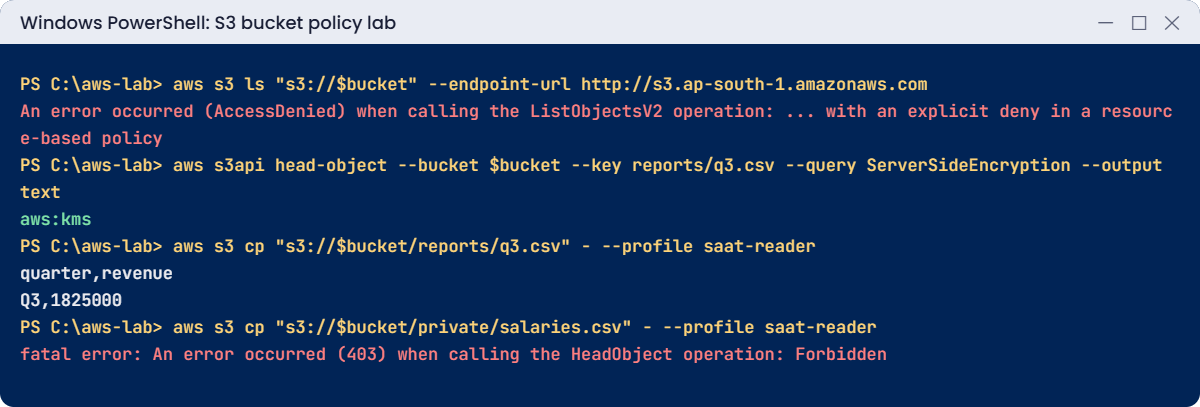
S3 bucket policy lab output: HTTP denied, SSE-KMS, reader role access
HTTP refused, SSE-KMS confirmed, and the reader limited to reports. Something like this.

5Test as the reader

Paste this whole block:

aws s3 cp "s3://$bucket/reports/q3.csv" - --profile saat-reader
aws s3 cp "s3://$bucket/private/salaries.csv" - --profile saat-reader

You should see this:

quarter,revenue
Q3,1825000
fatal error: An error occurred (403) when calling the HeadObject operation: Forbidden

The - at the end prints the file to the screen instead of saving it. The reader gets reports, decrypted through KMS, and nothing else.

✅ Checkpoint: Account-level Block Public Access shows True four times, objects are aws:kms with a bucket key, HTTP is refused even for you, and saat-reader can read reports/q3.csv but not private/salaries.csv.

Break It, Then Fix It

Two mistakes that cost engineers hours: the wrong ARN in a statement, and forgetting that reading and listing are different permissions.

1Break it: object action on the bucket ARN

Try to add a statement that uses the bucket ARN for GetObject:

@'
{
  "Version": "2012-10-17",
  "Statement": [ { "Effect": "Allow", "Principal": { "AWS": "ROLE_ARN" }, "Action": "s3:GetObject", "Resource": "arn:aws:s3:::BUCKET" } ]
}
'@ -replace 'BUCKET', $bucket -replace 'ROLE_ARN', $roleArn | Set-Content bad-policy.json
aws s3api put-bucket-policy --bucket $bucket --policy file://bad-policy.json

You’ll get this error:

An error occurred (MalformedPolicy) when calling the PutBucketPolicy operation: Action does not apply to any resource(s) in statement

GetObject works on objects, but the resource is the bucket itself, so the statement could never match anything. S3 refuses it, and your good policy stays in place. Fix: object actions take arn:aws:s3:::bucket/* (or a prefix such as /reports/*); bucket actions such as ListBucket take arn:aws:s3:::bucket.

2Break it: ask for a file that is not there

As the reader, ask for a report that doesn’t exist:

aws s3 cp "s3://$bucket/reports/q4.csv" - --profile saat-reader

You’ll get this error:

fatal error: An error occurred (403) when calling the HeadObject operation: Forbidden
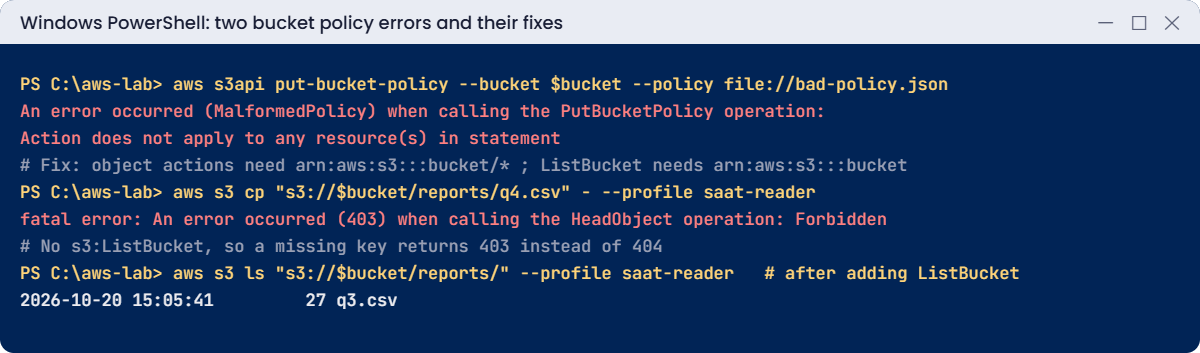
S3 bucket policy errors: MalformedPolicy and 403 instead of 404 with fixes
Both errors and their fixes. Something like this.

The file simply isn’t there, yet S3 says 403, not 404. Without s3:ListBucket, S3 won’t confirm whether a key exists. Teams lose hours checking permissions on files that were never uploaded.

Fix: give the reader ListBucket, limited to the reports prefix. Paste this whole block:

$p = Get-Content policy.json -Raw | ConvertFrom-Json
$list = [pscustomobject]@{ Sid = 'ReaderListReports'; Effect = 'Allow'; Principal = @{ AWS = $roleArn }; Action = 's3:ListBucket'; Resource = "arn:aws:s3:::$bucket"; Condition = @{ StringLike = @{ 's3:prefix' = 'reports/*' } } }
$p.Statement += $list
$p | ConvertTo-Json -Depth 10 | Set-Content policy.json
aws s3api put-bucket-policy --bucket $bucket --policy file://policy.json
aws s3 ls "s3://$bucket/reports/" --profile saat-reader
aws s3 cp "s3://$bucket/reports/q4.csv" - --profile saat-reader

You should see something like this:

2026-10-20 15:05:41         27 q3.csv
fatal error: An error occurred (404) when calling the HeadObject operation: Key "reports/q4.csv" does not exist

Now the error tells the truth: the key does not exist. Clean up everything from this lesson (account-level Block Public Access stays on, as it should):

aws s3 rm "s3://$bucket" --recursive
aws s3 rb "s3://$bucket"
aws iam delete-role --role-name saat-report-reader
Remove-Item q3.csv, salaries.csv, enc.json, reader-trust.json, policy.json, bad-policy.json
notepad $HOME\.aws\config
.\Find-LabResources.ps1

In Notepad, delete the three lines under [profile saat-reader] and save.

✅ Checkpoint: You fixed MalformedPolicy by using the right ARN, and turned a confusing 403 into an honest 404 by adding a prefix-limited ListBucket. The lesson 17 bucket, role and profile are gone.

This happened at work

The policy that locked out the admins

A fintech company wanted its statements bucket reachable only from inside its VPC. An engineer added a bucket policy: Deny s3:* to everyone unless aws:SourceVpce matched their endpoint. It was tested from an EC2 instance, it worked, and it went live on a Friday evening.

On Monday the nightly export from the payments partner had failed three times, the CI pipeline couldn’t publish reports, and the security team couldn’t even read the bucket policy from their laptops. The Deny covered s3:GetBucketPolicy and s3:PutBucketPolicy too, so no administrator could fix it outside the VPC.

The account owners signed in as root, which can always delete a bucket policy, and removed it. The new version denies only object actions, excludes the partner’s role and a break-glass admin role with aws:PrincipalArn, and every bucket policy change now goes through a pull request with IAM Access Analyzer checks.

Common mistakes and troubleshooting

MistakeWhat happensWhat to do
Object action with the bucket ARNMalformedPolicy: Action does not apply to any resource(s)Use bucket/* for objects, bucket for ListBucket
Deny s3:* with a VPC endpoint conditionAdmins and partners are locked outDeny object actions only; exclude break-glass roles
No ListBucket for readersMissing files show 403, wasting hoursGrant ListBucket with an s3:prefix condition
Relying on bucket-level Block Public Access onlyA new bucket can be made publicTurn it on at account level and protect it with an SCP
Creating the policy before the role existsInvalid principal in policyCreate the role first and wait a few seconds
Principal “*” with Allow and no conditionThe bucket is open to anyoneBlock Public Access stops it; name exact principals

Interview questions

Click a question to open it. Each one is written the way an interviewer would ask it. Under it you will see why they ask it and one way you could answer, in your own words.

Fresher level

1. Can you explain the difference between a bucket policy and an IAM policy in simple words?

Why they ask this: They want to check you understand the two policy types that control S3 access. Most S3 access problems involve one or both.

How you might answer: A bucket policy is attached to the bucket and names who can access it. An IAM policy is attached to a user, group or role and says what that identity can do.

S3 looks at both when it decides whether to allow a request.

2. How would you explain Block Public Access to a developer who just wants their bucket to work?

Why they ask this: They want to see basic S3 security awareness. They also check that you can explain a guardrail without sounding like a blocker.

How you might answer: I’d say it’s a safety switch. It stops public ACLs and public bucket policies from taking effect, at bucket or account level, even if someone writes them by mistake.

3. Your security team says all S3 access must use HTTPS. How would you enforce that on a bucket?

Why they ask this: They want to check you know a very common bucket policy pattern. It comes up in almost every security review.

How you might answer: I’d add a Deny statement for s3:* on the bucket and its objects, with the condition aws:SecureTransport equal to false. Any request over plain HTTP then gets denied.

2–5 years experience

4. A user gets a 403 error for a file that doesn’t even exist. Why would S3 do that?

Why they ask this: They want to see real troubleshooting knowledge. This confuses many people, and it often sends them chasing the wrong problem.

How you might answer: If the user doesn’t have s3:ListBucket, S3 returns 403 for missing keys. That way, callers can’t find out which keys exist.

Once I grant ListBucket, the same request returns a 404 instead.

5. What’s the difference between SSE-S3 and SSE-KMS, and when would you choose KMS?

Why they ask this: They want to see that you understand encryption choices and their costs. Choosing KMS without bucket keys can raise the bill.

How you might answer: SSE-S3 uses keys that S3 manages, with no extra control for me. SSE-KMS uses a KMS key, so I get key policies, CloudTrail logs of every use, and the option to disable the key.

I’d choose KMS when we need that control or audit trail. It adds KMS request costs, so I’d turn on bucket keys to reduce them.

6. A team in another AWS account needs to read files from your bucket. How would you set that up?

Why they ask this: They want to see that you understand cross-account access needs both sides to agree. Missing the KMS step is the usual mistake.

How you might answer: I’d allow the other account’s role in my bucket policy, and they must allow the action in that role’s IAM policy. Both sides have to say yes.

If the objects use a customer managed KMS key, the key policy must allow that role too.

Senior level

7. You join a regulated company, like a bank. How would you design S3 data protection there?

Why they ask this: They want to see defence in depth. In regulated work, one layer of protection is never enough.

How you might answer: I’d turn on account-level Block Public Access and enforce it with an SCP, and use SSE-KMS with customer managed keys per data class. Bucket policies would allow TLS only and only our organization, and VPC endpoint policies add another layer.

Records get versioning and Object Lock. Access Analyzer and Config rules catch drift, and CloudTrail data events cover the sensitive buckets.

8. Someone pushed a bucket policy that locked everyone out, including admins. What do you do?

Why they ask this: They want to see calm incident handling and a plan to stop it happening again. Recovery steps for S3 lockouts are not obvious.

How you might answer: I’d sign in as the account root user, which can always delete a bucket policy, and remove it. Then I’d rebuild a scoped version with exceptions for break-glass roles.

Afterwards, I’d make sure policy changes go through code review and policy validation, so it doesn’t happen again.

Quick quiz

Q1. Which resource ARN does s3:GetObject need?

  1. arn:aws:s3:::bucket
  2. arn:aws:s3:::bucket/*
  3. arn:aws:iam::bucket
  4. Any ARN
Show answer

B — Object actions apply to objects, so the ARN ends with /* or a prefix.

Q2. Which condition key refuses plain HTTP?

  1. aws:SourceIp
  2. aws:SecureTransport
  3. s3:prefix
  4. aws:PrincipalOrgID
Show answer

B — Deny when aws:SecureTransport is false.

Q3. Why did the reader get 403 for a missing file?

  1. The bucket was public
  2. It lacked s3:ListBucket
  3. KMS was disabled
  4. The file was encrypted
Show answer

B — Without ListBucket, S3 hides whether a key exists.

Q4. In one account, what does a role need to read an object?

  1. Allows in both IAM and bucket policy
  2. An Allow in either, and no explicit Deny
  3. Root access
  4. A public bucket
Show answer

B — Same account: one Allow is enough unless a Deny applies.

Q5. Who can always delete a bucket policy that locked everyone out?

  1. Any IAM user
  2. The account root user
  3. AWS Support
  4. Nobody
Show answer

B — The root user can delete a bucket policy even when it denies everyone.

Quick recap

  • Turn on Block Public Access at account level first.
  • An explicit Deny wins over every Allow, even for administrators.
  • Object actions use bucket/*; ListBucket uses the bucket ARN.
  • Without ListBucket, missing keys return 403 instead of 404.
  • SSE-KMS with a bucket key gives key control and audit at low cost.

Next lesson

Lesson 18: S3 versioning, lifecycle rules and replication → You’ll recover deleted files with versioning, cut costs with lifecycle rules and copy data to another Region.

Further reading: S3 bucket policy

Want to go deeper into S3 bucket policy? Read Examples of Amazon S3 bucket policies and Blocking public access to your Amazon S3 storage. You can also see the full plan for this course on the AWS Cloud Administration course page.

Scroll to Top