
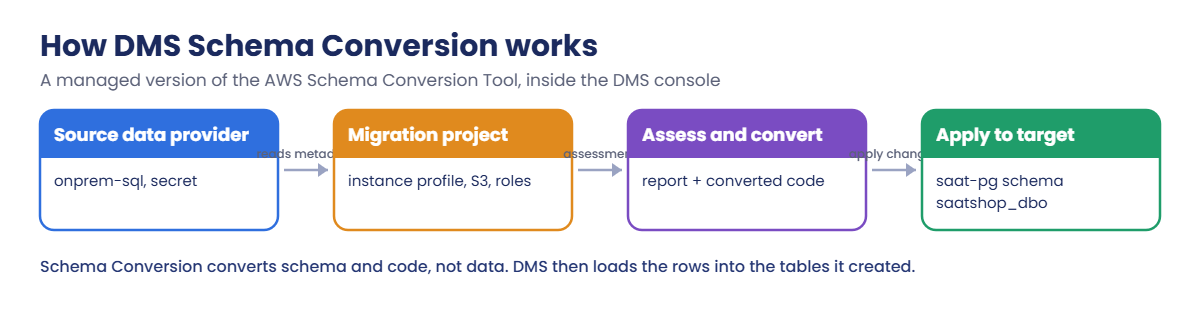
Sign in, start the PostgreSQL target first (it takes about 10 minutes), then start onprem-sql:
cd C:\aws-lab
aws login --profile saat-admin
$env:AWS_PROFILE = 'saat-admin'
$v = Get-Content C:\aws-lab\saat-vpc.json | ConvertFrom-Json
$acct = aws sts get-caller-identity --query Account --output text
$pgSg = aws ec2 create-security-group --group-name saat-pg-sg --description "PostgreSQL target" --vpc-id $v.VpcId --query GroupId --output text
aws ec2 authorize-security-group-ingress --group-id $pgSg --ip-permissions "IpProtocol=tcp,FromPort=5432,ToPort=5432,UserIdGroupPairs=[{GroupId=$($v.AppSg),Description=5432-from-app-sg}]" | Out-Null
aws rds create-db-instance --db-instance-identifier saat-pg --engine postgres --db-instance-class db.t4g.micro --allocated-storage 20 --storage-type gp3 --storage-encrypted --master-username saatadmin --manage-master-user-password --db-name saatshop --db-subnet-group-name saat-db-subnets --vpc-security-group-ids $pgSg --no-publicly-accessible --backup-retention-period 0 --tags Key=course,Value=saatvedha-aws Key=lesson,Value=49 --query "DBInstance.DBInstanceStatus" --output text
.\Start-SsmEndpoints.ps1
$src = aws ec2 describe-instances --filters "Name=tag:Name,Values=onprem-sql" "Name=instance-state-name,Values=stopped,running" --query "Reservations[0].Instances[0].InstanceId" --output text
$srcIp = aws ec2 describe-instances --instance-ids $src --query "Reservations[0].Instances[0].PrivateIpAddress" --output text
$srcSg = aws ec2 describe-security-groups --filters "Name=group-name,Values=saat-onprem-sql-sg" --query "SecurityGroups[0].GroupId" --output text
aws ec2 start-instances --instance-ids $src | Out-Null
do { Start-Sleep 20; $p = aws ssm describe-instance-information --filters "Key=InstanceIds,Values=$src" --query "InstanceInformationList[0].PingStatus" --output text } until ($p -eq 'Online')
"$src $srcIp"
You should see something like this:
creating
i-0a1b2c3d4e5f60718 10.20.11.1431Add real objects and list what DMS would miss
Paste this whole block. It adds a customers table, a foreign key, a view, two procedures and a trigger, then counts user objects:
function Invoke-Src([string]$Sql) {
  $line = 'sqlcmd -S . -E -C -h -1 -W -s " " -d SaatShop -Q "' + $Sql + '"'
  @{ commands = @($line) } | ConvertTo-Json | Set-Content src-cmd.json
  $cmd = aws ssm send-command --document-name AWS-RunPowerShellScript --instance-ids $src --parameters file://src-cmd.json --query Command.CommandId --output text
  do { Start-Sleep 5; $st = aws ssm get-command-invocation --command-id $cmd --instance-id $src --query Status --output text 2>$null } until ($st -in 'Success', 'Failed', 'TimedOut')
  aws ssm get-command-invocation --command-id $cmd --instance-id $src --query StandardOutputContent --output text
}
Invoke-Src "CREATE TABLE dbo.Customers (CustomerId int IDENTITY PRIMARY KEY, Name nvarchar(100) NOT NULL, Email nvarchar(200) UNIQUE, CreatedAt datetime2 DEFAULT SYSUTCDATETIME()); INSERT dbo.Customers (Name, Email) VALUES (N'Asha', N'asha@example.com'), (N'Ravi', N'ravi@example.com'), (N'Meena', N'meena@example.com'); ALTER TABLE dbo.Orders ADD CustomerId int NULL; CREATE TABLE dbo.OrderAudit (AuditId int IDENTITY PRIMARY KEY, OrderId int, ChangedAt datetime2 DEFAULT SYSUTCDATETIME(), ChangedBy sysname DEFAULT SUSER_SNAME());" | Out-Null
Invoke-Src "UPDATE dbo.Orders SET CustomerId = 1 + OrderId % 3; ALTER TABLE dbo.Orders ADD CONSTRAINT FK_Orders_Customers FOREIGN KEY (CustomerId) REFERENCES dbo.Customers (CustomerId);" | Out-Null
Invoke-Src "CREATE VIEW dbo.vw_CustomerTotals AS SELECT c.CustomerId, c.Name, COUNT(*) AS OrderCount, SUM(o.Amount) AS Total FROM dbo.Customers c JOIN dbo.Orders o ON o.CustomerId = c.CustomerId GROUP BY c.CustomerId, c.Name" | Out-Null
Invoke-Src "CREATE PROCEDURE dbo.usp_TopCustomers @n int = 5 AS BEGIN SET NOCOUNT ON; SELECT TOP (@n) Name, Total, CONVERT(varchar(10), GETDATE(), 23) AS AsOf FROM dbo.vw_CustomerTotals ORDER BY Total DESC; END" | Out-Null
Invoke-Src "CREATE PROCEDURE dbo.usp_CountRows @table sysname AS BEGIN DECLARE @sql nvarchar(400) = N'SELECT COUNT(*) FROM dbo.' + QUOTENAME(@table); EXEC sp_executesql @sql; END" | Out-Null
Invoke-Src "CREATE TRIGGER dbo.trg_Orders_Audit ON dbo.Orders AFTER UPDATE AS BEGIN SET NOCOUNT ON; INSERT dbo.OrderAudit (OrderId) SELECT OrderId FROM inserted; END" | Out-Null
Invoke-Src "SET NOCOUNT ON; SELECT type_desc, COUNT(*) FROM sys.objects WHERE is_ms_shipped = 0 GROUP BY type_desc ORDER BY type_desc; SELECT 'IDENTITY_COLUMN', COUNT(*) FROM sys.identity_columns c JOIN sys.objects o ON o.object_id = c.object_id WHERE o.is_ms_shipped = 0;"
You should see something like this:
DEFAULT_CONSTRAINT 4
FOREIGN_KEY_CONSTRAINT 1
PRIMARY_KEY_CONSTRAINT 3
SQL_STORED_PROCEDURE 2
SQL_TRIGGER 1
UNIQUE_CONSTRAINT 1
USER_TABLE 3
VIEW 1
IDENTITY_COLUMN 3
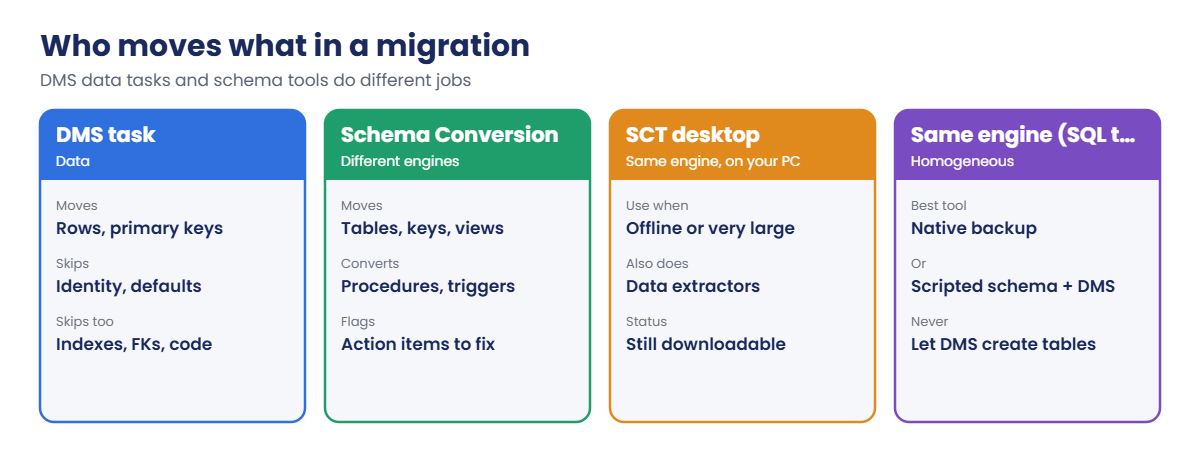
A DMS task would bring the 3 tables, their rows and the 3 primary keys. Everything else on this list, plus IX_Orders_Customer, would be missing. Running this inventory first tells you how much schema work a migration really has.
2Set up Schema Conversion
Paste this whole block. It creates the bucket, secrets, roles, network rules, instance profile, data providers and the migration project:
$sc = "saat-sc-$acct-ap-south-1-an"
aws s3api create-bucket --bucket $sc --bucket-namespace account-regional --region ap-south-1 --create-bucket-configuration LocationConstraint=ap-south-1 | Out-Null
aws s3api put-bucket-versioning --bucket $sc --versioning-configuration Status=Enabled
$dmsPw = aws secretsmanager get-random-password --password-length 20 --exclude-punctuation --require-each-included-type --query RandomPassword --output text
Invoke-Src "ALTER LOGIN dms_user WITH PASSWORD = '$dmsPw'; GRANT VIEW ANY DEFINITION TO dms_user;" | Out-Null
@{ username = 'dms_user'; password = $dmsPw } | ConvertTo-Json | Set-Content src-secret.json
$srcSecret = aws secretsmanager create-secret --name saat-sc-source --secret-string file://src-secret.json --query ARN --output text
Remove-Item src-secret.json
aws rds wait db-instance-available --db-instance-identifier saat-pg
$pgHost = aws rds describe-db-instances --db-instance-identifier saat-pg --query "DBInstances[0].Endpoint.Address" --output text
$pgSecret = aws rds describe-db-instances --db-instance-identifier saat-pg --query "DBInstances[0].MasterUserSecret.SecretArn" --output text
'{ "Version": "2012-10-17", "Statement": [ { "Effect": "Allow", "Principal": { "Service": "dms.amazonaws.com" }, "Action": "sts:AssumeRole" } ] }' | Set-Content sc-trust.json
@{ Version = '2012-10-17'; Statement = @(
  @{ Effect = 'Allow'; Action = @('s3:ListBucket', 's3:GetBucketLocation', 's3:GetBucketVersioning'); Resource = "arn:aws:s3:::$sc" },
  @{ Effect = 'Allow'; Action = @('s3:PutObject', 's3:GetObject', 's3:GetObjectVersion'); Resource = "arn:aws:s3:::$sc/*" }) } | ConvertTo-Json -Depth 5 | Set-Content sc-s3.json
@{ Version = '2012-10-17'; Statement = @(@{ Effect = 'Allow'; Action = @('secretsmanager:GetSecretValue', 'secretsmanager:DescribeSecret'); Resource = @($srcSecret, $pgSecret) }) } | ConvertTo-Json -Depth 5 | Set-Content sc-secrets.json
$s3Role = aws iam create-role --role-name saat-sc-s3-role --assume-role-policy-document file://sc-trust.json --query Role.Arn --output text
aws iam put-role-policy --role-name saat-sc-s3-role --policy-name sc-s3 --policy-document file://sc-s3.json
$secRole = aws iam create-role --role-name saat-sc-secrets-role --assume-role-policy-document file://sc-trust.json --query Role.Arn --output text
aws iam put-role-policy --role-name saat-sc-secrets-role --policy-name sc-secrets --policy-document file://sc-secrets.json
$scSg = aws ec2 create-security-group --group-name saat-sc-sg --description "DMS Schema Conversion" --vpc-id $v.VpcId --query GroupId --output text
aws ec2 authorize-security-group-ingress --group-id $srcSg --ip-permissions "IpProtocol=tcp,FromPort=1433,ToPort=1433,UserIdGroupPairs=[{GroupId=$scSg,Description=1433-from-sc}]" | Out-Null
aws ec2 authorize-security-group-ingress --group-id $pgSg --ip-permissions "IpProtocol=tcp,FromPort=5432,ToPort=5432,UserIdGroupPairs=[{GroupId=$scSg,Description=5432-from-sc}]" | Out-Null
aws dms create-replication-subnet-group --replication-subnet-group-identifier saat-dms-subnets --replication-subnet-group-description "saat-vpc private subnets" --subnet-ids $v.PrivateA $v.PrivateB | Out-Null
Start-Sleep 15
$ip = aws dms create-instance-profile --instance-profile-name saat-sc-profile --subnet-group-identifier saat-dms-subnets --vpc-security-groups $scSg --network-type IPV4 --no-publicly-accessible --query InstanceProfile.InstanceProfileArn --output text
$srcDp = aws dms create-data-provider --data-provider-name saat-onprem-sqlserver --engine sqlserver --settings "MicrosoftSqlServerSettings={ServerName=$srcIp,Port=1433,DatabaseName=SaatShop,SslMode=none}" --query DataProvider.DataProviderArn --output text
$tgtDp = aws dms create-data-provider --data-provider-name saat-pg --engine postgres --settings "PostgreSqlSettings={ServerName=$pgHost,Port=5432,DatabaseName=saatshop,SslMode=require}" --query DataProvider.DataProviderArn --output text
$proj = aws dms create-migration-project --migration-project-name saat-sc --source-data-provider-descriptors "DataProviderIdentifier=$srcDp,SecretsManagerSecretId=$srcSecret,SecretsManagerAccessRoleArn=$secRole" --target-data-provider-descriptors "DataProviderIdentifier=$tgtDp,SecretsManagerSecretId=$pgSecret,SecretsManagerAccessRoleArn=$secRole" --instance-profile-identifier $ip --schema-conversion-application-attributes "S3BucketPath=s3://$sc,S3BucketRoleArn=$s3Role" --query MigrationProject.MigrationProjectArn --output text
$proj
You should see something like this:
arn:aws:dms:ap-south-1:111122223333:migration-project:ABCDEFGHIJKLMNOPQRSTUVWXYZThe source secret holds dms_user’s new password; the target uses the secret RDS already manages for saat-pg. Every quoted argument above mixes text and variables, which is why each one sits inside double quotes.
3Assess, convert and apply in the console
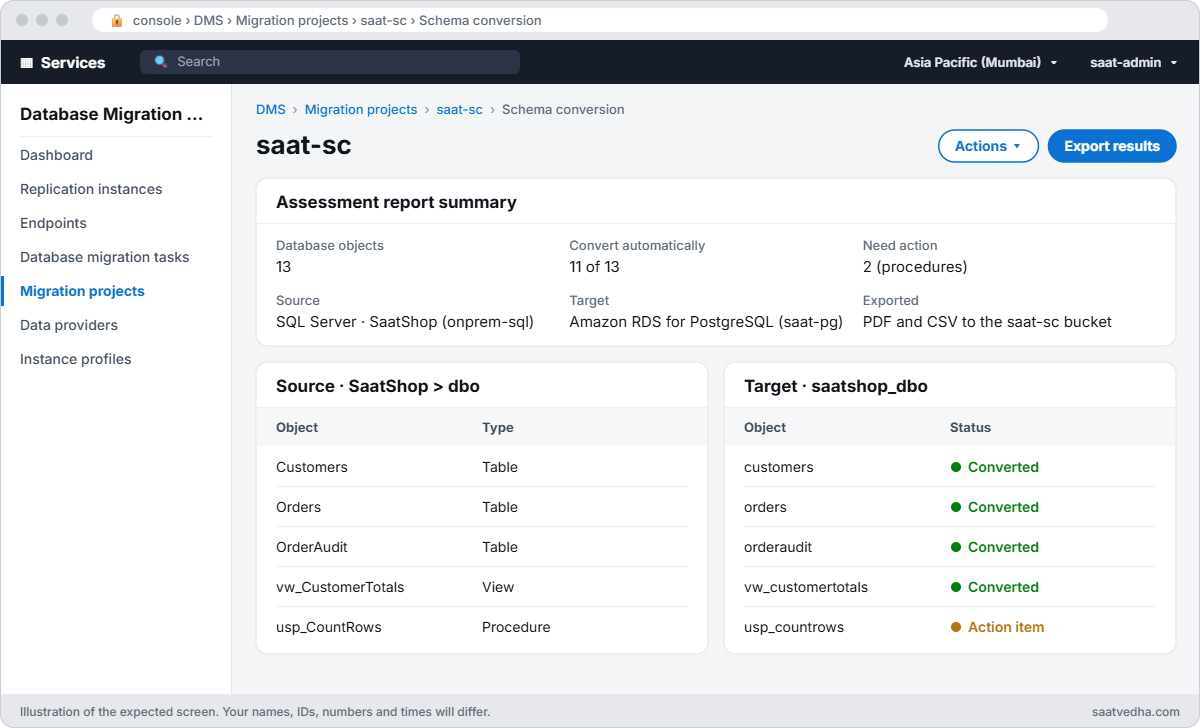
Schema Conversion’s main screen is in the console. Open AWS DMS > Migration projects > saat-sc > Schema conversion and choose Launch schema conversion; the first launch takes 10 to 15 minutes.
- In the source pane, expand SaatShop > Schemas, tick dbo, then choose Actions > Assess.
- Open the assessment summary. You should see something like “11 of 13 objects can be converted automatically”, with action items on the procedures.
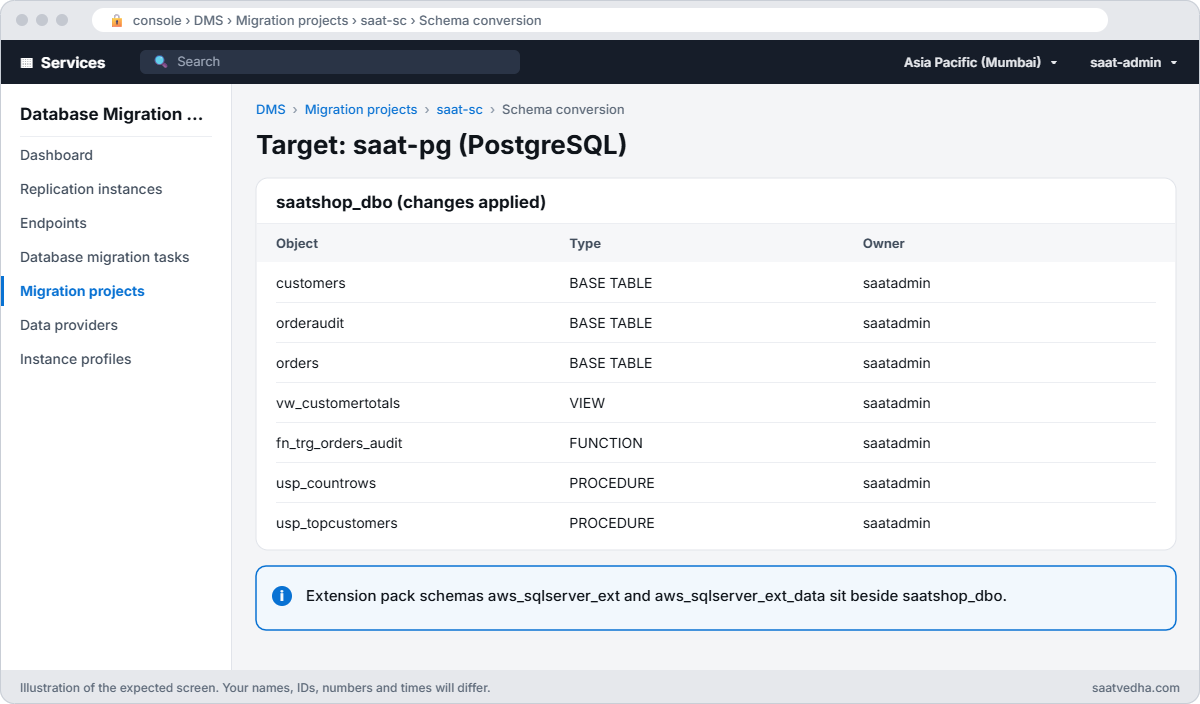
- Choose Actions > Convert. A schema called saatshop_dbo appears in the target pane; click usp_CountRows to compare the T-SQL with the converted PL/pgSQL and read its action item about dynamic SQL.
- Tick saatshop_dbo in the target pane and choose Actions > Apply changes.
- Choose Export results to save the assessment as PDF and CSV in the saat-sc bucket.
Save the PDF for your project plan: the action item count is the honest measure of how much manual work is left.
4Check the converted schema in PostgreSQL
Paste this whole block. It starts a small checker instance with psql and lists what Schema Conversion created:
$base = aws ssm get-parameter --name /aws/service/ami-amazon-linux-latest/al2023-ami-kernel-default-x86_64 --query Parameter.Value --output text
$chk = aws ec2 run-instances --image-id $base --instance-type t3.micro --subnet-id $v.PrivateA --security-group-ids $v.AppSg --iam-instance-profile Name=saat-ec2-ssm-profile --metadata-options HttpTokens=required --user-data "#!/bin/bash
dnf install -y postgresql16" --tag-specifications 'ResourceType=instance,Tags=[{Key=Name,Value=pgcheck},{Key=course,Value=saatvedha-aws},{Key=lesson,Value=49}]' --query "Instances[0].InstanceId" --output text
do { Start-Sleep 20; $p = aws ssm describe-instance-information --filters "Key=InstanceIds,Values=$chk" --query "InstanceInformationList[0].PingStatus" --output text } until ($p -eq 'Online')
Start-Sleep 60
$pgPw = (aws secretsmanager get-secret-value --secret-id $pgSecret --query SecretString --output text | ConvertFrom-Json).password
function Invoke-Pg([string]$Sql) {
  $b64 = [Convert]::ToBase64String([Text.Encoding]::UTF8.GetBytes($pgPw))
  $lines = @('export PGPASSWORD=$(echo ' + $b64 + ' | base64 -d)', "psql 'host=$pgHost dbname=saatshop user=saatadmin sslmode=require' -At -F ' ' -c ""$Sql""")
  @{ commands = $lines } | ConvertTo-Json | Set-Content pg-cmd.json
  $cmd = aws ssm send-command --document-name AWS-RunShellScript --instance-ids $chk --parameters file://pg-cmd.json --query Command.CommandId --output text
  do { Start-Sleep 5; $st = aws ssm get-command-invocation --command-id $cmd --instance-id $chk --query Status --output text 2>$null } until ($st -in 'Success', 'Failed', 'TimedOut')
  aws ssm get-command-invocation --command-id $cmd --instance-id $chk --query "[StandardOutputContent,StandardErrorContent]" --output text
}
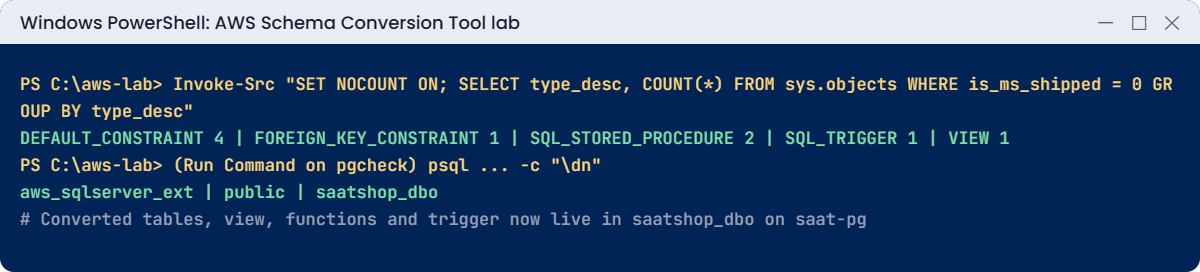
Invoke-Pg "\dn"
Invoke-Pg "SELECT table_name, table_type FROM information_schema.tables WHERE table_schema = 'saatshop_dbo' ORDER BY 1"
Invoke-Pg "SELECT routine_name, routine_type FROM information_schema.routines WHERE routine_schema = 'saatshop_dbo' ORDER BY 1"
You should see something like this:
aws_sqlserver_ext saatadmin
aws_sqlserver_ext_data saatadmin
public pg_database_owner
saatshop_dbo saatadmin

customers BASE TABLE
orderaudit BASE TABLE
orders BASE TABLE
vw_customertotals VIEW

fn_trg_orders_audit FUNCTION
usp_countrows PROCEDURE
usp_topcustomers PROCEDURE
The tables, view, procedures and trigger function now exist in saatshop_dbo, in lower case, with the extension pack schemas beside them. A DMS task with TRUNCATE_BEFORE_LOAD would now load the rows into this schema.
✅ Checkpoint: The inventory shows 4 defaults, 1 foreign key, 2 procedures, 1 trigger, 1 view and 3 identity columns; the assessment PDF is in the saat-sc bucket; saat-pg has the saatshop_dbo schema with tables, a view and routines.
Two problems that slow down real conversion projects.
1Break it: Schema Conversion can’t reach the source
Remove the 1433 rule for Schema Conversion, then refresh the source in the console:
aws ec2 revoke-security-group-ingress --group-id $srcSg --ip-permissions "IpProtocol=tcp,FromPort=1433,ToPort=1433,UserIdGroupPairs=[{GroupId=$scSg}]" | Out-NullIn the Schema conversion screen, choose the source server and Refresh from database. You’ll get an error like this:
Failed to connect to the source data provider saat-onprem-sqlserver. Check that the database is reachable from the instance profile network and that the security groups allow the connection.Schema Conversion connects from the instance profile’s security group, not from your laptop or the DMS replication instance. Teams often open the database to the replication instance and forget Schema Conversion has its own group. Fix: allow 1433 from saat-sc-sg again, then refresh:
aws ec2 authorize-security-group-ingress --group-id $srcSg --ip-permissions "IpProtocol=tcp,FromPort=1433,ToPort=1433,UserIdGroupPairs=[{GroupId=$scSg,Description=1433-from-sc}]" | Out-NullThe source tree loads again in the console.
2Break it: rows arrive before their parent
A DMS full load runs tables in parallel, so an order can arrive before its customer. Try it by hand:
Invoke-Pg "INSERT INTO saatshop_dbo.orders (customer, amount, customerid) VALUES ('Test', 1.00, 999)"You’ll get an error like this:
ERROR:  insert or update on table "orders" violates foreign key constraint "fk_orders_customers"
DETAIL:  Key (customerid)=(999) is not present in table "customers".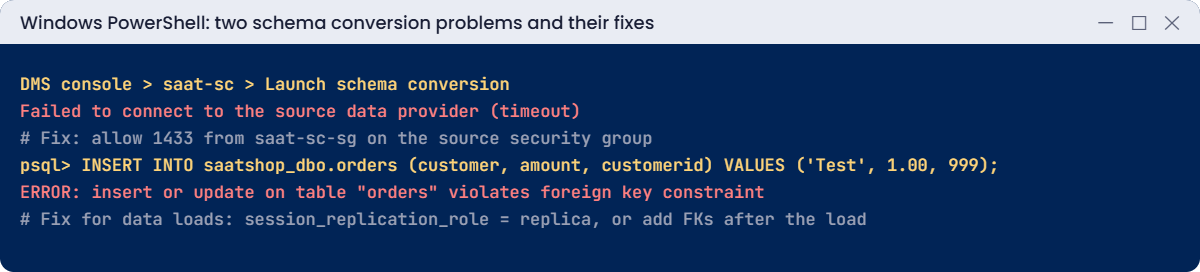
The schema is correct, but foreign keys and triggers fire during the load, and the load order is not guaranteed. On PostgreSQL targets, DMS loads normally run with session_replication_role set to replica, which skips foreign key checks and ordinary triggers for that session. Fix: show the same setting by hand, then remove the test row:
Invoke-Pg "SET session_replication_role = replica; INSERT INTO saatshop_dbo.orders (customer, amount, customerid) VALUES ('Test', 1.00, 999); DELETE FROM saatshop_dbo.orders WHERE customer = 'Test'; SELECT 'ok'"You should see something like this:
okIn a DMS task, put afterConnectScript=SET session_replication_role = 'replica' on the PostgreSQL target endpoint, or add foreign keys and triggers after the full load. For SQL Server targets, disable foreign keys and triggers during the load and re-enable them before CDC catches up.
Now clean up. onprem-sql keeps the new objects and stays stopped for Lesson 50:
aws dms delete-migration-project --migration-project-identifier $proj | Out-Null
Start-Sleep 30
aws dms delete-data-provider --data-provider-identifier $srcDp | Out-Null
aws dms delete-data-provider --data-provider-identifier $tgtDp | Out-Null
aws dms delete-instance-profile --instance-profile-identifier $ip | Out-Null
aws ec2 terminate-instances --instance-ids $chk | Out-Null
aws rds delete-db-instance --db-instance-identifier saat-pg --skip-final-snapshot --query "DBInstance.DBInstanceStatus" --output text
aws secretsmanager delete-secret --secret-id $srcSecret --force-delete-without-recovery | Out-Null
aws ec2 revoke-security-group-ingress --group-id $srcSg --ip-permissions "IpProtocol=tcp,FromPort=1433,ToPort=1433,UserIdGroupPairs=[{GroupId=$scSg}]" | Out-Null
aws ec2 stop-instances --instance-ids $src | Out-Null
foreach ($r in 'saat-sc-s3-role', 'saat-sc-secrets-role') { $pn = aws iam list-role-policies --role-name $r --query "PolicyNames[0]" --output text; aws iam delete-role-policy --role-name $r --policy-name $pn; aws iam delete-role --role-name $r }
.\Remove-LabBucket.ps1 -Bucket $sc
aws rds wait db-instance-deleted --db-instance-identifier saat-pg
aws dms delete-replication-subnet-group --replication-subnet-group-identifier saat-dms-subnets
aws ec2 delete-security-group --group-id $scSg
aws ec2 delete-security-group --group-id $pgSg
.\Stop-SsmEndpoints.ps1
Remove-Item sc-trust.json, sc-s3.json, sc-secrets.json, src-cmd.json, pg-cmd.json
✅ Checkpoint: You fixed a source connection failure with the Schema Conversion security group rule and a foreign key violation with session_replication_role. The project, data providers, instance profile, saat-pg, secret, roles, bucket and security groups are gone, and onprem-sql is stopping.