Route 53 DNS
-
Phase 0: Before you start
-
Phase 1: The foundation
-
Phase 2: Operations and security
-
Phase 3: SQL Server on AWS
-
Phase 4: Troubleshooting step by step
-
Phase 5: Final project and career
“It’s always DNS” is a joke because it is so often true. Apps break when a name points to an old IP, when a record was never created, or when a private name is used from outside the network. Route 53 DNS is where AWS teams manage these names, for public websites and for private names inside a VPC.
You’ll create a private hosted zone called saat.internal for saat-vpc, add A, CNAME and TXT records, query them from a server with dig, and see why your laptop can’t see them. You don’t need to buy a domain for any of it.
| Time | You need | By the end you can |
|---|---|---|
| 60 minutes (one small instance and the Session Manager endpoints for under an hour) | saat-vpc, Start-SsmEndpoints.ps1 and Stop-SsmEndpoints.ps1, saat-ec2-ssm-profile (Lessons 8 to 14), your laptop signed in as saat-admin. Cost: about USD 0.10; a hosted zone deleted within 12 hours of creation is not charged. | Create a private hosted zone, manage records safely with CREATE, UPSERT and DELETE, read dig output and TTLs, and pick a routing policy. |
What it is, in one line
Route 53 DNS is the AWS service that answers “what is the address for this name?”, for public domains on the internet and private names inside your VPCs.
In Simple Words
The phone book at the reception desk
People remember names, not phone numbers. DNS is the phone book that turns “app” into the number 10.20.11.25.
A public hosted zone is the city phone book anyone can read. A private hosted zone is the office’s internal list, kept at reception. Only people inside the building can ask for it.
When someone looks up a number, they remember it for a while instead of asking every time. That “while” is the TTL. If the number changes, people who just asked keep calling the old one until their memory expires.
Engineer's View
What Route 53 really does
A hosted zone holds the records for one domain. Public zones are answered by Route 53’s name servers on the internet; private zones are answered only by the Route 53 Resolver inside the VPCs you associate with them. The VPC needs enableDnsSupport and enableDnsHostnames on, which saat-vpc has from Lesson 8.
Inside a VPC, instances ask the resolver at the VPC base address plus two (10.20.0.2 here) or 169.254.169.253. Common record types: A (IPv4 address), AAAA (IPv6), CNAME (alias to another name, never at the zone apex), TXT (text, used for ownership checks), MX (mail) and Route 53 alias records, which point at AWS resources such as load balancers and work at the apex.
Changes go through change-resource-record-sets with CREATE, UPSERT or DELETE and become INSYNC on all Route 53 servers, usually within a minute. Clients may still use cached answers until the TTL runs out. .internal is reserved by ICANN for private use, so it will never clash with a real public domain.
How it works, step by step
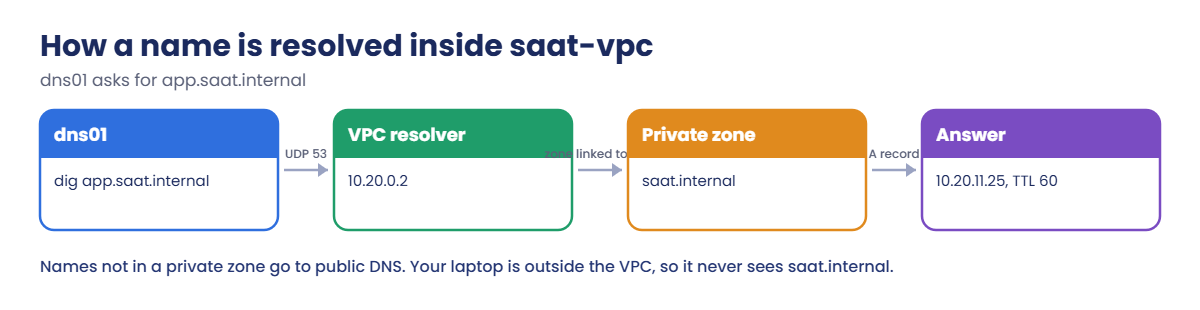
Here is the path of one query inside saat-vpc.
1The instance asks the VPC resolver
dig app.saat.internal sends a UDP query on port 53 to 10.20.0.2. You never configure this; the VPC’s DHCP options hand it out.
2The resolver checks private zones first
saat.internal is associated with saat-vpc, so the resolver answers from your private zone. Names it doesn’t own, such as amazon.com, are resolved on the public internet.
3The answer comes back with a TTL
The client caches 10.20.11.25 for 60 seconds. Short TTLs make changes take effect fast; long TTLs mean fewer queries and less exposure to DNS problems.
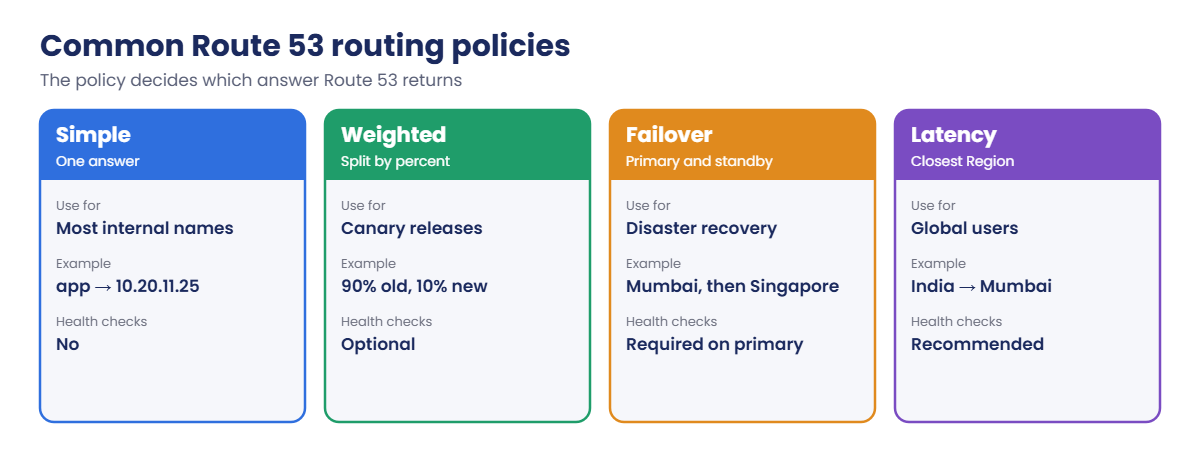
4Routing policies choose between answers
When a name has several possible answers, the routing policy decides which one Route 53 gives:
Weighted and failover records are how teams shift traffic during releases and disasters without touching the apps. Lesson 20 adds alias records for load balancers.
✅ Checkpoint: You can explain a private hosted zone, where an instance sends DNS queries, what a TTL does, and why a CNAME can’t sit at the zone apex.
Hands-on lab: private Route 53 DNS for saat-vpc
Start as usual, with the Session Manager endpoints:
cd C:\aws-lab
aws login --profile saat-admin
$env:AWS_PROFILE = 'saat-admin'
$env:Path += ';C:\Program Files\Amazon\SessionManagerPlugin\bin'
$v = Get-Content C:\aws-lab\saat-vpc.json | ConvertFrom-Json
.\Start-SsmEndpoints.ps11Launch dns01 with dig installed
Paste this whole block:
[IO.File]::WriteAllText('C:\aws-lab\dns-userdata.sh', "#!/bin/bash`ndnf install -y bind-utils`n")
$base = aws ssm get-parameter --name /aws/service/ami-amazon-linux-latest/al2023-ami-kernel-default-x86_64 --query Parameter.Value --output text
$i = aws ec2 run-instances --image-id $base --instance-type t3.micro --subnet-id $v.PrivateA --security-group-ids $v.AppSg --iam-instance-profile Name=saat-ec2-ssm-profile --metadata-options HttpTokens=required --user-data file://dns-userdata.sh --tag-specifications 'ResourceType=instance,Tags=[{Key=Name,Value=dns01},{Key=course,Value=saatvedha-aws},{Key=lesson,Value=19}]' --query "Instances[0].InstanceId" --output text
$ip = aws ec2 describe-instances --instance-ids $i --query "Reservations[0].Instances[0].PrivateIpAddress" --output text
$ipYou should see something like this:
10.20.11.25The private IP is known as soon as the instance is created, so you can build its DNS record while it boots.
2Create the private hosted zone
Paste this whole block:
$z = aws route53 create-hosted-zone --name saat.internal --caller-reference "lesson19-$(Get-Date -Format yyyyMMddHHmmss)" --vpc "VPCRegion=ap-south-1,VPCId=$($v.VpcId)" --hosted-zone-config Comment=lesson19,PrivateZone=true --query HostedZone.Id --output text
$zone = ($z -split '/')[-1]
aws route53 change-tags-for-resource --resource-type hostedzone --resource-id $zone --add-tags Key=course,Value=saatvedha-aws Key=lesson,Value=19
aws route53 get-hosted-zone --id $zone --query "[HostedZone.Name,HostedZone.Config.PrivateZone,VPCs[0].VPCId]" --output textYou should see something like this:
saat.internal. True vpc-0a1b2c3d4e5f67890The caller reference is a unique string that stops the same request from creating two zones if you retry it. A date stamp works well.
3Add A, CNAME and TXT records
Paste this whole block:
@'
{
"Comment": "lesson 19 records",
"Changes": [
{ "Action": "CREATE", "ResourceRecordSet": { "Name": "app.saat.internal", "Type": "A", "TTL": 60, "ResourceRecords": [ { "Value": "APP_IP" } ] } },
{ "Action": "CREATE", "ResourceRecordSet": { "Name": "db.saat.internal", "Type": "CNAME", "TTL": 60, "ResourceRecords": [ { "Value": "app.saat.internal" } ] } },
{ "Action": "CREATE", "ResourceRecordSet": { "Name": "saat.internal", "Type": "TXT", "TTL": 300, "ResourceRecords": [ { "Value": "\"owner=platform-team\"" } ] } }
]
}
'@ -replace 'APP_IP', $ip | Set-Content records.json
$chg = aws route53 change-resource-record-sets --hosted-zone-id $zone --change-batch file://records.json --query ChangeInfo.Id --output text
aws route53 wait resource-record-sets-changed --id $chg
aws route53 list-resource-record-sets --hosted-zone-id $zone --query "ResourceRecordSets[].[Name,Type,TTL]" --output textYou should see this:
saat.internal. NS 172800
saat.internal. SOA 900
saat.internal. TXT 300
app.saat.internal. A 60
db.saat.internal. CNAME 60Route 53 created the NS and SOA records with the zone. The waiter returned once your change was INSYNC on every Route 53 server.
4Query from inside and outside the VPC
Paste this whole block:
do { Start-Sleep 20; $p = aws ssm describe-instance-information --filters "Key=InstanceIds,Values=$i" --query "InstanceInformationList[0].PingStatus" --output text } until ($p -eq 'Online')
aws ssm start-session --target $i --document-name AWS-StartInteractiveCommand --parameters command="cloud-init status --wait"
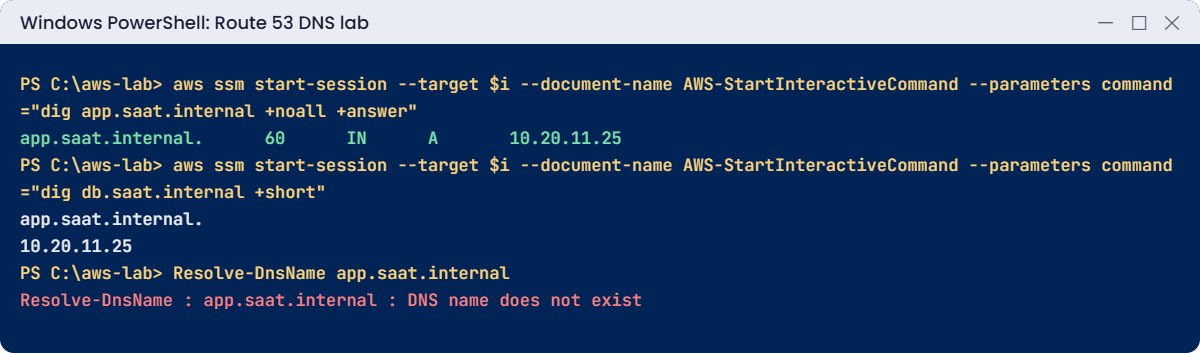
aws ssm start-session --target $i --document-name AWS-StartInteractiveCommand --parameters command="dig app.saat.internal +noall +answer"
aws ssm start-session --target $i --document-name AWS-StartInteractiveCommand --parameters command="dig db.saat.internal +short"
aws ssm start-session --target $i --document-name AWS-StartInteractiveCommand --parameters command="dig saat.internal TXT +short"
Resolve-DnsName app.saat.internalYou should see something like this (session start and exit lines left out):
status: done
app.saat.internal. 60 IN A 10.20.11.25
app.saat.internal.
10.20.11.25
"owner=platform-team"
Resolve-DnsName : app.saat.internal : DNS name does not existRead the dig answer left to right: name, TTL in seconds, class, type, value. The CNAME answer shows both steps, the alias and the address it leads to. Your laptop gets “does not exist” because it asks public DNS, which knows nothing about private zones.
✅ Checkpoint: saat.internal is a private zone linked to saat-vpc, dig on dns01 returns the A, CNAME and TXT answers, and your laptop can’t resolve app.saat.internal. Keep everything for the break lab.
Break It, Then Fix It
Two errors you’ll hit the first time you automate DNS changes: rerunning a script, and deleting a zone.
1Break it: run the same change twice
A teammate reruns the deployment script:
aws route53 change-resource-record-sets --hosted-zone-id $zone --change-batch file://records.jsonYou’ll get this error:
An error occurred (InvalidChangeBatch) when calling the ChangeResourceRecordSets operation: [Tried to create resource record set [name='app.saat.internal.', type='A'] but it already exists]CREATE fails if the record exists, and because a change batch is all or nothing, none of the three changes were applied. Fix: use UPSERT, which creates the record or replaces it, so the script is safe to run any number of times:
(Get-Content records.json -Raw) -replace '"CREATE"', '"UPSERT"' | Set-Content records-upsert.json
$chg = aws route53 change-resource-record-sets --hosted-zone-id $zone --change-batch file://records-upsert.json --query ChangeInfo.Status --output text
$chgYou should see this:
PENDINGPENDING is normal. It turns INSYNC within about a minute.
2Break it: delete a zone that still has records
Try to delete the zone straight away:
aws route53 delete-hosted-zone --id $zoneYou’ll get this error:
An error occurred (HostedZoneNotEmpty) when calling the DeleteHostedZone operation: The specified hosted zone contains non-required resource record sets and so cannot be deleted.
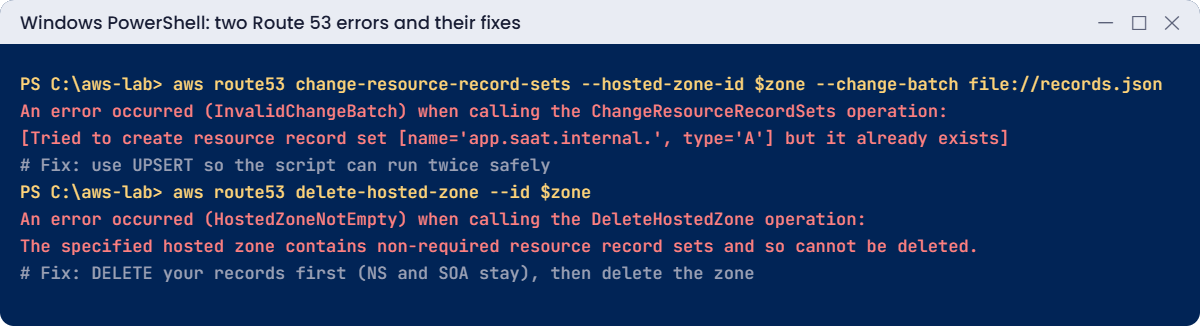
Route 53 won’t delete a zone that still holds your records; only NS and SOA may remain. Fix: delete your records first. A DELETE must match the record exactly, including TTL and value, which is why keeping the same JSON file pays off:
(Get-Content records.json -Raw) -replace '"CREATE"', '"DELETE"' | Set-Content records-delete.json
$chg = aws route53 change-resource-record-sets --hosted-zone-id $zone --change-batch file://records-delete.json --query ChangeInfo.Id --output text
aws route53 wait resource-record-sets-changed --id $chg
aws route53 delete-hosted-zone --id $zone --query ChangeInfo.Status --output text
aws ec2 terminate-instances --instance-ids $i | Out-Null
aws ec2 wait instance-terminated --instance-ids $i
.\Stop-SsmEndpoints.ps1
Remove-Item records*.json, dns-userdata.sh
.\Find-LabResources.ps1The delete-hosted-zone line prints:
PENDING✅ Checkpoint: You made a record change safe to rerun with UPSERT and deleted a zone the right way. The zone, dns01 and the endpoints are gone.
This happened at work
The cutover that took a day instead of a minute
A payments team moved its API from old servers to a new load balancer on a Saturday night. The plan was simple: change api.example.com to the new address and switch off the old servers ten minutes later.
The record had a TTL of 86,400 seconds, set years earlier and never questioned. Many partner systems and mobile networks kept using the old address for up to a day. When the old servers went off, a large share of payment calls failed, and the team had to turn them back on at 2 a.m.
Their runbook now lowers the TTL to 60 seconds two days before any cutover, checks the change with dig against several public resolvers, keeps old servers running for one full old TTL, and only then raises the TTL again.
Common mistakes and troubleshooting
| Mistake | What happens | What to do |
|---|---|---|
| Long TTL right before a migration | Clients keep using the old IP for hours | Lower the TTL days before the change |
| Using CREATE in scripts | Reruns fail with “already exists” | Use UPSERT for idempotent changes |
| CNAME at the zone apex | InvalidChangeBatch: not permitted at apex | Use an alias record for the apex |
| Private zone not associated with the VPC | Names don’t resolve inside that VPC | Associate the zone with every VPC that needs it |
| Testing private names from a laptop | DNS name does not exist | Test from an instance in the VPC, or use Route 53 Resolver endpoints |
| Deleting a zone with records | HostedZoneNotEmpty | Delete your records first, keeping exact TTLs and values |
Interview questions
Click a question to open it. Each one is written the way an interviewer would ask it. Under it you will see why they ask it and one way you could answer, in your own words.
Fresher level
1. Can you explain in simple words what a hosted zone is in Route 53?
Why they ask this: They want to check basic DNS knowledge in AWS. Public and private zones behave very differently, so knowing both matters.
How you might answer: A hosted zone is a container in Route 53 that holds the DNS records for one domain.
It can be public, so it answers on the internet, or private, so it answers only inside the VPCs linked to it.
2. What’s the difference between an A record and a CNAME, and is there anywhere you can’t use a CNAME?
Why they ask this: They want to check that you know the common record types. The apex rule catches many people out.
How you might answer: An A record maps a name to an IPv4 address. A CNAME maps a name to another name.
You can’t use a CNAME at the zone apex, so not on the bare domain like example.com.
3. You changed a DNS record, but some users still see the old address. How would you explain TTL to them?
Why they ask this: They want to see that you understand DNS caching. It explains most “I changed it but nothing happened” complaints.
How you might answer: I’d explain that TTL means time to live. It’s how many seconds resolvers and clients are allowed to cache the answer before they ask again.
So until the old TTL runs out, some users will still get the old address.
2–5 years experience
4. Why would you use a Route 53 alias record instead of a CNAME for your load balancer?
Why they ask this: They want to check AWS-specific DNS knowledge. Alias records solve real problems that plain DNS can’t.
How you might answer: An alias points a name at an AWS resource like a load balancer, CloudFront or an S3 website. Unlike a CNAME, it works at the zone apex.
It also follows the resource’s IP changes automatically, and alias queries to AWS resources aren’t charged.
5. Servers in your office data centre can’t resolve names in a private hosted zone. How would you fix it?
Why they ask this: They want to see hybrid DNS skills. Almost every company with a data centre and AWS runs into this.
How you might answer: I’d create a Route 53 Resolver inbound endpoint in the VPC. Then I’d add a conditional forwarder for that domain on the on-premises DNS servers, pointing at the endpoint.
For the other direction, AWS resolving office names, I’d use an outbound endpoint and forwarding rules.
6. Your team wants to release a new version to about 10 percent of users first. How could you do that with DNS?
Why they ask this: They want to see that you know traffic shifting and its limits. Being honest about what DNS can’t control shows experience.
How you might answer: I’d use weighted records, with weight 90 on the old target and 10 on the new one, plus health checks. Then I’d shift the weights step by step.
But TTLs and client caching mean the split is only approximate, so I’d tell the team that up front.
Senior level
7. You have 50 accounts that all need to resolve the same private names. How would you design DNS for that?
Why they ask this: They want to see multi-account DNS design. Without a central plan, private zones get duplicated and drift apart.
How you might answer: A central networking account owns the private hosted zones. They’re linked to VPCs in other accounts through authorization, or we share Resolver rules through RAM.
Resolver endpoints connect to on-premises DNS. Resolver query logging and DNS Firewall give us visibility and control.
8. After a DNS change, users in one city can’t reach your site, but everyone else can. How would you investigate?
Why they ask this: They want to see structured troubleshooting that goes from the source outward. Location-specific problems are usually caching or split views.
How you might answer: First I’d check the record in Route 53 and confirm the change status is INSYNC. Then I’d query the authoritative name servers directly, and after that the public resolvers people use in that area.
I’d compare TTLs and cached answers, check for split-horizon zones, and confirm the target itself is healthy.
Quick quiz
Q1. Who can resolve names in a private hosted zone?
- Anyone on the internet
- Only resources in associated VPCs
- Only the root user
- Only Route 53 admins
Show answer
B — Private zones are answered only inside the VPCs you associate.
Q2. Which action makes a record change safe to run twice?
- CREATE
- UPSERT
- DELETE
- REPLACE
Show answer
B — UPSERT creates the record if missing and replaces it if present.
Q3. What is the DNS resolver address in a 10.20.0.0/16 VPC?
- 10.20.0.1
- 10.20.0.2
- 10.20.255.255
- 8.8.8.8
Show answer
B — The resolver is the VPC base address plus two.
Q4. Why did HostedZoneNotEmpty appear?
- The zone had your own records
- NS and SOA can’t exist
- The VPC was missing
- The TTL was too long
Show answer
A — Delete your records first; NS and SOA may remain.
Q5. What should you do before a DNS cutover?
- Raise the TTL
- Lower the TTL in advance
- Delete the zone
- Turn off health checks
Show answer
B — A short TTL lets clients pick up the change quickly.
Quick recap
- A hosted zone holds a domain’s records; private zones answer only inside associated VPCs.
- Instances ask the VPC resolver at base plus two.
- TTL controls caching; lower it before any cutover.
- Use UPSERT in scripts and delete records before deleting a zone.
- Routing policies (weighted, failover, latency) shift traffic without app changes.
Next lesson
Lesson 20: Application Load Balancer → You’ll put two web servers behind an Application Load Balancer, with health checks and listener rules.
Further reading: Route 53 DNS
Want to go deeper into Route 53 DNS? Read Working with private hosted zones and Choosing a routing policy. You can also see the full plan for this course on the AWS Cloud Administration course page.
