Windows Authentication with AWS Managed Microsoft AD
-
Phase 0: Before you start
-
Phase 1: The foundation
-
Phase 2: Operations and security
-
Phase 3: SQL Server on AWS
-
Phase 4: Troubleshooting step by step
-
Phase 5: Final project and career
Most companies don’t want a separate SQL password for every person; they want people to log in with the same Windows account they use for everything else, and access to follow their AD groups. RDS SQL Server Windows authentication does that by joining the instance to AWS Managed Microsoft AD.
You’ll create a Managed AD domain, add a user and group with the AWS CLI, join saat-sql to the domain, map the group to a SQL login, and log in as that user from a domain-joined Windows server. Then you’ll fix the two errors almost everyone sees on their first attempt.
| Time | You need | By the end you can |
|---|---|---|
| 150 minutes (most of it waiting for the directory and domain joins) | Lessons 42 to 44 done (saat-sql, Start-SqlLab.ps1, Stop-SqlLab.ps1), saat-vpc, saat-ec2-ssm-profile, your laptop signed in as saat-admin. Cost: about USD 1 for the session (Managed AD Standard runs two domain controllers at about USD 0.15 an hour, plus a small Windows instance); everything is deleted at the end. | Create AWS Managed Microsoft AD, manage users and groups with the Directory Service Data API, join RDS for SQL Server to a domain with the right IAM role, create Windows logins for AD groups, and troubleshoot name and Kerberos problems. |
What it is, in one line
RDS SQL Server Windows authentication lets domain users and groups from AWS Managed Microsoft AD log in to SQL Server with their Windows identity instead of SQL passwords.
In Simple Words
The office ID card
In a big office, you don’t get a separate key for every room. You get one ID card, and the security desk knows which rooms your department may enter. Change departments, and your access changes the same day.
Managed AD is the security desk. Your Windows account is the ID card. A SQL login for an AD group says “anyone from this department may read the shop data”.
The card reader only trusts cards when you walk in through the official door with the building’s real name on it. Use a side door with a different sign and the reader refuses you. That’s why the server name matters for Kerberos.
Engineer's View
How Windows authentication works on RDS
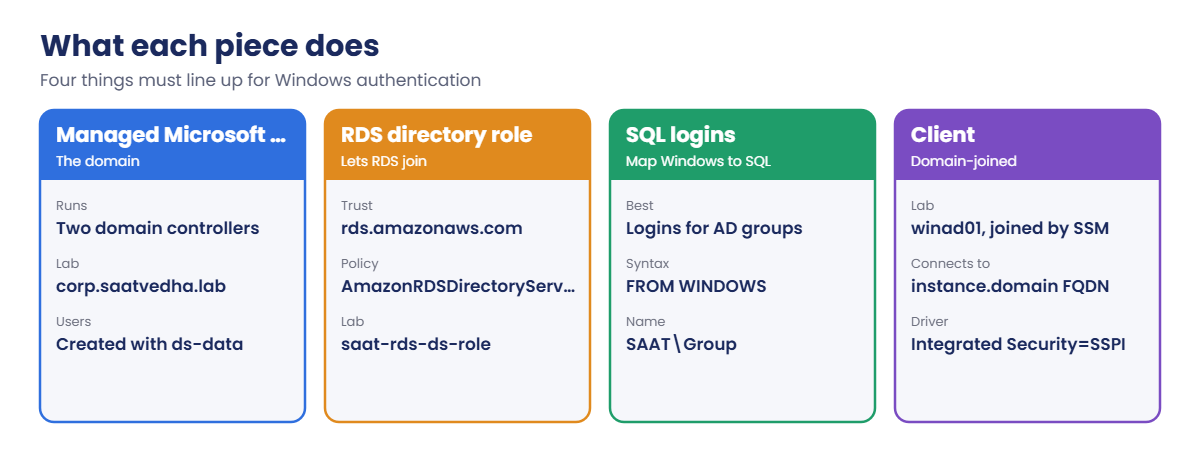
AWS Managed Microsoft AD runs real Windows Server domain controllers in two subnets you choose (Standard or Enterprise edition), managed and patched by AWS. You manage users and groups with normal AD tools from a domain-joined machine, or with the Directory Service Data API (aws ds-data) once directory data access is enabled. It can trust an on-premises AD, so people keep their existing accounts.
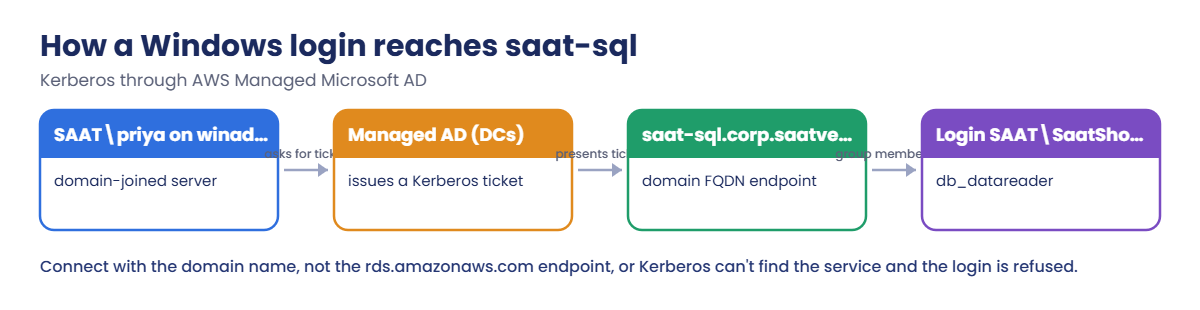
RDS joins the instance to the domain using an IAM role that trusts rds.amazonaws.com with the AmazonRDSDirectoryServiceAccess policy. RDS then has a domain endpoint, instance-id.domain-fqdn, with the Kerberos service principal registered. Clients must connect to that name: connecting with the rds.amazonaws.com endpoint or an IP makes Kerberos fail, and the login is refused as coming from an untrusted domain.
Inside SQL Server you create logins FROM WINDOWS using the NetBIOS short name (SAAT\Group). Granting to groups rather than people keeps access reviews in AD. The same directory can back FSx for Windows File Server (Lesson 22), EC2 domain joins and Amazon WorkSpaces.
How it works, step by step
Here is what happens when SAAT\priya opens a connection.
1The client asks the domain for a ticket
winad01 is joined to corp.saatvedha.lab. When priya connects to saat-sql.corp.saatvedha.lab, Windows asks a domain controller for a Kerberos ticket for that SQL Server service.
2SQL Server checks the ticket
saat-sql is joined to the same domain, so it can verify the ticket without ever seeing priya’s password.
3Group membership decides access
priya is in SaatShopReaders, which has a login and db_datareader in SaatShop. Remove her from the group and her access goes with it.
4Line up the pieces
Four things must be right at the same time:
Most failures come from one piece being slightly off: the wrong short domain name in CREATE LOGIN, a client using the wrong server name, or the RDS role missing.
✅ Checkpoint: You can explain the role of Managed AD, the RDS directory role, Windows logins for groups, and why clients must use the domain FQDN endpoint.
Hands-on lab: log in to RDS SQL Server as a domain user
Sign in, start the SQL lab and set names:
cd C:\aws-lab
aws login --profile saat-admin
$env:AWS_PROFILE = 'saat-admin'
$v = Get-Content C:\aws-lab\saat-vpc.json | ConvertFrom-Json
.\Start-SqlLab.ps11Create the Managed AD domain
Paste this whole block. The directory usually takes 20 to 40 minutes to become Active:
$adPw = aws secretsmanager get-random-password --password-length 20 --exclude-punctuation --require-each-included-type --query RandomPassword --output text
$dir = aws ds create-microsoft-ad --name corp.saatvedha.lab --short-name SAAT --password $adPw --edition Standard --vpc-settings "VpcId=$($v.VpcId),SubnetIds=$($v.PrivateA),$($v.PrivateB)" --tags Key=course,Value=saatvedha-aws --query DirectoryId --output text
do { Start-Sleep 60; $stage = aws ds describe-directories --directory-ids $dir --query "DirectoryDescriptions[0].Stage" --output text; $stage } until ($stage -in 'Active', 'Failed')
$dns = (aws ds describe-directories --directory-ids $dir --query "DirectoryDescriptions[0].DnsIpAddrs" --output text) -split '\s+'
"$dir $($dns -join ' ')"You should see something like this:
Creating
Creating
Active
d-9f67a1b2c3 10.20.11.207 10.20.12.84Two domain controllers now run in saat-private-a and saat-private-b, with those IP addresses acting as the domain’s DNS servers. The Admin password is in $adPw for this session only; in production it goes straight into Secrets Manager.
2Add a user and a group with the CLI
Paste this whole block:
aws ds enable-directory-data-access --directory-id $dir
Start-Sleep 60
aws ds-data create-user --directory-id $dir --sam-account-name priya --given-name Priya --surname Shah | Out-Null
$userPw = aws secretsmanager get-random-password --password-length 20 --exclude-punctuation --require-each-included-type --query RandomPassword --output text
aws ds reset-user-password --directory-id $dir --user-name priya --new-password $userPw
aws ds-data create-group --directory-id $dir --sam-account-name SaatShopReaders | Out-Null
aws ds-data add-group-member --directory-id $dir --group-name SaatShopReaders --member-name priya
aws ds-data list-group-members --directory-id $dir --sam-account-name SaatShopReaders --query "Members[].SAMAccountName" --output textYou should see this:
priyaNo Windows server was needed to manage the directory. Teams with existing AD usually add a trust instead, so people keep their on-premises accounts.
3Join saat-sql to the domain and create the login
Paste this whole block. The join restarts saat-sql and takes 10 to 20 minutes:
'{ "Version": "2012-10-17", "Statement": [ { "Effect": "Allow", "Principal": { "Service": "rds.amazonaws.com" }, "Action": "sts:AssumeRole" } ] }' | Set-Content rds-ds-trust.json
aws iam create-role --role-name saat-rds-ds-role --assume-role-policy-document file://rds-ds-trust.json --query Role.RoleName --output text
aws iam attach-role-policy --role-name saat-rds-ds-role --policy-arn arn:aws:iam::aws:policy/service-role/AmazonRDSDirectoryServiceAccess
Start-Sleep 15
aws rds modify-db-instance --db-instance-identifier saat-sql --domain $dir --domain-iam-role-name saat-rds-ds-role --apply-immediately --query "DBInstance.DBInstanceStatus" --output text
Start-Sleep 60
aws rds wait db-instance-available --db-instance-identifier saat-sql
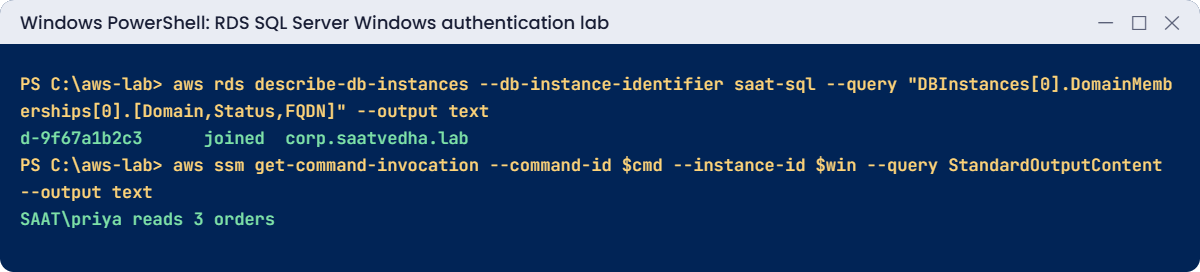
aws rds describe-db-instances --db-instance-identifier saat-sql --query "DBInstances[0].DomainMemberships[0].[Domain,Status,FQDN]" --output text
sqlcmd -S "127.0.0.1,11433" -U saatadmin -C -Q "CREATE LOGIN [SAAT\SaatShopReaders] FROM WINDOWS"
sqlcmd -S "127.0.0.1,11433" -U saatadmin -C -d SaatShop -Q "CREATE USER [SAAT\SaatShopReaders] FOR LOGIN [SAAT\SaatShopReaders]; ALTER ROLE db_datareader ADD MEMBER [SAAT\SaatShopReaders];"You should see something like this:
saat-rds-ds-role
modifying
d-9f67a1b2c3 joined corp.saatvedha.labsaat-sql is now a member of corp.saatvedha.lab, and anyone in SaatShopReaders can read SaatShop. You granted access to a group, not a person, so the business can manage who’s in it.
4Log in as priya from a domain-joined server
Paste this whole block. It launches winad01, joins it to the domain with Systems Manager, then tests the login (about 20 minutes):
aws iam attach-role-policy --role-name saat-ec2-ssm-role --policy-arn arn:aws:iam::aws:policy/AmazonSSMDirectoryServiceAccess
$dsEp = aws ec2 create-vpc-endpoint --vpc-id $v.VpcId --vpc-endpoint-type Interface --service-name com.amazonaws.ap-south-1.ds --subnet-ids $v.PrivateA --security-group-ids $v.EndpointSg --private-dns-enabled --query VpcEndpoint.VpcEndpointId --output text
$winAmi = aws ssm get-parameter --name /aws/service/ami-windows-latest/Windows_Server-2022-English-Full-Base --query Parameter.Value --output text
$win = aws ec2 run-instances --image-id $winAmi --instance-type t3.medium --subnet-id $v.PrivateA --security-group-ids $v.AppSg --iam-instance-profile Name=saat-ec2-ssm-profile --metadata-options HttpTokens=required --tag-specifications 'ResourceType=instance,Tags=[{Key=Name,Value=winad01},{Key=course,Value=saatvedha-aws},{Key=lesson,Value=45}]' --query "Instances[0].InstanceId" --output text
do { Start-Sleep 30; $p = aws ssm describe-instance-information --filters "Key=InstanceIds,Values=$win" --query "InstanceInformationList[0].PingStatus" --output text } until ($p -eq 'Online')
@{ directoryId = @($dir); directoryName = @('corp.saatvedha.lab'); dnsIpAddresses = $dns } | ConvertTo-Json | Set-Content join.json
aws ssm create-association --name AWS-JoinDirectoryServiceDomain --targets "Key=InstanceIds,Values=$win" --parameters file://join.json | Out-Null
do { Start-Sleep 30; $j = aws ssm describe-instance-associations-status --instance-id $win --query "InstanceAssociationStatusInfos[?Name=='AWS-JoinDirectoryServiceDomain'] | [0].Status" --output text } until ($j -in 'Success', 'Failed')
do { Start-Sleep 30; $p = aws ssm describe-instance-information --filters "Key=InstanceIds,Values=$win" --query "InstanceInformationList[0].PingStatus" --output text } until ($p -eq 'Online')
$test = @'
$pw = ConvertTo-SecureString 'PW_HERE' -AsPlainText -Force
$cred = New-Object System.Management.Automation.PSCredential('SAAT\priya', $pw)
$job = Start-Job -Credential $cred -ArgumentList 'SERVER_HERE' -ScriptBlock {
param($srv)
$cn = New-Object System.Data.SqlClient.SqlConnection("Server=$srv;Database=SaatShop;Integrated Security=SSPI;Encrypt=True;TrustServerCertificate=True")
try { $cn.Open(); $cmd = $cn.CreateCommand(); $cmd.CommandText = "SELECT SUSER_NAME() + ' reads ' + CAST(COUNT(*) AS varchar(10)) + ' orders' FROM dbo.Orders"; $cmd.ExecuteScalar() }
catch { $_.Exception.Message } finally { $cn.Close() }
}
$job | Wait-Job -Timeout 90 | Receive-Job
'@
function Test-WinLogin([string]$Server) {
$script = $test -replace 'PW_HERE', $userPw -replace 'SERVER_HERE', $Server
@{ commands = @($script -split "`r?`n") } | ConvertTo-Json | Set-Content win-test.json
$cmd = aws ssm send-command --document-name AWS-RunPowerShellScript --instance-ids $win --parameters file://win-test.json --query Command.CommandId --output text
do { Start-Sleep 10; $st = aws ssm get-command-invocation --command-id $cmd --instance-id $win --query Status --output text 2>$null } until ($st -in 'Success', 'Failed', 'TimedOut')
aws ssm get-command-invocation --command-id $cmd --instance-id $win --query StandardOutputContent --output text
}
Test-WinLogin 'saat-sql.corp.saatvedha.lab'You should see something like this:
SAAT\priya reads 3 orderspriya logged in with Kerberos and read the orders through her group. The test runs PowerShell on winad01 as priya using .NET’s built-in SQL client, so no extra tools are needed on the server. You can also connect with Fleet Manager’s Remote Desktop as SAAT\priya and use SSMS.
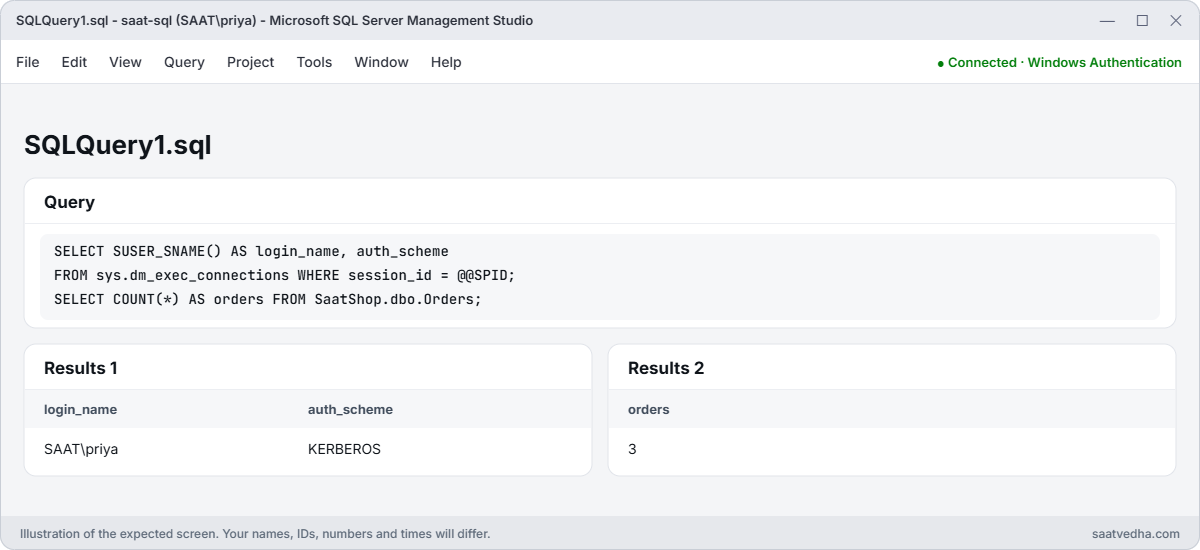
✅ Checkpoint: corp.saatvedha.lab is Active, saat-sql shows joined, SAAT\SaatShopReaders has a login with db_datareader, and SAAT\priya read 3 orders from winad01.
Break It, Then Fix It
The two classic first-day errors with Windows authentication.
1Break it: the wrong domain name in CREATE LOGIN
Use the first part of the DNS name instead of the short name:
sqlcmd -S "127.0.0.1,11433" -U saatadmin -C -Q "CREATE LOGIN [CORP\SaatShopReaders] FROM WINDOWS"You’ll get an error like this:
Msg 15401, Level 16, State 1, Server EC2AMAZ-ABC123, Line 1
Windows NT user or group 'CORP\SaatShopReaders' not found. Check the name again.SQL Server wants the NetBIOS short name you chose when creating the directory (SAAT), not the first label of the DNS name (corp). In companies these often differ, which is why this error is so common. Fix: check the short name, then use it:
aws ds describe-directories --directory-ids $dir --query "DirectoryDescriptions[0].[Name,ShortName]" --output textYou should see this:
corp.saatvedha.lab SAAT2Break it: connect with the RDS endpoint name
Run the same login test, but use the normal RDS endpoint:
$rdsEp = aws rds describe-db-instances --db-instance-identifier saat-sql --query "DBInstances[0].Endpoint.Address" --output text
Test-WinLogin $rdsEpYou should see something like this:
Exception calling "Open" with "0" argument(s): "Login failed. The login is from an untrusted domain and cannot be used with Integrated authentication."
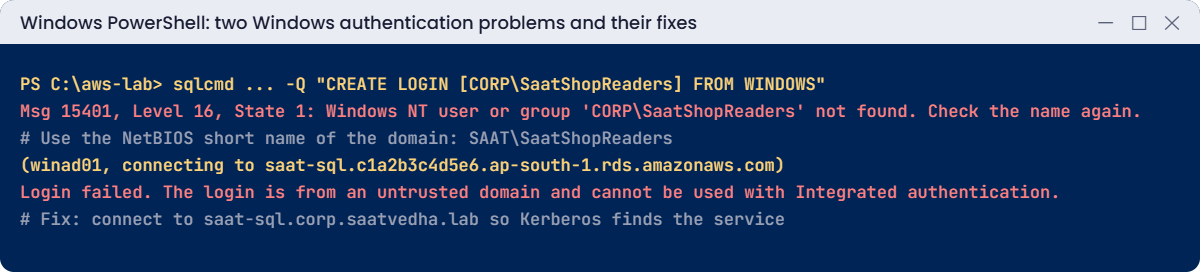
Kerberos looks for a service registered under the name you connect to. The rds.amazonaws.com name isn’t in the domain, so Windows falls back to a method RDS refuses for domain logins.
App teams hit this when they copy the endpoint from the console. Fix: always use saat-sql.corp.saatvedha.lab (instance name plus domain) for Windows authentication, as in step 4.
Now clean up. Leave the domain first, then delete the directory:
sqlcmd -S "127.0.0.1,11433" -U saatadmin -C -d SaatShop -Q "DROP USER [SAAT\SaatShopReaders];"
sqlcmd -S "127.0.0.1,11433" -U saatadmin -C -Q "DROP LOGIN [SAAT\SaatShopReaders];"
aws rds modify-db-instance --db-instance-identifier saat-sql --disable-domain --apply-immediately --query "DBInstance.DBInstanceStatus" --output text
aws ec2 terminate-instances --instance-ids $win | Out-Null
Start-Sleep 60
aws rds wait db-instance-available --db-instance-identifier saat-sql
aws ds delete-directory --directory-id $dir --query DirectoryId --output text
aws ec2 delete-vpc-endpoints --vpc-endpoint-ids $dsEp | Out-Null
aws iam detach-role-policy --role-name saat-ec2-ssm-role --policy-arn arn:aws:iam::aws:policy/AmazonSSMDirectoryServiceAccess
aws iam detach-role-policy --role-name saat-rds-ds-role --policy-arn arn:aws:iam::aws:policy/service-role/AmazonRDSDirectoryServiceAccess
aws iam delete-role --role-name saat-rds-ds-role
Remove-Item rds-ds-trust.json, join.json, win-test.json
.\Stop-SqlLab.ps1✅ Checkpoint: You fixed Msg 15401 with the right short domain name and an untrusted-domain login by using the domain FQDN. saat-sql has left the domain, the directory, winad01, the endpoint and the role are gone, and saat-sql is stopping.
This happened at work
The migration weekend that stalled on Monday
An insurance company moved its claims database to RDS SQL Server over a weekend and joined it to Managed AD with a trust to the on-premises domain. Testing on Sunday with the DBA’s laptop worked perfectly.
On Monday morning, 300 claims staff got “login is from an untrusted domain”. The application’s connection string had been updated with the endpoint copied from the RDS console, the rds.amazonaws.com name. The DBA had tested with the domain name, so Kerberos had worked for him.
The fix took five minutes once found: change the connection string to the instance name plus domain, and add a CNAME in on-premises DNS for an easy name that points to it. They added a step to the cutover checklist: test as an ordinary user, from an ordinary desktop, using the exact connection string the app uses.
Common mistakes and troubleshooting
| Mistake | What happens | What to do |
|---|---|---|
| Connecting with the rds.amazonaws.com name | Login from an untrusted domain | Use instance-name.domain-FQDN |
| Using the DNS label instead of the short name | Msg 15401 user or group not found | Use the NetBIOS short name (SAAT\…) |
| Logins for individual users | Access reviews scattered across servers | Create logins for AD groups |
| Missing RDS directory role | The domain join fails | Role trusting rds.amazonaws.com with AmazonRDSDirectoryServiceAccess |
| Directory in subnets apps can’t reach | Joins and logins time out | Put DCs where clients and RDS can reach them; check security groups |
| Deleting the directory before leaving the domain | Instance stuck with a broken membership | Disable the domain on RDS first |
Interview questions
Click a question to open it. Each one is written the way an interviewer would ask it. Under it you will see why they ask it and one way you could answer, in your own words.
Fresher level
1. Your company wants people to log in to RDS SQL Server with their Windows accounts. What do you need to set that up?
Why they ask this: They want to know you understand all the pieces of Windows authentication on RDS. Missing one piece is the usual reason the setup fails.
How you might answer: I need AWS Managed Microsoft AD, which can also trust our on-premises AD if we have one. RDS needs an IAM role with AmazonRDSDirectoryServiceAccess, and the instance has to be joined to the directory.
Once that’s done, I create Windows logins in SQL Server for the people or groups who need access.
2. The finance team needs read access to a reporting database. How would you create a login for their AD group?
Why they ask this: They are checking that you can do the basic T-SQL for Windows logins. It’s an everyday task once Windows authentication is in place.
How you might answer: I’d run CREATE LOGIN [SHORTNAME\FinanceGroup] FROM WINDOWS to create the login for the group. Then I’d create a database user for that login in the reporting database, and give it only the read role it needs.
3. Why would you grant database access to AD groups instead of individual users?
Why they ask this: They want to see good access management habits. Granting access user by user becomes a mess as people join and leave.
How you might answer: Access then follows group membership, which is managed in AD. When someone joins or leaves, it’s handled in one place, without touching SQL Server.
It also makes access reviews much simpler, because I review a few groups instead of hundreds of users.
2–5 years experience
4. Users get the error “login is from an untrusted domain” when connecting to RDS. What would you check?
Why they ask this: They want to see a clear troubleshooting order for a confusing Kerberos-related error. It’s one of the most common Windows authentication problems.
How you might answer: First I’d check the server name they use, because it must be the domain FQDN endpoint for Kerberos to work. Then I’d check that the client is domain-joined or in a trusted domain, and that DNS resolves to the instance.
I’d also check time sync, and that the instance actually shows as joined to the directory.
5. Staff in the office want to log in to RDS with the same accounts they use every day on-premises. How would you make that work?
Why they ask this: They are checking that you understand hybrid identity. Most companies already have an on-premises AD they want to keep using.
How you might answer: I’d create a trust between AWS Managed Microsoft AD and the on-premises AD, over VPN or Direct Connect. Then I’d create logins in SQL Server for the on-premises groups, so people use their existing accounts.
6. What is the Directory Service Data API, and why would an admin use it?
Why they ask this: They want to see that you know newer tools that make daily work easier. It shows you keep up with changes in the services you run.
How you might answer: It’s an API, aws ds-data, that lets me manage users and groups in Managed Microsoft AD without a domain-joined machine. I have to enable directory data access first.
It’s handy for scripting user and group changes from the CLI instead of logging in to a Windows server.
Senior level
7. You’re asked to design identity for 50 RDS SQL Server instances used by 2,000 employees. How would you set it up?
Why they ask this: They want to see identity architecture at scale. They are checking that you think about sharing, trusts, emergency access and auditing.
How you might answer: I’d run Managed Microsoft AD in a shared services account and share it to the workload accounts, with a two-way or one-way trust to on-premises AD. Logins would only be created for AD groups, mapped to roles in each database.
For emergencies I’d keep break-glass SQL logins in Secrets Manager, and I’d audit logins with SQL Server Audit.
8. Your apps use SQL logins today, and security wants them moved to Windows authentication. How would you do it without breaking anything?
Why they ask this: They want to see careful change management. They are checking that you move step by step and can roll back if needed.
How you might answer: First I’d inventory the SQL logins and which apps use them. Then I’d create AD groups and gMSA or service accounts, and add Windows logins alongside the existing SQL logins.
I’d switch connection strings app by app, testing each one with the domain FQDN. Only after that would I disable the SQL logins and watch for failed logins.
Quick quiz
Q1. Which name must clients use for Kerberos with RDS?
- The rds.amazonaws.com endpoint
- instance-name.domain-FQDN
- The IP address
- localhost
Show answer
B — The domain endpoint has the service registered.
Q2. Why did CREATE LOGIN [CORP\…] fail?
- No permission
- CORP isn’t the NetBIOS short name
- The group was empty
- TLS was off
Show answer
B — The short name is SAAT.
Q3. What policy does the RDS directory role need?
- AmazonRDSFullAccess
- AmazonRDSDirectoryServiceAccess
- AdministratorAccess
- AmazonSSMManagedInstanceCore
Show answer
B — It lets RDS join and manage the domain membership.
Q4. What should SQL logins be created for?
- Individual users
- AD groups
- Computers
- Nobody
Show answer
B — Groups keep access managed in AD.
Q5. What must you do before deleting the directory?
- Nothing
- Remove RDS from the domain
- Delete the database
- Rotate passwords
Show answer
B — Disable the domain on the instance first.
Quick recap
- Managed Microsoft AD gives RDS a real domain; RDS joins with a role using AmazonRDSDirectoryServiceAccess.
- Create Windows logins for AD groups with the NetBIOS short name.
- Clients must connect to instance-name.domain-FQDN for Kerberos.
- The Directory Service Data API manages users and groups from the CLI.
- Leave the domain before deleting the directory.
Next lesson
Lesson 46: Native backup and restore with S3 → You’ll back up a database from saat-sql to S3 with rds_backup_database and restore it as a new database.
Further reading: RDS SQL Server Windows authentication
Want to go deeper into RDS SQL Server Windows authentication? Read Working with AWS Managed Active Directory with RDS for SQL Server and AWS Managed Microsoft AD. You can also see the full plan for this course on the AWS Cloud Administration course page.
