VPC basics: CIDR, subnets, route tables and the internet gateway

Every server, database and load balancer in this course lives inside one private network. This AWS VPC tutorial explains CIDR blocks, subnets, route tables and internet gateways in plain words, then you build saat-vpc from the command line.

A VPC and its subnets cost nothing, so this network stays in your account for the rest of the course. You’ll save its IDs in a file that later lessons read.

TimeYou needBy the end you can
60 minutesYour laptop signed in with aws login --profile saat-admin.Plan IP ranges with CIDR, build a VPC with public, private and database subnets in two zones, route a public subnet to the internet, and fix overlapping or out-of-range subnets.

What it is, in one line

A VPC is your own private network in AWS, split into subnets, with route tables that decide where traffic can go.

In Simple Words

A gated housing society

Think of a gated housing society. The whole society has a range of house numbers, say 1 to 65,000. That range is the VPC’s CIDR block.

The society is split into blocks: Block A near the main gate for shops, Block B for homes, Block C behind the homes for the bank vault. Those are subnets. Only Block A has a road to the main gate.

The signboards at each junction (“To main gate: turn left”) are route tables. The main gate itself is the internet gateway. A house in Block B can’t reach the street, not because of a wall, but because no signboard points to the gate.

Engineer's View

How a VPC is put together

A VPC belongs to one Region and has an IPv4 range written in CIDR notation, like 10.20.0.0/16. The number after the slash is how many bits are fixed: a /16 has 65,536 addresses, a /24 has 256, a /28 has 16. VPC sizes run from /16 to /28.

Use private ranges (10.x, 172.16 to 172.31, 192.168.x) that don’t overlap your office network or other VPCs you may connect later.

A subnet is a slice of the VPC range in one Availability Zone. AWS keeps five addresses in every subnet (network, router, DNS, one reserved, broadcast), so a /24 gives 251 usable addresses.

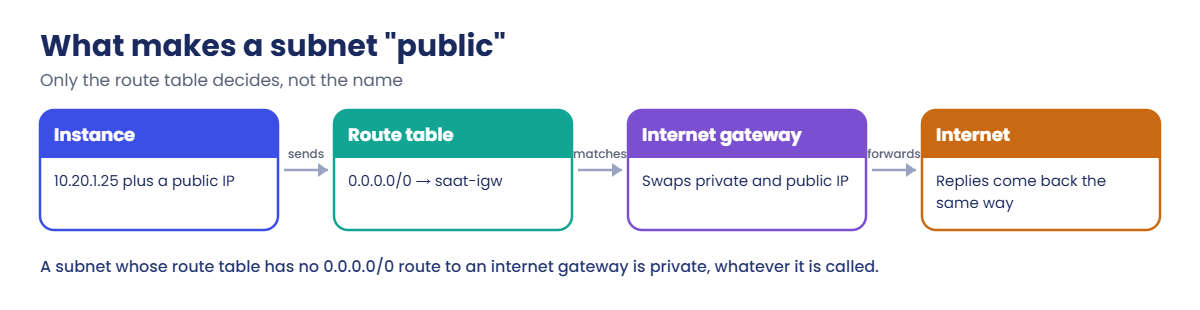
Every subnet uses exactly one route table. Each table has a local route for the whole VPC, so all subnets can talk to each other. A subnet is public only when its route table sends 0.0.0.0/0 to an internet gateway and its instances have public IPs.

Subnets without an explicit association use the VPC’s main route table.

Public IPv4 addresses have an hourly charge (about USD 0.005 an hour each since 2024), so only public subnets assign them automatically in our design.

How it works, step by step

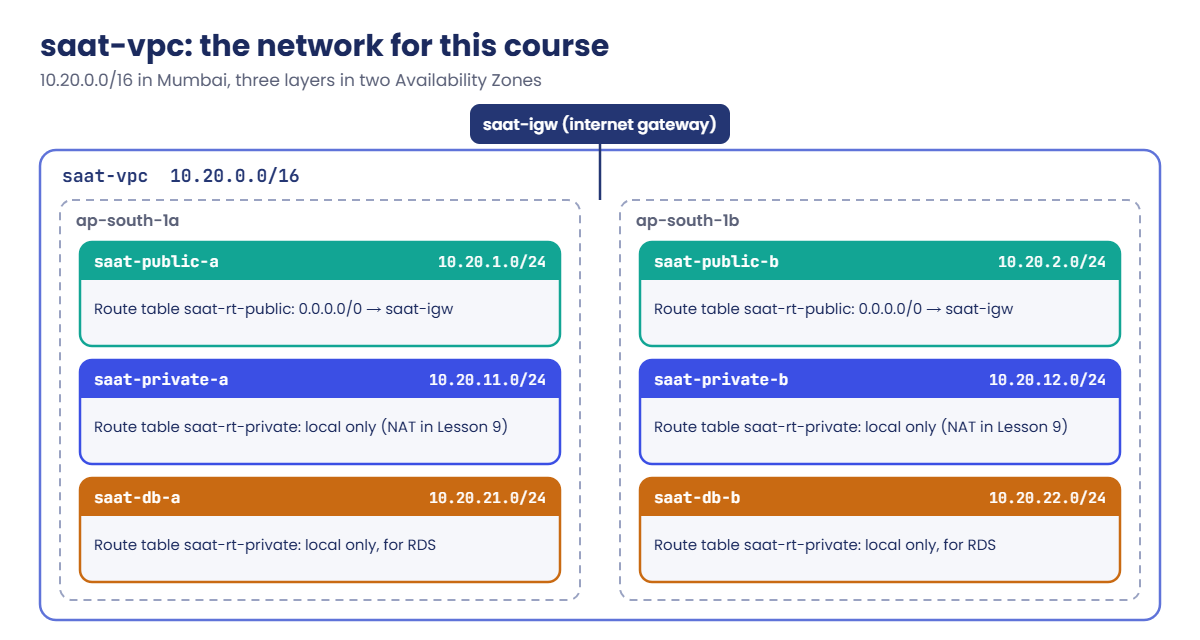
Here is the design you are about to build. Read it once before you type anything.

1Choose the range

10.20.0.0/16 is big enough for years of labs and unlikely to clash with home routers (usually 192.168.x) or common office ranges (10.0.x).

AWS VPC tutorial: saat-vpc with public, private and database subnets in two zones

2Cut it into layers and zones

Three layers: public (load balancers, bastions), private (app servers), database. Each layer gets one /24 in ap-south-1a and one in ap-south-1b, so a zone failure leaves half of everything running.

3Give the public layer a way out

An internet gateway attached to the VPC, plus a route table saat-rt-public with 0.0.0.0/0 pointing at it, used only by the two public subnets.

4Keep the others inside

saat-rt-private has only the local route. Private servers get outbound internet through a NAT gateway in Lesson 9; databases never get it.

Remember: a subnet’s name means nothing to AWS. This is the only test that matters.

AWS VPC tutorial: what makes a subnet public

When someone says “my instance in the public subnet can’t reach the internet”, check three things in this order: the route table of that subnet, whether the instance has a public IP, and the security group (Lesson 10).

✅ Checkpoint: You can say how many usable addresses a /24 has in AWS (251) and what makes a subnet public.

Hands-on lab: AWS VPC tutorial, build saat-vpc

Start as usual:

cd C:\aws-lab
aws login --profile saat-admin
$env:AWS_PROFILE = 'saat-admin'

1Do the CIDR maths first

Paste this whole block:

function Get-SubnetInfo([string]$Cidr) {
    $ip, $bits = $Cidr -split '/'
    $size = [math]::Pow(2, 32 - [int]$bits)
    [pscustomobject]@{ Cidr = $Cidr; Addresses = $size; UsableInAws = $size - 5 }
}
'10.20.0.0/16','10.20.1.0/24','10.20.21.0/28' | ForEach-Object { Get-SubnetInfo $_ } | Format-Table

You should see this:

Cidr          Addresses UsableInAws
----          --------- -----------
10.20.0.0/16      65536       65531
10.20.1.0/24        256         251
10.20.21.0/28        16          11

2Create the VPC

Run this:

$vpc = aws ec2 create-vpc --cidr-block 10.20.0.0/16 --tag-specifications 'ResourceType=vpc,Tags=[{Key=Name,Value=saat-vpc},{Key=course,Value=saatvedha-aws},{Key=lesson,Value=08}]' --query Vpc.VpcId --output text
aws ec2 modify-vpc-attribute --vpc-id $vpc --enable-dns-hostnames Value=true
$vpc

You should see something like this:

vpc-0f1e2d3c4b5a69788

3Create the six subnets

Paste this whole block:

$plan = @(
  @{ Name = 'saat-public-a';  Cidr = '10.20.1.0/24';  Az = 'ap-south-1a' },
  @{ Name = 'saat-public-b';  Cidr = '10.20.2.0/24';  Az = 'ap-south-1b' },
  @{ Name = 'saat-private-a'; Cidr = '10.20.11.0/24'; Az = 'ap-south-1a' },
  @{ Name = 'saat-private-b'; Cidr = '10.20.12.0/24'; Az = 'ap-south-1b' },
  @{ Name = 'saat-db-a';      Cidr = '10.20.21.0/24'; Az = 'ap-south-1a' },
  @{ Name = 'saat-db-b';      Cidr = '10.20.22.0/24'; Az = 'ap-south-1b' }
)
$ids = @{}
foreach ($s in $plan) {
  $ids[$s.Name] = aws ec2 create-subnet --vpc-id $vpc --cidr-block $s.Cidr --availability-zone $s.Az --tag-specifications "ResourceType=subnet,Tags=[{Key=Name,Value=$($s.Name)},{Key=course,Value=saatvedha-aws},{Key=lesson,Value=08}]" --query Subnet.SubnetId --output text
}
$ids

4Add the internet gateway and the public route table

Paste this whole block:

$igw = aws ec2 create-internet-gateway --tag-specifications 'ResourceType=internet-gateway,Tags=[{Key=Name,Value=saat-igw},{Key=course,Value=saatvedha-aws},{Key=lesson,Value=08}]' --query InternetGateway.InternetGatewayId --output text
aws ec2 attach-internet-gateway --internet-gateway-id $igw --vpc-id $vpc

$rtPub = aws ec2 create-route-table --vpc-id $vpc --tag-specifications 'ResourceType=route-table,Tags=[{Key=Name,Value=saat-rt-public},{Key=course,Value=saatvedha-aws},{Key=lesson,Value=08}]' --query RouteTable.RouteTableId --output text
aws ec2 create-route --route-table-id $rtPub --destination-cidr-block 0.0.0.0/0 --gateway-id $igw
foreach ($n in 'saat-public-a','saat-public-b') {
  aws ec2 associate-route-table --route-table-id $rtPub --subnet-id $ids[$n] | Out-Null
  aws ec2 modify-subnet-attribute --subnet-id $ids[$n] --map-public-ip-on-launch
}

The create-route command should print:

{
    "Return": true
}

5Add the private route table

Paste this whole block:

$rtPriv = aws ec2 create-route-table --vpc-id $vpc --tag-specifications 'ResourceType=route-table,Tags=[{Key=Name,Value=saat-rt-private},{Key=course,Value=saatvedha-aws},{Key=lesson,Value=08}]' --query RouteTable.RouteTableId --output text
foreach ($n in 'saat-private-a','saat-private-b','saat-db-a','saat-db-b') {
  aws ec2 associate-route-table --route-table-id $rtPriv --subnet-id $ids[$n] | Out-Null
}

6Check the result

Run this:

aws ec2 describe-subnets --filters "Name=vpc-id,Values=$vpc" --query "Subnets[].[Tags[?Key=='Name']|[0].Value,CidrBlock,AvailabilityZone,MapPublicIpOnLaunch]" --output text | Sort-Object

You should see this:

saat-db-a       10.20.21.0/24   ap-south-1a     False
saat-db-b       10.20.22.0/24   ap-south-1b     False
saat-private-a  10.20.11.0/24   ap-south-1a     False
saat-private-b  10.20.12.0/24   ap-south-1b     False
saat-public-a   10.20.1.0/24    ap-south-1a     True
saat-public-b   10.20.2.0/24    ap-south-1b     True
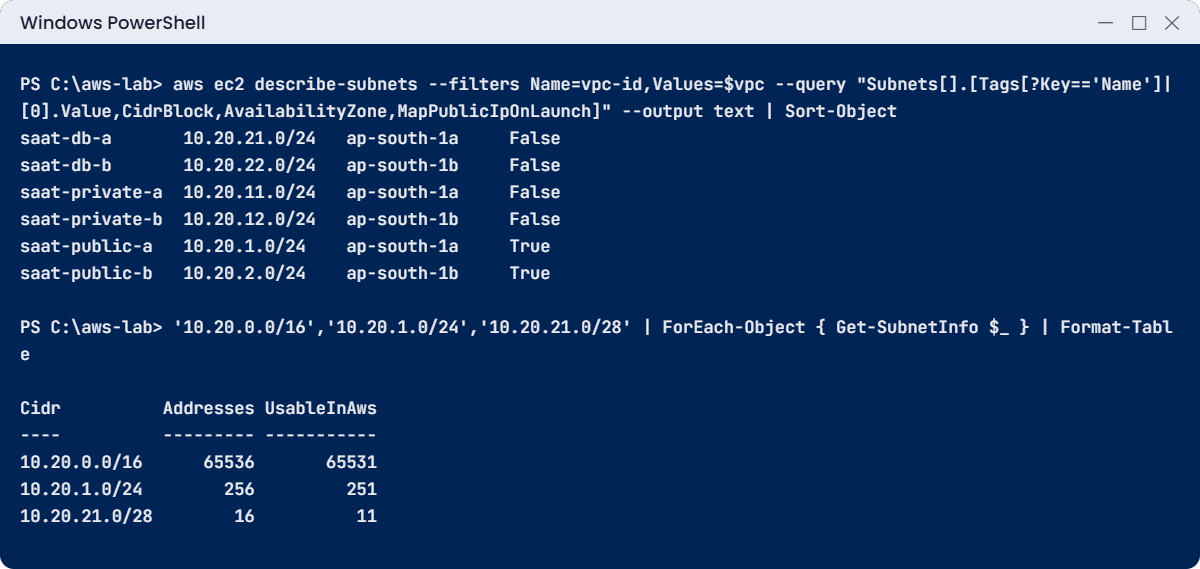
AWS VPC tutorial lab: the six subnets and CIDR sizes
Subnet list and CIDR maths. The CIDR table is exact; IDs and order may differ slightly.

7Save the IDs for later lessons

Run this:

[pscustomobject]@{
  VpcId = $vpc; IgwId = $igw; RtPublic = $rtPub; RtPrivate = $rtPriv
  PublicA = $ids['saat-public-a'];  PublicB = $ids['saat-public-b']
  PrivateA = $ids['saat-private-a']; PrivateB = $ids['saat-private-b']
  DbA = $ids['saat-db-a'];          DbB = $ids['saat-db-b']
} | ConvertTo-Json | Set-Content C:\aws-lab\saat-vpc.json
Get-Content C:\aws-lab\saat-vpc.json

From now on, any lesson can load the network with $v = Get-Content C:\aws-lab\saat-vpc.json | ConvertFrom-Json.

✅ Checkpoint: Six subnets exist, only the two public ones say True, the public route table has 0.0.0.0/0 to saat-igw, and saat-vpc.json holds all ten IDs. Don’t delete this VPC; it costs nothing and you need it from Lesson 9 on.

Break It, Then Fix It

CIDR mistakes are the most common errors when building networks, and AWS catches both of these immediately.

1Break it: a subnet that overlaps another

Try to create a subnet inside saat-public-a’s range:

aws ec2 create-subnet --vpc-id $vpc --cidr-block 10.20.1.128/25 --availability-zone ap-south-1a

You’ll get this error:

An error occurred (InvalidSubnet.Conflict) when calling the CreateSubnet operation: The CIDR '10.20.1.128/25' conflicts with another subnet

10.20.1.128/25 is the top half of 10.20.1.0/24. Subnets in one VPC can never share addresses. Fix: pick an unused block, for example 10.20.3.0/24, and keep a written plan like the one in step 3 so everyone uses the next unused number.

2Break it: a subnet outside the VPC range

Run this:

aws ec2 create-subnet --vpc-id $vpc --cidr-block 10.30.1.0/24 --availability-zone ap-south-1a

You’ll get this error:

An error occurred (InvalidSubnet.Range) when calling the CreateSubnet operation: The CIDR '10.30.1.0/24' is invalid.
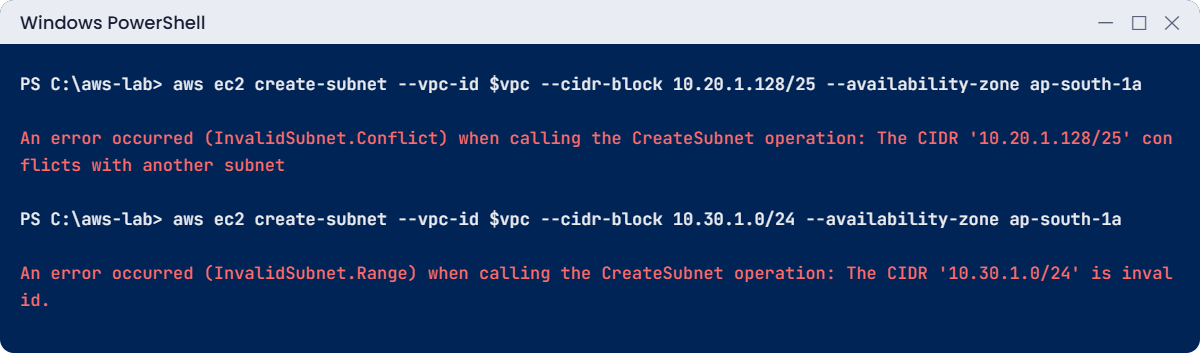
AWS VPC tutorial break lab: subnet conflict and out-of-range CIDR
Both CIDR errors. The messages are exact.

The message only says “invalid”, but the reason is simple: 10.30.x isn’t inside 10.20.0.0/16. Fix: use a block inside the VPC, or add a secondary CIDR block to the VPC first if you really need more space.

✅ Checkpoint: You saw both CIDR errors and know the fix for each. Nothing new was created, so there is nothing to clean up.

This happened at work

The VPC that matched the office

A logistics company built its first VPC with the console’s suggested range, 10.0.0.0/16. Everything worked for a year. Then the company wanted a Site-to-Site VPN so warehouse systems could reach the cloud app directly.

The head office network was also 10.0.0.0/16. With the same addresses on both sides, routers couldn’t tell which 10.0.5.20 was meant. The VPN came up, but nothing could talk across it.

The team had to build a new VPC with 10.40.0.0/16, rebuild the servers into it and move the database during a weekend window. Since then, every new VPC gets its range from a shared IP plan (later managed in VPC IP Address Manager), and nobody accepts a default range.

Common mistakes and troubleshooting

MistakeWhat happensWhat to do
Using the default 10.0.0.0/16 everywhereVPN or peering fails later because ranges overlapPlan ranges per VPC; avoid ranges your office uses
VPC too small (for example /24)No room for new subnets laterStart with /16 for a main VPC; subnets are cheap to add
Calling a subnet “public” but not routing itInstances can’t reach the internetRoute 0.0.0.0/0 to an internet gateway in its route table
Forgetting to associate a subnetIt silently uses the main route tableAssociate every subnet explicitly
Auto-assigning public IPs in private subnetsExtra hourly charges and exposureOnly public subnets get map-public-ip-on-launch
Forgetting AWS keeps 5 addresses per subnetFewer IPs than expected, launches fail when fullA /24 gives 251 usable addresses, a /28 only 11

Interview questions

Click a question to open it. Each one is written the way an interviewer would ask it. Under it you will see why they ask it and one way you could answer, in your own words.

Fresher level

1. How would you explain a VPC to someone who has only worked with an office network?

Why they ask this: They want to check you understand the basic network idea in AWS. Everything else in networking builds on it.

How you might answer: I’d say a VPC is a private, isolated network for my account in one Region. I choose its IP range, and I create its subnets, route tables and gateways.

Resources like EC2 instances and RDS databases live inside it, a bit like servers sit inside the office network.

2. A teammate named a subnet “public-subnet”, but nothing in it can reach the internet. What actually makes a subnet public?

Why they ask this: This is one of the most common VPC questions. They want to know you look at routes, not names.

How you might answer: The name doesn’t matter at all. A subnet is public when its route table has a 0.0.0.0/0 route to an internet gateway, and the instances in it have public IP addresses.

So I’d check the route table association first, then whether the instances got a public IP.

3. You create a /24 subnet in AWS. How many IP addresses can you actually use, and why?

Why they ask this: They want to see practical CIDR knowledge. Getting this wrong leads to subnets that fill up sooner than planned.

How you might answer: I can use 251. A /24 has 256 addresses, and AWS reserves 5 in every subnet: the network address, the VPC router, DNS, one for future use, and the broadcast address.

2–5 years experience

4. Why would you bother creating subnets in more than one Availability Zone?

Why they ask this: They want to see high availability thinking. Single-zone designs are a common cause of outages.

How you might answer: A subnet lives in one zone only. If that zone has a problem, everything in that subnet is affected.

With matching subnets in two or three zones, load balancers and Multi-AZ databases can keep working when one zone fails.

5. Someone added an internet route to the main route table, and suddenly several “private” subnets became public. How did that happen?

Why they ask this: They want to know if you understand hidden defaults in a VPC. These quiet defaults cause real security incidents.

How you might answer: The main route table is the one any subnet uses if it has no explicit association. So adding an internet route there made every unassociated subnet public.

To avoid it, I keep the main table private and associate each subnet with a route table explicitly.

6. You’re creating a new VPC. How would you choose its CIDR range?

Why they ask this: They want to see that you plan for growth and future connections. Overlapping ranges are very painful to fix later.

How you might answer: I’d pick a private range that doesn’t overlap the office network, other VPCs, or any partner I may connect to. I’d make it big enough to grow, often a /16.

Then I’d record it in a shared IP plan or in IPAM so nobody else takes it.

Senior level

7. Your company wants 50 VPCs connected to each other and to the data centre. How would you plan the IP addresses?

Why they ask this: They want to see large-scale network design. They also check that you’d remove manual steps that cause mistakes.

How you might answer: I’d set aside a large supernet for AWS that doesn’t clash with on-premises, then split it into pools per Region and per environment in VPC IPAM. Each VPC gets a block that doesn’t overlap any other.

I’d connect them through a Transit Gateway with route tables per environment. Allocation is documented and automated, so nobody picks ranges by hand.

8. A VPC is running out of IP addresses and the app team needs more servers next week. What are your options?

Why they ask this: They want to see problem-solving under pressure. They also check that you try the least disruptive options first.

How you might answer: I’d add a secondary CIDR block to the VPC and create new subnets there. For the next workloads I’d use smaller subnets, and I’d clean up unused ENIs and IPs.

For containers I’d look at prefix delegation or IPv6. Rebuilding the VPC is my last resort.

Quick quiz

Q1. How many addresses does AWS reserve in every subnet?

  1. 0
  2. 2
  3. 5
  4. 10
Show answer

C — AWS reserves 5 addresses per subnet, so a /24 has 251 usable addresses.

Q2. What makes saat-public-a a public subnet?

  1. Its name
  2. Its route table sends 0.0.0.0/0 to an internet gateway
  3. It is in ap-south-1a
  4. It has a /24 range
Show answer

B — Only the route to an internet gateway (plus public IPs) makes a subnet public.

Q3. A subnet lives in how many Availability Zones?

  1. One
  2. Two
  3. All zones of the Region
  4. None
Show answer

A — Each subnet belongs to exactly one zone. That is why you create pairs.

Q4. Creating 10.20.1.128/25 fails with InvalidSubnet.Conflict. Why?

  1. The VPC is full
  2. It overlaps 10.20.1.0/24
  3. /25 isn’t allowed
  4. Wrong zone
Show answer

B — 10.20.1.128/25 is half of an existing subnet, and subnets can’t overlap.

Q5. Which range is the safest choice for a VPC you may later connect to an office using 10.0.0.0/16?

  1. 10.0.0.0/16
  2. 10.0.128.0/17
  3. 10.20.0.0/16
  4. 0.0.0.0/0
Show answer

C — 10.20.0.0/16 doesn’t overlap the office range.

Quick recap

  • A VPC is a private network in one Region with a CIDR range; saat-vpc is 10.20.0.0/16.
  • Subnets are slices of that range in one zone; AWS keeps 5 addresses in each.
  • Route tables decide traffic paths. A subnet is public only with 0.0.0.0/0 to an internet gateway.
  • Plan ranges so they never overlap networks you may connect later.
  • saat-vpc.json holds all the IDs; later lessons load it instead of looking them up.

Next lesson

Lesson 9: Private subnets, NAT gateway and VPC endpoints → You’ll give private servers a safe way out to the internet and learn why NAT gateways show up on bills.

Further reading: AWS VPC tutorial

Want to go deeper into AWS VPC tutorial? Read How Amazon VPC works and Subnet CIDR blocks in the Amazon VPC User Guide. You can also see the full plan for this course on the AWS Cloud Administration course page.

Scroll to Top