Application Load Balancer

One web server is one failure away from an outage. An AWS Application Load Balancer (ALB) sits in front of several servers in different Availability Zones, checks their health every few seconds and sends each request only to servers that are working.

You’ll build saat-web-alb in the public subnets, put two private web servers behind it, add a rule that blocks /admin, and then fix the two “unhealthy target” problems you’ll meet on almost every ALB at work.

TimeYou needBy the end you can
60 minutes (load balancer and two small instances for under an hour)saat-vpc with saat-web-sg and saat-app-sg (Lessons 8 to 10), your laptop signed in as saat-admin. No Session Manager endpoints this time. Cost: about USD 0.10 for an hour.Create a target group with health checks, an internet-facing ALB and listener rules, read target health reasons, and troubleshoot 301 health checks and 504 timeouts.

What it is, in one line

An AWS Application Load Balancer receives HTTP and HTTPS requests and forwards each one to a healthy server in a target group, based on rules you define.

In Simple Words

The token counter at a hospital

A busy hospital doesn’t let patients walk into any doctor’s room. They go to the token counter. The counter sends each patient to a doctor who is available today.

Every few minutes the counter checks: “Dr. Rao, are you there?” If a doctor doesn’t answer, no more patients are sent there until they’re back. That check is the health check.

Some requests never reach a doctor at all. “Billing questions? Go to window 3.” That is a listener rule.

Engineer's View

How an ALB really works

An ALB works at layer 7 (HTTP). It has listeners (protocol and port, such as HTTP:80 or HTTPS:443), rules evaluated by priority (path, host, header, query string, source IP) and target groups (instances, IPs or Lambda functions on a port, with a health check).

AWS runs ALB nodes in each subnet you choose, at least two Availability Zones. Its IP addresses change, so you always use its DNS name or a Route 53 alias record. Health checks run from every node; a target becomes healthy after the healthy threshold and unhealthy after the unhealthy threshold.

If every target is unhealthy, the ALB fails open and sends traffic to all of them anyway.

Security groups: the ALB’s group must allow clients in, and the targets’ group must allow the ALB’s group on the target port. Deregistered targets drain for 300 seconds by default so in-flight requests finish. ALB also terminates TLS with ACM certificates, which you’ll add when you have a domain.

How it works, step by step

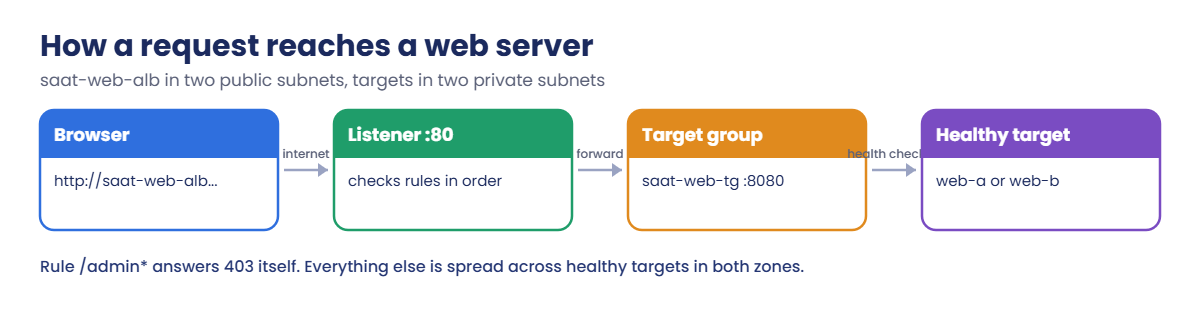
Here is the path of one request in this lab.

1DNS gives the browser ALB node addresses

saat-web-alb-1234567890.ap-south-1.elb.amazonaws.com resolves to public IPs of ALB nodes in ap-south-1a and ap-south-1b. saat-web-sg lets port 80 in from anywhere.

AWS Application Load Balancer request flow: browser, listener, target group, healthy targets

2The listener checks its rules

Rules run from the lowest priority number. /admin* matches rule 10 and gets a 403 straight from the ALB. Anything else falls to the default action: forward to saat-web-tg.

3The target group picks a healthy server

The ALB opens a connection to port 8080 on web-a or web-b. saat-app-sg allows 8080 only from saat-web-sg, so nothing else on the internet can reach the servers.

4Health checks keep the list current

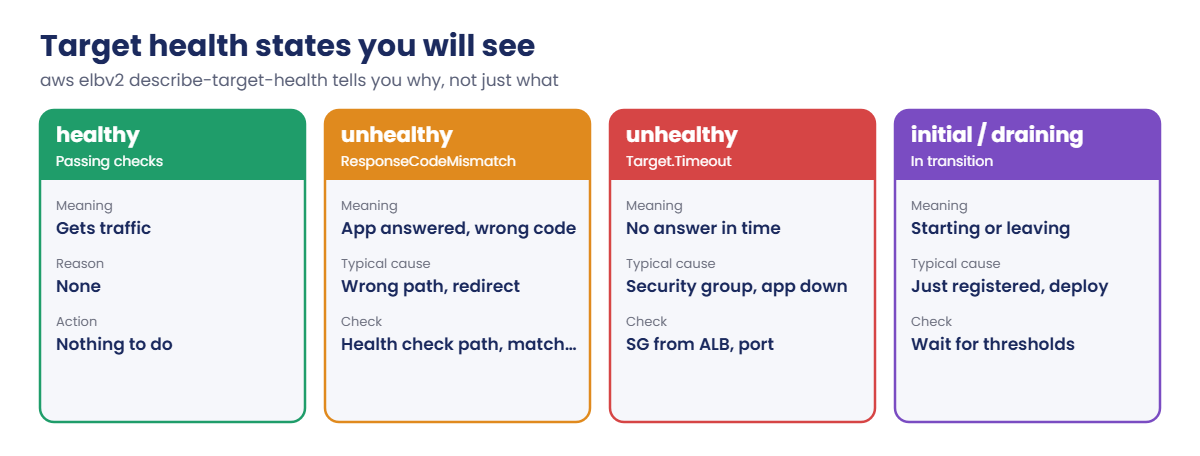
Every 10 seconds each ALB node asks GET /health/. The answer decides the target’s state:

ALB target health states: healthy, ResponseCodeMismatch, Timeout, initial and draining

The reason code is the most useful thing on this page. ResponseCodeMismatch means the app answered with the wrong code; Target.Timeout almost always means a security group or a stopped app.

✅ Checkpoint: You can trace a request from browser to target, say what the ALB and target security groups must allow, and explain fail-open.

Hands-on lab: build an AWS Application Load Balancer

Sign in and load saat-vpc:

cd C:\aws-lab
aws login --profile saat-admin
$env:AWS_PROFILE = 'saat-admin'
$v = Get-Content C:\aws-lab\saat-vpc.json | ConvertFrom-Json

1Launch web-a and web-b in two zones

The servers use Python’s built-in web server on port 8080, so they need no packages and no internet access.

Paste this whole block:

$ud = @'
#!/bin/bash
mkdir -p /srv/www/health
TOKEN=$(curl -s -X PUT http://169.254.169.254/latest/api/token -H "X-aws-ec2-metadata-token-ttl-seconds: 300")
AZ=$(curl -s -H "X-aws-ec2-metadata-token: $TOKEN" http://169.254.169.254/latest/meta-data/placement/availability-zone)
echo "<h1>saat-web from $(hostname) in $AZ</h1>" > /srv/www/index.html
echo ok > /srv/www/health/index.html
cat > /etc/systemd/system/saat-web.service <<'UNIT'
[Unit]
Description=saat web test server
After=network-online.target
[Service]
ExecStart=/usr/bin/python3 -m http.server 8080 --directory /srv/www
Restart=always
[Install]
WantedBy=multi-user.target
UNIT
systemctl daemon-reload
systemctl enable --now saat-web
'@
[IO.File]::WriteAllText('C:\aws-lab\web-userdata.sh', ($ud -replace "`r`n", "`n"))
$base = aws ssm get-parameter --name /aws/service/ami-amazon-linux-latest/al2023-ami-kernel-default-x86_64 --query Parameter.Value --output text
$ids = foreach ($s in @(@('web-a', $v.PrivateA), @('web-b', $v.PrivateB))) {
  aws ec2 run-instances --image-id $base --instance-type t3.micro --subnet-id $s[1] --security-group-ids $v.AppSg --metadata-options HttpTokens=required --user-data file://web-userdata.sh --tag-specifications "ResourceType=instance,Tags=[{Key=Name,Value=$($s[0])},{Key=course,Value=saatvedha-aws},{Key=lesson,Value=20}]" --query "Instances[0].InstanceId" --output text
}
$ids

You should see two instance IDs, something like this:

i-0a1b2c3d4e5f60001
i-0a1b2c3d4e5f60002

2Create the target group and register the servers

Paste this whole block:

$tg = aws elbv2 create-target-group --name saat-web-tg --protocol HTTP --port 8080 --vpc-id $v.VpcId --target-type instance --health-check-path /health/ --health-check-interval-seconds 10 --healthy-threshold-count 2 --unhealthy-threshold-count 2 --tags Key=course,Value=saatvedha-aws Key=lesson,Value=20 --query "TargetGroups[0].TargetGroupArn" --output text
aws elbv2 modify-target-group-attributes --target-group-arn $tg --attributes Key=deregistration_delay.timeout_seconds,Value=30 | Out-Null
aws ec2 wait instance-running --instance-ids $ids
aws elbv2 register-targets --target-group-arn $tg --targets Id=$($ids[0]) Id=$($ids[1])
aws elbv2 describe-target-health --target-group-arn $tg --query "TargetHealthDescriptions[].[Target.Id,TargetHealth.State,TargetHealth.Reason]" --output text

You should see something like this (no load balancer uses the group yet):

i-0a1b2c3d4e5f60001      unused  Target.NotInUse
i-0a1b2c3d4e5f60002      unused  Target.NotInUse

A 30-second deregistration delay keeps lab cleanup quick. Production usually keeps the default 300 seconds or tunes it to the longest request.

3Create the load balancer and listener

Paste this whole block (the wait takes about three minutes):

$alb, $dns = (aws elbv2 create-load-balancer --name saat-web-alb --type application --scheme internet-facing --subnets $v.PublicA $v.PublicB --security-groups $v.WebSg --tags Key=course,Value=saatvedha-aws Key=lesson,Value=20 --query "LoadBalancers[0].[LoadBalancerArn,DNSName]" --output text) -split '\s+'
aws elbv2 wait load-balancer-available --load-balancer-arns $alb
$listener = aws elbv2 create-listener --load-balancer-arn $alb --protocol HTTP --port 80 --default-actions "Type=forward,TargetGroupArn=$tg" --query "Listeners[0].ListenerArn" --output text
aws elbv2 wait target-in-service --target-group-arn $tg
aws elbv2 describe-target-health --target-group-arn $tg --query "TargetHealthDescriptions[].[Target.Id,TargetHealth.State]" --output text
$dns

You should see something like this:

i-0a1b2c3d4e5f60001      healthy
i-0a1b2c3d4e5f60002      healthy
saat-web-alb-1234567890.ap-south-1.elb.amazonaws.com
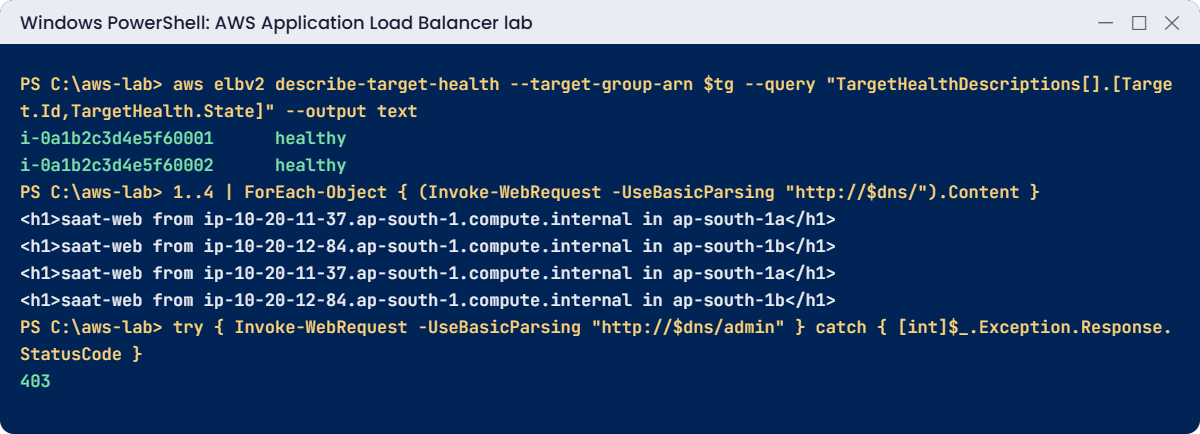
AWS Application Load Balancer lab output: healthy targets, alternating responses, 403 rule
Healthy targets, alternating zones and the /admin rule. Something like this.

4Send traffic and add a listener rule

Paste this whole block:

do { Start-Sleep 10 } until (Resolve-DnsName $dns -ErrorAction SilentlyContinue)
1..4 | ForEach-Object { (Invoke-WebRequest -UseBasicParsing "http://$dns/").Content }
'[ { "Field": "path-pattern", "PathPatternConfig": { "Values": [ "/admin*" ] } } ]' | Set-Content rule-conditions.json
'[ { "Type": "fixed-response", "FixedResponseConfig": { "StatusCode": "403", "ContentType": "text/plain", "MessageBody": "Admins only. Use the VPN." } } ]' | Set-Content rule-actions.json
aws elbv2 create-rule --listener-arn $listener --priority 10 --conditions file://rule-conditions.json --actions file://rule-actions.json | Out-Null
try { Invoke-WebRequest -UseBasicParsing "http://$dns/admin" } catch { [int]$_.Exception.Response.StatusCode }

You should see something like this:

<h1>saat-web from ip-10-20-11-37.ap-south-1.compute.internal in ap-south-1a</h1>
<h1>saat-web from ip-10-20-12-84.ap-south-1.compute.internal in ap-south-1b</h1>
<h1>saat-web from ip-10-20-11-37.ap-south-1.compute.internal in ap-south-1a</h1>
<h1>saat-web from ip-10-20-12-84.ap-south-1.compute.internal in ap-south-1b</h1>
403

Requests take turns between the two zones. The /admin request never reached a server; the ALB answered it from rule 10. A new ALB name can take a minute or two to resolve, which is what the first line waits for.

✅ Checkpoint: Both targets are healthy, responses alternate between ap-south-1a and ap-south-1b, and /admin returns 403. Keep everything for the break lab.

Break It, Then Fix It

Almost every “the site is down behind the ALB” ticket comes down to one of these two. Watch the reason codes.

1Break it: a health check path without the slash

Change the health check to /health, then wait 30 seconds:

aws elbv2 modify-target-group --target-group-arn $tg --health-check-path /health | Out-Null
Start-Sleep 30
aws elbv2 describe-target-health --target-group-arn $tg --query "TargetHealthDescriptions[].[TargetHealth.State,TargetHealth.Reason,TargetHealth.Description]" --output text
(Invoke-WebRequest -UseBasicParsing "http://$dns/").StatusCode

You should see something like this:

unhealthy       Target.ResponseCodeMismatch     Health checks failed with these codes: [301]
200

The web server redirects /health to /health/ with a 301, and the default matcher accepts only 200. Notice the site still answers 200: with every target unhealthy, the ALB fails open. That hides the problem until one target recovers, and then all traffic lands on that one server.

Fix: use the exact path the app answers with 200, or widen the matcher if redirects are expected:

aws elbv2 modify-target-group --target-group-arn $tg --health-check-path /health/ | Out-Null
aws elbv2 wait target-in-service --target-group-arn $tg

2Break it: the targets’ security group stops trusting the ALB

Remove the rule that lets saat-web-sg reach port 8080, then test:

aws ec2 revoke-security-group-ingress --group-id $v.AppSg --ip-permissions "IpProtocol=tcp,FromPort=8080,ToPort=8080,UserIdGroupPairs=[{GroupId=$($v.WebSg)}]" | Out-Null
Start-Sleep 40
aws elbv2 describe-target-health --target-group-arn $tg --query "TargetHealthDescriptions[].[TargetHealth.State,TargetHealth.Reason,TargetHealth.Description]" --output text
try { Invoke-WebRequest -UseBasicParsing "http://$dns/" } catch { $_.Exception.Message }

You should see something like this:

unhealthy       Target.Timeout  Request timed out
The remote server returned an error: (504) Gateway Time-out.
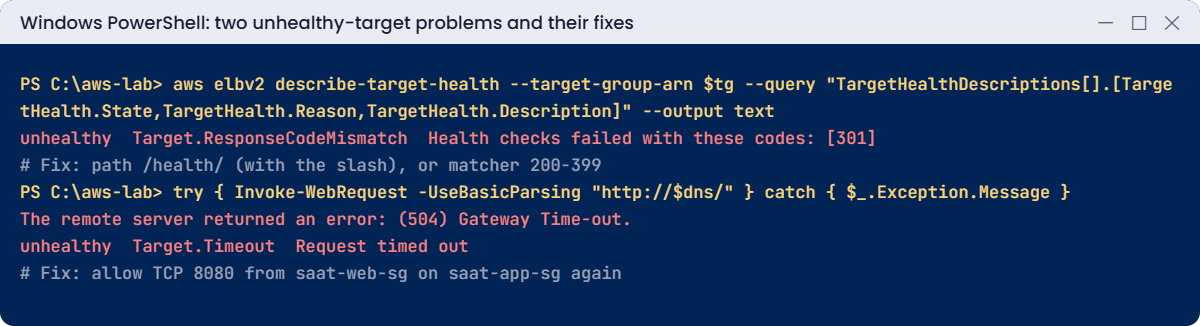
ALB unhealthy targets: 301 ResponseCodeMismatch and 504 Target.Timeout, with fixes
Both unhealthy-target problems and their fixes. Something like this.

The ALB still fails open and tries the targets, but its connections time out, so users get 504. This is what happens when someone “tidies up” a security group or a new target group uses a port the group doesn’t allow. Fix: put the rule back:

aws ec2 authorize-security-group-ingress --group-id $v.AppSg --ip-permissions "IpProtocol=tcp,FromPort=8080,ToPort=8080,UserIdGroupPairs=[{GroupId=$($v.WebSg),Description=8080-from-web-sg}]" | Out-Null
aws elbv2 wait target-in-service --target-group-arn $tg
(Invoke-WebRequest -UseBasicParsing "http://$dns/").StatusCode

You should see this:

200

Now clean up. The target group can only be deleted after the load balancer is gone:

aws elbv2 delete-load-balancer --load-balancer-arn $alb
aws elbv2 wait load-balancers-deleted --load-balancer-arns $alb
Start-Sleep 15
aws elbv2 delete-target-group --target-group-arn $tg
aws ec2 terminate-instances --instance-ids $ids | Out-Null
aws ec2 wait instance-terminated --instance-ids $ids
Remove-Item web-userdata.sh, rule-*.json
.\Find-LabResources.ps1

✅ Checkpoint: You read Target.ResponseCodeMismatch [301] and Target.Timeout correctly, saw fail-open in action, and fixed both. The load balancer, target group and both servers are gone; saat-app-sg has its 8080 rule back.

This happened at work

The health check that said everything was fine

An insurance portal’s ALB health check pointed at /, the home page. The home page was mostly static, cached by the app, and almost never failed.

One afternoon the database connection pool filled up on two of four servers. Those servers kept serving the cached home page with 200, so the ALB marked them healthy, but every login and quote request on them failed. A quarter to half of all customers saw errors for 70 minutes while dashboards showed four healthy targets.

The team added a /health/ready endpoint that checks the database and the downstream API with short timeouts, and pointed the health check at it. They also alarm on HTTPCode_Target_5XX_Count and UnHealthyHostCount, because a health check is only as honest as the page it calls.

Common mistakes and troubleshooting

MistakeWhat happensWhat to do
Health check path that redirectsTargets unhealthy with code 301 or 302Use the exact path, or matcher 200-399
Targets’ SG doesn’t allow the ALB’s SGTarget.Timeout and 504 for usersAllow the target port from the ALB security group
Health check on a page that never failsBroken servers stay in serviceCheck real dependencies in a readiness endpoint
Only one subnet or zoneALB creation fails; no zone redundancyChoose subnets in at least two AZs
Pointing DNS at ALB IP addressesSite breaks when ALB IPs changeUse the DNS name or a Route 53 alias
Deleting the target group firstResourceInUse errorDelete the load balancer, then the target group

Interview questions

Click a question to open it. Each one is written the way an interviewer would ask it. Under it you will see why they ask it and one way you could answer, in your own words.

Fresher level

1. How would you explain what an Application Load Balancer does to someone new to AWS?

Why they ask this: They want to check basic load balancing knowledge. It’s a core part of almost every web app on AWS.

How you might answer: I’d say it sits in front of your servers and receives HTTP or HTTPS requests. It spreads them across the healthy targets, like EC2 instances, using listener rules and health checks.

If one server stops responding, it simply stops sending traffic there.

2. Can you explain in simple words what a target group is?

Why they ask this: They want to see that you know the ALB building blocks. Most ALB problems are found by looking at the target group.

How you might answer: A target group is a set of targets, like instances, IP addresses or Lambda functions, on a port, with one health check configuration. The listener rules decide which target group a request goes to.

3. What’s the difference between an ALB and a Network Load Balancer, and when would you pick each?

Why they ask this: They want to see that you can choose the right load balancer for the job. Picking the wrong one can block features you need later.

How you might answer: An ALB works at layer 7, so it understands HTTP and can route by path or host name. I’d pick it for normal web apps and APIs.

An NLB works at layer 4, with TCP, UDP and TLS. I’d pick it when I need very high throughput, static IPs per zone or the client’s real IP preserved.

2–5 years experience

4. You register new servers behind an ALB, and they all show unhealthy with Target.Timeout. What do you check?

Why they ask this: They want to see real troubleshooting. A timeout usually means the health check never reached the app.

How you might answer: First I’d check that the target security group allows the ALB’s security group on the target port. Then I’d confirm the app is actually listening on that port and on the right interface.

After that, I’d make sure the network ACLs allow the traffic and the return ports, and that the instance isn’t overloaded.

5. Say every target behind your ALB is marked unhealthy. What happens to user traffic?

Why they ask this: They want to check that you know how the ALB behaves in a bad moment. It explains confusing symptoms during an outage.

How you might answer: The ALB fails open and sends traffic to all the targets anyway. So users may still get responses, or errors like 502 and 504, depending on why the health checks are failing.

6. Walk me through how you’d deploy a new version behind an ALB without any downtime.

Why they ask this: They want to see good operations practice. Deployments are when most outages start.

How you might answer: I’d register the new targets and wait until they’re healthy. Then I’d deregister the old ones, and the deregistration delay lets their open connections finish.

Another way is a second target group with weighted forwarding, so I can shift traffic step by step.

Senior level

7. You’re asked to design a highly available web tier for 50,000 users. What would it look like?

Why they ask this: They want to see architecture thinking that covers availability, security and monitoring together. Senior engineers are expected to design the whole picture.

How you might answer: I’d put an ALB across three Availability Zones with AWS WAF and HTTPS using a certificate from ACM. Behind it, Auto Scaling groups run in private subnets with readiness health checks, and Route 53 alias records point at the ALB.

CloudWatch alarms watch 5XX errors, latency and unhealthy hosts. Access logs go to S3 for analysis.

8. Users report random 502 errors a few times an hour. How would you find the cause?

Why they ask this: They want to see deep troubleshooting skills. Intermittent errors need logs and patterns, not guesses.

How you might answer: I’d read the ALB access logs and compare elb_status_code with target_status_code, then check the app logs on the targets at those exact times. I’d also compare keep-alive timeouts, because the app’s must be longer than the ALB idle timeout.

Then I’d look for targets closing connections or crashing, and line the errors up against deployments and scaling events.

Quick quiz

Q1. What does Target.ResponseCodeMismatch mean?

  1. No answer from the target
  2. The target answered with a code the matcher doesn’t accept
  3. The target is draining
  4. The security group blocks traffic
Show answer

B — The app replied, but not with an accepted code such as 200.

Q2. What should the targets’ security group allow?

  1. Port 22 from anywhere
  2. The target port from the ALB’s security group
  3. All traffic from the internet
  4. Nothing
Show answer

B — Only the ALB should reach the target port.

Q3. What does the ALB do when every target is unhealthy?

  1. Returns 503 at once
  2. Fails open and sends traffic to all targets
  3. Deletes the targets
  4. Switches Region
Show answer

B — It fails open, which can hide a broken health check.

Q4. How should DNS point to an ALB?

  1. To its IP addresses
  2. To its DNS name or a Route 53 alias
  3. To the target instances
  4. To the VPC resolver
Show answer

B — ALB IPs change; use the name or an alias.

Q5. Why did users get 504 in the break lab?

  1. The rule returned 403
  2. Connections from the ALB to targets timed out
  3. The listener was deleted
  4. DNS failed
Show answer

B — The security group no longer allowed the ALB to reach port 8080.

Quick recap

  • An ALB has listeners, rules and target groups with health checks.
  • It runs in at least two Availability Zones and is reached by DNS name.
  • The targets’ security group must allow the ALB’s security group on the target port.
  • Read target health reasons: ResponseCodeMismatch versus Target.Timeout.
  • With every target unhealthy, the ALB fails open.

Next lesson

Lesson 21: Auto Scaling groups → You’ll combine the launch template from Lesson 15 with this load balancer so servers are added and replaced automatically.

Further reading: AWS Application Load Balancer

Want to go deeper into AWS Application Load Balancer? Read What is an Application Load Balancer? and Health checks for Application Load Balancer target groups. You can also see the full plan for this course on the AWS Cloud Administration course page.

Scroll to Top