AMIs and launch templates
-
Phase 0: Before you start
-
Phase 1: The foundation
-
Phase 2: Operations and security
-
Phase 3: SQL Server on AWS
-
Phase 4: Troubleshooting step by step
-
Phase 5: Final project and career
Installing software with user data on every boot is slow and can fail. Teams bake a ready server into an AWS AMI (Amazon Machine Image) once, then launch identical copies from a launch template in seconds. That is how Auto Scaling (Lesson 21) adds servers during a traffic spike.
You’ll build bake01, turn it into an image called saat-web, create the launch template saat-web-lt, launch two copies, and learn why $Latest and a deregistered AMI both cause trouble at work.
| Time | You need | By the end you can |
|---|---|---|
| 60 minutes (instances and endpoints running for under an hour) | Everything from Lessons 13 and 14 (endpoints helper scripts, saat-ec2-ssm-profile, the S3 gateway endpoint), your laptop signed in with aws login --profile saat-admin. Cost: about USD 0.10 plus a few cents for the AMI snapshot until you delete it. | Create a custom AMI, write a launch template with safe defaults, launch from it, manage template versions, and clean up AMIs without leaving snapshots behind. |
What it is, in one line
An AWS AMI is a saved server image; a launch template stores everything else needed to start identical servers from it.
In Simple Words
A cake mould and a recipe card
Baking every cake from scratch takes hours and each one comes out a little different. A bakery makes one perfect cake, takes a mould of it and then pours copies. The mould is the AMI.
The recipe card next to the mould says which oven, what temperature and which box to pack it in. That card is the launch template. When the bakery changes the recipe, it writes a new card version, but keeps the old one in case the new cake comes out wrong.
Throwing away the mould doesn’t throw away the clay it was made from. Someone still has to clear that shelf.
Engineer's View
What is inside an AMI and a template
An AMI is metadata (name, architecture, boot mode) plus one EBS snapshot per disk. create-image snapshots the instance’s volumes; by default it reboots the instance first so the file system is consistent. AMIs are Regional; you can copy them to other Regions and share them with other accounts. While anything references it, keep it; when you deregister an AMI, its snapshots are not deleted automatically.
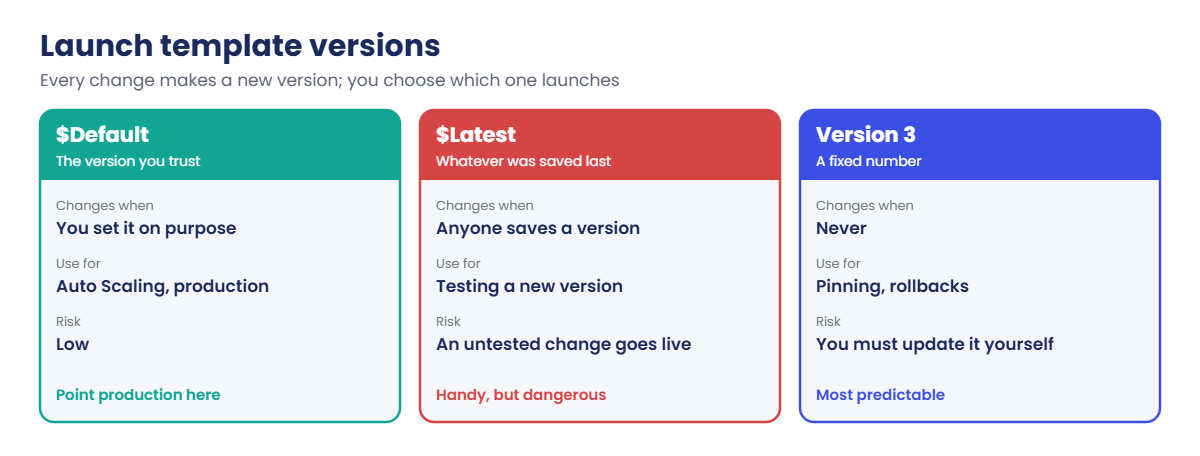
A launch template stores launch settings: AMI, instance type, security groups, instance profile, metadata options, tags, user data and more. Every change creates a new numbered version. $Default is the version you mark as default; $Latest is simply the newest. Auto Scaling groups and EC2 Fleet launch from templates, and you can override fields such as the subnet at launch time.
Good images are small, patched and contain no secrets. Configuration that differs per environment (database endpoints, passwords) is fetched at boot from Parameter Store or Secrets Manager (Lesson 31), not baked in. EC2 Image Builder automates baking and patching on a schedule.
How it works, step by step
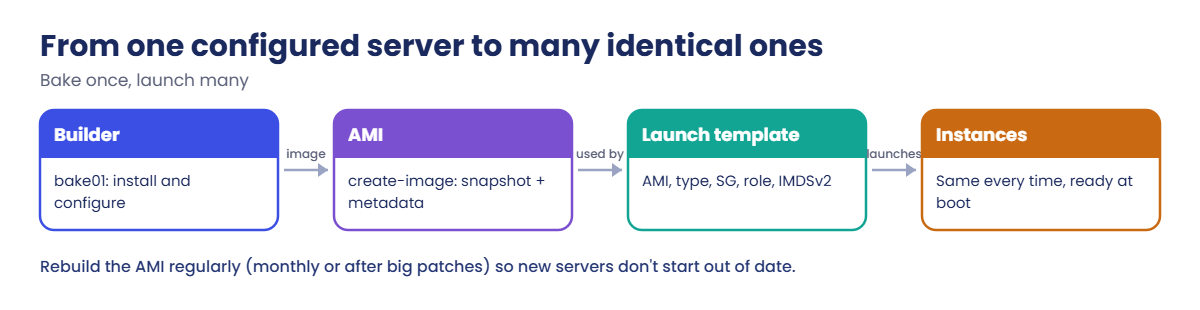
Here is the pipeline you’ll build by hand today.
1Build and configure one server
bake01 installs nginx and writes a page through user data. Packages come from Amazon Linux repositories hosted in S3, reached through saat-s3-endpoint, so no NAT gateway is needed.
2Bake the image
create-image reboots bake01, snapshots its root volume and registers saat-web-YYYYMMDD-HHMM. Dated names make it obvious which image is newest.
3Write the launch template
The template points at the AMI and sets t3.micro, saat-app-sg, the SSM instance profile, IMDSv2 required and tags. The subnet is chosen at launch time.
4Launch copies
Two instances from $Default, ready the moment they boot, with no user data at all.
Versions are where teams get hurt.
Production should launch a version someone has tested, which means $Default or a fixed number. $Latest is for trying a new version on purpose.
✅ Checkpoint: You can say what an AMI contains, why deregistering it leaves snapshots, and the difference between $Default and $Latest.
Hands-on lab: bake an AWS AMI and launch from a template
Start as usual, with the Session Manager endpoints:
cd C:\aws-lab
aws login --profile saat-admin
$env:AWS_PROFILE = 'saat-admin'
$env:Path += ';C:\Program Files\Amazon\SessionManagerPlugin\bin'
$v = Get-Content C:\aws-lab\saat-vpc.json | ConvertFrom-Json
.\Start-SsmEndpoints.ps11Build bake01
Paste this whole block:
$ud = @'
#!/bin/bash
dnf install -y nginx
echo "<h1>Hello from the saat-web AMI</h1>" > /usr/share/nginx/html/index.html
systemctl enable nginx
'@
[IO.File]::WriteAllText('C:\aws-lab\bake-userdata.sh', ($ud -replace "`r`n", "`n"))
$base = aws ssm get-parameter --name /aws/service/ami-amazon-linux-latest/al2023-ami-kernel-default-x86_64 --query Parameter.Value --output text
$bake = aws ec2 run-instances --image-id $base --instance-type t3.micro --subnet-id $v.PrivateA --security-group-ids $v.AppSg --iam-instance-profile Name=saat-ec2-ssm-profile --metadata-options HttpTokens=required --user-data file://bake-userdata.sh --tag-specifications 'ResourceType=instance,Tags=[{Key=Name,Value=bake01},{Key=course,Value=saatvedha-aws},{Key=lesson,Value=15}]' 'ResourceType=volume,Tags=[{Key=course,Value=saatvedha-aws},{Key=lesson,Value=15}]' --query "Instances[0].InstanceId" --output text
do { Start-Sleep 20; $ping = aws ssm describe-instance-information --filters "Key=InstanceIds,Values=$bake" --query "InstanceInformationList[0].PingStatus" --output text } until ($ping -eq 'Online')
aws ssm start-session --target $bake --document-name AWS-StartInteractiveCommand --parameters command="cloud-init status --wait"You should see something like this (the dots appear while user data runs):
Starting session with SessionId: yourname.admin-0a1b2c3d4e5f67890
.....
status: done
Exiting session with sessionId: yourname.admin-0a1b2c3d4e5f67890.2Create the AMI
Paste this whole block (the wait usually takes three to six minutes):
$name = "saat-web-$(Get-Date -Format yyyyMMdd-HHmm)"
$ami = aws ec2 create-image --instance-id $bake --name $name --description "AL2023 + nginx + page" --tag-specifications 'ResourceType=image,Tags=[{Key=course,Value=saatvedha-aws},{Key=lesson,Value=15}]' 'ResourceType=snapshot,Tags=[{Key=course,Value=saatvedha-aws},{Key=lesson,Value=15}]' --query ImageId --output text
aws ec2 wait image-available --image-ids $ami
$amiSnap = aws ec2 describe-images --image-ids $ami --query "Images[0].BlockDeviceMappings[0].Ebs.SnapshotId" --output text
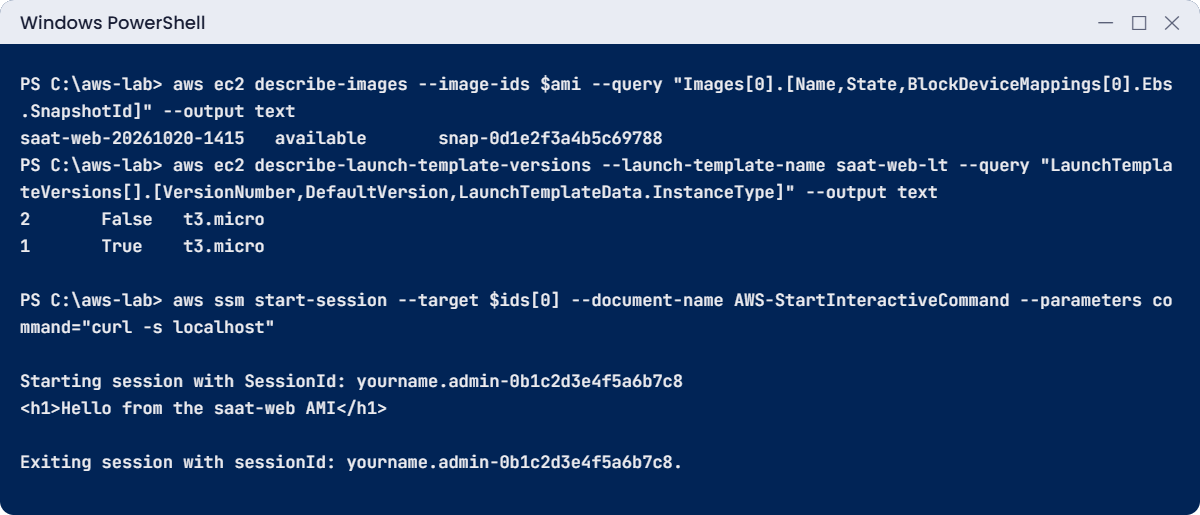
aws ec2 describe-images --image-ids $ami --query "Images[0].[Name,State,BlockDeviceMappings[0].Ebs.SnapshotId]" --output textYou should see something like this:
saat-web-20261020-1415 available snap-0d1e2f3a4b5c69788bake01 has done its job. Terminate it now; the image doesn’t need it any more:
aws ec2 terminate-instances --instance-ids $bake | Out-Null3Create the launch template
Paste this whole block:
@'
{
"ImageId": "AMI_ID",
"InstanceType": "t3.micro",
"SecurityGroupIds": ["APP_SG"],
"IamInstanceProfile": { "Name": "saat-ec2-ssm-profile" },
"MetadataOptions": { "HttpTokens": "required" },
"TagSpecifications": [
{ "ResourceType": "instance", "Tags": [ { "Key": "Name", "Value": "web-lt" }, { "Key": "course", "Value": "saatvedha-aws" }, { "Key": "lesson", "Value": "15" } ] },
{ "ResourceType": "volume", "Tags": [ { "Key": "course", "Value": "saatvedha-aws" }, { "Key": "lesson", "Value": "15" } ] }
]
}
'@ -replace 'AMI_ID', $ami -replace 'APP_SG', $v.AppSg | Set-Content lt-v1.json
aws ec2 create-launch-template --launch-template-name saat-web-lt --version-description "v1 saat-web AMI" --launch-template-data file://lt-v1.json --query "LaunchTemplate.[LaunchTemplateName,DefaultVersionNumber]" --output textYou should see this:
saat-web-lt 1
4Launch two copies from $Default
Paste this whole block:
$ids = (aws ec2 run-instances --launch-template 'LaunchTemplateName=saat-web-lt,Version=$Default' --subnet-id $v.PrivateA --count 2 --query "Instances[].InstanceId" --output text) -split '\s+'
foreach ($i in $ids) { do { Start-Sleep 20; $p = aws ssm describe-instance-information --filters "Key=InstanceIds,Values=$i" --query "InstanceInformationList[0].PingStatus" --output text } until ($p -eq 'Online') }
aws ssm start-session --target $ids[0] --document-name AWS-StartInteractiveCommand --parameters command="curl -s localhost"You should see something like this:
Starting session with SessionId: yourname.admin-0b1c2d3e4f5a6b7c8
<h1>Hello from the saat-web AMI</h1>
Exiting session with sessionId: yourname.admin-0b1c2d3e4f5a6b7c8.The page is there the moment the server boots. Nothing was installed at launch; it was all in the image. The single quotes around '...Version=$Default' stop PowerShell from treating $Default as one of its own variables.
✅ Checkpoint: saat-web-YYYYMMDD-HHMM is available, saat-web-lt version 1 is the default, and both copies serve the baked page. Keep everything for the break lab.
Break It, Then Fix It
Two problems from real teams: an untested template version and an AMI that was “deleted” but still costs money. The second one is also your cleanup.
1Break it: a bad new version and $Latest
Save version 2 with a one-letter typo in the instance profile, then launch with $Latest:
'{ "IamInstanceProfile": { "Name": "saat-ec2-ssm-profil" } }' | Set-Content lt-v2.json
aws ec2 create-launch-template-version --launch-template-name saat-web-lt --source-version 1 --version-description "v2 typo" --launch-template-data file://lt-v2.json --query "LaunchTemplateVersion.VersionNumber" --output text
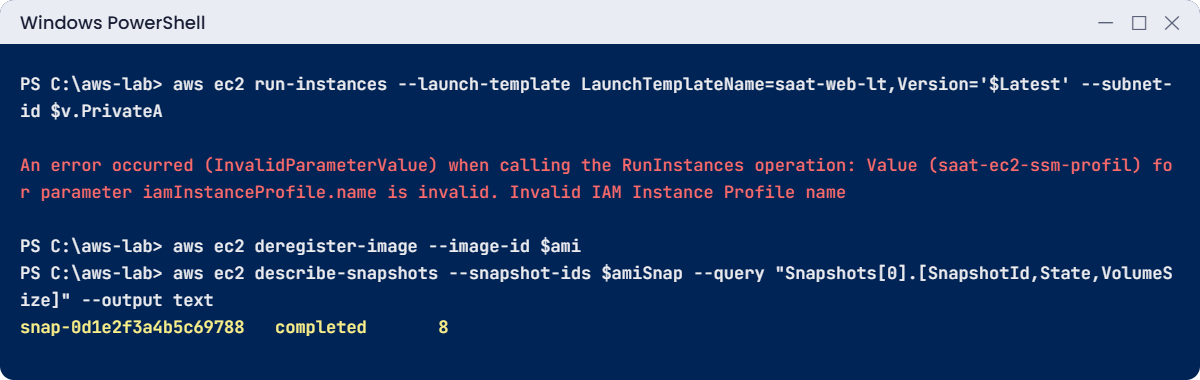
aws ec2 run-instances --launch-template 'LaunchTemplateName=saat-web-lt,Version=$Latest' --subnet-id $v.PrivateAYou’ll get this error (something like this):
2
An error occurred (InvalidParameterValue) when calling the RunInstances operation: Value (saat-ec2-ssm-profil) for parameter iamInstanceProfile.name is invalid. Invalid IAM Instance Profile name
Anything launching with $Latest (a script, an Auto Scaling group) is now broken by someone else’s untested save. Anything on $Default still works, because version 1 is still the default:
aws ec2 describe-launch-template-versions --launch-template-name saat-web-lt --query "LaunchTemplateVersions[].[VersionNumber,DefaultVersion,LaunchTemplateData.IamInstanceProfile.Name]" --output text
aws ec2 delete-launch-template-versions --launch-template-name saat-web-lt --versions 2 | Out-NullThe first command shows:
2 False saat-ec2-ssm-profil
1 True saat-ec2-ssm-profileFix: point production at $Default, test a new version by launching it by number, then make it the default with modify-launch-template --default-version.
2Break it: deregister the AMI and stop there
Terminate the copies, deregister the AMI, then look for its snapshot:
aws ec2 terminate-instances --instance-ids $ids | Out-Null
aws ec2 deregister-image --image-id $ami
aws ec2 describe-snapshots --snapshot-ids $amiSnap --query "Snapshots[0].[SnapshotId,State,VolumeSize]" --output textYou should see something like this:
snap-0d1e2f3a4b5c69788 completed 8The image is gone from the AMI list, but its 8 GiB snapshot is still stored and still billed every month. Fix: delete the snapshot yourself after deregistering, then finish the cleanup:
aws ec2 delete-snapshot --snapshot-id $amiSnap
aws ec2 delete-launch-template --launch-template-name saat-web-lt | Out-Null
aws ec2 wait instance-terminated --instance-ids $ids $bake
.\Stop-SsmEndpoints.ps1
.\Find-LabResources.ps1✅ Checkpoint: You saw $Latest pick up a broken version while $Default kept working, and found and deleted the snapshot a deregistered AMI left behind. All lesson 15 resources are gone.
This happened at work
The 18-month-old image that slowed a sale
An online electronics shop ran its web tier in an Auto Scaling group from an AMI built 18 months earlier. To stay patched, user data ran dnf update -y and installed the app on every new server. Each new server took about 25 minutes to become healthy.
On the first day of a big sale, traffic tripled in ten minutes. Auto Scaling launched servers correctly, but they were still updating packages when the existing ones ran out of capacity. The site slowed to a crawl for over half an hour, the most valuable half hour of the year.
The team moved to an EC2 Image Builder pipeline that bakes and tests a new AMI every month and after critical patches, with the app already installed. User data shrank to a few lines that read settings from Parameter Store. New servers are healthy in about two minutes, and the launch template’s default version only changes after the new image passes a test launch.
Common mistakes and troubleshooting
| Mistake | What happens | What to do |
|---|---|---|
| Launching production from $Latest | An untested template change goes live | Use $Default or a fixed version number |
| Deregistering an AMI and forgetting its snapshots | Storage keeps charging | Delete the snapshot IDs from the AMI’s block device mappings |
| Baking secrets or passwords into the image | Anyone with the AMI has the secret | Fetch secrets at boot from Secrets Manager or Parameter Store |
| Images that are never rebuilt | New servers start unpatched or patch for ages at boot | Rebuild monthly, for example with EC2 Image Builder |
| Heavy user data instead of baking | Slow scale-out when you most need it | Bake software in; keep user data small |
| Passing JSON inline in Windows PowerShell 5.1 | Quotes are stripped; the CLI reports invalid JSON | Write JSON to a file and use file:// |
Interview questions
Click a question to open it. Each one is written the way an interviewer would ask it. Under it you will see why they ask it and one way you could answer, in your own words.
Fresher level
1. Can you explain in simple words what an AMI really contains?
Why they ask this: They want to check basic EC2 knowledge beyond the name. Knowing it’s built from snapshots and tied to a Region helps later with sharing and cost.
How you might answer: An AMI is the template for an instance’s disks, plus metadata like the architecture and boot mode. Behind the scenes it’s backed by EBS snapshots.
It’s Regional, so to use it in another Region I have to copy it there.
2. How would you explain a launch template to a new team member?
Why they ask this: They want to see that you know how launch settings are saved and reused. Launch templates are the base of Auto Scaling.
How you might answer: I’d say it’s a saved, versioned set of launch settings: the AMI, instance type, security groups, instance profile, metadata options, tags and user data.
Auto Scaling and our scripts launch instances from it, so every server starts the same way.
3. You deregistered a bunch of old AMIs to save money, but the bill didn’t change. What did you miss?
Why they ask this: They want to see that you know a common cost trap. Forgotten snapshots quietly add up over years.
How you might answer: Deregistering an AMI doesn’t touch its snapshots. They stay and keep costing money, so I have to delete them separately.
2–5 years experience
4. Your team argues about baking software into the AMI versus installing it at boot. Where do you stand?
Why they ask this: They want to see trade-off thinking, not a one-sided answer. The choice affects how fast and how reliably you can scale.
How you might answer: I’d bake anything slow or stable, like OS patches, runtimes and the app version, and keep boot-time steps small and fast, like fetching config and secrets. Baking gives faster and more reliable scale-out, and boot-time setup gives flexibility.
Most teams do both, but I lean strongly toward baking.
5. Someone saved a new launch template version, and production started launching broken servers. How could $Default versus $Latest explain that?
Why they ask this: They want to check you understand template versioning. Pointing production at the wrong version is a real and common mistake.
How you might answer: $Default is the version you explicitly mark as default, and $Latest is simply the newest saved version. If production used $Latest, the untested version went live as soon as it was saved.
So production should use $Default or a pinned version number.
6. Another team needs to use your AMI in their account. How would you share it securely?
Why they ask this: They want to see cross-account skills, including the encryption detail. Sharing often fails because of the KMS key.
How you might answer: I’d add their account ID to the image’s launch permissions. If the snapshot is encrypted with a customer managed KMS key, I’d also let that account use the key.
An AMI encrypted with the default aws/ebs key can’t be shared, so I’d re-encrypt it with a customer managed key first.
Senior level
7. Forty teams each build their own server images in different ways. How would you design one image pipeline for all of them?
Why they ask this: They want to see platform thinking. A senior engineer should make the secure path easy for many teams at once.
How you might answer: I’d set up a central EC2 Image Builder pipeline that builds a hardened base image every month, runs tests and scans, and distributes it to accounts and Regions. Teams build their app images on top of it.
Image IDs get published to Parameter Store, and launch templates read them from there. Old images are deprecated and cleaned up with lifecycle policies.
8. Your Auto Scaling group suddenly can’t launch any instances. How do you investigate?
Why they ask this: They want to see methodical launch troubleshooting. The exact error message usually points straight to the cause.
How you might answer: I’d read the Auto Scaling activity history for the exact error and check which template version it’s using. Then I’d confirm the AMI still exists and is shared, and check the instance profile name, security group and subnet IDs.
I’d also look at service quotas and capacity in the zone. Then I’d launch the same template version by hand to reproduce it.
Quick quiz
Q1. What is an AMI made of?
- Only a name
- Metadata plus EBS snapshots
- A running instance
- A launch template
Show answer
B — An EBS-backed AMI is metadata plus one snapshot per disk.
Q2. After deregistering an AMI, what still costs money?
- Nothing
- Its EBS snapshots
- The launch template
- The instance profile
Show answer
B — Snapshots remain until you delete them.
Q3. Which launch template version should production use?
- $Latest
- $Default or a fixed number
- Version 0
- Any
Show answer
B — $Latest can pick up untested changes. $Default changes only when you choose.
Q4. Why do teams bake software into AMIs?
- AMIs cost nothing to store
- New servers become ready faster and more reliably
- User data is not allowed
- It avoids security groups
Show answer
B — Baked servers skip slow installs at boot, which matters during scale-out.
Q5. Why did the lab write launch template JSON to a file?
- Files are faster
- Windows PowerShell 5.1 strips quotes from inline JSON
- The CLI only reads files
- For encryption
Show answer
B — PowerShell 5.1 mangles quotes passed to native programs, so file:// is safer.
Quick recap
- An AMI is metadata plus snapshots; create-image reboots the source by default.
- A launch template holds everything else; every change is a new version.
- Production uses $Default or a fixed version, never $Latest.
- Deregistering an AMI leaves its snapshots; delete them yourself.
- Bake slow steps into the image, keep user data small, and rebuild images regularly.
Next lesson
Lesson 16: Amazon S3 basics → You’ll create buckets, upload and list objects, and choose storage classes from the CLI.
Further reading: AWS AMI
Want to go deeper into AWS AMI? Read Amazon Machine Images in Amazon EC2 and Store instance launch parameters in Amazon EC2 launch templates. You can also see the full plan for this course on the AWS Cloud Administration course page.