IAM policies in depth: conditions, variables and boundaries
-
Phase 0: Before you start
-
Phase 1: The foundation
-
Phase 2: Operations and security
-
Phase 3: SQL Server on AWS
-
Phase 4: Troubleshooting step by step
-
Phase 5: Final project and career
Managed policies like ReadOnlyAccess are a start, but real jobs need your own rules: “only in Mumbai”, “only your own files”, “only servers tagged with your name”. These IAM policy examples show how to write those rules in JSON and, just as important, how to test them before anyone depends on them.
You’ll write a Region guard, a per-user rule with a policy variable, a tag-based rule and a permission boundary, then check each one with IAM Access Analyzer and the policy simulator. Nothing in this lab costs money.
| Time | You need | By the end you can |
|---|---|---|
| 60 minutes | Your laptop signed in with aws login --profile saat-admin (Lesson 6). | Read and write policy statements with conditions, use policy variables and tags, set a permission boundary, and catch silent mistakes with Access Analyzer and the simulator. |
What it is, in one line
IAM policy examples are JSON rules of Effect, Action, Resource and Condition that you test before you attach them.
In Simple Words
Rules for borrowing the family car
“You can use the car” is a policy. “You can use the car, but only in our city” adds a condition. “You can only drive the car with your name on the key tag” uses a tag.
Parents might also say “Whatever your older brother lets you do, you still can’t drive on the highway”. That is a permission boundary: a ceiling nobody can lift.
And before handing over the keys, a good parent checks the rules make sense. That is the simulator.
Engineer's View
The grammar of a policy
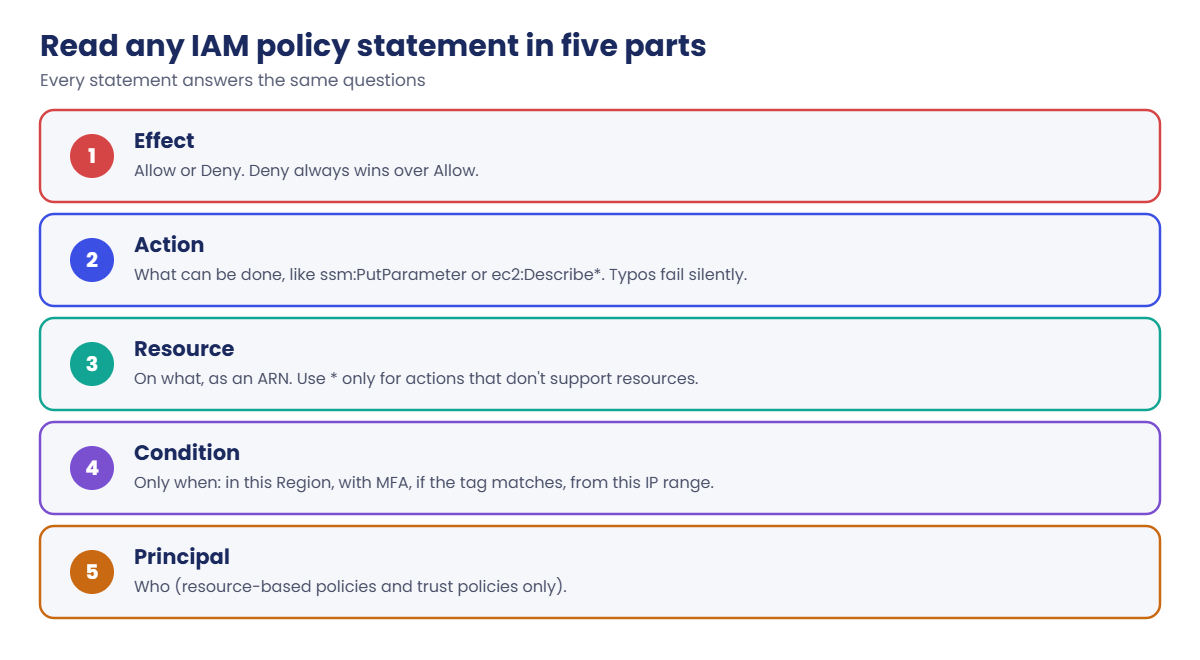
A policy has a Version (always 2012-10-17) and one or more Statement blocks. Each statement has Effect, Action (or NotAction), Resource (or NotResource) and an optional Condition.
Conditions use operators and keys: StringEquals, StringLike, IpAddress, Bool and DateLessThan, with keys like aws:RequestedRegion, aws:MultiFactorAuthPresent, aws:SourceIp, aws:PrincipalTag/team and ec2:ResourceTag/owner. Tag-based rules are called attribute-based access control (ABAC): you write one policy and tags decide who gets what.
Policy variables like ${aws:username} are replaced at request time, but only when Version is 2012-10-17. Without it, the text is used literally and the rule quietly never matches.
A permission boundary is a managed policy attached as a limit on a user or role. The effective permission is what both the identity policy and the boundary allow. It lets you hand out “create roles for your app” safely, because nothing created can exceed the boundary.
IAM does not check that action names exist when you save a policy. ssm:PutParamter saves fine and grants nothing. aws accessanalyzer validate-policy catches that, and the simulator shows the result for a given request.
How it works, step by step
Every policy you write goes through the same loop.
1Write it small
Start from the job (“Priya must restart her own servers in Mumbai”) and list the exact actions, resources and conditions. Avoid * in actions unless you mean it.
2Validate it
Run Access Analyzer’s checks. Fix every ERROR and read every SECURITY_WARNING. This catches typos, missing versions and grants wider than you meant.
3Simulate it
Ask the simulator the questions you care about: allowed in Mumbai? denied in Virginia? denied for someone else’s server? Supply the context values (Region, tags, user name) the conditions look at.
4Attach, watch, shrink
Attach it to a group or role, not a person. After a few weeks, look at last-accessed data and remove what isn’t used.
When you read someone else’s policy, use the same five-part check in order.
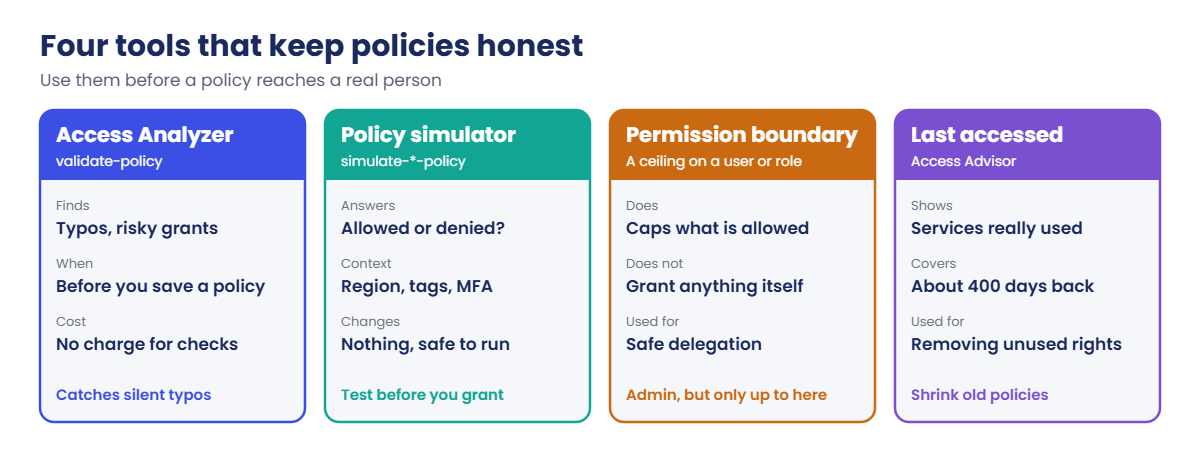
The tools below turn this from guesswork into a routine. Teams that use them before every change rarely see “it worked in test but not for the user”.
✅ Checkpoint: You can name the five parts of a statement and say what a permission boundary does and does not do.
Hands-on lab: IAM policy examples you test before use
Start every lab from now on like this:
cd C:\aws-lab
aws login --profile saat-admin
$env:AWS_PROFILE = 'saat-admin'
$acct = aws sts get-caller-identity --query Account --output textAll policy files use single-quoted here-strings (@' … '@). In a double-quoted one, PowerShell would treat ${aws:username} as its own variable and quietly remove it.
1A Region guard: deny everything outside Mumbai
Paste this whole block:
@'
{ "Version": "2012-10-17", "Statement": [{ "Effect": "Allow", "Action": "ec2:*", "Resource": "*" }] }
'@ | Set-Content allow-ec2.json
@'
{
"Version": "2012-10-17",
"Statement": [{
"Sid": "OnlyMumbai",
"Effect": "Deny",
"NotAction": ["iam:*", "sts:*", "organizations:*", "budgets:*", "ce:*", "support:*",
"cloudfront:*", "route53:*", "health:*", "account:*", "signin:*"],
"Resource": "*",
"Condition": { "StringNotEquals": { "aws:RequestedRegion": ["ap-south-1"] } }
}]
}
'@ | Set-Content region-guard.jsonNotAction lists global services that don’t run in a Region, so the guard doesn’t break sign-in, IAM or billing.
2Validate and simulate the guard
Run this:
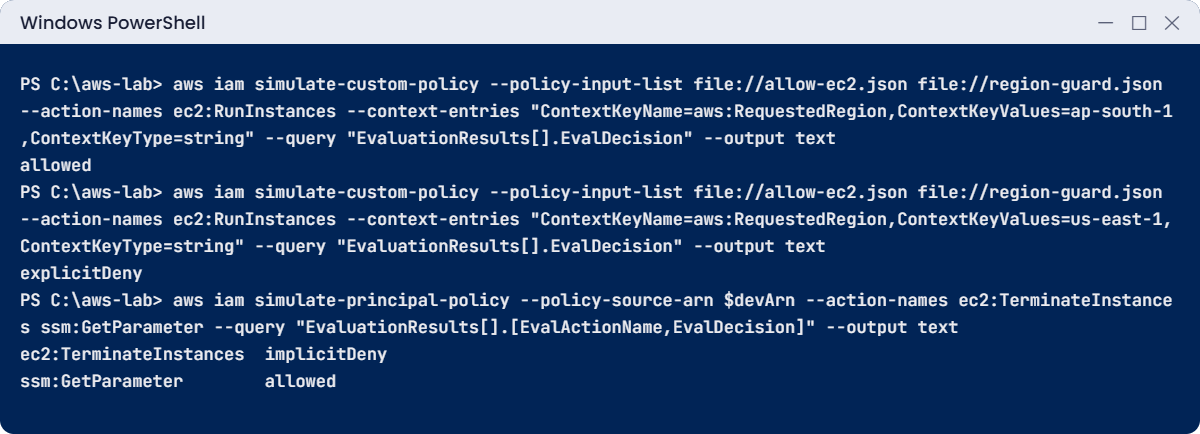
aws accessanalyzer validate-policy --policy-type IDENTITY_POLICY --policy-document file://region-guard.json --query "findings[].[findingType,issueCode]" --output text
foreach ($r in 'ap-south-1','us-east-1') {
aws iam simulate-custom-policy --policy-input-list file://allow-ec2.json file://region-guard.json --action-names ec2:RunInstances --context-entries "ContextKeyName=aws:RequestedRegion,ContextKeyValues=$r,ContextKeyType=string" --query "EvaluationResults[].EvalDecision" --output text
}You should see this (Access Analyzer may print a SUGGESTION line or nothing):
allowed
explicitDeny3Your own corner with a policy variable
Paste this whole block:
@'
{
"Version": "2012-10-17",
"Statement": [{
"Effect": "Allow",
"Action": ["ssm:PutParameter", "ssm:GetParameter"],
"Resource": "arn:aws:ssm:ap-south-1:ACCOUNT_ID:parameter/lab/${aws:username}/*"
}]
}
'@ -replace 'ACCOUNT_ID', $acct | Set-Content my-params.json
$myParam = "arn:aws:ssm:ap-south-1:$($acct):parameter/lab/yourname.admin/note"
$other = "arn:aws:ssm:ap-south-1:$($acct):parameter/lab/priya.dev/note"
foreach ($res in $myParam, $other) {
aws iam simulate-custom-policy --policy-input-list file://my-params.json --action-names ssm:PutParameter --resource-arns $res --context-entries "ContextKeyName=aws:username,ContextKeyValues=yourname.admin,ContextKeyType=string" --query "EvaluationResults[].EvalDecision" --output text
}You should see this:
allowed
implicitDenyOne policy, attached to a whole group, and each person can only write under their own name.
4Tag-based access: only your own servers
Paste this whole block:
@'
{
"Version": "2012-10-17",
"Statement": [{
"Effect": "Allow",
"Action": ["ec2:StartInstances", "ec2:StopInstances"],
"Resource": "arn:aws:ec2:ap-south-1:*:instance/*",
"Condition": { "StringEquals": { "ec2:ResourceTag/owner": "${aws:username}" } }
}]
}
'@ | Set-Content owner-tag.json
$inst = "arn:aws:ec2:ap-south-1:$($acct):instance/i-0123456789abcdef0"
foreach ($owner in 'yourname.admin','priya.dev') {
aws iam simulate-custom-policy --policy-input-list file://owner-tag.json --action-names ec2:StopInstances --resource-arns $inst --context-entries "ContextKeyName=aws:username,ContextKeyValues=yourname.admin,ContextKeyType=string" "ContextKeyName=ec2:ResourceTag/owner,ContextKeyValues=$owner,ContextKeyType=string" --query "EvaluationResults[].EvalDecision" --output text
}You should see this:
allowed
implicitDeny
5A permission boundary: admin, but only up to a ceiling
Paste this whole block:
@'
{
"Version": "2012-10-17",
"Statement": [{
"Effect": "Allow",
"Action": ["ssm:*", "ec2:Describe*", "s3:Get*", "s3:List*"],
"Resource": "*"
}]
}
'@ | Set-Content boundary.json
$bArn = aws iam create-policy --policy-name lab-boundary --policy-document file://boundary.json --query Policy.Arn --output text
$devArn = aws iam create-user --user-name lab-dev --permissions-boundary $bArn --tags Key=course,Value=saatvedha-aws Key=lesson,Value=07 --query User.Arn --output text
aws iam attach-user-policy --user-name lab-dev --policy-arn arn:aws:iam::aws:policy/AdministratorAccess
aws iam simulate-principal-policy --policy-source-arn $devArn --action-names ec2:TerminateInstances ssm:GetParameter --query "EvaluationResults[].[EvalActionName,EvalDecision]" --output textYou should see this:
ec2:TerminateInstances implicitDeny
ssm:GetParameter allowedlab-dev has AdministratorAccess, yet can’t terminate an instance, because the boundary doesn’t allow it. The boundary itself grants nothing: remove AdministratorAccess and ssm:GetParameter would be denied too.
✅ Checkpoint: The guard gives allowed for Mumbai and explicitDeny for us-east-1, the variable and tag rules only allow your own items, and the boundary blocks terminate. Keep the files for the break lab.
Break It, Then Fix It
The two most dangerous policy mistakes are the ones IAM accepts without complaint.
1Break it: a typo in an action name
Create a policy with one missing letter and validate it:
@'
{ "Version": "2012-10-17", "Statement": [{ "Effect": "Allow", "Action": "ssm:PutParamter", "Resource": "*" }] }
'@ | Set-Content typo.json
aws accessanalyzer validate-policy --policy-type IDENTITY_POLICY --policy-document file://typo.json --query "findings[].[findingType,issueCode]" --output textYou’ll get this finding:
ERROR INVALID_ACTIONIAM would have saved this policy, and the user would have got “Access Denied” with no clue why. The full finding message even suggests the correct action. Fix: correct it to ssm:PutParameter and validate again until there is no ERROR.
2Break it: forget the Version line
Copy my-params.json without the Version line, then validate and simulate:
(Get-Content my-params.json) | Where-Object { $_ -notmatch '"Version"' } | Set-Content no-version.json
aws accessanalyzer validate-policy --policy-type IDENTITY_POLICY --policy-document file://no-version.json --query "findings[?findingType=='ERROR'].issueCode" --output text
aws iam simulate-custom-policy --policy-input-list file://no-version.json --action-names ssm:PutParameter --resource-arns $myParam --context-entries "ContextKeyName=aws:username,ContextKeyValues=yourname.admin,ContextKeyType=string" --query "EvaluationResults[].EvalDecision" --output textYou should see this:
VARIABLE_UNSUPPORTED_IN_VERSION
implicitDeny
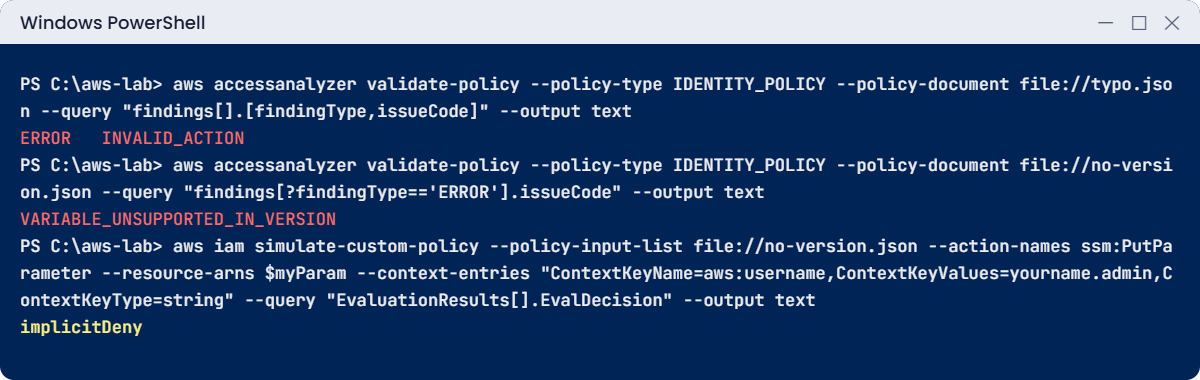
Without the Version, ${aws:username} is taken as plain text, so the resource never matches and your own write is denied. Fix: always start with "Version": "2012-10-17".
3Clean up
Paste this whole block:
aws iam detach-user-policy --user-name lab-dev --policy-arn arn:aws:iam::aws:policy/AdministratorAccess
aws iam delete-user --user-name lab-dev
aws iam delete-policy --policy-arn $bArn
Remove-Item allow-ec2.json, region-guard.json, my-params.json, owner-tag.json, boundary.json, typo.json, no-version.json✅ Checkpoint: Access Analyzer caught both silent mistakes, you fixed them, and lab-dev plus lab-boundary are gone.
This happened at work
“Power users” who switched off the audit log
A product company wanted developers to have “everything except IAM”. Someone wrote one statement: Allow with NotAction: iam:* on *. It looked tidy, and it worked for months.
Then a developer trying to cut costs in a test account noticed CloudTrail and GuardDuty charges and turned both off. The policy allowed it, because “everything except IAM” includes security services. Weeks later an incident in that account couldn’t be investigated, because nothing had been logged.
The team replaced the home-made policy with PowerUserAccess plus explicit Deny statements for cloudtrail:StopLogging, cloudtrail:DeleteTrail, guardduty:DeleteDetector and changes to AWS Config, then moved those denies into a service control policy so no account admin could undo them. Every new policy now goes through Access Analyzer validation in the pull request.
Common mistakes and troubleshooting
| Mistake | What happens | What to do |
|---|---|---|
| Typo in an action name | Saved without error, grants nothing | Run aws accessanalyzer validate-policy before saving |
| Missing Version | Policy variables become plain text and never match | Always include “Version”: “2012-10-17” |
| Double-quoted PowerShell here-string with ${aws:username} | PowerShell removes the variable text | Use single-quoted here-strings and -replace for your own values |
| Allow + NotAction | Grants far more than you think (every other service) | Use NotAction mainly with Deny; prefer explicit Allow lists |
| Region guard without exceptions for global services | IAM, billing and sign-in break | List global services in NotAction, as in the lab |
| Expecting a boundary to grant access | Still denied | A boundary only limits; the identity policy must also allow |
Interview questions
Click a question to open it. Each one is written the way an interviewer would ask it. Under it you will see why they ask it and one way you could answer, in your own words.
Fresher level
1. If I showed you an IAM policy, what parts would you expect to see in each statement?
Why they ask this: They want to check that you can read policy grammar. You can’t debug a policy you can’t read.
How you might answer: Each statement has an Effect, which is Allow or Deny, then Action, Resource, and an optional Condition.
Resource-based policies and trust policies also have a Principal, which says who the statement applies to.
2. Your manager says, “Nobody should create anything outside Mumbai.” How would you enforce that?
Why they ask this: They want to see you handle a very common real requirement. They also check you remember that global services need an exception.
How you might answer: I’d write a Deny statement with StringNotEquals on aws:RequestedRegion, and use NotAction to leave out global services like IAM, STS and billing.
In an organization I’d put it in a service control policy, so account admins can’t remove it.
3. Can you explain in simple words what a policy variable is and why it’s useful?
Why they ask this: They want to see whether you can write one policy that works for many people. It shows you think about reuse instead of copying policies.
How you might answer: A policy variable is a placeholder like ${aws:username} that AWS fills in when the request happens. So one policy can say “your own folder” for everyone.
It only works when the policy uses Version 2012-10-17.
2–5 years experience
4. Developers want to create their own IAM roles for their apps. How would you allow that without giving away the keys to the account?
Why they ask this: They want to see that you know how to delegate safely with permission boundaries. Saying no to everything slows teams down, and saying yes to everything is risky.
How you might answer: I’d use a permission boundary, which is a managed policy that sets the maximum permissions a user or role can have. Developers can create roles, but only if they attach our boundary.
That way no role they create can ever go beyond it.
5. You write a new policy and the user says it “doesn’t work”. How do you debug it?
Why they ask this: They want to see a methodical way of debugging policies. Guessing and adding more permissions is the habit they want to avoid.
How you might answer: First I’d validate it with Access Analyzer to catch typos and version problems. Then I’d run the policy simulator with the user, action, resource and context values.
I’d also read the exact AccessDenied message to see which policy type denied it, and check for SCPs, boundaries and resource policies.
6. How would you explain ABAC to a new team member, and why would you choose it?
Why they ask this: They want to know you’re aware of modern access patterns. ABAC matters when the number of people and resources keeps growing.
How you might answer: I’d say ABAC means attribute-based access control, so permissions depend on tags. For example, a user can run StopInstances only when the instance’s owner tag matches their own.
It scales well, because new people and resources just need the right tags, not new policies.
Senior level
7. You find a policy that uses Allow with NotAction. Why might that worry you, and when is NotAction the right choice?
Why they ask this: They want to see deep understanding of policy logic. This mistake can quietly grant far more than anyone meant to.
How you might answer: Allow with NotAction grants every action that isn’t listed, across all current and future services, including security ones. So it can give away much more than intended.
NotAction is safest inside Deny statements. A good example is “deny everything outside this Region, except these global services”.
8. How would you build policy quality checks into your team’s daily workflow?
Why they ask this: They want to see that you think about automation and governance, not one-off reviews. Senior engineers are expected to make good practice the default.
How you might answer: Policies live in code, using CloudFormation, CDK or Terraform. The pipeline runs Access Analyzer validate-policy and our own checks, like “no new public access”, on every pull request, and fails on errors or security warnings.
Every quarter we review Access Advisor data and remove permissions nobody uses.
Quick quiz
Q1. IAM accepts a policy with the action “ssm:PutParamter”. What happens when the user tries to put a parameter?
- It works
- It is denied, because the action name matches nothing
- IAM fixes the typo
- The policy is rejected when saved
Show answer
B — IAM doesn’t check action names at save time. Access Analyzer validation catches it.
Q2. What happens to ${aws:username} if the policy has no Version element?
- It still works
- It is used as plain text
- It becomes *
- The policy fails to save
Show answer
B — Variables need Version 2012-10-17. Otherwise they are literal text.
Q3. A user has AdministratorAccess and a boundary that allows only ssm:*. Can they terminate an EC2 instance?
- Yes
- No
- Only in Mumbai
- Only with MFA
Show answer
B — Effective permissions are what both the identity policy and the boundary allow.
Q4. Which condition key limits actions to certain Regions?
- aws:SourceIp
- aws:RequestedRegion
- aws:CurrentTime
- ec2:Region
Show answer
B — aws:RequestedRegion is the Region the request is sent to.
Q5. Why should a Region guard exclude IAM, STS and billing actions?
- They are cheap
- They are global services, not tied to your Region
- They can’t be denied
- They need MFA
Show answer
B — Global services would otherwise be blocked, breaking sign-in and administration.
Quick recap
- Read every statement as Effect, Action, Resource, Condition (and Principal for resource policies).
- Conditions and tags let one policy cover many cases: Regions, MFA, owner tags.
- Policy variables need Version 2012-10-17; in PowerShell use single-quoted here-strings.
- A permission boundary caps permissions and grants nothing by itself.
- Validate with Access Analyzer and test with the simulator before attaching a policy.
Next lesson
Lesson 8: VPC basics: CIDR, subnets and route tables → You’ll build saat-vpc, the network every later lesson uses.
Further reading: IAM policy examples
Want to go deeper into IAM policy examples? AWS keeps a long list of Example IAM identity-based policies, and the checks you ran are documented in IAM Access Analyzer policy check reference. You can also see the full plan for this course on the AWS Cloud Administration course page.
