Cost management: Budgets, Cost Explorer, Savings Plans

The cloud bill is the one report every manager reads. AWS cost optimization is a routine, not a one-off project: see where the money goes, get warned before a budget is blown, remove waste, and only then commit to discounts like Savings Plans.

You’ll break down your month-to-date cost by service and by the course tag, create a tag-based budget with email alerts, check what Savings Plans would suggest, and write Find-Waste.ps1, a script that finds the leftovers that quietly cost money. Then you’ll fix a date bug that breaks cost scripts on the 1st of every month.

TimeYou needBy the end you can
45 minutesLesson 4 done (the course tag activated for cost allocation), your laptop signed in as saat-admin, an email address for budget alerts. Cost: about USD 0.10 (Cost Explorer API calls are USD 0.01 each, plus a few minutes of an idle Elastic IP).Query Cost Explorer by service and tag, create budgets on actual and forecasted spend, read Savings Plans recommendations, find idle resources with a script, and avoid common cost-reporting mistakes.

What it is, in one line

AWS cost optimization means continuously matching what you pay for with what you actually use, using visibility (Cost Explorer), alerts (Budgets), cleanup and commitment discounts.

In Simple Words

The household electricity bill

When the electricity bill jumps, a family first looks at what used the power: the AC, the geyser, the old fridge. That is Cost Explorer.

Then they set a rule: “if we reach 80 percent of our usual bill by the 20th, we talk about it.” That is a budget alert.

Then they switch off fans in empty rooms and replace the old fridge. That is removing waste and rightsizing. Only after that does a yearly plan with the electricity company make sense, which is what a Savings Plan is.

Engineer's View

How AWS cost tools really work

Cost Explorer shows cost and usage by service, account, Region, usage type and cost allocation tag, with up to 13 months of history and forecasts. Its API (ce) charges USD 0.01 per request. Tags only appear in billing after you activate them as cost allocation tags, and only for costs incurred after activation.

Time periods use an inclusive start and exclusive end date.

AWS Budgets tracks cost, usage, Savings Plans or Reserved Instance coverage against a limit, with alerts on actual or forecasted values to email, SNS or chat, and optional actions (apply an IAM policy or SCP, stop instances). Cost Anomaly Detection uses machine learning to flag unusual spend and is enabled with a default monitor for many accounts.

Savings Plans trade a one- or three-year commitment in USD per hour for up to about 66 percent off (Compute) or more (EC2 Instance). Rightsize before committing, and cover only the steady base. Compute Optimizer recommends instance sizes from CloudWatch data.

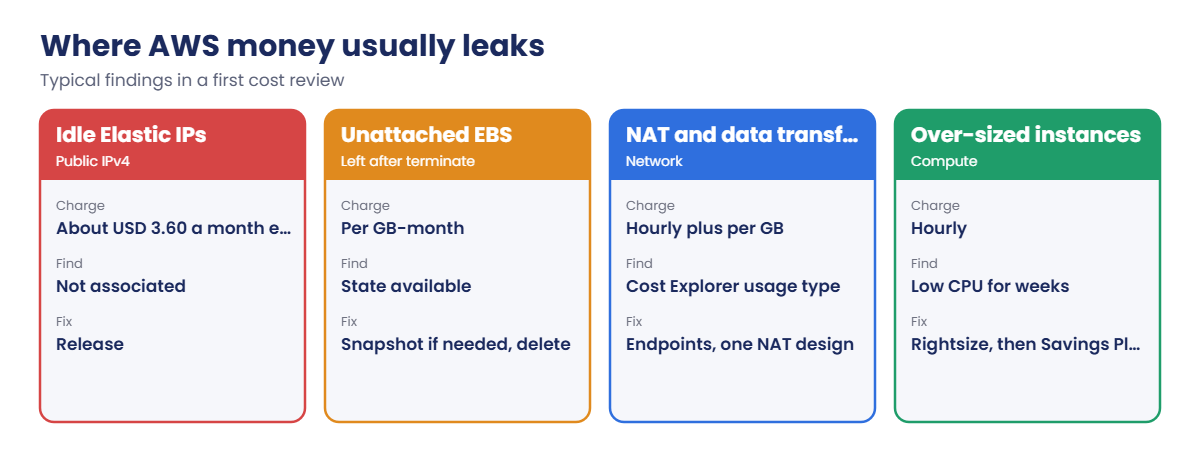
Common waste: unassociated Elastic IPs (all public IPv4 is charged), unattached volumes, old snapshots, idle NAT gateways and load balancers, and log groups without retention.

How it works, step by step

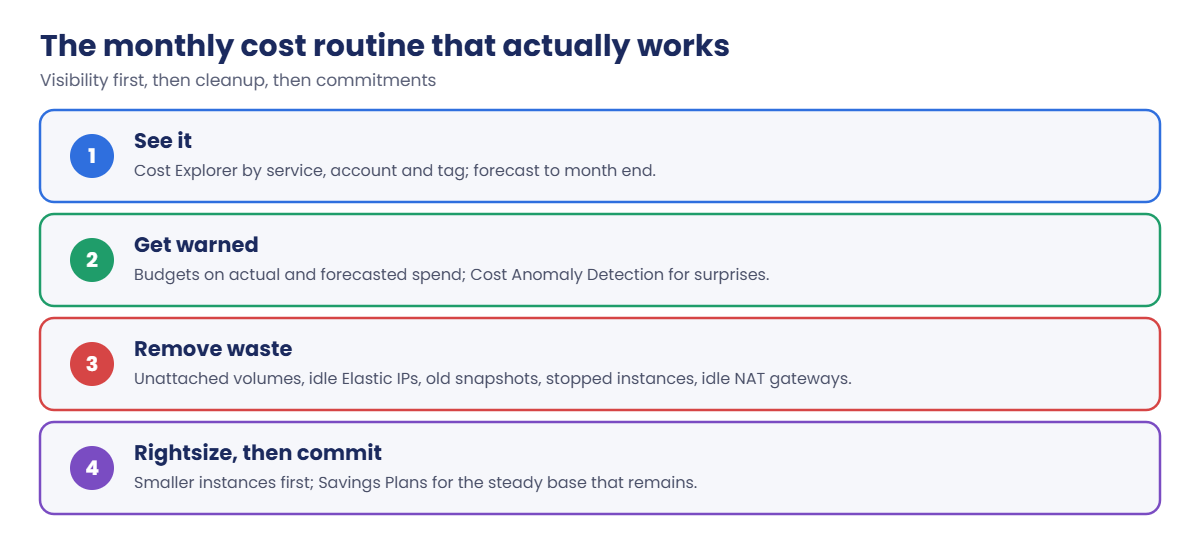
Here is the routine you’ll practise:

AWS cost optimization routine: see it, get warned, remove waste, rightsize then commit

1See it

Group cost by service and by tag. “Which team or project spent this?” only works if resources are tagged and the tag is activated.

2Get warned

Budgets on forecasted spend warn you mid-month, while you can still act; budgets on actual spend confirm what happened.

3Remove waste, then commit

Most first reviews find the same leaks:

Where AWS money leaks: idle Elastic IPs, unattached EBS, NAT and data transfer, over-sized instances

Committing to Savings Plans before cleaning up locks you into paying for waste for a year or three. Clean up and rightsize first.

✅ Checkpoint: You can explain cost allocation tags, actual versus forecasted budget alerts, why Savings Plans come last, and the common sources of waste.

Hands-on lab: AWS cost optimization from the CLI

Sign in and set your alert email:

cd C:\aws-lab
aws login --profile saat-admin
$env:AWS_PROFILE = 'saat-admin'
$acct = aws sts get-caller-identity --query Account --output text
$email = 'you@example.com'

1See month-to-date cost by service and tag

Paste this whole block (two Cost Explorer calls, USD 0.02):

$today = Get-Date
if ($today.Day -eq 1) { $start = $today.AddMonths(-1).ToString('yyyy-MM-01') } else { $start = $today.ToString('yyyy-MM-01') }
$end = $today.ToString('yyyy-MM-dd')
$r = aws ce get-cost-and-usage --time-period "Start=$start,End=$end" --granularity MONTHLY --metrics UnblendedCost --group-by Type=DIMENSION,Key=SERVICE --output json | ConvertFrom-Json
$byService = $r.ResultsByTime[0].Groups | ForEach-Object { [pscustomobject]@{ Service = $_.Keys[0]; USD = [math]::Round([double]$_.Metrics.UnblendedCost.Amount, 2) } } | Sort-Object USD -Descending
$byService | Select-Object -First 4 | Format-Table -AutoSize
$t = aws ce get-cost-and-usage --time-period "Start=$start,End=$end" --granularity MONTHLY --metrics UnblendedCost --group-by Type=TAG,Key=course --output json | ConvertFrom-Json
$t.ResultsByTime[0].Groups | ForEach-Object { "{0,-28} {1:N2}" -f $_.Keys[0], [double]$_.Metrics.UnblendedCost.Amount }

You should see something like this (your numbers will differ):

Service                                  USD
-------                                  ---
Amazon Elastic Compute Cloud - Compute   1.84
Amazon Virtual Private Cloud             1.12
Amazon Simple Storage Service            0.21
AWS Key Management Service               0.08
course$                      0.31
course$saatvedha-aws         3.42

course$ is untagged spend: things like tax lines, some data transfer, and resources created without the tag. In a real company, a large untagged share is the first thing to fix, because nobody can own it. VPC cost is mostly the interface endpoints you create in labs.
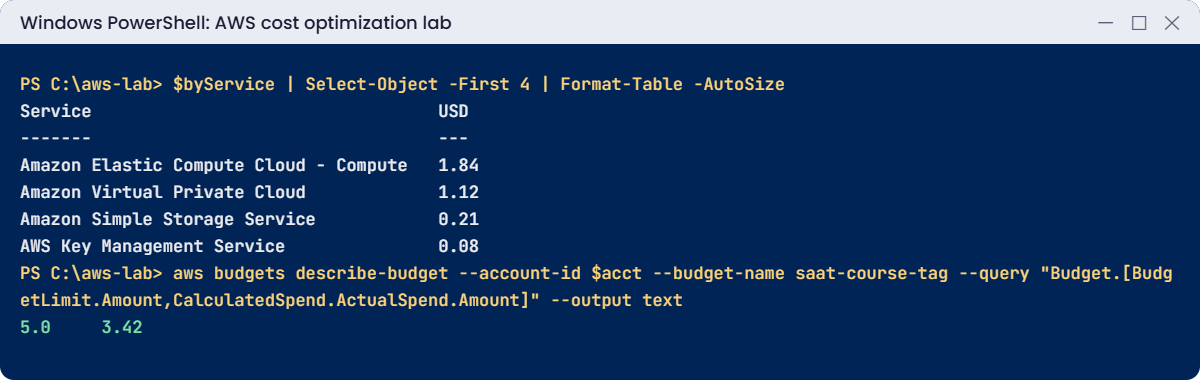
AWS cost optimization lab output: month-to-date cost by service and tag budget spend
Month-to-date cost by service and the tag budget. Something like this.

2Budget the course tag

Paste this whole block. Confirm nothing; budget emails need no subscription:

@'
{
  "BudgetName": "saat-course-tag",
  "BudgetLimit": { "Amount": "5", "Unit": "USD" },
  "TimeUnit": "MONTHLY",
  "BudgetType": "COST",
  "CostFilters": { "TagKeyValue": [ "user:course$saatvedha-aws" ] }
}
'@ | Set-Content budget.json
@'
[
  { "Notification": { "NotificationType": "ACTUAL", "ComparisonOperator": "GREATER_THAN", "Threshold": 80, "ThresholdType": "PERCENTAGE" },
    "Subscribers": [ { "SubscriptionType": "EMAIL", "Address": "EMAIL_ADDRESS" } ] },
  { "Notification": { "NotificationType": "FORECASTED", "ComparisonOperator": "GREATER_THAN", "Threshold": 100, "ThresholdType": "PERCENTAGE" },
    "Subscribers": [ { "SubscriptionType": "EMAIL", "Address": "EMAIL_ADDRESS" } ] }
]
'@ -replace 'EMAIL_ADDRESS', $email | Set-Content budget-notifications.json
aws budgets create-budget --account-id $acct --budget file://budget.json --notifications-with-subscribers file://budget-notifications.json
Start-Sleep 30
aws budgets describe-budget --account-id $acct --budget-name saat-course-tag --query "Budget.[BudgetLimit.Amount,CalculatedSpend.ActualSpend.Amount]" --output text

You should see something like this (spend can take a few hours to appear for a new budget):

5.0     3.42

You’ll get an email when course-tagged spend passes 80 percent of USD 5, and earlier if AWS forecasts you’ll pass USD 5 by month end. Note the filter format: user:course$saatvedha-aws, with the user: prefix for your own tags.

3Ask about Savings Plans

Paste this whole block:

aws ce get-savings-plans-purchase-recommendation --savings-plans-type COMPUTE_SP --term-in-years ONE_YEAR --payment-option NO_UPFRONT --lookback-period-in-days THIRTY_DAYS --query 'length(SavingsPlansPurchaseRecommendation.SavingsPlansPurchaseRecommendationDetails || `[]`)'

You should see this in a lab account:

0

No recommendation, because nothing in a lab account runs steadily. In a company running 40 servers all month, this call suggests an hourly commitment and the expected saving. Buy only what covers the floor of your usage, after rightsizing.

4Write a waste finder

Paste this whole block. It saves Find-Waste.ps1 and runs it:

@'
param([string]$Region = 'ap-south-1')
# Rough Mumbai list prices; check the pricing pages for your Region.
$gp3PerGb = 0.0912; $snapPerGb = 0.05; $ipv4PerMonth = 3.65
$rows = @()
foreach ($l in @(aws ec2 describe-volumes --region $Region --filters Name=status,Values=available --query "Volumes[].[VolumeId,Size,VolumeType,AvailabilityZone]" --output text)) {
  if (-not $l) { continue }
  $id, $size, $type, $az = $l -split "`t"
  $rows += [pscustomobject]@{ Type = 'EBSVolume'; Id = $id; Detail = "$size GiB $type, $az"; EstUsdPerMonth = [math]::Round([double]$size * $gp3PerGb, 2) }
}
foreach ($l in @(aws ec2 describe-addresses --region $Region --query "Addresses[?AssociationId==null].[AllocationId,PublicIp]" --output text)) {
  if (-not $l) { continue }
  $id, $ip = $l -split "`t"
  $rows += [pscustomobject]@{ Type = 'ElasticIP'; Id = $id; Detail = $ip; EstUsdPerMonth = $ipv4PerMonth }
}
foreach ($l in @(aws ec2 describe-snapshots --region $Region --owner-ids self --query "Snapshots[].[SnapshotId,VolumeSize,StartTime]" --output text)) {
  if (-not $l) { continue }
  $id, $size, $start = $l -split "`t"
  if ([datetime]$start -lt (Get-Date).AddDays(-90)) { $rows += [pscustomobject]@{ Type = 'OldSnapshot'; Id = $id; Detail = "$size GiB, $start"; EstUsdPerMonth = [math]::Round([double]$size * $snapPerGb, 2) } }
}
foreach ($l in @(aws ec2 describe-instances --region $Region --filters Name=instance-state-name,Values=stopped --query "Reservations[].Instances[].[InstanceId,InstanceType]" --output text)) {
  if (-not $l) { continue }
  $id, $type = $l -split "`t"
  $rows += [pscustomobject]@{ Type = 'StoppedEC2'; Id = $id; Detail = "$type (volumes still billed)"; EstUsdPerMonth = $null }
}
if ($rows) { $rows | Format-Table -AutoSize } else { "No waste found in $Region" }
'@ | Set-Content C:\aws-lab\Find-Waste.ps1
.\Find-Waste.ps1

In a clean lab account you should see this:

No waste found in ap-south-1

Run it in each Region you use, monthly. It looks for unattached volumes, Elastic IPs not attached to anything, snapshots older than 90 days and stopped instances, whose volumes are still billed. Cost Explorer and AWS Trusted Advisor have similar checks, but a script you own can run anywhere and feed a report.
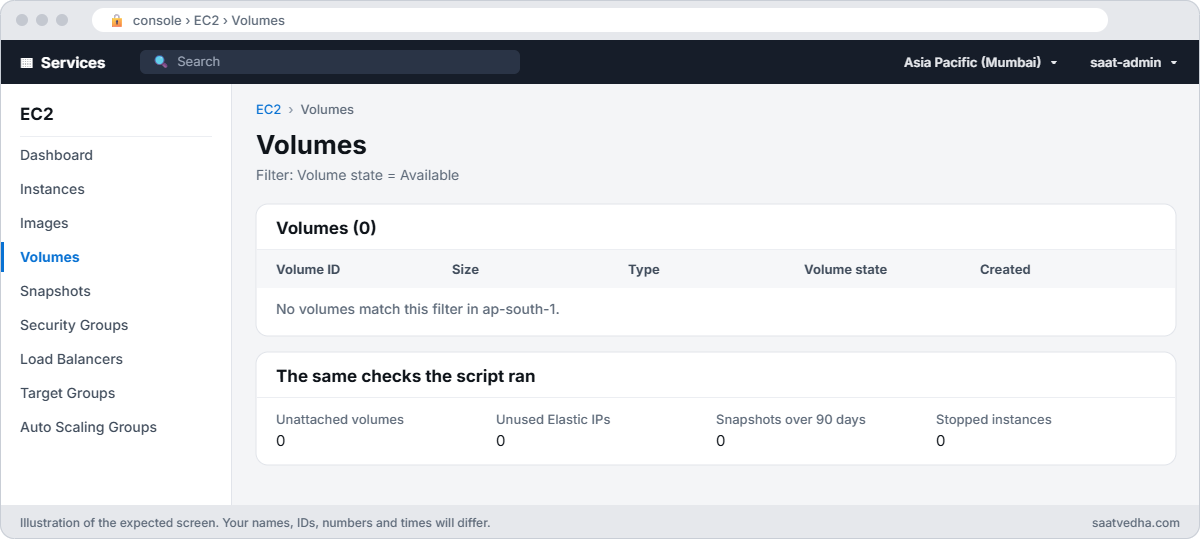
EC2 console volume list filtered to available volumes with no results in ap-south-1
A clean Region in the console: no unattached volumes, idle Elastic IPs, old snapshots or forgotten stopped servers.

✅ Checkpoint: You broke down this month’s cost by service and tag, created the saat-course-tag budget with actual and forecast alerts, saw the Savings Plans recommendation, and Find-Waste.ps1 reports a clean account.

Break It, Then Fix It

A script that fails once a month, and the leftovers that cost money every hour.

1Break it: run a cost report on the 1st of the month

Simulate the 1st, when “start of month to today” means the same date twice:

$today = (Get-Date).ToString('yyyy-MM-dd')
aws ce get-cost-and-usage --time-period "Start=$today,End=$today" --granularity MONTHLY --metrics UnblendedCost

You’ll get this error:

An error occurred (ValidationException) when calling the GetCostAndUsage operation: Start date (and hour) should be before end date (and hour)

The end date is exclusive, so an empty range is invalid. Scheduled cost reports that work all month fail every 1st, which is exactly when finance wants last month’s numbers. Fix: handle the 1st explicitly, as step 1 does: report the previous month, or use an end date of tomorrow for “today so far”.

2Break it: leave an Elastic IP and a volume behind

Create the two most common leftovers, then run the waste finder:

$eip = aws ec2 allocate-address --domain vpc --tag-specifications 'ResourceType=elastic-ip,Tags=[{Key=course,Value=saatvedha-aws},{Key=lesson,Value=36}]' --query AllocationId --output text
$vol = aws ec2 create-volume --availability-zone ap-south-1a --size 1 --volume-type gp3 --tag-specifications 'ResourceType=volume,Tags=[{Key=course,Value=saatvedha-aws},{Key=lesson,Value=36}]' --query VolumeId --output text
aws ec2 wait volume-available --volume-ids $vol
.\Find-Waste.ps1

You should see something like this:

Type      Id                         Detail            EstUsdPerMonth
----      --                         ------            --------------
EBSVolume vol-0a1b2c3d4e5f60082      1 GiB gp3, ap-south-1a          0.09
ElasticIP eipalloc-0a1b2c3d4e5f60081 13.234.56.78                    3.65
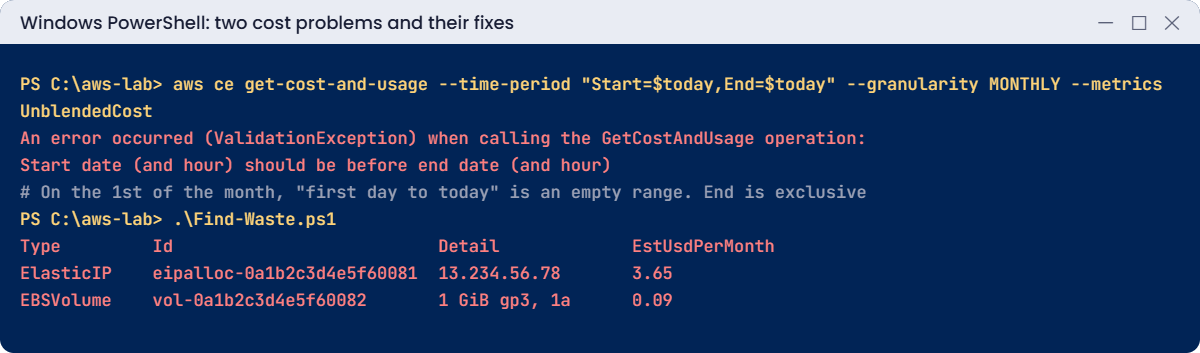
Cost problems: Cost Explorer empty date range on the 1st, idle Elastic IP and volume found
Both problems and their fixes. Something like this.

An Elastic IP not attached to anything costs about USD 3.65 a month, more than this small volume. In big accounts there are often hundreds of each, left behind by deleted servers, NAT gateways and tests. Fix: release and delete what nobody owns (snapshot volumes first if anyone might need the data), and schedule the script:

aws ec2 release-address --allocation-id $eip
aws ec2 delete-volume --volume-id $vol
aws budgets delete-budget --account-id $acct --budget-name saat-course-tag
Remove-Item budget.json, budget-notifications.json
.\Find-Waste.ps1

You should see this:

No waste found in ap-south-1

The budgets from Lesson 2 stay. Keep Find-Waste.ps1 and run it after every lab, next to Find-LabResources.ps1.

✅ Checkpoint: You fixed the 1st-of-month date bug and found and removed an idle Elastic IP and an unattached volume. The extra budget is deleted and Find-Waste.ps1 is saved.

This happened at work

The NAT gateways nobody remembered

A media company’s AWS bill rose 30 percent over six months with no new products. Cost Explorer by service showed EC2-Other as the biggest growth, which tells you almost nothing on its own.

Grouping by usage type found it: NAT gateway hours and NAT data processing. Each new test VPC created by a template got three NAT gateways, one per zone, and test VPCs were rarely deleted. There were 41 of them.

Worse, servers pulled container images and S3 data through NAT instead of VPC endpoints, paying per GB.

They deleted idle VPCs, added S3 and ECR endpoints, used one NAT gateway in test VPCs, tagged everything with an owner, and set budgets per team with forecast alerts. The bill dropped below where it had started, and a Compute Savings Plan on the remaining steady base cut another fifth.

Common mistakes and troubleshooting

MistakeWhat happensWhat to do
Buying Savings Plans before cleanupPaying for waste for yearsClean up and rightsize first; cover the steady base
Tags not activated for cost allocationTag reports show nothingActivate tags in Billing; they apply from activation onwards
Budgets on actual spend onlyYou learn after the money is spentAdd forecasted alerts
Cost scripts with start equal to endFail on the 1st of every monthEnd is exclusive; handle the 1st
Idle Elastic IPs and unattached volumesCharges every hour, foreverRun a waste finder monthly in every Region
Traffic through NAT that could use endpointsPer-GB processing chargesGateway endpoints for S3 and DynamoDB, interface endpoints where volume justifies

Interview questions

Click a question to open it. Each one is written the way an interviewer would ask it. Under it you will see why they ask it and one way you could answer, in your own words.

Fresher level

1. Your manager says this month’s AWS bill is higher than usual and asks you to find out why. Where would you start?

Why they ask this: They want to know you can use the basic cost tools on your own. Every admin gets asked about the bill sooner or later.

How you might answer: I’d open Cost Explorer and group by service first, then compare this month with last month to see which service grew the most. Then I’d break that service down by usage type, account, Region and cost allocation tags.

That usually points me to the exact resources and the team that owns them.

2. What’s the difference between an actual budget alert and a forecasted budget alert?

Why they ask this: They are checking that you know how to get warned early, not only after the money is spent. Forecasted alerts give you time to act.

How you might answer: An actual alert fires when spend has already reached the threshold. A forecasted alert fires when AWS predicts you’ll go over by the end of the period.

I like to set both, because the forecasted one gives me time to fix things before the month closes.

3. If you had one hour to look for wasted money in an AWS account, what would you check first?

Why they ask this: They want to see practical experience with common waste. These are the quick wins every cost review finds.

How you might answer: I’d look for unattached EBS volumes, unassociated Elastic IPs and old snapshots first, because they’re easy to find and safe to clean up. Then I’d check for idle NAT gateways and load balancers, over-sized instances, and log groups without retention.

2–5 years experience

4. Finance asks if you should buy Savings Plans. How would you decide, and which type would you pick?

Why they ask this: They want to see that you think before committing money for a long time. Buying commitments too early locks in waste.

How you might answer: I’d only buy Savings Plans for steady, predictable usage, and only after rightsizing and cleanup, so I’m not committing to waste. Compute Savings Plans are flexible across instance families, Regions, Fargate and Lambda.

EC2 Instance Savings Plans give a bigger discount, but only for a fixed instance family and Region, so I’d pick them only where that usage won’t change.

5. You built a cost report by the Team tag, but last month shows nothing. Why might that be?

Why they ask this: They are checking that you understand how cost allocation tags work. This catches out a lot of people the first time they report by tag.

How you might answer: Either the tag wasn’t activated for cost allocation at that time, or the resources weren’t tagged. Activating a tag only applies to costs from that point on, so it won’t fill in last month.

That’s why I activate the important tags early, as soon as a new account is set up.

6. The “EC2-Other” line on your bill doubled this month. How would you investigate it?

Why they ask this: They want to see that you know what hides inside this confusing cost line. It’s a very common question in real cost reviews.

How you might answer: EC2-Other isn’t instances. It includes EBS volumes and snapshots, NAT gateway hours and data, data transfer and Elastic IPs.

So I’d group by usage type in Cost Explorer to see which one grew, then find the resources and owners behind it.

Senior level

7. A company spending USD 200,000 a month on AWS has no cost control at all. How would you set up FinOps practices for them?

Why they ask this: They want to see cost governance at scale: ownership, visibility, alerts and regular review. They are checking that you can make cost everyone’s job, not only finance’s.

How you might answer: I’d make owner and cost-centre tags mandatory, enforced by tag policies and SCPs, and give each team its own account. Each account would get budgets with forecasts, plus anomaly detection.

Every month we’d review Cost Explorer and the Cost and Usage Report in Athena, rightsize with Compute Optimizer, and shut down non-prod on a schedule. I’d review the Savings Plans strategy every quarter.

8. Developers have sandbox accounts, and one of them accidentally left something huge running. How would you stop a runaway cost like that automatically?

Why they ask this: They want to see that you build guardrails, not only reports. They are checking that you can limit damage without someone watching all the time.

How you might answer: I’d set a budget with a budget action that kicks in when actual spend passes a threshold. The action can apply a restrictive SCP or IAM policy, or stop the instances.

I’d also send anomaly alerts to the account owner, so they know what happened and why.

Quick quiz

Q1. Why should Savings Plans come after cleanup?

  1. They are cheaper later
  2. Otherwise you commit to paying for waste
  3. They need tags
  4. They only cover S3
Show answer

B — Rightsize and clean up, then commit to the steady base.

Q2. What does course$ mean in a tag cost report?

  1. A broken tag
  2. Cost with no value for the course tag
  3. Tax only
  4. Credits only
Show answer

B — It is untagged spend for that tag key.

Q3. Why did the cost query fail with Start equal to End?

  1. Wrong Region
  2. End date is exclusive, so the range was empty
  3. No permission
  4. Cost Explorer was off
Show answer

B — Handle the 1st of the month explicitly.

Q4. Which budget alert warns you before money is spent?

  1. Actual
  2. Forecasted
  3. Both equally
  4. Neither
Show answer

B — Forecasted alerts give time to act.

Q5. What does an unassociated Elastic IP cost?

  1. Nothing
  2. About USD 3.65 a month
  3. USD 100 a month
  4. Only data transfer
Show answer

B — All public IPv4 addresses are charged hourly.

Quick recap

  • See cost by service, usage type and activated tags in Cost Explorer.
  • Budgets with forecasted alerts warn you in time.
  • Find and remove idle Elastic IPs, unattached volumes and old snapshots regularly.
  • Rightsize and clean up before buying Savings Plans.
  • Cost Explorer end dates are exclusive; handle the 1st of the month.

Next lesson

Lesson 37: Site-to-Site VPN and Direct Connect → You’ll connect a simulated office network to saat-vpc with a Site-to-Site VPN and learn when Direct Connect is worth it.

Further reading: AWS cost optimization

Want to go deeper into AWS cost optimization? Read Analyzing your costs with AWS Cost Explorer and Managing your costs with AWS Budgets. You can also see the full plan for this course on the AWS Cloud Administration course page.

Scroll to Top