Secure RDS SQL Server: KMS, TLS, security groups
-
Phase 0: Before you start
-
Phase 1: The foundation
-
Phase 2: Operations and security
-
Phase 3: SQL Server on AWS
-
Phase 4: Troubleshooting step by step
-
Phase 5: Final project and career
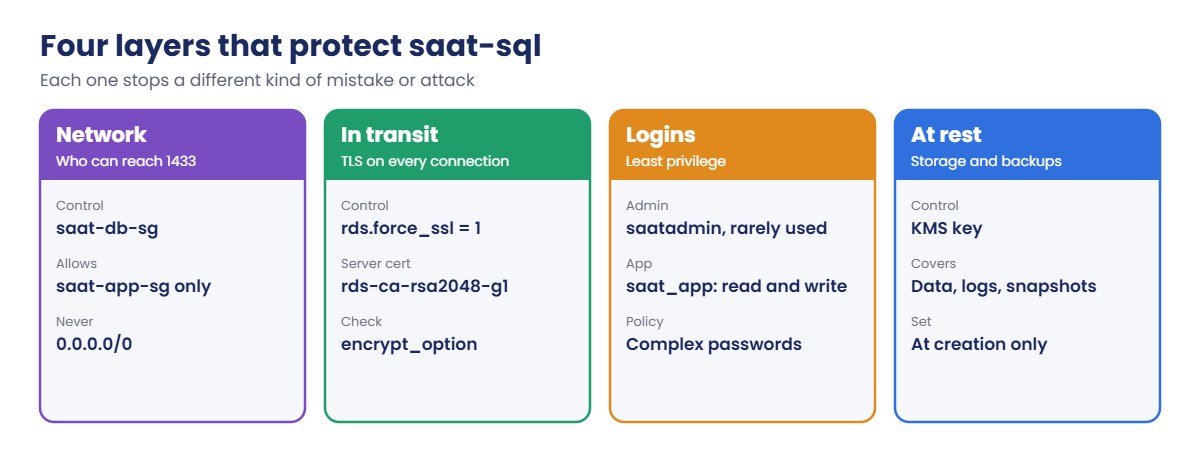
Databases hold the data attackers want most. RDS SQL Server security comes in layers: who can reach port 1433, whether every connection is encrypted, which login can do what, and whether the disks and backups are encrypted. Miss one layer and the others carry more weight than they should.
You’ll confirm encryption at rest and the server certificate, force TLS on every connection with rds.force_ssl, create a least-privilege login for applications, and review the network rule that protects saat-sql. Then you’ll fix a weak password that SQL Server refuses and a security group change that cuts everyone off.
| Time | You need | By the end you can |
|---|---|---|
| 50 minutes (including one reboot of saat-sql) | Lessons 42 and 43 done (saat-sql, Start-SqlLab.ps1, Stop-SqlLab.ps1), your laptop signed in as saat-admin. Cost: about USD 0.20 for the session. | Check KMS encryption and the RDS certificate authority, enforce TLS with a static parameter and a planned reboot, verify session encryption, create least-privilege SQL logins, and troubleshoot password policy and security group problems. |
What it is, in one line
RDS SQL Server security is the combination of network rules, encryption in transit and at rest, and least-privilege logins that keeps your database and its data private.
In Simple Words
A bank with guards, armoured vans and limited keys
A bank doesn’t rely on one lock. There’s a guard at the gate who checks who may enter (security groups). Money travels between branches only in armoured vans (TLS).
The vault is locked even if someone gets inside (encryption at rest).
And staff get only the keys they need. A cashier can open the cash drawer, not the vault. That is a least-privilege login.
If the guard lets nobody in, not even staff, the bank is safe but useless for the day. Security rules must be exact, not just tight.
Engineer's View
How each layer works on RDS for SQL Server
Encryption at rest uses a KMS key for storage, automated backups, snapshots and read replicas. It’s chosen when the instance is created; to change it you copy a snapshot with a new key and restore. Transparent Data Encryption (TDE) is also available through an option group for Standard and Enterprise editions when you need database-level encryption.
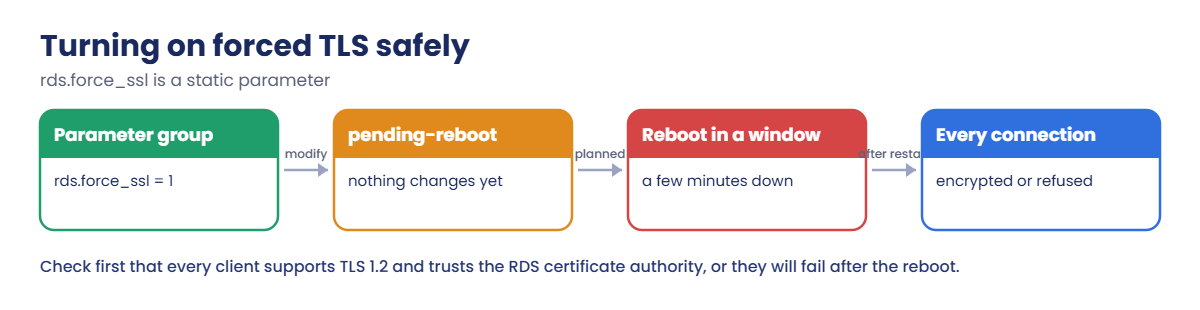
Encryption in transit: every RDS SQL Server has a server certificate signed by an RDS certificate authority such as rds-ca-rsa2048-g1. Setting the static parameter rds.force_ssl to 1 and rebooting makes the server refuse unencrypted connections. Clients that validate the certificate need the RDS CA bundle in their trust store; CA rotations are a recurring operational task with deadlines.
Logins: SQL logins follow the Windows password policy (complexity and length) by default; custom password policies aren’t supported. Give apps their own login with database roles such as db_datareader and db_datawriter, never the master user. Network: the instance’s security group should allow 1433 only from app and admin security groups.
CloudTrail and the exported error log record management changes and failed logins.
How it works, step by step
The four layers, from the outside in:
1Network decides who can knock
saat-db-sg allows 1433 only from saat-app-sg. Your laptop gets in through sqljump, which is in that group.
2TLS protects what travels
With forced TLS, a client that won’t encrypt is refused at connect time, before any login.
3Logins limit what’s possible
The app login can read and write rows, nothing else. Forcing TLS needs a planned restart:
4Encryption at rest covers the rest
Storage, backups and snapshots are encrypted with KMS, so a copied snapshot is useless without the key (Lesson 30).
✅ Checkpoint: You can describe the four layers, explain why rds.force_ssl needs a reboot, and why apps get their own login.
Hands-on lab: RDS SQL Server security in four layers
Sign in and start the SQL lab:
cd C:\aws-lab
aws login --profile saat-admin
$env:AWS_PROFILE = 'saat-admin'
$v = Get-Content C:\aws-lab\saat-vpc.json | ConvertFrom-Json
.\Start-SqlLab.ps11Check encryption at rest and the certificate
Paste this whole block:
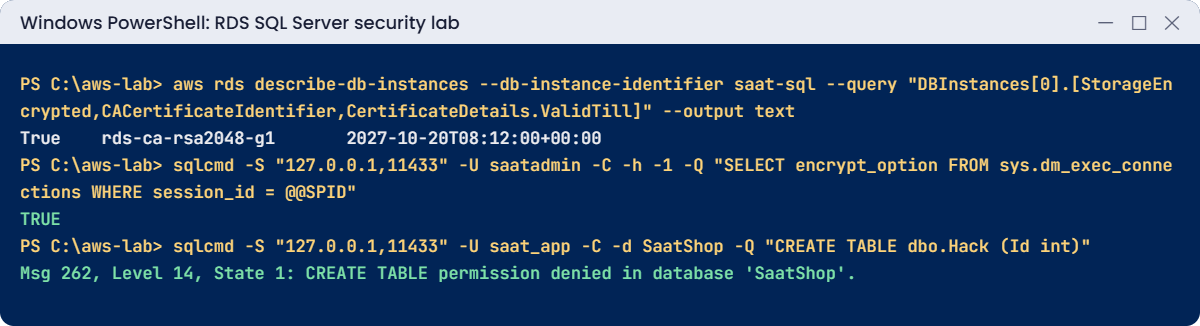
aws rds describe-db-instances --db-instance-identifier saat-sql --query "DBInstances[0].[StorageEncrypted,CACertificateIdentifier,CertificateDetails.ValidTill]" --output text
aws rds describe-db-instances --db-instance-identifier saat-sql --query "DBInstances[0].KmsKeyId" --output text | ForEach-Object { aws kms describe-key --key-id $_ --query "KeyMetadata.[KeyManager,Description]" --output text }
aws rds describe-certificates --query "Certificates[?CertificateIdentifier=='rds-ca-rsa2048-g1'].[CertificateIdentifier,ValidTill,CustomerOverride]" --output textYou should see something like this:
True rds-ca-rsa2048-g1 2027-10-20T08:12:00+00:00
AWS Default key that protects my RDS database volumes when no other key is defined
rds-ca-rsa2048-g1 2061-05-25T23:34:57+00:00 FalseStorage uses the AWS managed key aws/rds. Production often uses a customer managed key so access to snapshots can be controlled and audited separately. The server certificate expires in about a year and renews automatically; the CA itself lasts much longer.
2Force TLS on every connection
Paste this whole block. The reboot takes a few minutes:
'[ { "ParameterName": "rds.force_ssl", "ParameterValue": "1", "ApplyMethod": "pending-reboot" } ]' | Set-Content force-ssl.json
aws rds modify-db-parameter-group --db-parameter-group-name saat-sqlserver-ex-16 --parameters file://force-ssl.json | Out-Null
Start-Sleep 20
aws rds describe-db-instances --db-instance-identifier saat-sql --query "DBInstances[0].DBParameterGroups[0].ParameterApplyStatus" --output text
aws rds reboot-db-instance --db-instance-identifier saat-sql --query "DBInstance.DBInstanceStatus" --output text
aws rds wait db-instance-available --db-instance-identifier saat-sql
aws rds describe-db-instances --db-instance-identifier saat-sql --query "DBInstances[0].DBParameterGroups[0].ParameterApplyStatus" --output text
sqlcmd -S "127.0.0.1,11433" -U saatadmin -C -N true -h -1 -Q "SET NOCOUNT ON; SELECT encrypt_option FROM sys.dm_exec_connections WHERE session_id = @@SPID"You should see something like this:
pending-reboot
rebooting
in-sync
TRUEThe tunnel window keeps working through the reboot, because each new connection is forwarded fresh. From now on, any client that doesn’t encrypt is refused. -C still trusts the certificate without checking it, because your laptop connects to 127.0.0.1 rather than the RDS name; apps inside the VPC should validate the certificate against the RDS CA bundle.
3Create a least-privilege app login
Paste this whole block:
$appPw = aws secretsmanager get-random-password --password-length 24 --exclude-punctuation --require-each-included-type --query RandomPassword --output text
sqlcmd -S "127.0.0.1,11433" -U saatadmin -C -Q "CREATE LOGIN saat_app WITH PASSWORD = '$appPw', DEFAULT_DATABASE = SaatShop"
sqlcmd -S "127.0.0.1,11433" -U saatadmin -C -d SaatShop -Q "CREATE USER saat_app FOR LOGIN saat_app; ALTER ROLE db_datareader ADD MEMBER saat_app; ALTER ROLE db_datawriter ADD MEMBER saat_app;"
$adminPw = $env:SQLCMDPASSWORD; $env:SQLCMDPASSWORD = $appPw
sqlcmd -S "127.0.0.1,11433" -U saat_app -C -d SaatShop -h -1 -Q "SET NOCOUNT ON; SELECT COUNT(*) FROM dbo.Orders"
sqlcmd -S "127.0.0.1,11433" -U saat_app -C -d SaatShop -Q "CREATE TABLE dbo.Hack (Id int)"
$env:SQLCMDPASSWORD = $adminPwYou should see something like this:
3
Msg 262, Level 14, State 1, Server EC2AMAZ-ABC123, Line 1
CREATE TABLE permission denied in database 'SaatShop'.The app login reads the three orders but can’t change the schema. If the app is ever compromised, the attacker gets row access to one database, not control of the server. In production the password goes into Secrets Manager and the app reads it with its role (Lesson 31).
4Review the network rule
Paste this whole block:
aws ec2 describe-security-group-rules --filters "Name=group-id,Values=$($v.DbSg)" --query 'SecurityGroupRules[?IsEgress==`false`].[IpProtocol,FromPort,ReferencedGroupInfo.GroupId,CidrIpv4]' --output text
$v.AppSgYou should see something like this:
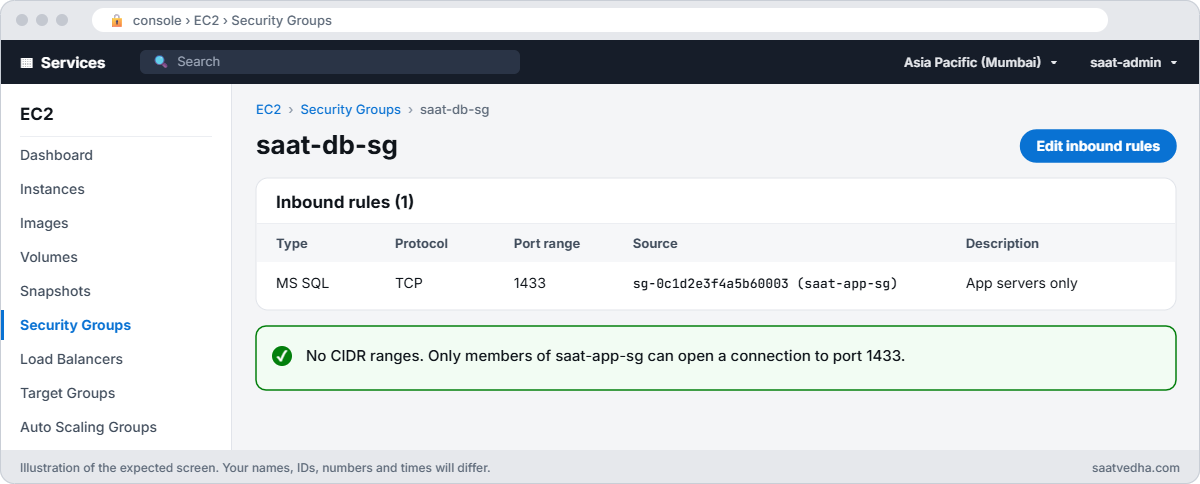
tcp 1433 sg-0c1d2e3f4a5b60003 None
sg-0c1d2e3f4a5b60003One inbound rule: TCP 1433 from saat-app-sg, no CIDR ranges at all. That’s the shape to aim for in production too: reference security groups, not IP ranges, and give admins access through a controlled path.
✅ Checkpoint: Storage is encrypted, rds.force_ssl is in-sync and your session shows encrypt_option TRUE, saat_app can read but not create tables, and saat-db-sg allows 1433 only from saat-app-sg.
Break It, Then Fix It
One mistake security stops, one security mistake that stops everything.
1Break it: a weak app password
Try to create a second login the way many scripts still do:
sqlcmd -S "127.0.0.1,11433" -U saatadmin -C -Q "CREATE LOGIN saat_report WITH PASSWORD = 'shop123'"You’ll get an error like this:
Msg 15118, Level 16, State 1, Server EC2AMAZ-ABC123, Line 1
Password validation failed. The password does not meet the operating system policy requirements because it is not complex enough.RDS applies the Windows password policy to SQL logins. Some teams “fix” this with CHECK_POLICY = OFF, which is exactly the wrong lesson. Fix: generate passwords, store them in Secrets Manager, and leave the policy on:
$rptPw = aws secretsmanager get-random-password --password-length 24 --exclude-punctuation --require-each-included-type --query RandomPassword --output text
sqlcmd -S "127.0.0.1,11433" -U saatadmin -C -Q "CREATE LOGIN saat_report WITH PASSWORD = '$rptPw'; SELECT name, is_policy_checked FROM sys.sql_logins WHERE name LIKE 'saat[_]%'"You should see something like this:
name is_policy_checked
saat_app 1
saat_report 12Break it: remove the app tier’s access
Someone tidies up saat-db-sg and removes the 1433 rule. Remove it, then connect:
aws ec2 revoke-security-group-ingress --group-id $v.DbSg --protocol tcp --port 1433 --source-group $v.AppSg | Out-Null
Start-Sleep 5
sqlcmd -S "127.0.0.1,11433" -U saatadmin -C -l 15 -Q "SELECT 1"sqlcmd fails after its 15-second login timeout, and the tunnel window shows something like this:
Connection to destination port failed, check SSM Agent logs.
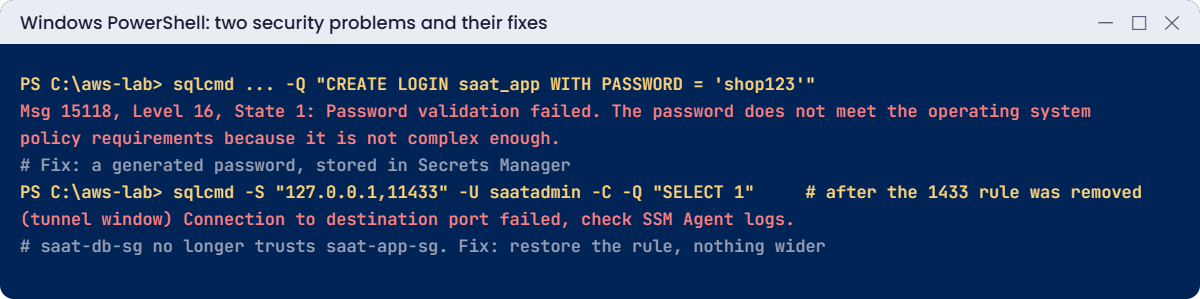
Every app server in saat-app-sg just lost its database too. The error looks like a network outage, not a security change, so people restart servers first. CloudTrail’s RevokeSecurityGroupIngress event (Lesson 25) tells you what really happened.
Fix: put back exactly the rule that was there, never something wider like 10.0.0.0/8:
aws ec2 authorize-security-group-ingress --group-id $v.DbSg --ip-permissions "IpProtocol=tcp,FromPort=1433,ToPort=1433,UserIdGroupPairs=[{GroupId=$($v.AppSg),Description=1433-from-app-sg}]" | Out-Null
sqlcmd -S "127.0.0.1,11433" -U saatadmin -C -h -1 -Q "SET NOCOUNT ON; SELECT 'connected'"You should see this:
connectedClean up the test logins and stop the lab. rds.force_ssl stays on for the rest of the course:
sqlcmd -S "127.0.0.1,11433" -U saatadmin -C -d SaatShop -Q "DROP USER saat_app;"
sqlcmd -S "127.0.0.1,11433" -U saatadmin -C -Q "DROP LOGIN saat_app; DROP LOGIN saat_report;"
Remove-Item force-ssl.json
.\Stop-SqlLab.ps1✅ Checkpoint: You saw SQL Server refuse a weak password and fixed it properly, and restored a removed security group rule exactly. The test logins are gone, forced TLS stays on, and saat-sql is stopping.
This happened at work
The reporting login that could do everything
A logistics company gave its new reporting tool the RDS master login “for now”, because it needed to read from several databases. The tool’s connection string sat in a config file on a shared reporting server.
A contractor’s laptop with access to that share was infected. The attacker found the config, connected, and since the master user could create logins and drop databases, created a hidden login and exported customer tables over several nights. TLS wasn’t forced, so the traffic also crossed the VPN unencrypted.
The company rotated the master password, removed the hidden login, forced TLS, and gave each tool its own login with read-only roles on only the databases it needed, with passwords in Secrets Manager and alerts on new logins created outside change windows.
Common mistakes and troubleshooting
| Mistake | What happens | What to do |
|---|---|---|
| Apps using the master login | A compromised app controls the server | One login per app with database roles |
| CHECK_POLICY = OFF for convenience | Weak passwords get through | Generate strong passwords; keep the policy |
| Setting rds.force_ssl without testing clients | Old clients fail after reboot | Test TLS 1.2 and the CA bundle first |
| Wide CIDR rules on 1433 | Too many machines can attack the port | Reference security groups only |
| Ignoring CA rotation deadlines | Clients fail certificate checks | Track CACertificateIdentifier and rotate in time |
| Unencrypted instance | Snapshots and backups unencrypted too | Encrypt at creation; snapshot-copy to fix |
Interview questions
Click a question to open it. Each one is written the way an interviewer would ask it. Under it you will see why they ask it and one way you could answer, in your own words.
Fresher level
1. You’re creating a new RDS SQL Server instance for customer data. How would you make sure the data is encrypted at rest?
Why they ask this: They want to know you understand when and how RDS encryption is set. Missing it at creation means a lot of extra work later.
How you might answer: I’d turn on storage encryption with a KMS key when I create the instance. That covers the data, logs, backups, snapshots and read replicas, so everything stays encrypted.
2. Security says every connection to the database must be encrypted. How would you enforce that on RDS SQL Server?
Why they ask this: They are checking that you know how to force TLS, not only allow it. They also want to see you know it needs a reboot.
How you might answer: I’d set rds.force_ssl to 1 in the instance’s parameter group. It’s a static parameter, so I’d reboot the instance at a quiet time for it to take effect.
3. A developer wants the app to connect with the master user because it’s easier. What would you tell them?
Why they ask this: They want to see that you understand least privilege and can explain it to others. This is a very common shortcut in real teams.
How you might answer: I’d explain that the master user can create logins and change any database on the instance. If the app were ever compromised, the attacker would control the whole instance.
Instead I’d create a login for the app with only the permissions it needs.
2–5 years experience
4. Right after you turned on rds.force_ssl, some clients can’t connect anymore. What would you check?
Why they ask this: They want to see a clear troubleshooting order for TLS problems. These errors are common right after forcing encryption.
How you might answer: First I’d check that the client driver supports TLS 1.2. Then I’d check whether the client validates certificates and has the RDS CA bundle, and whether the hostname it uses matches the certificate name.
I’d also look at the connection string settings, like Encrypt and TrustServerCertificate.
5. An audit finds an old RDS instance that isn’t encrypted. How would you fix it?
Why they ask this: They are checking that you know encryption can’t simply be switched on later. They also want to see you plan the cutover.
How you might answer: I’d take a snapshot, copy it with encryption turned on and a KMS key chosen, and restore a new instance from that encrypted copy. Then I’d cut the clients over to the new instance, planned with the app team.
6. What is RDS CA rotation, and why should an admin care about it?
Why they ask this: They want to see that you know about certificate expiry before it causes an outage. CA changes have broken many apps that validate certificates.
How you might answer: RDS server certificates are signed by an RDS certificate authority. When AWS brings in new CAs, I need to update the instances to the new CA and make sure the clients trust it before the old one expires.
If I don’t, any client that validates certificates will fail to connect.
Senior level
7. You’re asked to design database security for a PCI workload on RDS SQL Server. How would you approach it?
Why they ask this: They want to see layered security architecture for a regulated workload. They are checking network, encryption, identity, auditing and review.
How you might answer: I’d put the database in private subnets, with security groups that allow traffic by reference, and force TLS with certificate validation. Encryption would use customer managed KMS keys, plus TDE if required.
Each app gets its own least-privilege login with secret rotation, and people use Windows authentication through Managed AD. For auditing I’d use SQL Server Audit to S3, CloudTrail and GuardDuty RDS protection, with regular access reviews.
8. You suspect someone is misusing a database login. What do you do?
Why they ask this: They want to see a calm, ordered incident response. They are checking that you collect evidence and contain the problem.
How you might answer: First I’d check the error log and SQL Server Audit to see when and from where that login connected, and sys.dm_exec_sessions for live sessions. I’d also check CloudTrail for management changes and VPC Flow Logs for unusual sources.
Then I’d disable or rotate the login, and look for any new logins or permission changes the person may have made.
Quick quiz
Q1. Which parameter forces TLS on RDS for SQL Server?
- force_tls
- rds.force_ssl
- require_secure_transport
- ssl_mode
Show answer
B — Set it to 1 and reboot.
Q2. Why did the parameter show pending-reboot?
- It failed
- rds.force_ssl is static
- The group was wrong
- TLS is unsupported
Show answer
B — Static parameters apply at the next restart.
Q3. What did saat_app get when it tried CREATE TABLE?
- Success
- Msg 262 permission denied
- Login failed
- Timeout
Show answer
B — It only has data reader and writer roles.
Q4. Why was the password shop123 rejected?
- Too long
- Windows password policy complexity
- Wrong database
- TLS was off
Show answer
B — Msg 15118.
Q5. What should saat-db-sg reference for 1433?
- 0.0.0.0/0
- The app tier security group
- The whole VPC CIDR
- Nothing
Show answer
B — Reference security groups, not ranges.
Quick recap
- Protect RDS SQL Server in layers: network, TLS, logins and encryption at rest.
- rds.force_ssl is static: set it, plan a reboot, then verify encrypt_option.
- Apps get their own least-privilege logins; never the master user.
- Keep the password policy on; generate passwords and store them in Secrets Manager.
- Security group rules should reference app security groups; restore exact rules after mistakes.
Next lesson
Lesson 45: Windows Authentication with AWS Managed Microsoft AD → You’ll join saat-sql to a Managed Microsoft AD domain and log in with Windows accounts instead of SQL logins.
Further reading: RDS SQL Server security
Want to go deeper into RDS SQL Server security? Read Using SSL with a Microsoft SQL Server DB instance and Rotating your SSL/TLS certificate. You can also see the full plan for this course on the AWS Cloud Administration course page.
