Security groups and network ACLs
-
Phase 0: Before you start
-
Phase 1: The foundation
-
Phase 2: Operations and security
-
Phase 3: SQL Server on AWS
-
Phase 4: Troubleshooting step by step
-
Phase 5: Final project and career
Every packet that reaches a server in AWS passes two firewalls you control. This lesson on security groups vs NACL (network access control lists) shows what each one does, why one remembers connections and the other doesn’t, and which one you should reach for first.
You’ll build the three security groups the rest of the course uses: web, app and database, each one only open to the tier in front of it. Security groups and network ACLs cost nothing, so the groups stay in your account.
| Time | You need | By the end you can |
|---|---|---|
| 50 minutes | saat-vpc and saat-vpc.json from Lessons 8 and 9, your laptop signed in with aws login --profile saat-admin. | Explain stateful and stateless filtering, build a security group chain with group references, read and test network ACL rules, and fix duplicate-rule and dependency errors. |
What it is, in one line
Security groups are stateful allow-lists around each server; network ACLs are stateless, numbered allow and deny rules at the edge of a subnet.
In Simple Words
A guard at the flat door and a gate at the colony
A security group is like the guard at the door of one flat. He has a list of who may come in. When you go out to buy milk, he remembers you and lets you back in without checking the list.
A network ACL is the gate at the entrance of the whole colony. The gate has a numbered rule board and no memory. If the board says “visitors in through gate 3”, it must also say “visitors out through gate 7”, or people get stuck inside.
Most days you only talk to the flat guard. The colony gate is for big, blunt rules like “nobody from that street at all”.
Engineer's View
How the two filters work
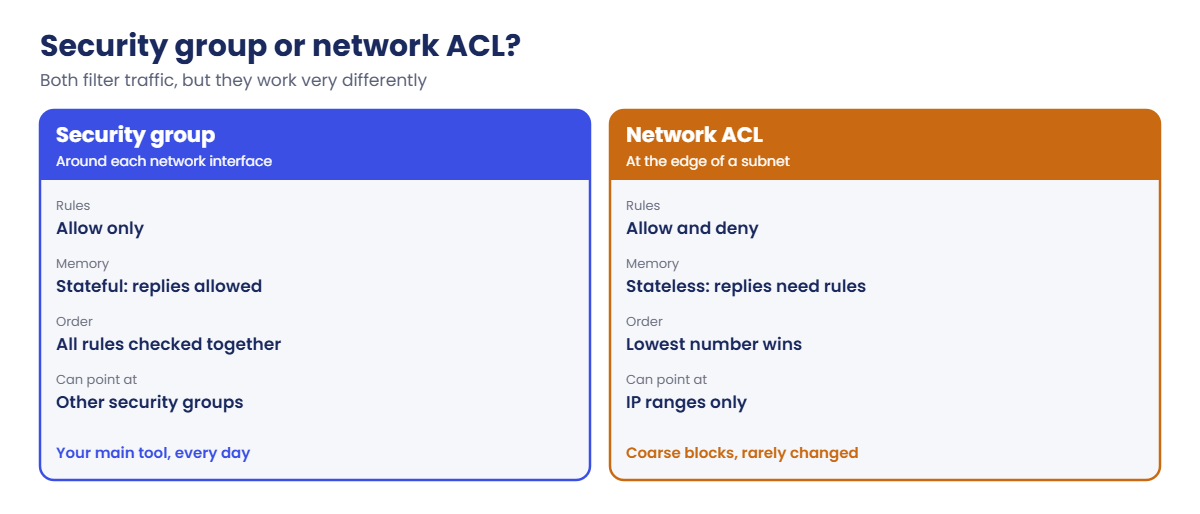
A security group is attached to network interfaces (instances, load balancers, RDS, Lambda in a VPC). It has only allow rules, for inbound and outbound. All rules are evaluated together; if any rule allows the traffic, it is allowed.
It is stateful: when an inbound connection is allowed, the reply goes out automatically, whatever the outbound rules say. New groups allow all outbound traffic and no inbound traffic.
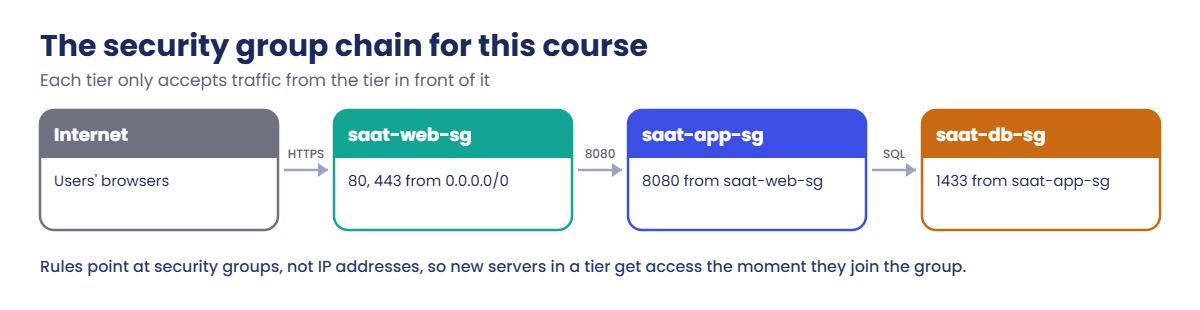
A rule’s source can be an IP range or another security group. “Allow 1433 from saat-app-sg” means “from any interface that has saat-app-sg attached”. This is how real tiers are wired, because IP addresses change and group membership doesn’t.
A network ACL is attached to subnets. It has numbered rules for inbound and outbound, evaluated from the lowest number, and the first match wins, including explicit deny rules. It is stateless: replies are checked like any other packet.
Replies to a client use a short-lived high port (an ephemeral port, typically 1024 to 65535), so an ACL that allows 443 in must also allow those ports out. The default ACL allows everything; a new custom ACL denies everything until you add rules.
How it works, step by step
Here is the path a request takes into a server in a public subnet.
1The subnet’s network ACL checks it
Inbound rules from lowest number up. In saat-vpc we keep the default ACL, which allows everything, so this check passes.
2The security group checks it
Is there any inbound rule matching the protocol, port and source? If not, the packet is dropped silently. The client just sees a timeout, never a “denied” message.
3The reply goes back
The security group lets the reply out because it remembers the connection. The network ACL checks the reply against its outbound rules like a brand-new packet.
4The next tier repeats it
The app server calls the database on 1433. saat-db-sg allows it only because the caller has saat-app-sg. A server without that group, even in the same subnet, can’t connect.
Side by side, the two filters look like this.
And this is the chain you’ll build now. Lessons 11 to 55 attach these groups to real servers and databases.
✅ Checkpoint: You can explain stateful versus stateless, and why a security group rule that points at another group is better than one that lists IP addresses.
Hands-on lab: security groups vs NACL in saat-vpc
Start as usual and load the network:
cd C:\aws-lab
aws login --profile saat-admin
$env:AWS_PROFILE = 'saat-admin'
$v = Get-Content C:\aws-lab\saat-vpc.json | ConvertFrom-Json1Create the three security groups
Paste this whole block:
function New-Sg($Name, $Desc) {
aws ec2 create-security-group --group-name $Name --description $Desc --vpc-id $v.VpcId --tag-specifications "ResourceType=security-group,Tags=[{Key=Name,Value=$Name},{Key=course,Value=saatvedha-aws},{Key=lesson,Value=10}]" --query GroupId --output text
}
$web = New-Sg 'saat-web-sg' 'Web tier: HTTP and HTTPS from the internet'
$app = New-Sg 'saat-app-sg' 'App tier: 8080 from the web tier'
$db = New-Sg 'saat-db-sg' 'Database tier: SQL Server from the app tier'
$web, $app, $dbYou should see three IDs, something like this:
sg-0a1b2c3d4e5f60718
sg-0b2c3d4e5f6a70819
sg-0c3d4e5f6a7b8091a2Add the inbound rules
Paste this whole block:
aws ec2 authorize-security-group-ingress --group-id $web --protocol tcp --port 443 --cidr 0.0.0.0/0 | Out-Null
aws ec2 authorize-security-group-ingress --group-id $web --protocol tcp --port 80 --cidr 0.0.0.0/0 | Out-Null
aws ec2 authorize-security-group-ingress --group-id $app --protocol tcp --port 8080 --source-group $web | Out-Null
aws ec2 authorize-security-group-ingress --group-id $db --protocol tcp --port 1433 --source-group $app | Out-Null3Read the rules back
Run this (note the single quotes: the backticks inside are part of the query):
aws ec2 describe-security-group-rules --filters "Name=group-id,Values=$db" --query 'SecurityGroupRules[?IsEgress==`false`].[IpProtocol,FromPort,ToPort,ReferencedGroupInfo.GroupId]' --output text
aws ec2 describe-security-group-rules --filters "Name=group-id,Values=$db" --query 'SecurityGroupRules[?IsEgress==`true`].[IpProtocol,CidrIpv4]' --output textYou should see something like this:
tcp 1433 1433 sg-0b2c3d4e5f6a70819
-1 0.0.0.0/0The first line is the only way in: SQL Server port 1433 from the app group. The second line is the default outbound rule (all protocols, anywhere).
4Save the group IDs
Run this:
foreach ($p in @{WebSg=$web; AppSg=$app; DbSg=$db}.GetEnumerator()) {
$v | Add-Member -NotePropertyName $p.Key -NotePropertyValue $p.Value -Force
}
$v | ConvertTo-Json | Set-Content C:\aws-lab\saat-vpc.json5See the default network ACL
Run this:
aws ec2 describe-network-acls --filters "Name=vpc-id,Values=$($v.VpcId)" Name=default,Values=true --query "NetworkAcls[0].Entries[].[Egress,RuleNumber,RuleAction,CidrBlock]" --output textYou should see something like this:
True 100 allow 0.0.0.0/0
True 32767 deny 0.0.0.0/0
False 100 allow 0.0.0.0/0
False 32767 deny 0.0.0.0/0Rule 100 allows everything in both directions; rule 32767 (shown as * in the console) denies anything that reached it. Because 100 comes first, everything is allowed.
6Test a stateless ACL
Create a demo network ACL (not attached to any subnet) that allows HTTPS in, and a small rule checker:
$demo = aws ec2 create-network-acl --vpc-id $v.VpcId --tag-specifications 'ResourceType=network-acl,Tags=[{Key=Name,Value=saat-nacl-demo},{Key=course,Value=saatvedha-aws},{Key=lesson,Value=10}]' --query NetworkAcl.NetworkAclId --output text
aws ec2 create-network-acl-entry --network-acl-id $demo --ingress --rule-number 100 --protocol tcp --port-range From=443,To=443 --cidr-block 0.0.0.0/0 --rule-action allow
function Test-NaclRule($NaclId, [switch]$Outbound, [int]$Port) {
$e = aws ec2 describe-network-acls --network-acl-ids $NaclId --query "NetworkAcls[0].Entries" --output json | ConvertFrom-Json
$e | Where-Object { $_.Egress -eq [bool]$Outbound } | Sort-Object RuleNumber | Where-Object {
$_.Protocol -eq '-1' -or ($_.Protocol -eq '6' -and $Port -ge $_.PortRange.From -and $Port -le $_.PortRange.To)
} | Select-Object -First 1 RuleNumber, RuleAction
}
Test-NaclRule $demo -Port 443
Test-NaclRule $demo -Outbound -Port 50123You should see this:
RuleNumber RuleAction
---------- ----------
100 allow
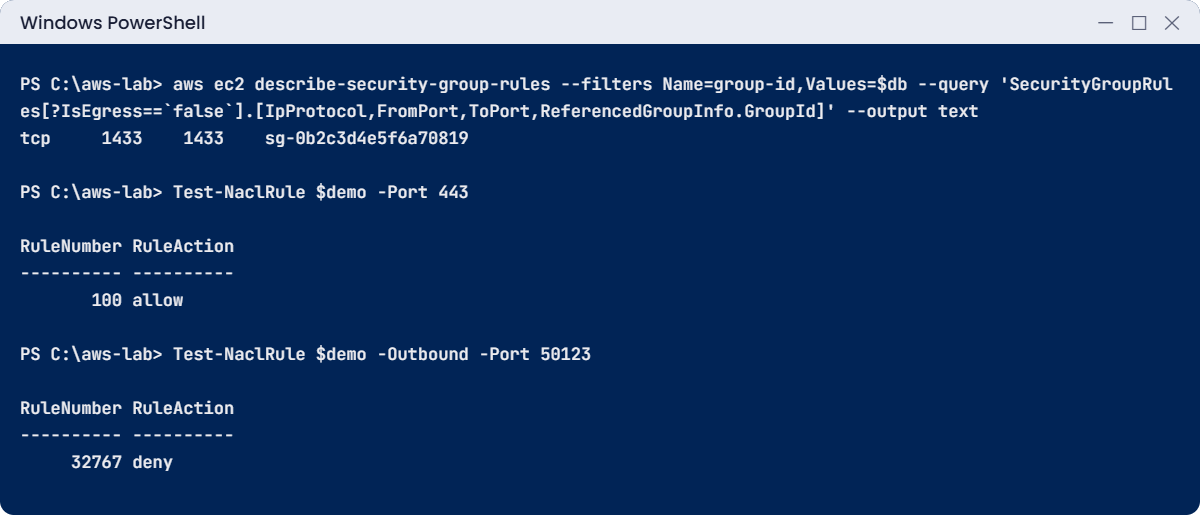
RuleNumber RuleAction
---------- ----------
32767 denyHTTPS gets in, but the reply to the client’s port 50123 is denied on the way out. A web server behind this ACL would accept connections and never answer. Add the outbound rule for ephemeral ports and test again:
aws ec2 create-network-acl-entry --network-acl-id $demo --egress --rule-number 100 --protocol tcp --port-range From=1024,To=65535 --cidr-block 0.0.0.0/0 --rule-action allow
Test-NaclRule $demo -Outbound -Port 50123
aws ec2 delete-network-acl --network-acl-id $demoYou should see this:
RuleNumber RuleAction
---------- ----------
100 allow
✅ Checkpoint: saat-web-sg, saat-app-sg and saat-db-sg exist with the chain of rules and are saved in saat-vpc.json, and you saw a stateless ACL block replies until an outbound rule was added. Keep the three groups.
Break It, Then Fix It
Two security group errors you’ll see the first time you clean up or script rules.
1Break it: add a rule that already exists
Run this:
aws ec2 authorize-security-group-ingress --group-id $web --protocol tcp --port 443 --cidr 0.0.0.0/0You’ll get this error (something like this):
An error occurred (InvalidPermission.Duplicate) when calling the AuthorizeSecurityGroupIngress operation: the specified rule "peer: 0.0.0.0/0, TCP, from port: 443, to port: 443, ALLOW" already existsScripts that run twice hit this all the time. Fix: nothing is wrong with the group; the rule is already there. In scripts, check with describe-security-group-rules first, or manage groups with CloudFormation (Lesson 34), which works out the difference for you.
2Break it: delete a group another group points at
Try to delete the app group:
aws ec2 delete-security-group --group-id $appYou’ll get this error (something like this):
An error occurred (DependencyViolation) when calling the DeleteSecurityGroup operation: resource sg-0b2c3d4e5f6a70819 has a dependent object
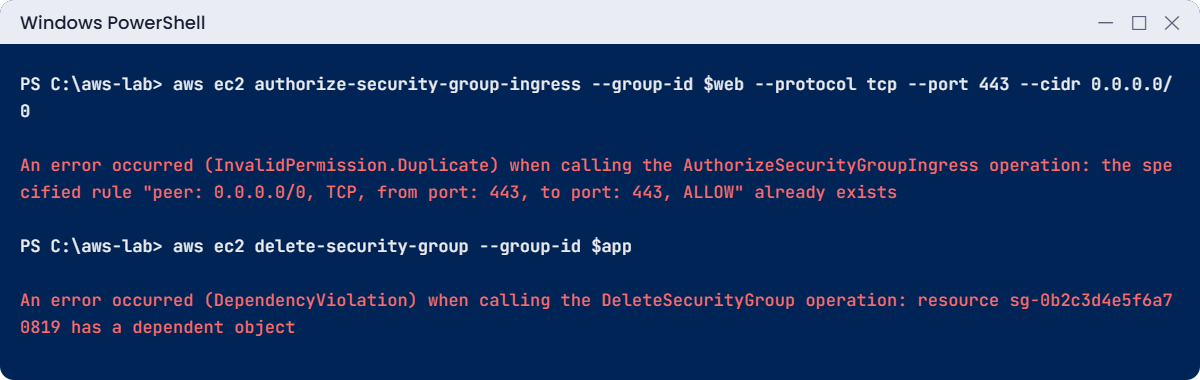
The message doesn’t say what depends on it. Find out yourself:
aws ec2 describe-security-groups --filters "Name=ip-permission.group-id,Values=$app" --query "SecurityGroups[].GroupName" --output text
aws ec2 describe-network-interfaces --filters "Name=group-id,Values=$app" --query "NetworkInterfaces[].NetworkInterfaceId" --output textYou should see this:
saat-db-sg
saat-db-sg has a rule that references the app group, and no network interface uses it yet. To really delete it you’d remove that rule first, then any interfaces. We keep all three groups, so stop here.
✅ Checkpoint: You read a duplicate-rule error and a dependency error, and you know the two commands that find what depends on a security group.
This happened at work
The night the “extra security” took the site down
A retail company passed an audit that said “tighten network controls”. A network engineer added a custom network ACL to the public subnets: allow 80 and 443 inbound, allow 80 and 443 outbound, deny everything else. It looked neat and symmetrical.
It went live at 11 PM.
Within minutes the website stopped responding. Security groups looked fine, the load balancer showed healthy targets from inside the VPC, and nothing showed “denied” anywhere. Customers’ browsers connected and then hung.
After two hours someone remembered that network ACLs are stateless. Replies to browsers go to the browser’s high port, not 443, and the new ACL dropped every reply. Adding outbound 1024 to 65535 fixed it in a minute.
The team now changes ACLs only with a peer review, tests them with VPC Reachability Analyzer before applying, and keeps most rules in security groups.
Common mistakes and troubleshooting
| Mistake | What happens | What to do |
|---|---|---|
| Opening SSH (22) or RDP (3389) to 0.0.0.0/0 | Constant login attempts from the whole internet | Use Session Manager (Lesson 13) and no inbound admin ports |
| Using IP addresses between tiers | Rules break when servers are replaced | Reference security groups (source-group) |
| Forgetting NACLs are stateless | Connections open but replies never come back | Allow ephemeral ports 1024 to 65535 for replies |
| Adding deny rules to a security group | There are no deny rules in security groups | Use a network ACL deny, or simply don’t allow it |
| Expecting a “denied” message | Clients just time out | Treat a timeout as “check security groups, NACLs, routes” |
| Re-running rule scripts | InvalidPermission.Duplicate | Check first, or use CloudFormation |
Interview questions
Click a question to open it. Each one is written the way an interviewer would ask it. Under it you will see why they ask it and one way you could answer, in your own words.
Fresher level
1. What’s the difference between a security group and a network ACL, and when would you use each?
Why they ask this: This is one of the most asked AWS networking questions. They want to hear that you understand stateful versus stateless, not just the names.
How you might answer: A security group is attached to network interfaces, has only allow rules, and is stateful, so replies are allowed automatically. A network ACL is attached to a subnet, has numbered allow and deny rules checked in order, and is stateless, so replies need their own rules.
I use security groups for everyday rules, and network ACLs only for broad subnet-wide blocks.
2. A developer says their connection to a server just hangs and times out. What does that usually tell you?
Why they ask this: They want to see that you understand silent drops. Knowing a timeout from a refusal speeds up troubleshooting a lot.
How you might answer: When no security group rule allows the traffic, it’s dropped silently. The client sees a timeout, not a refusal.
So a timeout usually points me at security groups, network ACLs or routes, before I look at the app.
3. You’ve just created a new security group. Before you add anything, what rules does it already have?
Why they ask this: They want to check that you know the defaults. Many access problems come from assuming a default that isn’t there.
How you might answer: It has no inbound rules, so nothing can come in. It has one outbound rule that allows all traffic to anywhere.
2–5 years experience
4. In a database security group rule, why would you reference the app’s security group instead of the app servers’ IP range?
Why they ask this: They want to see real-world design thinking. Rules based on IPs break quietly when servers change.
How you might answer: App servers come and go, and their IPs change. A rule like “allow 1433 from saat-app-sg” keeps working for any server in that tier.
It also documents the intent, so the next engineer can see why the rule exists.
5. A web server accepts connections but never responds, and the security groups look fine. What would you check next?
Why they ask this: They want to see that you can debug stateless filters. Forgetting the return path is a classic network ACL mistake.
How you might answer: I’d check the subnet’s network ACL outbound rules for ephemeral ports, then the route table for the reply path. After that, the OS firewall and the app itself.
VPC Flow Logs would show a REJECT on the outbound side if the network ACL is the problem.
6. Most teams only use security groups. When would you actually bother with a network ACL?
Why they ask this: They want to see judgement about when a tool is worth the extra work. Overusing network ACLs makes troubleshooting harder.
How you might answer: I’d use one for broad subnet-wide blocks, like denying a known bad IP range, or making sure a database subnet can never reach certain networks. It’s also useful as a second layer for compliance.
Day-to-day rules still belong in security groups.
Senior level
7. You’re responsible for security groups across 30 accounts. How do you stop them from turning into a mess?
Why they ask this: They want to see governance at scale. One open port in one account can be enough for an incident.
How you might answer: I’d define security groups in code, and use AWS Firewall Manager security group policies to audit and remove rules that are too open. AWS Config rules catch SSH or RDP from 0.0.0.0/0.
Regular reports show unused groups, and prefix lists help share approved CIDRs across accounts.
8. Walk me through how you’d design inbound access for a three-tier web app.
Why they ask this: They want to see you put everything together into a clean, layered design. It also shows how you handle admin access.
How you might answer: The public load balancer group allows 443 from the internet. The app group allows the app port only from the load balancer group, and the database group allows the database port only from the app group.
There’s no SSH or RDP anywhere, admin access goes through Session Manager. Network ACLs stay at the default except for specific blocks.
Quick quiz
Q1. Which filter is stateful?
- Network ACL
- Security group
- Route table
- Both
Show answer
B — Security groups remember connections, so replies are allowed automatically.
Q2. A custom network ACL allows 443 inbound only. What happens to the server’s replies?
- They are allowed automatically
- They are denied, because there is no outbound rule for ephemeral ports
- They go through the NAT gateway
- They are encrypted
Show answer
B — Network ACLs are stateless. Replies need their own outbound rule.
Q3. What does “allow 1433 from saat-app-sg” mean?
- Allow from one fixed IP
- Allow from any interface that has saat-app-sg attached
- Allow from the whole VPC
- Allow from the internet
Show answer
B — A group reference matches every interface that carries that group.
Q4. Can you add a deny rule to a security group?
- Yes
- No
- Only for outbound
- Only with a NACL attached
Show answer
B — Security groups only have allow rules. Use a network ACL for explicit denies.
Q5. Deleting saat-app-sg fails with DependencyViolation. What is a likely reason?
- The group is too new
- Another group’s rule references it
- You are in the wrong Region
- The VPC is full
Show answer
B — saat-db-sg references it. Remove that rule (and any interfaces) first.
Quick recap
- Security groups: on interfaces, allow-only, stateful, can reference other groups.
- Network ACLs: on subnets, numbered allow and deny, first match wins, stateless (replies need ephemeral ports).
- saat-web-sg, saat-app-sg and saat-db-sg form the course’s chain and are saved in saat-vpc.json.
- A blocked packet is dropped silently; clients see timeouts, not errors.
- Duplicate-rule and dependency errors are normal; check before adding and find references before deleting.
Next lesson
Lesson 11: Launch your first EC2 instance → You’ll launch a Linux server into saat-public-a with saat-web-sg and serve your first web page.
Further reading: security groups vs NACL
Want to go deeper into security groups vs NACL? Read Control traffic to your AWS resources using security groups and Control subnet traffic with network access control lists. You can also see the full plan for this course on the AWS Cloud Administration course page.
