Lambda for operations automation

Every operations team has small, boring jobs: stop test servers at night, clean old snapshots, tag new resources, react to an alarm. AWS Lambda automation runs these jobs as small functions, with no server to patch, triggered on a schedule or by an event, and logged automatically.

You’ll write a Python function that stops running servers tagged AutoStop=true, test it with a dry run, schedule it for 8 p.m. India time with EventBridge Scheduler, and read its logs. Then you’ll fix a permissions failure caused by a tag condition and the CLI error everyone hits when invoking Lambda.

TimeYou needBy the end you can
50 minutes (two small instances for under an hour)saat-vpc, your laptop signed in as saat-admin. No Session Manager endpoints needed. Cost: a few cents for the instances; Lambda and EventBridge Scheduler runs this small fall well within their monthly allowances.Write and deploy a Python Lambda function with a least-privilege execution role, invoke it with test payloads, read its logs, schedule it with EventBridge Scheduler in a time zone, and troubleshoot permission and invocation errors.

What it is, in one line

AWS Lambda runs your code in response to events or schedules without servers to manage, which makes it a natural tool for small operations automation jobs.

In Simple Words

The watchman who switches off the lights

An office pays a watchman to walk round at 8 p.m. and switch off lights in rooms marked “switch off at night”. He doesn’t touch rooms without the sign, and he writes in a book which rooms he switched off.

Lambda is the watchman: he only exists while he’s doing the round, and you pay only for those minutes. The schedule is his duty roster, the AutoStop tag is the sign on the door, and CloudWatch Logs is his book.

Give him a master key and he could switch off the server room by mistake. That is why his role only opens doors with the sign.

Engineer's View

How Lambda really works for operations

A function has code (a zip file or container image), a runtime such as python3.13, a handler, memory (which also sets CPU), a timeout (default 3 seconds, up to 15 minutes) and an execution role that gives the code its AWS permissions. Anything the code prints goes to CloudWatch Logs in /aws/lambda/FUNCTION.

Triggers include EventBridge Scheduler (cron or rate schedules in any time zone, one-time schedules, retries and dead-letter queues), EventBridge rules for AWS events such as CloudTrail API calls or alarms, S3 events and SQS. Scheduler uses its own role to invoke the function, separate from the function’s role.

Good ops functions are idempotent (safe to run twice), support a dry run, scope permissions with conditions such as aws:ResourceTag, handle pagination, and fail loudly so errors appear in metrics (Errors, Throttles, Duration). The AWS CLI v2 expects --payload as base64 unless you add --cli-binary-format raw-in-base64-out.

How it works, step by step

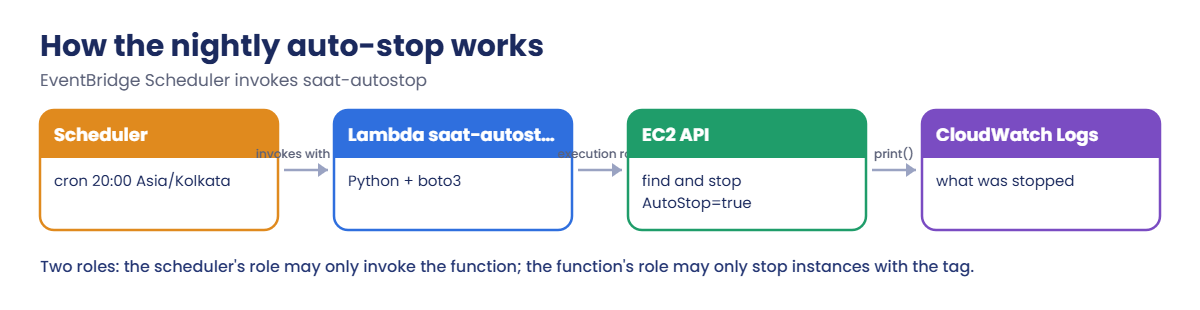
Here is what happens every evening at 8.

1Scheduler fires

The schedule’s cron runs in Asia/Kolkata time, so 20:00 means 8 p.m. in India, not UTC. Scheduler assumes its role and invokes the function with {"dry_run": false}.

AWS Lambda automation flow: Scheduler, Lambda, EC2 API, CloudWatch Logs

2The function finds tagged servers

boto3 lists running instances with AutoStop=true, page by page, and prints what it found.

3It stops only what it may stop

The execution role allows StopInstances only on instances carrying that tag, so a bug in the code still can’t stop production servers.

4Pick jobs like this

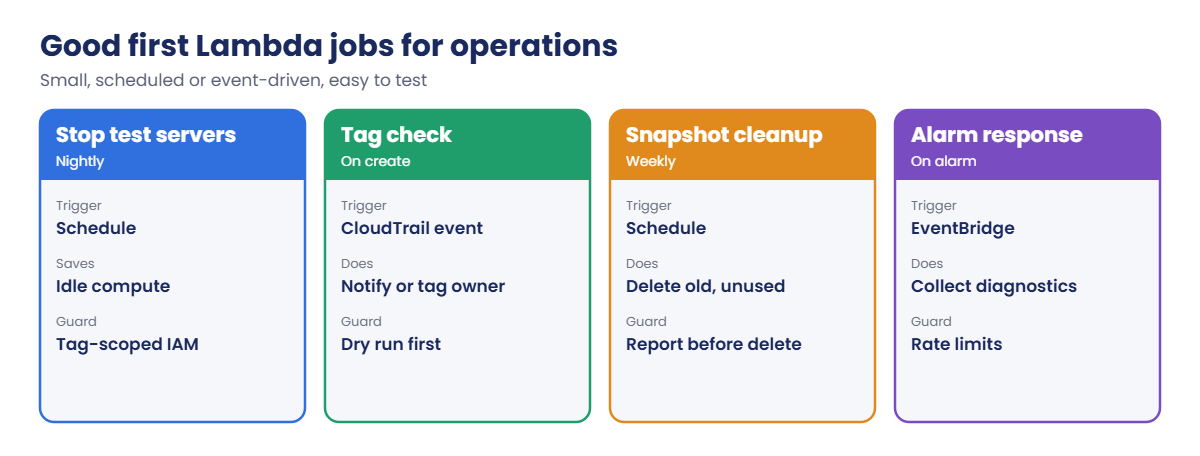
Good first functions are small and easy to test:

Good first AWS Lambda automation jobs for operations teams

If a job needs more than 15 minutes, many steps or human approval, use a Systems Manager Automation runbook or Step Functions instead.

✅ Checkpoint: You can explain the execution role, the scheduler’s role, where logs go, and why dry runs and tag conditions matter.

Hands-on lab: AWS Lambda automation that stops test servers

Sign in and set up:

cd C:\aws-lab
aws login --profile saat-admin
$env:AWS_PROFILE = 'saat-admin'
$v = Get-Content C:\aws-lab\saat-vpc.json | ConvertFrom-Json
$acct = aws sts get-caller-identity --query Account --output text

1Create the execution role

Paste this whole block:

'{ "Version": "2012-10-17", "Statement": [ { "Effect": "Allow", "Principal": { "Service": "lambda.amazonaws.com" }, "Action": "sts:AssumeRole" } ] }' | Set-Content lambda-trust.json
$roleArn = aws iam create-role --role-name saat-lambda-autostop --assume-role-policy-document file://lambda-trust.json --tags Key=course,Value=saatvedha-aws --query Role.Arn --output text
aws iam attach-role-policy --role-name saat-lambda-autostop --policy-arn arn:aws:iam::aws:policy/service-role/AWSLambdaBasicExecutionRole
@'
{
  "Version": "2012-10-17",
  "Statement": [
    { "Effect": "Allow", "Action": "ec2:DescribeInstances", "Resource": "*" },
    { "Effect": "Allow", "Action": "ec2:StopInstances", "Resource": "arn:aws:ec2:ap-south-1:ACCT:instance/*",
      "Condition": { "StringEquals": { "aws:ResourceTag/AutoStop": "TAG_VALUE" } } }
  ]
}
'@ -replace 'ACCT', $acct | Set-Content autostop-policy-template.json
(Get-Content autostop-policy-template.json -Raw) -replace 'TAG_VALUE', 'true' | Set-Content autostop-policy.json
aws iam put-role-policy --role-name saat-lambda-autostop --policy-name stop-tagged --policy-document file://autostop-policy.json
$roleArn

You should see something like this:

arn:aws:iam::111122223333:role/saat-lambda-autostop

AWSLambdaBasicExecutionRole lets the function write logs. The inline policy lets it list everything but stop only instances tagged AutoStop=true.

2Deploy the function

Paste this whole block:

@'
import json
import boto3

ec2 = boto3.client('ec2')


def handler(event, context):
    dry_run = bool(event.get('dry_run', False))
    pages = ec2.get_paginator('describe_instances').paginate(Filters=[
        {'Name': 'tag:AutoStop', 'Values': ['true']},
        {'Name': 'instance-state-name', 'Values': ['running']},
    ])
    ids = [i['InstanceId'] for page in pages for r in page['Reservations'] for i in r['Instances']]
    print(json.dumps({'found': ids, 'dry_run': dry_run}))
    if ids and not dry_run:
        ec2.stop_instances(InstanceIds=ids)
    return {'stopped': [] if dry_run else ids}
'@ | Set-Content lambda_function.py
Compress-Archive -Path lambda_function.py -DestinationPath autostop.zip -Force
Start-Sleep 15
aws lambda create-function --function-name saat-autostop --runtime python3.13 --handler lambda_function.handler --role $roleArn --zip-file fileb://autostop.zip --timeout 30 --tags course=saatvedha-aws --query "[FunctionName,Runtime,Timeout]" --output text
aws lambda wait function-active-v2 --function-name saat-autostop
aws lambda get-function --function-name saat-autostop --query Configuration.State --output text

You should see this:

saat-autostop   python3.13      30
Active

The 15-second pause gives IAM time to make the new role visible to Lambda. The timeout is raised from the default 3 seconds, which is too short once an account has a few hundred instances.

3Test with a dry run, then for real

Paste this whole block. It launches one server to stop and one to keep:

$base = aws ssm get-parameter --name /aws/service/ami-amazon-linux-latest/al2023-ami-kernel-default-x86_64 --query Parameter.Value --output text
$stopMe = aws ec2 run-instances --image-id $base --instance-type t3.micro --subnet-id $v.PrivateA --security-group-ids $v.AppSg --metadata-options HttpTokens=required --tag-specifications 'ResourceType=instance,Tags=[{Key=Name,Value=stop-me},{Key=AutoStop,Value=true},{Key=course,Value=saatvedha-aws},{Key=lesson,Value=38}]' --query "Instances[0].InstanceId" --output text
$keepMe = aws ec2 run-instances --image-id $base --instance-type t3.micro --subnet-id $v.PrivateA --security-group-ids $v.AppSg --metadata-options HttpTokens=required --tag-specifications 'ResourceType=instance,Tags=[{Key=Name,Value=keep-me},{Key=course,Value=saatvedha-aws},{Key=lesson,Value=38}]' --query "Instances[0].InstanceId" --output text
aws ec2 wait instance-running --instance-ids $stopMe $keepMe
'{ "dry_run": true }' | Set-Content dry.json
'{ "dry_run": false }' | Set-Content real.json
aws lambda invoke --function-name saat-autostop --payload file://dry.json --cli-binary-format raw-in-base64-out response.json | Out-Null
Get-Content response.json
aws lambda invoke --function-name saat-autostop --payload file://real.json --cli-binary-format raw-in-base64-out response.json | Out-Null
Get-Content response.json
aws ec2 wait instance-stopped --instance-ids $stopMe
aws ec2 describe-instances --instance-ids $stopMe $keepMe --query "Reservations[].Instances[].[Tags[?Key=='Name']|[0].Value,State.Name]" --output text

You should see something like this:

{"stopped": []}
{"stopped": ["i-0e1f2a3b4c5d60101"]}
stop-me         stopped
keep-me         running

The dry run found the server and changed nothing; the real run stopped only the tagged one. Now read what the function wrote:

aws logs tail /aws/lambda/saat-autostop --since 10m --format short | Select-String found

You should see something like this:

2026-10-20T22:41:07 {"found": ["i-0e1f2a3b4c5d60101"], "dry_run": true}
2026-10-20T22:41:09 {"found": ["i-0e1f2a3b4c5d60101"], "dry_run": false}
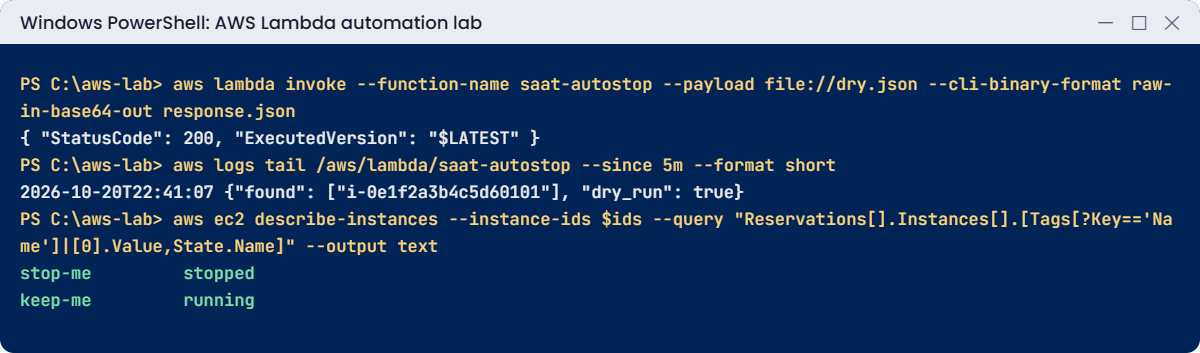
AWS Lambda automation lab output: dry run, logs and only the tagged server stopped
A dry run, the logs and only the tagged server stopped. Something like this.

4Schedule it for 8 p.m. India time

Paste this whole block:

$funcArn = aws lambda get-function --function-name saat-autostop --query Configuration.FunctionArn --output text
'{ "Version": "2012-10-17", "Statement": [ { "Effect": "Allow", "Principal": { "Service": "scheduler.amazonaws.com" }, "Action": "sts:AssumeRole", "Condition": { "StringEquals": { "aws:SourceAccount": "ACCT" } } } ] }' -replace 'ACCT', $acct | Set-Content sched-trust.json
$schedRole = aws iam create-role --role-name saat-scheduler-autostop --assume-role-policy-document file://sched-trust.json --query Role.Arn --output text
'{ "Version": "2012-10-17", "Statement": [ { "Effect": "Allow", "Action": "lambda:InvokeFunction", "Resource": "FUNC_ARN" } ] }' -replace 'FUNC_ARN', $funcArn | Set-Content sched-policy.json
aws iam put-role-policy --role-name saat-scheduler-autostop --policy-name invoke-autostop --policy-document file://sched-policy.json
@'
{ "Arn": "FUNC_ARN", "RoleArn": "ROLE_ARN", "Input": "{\"dry_run\": false}" }
'@ -replace 'FUNC_ARN', $funcArn -replace 'ROLE_ARN', $schedRole | Set-Content sched-target.json
Start-Sleep 15
aws scheduler create-schedule --name saat-autostop-nightly --schedule-expression "cron(0 20 * * ? *)" --schedule-expression-timezone Asia/Kolkata --flexible-time-window Mode=OFF --target file://sched-target.json | Out-Null
aws scheduler get-schedule --name saat-autostop-nightly --query "[State,ScheduleExpression,ScheduleExpressionTimezone]" --output text

You should see this:

ENABLED cron(0 20 * * ? *)      Asia/Kolkata

Older setups use EventBridge rules, whose cron always runs in UTC; teams then schedule “14:30” and forget it means 8 p.m. in India. Scheduler’s time zone setting removes that whole class of mistake, including daylight saving in Regions that have it.
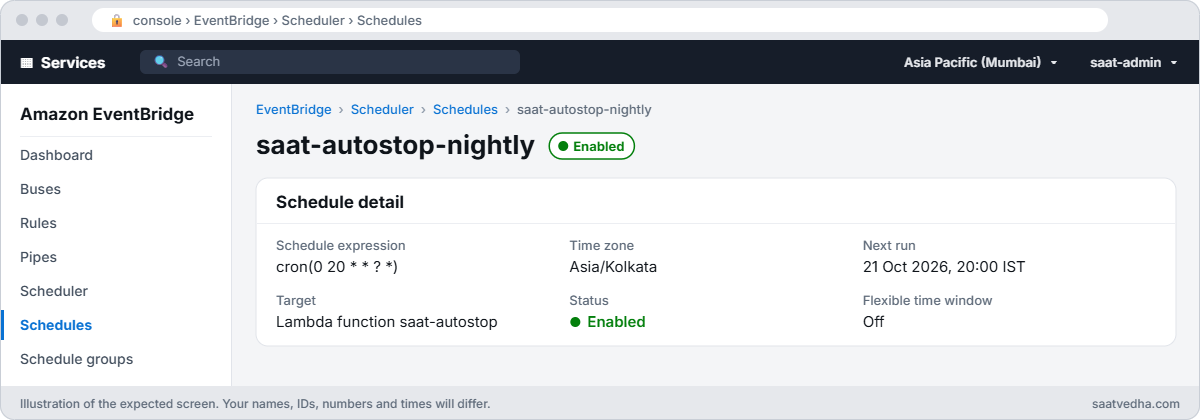
EventBridge Scheduler schedule saat-autostop-nightly with cron at 8 pm Asia/Kolkata calling Lambda saat-autostop
The schedule in EventBridge Scheduler: 8 p.m. every day, in India time, calling saat-autostop.

✅ Checkpoint: saat-autostop is Active, a dry run changed nothing, a real run stopped only stop-me, the logs show both runs, and saat-autostop-nightly is ENABLED for 20:00 Asia/Kolkata. Keep everything for the break lab.

Break It, Then Fix It

A permissions failure that looks like a code bug, and a CLI error that looks like a Lambda bug.

1Break it: a tag condition that doesn’t match

Change the policy condition to AutoStop=yes, start stop-me again and run the function:

(Get-Content autostop-policy-template.json -Raw) -replace 'TAG_VALUE', 'yes' | Set-Content autostop-policy.json
aws iam put-role-policy --role-name saat-lambda-autostop --policy-name stop-tagged --policy-document file://autostop-policy.json
aws ec2 start-instances --instance-ids $stopMe | Out-Null
aws ec2 wait instance-running --instance-ids $stopMe
Start-Sleep 10
aws lambda invoke --function-name saat-autostop --payload file://real.json --cli-binary-format raw-in-base64-out response.json --query FunctionError --output text
Get-Content response.json

You should see something like this:

Unhandled
{"errorMessage": "An error occurred (UnauthorizedOperation) when calling the StopInstances operation: You are not authorized to perform this operation. User: arn:aws:sts::111122223333:assumed-role/saat-lambda-autostop/saat-autostop is not authorized to perform: ec2:StopInstances on resource: arn:aws:ec2:ap-south-1:111122223333:instance/i-0e1f2a3b4c5d60101 because no identity-based policy allows the ec2:StopInstances action. Encoded authorization failure message: ...", "errorType": "ClientError", ...}
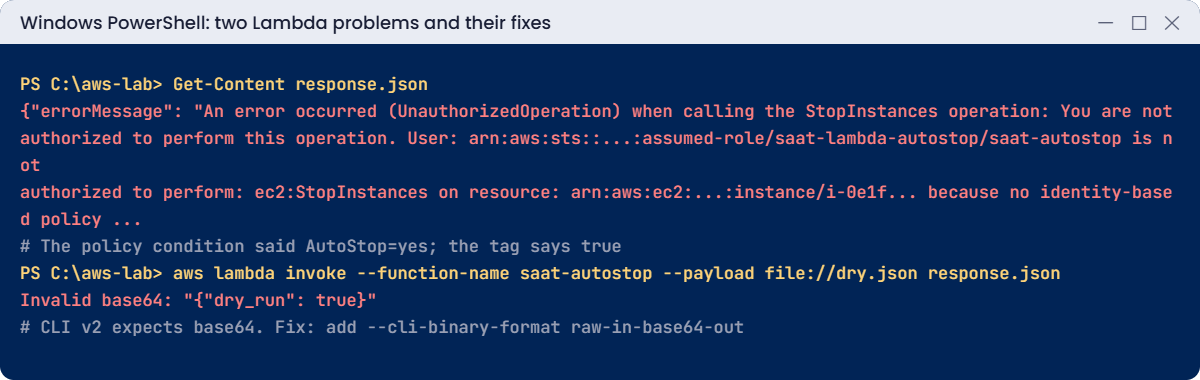
Lambda problems: UnauthorizedOperation from a tag condition and CLI v2 Invalid base64
Both problems and their fixes. Something like this.

The code found the server (the filter says true) but the role only allows stopping servers tagged yes. Tag values are compared exactly. This is the safe kind of failure: scope too narrow, nothing stopped.

Fix: make the condition match the real tag, and decide on tag values once for the whole company:

(Get-Content autostop-policy-template.json -Raw) -replace 'TAG_VALUE', 'true' | Set-Content autostop-policy.json
aws iam put-role-policy --role-name saat-lambda-autostop --policy-name stop-tagged --policy-document file://autostop-policy.json
Start-Sleep 10
aws lambda invoke --function-name saat-autostop --payload file://real.json --cli-binary-format raw-in-base64-out response.json | Out-Null
Get-Content response.json

You should see something like this:

{"stopped": ["i-0e1f2a3b4c5d60101"]}

2Break it: invoke without the binary format option

Invoke the way many older guides show:

aws lambda invoke --function-name saat-autostop --payload file://dry.json response.json

You’ll get an error like this:

Invalid base64: "{ "dry_run": true }"

AWS CLI version 2 treats binary parameters such as --payload as base64 by default. The function was never called. Fix: add --cli-binary-format raw-in-base64-out to the command, or set it once in your profile with aws configure set cli_binary_format raw-in-base64-out --profile saat-admin.

Clean up:

aws scheduler delete-schedule --name saat-autostop-nightly
aws lambda delete-function --function-name saat-autostop
aws logs delete-log-group --log-group-name /aws/lambda/saat-autostop
aws iam delete-role-policy --role-name saat-scheduler-autostop --policy-name invoke-autostop
aws iam delete-role --role-name saat-scheduler-autostop
aws iam delete-role-policy --role-name saat-lambda-autostop --policy-name stop-tagged
aws iam detach-role-policy --role-name saat-lambda-autostop --policy-arn arn:aws:iam::aws:policy/service-role/AWSLambdaBasicExecutionRole
aws iam delete-role --role-name saat-lambda-autostop
aws ec2 terminate-instances --instance-ids $stopMe $keepMe | Out-Null
aws ec2 wait instance-terminated --instance-ids $stopMe $keepMe
Remove-Item lambda_function.py, autostop.zip, lambda-trust.json, autostop-policy-template.json, autostop-policy.json, dry.json, real.json, response.json, sched-trust.json, sched-policy.json, sched-target.json
.\Find-LabResources.ps1

✅ Checkpoint: You fixed an UnauthorizedOperation caused by a mismatched tag condition, and the CLI v2 Invalid base64 error. The schedule, function, log group, roles and both servers are gone.

This happened at work

The nightly job that stopped production

A healthcare software company wrote a Lambda function to stop non-production servers at night to save money. It stopped every instance whose Environment tag wasn’t “prod”. The role had ec2:StopInstances on *.

A new team launched production servers tagged Environment=Production. At 9 p.m. the function stopped all of them, including the appointment booking API, during evening hours when clinics confirmed the next day’s patients.

They flipped the logic to opt-in (only AutoStop=true is stopped), limited the role with an aws:ResourceTag condition, added a dry-run report emailed an hour before each run, and enforced allowed tag values with an AWS Organizations tag policy.

Common mistakes and troubleshooting

MistakeWhat happensWhat to do
Opt-out logic (“stop everything except prod”)New or mistagged servers get stoppedOpt-in with an explicit tag
StopInstances on * in the roleA code bug can stop productionScope with aws:ResourceTag conditions
Default 3-second timeoutTask timed out on larger accountsSet a realistic timeout and measure Duration
No paginationOnly the first page of instances handledUse boto3 paginators
EventBridge rule cron in UTCJob runs at the wrong local timeUse Scheduler with a time zone
Creating the function right after the roleThe role defined for the function cannot be assumed by LambdaWait a few seconds after creating the role

Interview questions

Click a question to open it. Each one is written the way an interviewer would ask it. Under it you will see why they ask it and one way you could answer, in your own words.

Fresher level

1. Can you explain in simple words what AWS Lambda is?

Why they ask this: They want to know you understand serverless basics. Lambda is the most common tool for small automation jobs in AWS.

How you might answer: Lambda runs your code when an event happens or on a schedule, and you don’t manage any servers. It scales on its own, and you pay per request and for how long the code runs.

For an admin, it’s perfect for small jobs like cleaning up resources or sending reports.

2. What is a Lambda execution role, and why does it matter?

Why they ask this: They are checking that you understand how a function gets its permissions. Most Lambda problems in real work come down to this role.

How you might answer: The execution role is the IAM role the function assumes when it runs. It decides which AWS actions the code is allowed to do.

I keep it to the least privilege the function needs, so a bug in the code can’t do much damage.

3. A function ran this morning and you want to see what it did. Where would you look?

Why they ask this: They want to know you can find a function’s output and spot problems. Reading logs is the first step in any Lambda troubleshooting.

How you might answer: I’d go to CloudWatch Logs, in the log group /aws/lambda/FUNCTION_NAME. It has anything the code printed, plus the START, END and REPORT lines.

The REPORT line shows the duration and memory used, which helps me see if it’s close to its limits.

2–5 years experience

4. Your manager wants test servers stopped every evening to save money. How would you build that safely with Lambda?

Why they ask this: They want to see that you think about safety, not only about getting the job done. A careless stop script can shut down production.

How you might answer: I’d only stop servers that opt in with a tag, and give the function a least-privilege role with a tag condition so it can’t touch anything else. I’d add a dry-run mode and handle pagination so it doesn’t miss servers.

The schedule would use the right time zone, and I’d keep logs plus an alert if the function errors.

5. Your Lambda function fails with AccessDenied. Walk me through how you’d troubleshoot it.

Why they ask this: They want to see a careful order of checks. AccessDenied can come from several layers, and they want to know you check them all.

How you might answer: First I’d read the error to see which action and resource were denied. Then I’d check the execution role’s policies and any conditions, like tags or Regions.

If the role looks fine, I’d check SCPs and resource policies, and decode the authorization message if the error includes an encoded one.

6. For a nightly cron job, would you use EventBridge Scheduler or an EventBridge rule, and why?

Why they ask this: They are checking that you know the right tool for scheduling. Picking the wrong one can mean jobs running at the wrong local time.

How you might answer: I’d use EventBridge Scheduler. It supports time zones, one-time schedules, retries and dead-letter queues, and it scales to millions of schedules.

Rules work only in UTC, so I keep them for matching events rather than for cron jobs.

Senior level

7. You’re asked to design an event-driven system that fixes risky changes automatically across 30 accounts. How would you build it?

Why they ask this: They want to see architecture thinking for safe automation at scale. They are checking that you think about permissions, safety modes and auditing.

How you might answer: I’d use organization-wide EventBridge rules to send security and config events to a central event bus. Lambda or Step Functions would do the fix, assuming a least-privilege role in the target account for each action.

I’d build in dry-run and approval modes, make every action idempotent, and add rate limits. Metrics, alarms and an audit trail would show what the system did and when.

8. Your scheduled function is supposed to stop test servers, but on some nights it stops nothing. How would you investigate?

Why they ask this: They want to see deep troubleshooting where the cause isn’t obvious. They are checking that you look at the schedule, the code, the data and permissions.

How you might answer: First I’d check the scheduler’s invocation metrics and the function’s logs for those nights, looking for errors, throttles or timeouts. Then I’d check whether the instances were actually tagged at that time, using Config history, and whether the filter values and case match.

Finally I’d look in CloudTrail for any permission changes around those dates.

Quick quiz

Q1. What gives a Lambda function its AWS permissions?

  1. The caller
  2. Its execution role
  3. The VPC
  4. The scheduler
Show answer

B — The code runs with the execution role.

Q2. Why did StopInstances fail in break 1?

  1. Wrong Region
  2. The role’s tag condition said yes, the tag was true
  3. The function timed out
  4. No logs
Show answer

B — Condition values are compared exactly.

Q3. What fixed “Invalid base64” when invoking?

  1. A new role
  2. --cli-binary-format raw-in-base64-out
  3. A longer timeout
  4. A new runtime
Show answer

B — CLI v2 treats --payload as base64 by default.

Q4. Why use Scheduler’s time zone setting?

  1. It is cheaper
  2. So 20:00 means local time, not UTC
  3. It is required
  4. For logs
Show answer

B — Rule cron expressions are UTC only.

Q5. What is the default Lambda timeout?

  1. 1 second
  2. 3 seconds
  3. 60 seconds
  4. 15 minutes
Show answer

B — Raise it for real jobs.

Quick recap

  • Lambda runs small jobs without servers; logs go to CloudWatch automatically.
  • The execution role decides what the code can do; scope it with tag conditions.
  • Build in a dry run, pagination and a realistic timeout.
  • EventBridge Scheduler runs cron in your time zone with its own invoke role.
  • CLI v2 needs --cli-binary-format raw-in-base64-out for raw JSON payloads.

Next lesson

Lesson 39: Containers on ECS with Fargate → You’ll run a container on ECS Fargate behind a load balancer, read its logs and fix the classic task startup failures.

Further reading: AWS Lambda automation

Want to go deeper into AWS Lambda automation? Read What is AWS Lambda? and What is Amazon EventBridge Scheduler?. You can also see the full plan for this course on the AWS Cloud Administration course page.

Scroll to Top