S3 403 and Access Problems
-
Phase 0: Before you start
-
Phase 1: The foundation
-
Phase 2: Operations and security
-
Phase 3: SQL Server on AWS
-
Phase 4: Troubleshooting step by step
-
Phase 5: Final project and career
S3 has one answer for many different problems: 403 Forbidden. A missing file, a missing KMS permission, a bucket policy condition and a private bucket all look the same at first. Fixing an S3 access denied 403 quickly means knowing the four or five places S3 checks and reading the message for clues.
You’ll set up a bucket with normal and KMS-encrypted files and a read-only role, then work through a 403 that is really a 404, a 403 that is really KMS, a bucket policy deny, and a “public link” request that Block Public Access refuses, ending with the right way to share a file.
| Time | You need | By the end you can |
|---|---|---|
| 60 minutes | Lessons 16 to 18, 30 and 59 done (S3, KMS, IAM policies), signed in as saat-admin. Cost: a few cents (a KMS key for an hour, prorated, plus a few KB in S3). | Tell apart 403s from IAM, missing ListBucket, KMS, bucket policies and Block Public Access, fix each at the right place, and share private objects safely with presigned URLs. |
What it is, in one line
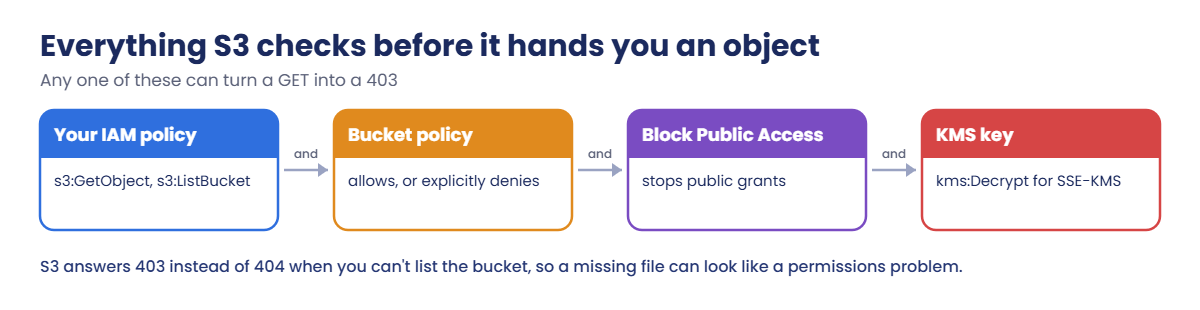
An S3 access denied 403 means one of S3’s checks refused the request: your IAM policy, the bucket policy, Block Public Access, object ownership, or the KMS key protecting the object.
In Simple Words
The bank locker
To open a bank locker, the bank checks your ID card (IAM), the locker’s own rules (bucket policy), and whether you have the second key (KMS). If any check fails, the clerk just says “not allowed”.
The clerk also won’t say whether a locker number even exists unless you’re allowed to see the list. So “not allowed” can secretly mean “there’s no such locker”.
And the bank never hands lockers to strangers off the street, even if you ask nicely. For that, you give someone a time-limited letter (a presigned URL).
Engineer's View
What S3 checks
For a GetObject, S3 evaluates the caller’s IAM policy and the bucket policy (same account: either can allow, any explicit deny wins; cross-account: both must allow). Block Public Access stops public bucket policies and ACLs. With Object Ownership set to bucket owner enforced (the default), ACLs are off and the bucket owner owns every object, which removed the classic cross-account ownership 403.
For SSE-KMS objects, the caller also needs kms:Decrypt on the key (and kms:GenerateDataKey to upload), allowed by the key policy or by IAM if the key policy delegates to the account. Without s3:ListBucket, S3 returns 403 instead of 404 for a missing key, so it doesn’t reveal what exists.
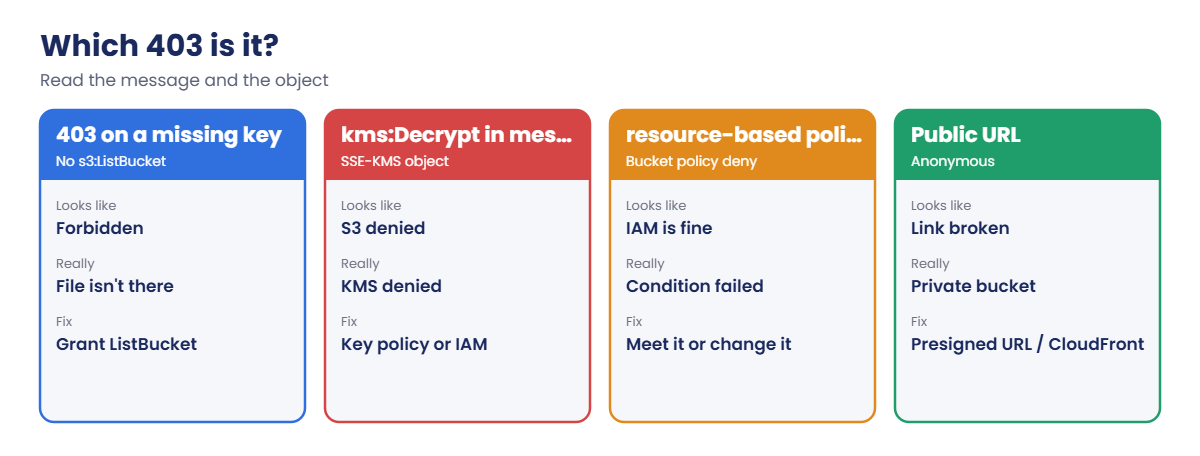
Newer messages often name the action and layer, for example “kms:Decrypt” or “explicit deny in a resource-based policy”. S3 data events in CloudTrail and server access logs record the denied request, but they’re off by default. To share an object with someone outside AWS, use a presigned URL or CloudFront with origin access control, not a public bucket.
How it works, step by step
Here is the order to check a 403 in.
1Read the message and the object
Note the action, the ARN, and any extra words like kms or resource-based. Then check the object exists and how it’s encrypted (as an admin).
2Check IAM, then the bucket policy
Does the caller have GetObject on that key and ListBucket on the bucket? Does the bucket policy have a Deny with a condition the caller fails?
3Check KMS and public access
For SSE-KMS, check kms:Decrypt. For anonymous access, remember Block Public Access, and use presigned URLs instead.
4Match the 403 to its cause
Each cause has its own sign:
Ask “which of the four checks?” before changing anything. Most bad S3 fixes come from opening the bucket when the real problem was KMS or a missing file.
✅ Checkpoint: You can name S3’s checks, explain why a missing object can give 403, and say what kms:Decrypt in a message means.
Hands-on lab: four S3 403s and their real causes
Sign in and set names:
cd C:\aws-lab
aws login --profile saat-admin
$env:AWS_PROFILE = 'saat-admin'
$acct = aws sts get-caller-identity --query Account --output text
$b = "saat-s3lab-$acct-ap-south-1-an"1Set up the bucket, files and a reader role
Paste this whole block. It creates a bucket, a KMS key, two files (one encrypted with that key) and a role that can only GetObject:
aws s3api create-bucket --bucket $b --bucket-namespace account-regional --region ap-south-1 --create-bucket-configuration LocationConstraint=ap-south-1 | Out-Null
$key = aws kms create-key --description "saat S3 403 lab" --tags TagKey=course,TagValue=saatvedha-aws --query KeyMetadata.Arn --output text
aws kms create-alias --alias-name alias/saat-s3-lab --target-key-id $key
'month,total' | Set-Content jan.csv
'name,salary' | Set-Content payroll.csv
aws s3 cp jan.csv "s3://$b/reports/jan.csv" --only-show-errors
aws s3 cp payroll.csv "s3://$b/secret/payroll.csv" --sse aws:kms --sse-kms-key-id $key --only-show-errors
@{ Version = '2012-10-17'; Statement = @(@{ Effect = 'Allow'; Principal = @{ AWS = "arn:aws:iam::$($acct):root" }; Action = 'sts:AssumeRole' }) } | ConvertTo-Json -Depth 5 | Set-Content reader-trust.json
@{ Version = '2012-10-17'; Statement = @(@{ Effect = 'Allow'; Action = 's3:GetObject'; Resource = "arn:aws:s3:::$b/*" }) } | ConvertTo-Json -Depth 5 | Set-Content reader-policy.json
$roleArn = aws iam create-role --role-name saat-lab-reader --assume-role-policy-document file://reader-trust.json --query Role.Arn --output text
aws iam put-role-policy --role-name saat-lab-reader --policy-name read-objects --policy-document file://reader-policy.json
aws configure set profile.saat-reader.role_arn $roleArn
aws configure set profile.saat-reader.source_profile saat-admin
aws configure set profile.saat-reader.region ap-south-1
Start-Sleep 15
aws s3api get-object-attributes --bucket $b --key secret/payroll.csv --object-attributes ObjectSize --query ObjectSize --output text
aws s3api head-object --bucket $b --key secret/payroll.csv --query "[ServerSideEncryption,SSEKMSKeyId]" --output text
aws s3 cp "s3://$b/reports/jan.csv" - --profile saat-readerYou should see something like this:
13
aws:kms arn:aws:kms:ap-south-1:111122223333:key/1a2b3c4d-5e6f-7a8b-9c0d-e1f2a3b4c5d6
month,totalThe reader can read reports/jan.csv. As admin you confirmed payroll.csv exists and is encrypted with your KMS key; checking the object as an admin first is always step one.
2Meet the 403 that is really a 404
Ask for a report that doesn’t exist:
aws s3api head-object --bucket $b --key reports/feb.csv --profile saat-readerYou’ll get this:
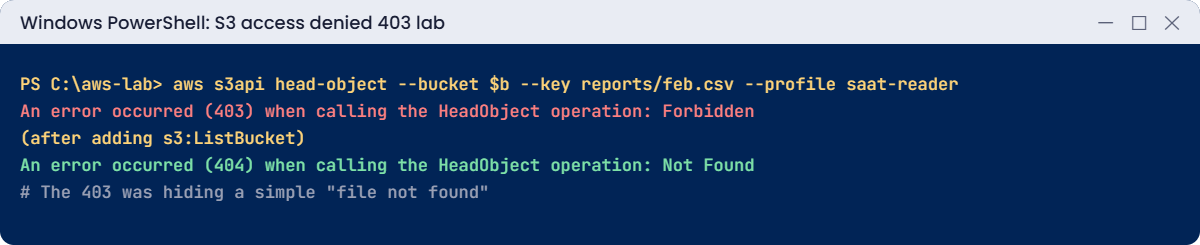
An error occurred (403) when calling the HeadObject operation: ForbiddenThe file simply isn’t there, but without s3:ListBucket S3 won’t say so. Users report this as “access denied on feb.csv”, and people waste time on permissions. Give the reader ListBucket on the bucket and ask again:
@{ Version = '2012-10-17'; Statement = @(
@{ Effect = 'Allow'; Action = 's3:GetObject'; Resource = "arn:aws:s3:::$b/*" },
@{ Effect = 'Allow'; Action = 's3:ListBucket'; Resource = "arn:aws:s3:::$b" }) } | ConvertTo-Json -Depth 5 | Set-Content reader-policy.json
aws iam put-role-policy --role-name saat-lab-reader --policy-name read-objects --policy-document file://reader-policy.json
Start-Sleep 15
aws s3api head-object --bucket $b --key reports/feb.csv --profile saat-reader
aws s3 ls "s3://$b/reports/" --profile saat-readerYou should see something like this:
An error occurred (404) when calling the HeadObject operation: Not Found
2026-10-20 16:02:11 13 jan.csvNow the answer is honest: 404, and the listing shows only jan.csv. Whether to grant ListBucket is a design choice; if you don’t, train your team that 403 might mean “not there”.
3Add an HTTPS-only bucket policy
Real buckets often require HTTPS. Add that rule and confirm the reader still works over HTTPS (the CLI always uses it):
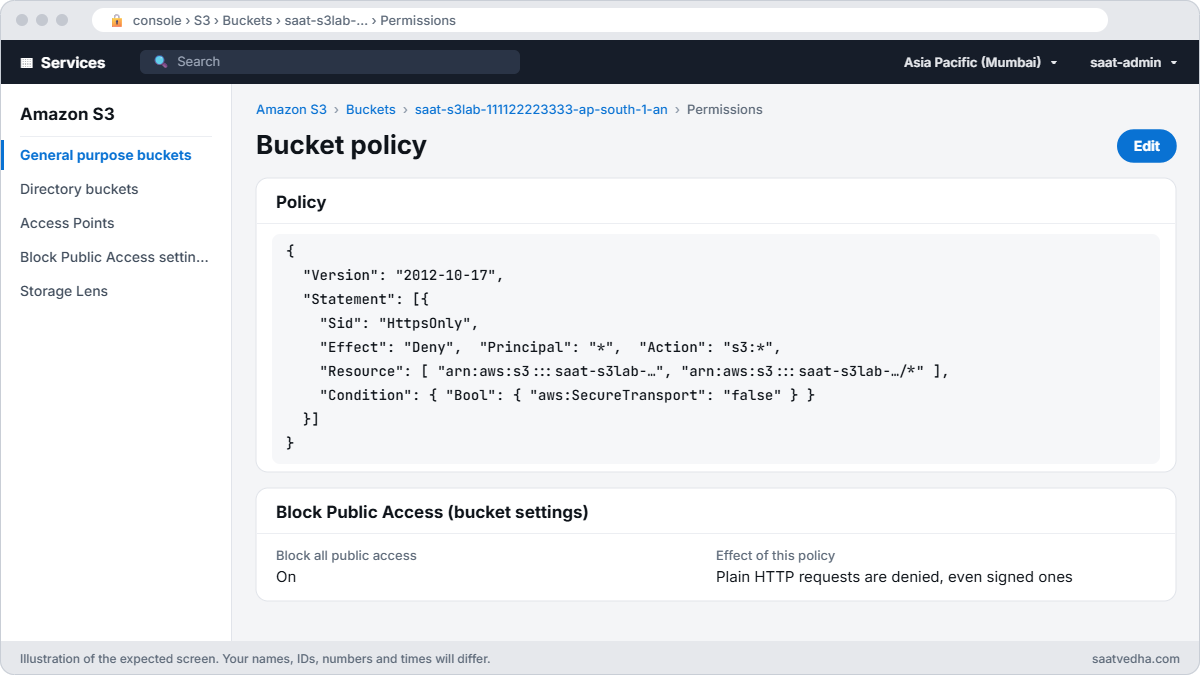
@{ Version = '2012-10-17'; Statement = @(@{ Sid = 'HttpsOnly'; Effect = 'Deny'; Principal = '*'; Action = 's3:*'; Resource = @("arn:aws:s3:::$b", "arn:aws:s3:::$b/*"); Condition = @{ Bool = @{ 'aws:SecureTransport' = 'false' } } }) } | ConvertTo-Json -Depth 6 | Set-Content https-only.json
aws s3api put-bucket-policy --bucket $b --policy file://https-only.json
aws s3 cp "s3://$b/reports/jan.csv" - --profile saat-reader
function Get-HttpCode([string]$Url) { try { (Invoke-WebRequest $Url -UseBasicParsing).StatusCode } catch { [int]$_.Exception.Response.StatusCode } }
Get-HttpCode "http://$b.s3.ap-south-1.amazonaws.com/reports/jan.csv"You should see something like this:
month,total
403The CLI over HTTPS still works; a plain HTTP request is refused by the explicit deny (it would be refused anyway because it’s anonymous, but now even signed HTTP requests are). When a deny like this blocks a real app, the message says “explicit deny in a resource-based policy”.
✅ Checkpoint: The reader reads jan.csv, gets 403 then 404 for feb.csv once ListBucket is added, and the HttpsOnly bucket policy is in place.
Break It, Then Fix It
Two 403s that send people to the wrong fix.
1Break it: an object encrypted with a key you can’t use
Read the payroll file as the reader:
aws s3 cp "s3://$b/secret/payroll.csv" - --profile saat-readerYou’ll get an error like this:
download failed: s3://saat-s3lab-111122223333-ap-south-1-an/secret/payroll.csv to - An error occurred (AccessDenied) when calling the GetObject operation: User: arn:aws:sts::111122223333:assumed-role/saat-lab-reader/... is not authorized to perform: kms:Decrypt on resource: arn:aws:kms:ap-south-1:111122223333:key/1a2b3c4d-... because no identity-based policy allows the kms:Decrypt actionS3 allowed the GetObject; KMS refused to decrypt. People often widen the bucket policy here, which can’t help. Fix: allow kms:Decrypt on this one key, only through S3:
@{ Version = '2012-10-17'; Statement = @(@{ Effect = 'Allow'; Action = 'kms:Decrypt'; Resource = $key; Condition = @{ StringEquals = @{ 'kms:ViaService' = 's3.ap-south-1.amazonaws.com' } } }) } | ConvertTo-Json -Depth 6 | Set-Content reader-kms.json
aws iam put-role-policy --role-name saat-lab-reader --policy-name decrypt-s3-lab --policy-document file://reader-kms.json
Start-Sleep 15
aws s3 cp "s3://$b/secret/payroll.csv" - --profile saat-readerYou should see this:
name,salaryThis works because the default key policy lets IAM policies in the account grant use of the key. If a key policy doesn’t, the change must go in the key policy itself.
2Break it: “just make the file public”
A colleague wants a link for a vendor. Try the plain URL, then a public bucket policy:
Get-HttpCode "https://$b.s3.ap-south-1.amazonaws.com/reports/jan.csv"
@{ Version = '2012-10-17'; Statement = @(@{ Sid = 'PublicRead'; Effect = 'Allow'; Principal = '*'; Action = 's3:GetObject'; Resource = "arn:aws:s3:::$b/reports/*" }) } | ConvertTo-Json -Depth 5 | Set-Content public.json
aws s3api put-bucket-policy --bucket $b --policy file://public.jsonYou’ll get something like this:
403
An error occurred (AccessDenied) when calling the PutBucketPolicy operation: User: arn:aws:sts::111122223333:assumed-role/.../saat-admin is not authorized to perform: s3:PutBucketPolicy on resource: "arn:aws:s3:::saat-s3lab-111122223333-ap-south-1-an" because public policies are blocked by the BlockPublicPolicy block public access setting.
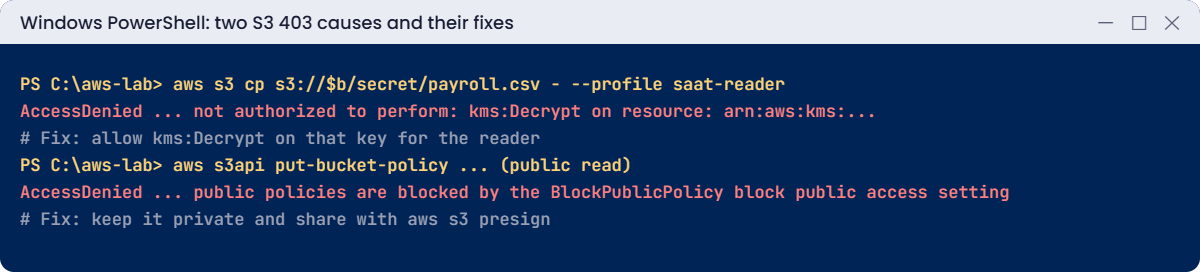
Block Public Access did its job, even for an admin. Turning it off to share one file is how data leaks start. Fix: share a time-limited presigned URL instead:
$url = aws s3 presign "s3://$b/reports/jan.csv" --expires-in 900
Get-HttpCode $urlYou should see this:
200The link works for 15 minutes and nobody else can use the bucket. For websites or many files, use CloudFront with origin access control (Lesson 17).
Now clean up:
aws s3 rb "s3://$b" --force | Out-Null
aws kms delete-alias --alias-name alias/saat-s3-lab
aws kms schedule-key-deletion --key-id $key --pending-window-in-days 7 --query DeletionDate --output text
foreach ($p in 'read-objects', 'decrypt-s3-lab') { aws iam delete-role-policy --role-name saat-lab-reader --policy-name $p }
aws iam delete-role --role-name saat-lab-reader
Remove-Item jan.csv, payroll.csv, reader-trust.json, reader-policy.json, reader-kms.json, https-only.json, public.jsonAlso delete the [profile saat-reader] section from your %USERPROFILE%\.aws\config file.
✅ Checkpoint: You fixed a KMS 403 with a narrow kms:Decrypt grant and a “make it public” request with a presigned URL. The bucket, alias and role are gone, and the key is scheduled for deletion.
This happened at work
The quarterly report that “lost permissions”
A retail company’s finance team reported that their BI tool suddenly got 403 on every new S3 report file, while old files still opened fine. The data team spent a morning comparing IAM policies and bucket policies: nothing had changed.
The real change was upstream. A security project had switched the bucket’s default encryption from SSE-S3 to SSE-KMS with a new customer managed key. Old files stayed SSE-S3; every new file used the key, and the BI tool’s role had no kms:Decrypt on it.
The error message even said kms:Decrypt; nobody had read past “AccessDenied”.
One IAM statement fixed it. The security team now announces encryption changes to data consumers, and the runbook says: read the whole error, then check how the object is encrypted.
Common mistakes and troubleshooting
| Mistake | What happens | What to do |
|---|---|---|
| Treating every 403 as IAM | Hours on the wrong policy | Read the message; check the object as admin |
| Forgetting 403 can mean “not found” | Chasing permissions for a missing file | Grant ListBucket, or know the rule |
| Ignoring kms:Decrypt in the message | Widening bucket policies for nothing | Grant kms:Decrypt on the key |
| Turning off Block Public Access to share a file | Data exposure risk | Presigned URLs or CloudFront OAC |
| Deny statements without conditions checked | Apps blocked unexpectedly | Test with the reader role after policy changes |
| Expecting CloudTrail to show S3 reads | No records | Enable data events or server access logs when needed |
Interview questions
Click a question to open it. Each one is written the way an interviewer would ask it. Under it you will see why they ask it and one way you could answer, in your own words.
Fresher level
1. A user asks for a file in S3 that doesn’t exist, and gets 403 instead of 404. Why would S3 do that?
Why they ask this: They want to check that you know this S3 behaviour, because it sends many people looking for a permission problem that isn’t there.
How you might answer: If the user doesn’t have s3:ListBucket, S3 returns 403 instead of 404. That way it doesn’t reveal which keys exist in the bucket.
So when I see 403, I also check if the object is really there.
2. The object is encrypted with SSE-KMS. What extra permission does someone need to read it?
Why they ask this: They want to see that you remember the KMS layer, which is a very common cause of 403 errors.
How you might answer: They need kms:Decrypt on the KMS key, not just s3:GetObject. The key policy has to allow it, or delegate to IAM so an IAM policy can allow it.
Without that, S3 returns 403 even though the S3 permissions look correct.
3. A colleague needs to share one private file with a customer for a day. How would you do it?
Why they ask this: They want to see that you can share data safely without making the bucket public.
How you might answer: I’d create a presigned URL with an expiry time, so the link stops working on its own. The bucket stays private.
If it’s for many users or a website, I’d use CloudFront with signed URLs instead.
2–5 years experience
4. A user has s3:GetObject in their policy but still gets 403. Walk me through what you’d check.
Why they ask this: They want to see that you know the many layers that can block S3 access, and check them in a sensible order.
How you might answer: First I look at the bucket policy for explicit denies, especially conditions like a VPC endpoint, source IP or HTTPS only. Then I check permissions on the KMS key.
If it’s cross-account, both sides must allow it. I also confirm the object exists, using ListBucket, and check for SCPs.
5. How would you explain the change to S3 Object Ownership to a teammate who learned S3 years ago?
Why they ask this: They want to know you’re up to date with current S3 defaults and how they remove an old class of problems.
How you might answer: New buckets now use the bucket owner enforced setting. ACLs are turned off, and the bucket owner owns every object, even ones uploaded from another account.
That removes the old 403 errors where another account owned an object in your bucket.
6. How would you find out who is getting denied when accessing an S3 bucket?
Why they ask this: They want to see that you set up visibility in advance, since you can’t look back at logs you never collected.
How you might answer: I’d look at CloudTrail data events or S3 server access logs. Both must be turned on ahead of time, so I enable them on important buckets from the start.
The error message itself also often names the layer that denied the request, which is a good first clue.
Senior level
7. Twenty teams need access to one shared data lake bucket. How would you design it?
Why they ask this: They want to see that you can separate teams cleanly, keep strong guardrails, and still audit everything.
How you might answer: I’d give each team its own prefix through IAM, or its own S3 Access Point. The bucket policy would add guardrails for HTTPS, VPC endpoints and our organization ID.
Data would use SSE-KMS with keys per data domain, and Lake Formation where needed. Data events would be on for audit, and public access blocked.
8. A vendor needs to pick up files from you every day. How would you set that up securely?
Why they ask this: They want to see a safe cross-account design where the vendor gets only what they need and you can see what they do.
How you might answer: I’d give them a dedicated prefix or access point, and a bucket policy that allows only the vendor’s role, with conditions. The KMS key policy would grant them decrypt on that key.
I’d keep bucket owner enforced ownership on, and monitor their access.
Quick quiz
Q1. Without s3:ListBucket, a missing key returns?
- 404
- 403
- 500
- 200
Show answer
B — S3 hides whether it exists.
Q2. “kms:Decrypt” in an S3 403 means?
- Bucket policy deny
- KMS key permission missing
- Object missing
- BPA
Show answer
B — KMS refused to decrypt.
Q3. What blocked the public bucket policy?
- IAM
- Block Public Access
- KMS
- CloudTrail
Show answer
B — BlockPublicPolicy setting.
Q4. Safest way to give a vendor one file for 15 minutes?
- Make it public
- Presigned URL
- Email credentials
- Turn off BPA
Show answer
B — Time-limited and specific.
Q5. With bucket owner enforced, who owns uploaded objects?
- The uploader
- The bucket owner
- AWS
- Nobody
Show answer
B — ACLs are disabled.
Quick recap
- S3 checks IAM, the bucket policy, Block Public Access and the KMS key.
- 403 can mean “not found” when ListBucket is missing.
- kms:Decrypt in the message means a key problem, not a bucket problem.
- Explicit denies in bucket policies win; read their conditions.
- Share with presigned URLs or CloudFront, never by going public.
Next lesson
Lesson 61: EC2 and EBS performance → You’ll diagnose slow instances: CPU credits, EBS IOPS and throughput limits, and status check failures.
Further reading: S3 access denied 403
Want to go deeper into S3 access denied 403? Read Troubleshoot access denied (403 Forbidden) errors in Amazon S3 and Sharing objects with presigned URLs. You can also see the full plan for this course on the AWS Cloud Administration course page.
