
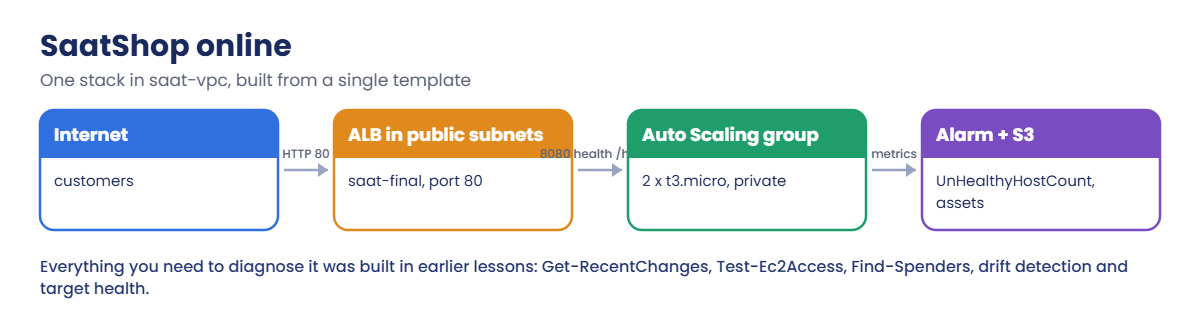
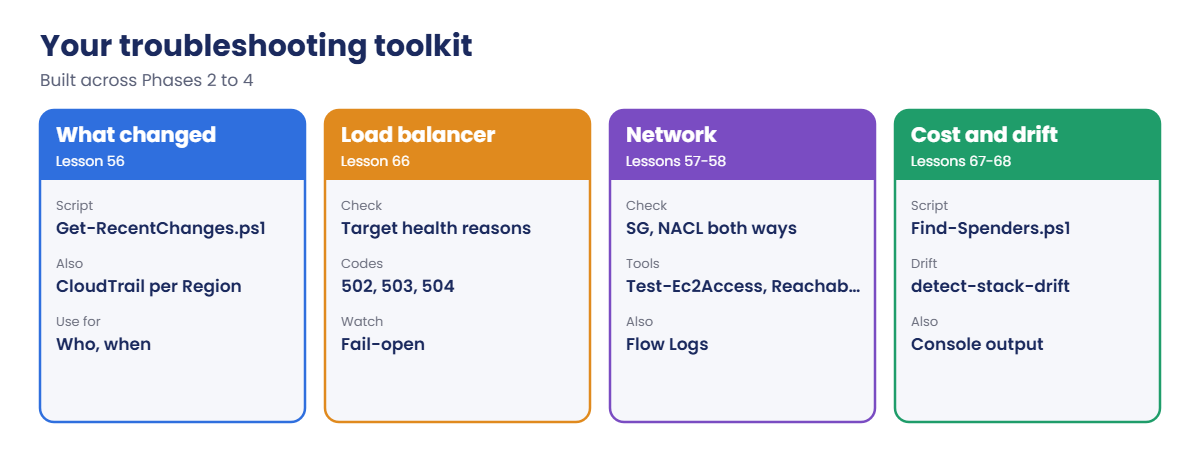
Sign in and save the template:
cd C:\aws-lab
aws login --profile saat-admin
$env:AWS_PROFILE = 'saat-admin'
$v = Get-Content C:\aws-lab\saat-vpc.json | ConvertFrom-Json
$tpl = @'
AWSTemplateFormatVersion: '2010-09-09'
Description: SaatVedha final project - SaatShop online
Parameters:
  VpcId:
    Type: AWS::EC2::VPC::Id
  PublicSubnets:
    Type: List<AWS::EC2::Subnet::Id>
  PrivateSubnets:
    Type: List<AWS::EC2::Subnet::Id>
  AlbSg:
    Type: AWS::EC2::SecurityGroup::Id
  AppSg:
    Type: AWS::EC2::SecurityGroup::Id
  AlertTopic:
    Type: String
Resources:
  AppRole:
    Type: AWS::IAM::Role
    Properties:
      AssumeRolePolicyDocument:
        Version: '2012-10-17'
        Statement:
          - Effect: Allow
            Principal:
              Service: ec2.amazonaws.com
            Action: sts:AssumeRole
      ManagedPolicyArns:
        - arn:aws:iam::aws:policy/AmazonSSMManagedInstanceCore
  AppProfile:
    Type: AWS::IAM::InstanceProfile
    Properties:
      Roles:
        - !Ref AppRole
  AdminSg:
    Type: AWS::EC2::SecurityGroup
    Properties:
      GroupDescription: SaatShop admin access (no rules on purpose)
      VpcId: !Ref VpcId
  AppLT:
    Type: AWS::EC2::LaunchTemplate
    Properties:
      LaunchTemplateData:
        ImageId: '{{resolve:ssm:/aws/service/ami-amazon-linux-latest/al2023-ami-kernel-default-x86_64}}'
        InstanceType: t3.micro
        IamInstanceProfile:
          Arn: !GetAtt AppProfile.Arn
        SecurityGroupIds:
          - !Ref AppSg
          - !Ref AdminSg
        MetadataOptions:
          HttpTokens: required
        TagSpecifications:
          - ResourceType: instance
            Tags:
              - Key: Name
                Value: saat-final-app
              - Key: course
                Value: saatvedha-aws
        UserData:
          Fn::Base64: |
            #!/bin/bash
            cat > /opt/app.py <<'EOF2'
            import http.server, socket
            class H(http.server.BaseHTTPRequestHandler):
                def do_GET(self):
                    if self.path not in ('/', '/health'):
                        self.send_error(404)
                        return
                    body = ('SaatShop online from ' + socket.gethostname() + '\n').encode()
                    self.send_response(200)
                    self.send_header('Content-Length', str(len(body)))
                    self.end_headers()
                    self.wfile.write(body)
                def log_message(self, *args):
                    pass
            http.server.ThreadingHTTPServer(('', 8080), H).serve_forever()
            EOF2
            systemd-run --unit=app8080 python3 /opt/app.py
  AppTG:
    Type: AWS::ElasticLoadBalancingV2::TargetGroup
    Properties:
      VpcId: !Ref VpcId
      Protocol: HTTP
      Port: 8080
      TargetType: instance
      HealthCheckPath: /health
      HealthCheckIntervalSeconds: 10
      HealthyThresholdCount: 2
      UnhealthyThresholdCount: 2
  Alb:
    Type: AWS::ElasticLoadBalancingV2::LoadBalancer
    Properties:
      Type: application
      Subnets: !Ref PublicSubnets
      SecurityGroups:
        - !Ref AlbSg
  Listener:
    Type: AWS::ElasticLoadBalancingV2::Listener
    Properties:
      LoadBalancerArn: !Ref Alb
      Port: 80
      Protocol: HTTP
      DefaultActions:
        - Type: forward
          TargetGroupArn: !Ref AppTG
  AppAsg:
    Type: AWS::AutoScaling::AutoScalingGroup
    Properties:
      MinSize: '2'
      MaxSize: '4'
      DesiredCapacity: '2'
      VPCZoneIdentifier: !Ref PrivateSubnets
      LaunchTemplate:
        LaunchTemplateId: !Ref AppLT
        Version: !GetAtt AppLT.LatestVersionNumber
      TargetGroupARNs:
        - !Ref AppTG
      HealthCheckType: ELB
      HealthCheckGracePeriod: 120
  AssetBucket:
    Type: AWS::S3::Bucket
  UnhealthyAlarm:
    Type: AWS::CloudWatch::Alarm
    Properties:
      AlarmDescription: SaatShop has unhealthy app servers
      Namespace: AWS/ApplicationELB
      MetricName: UnHealthyHostCount
      Dimensions:
        - Name: TargetGroup
          Value: !GetAtt AppTG.TargetGroupFullName
        - Name: LoadBalancer
          Value: !GetAtt Alb.LoadBalancerFullName
      Statistic: Maximum
      Period: 60
      EvaluationPeriods: 2
      Threshold: 0
      ComparisonOperator: GreaterThanThreshold
      TreatMissingData: notBreaching
      AlarmActions:
        - !Ref AlertTopic
Outputs:
  AlbDns:
    Value: !GetAtt Alb.DNSName
  AlbFullName:
    Value: !GetAtt Alb.LoadBalancerFullName
  AsgName:
    Value: !Ref AppAsg
  TgArn:
    Value: !Ref AppTG
  LtId:
    Value: !Ref AppLT
  AlarmName:
    Value: !Ref UnhealthyAlarm
  Bucket:
    Value: !Ref AssetBucket
  AdminSgId:
    Value: !Ref AdminSg
'@
$tpl | Set-Content final.yaml
aws cloudformation validate-template --template-body file://final.yaml --query "Capabilities" --output text
You should see this:
CAPABILITY_IAM1Deploy SaatShop online
Paste this whole block (about 6 minutes):
$topic = aws sns list-topics --query "Topics[?ends_with(TopicArn, ':saat-alerts')].TopicArn | [0]" --output text
@(
  @{ ParameterKey = 'VpcId'; ParameterValue = $v.VpcId },
  @{ ParameterKey = 'PublicSubnets'; ParameterValue = "$($v.PublicA),$($v.PublicB)" },
  @{ ParameterKey = 'PrivateSubnets'; ParameterValue = "$($v.PrivateA),$($v.PrivateB)" },
  @{ ParameterKey = 'AlbSg'; ParameterValue = $v.WebSg },
  @{ ParameterKey = 'AppSg'; ParameterValue = $v.AppSg },
  @{ ParameterKey = 'AlertTopic'; ParameterValue = $topic }) | ConvertTo-Json | Set-Content final-params.json
aws cloudformation create-stack --stack-name saat-final --template-body file://final.yaml --parameters file://final-params.json --capabilities CAPABILITY_IAM --tags Key=course,Value=saatvedha-aws Key=lesson,Value=69 | Out-Null
aws cloudformation wait stack-create-complete --stack-name saat-final
aws cloudformation describe-stacks --stack-name saat-final --query "Stacks[0].StackStatus" --output text
You should see this:
CREATE_COMPLETE2Check its health
Paste this whole block. It loads the stack outputs and two helpers, then waits until both servers are healthy:
$o = @{}
aws cloudformation describe-stacks --stack-name saat-final --query "Stacks[0].Outputs" --output json | ConvertFrom-Json | ForEach-Object { $o[$_.OutputKey] = $_.OutputValue }
function Get-Code([string]$Path) {
  $sw = [Diagnostics.Stopwatch]::StartNew()
  try { $r = Invoke-WebRequest "http://$($o.AlbDns)$Path" -UseBasicParsing -TimeoutSec 30; $code = $r.StatusCode; $body = $r.Content.Trim() } catch { $code = [int]$_.Exception.Response.StatusCode; $body = '' }
  '{0}  {1}  {2:N1} s  {3}' -f $Path, $code, $sw.Elapsed.TotalSeconds, $body
}
function Get-ShopHealth {
  "Site:   $(Get-Code /)"
  "Alarm:  $(aws cloudwatch describe-alarms --alarm-names $o.AlarmName --query 'MetricAlarms[0].StateValue' --output text)"
  "ASG:    $(aws autoscaling describe-auto-scaling-groups --auto-scaling-group-names $o.AsgName --query 'AutoScalingGroups[0].[MinSize,DesiredCapacity,length(Instances)]' --output text)"
  aws elbv2 describe-target-health --target-group-arn $o.TgArn --query "TargetHealthDescriptions[].[Target.Id,TargetHealth.State,TargetHealth.Reason]" --output text
}
do { Start-Sleep 20; $h = aws elbv2 describe-target-health --target-group-arn $o.TgArn --query "length(TargetHealthDescriptions[?TargetHealth.State=='healthy'])" --output text } until ($h -eq '2')
Get-ShopHealth
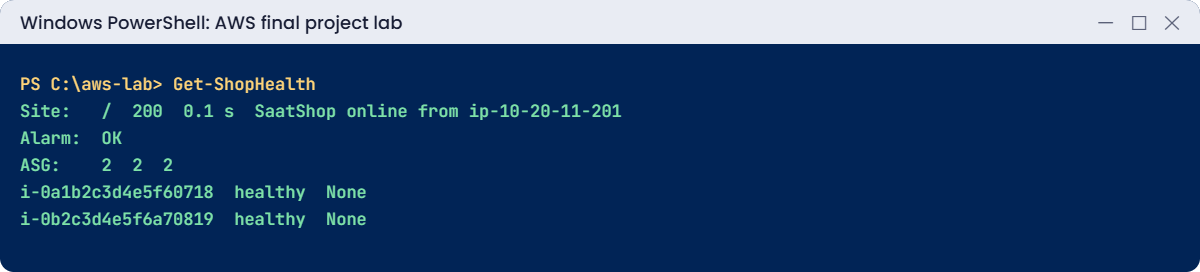
You should see something like this:
Site:   /  200  0.1 s  SaatShop online from ip-10-20-11-201.ap-south-1.compute.internal
Alarm:  OK
ASG:    2       2       2
i-0a1b2c3d4e5f60718     healthy None
i-0b2c3d4e5f6a70819     healthy None
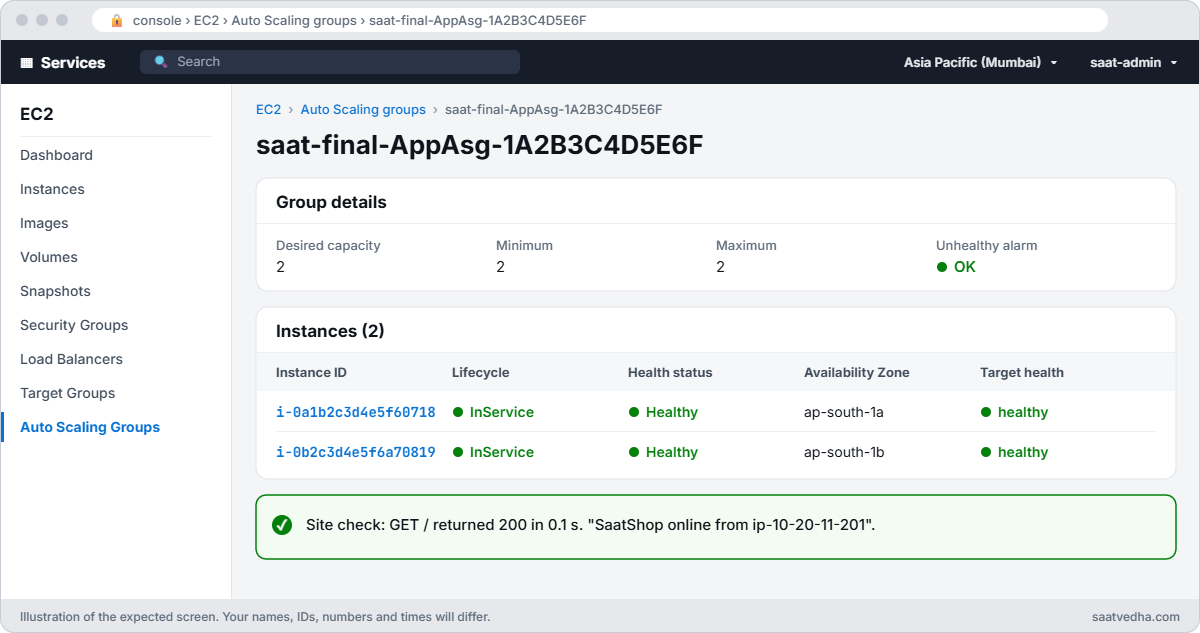
This is “normal”. Take a screenshot; after every fix, Get-ShopHealth should look like this again.
3Save the scenario script
Paste this whole block. Break-SaatShop.ps1 injects one failure each time you run it:
$b = @'
param([Parameter(Mandatory)][ValidateRange(1, 10)][int]$Scenario)
$o = @{}
aws cloudformation describe-stacks --stack-name saat-final --query "Stacks[0].Outputs" --output json | ConvertFrom-Json | ForEach-Object { $o[$_.OutputKey] = $_.OutputValue }
$v = Get-Content C:\aws-lab\saat-vpc.json | ConvertFrom-Json
$ids = @((aws autoscaling describe-auto-scaling-groups --auto-scaling-group-names $o.AsgName --query "AutoScalingGroups[0].Instances[].InstanceId" --output text) -split '\s+' | Where-Object { $_ })
switch ($Scenario) {
  1 { aws autoscaling update-auto-scaling-group --auto-scaling-group-name $o.AsgName --min-size 0 --desired-capacity 0 }
  2 { aws ec2 revoke-security-group-ingress --group-id $v.AppSg --ip-permissions "IpProtocol=tcp,FromPort=8080,ToPort=8080,UserIdGroupPairs=[{GroupId=$($v.WebSg)}]" | Out-Null }
  3 { aws elbv2 modify-target-group --target-group-arn $o.TgArn --health-check-path /status | Out-Null }
  4 {
    $assoc = aws ec2 describe-network-acls --filters "Name=association.subnet-id,Values=$($v.PrivateA)" --query "NetworkAcls[0].Associations[?SubnetId=='$($v.PrivateA)'].NetworkAclAssociationId | [0]" --output text
    $orig = aws ec2 describe-network-acls --filters "Name=association.subnet-id,Values=$($v.PrivateA)" --query "NetworkAcls[0].NetworkAclId" --output text
    $nacl = aws ec2 create-network-acl --vpc-id $v.VpcId --tag-specifications 'ResourceType=network-acl,Tags=[{Key=Name,Value=saat-final-nacl},{Key=course,Value=saatvedha-aws}]' --query NetworkAcl.NetworkAclId --output text
    aws ec2 create-network-acl-entry --network-acl-id $nacl --ingress --rule-number 100 --protocol tcp --port-range From=8080,To=8080 --cidr-block 10.20.0.0/16 --rule-action allow
    $new = aws ec2 replace-network-acl-association --association-id $assoc --network-acl-id $nacl --query NewAssociationId --output text
    @{ OriginalAcl = $orig; NewAssociation = $new; BadAcl = $nacl } | ConvertTo-Json | Set-Content C:\aws-lab\final-nacl.json
  }
  5 { aws ec2 stop-instances --instance-ids $ids[0] | Out-Null }
  6 {
    'Diwali sale: 20% off' | Set-Content promo.txt
    aws s3 cp promo.txt "s3://$($o.Bucket)/promo.txt" --only-show-errors
    aws s3 presign "s3://$($o.Bucket)/promo.txt" --expires-in 5 | Set-Content C:\aws-lab\final-link.txt
    Remove-Item promo.txt
  }
  7 {
    $topic = aws cloudwatch describe-alarms --alarm-names $o.AlarmName --query "MetricAlarms[0].AlarmActions[0]" --output text
    aws cloudwatch put-metric-alarm --alarm-name $o.AlarmName --namespace AWS/ApplicationELB --metric-name UnHealthyHostCount --dimensions "Name=LoadBalancer,Value=$($o.AlbFullName)" --statistic Maximum --period 60 --evaluation-periods 2 --threshold 0 --comparison-operator GreaterThanThreshold --alarm-actions $topic
  }
  8 { aws ec2 authorize-security-group-ingress --group-id $o.AdminSgId --protocol tcp --port 22 --cidr 0.0.0.0/0 | Out-Null }
  9 { aws ec2 allocate-address --region ap-southeast-1 --domain vpc --query PublicIp --output text | Out-Null }
  10 {
    $ud = aws ec2 describe-launch-template-versions --launch-template-id $o.LtId --versions 1 --query "LaunchTemplateVersions[0].LaunchTemplateData.UserData" --output text
    $text = [Text.Encoding]::UTF8.GetString([Convert]::FromBase64String($ud)).Replace([string][char]10, [string][char]13 + [string][char]10)
    '{ "UserData": "B64" }'.Replace('B64', [Convert]::ToBase64String([Text.Encoding]::UTF8.GetBytes($text))) | Set-Content lt-data.json
    $ver = aws ec2 create-launch-template-version --launch-template-id $o.LtId --source-version 1 --launch-template-data file://lt-data.json --query LaunchTemplateVersion.VersionNumber --output text
    aws autoscaling update-auto-scaling-group --auto-scaling-group-name $o.AsgName --launch-template "LaunchTemplateId=$($o.LtId),Version=$ver"
    aws autoscaling terminate-instance-in-auto-scaling-group --instance-id $ids[0] --no-should-decrement-desired-capacity | Out-Null
    Remove-Item lt-data.json
  }
}
"Scenario $Scenario is live. Find out what broke, then fix it."
'@
$b | Set-Content C:\aws-lab\Break-SaatShop.ps1
Get-ChildItem C:\aws-lab\*.ps1 | Select-Object -ExpandProperty Name
You should see something like this:
Break-SaatShop.ps1
Find-Spenders.ps1
Find-Waste.ps1
Get-RecentChanges.ps1
Remove-LabBucket.ps1
Start-SqlLab.ps1
Start-SsmEndpoints.ps1
Stop-SqlLab.ps1
Stop-SsmEndpoints.ps1
Test-Ec2Access.ps1
Test-NativeRestore.ps1
Test-RdsAccess.ps1
Don’t read the script yet if you want a fair test. Its switch block is the list of answers.
4Work through the scenarios
Run one scenario at a time with .\Break-SaatShop.ps1 -Scenario N, investigate, fix it, and confirm with Get-ShopHealth before the next. Here is what the “users” report for each one, and a hint about where to start:
| # | What users report | Start with |
|---|---|---|
| 1 | “The website shows Service Unavailable.” | Get-ShopHealth, Auto Scaling counts |
| 2 | “Pages hang for 10 seconds, then fail.” | Target health reasons, Lesson 66 |
| 3 | “Site works, but the unhealthy alarm went off.” | Target health reasons, alarm |
| 4 | “Half our capacity is gone, one server keeps failing.” | Target health, subnet, NACL (worked below) |
| 5 | “A server vanished and a new one appeared.” | Get-RecentChanges, Auto Scaling activities |
| 6 | “Marketing’s promo link gives an error.” | The link in C:\aws-lab\final-link.txt, Lesson 60 |
| 7 | “The unhealthy alarm never fires any more.” | Alarm state and its dimensions, Lesson 23 |
| 8 | “Security says something changed on our servers.” | Drift detection, Lesson 67 |
| 9 | “Finance sees a new small charge every day.” | Find-Spenders, Lesson 68 |
| 10 | “After a config change, new servers never come up.” | Scaling activities, console output (worked below) |
✅ Checkpoint: saat-final is CREATE_COMPLETE, Get-ShopHealth shows 200, alarm OK and two healthy targets, and Break-SaatShop.ps1 is saved.
Here are scenarios 4 and 10, worked from symptom to fix. Solve the other eight yourself, then compare with the answer key below.
1Worked scenario 4: half the capacity is gone
Inject it, wait for health checks, and look:
.\Break-SaatShop.ps1 -Scenario 4
Start-Sleep 60
Get-ShopHealth
$bad = aws elbv2 describe-target-health --target-group-arn $o.TgArn --query "TargetHealthDescriptions[?TargetHealth.State=='unhealthy'].Target.Id | [0]" --output text
$sub = aws ec2 describe-instances --instance-ids $bad --query "Reservations[0].Instances[0].SubnetId" --output text
aws ec2 describe-network-acls --filters "Name=association.subnet-id,Values=$sub" --query "NetworkAcls[0].[NetworkAclId,Tags[?Key=='Name'].Value | [0],length(Entries[?Egress])]" --output text
You’ll get something like this:
Site:   /  200  0.1 s  SaatShop online from ip-10-20-12-77.ap-south-1.compute.internal
Alarm:  ALARM
ASG:    2       2       2
i-0a1b2c3d4e5f60718     unhealthy       Target.Timeout
i-0b2c3d4e5f6a70819     healthy None
acl-0f1e2d3c4b5a69788   saat-final-nacl 1
The site still answers (from the healthy server), the alarm fired, and the failing server’s subnet now has a custom NACL whose only outbound entry is the default deny. Health check requests get in on 8080 but the replies can’t leave: Target.Timeout. Because the ASG uses ELB health checks, it will keep replacing that server, and the replacement fails the same way.
Fix: put the subnet back on its original NACL and remove the bad one:
$n = Get-Content C:\aws-lab\final-nacl.json | ConvertFrom-Json
aws ec2 replace-network-acl-association --association-id $n.NewAssociation --network-acl-id $n.OriginalAcl | Out-Null
aws ec2 delete-network-acl --network-acl-id $n.BadAcl
Remove-Item C:\aws-lab\final-nacl.json
Start-Sleep 90
Get-ShopHealth
You should see two healthy targets again, and the alarm back to OK within a few minutes.
2Worked scenario 10: new servers never come up
Inject it, give the replacement a few minutes, then follow the evidence:
.\Break-SaatShop.ps1 -Scenario 10
Start-Sleep 300
Get-ShopHealth
aws autoscaling describe-scaling-activities --auto-scaling-group-name $o.AsgName --max-items 3 --query "Activities[].[StatusCode,Description]" --output text
$new = aws autoscaling describe-auto-scaling-groups --auto-scaling-group-names $o.AsgName --query "AutoScalingGroups[0].Instances[?LaunchTemplate.Version!='1'].InstanceId | [0]" --output text
aws ec2 get-console-output --instance-id $new --latest --query Output --output text | Select-String 'bad interpreter' | Select-Object -First 1
You’ll get something like this:
Site:   /  200  0.1 s  SaatShop online from ip-10-20-12-77.ap-south-1.compute.internal
Alarm:  ALARM
ASG:    2       2       2
i-0c3d4e5f6a7b80912     unhealthy       Target.FailedHealthChecks
i-0b2c3d4e5f6a70819     healthy None
InProgress      Launching a new EC2 instance: i-0d4e5f6a7b8c90123
Successful      Terminating EC2 instance: i-0c2b3a4d5e6f70811
Successful      Launching a new EC2 instance: i-0c2b3a4d5e6f70811
[   48.120000] cloud-init[1203]: /var/lib/cloud/instance/scripts/part-001: /bin/bash^M: bad interpreter: No such file or directory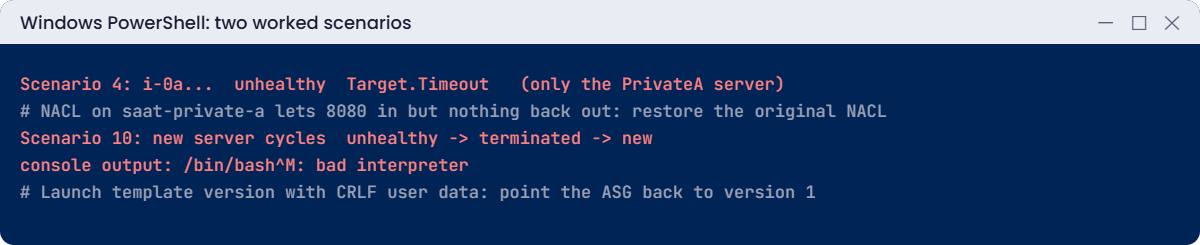
The group launches a server, ELB marks it unhealthy because the app never started, the group terminates it and tries again: a replacement loop. The console output names the cause from Lesson 11: the new launch template version’s user data has Windows line endings, so the script never runs.
Fix: point the group back at the good version 1 and replace the broken server (in real life you’d also delete the bad version and fix the pipeline that made it):
aws autoscaling update-auto-scaling-group --auto-scaling-group-name $o.AsgName --launch-template "LaunchTemplateId=$($o.LtId),Version=1"
$broken = aws autoscaling describe-auto-scaling-groups --auto-scaling-group-names $o.AsgName --query "AutoScalingGroups[0].Instances[?LaunchTemplate.Version!='1'].InstanceId" --output text
foreach ($x in ($broken -split '\s+')) { if ($x) { aws autoscaling terminate-instance-in-auto-scaling-group --instance-id $x --no-should-decrement-desired-capacity | Out-Null } }
Start-Sleep 240
Get-ShopHealth
You should see two healthy targets again.
3Answer key for the other scenarios
Only read a row after you’ve tried that scenario yourself:
| # | Cause | Fix |
|---|---|---|
| 1 | Auto Scaling min and desired set to 0: no targets, so 503 | update-auto-scaling-group --min-size 2 --desired-capacity 2 |
| 2 | AppSg lost its 8080 rule from WebSg: Target.Timeout and 504 | Re-authorize 8080 from WebSg on AppSg |
| 3 | Health check path changed to /status: ResponseCodeMismatch, fail-open keeps the site up | modify-target-group --health-check-path /health |
| 5 | Someone stopped a server; ELB health checks made the ASG replace it | Get-RecentChanges shows StopInstances and who; talk to them; nothing to restore |
| 6 | The presigned URL expired after 5 seconds: 403 Request has expired | Generate a new link with a sensible --expires-in |
| 7 | The alarm was edited to use only the LoadBalancer dimension: no data | Put both TargetGroup and LoadBalancer dimensions back (or update the stack) |
| 8 | Port 22 from 0.0.0.0/0 added to the stack’s admin security group: drift | Revoke the rule; detect-stack-drift shows IN_SYNC |
| 9 | An unused Elastic IP in ap-southeast-1: idle IPv4 charge | Find-Spenders finds it; release-address in that Region |
Now clean up. The first lines undo any scenario you didn’t finish:
aws ec2 authorize-security-group-ingress --group-id $v.AppSg --ip-permissions "IpProtocol=tcp,FromPort=8080,ToPort=8080,UserIdGroupPairs=[{GroupId=$($v.WebSg),Description=8080-from-web-sg}]" 2>$null | Out-Null
if (Test-Path C:\aws-lab\final-nacl.json) { $n = Get-Content C:\aws-lab\final-nacl.json | ConvertFrom-Json; aws ec2 replace-network-acl-association --association-id $n.NewAssociation --network-acl-id $n.OriginalAcl | Out-Null; aws ec2 delete-network-acl --network-acl-id $n.BadAcl; Remove-Item C:\aws-lab\final-nacl.json }
$eips = aws ec2 describe-addresses --region ap-southeast-1 --query "Addresses[?AssociationId==null].AllocationId" --output text
foreach ($x in ($eips -split '\s+')) { if ($x) { aws ec2 release-address --region ap-southeast-1 --allocation-id $x } }
aws s3 rm "s3://$($o.Bucket)" --recursive --only-show-errors
aws cloudformation delete-stack --stack-name saat-final
aws cloudformation wait stack-delete-complete --stack-name saat-final
Remove-Item final.yaml, final-params.json, C:\aws-lab\final-link.txt -ErrorAction SilentlyContinue
.\Find-Spenders.ps1
The last command should report nothing running or left behind.
✅ Checkpoint: You solved scenarios 4 and 10 from evidence, worked through the other eight with the answer key, and deleted saat-final. Find-Spenders.ps1 finds nothing left behind.