AWS Config rules and resource timeline
-
Phase 0: Before you start
-
Phase 1: The foundation
-
Phase 2: Operations and security
-
Phase 3: SQL Server on AWS
-
Phase 4: Troubleshooting step by step
-
Phase 5: Final project and career
CloudTrail tells you who made a change. But what did the security group look like before? And which of your 400 security groups break the rules right now?
AWS Config rules and the Config resource timeline answer those questions, continuously and automatically.
You’ll turn on the Config recorder for a few resource types, add two managed rules, open SSH to the world on a test group and watch Config flag it, then fix it and read the group’s full history. You’ll also meet the two setup problems that stop Config from working at all.
| Time | You need | By the end you can |
|---|---|---|
| 50 minutes | Lesson 25 done (saat-trail), saat-vpc, your laptop signed in as saat-admin. Cost: a few cents (about USD 0.003 per recorded change and USD 0.001 per rule evaluation). Everything is turned off at the end. | Set up the Config recorder and delivery channel, add managed rules, read compliance results and resource timelines, and fix delivery and recording-scope problems. |
What it is, in one line
AWS Config records the configuration of your resources over time and evaluates them against rules, marking each resource COMPLIANT or NON_COMPLIANT.
In Simple Words
The school uniform inspector
Every morning a teacher walks down the line and checks uniforms: tie on, shoes polished, ID card visible. Anyone who breaks a rule gets noted down. That teacher is a Config rule.
The school also takes a class photo every time something changes, like a new haircut or a new bag. Months later, you can flip through the photos and see exactly what someone looked like on any day. That photo album is the resource timeline.
The teacher only checks the classes they’re told to check. If nobody asks them to look at Class 5, Class 5 is never inspected.
Engineer's View
How AWS Config really works
The configuration recorder captures a configuration item (CI) whenever a recorded resource changes: its full configuration, relationships and related CloudTrail event IDs. You choose all supported types or a list of types; recording everything in a busy account can be expensive. The delivery channel sends history and snapshots to an S3 bucket (and optionally SNS).
Rules evaluate resources and return COMPLIANT, NON_COMPLIANT or NOT_APPLICABLE. AWS managed rules cover common checks (open SSH, unencrypted volumes, S3 versioning). Custom rules use Lambda or Guard policies.
Triggers are configuration changes, a schedule, or both. A rule whose resource type isn’t recorded never gets change-triggered results.
Remediation links a rule to a Systems Manager Automation document, manual or automatic. Conformance packs deploy groups of rules, and an aggregator collects results from many accounts and Regions. Config is Regional: record in every Region you use.
How it works, step by step
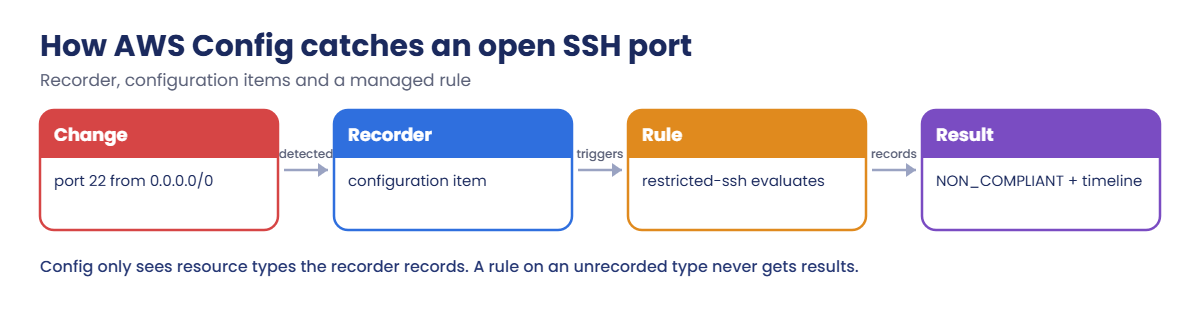
Here is how one bad change gets caught.
1Someone changes a resource
A security group gets 22 from 0.0.0.0/0. CloudTrail records the API call (Lesson 25).
2The recorder captures the new state
Within minutes, Config stores a configuration item: every rule on the group, its VPC, its tags and the CloudTrail event that caused it.
3Rules evaluate it
restricted-ssh (managed rule INCOMING_SSH_DISABLED) checks the new CI and marks the group NON_COMPLIANT. You can alert on that with EventBridge or fix it automatically.
4History stays
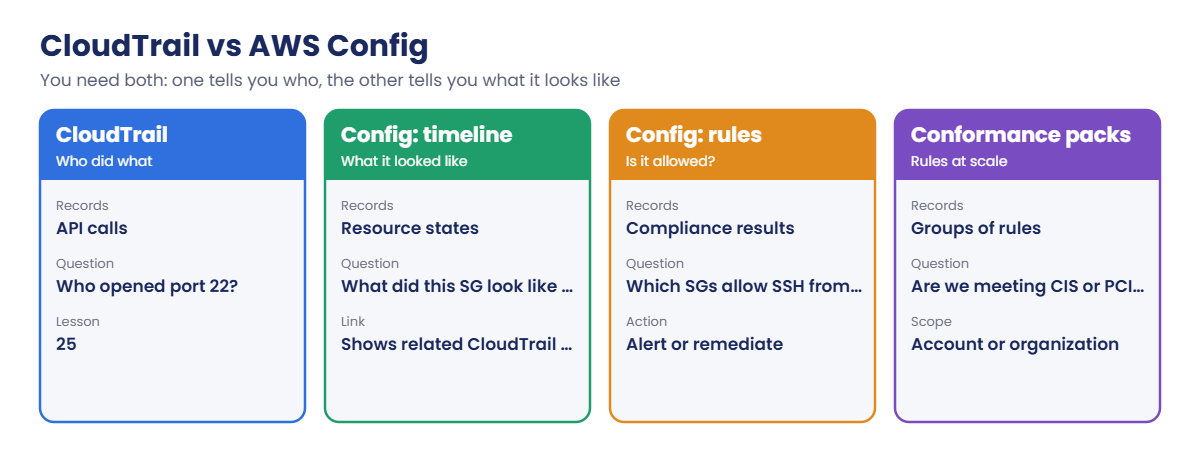
Every CI is kept, so the group’s timeline shows each version. Config and CloudTrail answer different questions:
In an incident you’ll often use both: Config to see what a resource looked like at 2 a.m., CloudTrail to see who changed it at 2:05.
✅ Checkpoint: You can explain the recorder, configuration items, the delivery channel and rules, and why recording scope matters.
Hands-on lab: AWS Config rules that catch an open port
Sign in and set up names:
cd C:\aws-lab
aws login --profile saat-admin
$env:AWS_PROFILE = 'saat-admin'
$v = Get-Content C:\aws-lab\saat-vpc.json | ConvertFrom-Json
$acct = aws sts get-caller-identity --query Account --output text
$bucket = "saat-config-$acct-ap-south-1-an"1Create the Config bucket and service role
Paste this whole block:
aws s3api create-bucket --bucket $bucket --bucket-namespace account-regional --region ap-south-1 --create-bucket-configuration LocationConstraint=ap-south-1 | Out-Null
@'
{
"Version": "2012-10-17",
"Statement": [
{ "Sid": "AWSConfigBucketPermissionsCheck", "Effect": "Allow", "Principal": { "Service": "config.amazonaws.com" }, "Action": "s3:GetBucketAcl", "Resource": "arn:aws:s3:::BUCKET", "Condition": { "StringEquals": { "AWS:SourceAccount": "ACCT" } } },
{ "Sid": "AWSConfigBucketExistenceCheck", "Effect": "Allow", "Principal": { "Service": "config.amazonaws.com" }, "Action": "s3:ListBucket", "Resource": "arn:aws:s3:::BUCKET", "Condition": { "StringEquals": { "AWS:SourceAccount": "ACCT" } } },
{ "Sid": "AWSConfigBucketDelivery", "Effect": "Allow", "Principal": { "Service": "config.amazonaws.com" }, "Action": "s3:PutObject", "Resource": "arn:aws:s3:::BUCKET/AWSLogs/ACCT/Config/*", "Condition": { "StringEquals": { "s3:x-amz-acl": "bucket-owner-full-control", "AWS:SourceAccount": "ACCT" } } }
]
}
'@ -replace 'BUCKET', $bucket -replace 'ACCT', $acct | Set-Content config-bucket-policy.json
aws s3api put-bucket-policy --bucket $bucket --policy file://config-bucket-policy.json
aws iam create-service-linked-role --aws-service-name config.amazonaws.com 2>$null | Out-Null
aws iam get-role --role-name AWSServiceRoleForConfig --query Role.Arn --output textYou should see something like this:
arn:aws:iam::111122223333:role/aws-service-role/config.amazonaws.com/AWSServiceRoleForConfigThe service-linked role lets Config read your resources. If it already exists, the create command fails quietly and the get shows it anyway.
2Start recording two resource types
Paste this whole block:
@'
{
"allSupported": false,
"includeGlobalResourceTypes": false,
"recordingStrategy": { "useOnly": "INCLUSION_BY_RESOURCE_TYPES" },
"resourceTypes": [ "AWS::EC2::SecurityGroup", "AWS::S3::Bucket" ]
}
'@ | Set-Content recording-group.json
aws configservice put-configuration-recorder --configuration-recorder "name=default,roleARN=arn:aws:iam::$($acct):role/aws-service-role/config.amazonaws.com/AWSServiceRoleForConfig" --recording-group file://recording-group.json
aws configservice put-delivery-channel --delivery-channel "name=default,s3BucketName=$bucket"
aws configservice start-configuration-recorder --configuration-recorder-name default
Start-Sleep 60
aws configservice describe-configuration-recorder-status --query "ConfigurationRecordersStatus[0].[recording,lastStatus]" --output textYou should see this:
True SUCCESSRecording only security groups and S3 buckets keeps the lab to a few cents. A real account usually records all supported types, and excludes noisy ones only for a reason.
3Add two rules and break one on purpose
Paste this whole block (evaluations take a few minutes):
'{ "ConfigRuleName": "restricted-ssh", "Source": { "Owner": "AWS", "SourceIdentifier": "INCOMING_SSH_DISABLED" }, "Scope": { "ComplianceResourceTypes": [ "AWS::EC2::SecurityGroup" ] } }' | Set-Content rule-ssh.json
'{ "ConfigRuleName": "s3-versioning", "Source": { "Owner": "AWS", "SourceIdentifier": "S3_BUCKET_VERSIONING_ENABLED" }, "Scope": { "ComplianceResourceTypes": [ "AWS::S3::Bucket" ] } }' | Set-Content rule-s3.json
aws configservice put-config-rule --config-rule file://rule-ssh.json
aws configservice put-config-rule --config-rule file://rule-s3.json
$sg = aws ec2 create-security-group --group-name lab26-ssh --description "Config rule test" --vpc-id $v.VpcId --query GroupId --output text
aws ec2 authorize-security-group-ingress --group-id $sg --protocol tcp --port 22 --cidr 0.0.0.0/0 | Out-Null
do { Start-Sleep 30; $r = aws configservice get-compliance-details-by-resource --resource-type AWS::EC2::SecurityGroup --resource-id $sg --query "EvaluationResults[0].ComplianceType" --output text } until ($r -eq 'NON_COMPLIANT')
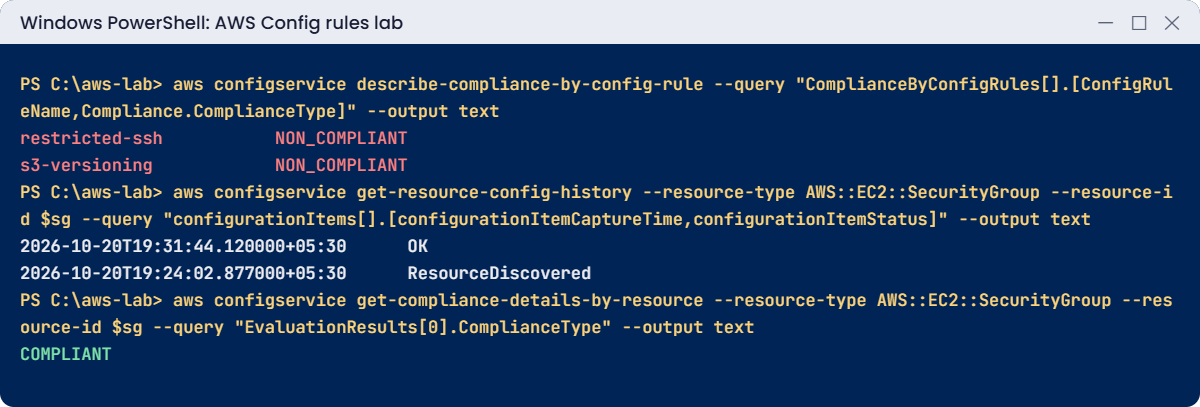
aws configservice describe-compliance-by-config-rule --query "ComplianceByConfigRules[].[ConfigRuleName,Compliance.ComplianceType]" --output textYou should see something like this:
restricted-ssh NON_COMPLIANT
s3-versioning NON_COMPLIANTrestricted-ssh caught lab26-ssh. s3-versioning flags your trail and Config buckets, which don’t have versioning. That is a real finding: many companies require versioning on log buckets. You’ll leave them as they are to avoid extra storage cost, and record the decision; an accepted exception is still a decision.
4Fix it and read the timeline
Paste this whole block:
aws ec2 revoke-security-group-ingress --group-id $sg --protocol tcp --port 22 --cidr 0.0.0.0/0 | Out-Null
do { Start-Sleep 30; $r = aws configservice get-compliance-details-by-resource --resource-type AWS::EC2::SecurityGroup --resource-id $sg --query "EvaluationResults[0].ComplianceType" --output text } until ($r -eq 'COMPLIANT')
aws configservice get-resource-config-history --resource-type AWS::EC2::SecurityGroup --resource-id $sg --query "configurationItems[].[configurationItemCaptureTime,configurationItemStatus,length(relatedEvents)]" --output text
$rYou should see something like this:
2026-10-20T19:31:44.120000+05:30 OK 1
2026-10-20T19:24:02.877000+05:30 ResourceDiscovered 2
COMPLIANTTwo versions of the group, each with the CloudTrail event IDs that caused it. In the console, open Config, then Resources, then lab26-ssh, and choose Resource timeline to see the rule appear and disappear.
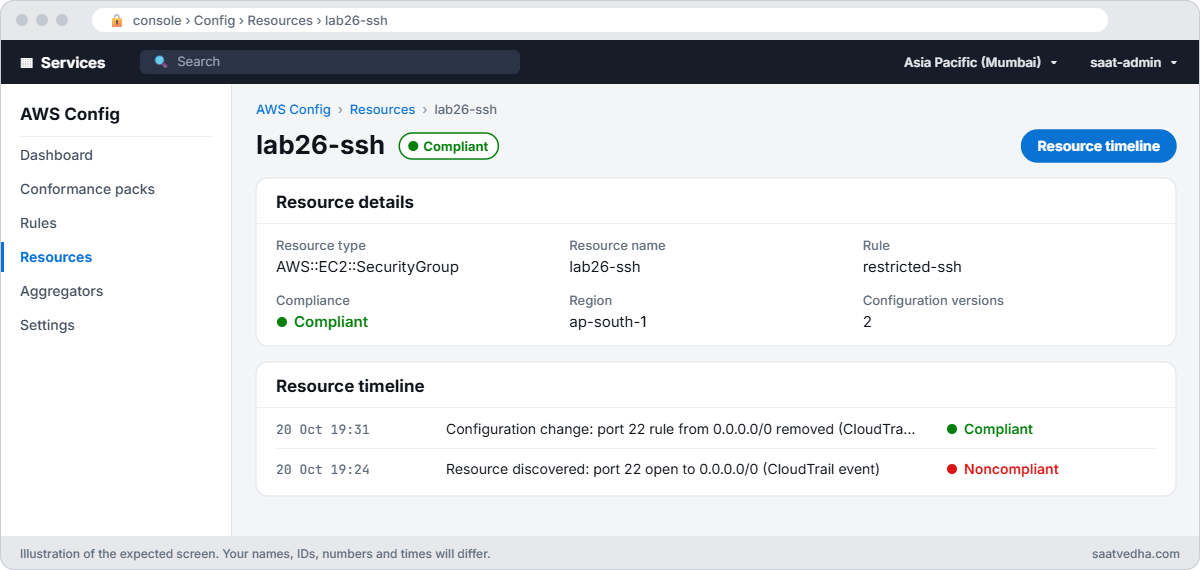
✅ Checkpoint: The recorder is recording with status SUCCESS, restricted-ssh flagged lab26-ssh and then marked it COMPLIANT after the fix, and the timeline shows both versions. Keep everything for the break lab.
Break It, Then Fix It
The two problems that make people think “Config doesn’t work”.
1Break it: a delivery channel the bucket won’t accept
Remove the bucket policy, then update the delivery channel, as a pipeline that rebuilds settings would:
aws s3api delete-bucket-policy --bucket $bucket
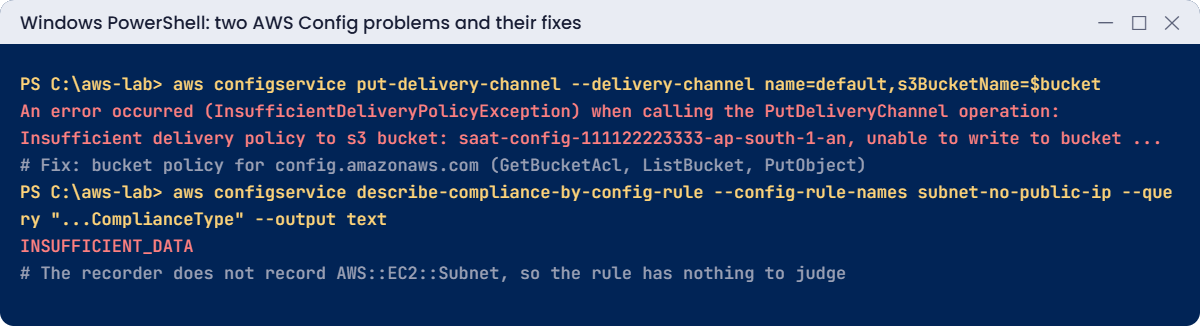
aws configservice put-delivery-channel --delivery-channel "name=default,s3BucketName=$bucket"You’ll get an error like this:
An error occurred (InsufficientDeliveryPolicyException) when calling the PutDeliveryChannel operation: Insufficient delivery policy to s3 bucket: saat-config-111122223333-ap-south-1-an, unable to write to bucket, provided s3 key prefix is 'null', provided kms key is 'null'.Config checks that it can read the bucket ACL, list the bucket and write under AWSLogs/ACCOUNT/Config/. The service-linked role has no S3 permissions, so the bucket policy must grant them. Fix: put the policy back and retry:
aws s3api put-bucket-policy --bucket $bucket --policy file://config-bucket-policy.json
aws configservice put-delivery-channel --delivery-channel "name=default,s3BucketName=$bucket"
aws configservice describe-delivery-channel-status --query "DeliveryChannelsStatus[0].configHistoryDeliveryInfo.lastStatus" --output textYou should see this:
SUCCESS2Break it: a rule for a type you don’t record
Add a rule that checks subnets, then look at it after a few minutes:
'{ "ConfigRuleName": "subnet-no-public-ip", "Source": { "Owner": "AWS", "SourceIdentifier": "SUBNET_AUTO_ASSIGN_PUBLIC_IP_DISABLED" }, "Scope": { "ComplianceResourceTypes": [ "AWS::EC2::Subnet" ] } }' | Set-Content rule-subnet.json
aws configservice put-config-rule --config-rule file://rule-subnet.json
Start-Sleep 180
aws configservice describe-compliance-by-config-rule --config-rule-names subnet-no-public-ip --query "ComplianceByConfigRules[0].Compliance.ComplianceType" --output textYou should see this:
INSUFFICIENT_DATA
The rule is fine; the recorder never records subnets, so the rule has nothing to judge. In real accounts this looks like a dashboard of green and grey, and nobody notices the grey. Fix: add the type to the recording group:
(Get-Content recording-group.json -Raw) -replace '"AWS::S3::Bucket"', '"AWS::S3::Bucket", "AWS::EC2::Subnet"' | Set-Content recording-group.json
aws configservice put-configuration-recorder --configuration-recorder "name=default,roleARN=arn:aws:iam::$($acct):role/aws-service-role/config.amazonaws.com/AWSServiceRoleForConfig" --recording-group file://recording-group.json
do { Start-Sleep 30; $r = aws configservice describe-compliance-by-config-rule --config-rule-names subnet-no-public-ip --query "ComplianceByConfigRules[0].Compliance.ComplianceType" --output text } until ($r -ne 'INSUFFICIENT_DATA')
aws configservice get-compliance-details-by-config-rule --config-rule-name subnet-no-public-ip --compliance-types NON_COMPLIANT --query "length(EvaluationResults)"You should see this:
2saat-public-a and saat-public-b auto-assign public IPs, which is exactly what public subnets are for. A good rule program handles that with an exception (for example by tag), not by deleting the rule.
Now turn Config off and clean up, so it stops recording and charging:
aws configservice delete-config-rule --config-rule-name restricted-ssh
aws configservice delete-config-rule --config-rule-name s3-versioning
aws configservice delete-config-rule --config-rule-name subnet-no-public-ip
aws configservice stop-configuration-recorder --configuration-recorder-name default
aws configservice delete-delivery-channel --delivery-channel-name default
aws configservice delete-configuration-recorder --configuration-recorder-name default
aws ec2 delete-security-group --group-id $sg
aws s3 rm "s3://$bucket" --recursive | Out-Null
aws s3 rb "s3://$bucket"
Remove-Item config-bucket-policy.json, recording-group.json, rule-*.json
.\Find-LabResources.ps1✅ Checkpoint: You fixed InsufficientDeliveryPolicyException and an INSUFFICIENT_DATA rule caused by recording scope. Config is fully turned off and its bucket deleted; saat-trail keeps running.
This happened at work
The audit that found nothing, wrongly
A healthcare company prepared for an audit with a Config conformance pack that checked encryption on databases, volumes and buckets. The dashboard showed no non-compliant RDS instances, and the team told the auditors every database was encrypted.
The auditor asked to see one database’s evaluation. There wasn’t one. Months earlier, someone had narrowed the recorder to “the important types” to cut cost, and RDS wasn’t on the list.
Every RDS rule had been INSUFFICIENT_DATA since then, and two old databases were in fact unencrypted.
The team now records all supported types (with a few noisy types excluded by documented decision), alerts on any rule in INSUFFICIENT_DATA for more than a day, and uses a Config aggregator so the security team sees every account and Region in one view.
Common mistakes and troubleshooting
| Mistake | What happens | What to do |
|---|---|---|
| Rule for a type the recorder skips | INSUFFICIENT_DATA forever | Record the type, or record all supported types |
| Delivery bucket without the Config policy | InsufficientDeliveryPolicyException | Grant GetBucketAcl, ListBucket and PutObject to config.amazonaws.com |
| Recording only one Region | Resources elsewhere are never checked | Enable Config in every Region you use |
| Treating “no NON_COMPLIANT” as “compliant” | Grey results are missed | Watch for INSUFFICIENT_DATA too |
| Deleting rules that flag expected cases | Real problems later go unnoticed | Use exceptions by tag or scope |
| Recording everything in a high-churn account without a check | Unexpected configuration item charges | Review CI counts; consider periodic recording for noisy types |
Interview questions
Click a question to open it. Each one is written the way an interviewer would ask it. Under it you will see why they ask it and one way you could answer, in your own words.
Fresher level
1. Can you explain in simple words what AWS Config does?
Why they ask this: They want to know you understand how AWS tracks whether resources follow the rules. It shows you know governance is more than setting things up once.
How you might answer: AWS Config records how your resources are configured over time. It also checks those configurations against rules, so you can see what is compliant and what is not.
Because it keeps the full change history, I can open any resource and see what it looked like last week and what changed since.
2. People often mix up AWS Config and CloudTrail. How would you explain the difference to a new team member?
Why they ask this: They want to see that you know which service answers which question. Picking the right one saves a lot of time in an investigation.
How you might answer: I’d say CloudTrail records the API calls, so it answers who did what and when. Config records the state of the resource, so it answers what the resource looked like and whether it follows our rules.
In practice I use both together: Config shows me a security group changed, and CloudTrail shows me who changed it.
3. What is a managed rule in AWS Config, and can you give me an example?
Why they ask this: They are checking that you know you don’t have to write code for common checks. It shows you can get value from Config quickly.
How you might answer: A managed rule is a ready-made rule that AWS provides, so I just turn it on and set the parameters. For example, INCOMING_SSH_DISABLED checks that security groups don’t allow SSH from anywhere, and S3_BUCKET_VERSIONING_ENABLED checks that buckets have versioning on.
2–5 years experience
4. You open the Config console and one of your rules shows INSUFFICIENT_DATA. What would you check?
Why they ask this: They want to see a clear troubleshooting order. This status confuses many people, and they want to know you can explain it.
How you might answer: First I’d check that the recorder is actually recording that resource type, and that resources of that type exist in the rule’s scope. If the rule is periodic, it may simply not have run yet.
If those look fine, I’d check the recorder itself, because a stopped recorder or failed delivery also leaves the rule with no data.
5. Your team keeps finding non-compliant resources and fixing them by hand. How would you automate that?
Why they ask this: They want to see that you can move from reporting problems to fixing them safely. They are also checking that you think about testing before automation touches real resources.
How you might answer: I’d attach a remediation action to the Config rule, using a Systems Manager Automation document with an assume role that has just the permissions it needs. Then I’d set it to automatic, with retry limits.
Before turning it on everywhere, I’d test it on non-production accounts first, because an automatic fix can break things if it’s wrong.
6. Security asks you for one view of Config compliance across all your accounts and Regions. How would you give them that?
Why they ask this: They want to know you can work beyond a single account. Most real companies run many accounts, and nobody wants to check them one by one.
How you might answer: I’d create a Config aggregator in a central or delegated admin account. It collects the results from all the accounts and Regions in the organization, so security sees everything in one place.
Senior level
7. You’re asked to build a compliance program for 50 AWS accounts using Config. How would you design it?
Why they ask this: They want to see governance thinking at scale: standards, ownership, automation and exceptions. They are checking that you design something people can live with, not only something that reports red.
How you might answer: I’d turn on the recorder across the organization through a delegated admin account, and deploy conformance packs mapped to our company standard. An aggregator in the security account gives one view, and EventBridge sends alerts to the resource owners.
For safe fixes I’d use auto-remediation, and I’d document exceptions with tags. I’d also report on INSUFFICIENT_DATA and drift, so gaps in coverage don’t stay hidden.
8. The finance team tells you the AWS Config bill jumped this month. How would you find out why?
Why they ask this: They want to see that you can trace a cost problem to its source. Config costs can grow quietly, and they want to know you understand what drives them.
How you might answer: I’d look at configuration items recorded by resource type in Cost Explorer or the usage reports. Usually one type with a lot of churn stands out, often from autoscaling or containers.
For those types I’d consider periodic recording or excluding them. I’d also review how many rule evaluations run and how big our conformance packs are.
Quick quiz
Q1. What does the Config recorder capture?
- API calls
- Configuration items for recorded resource types
- Application logs
- Network packets
Show answer
B — Each change creates a configuration item.
Q2. Why was subnet-no-public-ip INSUFFICIENT_DATA?
- No subnets existed
- Subnets were not recorded
- The rule was wrong
- The bucket was full
Show answer
B — A change-triggered rule needs its type recorded.
Q3. What fixed InsufficientDeliveryPolicyException?
- A new role
- A bucket policy for config.amazonaws.com
- Versioning
- A KMS key
Show answer
B — Config must be able to check and write to the bucket.
Q4. Which service tells you who changed a resource?
- AWS Config
- CloudTrail
- S3
- EFS
Show answer
B — Config links to related CloudTrail events, but CloudTrail records the caller.
Q5. What should you do about a rule that flags expected cases?
- Delete the rule
- Add a documented exception
- Stop the recorder
- Ignore all results
Show answer
B — Exceptions keep the rule useful for real problems.
Quick recap
- Config records resource states as configuration items and keeps a timeline.
- Rules mark resources COMPLIANT or NON_COMPLIANT.
- The delivery bucket needs a policy for config.amazonaws.com.
- Rules only work for resource types the recorder records.
- Watch INSUFFICIENT_DATA as closely as NON_COMPLIANT.
Next lesson
Lesson 27: Patch Manager for Linux and Windows → You’ll scan and patch servers with Patch Manager, use patch baselines and maintenance windows, and read compliance reports.
Further reading: AWS Config rules
Want to go deeper into AWS Config rules? Read What is AWS Config? and List of AWS Config managed rules. You can also see the full plan for this course on the AWS Cloud Administration course page.