Secrets Manager and Parameter Store
-
Phase 0: Before you start
-
Phase 1: The foundation
-
Phase 2: Operations and security
-
Phase 3: SQL Server on AWS
-
Phase 4: Troubleshooting step by step
-
Phase 5: Final project and career
Database passwords in config files, API keys in user data, connection strings in Git: this is how secrets leak. Choosing between Secrets Manager vs Parameter Store is really about where each kind of value belongs, and how servers read them at runtime with their role instead of carrying them around.
You’ll store settings and a SecureString in Parameter Store, create a database secret in Secrets Manager and add a new version, then have a private server read both with its instance role. Then you’ll fix the two mistakes that make apps show gibberish or AccessDenied on their first deploy.
| Time | You need | By the end you can |
|---|---|---|
| 50 minutes (one small instance and four interface endpoints for under an hour) | Lesson 30 done, saat-vpc, Start-SsmEndpoints.ps1 and Stop-SsmEndpoints.ps1, saat-ec2-ssm-profile, your laptop signed in as saat-admin. Cost: about USD 0.10 (endpoints, the instance, and one secret for an hour). | Store String, StringList and SecureString parameters, create and version a Secrets Manager secret, grant a server least-privilege read access, and troubleshoot decryption and ARN-suffix permission problems. |
What it is, in one line
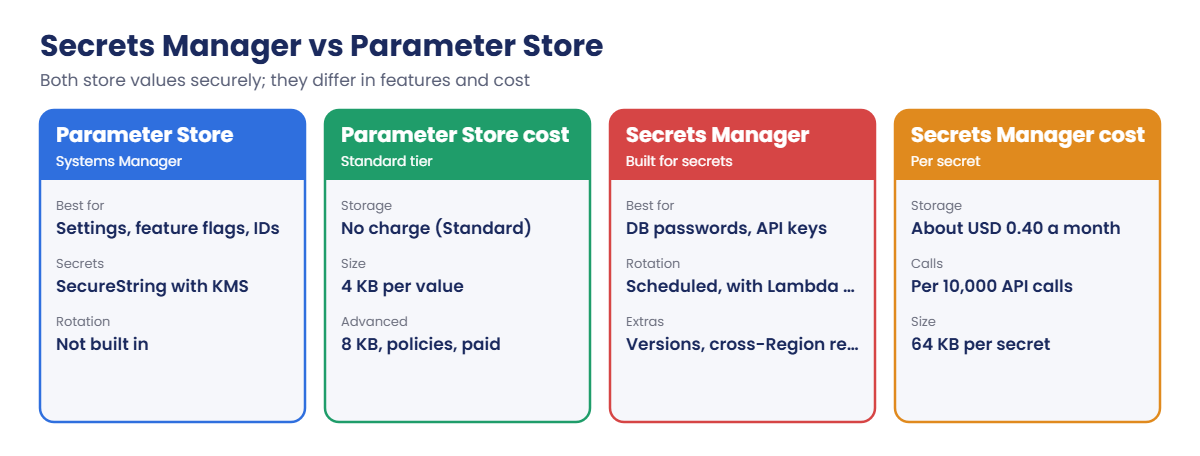
Parameter Store holds configuration values (and simple secrets as SecureString); Secrets Manager holds secrets that need rotation, versions and tight control.
In Simple Words
The notice board and the safe
An office has a notice board with the Wi-Fi name, the canteen timings and the meeting room numbers. Anyone in the office can read it. That is Parameter Store with plain String values.
The office also has a safe for the cash and the master key. Only certain people can open it, the code changes every month, and the old code still works for a day while everyone catches up. That is Secrets Manager.
You could lock a page in a drawer of the notice board (a SecureString), and for many small offices that’s enough. But it won’t change its own code every month.
Engineer's View
What each service really offers
Parameter Store (part of Systems Manager) stores hierarchical names such as /saat/app/db_host as String, StringList or SecureString (encrypted with KMS, aws/ssm by default). Standard parameters are up to 4 KB with no storage charge; Advanced parameters allow 8 KB, policies such as expiry, and cost per parameter. It keeps version history and labels, and you can read a whole path in one call.
Secrets Manager stores secrets up to 64 KB (often JSON with username, password, host and port), encrypts with KMS, and keeps versions with staging labels: AWSCURRENT, AWSPREVIOUS and AWSPENDING during rotation. Rotation runs on a schedule through a Lambda function or managed rotation for RDS and others. Secrets can be replicated to other Regions.
Secret ARNs end with a random six-character suffix, which matters in IAM policies.
Both are read at runtime with IAM: the instance or task role needs ssm:GetParameter or secretsmanager:GetSecretValue on specific names, plus KMS decrypt for customer managed keys. Parameter Store can also return a secret through /aws/reference/secretsmanager/. Private subnets need the ssm or secretsmanager endpoints.
How it works, step by step
Here is how to decide where a value goes:
1Settings go to Parameter Store
Hostnames, feature flags, AMI IDs, bucket names: values that are not secret, or secrets that never rotate and are low risk.
2Credentials go to Secrets Manager
Database passwords, API keys, anything an auditor will ask “when was this last rotated?” about.
3Apps read them at startup
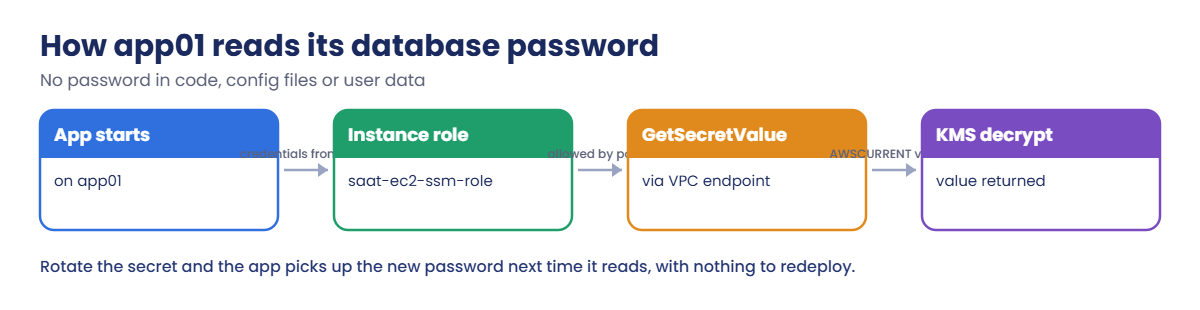
No value is baked into the AMI, the code or user data. The app reads them using its role:
When the secret changes, nothing is redeployed: the next read gets the new AWSCURRENT version. Many SDKs and the Secrets Manager agent cache values for a few minutes to keep API calls and cost down.
✅ Checkpoint: You can say which values belong in each service, what AWSCURRENT and AWSPREVIOUS mean, and what a server needs to read a secret.
Hands-on lab: Secrets Manager vs Parameter Store on a real server
Sign in and set up:
cd C:\aws-lab
aws login --profile saat-admin
$env:AWS_PROFILE = 'saat-admin'
$v = Get-Content C:\aws-lab\saat-vpc.json | ConvertFrom-Json
$acct = aws sts get-caller-identity --query Account --output text1Store settings in Parameter Store
Paste this whole block:
aws ssm put-parameter --name /saat/app/db_host --type String --value saat-db.internal --tags Key=course,Value=saatvedha-aws | Out-Null
aws ssm put-parameter --name /saat/app/features --type StringList --value 'orders,reports' --tags Key=course,Value=saatvedha-aws | Out-Null
aws ssm put-parameter --name /saat/app/db_password --type SecureString --value 'Lab-Only-Pass-91' --tags Key=course,Value=saatvedha-aws | Out-Null
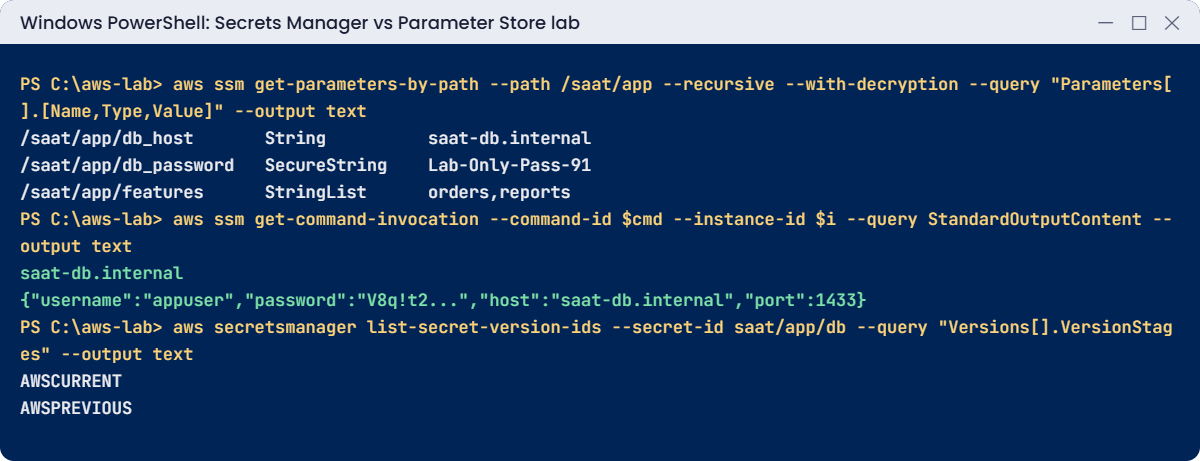
aws ssm get-parameters-by-path --path /saat/app --recursive --with-decryption --query "Parameters[].[Name,Type,Value]" --output textYou should see this:
/saat/app/db_host String saat-db.internal
/saat/app/db_password SecureString Lab-Only-Pass-91
/saat/app/features StringList orders,reportsOne call reads everything under /saat/app. A path per app and environment (/prod/orders/, /test/orders/) makes permissions simple.
2Create a secret and give it a new version
Paste this whole block:
$pw = aws secretsmanager get-random-password --password-length 24 --exclude-punctuation --query RandomPassword --output text
[ordered]@{ username = 'appuser'; password = $pw; host = 'saat-db.internal'; port = 1433 } | ConvertTo-Json -Compress | Set-Content secret.json
$secretArn = aws secretsmanager create-secret --name saat/app/db --description "lesson 31 app database login" --secret-string file://secret.json --tags Key=course,Value=saatvedha-aws --query ARN --output text
$secretArn
$pw2 = aws secretsmanager get-random-password --password-length 24 --exclude-punctuation --query RandomPassword --output text
[ordered]@{ username = 'appuser'; password = $pw2; host = 'saat-db.internal'; port = 1433 } | ConvertTo-Json -Compress | Set-Content secret.json
aws secretsmanager put-secret-value --secret-id saat/app/db --secret-string file://secret.json | Out-Null
Remove-Item secret.json
aws secretsmanager list-secret-version-ids --secret-id saat/app/db --query "Versions[].VersionStages" --output textYou should see something like this:
arn:aws:secretsmanager:ap-south-1:111122223333:secret:saat/app/db-AbCdEf
AWSCURRENT
AWSPREVIOUSNotice the -AbCdEf at the end of the ARN; you’ll meet it again in the break lab. The old password is still available as AWSPREVIOUS, which is what lets rotation happen without breaking apps that haven’t re-read yet. Real rotation runs on a schedule; you’ll see managed rotation for RDS in Lesson 44.
3Give a server read access
Paste this whole block. It adds a scoped policy to the instance role, the Secrets Manager endpoint and app01:
@'
{
"Version": "2012-10-17",
"Statement": [
{ "Effect": "Allow", "Action": [ "ssm:GetParameter", "ssm:GetParameters", "ssm:GetParametersByPath" ], "Resource": "arn:aws:ssm:ap-south-1:ACCT:parameter/saat/app/*" },
{ "Effect": "Allow", "Action": "secretsmanager:GetSecretValue", "Resource": "arn:aws:secretsmanager:ap-south-1:ACCT:secret:SECRET_RESOURCE" }
]
}
'@ -replace 'ACCT', $acct -replace 'SECRET_RESOURCE', 'saat/app/*' | Set-Content read-app-config.json
aws iam put-role-policy --role-name saat-ec2-ssm-role --policy-name read-saat-app-config --policy-document file://read-app-config.json
.\Start-SsmEndpoints.ps1
$smEp = aws ec2 create-vpc-endpoint --vpc-id $v.VpcId --vpc-endpoint-type Interface --service-name com.amazonaws.ap-south-1.secretsmanager --subnet-ids $v.PrivateA --security-group-ids $v.EndpointSg --private-dns-enabled --tag-specifications 'ResourceType=vpc-endpoint,Tags=[{Key=Name,Value=saat-secretsmanager-ep},{Key=course,Value=saatvedha-aws},{Key=lesson,Value=31}]' --query VpcEndpoint.VpcEndpointId --output text
$base = aws ssm get-parameter --name /aws/service/ami-amazon-linux-latest/al2023-ami-kernel-default-x86_64 --query Parameter.Value --output text
$i = aws ec2 run-instances --image-id $base --instance-type t3.micro --subnet-id $v.PrivateA --security-group-ids $v.AppSg --iam-instance-profile Name=saat-ec2-ssm-profile --metadata-options HttpTokens=required --tag-specifications 'ResourceType=instance,Tags=[{Key=Name,Value=app01},{Key=course,Value=saatvedha-aws},{Key=lesson,Value=31}]' --query "Instances[0].InstanceId" --output text
do { Start-Sleep 20; $p = aws ssm describe-instance-information --filters "Key=InstanceIds,Values=$i" --query "InstanceInformationList[0].PingStatus" --output text } until ($p -eq 'Online')
do { Start-Sleep 10; $s = aws ec2 describe-vpc-endpoints --vpc-endpoint-ids $smEp --query "VpcEndpoints[0].State" --output text } until ($s -eq 'available')
"$p $s"You should see this:
Online available
4Read both values from the server
Paste this whole block:
'{ "commands": [ "aws ssm get-parameter --name /saat/app/db_host --query Parameter.Value --output text --region ap-south-1", "aws secretsmanager get-secret-value --secret-id saat/app/db --query SecretString --output text --region ap-south-1" ] }' | Set-Content read-params.json
$cmd = aws ssm send-command --document-name AWS-RunShellScript --instance-ids $i --parameters file://read-params.json --query Command.CommandId --output text
Start-Sleep 15
aws ssm get-command-invocation --command-id $cmd --instance-id $i --query StandardOutputContent --output textYou should see something like this:
saat-db.internal
{"username":"appuser","password":"V8qt2LmZ0pRw4sXc7nBd1KfH","host":"saat-db.internal","port":1433}The server never had a password in its image, user data or files; it asked with its role. Printing a secret to command output is only for this lab. Run Command keeps output in its history, so real apps read secrets in code and never log them.
✅ Checkpoint: Three parameters are under /saat/app, saat/app/db has AWSCURRENT and AWSPREVIOUS versions, and app01 read the host and the secret with its instance role. Keep everything for the break lab.
Break It, Then Fix It
Two mistakes that show up on an app’s very first deploy.
1Break it: read a SecureString without decryption
Ask for the password the way many scripts do:
aws ssm get-parameter --name /saat/app/db_password --query Parameter.Value --output textYou should see something like this:
AQICAHhW5gQ9mT2rL0xY7pVnB3kZ8cE1sJ4uD6fR2aN0qO9iUwF3AAAAajBoBgkqhkiG9w0BBwagWzBZAgEA...No error, just the encrypted value. Apps then try to log in to the database with this string and fail with “login failed for user”, which sends people looking at the database instead of the code. Fix: ask for decryption explicitly:
aws ssm get-parameter --name /saat/app/db_password --with-decryption --query Parameter.Value --output textYou should see this:
Lab-Only-Pass-912Break it: a policy that names the secret exactly
Tighten the server’s policy to the exact secret name, then read again:
(Get-Content read-app-config.json -Raw) -replace 'secret:saat/app/\*', 'secret:saat/app/db' | Set-Content read-app-config.json
aws iam put-role-policy --role-name saat-ec2-ssm-role --policy-name read-saat-app-config --policy-document file://read-app-config.json
Start-Sleep 15
$cmd = aws ssm send-command --document-name AWS-RunShellScript --instance-ids $i --parameters file://read-params.json --query Command.CommandId --output text
Start-Sleep 15
aws ssm get-command-invocation --command-id $cmd --instance-id $i --query StandardErrorContent --output textYou’ll get an error like this:
An error occurred (AccessDeniedException) when calling the GetSecretValue operation: User: arn:aws:sts::111122223333:assumed-role/saat-ec2-ssm-role/i-0d1e2f3a4b5c60071 is not authorized to perform: secretsmanager:GetSecretValue on resource: saat/app/db because no identity-based policy allows the secretsmanager:GetSecretValue action
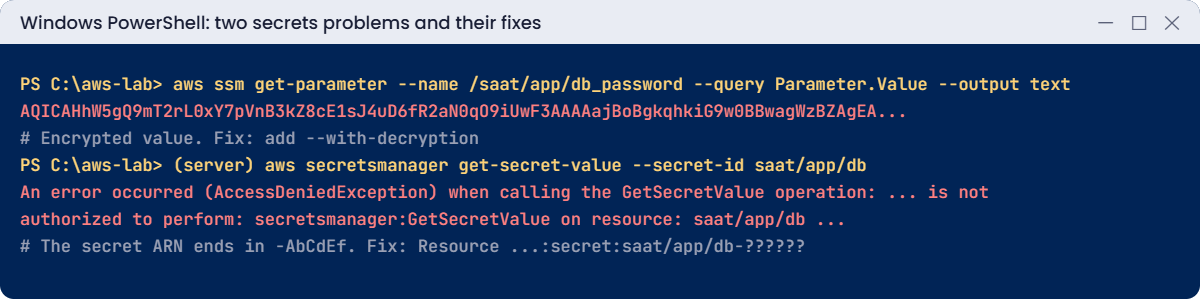
The policy says secret:saat/app/db, but the real ARN is secret:saat/app/db-AbCdEf. They don’t match, so nothing allows the call. Fix: match the six-character suffix with question marks, which is tighter than a star:
(Get-Content read-app-config.json -Raw) -replace 'secret:saat/app/db"', 'secret:saat/app/db-??????"' | Set-Content read-app-config.json
aws iam put-role-policy --role-name saat-ec2-ssm-role --policy-name read-saat-app-config --policy-document file://read-app-config.json
Start-Sleep 15
$cmd = aws ssm send-command --document-name AWS-RunShellScript --instance-ids $i --parameters file://read-params.json --query Command.CommandId --output text
Start-Sleep 15
aws ssm get-command-invocation --command-id $cmd --instance-id $i --query "[Status,ResponseCode]" --output textYou should see this:
Success 0Now clean up. A deleted secret waits 7 to 30 days before it’s gone, and its name can’t be reused until then:
aws ssm delete-parameters --names /saat/app/db_host /saat/app/features /saat/app/db_password | Out-Null
aws secretsmanager delete-secret --secret-id saat/app/db --recovery-window-in-days 7 --query DeletionDate --output text
aws iam delete-role-policy --role-name saat-ec2-ssm-role --policy-name read-saat-app-config
aws ec2 terminate-instances --instance-ids $i | Out-Null
aws ec2 delete-vpc-endpoints --vpc-endpoint-ids $smEp | Out-Null
aws ec2 wait instance-terminated --instance-ids $i
.\Stop-SsmEndpoints.ps1
Remove-Item read-app-config.json, read-params.json
.\Find-LabResources.ps1✅ Checkpoint: You fixed an encrypted value returned without --with-decryption and an AccessDenied caused by the secret ARN suffix. Parameters, the instance policy, app01 and endpoints are gone; the secret is scheduled for deletion.
This happened at work
The password that lived in a public repo
An e-commerce startup kept its database password in appsettings.json so new developers could “just run it”. A contractor pushed a copy of the repository to a public GitHub account to show a friend. Within hours, automated scanners found it.
The database was in a private subnet, so nobody could connect directly. But the same password was reused for an admin portal that was internet-facing, and attackers logged in and exported customer emails before anyone noticed.
They moved every credential to Secrets Manager with 30-day rotation, gave each service its own secret and role, enabled secret scanning on all repositories, and added a rule that a password used in two places is a finding in itself.
Common mistakes and troubleshooting
| Mistake | What happens | What to do |
|---|---|---|
Reading SecureString without --with-decryption | App gets ciphertext and fails to log in | Always request decryption |
| IAM resource with the exact secret name | AccessDenied: the ARN has a -XXXXXX suffix | Use name-?????? or a path wildcard |
| Secrets in user data, AMIs or Git | Anyone with access to those sees them | Read at runtime with a role |
| Printing secrets in logs or command output | Secrets stored in log history | Never log secret values |
| Deleting and recreating a secret with the same name | Name blocked during the recovery window | Restore it, or wait; plan names carefully |
| Using Secrets Manager for every setting | Extra cost for non-secret values | Settings in Parameter Store, credentials in Secrets Manager |
Interview questions
Click a question to open it. Each one is written the way an interviewer would ask it. Under it you will see why they ask it and one way you could answer, in your own words.
Fresher level
1. A developer asks whether to store something in Parameter Store or Secrets Manager. How would you help them decide?
Why they ask this: They want to know you can pick the right service for the job. Using the wrong one either costs more or leaves secrets without rotation.
How you might answer: I’d ask what the value is. For configuration that doesn’t rotate, like hostnames, feature flags or IDs, I’d use Parameter Store, and standard parameters have no storage charge.
For credentials that need rotation and versioning, like a database password, I’d use Secrets Manager.
2. Can you explain in simple words what a SecureString parameter is?
Why they ask this: They are checking that you know how to store sensitive values in Parameter Store. They also want to see that you know KMS permissions are involved.
How you might answer: A SecureString is a Parameter Store value that’s encrypted with KMS. To read the real value, I use --with-decryption.
The caller also needs permission on the KMS key, which is aws/ssm by default.
3. Your app on EC2 needs a database password. Where should it get it from, and how?
Why they ask this: They want to see good security habits. Passwords in code or config files are one of the most common causes of leaks.
How you might answer: The app should read it from Secrets Manager at startup, using the instance role. The role’s policy should allow GetSecretValue on that one secret only.
I’d never put the password in a file on the server or in the code.
2–5 years experience
4. You see AWSCURRENT and AWSPREVIOUS labels on a secret. What do they mean, and why do they matter?
Why they ask this: They want to know you understand secret versioning. This explains how rotation can happen without breaking running apps.
How you might answer: They are staging labels on the secret’s versions. AWSCURRENT is what apps get by default, and AWSPREVIOUS is the version just before it, kept so clients don’t break in the middle of a rotation.
During rotation there’s also an AWSPENDING version, which is the new value being tested.
5. An app gets AccessDenied reading a secret, but the IAM policy looks right. What would you check?
Why they ask this: They want to see a careful troubleshooting order for a confusing error. Several small things can block secret access even with a good-looking policy.
How you might answer: First I’d check the Resource ARN in the policy, because it often misses the six-character suffix that Secrets Manager adds. Then I’d check whether the secret uses a customer managed KMS key the role can’t decrypt, or whether a resource policy on the secret denies it.
If the app is in a private subnet, I’d also check it has the endpoint and is calling the right Region.
6. Walk me through what happens when Secrets Manager rotates a database password.
Why they ask this: They want to see that you understand rotation step by step. That helps when a rotation fails and you need to know where it stopped.
How you might answer: A Lambda function, or managed rotation, creates a new version of the secret labelled AWSPENDING. It sets that new password on the database, tests it, and then moves the AWSCURRENT label to it.
Apps that re-read the secret pick up the new value, so I make sure our apps don’t cache it forever.
Senior level
7. Say you join a team with 60 microservices and secrets scattered everywhere. How would you design secrets management for them?
Why they ask this: They want to see platform thinking: naming, access, rotation, recovery and detection. They are checking that you can make secrets safe at scale.
How you might answer: I’d create one secret per service and environment, named by path, with KMS keys per environment. Access would use resource-based policies plus role policies, and each secret type would get a rotation schedule.
Apps would use caching clients or the Secrets Manager agent, and I’d add cross-Region replicas for DR. I’d also add secret scanning in CI and alerts on GetSecretValue from unexpected principals.
8. A database password just leaked. What do you do in the first hour?
Why they ask this: They want to see a fast, ordered incident response. They are checking that you stop the damage, find the cause, and stop it happening again.
How you might answer: First I’d rotate the secret straight away, and anywhere else the same password was reused. Then I’d check the database logs and CloudTrail for any use of it, and revoke open sessions.
Next I’d find how it leaked, whether a repo, a log or a ticket, and remove it from there. After that I’d add scanning and tighter read permissions so it doesn’t happen again.
Quick quiz
Q1. Where should a feature flag usually live?
- Secrets Manager
- Parameter Store
- User data
- The AMI
Show answer
B — Non-secret settings belong in Parameter Store.
Q2. What did get-parameter return without --with-decryption?
- An error
- The encrypted value
- An empty string
- The previous version
Show answer
B — SecureString values stay encrypted unless you ask.
Q3. Why did the exact-name policy fail?
- The secret was deleted
- Secret ARNs end with a random suffix
- The KMS key was disabled
- The endpoint was down
Show answer
B — Use saat/app/db-?????? to match the suffix.
Q4. Which label do apps receive by default?
- AWSPREVIOUS
- AWSPENDING
- AWSCURRENT
- LATEST
Show answer
C — GetSecretValue returns AWSCURRENT unless asked otherwise.
Q5. What do private servers need to reach Secrets Manager without NAT?
- A public IP
- The secretsmanager interface endpoint
- Port 22
- An S3 bucket
Show answer
B — Interface endpoints keep calls inside the VPC.
Quick recap
- Parameter Store for settings; Secrets Manager for credentials that rotate.
- Read values at runtime with the instance or task role, never from files or code.
- SecureString needs
--with-decryption. - Secret ARNs end with a six-character suffix; match it in policies.
- AWSCURRENT and AWSPREVIOUS let rotation happen without breaking apps.
Next lesson
Lesson 32: GuardDuty and Security Hub → You’ll turn on GuardDuty, generate sample findings, send them to saat-alerts, and see how Security Hub scores your account.
Further reading: Secrets Manager vs Parameter Store
Want to go deeper into Secrets Manager vs Parameter Store? Read What is AWS Secrets Manager? and AWS Systems Manager Parameter Store. You can also see the full plan for this course on the AWS Cloud Administration course page.