CloudTrail: who did what, and when

“Who opened port 22 to the whole internet?” “Who deleted that bucket?” AWS CloudTrail answers these questions. It records every API call in your account: who made it, from which IP, when, and with what parameters, whether it came from the console, the CLI or a script.

You’ll make a risky change on purpose and find yourself in the records, then set up saat-trail, a multi-Region trail that keeps every event in your own S3 bucket. You’ll keep this trail for the rest of the course; later lessons on Config, GuardDuty and AccessDenied errors use it.

TimeYou needBy the end you can
45 minutessaat-vpc (only to create a test security group), your laptop signed in as saat-admin. Cost: no CloudTrail charge for the first copy of management events; a few cents a month of S3 storage for the trail.Search event history, read a CloudTrail event like an investigator, create a multi-Region trail with a correct bucket policy, and know where global service events are recorded.

What it is, in one line

AWS CloudTrail records the API calls made in your AWS account, so you can see who did what, when and from where.

In Simple Words

The CCTV at the office entrance

An office has a camera at the door and a visitor register. If a laptop goes missing, security checks who came in, at what time, and which badge they used.

CloudTrail is that camera and register for your AWS account. Every action, like “open this door” or “delete that file”, is written down with the person’s badge, the time and the place they came from.

The building keeps 90 days of footage on its own. If you want to keep it for years, or keep footage from every floor in one place, you copy it to your own locker. That is a trail.

Engineer's View

What CloudTrail really records

Every event is JSON with eventTime, eventName, eventSource, userIdentity (IAM user, assumed role and session name, or AWS service), sourceIPAddress, userAgent, requestParameters, responseElements and, for failures, errorCode such as AccessDenied.

Event history keeps 90 days of management events per Region at no cost, searchable by a single attribute. Global services such as IAM, STS (in some cases) and Organizations record in us-east-1. A trail delivers events to an S3 bucket (and optionally CloudWatch Logs), usually from all Regions; a multi-Region trail also captures global service events.

Log file validation adds hourly digest files signed by AWS, so you can prove logs weren’t changed.

Data events (S3 object reads, Lambda invocations) are off by default because of volume and cost. Events usually arrive within about five minutes. For SQL-style queries over years of events, teams use CloudTrail Lake or Athena on the trail bucket.

How it works, step by step

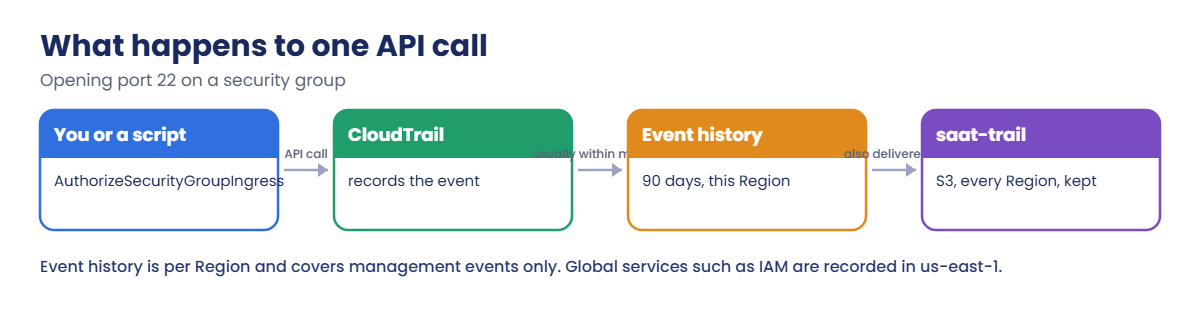
Here is what happens to one API call.

1You make a change

authorize-security-group-ingress goes to the EC2 API in Mumbai, signed with your saat-admin credentials.

AWS CloudTrail flow: API call, event recorded, event history and trail to S3

2CloudTrail records it

The event lands in Mumbai’s event history within minutes, with your IAM user, your public IP and the exact rule you added.

3A trail keeps a copy

saat-trail writes the same event, plus events from every other Region, as compressed JSON files to your S3 bucket, where you control retention.

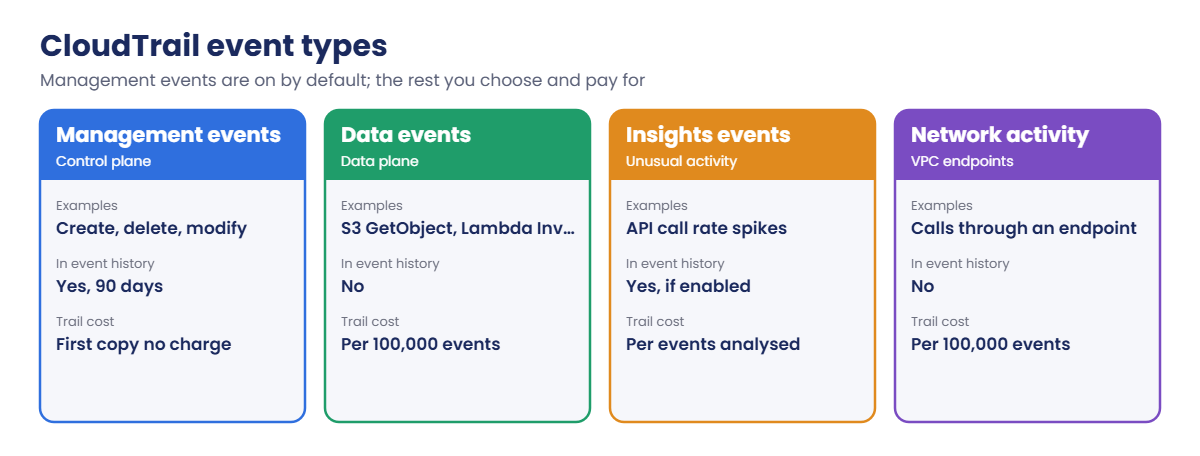
4Choose what to record

Not every event type is on by default:

AWS CloudTrail event types: management, data, Insights and network activity events

For most teams, one multi-Region trail with management events is the baseline. Data events are added for sensitive buckets only, because a busy bucket can produce millions of events a day.

✅ Checkpoint: You can name the key fields of an event, explain the difference between event history and a trail, and say where IAM events are recorded.

Hands-on lab: investigate with AWS CloudTrail and build a trail

Sign in and load saat-vpc:

cd C:\aws-lab
aws login --profile saat-admin
$env:AWS_PROFILE = 'saat-admin'
$v = Get-Content C:\aws-lab\saat-vpc.json | ConvertFrom-Json
$acct = aws sts get-caller-identity --query Account --output text

1Make a risky change, then undo it

Paste this whole block. The group is never attached to anything:

$sg = aws ec2 create-security-group --group-name lab25-test --description "CloudTrail test" --vpc-id $v.VpcId --query GroupId --output text
aws ec2 authorize-security-group-ingress --group-id $sg --protocol tcp --port 22 --cidr 0.0.0.0/0 | Out-Null
aws ec2 delete-security-group --group-id $sg
$sg

You should see something like this:

sg-0f1e2d3c4b5a69788

The group existed for a few seconds. In a real account, that is long enough for someone to ask “who did this?” later.

2Find the event and read it

Paste this whole block. Events usually appear within five minutes:

do { Start-Sleep 30; $e = aws cloudtrail lookup-events --lookup-attributes "AttributeKey=ResourceName,AttributeValue=$sg" --query "Events[?EventName=='AuthorizeSecurityGroupIngress'] | [0]" --output json | ConvertFrom-Json } until ($e)
$d = $e.CloudTrailEvent | ConvertFrom-Json
$d | Select-Object eventTime, eventName, sourceIPAddress, @{n='who';e={$_.userIdentity.arn}}
$d.requestParameters.ipPermissions.items.ipRanges.items.cidrIp
aws cloudtrail lookup-events --lookup-attributes "AttributeKey=ResourceName,AttributeValue=$sg" --query "Events[].EventName" --output text

You should see something like this:

eventTime       : 2026-10-20T18:42:17Z
eventName       : AuthorizeSecurityGroupIngress
sourceIPAddress : 203.0.113.25
who             : arn:aws:iam::111122223333:user/yourname.admin

0.0.0.0/0
DeleteSecurityGroup     AuthorizeSecurityGroupIngress   CreateSecurityGroup

That is the whole story: your user, your laptop’s public IP, the exact rule, and the group’s full life from create to delete. Searching by resource name is usually the fastest way to answer “who touched this?”.
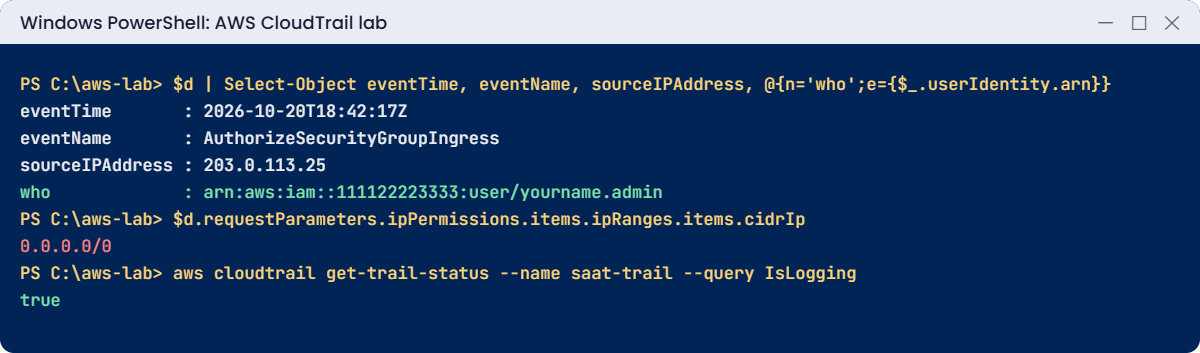
AWS CloudTrail lab output: who opened port 22, from where, and trail logging
Who opened port 22, from where, and the trail logging. Something like this.

3Create the trail bucket

Paste this whole block:

$bucket = "saat-trail-$acct-ap-south-1-an"
aws s3api create-bucket --bucket $bucket --bucket-namespace account-regional --region ap-south-1 --create-bucket-configuration LocationConstraint=ap-south-1 | Out-Null
aws s3api put-bucket-tagging --bucket $bucket --tagging 'TagSet=[{Key=course,Value=saatvedha-aws},{Key=purpose,Value=cloudtrail}]'
'{ "Rules": [ { "ID": "expire-90-days", "Status": "Enabled", "Filter": {}, "Expiration": { "Days": 90 } } ] }' | Set-Content trail-lifecycle.json
aws s3api put-bucket-lifecycle-configuration --bucket $bucket --lifecycle-configuration file://trail-lifecycle.json
aws s3api get-bucket-lifecycle-configuration --bucket $bucket --query "Rules[0].[ID,Expiration.Days]" --output text

You should see this:

expire-90-days  90

Ninety days keeps the lab cheap. Companies often keep trail logs for one to seven years, moving older files to Glacier.

4Create the trail with a correct bucket policy

You’ll first try without a bucket policy; that is the first break below. Here is the working version.

Paste this whole block:

@'
{
  "Version": "2012-10-17",
  "Statement": [
    {
      "Sid": "AWSCloudTrailAclCheck",
      "Effect": "Allow",
      "Principal": { "Service": "cloudtrail.amazonaws.com" },
      "Action": "s3:GetBucketAcl",
      "Resource": "arn:aws:s3:::BUCKET",
      "Condition": { "StringEquals": { "aws:SourceArn": "arn:aws:cloudtrail:ap-south-1:ACCT:trail/saat-trail" } }
    },
    {
      "Sid": "AWSCloudTrailWrite",
      "Effect": "Allow",
      "Principal": { "Service": "cloudtrail.amazonaws.com" },
      "Action": "s3:PutObject",
      "Resource": "arn:aws:s3:::BUCKET/AWSLogs/ACCT/*",
      "Condition": { "StringEquals": { "s3:x-amz-acl": "bucket-owner-full-control", "aws:SourceArn": "arn:aws:cloudtrail:ap-south-1:ACCT:trail/saat-trail" } }
    }
  ]
}
'@ -replace 'BUCKET', $bucket -replace 'ACCT', $acct | Set-Content trail-bucket-policy.json
aws s3api put-bucket-policy --bucket $bucket --policy file://trail-bucket-policy.json
aws cloudtrail create-trail --name saat-trail --s3-bucket-name $bucket --is-multi-region-trail --enable-log-file-validation --tags-list Key=course,Value=saatvedha-aws --query "[Name,IsMultiRegionTrail,LogFileValidationEnabled]" --output text
aws cloudtrail start-logging --name saat-trail
aws cloudtrail get-trail-status --name saat-trail --query IsLogging

You should see this:

saat-trail      True    True
true

About ten minutes later, check the bucket. Files are grouped by account, Region and date:

aws s3 ls "s3://$bucket/AWSLogs/$acct/CloudTrail/" --recursive | Select-Object -First 3

You should see something like this:

2026-10-20 18:58:12       1845 AWSLogs/111122223333/CloudTrail/ap-south-1/2026/10/20/111122223333_CloudTrail_ap-south-1_20261020T1855Z_a1B2c3D4e5F6g7H8.json.gz
2026-10-20 18:59:40        912 AWSLogs/111122223333/CloudTrail/us-east-1/2026/10/20/111122223333_CloudTrail_us-east-1_20261020T1855Z_i9J0k1L2m3N4o5P6.json.gz
2026-10-20 19:01:03       2210 AWSLogs/111122223333/CloudTrail/ap-south-1/2026/10/20/111122223333_CloudTrail_ap-south-1_20261020T1900Z_q7R8s9T0u1V2w3X4.json.gz

✅ Checkpoint: You found who opened port 22 and from which IP, saat-trail is logging from all Regions with log file validation, and files are arriving in your bucket. Keep the trail and bucket.

Break It, Then Fix It

Two things that confuse almost everyone the first time they work with CloudTrail.

1Break it: a trail bucket without a policy

If you ran step 4 already, remove the policy first; in a new account this is simply the order people try things in.

Paste this whole block:

aws cloudtrail delete-trail --name saat-trail
aws s3api delete-bucket-policy --bucket $bucket
aws cloudtrail create-trail --name saat-trail --s3-bucket-name $bucket --is-multi-region-trail --enable-log-file-validation

You’ll get this error:

An error occurred (InsufficientS3BucketPolicyException) when calling the CreateTrail operation: Incorrect S3 bucket policy is detected for bucket: saat-trail-111122223333-ap-south-1-an

CloudTrail checks before creating the trail that it can read the bucket ACL and write under AWSLogs/ACCOUNT/. The console adds this policy for you; the CLI and infrastructure code don’t. Fix: apply the policy, then create and start the trail:

aws s3api put-bucket-policy --bucket $bucket --policy file://trail-bucket-policy.json
aws cloudtrail create-trail --name saat-trail --s3-bucket-name $bucket --is-multi-region-trail --enable-log-file-validation --tags-list Key=course,Value=saatvedha-aws | Out-Null
aws cloudtrail start-logging --name saat-trail
aws cloudtrail get-trail-status --name saat-trail --query IsLogging

You should see this:

true

2Break it: look for an IAM change in Mumbai

Create and delete a test IAM policy, then search Mumbai’s event history for it:

'{ "Version": "2012-10-17", "Statement": [ { "Effect": "Deny", "Action": "s3:DeleteBucket", "Resource": "*" } ] }' | Set-Content p25.json
$pArn = aws iam create-policy --policy-name lab25-test --policy-document file://p25.json --query Policy.Arn --output text
aws iam delete-policy --policy-arn $pArn
Start-Sleep 300
aws cloudtrail lookup-events --lookup-attributes AttributeKey=EventName,AttributeValue=CreatePolicy --region ap-south-1 --query "length(Events)"

You should see this:

0
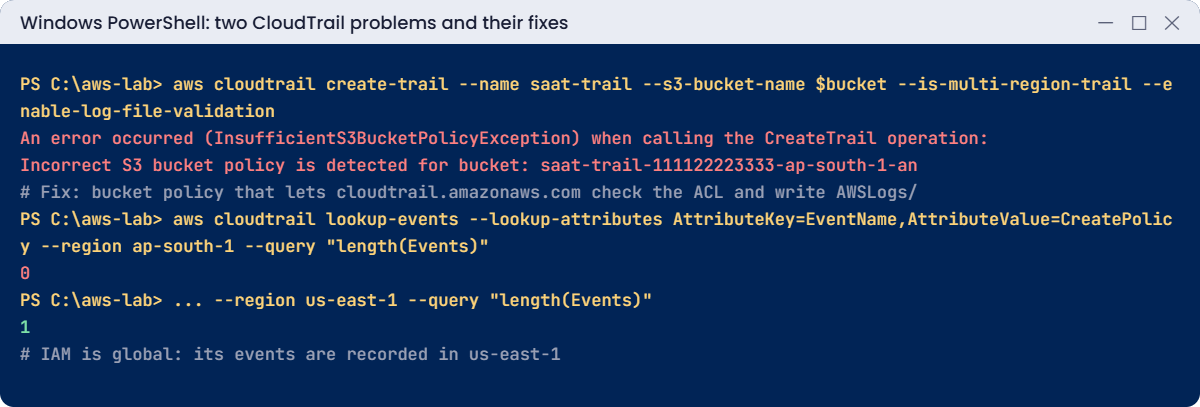
CloudTrail problems: InsufficientS3BucketPolicyException and IAM events only in us-east-1
Both problems and their fixes. Something like this.

No error, no event. IAM is a global service, so its events are recorded in us-east-1 (N. Virginia), not in the Region you work in.

Engineers lose a lot of time here during investigations. Fix: search us-east-1 for IAM, STS and Organizations changes, or search your multi-Region trail, which has them under the us-east-1 prefix:

aws cloudtrail lookup-events --lookup-attributes AttributeKey=EventName,AttributeValue=CreatePolicy --region us-east-1 --query "Events[0].[EventName,Username]" --output text
Remove-Item p25.json

You should see something like this:

CreatePolicy    yourname.admin

✅ Checkpoint: You fixed InsufficientS3BucketPolicyException with the CloudTrail bucket policy and found an IAM event in us-east-1. saat-trail stays on for the rest of the course.

This happened at work

The weekend nobody could explain

A retail company found 14 large GPU instances running in São Paulo on a Monday, about USD 6,000 of compute over the weekend. Nobody admitted launching them. The security team opened CloudTrail event history in Mumbai, their only Region, and found nothing.

Event history is per Region, and they had no trail. Someone eventually checked São Paulo’s event history and found the RunInstances calls, made with an access key belonging to a CI user. The key had been committed to a public repository two days earlier.

But the CreateAccessKey event for a second key, made in IAM, was only in us-east-1, and they nearly missed it.

They now run an organization-wide multi-Region trail to a locked bucket in a separate log archive account, with CloudTrail Lake for queries, GuardDuty on all Regions, and an SCP denying unused Regions.

Common mistakes and troubleshooting

MistakeWhat happensWhat to do
Relying on event history only90 days, one Region at a time, management events onlyCreate a multi-Region trail to S3
Searching your Region for IAM changesNothing foundSearch us-east-1 or the trail
Trail bucket without the CloudTrail policyInsufficientS3BucketPolicyExceptionAdd the AclCheck and Write statements
Trail bucket in the same account admins controlLogs can be deleted by an attackerUse a separate log archive account and Object Lock
Turning on data events for every bucketHuge event volume and costEnable data events only where needed
No retention on the trail bucketStorage grows foreverLifecycle rules that match your policy

Interview questions

Click a question to open it. Each one is written the way an interviewer would ask it. Under it you will see why they ask it and one way you could answer, in your own words.

Fresher level

1. Can you explain in simple words what AWS CloudTrail does?

Why they ask this: They want to know you understand where to look when someone asks who changed something. It is one of the first services an admin uses during any investigation.

How you might answer: CloudTrail records the API calls made in your AWS account. For each call it shows who made it, when, from which IP address and with what parameters.

I explain it like a CCTV camera for the account: whether someone clicks in the console or runs a CLI command, it leaves a record.

2. If you don’t set anything up, how far back can you look in CloudTrail event history?

Why they ask this: They are checking that you know the default limits before an incident happens. Many people find out too late that older events are gone.

How you might answer: Event history keeps 90 days of management events per Region, at no cost. If we need more than that, I’d create a trail that delivers logs to S3, or use CloudTrail Lake.

3. Someone deleted a security group this morning and nobody admits it. How would you find out who did it?

Why they ask this: They want to see that you can use CloudTrail for a real question, not only describe it. They also want to know which fields in the event matter.

How you might answer: I’d search event history, or the trail, for the event name DeleteSecurityGroup, or search by the group ID as the resource name. Then I’d open the event and read userIdentity, sourceIPAddress and eventTime.

That tells me which user or role made the call, from where, and exactly when.

2–5 years experience

4. What’s the difference between management events and data events, and when would you turn on data events?

Why they ask this: They want to know you understand what CloudTrail records by default and what costs extra. This affects both your audit coverage and your bill.

How you might answer: Management events are control-plane actions, like creating or changing a resource. Data events are the high-volume actions on the data itself, such as S3 GetObject or Lambda Invoke.

Data events are off by default and charged, so I’d turn them on only for the buckets or functions where we really need to know who read or called what.

5. A colleague says they changed an IAM policy yesterday, but you can’t find the event in your Region’s event history. What’s going on?

Why they ask this: They are checking that you know how global services are logged. This trips up a lot of people during real investigations.

How you might answer: IAM is a global service, so its events are recorded in us-east-1, not in the Region I’m working in. I’d switch to us-east-1 in event history, or search a multi-Region trail, and the change should be there.

6. During an audit, someone asks how you can prove your CloudTrail logs were never changed. What would you tell them?

Why they ask this: They want to see that you understand log integrity, not only log collection. Auditors and security teams care a lot about this.

How you might answer: I’d make sure log file validation is turned on for the trail. With it, CloudTrail writes signed digest files every hour.

Then I can run aws cloudtrail validate-logs, which checks the log files against those digests and shows if any file was changed or deleted.

Senior level

7. You’re asked to design audit logging for an organization with 60 AWS accounts. How would you set it up?

Why they ask this: They want to see governance thinking at scale. They are checking that you protect the logs from the same people whose actions they record.

How you might answer: I’d create an organization trail from the management account or a delegated admin account, delivering to a bucket in a dedicated log archive account. That bucket would have Object Lock, KMS encryption, tight access, and lifecycle rules to Glacier.

For searching, I’d use CloudTrail Lake or Athena. And I’d add SCPs so nobody in the member accounts can stop or change the trail.

8. It’s 2 a.m. and you get an alert that a leaked access key is being used. How would you use CloudTrail to investigate?

Why they ask this: They want to see a clear incident response process under pressure. They are checking that you find everything the attacker did, not only stop the key.

How you might answer: I’d search the trail or CloudTrail Lake by the AccessKeyId across all Regions, and list every API call, source IP and resource that was created or read. I’d also check us-east-1 for IAM changes like new users or new keys, because attackers often create a back door.

Then I’d disable the key, remove anything they created to keep access, and clean up the resources they launched.

Quick quiz

Q1. Where are IAM API events recorded in event history?

  1. Every Region
  2. us-east-1
  3. ap-south-1 only
  4. Nowhere
Show answer

B — IAM is global and records in us-east-1.

Q2. How long does event history keep management events?

  1. 7 days
  2. 30 days
  3. 90 days
  4. Forever
Show answer

C — For longer, use a trail or CloudTrail Lake.

Q3. Why did create-trail fail without a bucket policy?

  1. The bucket was public
  2. CloudTrail could not check and write to the bucket
  3. The trail name was taken
  4. Logging was off
Show answer

B — CloudTrail needs GetBucketAcl and PutObject permission.

Q4. Which field shows who made the call?

  1. eventSource
  2. userIdentity
  3. awsRegion
  4. requestID
Show answer

B — userIdentity holds the user, role or service.

Q5. What does log file validation give you?

  1. Faster delivery
  2. Proof that log files were not changed
  3. Data events
  4. Encryption
Show answer

B — Signed digest files let you validate the logs.

Quick recap

  • CloudTrail records who did what, when and from where.
  • Event history: 90 days, per Region, management events only.
  • A multi-Region trail keeps every Region in your bucket, with validation.
  • The trail bucket needs the CloudTrail bucket policy.
  • IAM and other global services record in us-east-1.

Next lesson

Lesson 26: AWS Config rules and resource timeline → You’ll record resource changes, see a security group’s full history and flag non-compliant resources automatically.

Further reading: AWS CloudTrail

Want to go deeper into AWS CloudTrail? Read What is AWS CloudTrail? and Amazon S3 bucket policy for CloudTrail. You can also see the full plan for this course on the AWS Cloud Administration course page.

Scroll to Top