GuardDuty and Security Hub

Most teams find out about a compromised key from the bill. AWS GuardDuty finds it earlier: it watches CloudTrail, VPC flow data and DNS queries for signs of attack, such as crypto-mining, stolen credentials used from outside AWS, or someone probing your servers, and raises findings with a severity.

You’ll turn GuardDuty on, generate sample findings, route high-severity ones to your saat-alerts email with EventBridge, and switch on Security Hub to collect everything in one place. Then you’ll fix the two reasons security alerts silently never arrive.

TimeYou needBy the end you can
45 minutesLesson 23 done (saat-alerts with a confirmed email), your laptop signed in as saat-admin. Cost: GuardDuty and Security Hub both have a 30-day trial for new accounts in each Region, and you turn both off at the end.Enable GuardDuty, read findings and severities, route findings with an EventBridge rule and SNS topic policy, test event patterns, and enable Security Hub CSPM with default standards.

What it is, in one line

AWS GuardDuty is a threat detection service that analyses AWS logs and raises findings when it sees signs of compromise or attack in your account.

In Simple Words

The security guard watching the cameras

A building has cameras everywhere, but nobody can watch fifty screens all night. A good guard knows what to look for: a person trying every door handle, a visitor leaving with a box at 3 a.m., a staff badge used in two cities at once.

GuardDuty is that guard for your AWS account. The cameras are logs AWS already keeps. When something looks wrong, the guard writes a note with how serious it is.

But a note left on a desk helps nobody at night. Someone has to get a phone call for the serious ones. That call is the EventBridge rule and SNS email you’ll build.

Engineer's View

How GuardDuty and Security Hub really work

GuardDuty is enabled per Region with a detector. It reads CloudTrail management events, VPC flow logs and DNS logs from its own copies (you don’t need to enable them), plus optional protection plans for S3 data events, EKS, runtime monitoring, malware scanning of EBS volumes, RDS login activity and Lambda. It uses threat intelligence and machine learning, and Extended Threat Detection links related events into attack sequences.

Each finding has a type such as CryptoCurrency:EC2/BitcoinTool.B!DNS (threat purpose, resource, details), a severity from 1 to 10, and the affected resource. Findings go to the console, to Security Hub, and to EventBridge, which is how you alert and automate. Suppression rules archive expected findings.

Security Hub CSPM (the original Security Hub, renamed in 2025) runs compliance checks such as AWS Foundational Security Best Practices and collects findings from GuardDuty, Inspector, Macie and Config. The newer Security Hub adds correlated risk analysis across those signals. Both are Regional and work best enabled across an organization from a delegated administrator account.

How it works, step by step

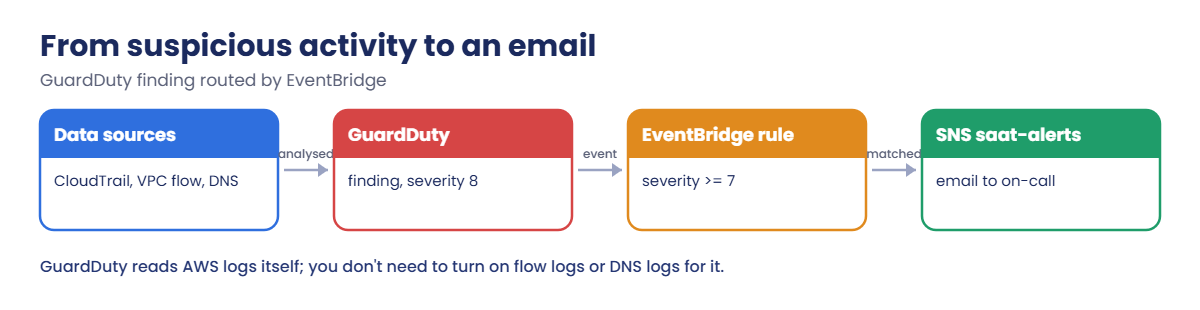
Here is how one finding becomes an email.

1GuardDuty sees something

A server’s DNS queries go to a known crypto-mining pool, or credentials issued to an EC2 instance are used from an IP outside AWS. GuardDuty raises a finding.

AWS GuardDuty alert flow: data sources, finding, EventBridge rule, SNS email

2EventBridge receives an event

Every finding is also an event with source: aws.guardduty and detail-type: GuardDuty Finding. A rule matches on fields such as severity.

3SNS delivers it

The rule’s target is saat-alerts. The topic’s access policy must allow EventBridge to publish, or delivery fails quietly.

4Severity decides who acts

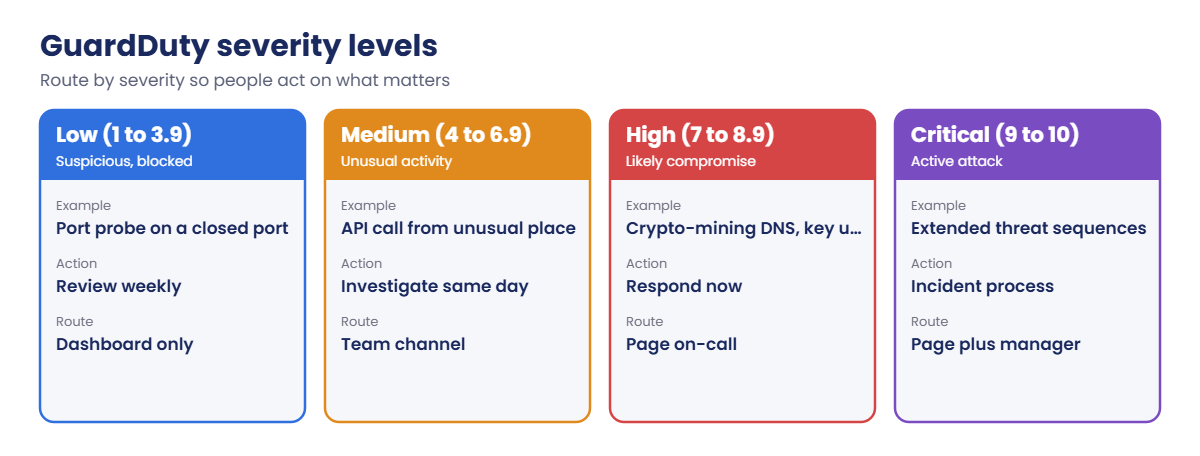
Not every finding should wake someone up:

AWS GuardDuty severity levels and how to route each one

A typical setup pages on 7 and above, sends medium to a team channel, and reviews low weekly. Suppression rules handle known, accepted activity such as a scanner you run yourself.

✅ Checkpoint: You can explain what GuardDuty reads, how a finding reaches an email, and why the SNS topic policy matters.

Hands-on lab: AWS GuardDuty findings that reach a person

Sign in and set up names:

cd C:\aws-lab
aws login --profile saat-admin
$env:AWS_PROFILE = 'saat-admin'
$acct = aws sts get-caller-identity --query Account --output text
$topic = "arn:aws:sns:ap-south-1:$($acct):saat-alerts"

1Turn on GuardDuty

Paste this whole block:

$det = aws guardduty create-detector --enable --finding-publishing-frequency FIFTEEN_MINUTES --tags course=saatvedha-aws --query DetectorId --output text
aws guardduty get-detector --detector-id $det --query "[Status,FindingPublishingFrequency]" --output text

You should see this:

ENABLED FIFTEEN_MINUTES

That is all GuardDuty needs. It starts reading your account’s logs right away, with no agents and no log setup.

2Generate and read sample findings

Paste this whole block:

aws guardduty create-sample-findings --detector-id $det --finding-types "Recon:EC2/PortProbeUnprotectedPort" "UnauthorizedAccess:IAMUser/InstanceCredentialExfiltration.OutsideAWS" "CryptoCurrency:EC2/BitcoinTool.B!DNS"
Start-Sleep 20
$ids = aws guardduty list-findings --detector-id $det --query FindingIds --output text
aws guardduty get-findings --detector-id $det --finding-ids ($ids -split '\s+') --query "sort_by(Findings, &Severity)[::-1].[Severity,Type]" --output text

You should see something like this:

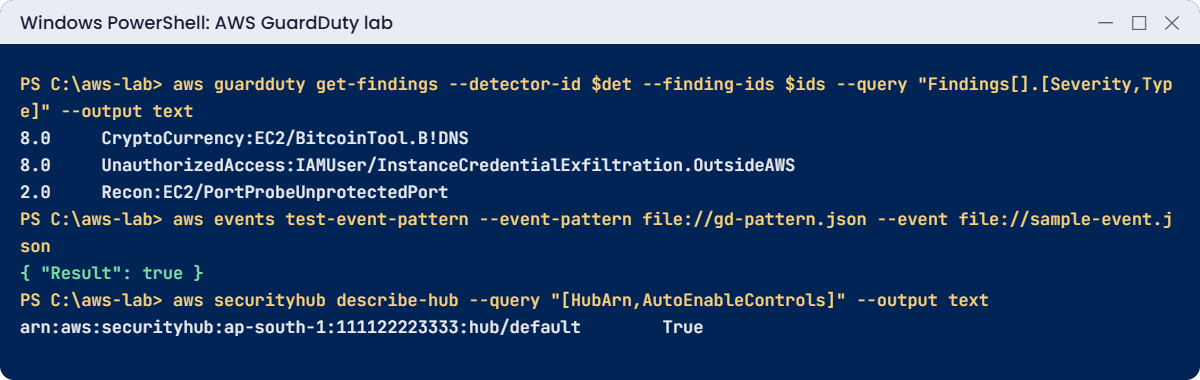
8.0     CryptoCurrency:EC2/BitcoinTool.B!DNS
8.0     UnauthorizedAccess:IAMUser/InstanceCredentialExfiltration.OutsideAWS
2.0     Recon:EC2/PortProbeUnprotectedPort

Sample findings are marked [SAMPLE] in their titles and point to made-up resources. In a real account, the second one means credentials from an instance role are being used somewhere else, which is the most urgent kind of finding: rotate and investigate now.

3Route high findings to saat-alerts

Paste this whole block, then watch your inbox:

@'
{
  "source": [ "aws.guardduty" ],
  "detail-type": [ "GuardDuty Finding" ],
  "detail": { "severity": [ { "numeric": [ ">=", 7 ] } ] }
}
'@ | Set-Content gd-pattern.json
$ruleArn = aws events put-rule --name saat-guardduty-high --event-pattern file://gd-pattern.json --state ENABLED --description "GuardDuty severity 7 and above to saat-alerts" --query RuleArn --output text
aws events put-targets --rule saat-guardduty-high --targets "Id=sns,Arn=$topic" | Out-Null
$pol = aws sns get-topic-attributes --topic-arn $topic --query Attributes.Policy --output text | ConvertFrom-Json
$pol.Statement += [pscustomobject]@{ Sid = 'AllowEventBridgeGuardDuty'; Effect = 'Allow'; Principal = @{ Service = 'events.amazonaws.com' }; Action = 'sns:Publish'; Resource = $topic; Condition = @{ ArnEquals = @{ 'aws:SourceArn' = $ruleArn } } }
$pol | ConvertTo-Json -Depth 10 | Set-Content topic-policy.json
aws sns set-topic-attributes --topic-arn $topic --attribute-name Policy --attribute-value file://topic-policy.json
aws guardduty create-sample-findings --detector-id $det --finding-types "CryptoCurrency:EC2/BitcoinTool.B!DNS"
"$((Get-Content topic-policy.json | ConvertFrom-Json).Statement.Sid -join ', ')"

You should see something like this, and an email from AWS Notifications within about five minutes:

__default_statement_ID, AllowEventBridgeGuardDuty

The email body is the raw finding JSON. Teams usually put a small Lambda function or a chat integration in between to format it; the routing is the same.
AWS GuardDuty lab output: sample findings, event pattern test, Security Hub enabled
Sample findings, a passing pattern test and Security Hub enabled. Something like this.

4Turn on Security Hub

Paste this whole block:

aws securityhub enable-security-hub --enable-default-standards --tags course=saatvedha-aws
aws securityhub describe-hub --query "[HubArn,AutoEnableControls]" --output text
aws securityhub get-enabled-standards --query "length(StandardsSubscriptions)"

You should see something like this:

arn:aws:securityhub:ap-south-1:111122223333:hub/default        True
2

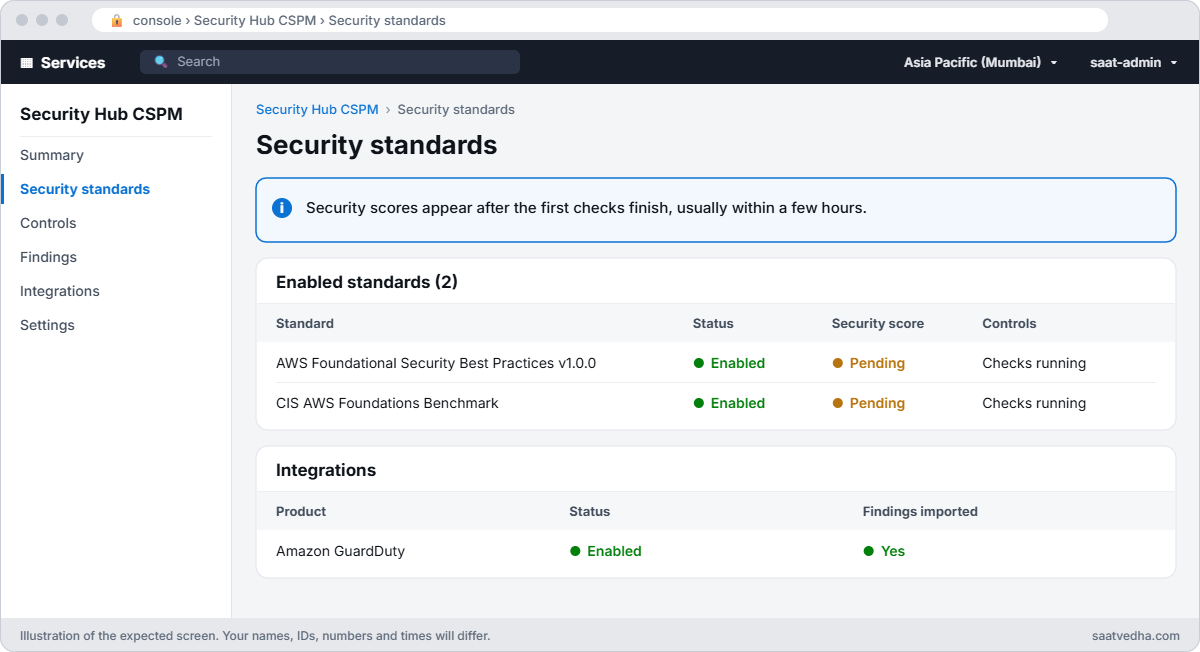
Security Hub CSPM now runs the default standards’ checks against your account and imports GuardDuty findings. Scores take a few hours to appear; if you keep it on for a day, open Security Hub in the console to see which controls fail.
Security Hub CSPM security standards page with two standards enabled and scores pending
Security Hub CSPM right after you turn it on: two standards enabled, scores still pending, GuardDuty findings flowing in.

✅ Checkpoint: GuardDuty is ENABLED, three sample findings are listed with severities, a high-severity finding reached your email through saat-guardduty-high, and Security Hub is on. Keep everything for the break lab.

Break It, Then Fix It

Two ways security alerts get lost: the rule never matches, or it matches and delivery fails.

1Break it: one wrong letter in the event pattern

Test the real pattern and a copy with a lowercase f against a sample event:

[ordered]@{ version = '0'; id = 'test-1'; 'detail-type' = 'GuardDuty Finding'; source = 'aws.guardduty'; account = $acct; time = '2026-10-20T12:00:00Z'; region = 'ap-south-1'; resources = @(); detail = @{ severity = 8 } } | ConvertTo-Json -Depth 5 | Set-Content sample-event.json
(Get-Content gd-pattern.json -Raw) -replace 'GuardDuty Finding', 'GuardDuty finding' | Set-Content gd-pattern-typo.json
aws events test-event-pattern --event-pattern file://gd-pattern.json --event file://sample-event.json --output json
aws events test-event-pattern --event-pattern file://gd-pattern-typo.json --event file://sample-event.json --output json

You should see this:

{
    "Result": true
}
{
    "Result": false
}

Event patterns are exact and case-sensitive. A rule with the typo is accepted, shows as ENABLED, and never fires. Fix: test every pattern with test-event-pattern against a real sample event before trusting it, and alarm on the rule’s MatchedEvents staying at zero for important rules.

2Break it: a topic that won’t accept EventBridge

Remove the EventBridge statement from the topic policy, create another high finding, then check the rule’s metrics after five minutes:

$pol = Get-Content topic-policy.json | ConvertFrom-Json
$pol.Statement = @($pol.Statement | Where-Object { $_.Sid -ne 'AllowEventBridgeGuardDuty' })
$pol | ConvertTo-Json -Depth 10 | Set-Content topic-policy-owner.json
aws sns set-topic-attributes --topic-arn $topic --attribute-name Policy --attribute-value file://topic-policy-owner.json
aws guardduty create-sample-findings --detector-id $det --finding-types "UnauthorizedAccess:IAMUser/InstanceCredentialExfiltration.OutsideAWS"
Start-Sleep 300
aws cloudwatch get-metric-statistics --namespace AWS/Events --metric-name FailedInvocations --dimensions Name=RuleName,Value=saat-guardduty-high --start-time (Get-Date).ToUniversalTime().AddMinutes(-15).ToString('o') --end-time (Get-Date).ToUniversalTime().ToString('o') --period 900 --statistics Sum --query "Datapoints[0].Sum" --output text

You should see something like this, and no email:

1.0
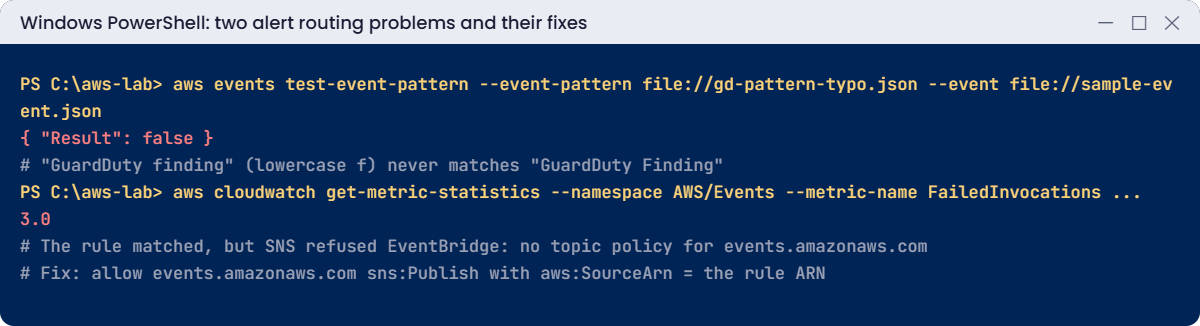
GuardDuty alert problems: event pattern typo and EventBridge FailedInvocations to SNS
Both problems and their fixes. Something like this.

The rule matched, EventBridge tried to deliver, and SNS refused because nothing in the topic policy allows events.amazonaws.com. There is no error anywhere you’d normally look; only this metric shows it. Fix: put the statement back, and add an alarm on FailedInvocations for alert rules:

aws sns set-topic-attributes --topic-arn $topic --attribute-name Policy --attribute-value file://topic-policy.json
aws guardduty create-sample-findings --detector-id $det --finding-types "UnauthorizedAccess:IAMUser/InstanceCredentialExfiltration.OutsideAWS"

Within about five minutes, the email arrives again.

Now clean up. saat-alerts stays, back to its original policy:

aws events remove-targets --rule saat-guardduty-high --ids sns | Out-Null
aws events delete-rule --name saat-guardduty-high
aws sns set-topic-attributes --topic-arn $topic --attribute-name Policy --attribute-value file://topic-policy-owner.json
aws guardduty delete-detector --detector-id $det
aws securityhub disable-security-hub
Remove-Item gd-pattern*.json, sample-event.json, topic-policy*.json
aws guardduty list-detectors --query "length(DetectorIds)"

The last command should show:

0

✅ Checkpoint: You caught a pattern that never matches with test-event-pattern and found a failed delivery through FailedInvocations, then fixed both. GuardDuty and Security Hub are off and saat-alerts is back to its original policy.

This happened at work

The alerts that went nowhere for three months

A gaming company enabled GuardDuty in all Regions and built an EventBridge rule to send high findings to an SNS topic that paged the security team. They tested it once with a sample finding, it worked, and everyone moved on.

Months later, a platform team replaced the topic with a new one created by infrastructure code. The new topic had a default policy without the EventBridge statement. A real finding, an IAM user’s keys used from an unusual country, sat in the console for 11 days while the attacker read customer support tickets.

The team now alarms on FailedInvocations for every security rule, sends a weekly synthetic sample finding and checks it arrives, and defines the rule, target and topic policy together in one stack so they can’t drift apart.

Common mistakes and troubleshooting

MistakeWhat happensWhat to do
SNS topic policy without events.amazonaws.comRule matches, delivery fails silentlyAllow sns:Publish for the rule ARN; alarm on FailedInvocations
Typos in event patternsRule never matchesUse test-event-pattern before deploying
GuardDuty in one Region onlyAttacks in other Regions are unseenEnable in every Region, ideally organization-wide
Paging on every findingAlert fatigue; real ones ignoredRoute by severity; suppress known activity
Ignoring credential exfiltration findingsStolen keys stay usableTreat as urgent: revoke sessions, rotate, investigate
Turning GuardDuty off after the trial to save costNo detection when it mattersCheck cost by plan; keep core detection on

Interview questions

Click a question to open it. Each one is written the way an interviewer would ask it. Under it you will see why they ask it and one way you could answer, in your own words.

Fresher level

1. Can you explain in simple words what GuardDuty does?

Why they ask this: They want to know you understand how AWS spots attacks in an account. Threat detection is part of every admin’s security duties.

How you might answer: GuardDuty is a threat detection service. It analyses CloudTrail events, VPC flow data and DNS data, plus some optional sources, and raises findings when something looks like a compromise.

Each finding has a severity score, so I know which ones to look at first.

2. A colleague says you must turn on VPC Flow Logs before GuardDuty can work. Is that right?

Why they ask this: They are checking a common misunderstanding. Knowing this saves teams from setting up and paying for logs they think GuardDuty needs.

How you might answer: No, that’s not right. GuardDuty reads its own independent stream of flow logs, DNS logs and CloudTrail events, so I can turn it on without enabling VPC Flow Logs first.

3. Your team wants a message in their chat channel whenever GuardDuty finds something serious. How would you set that up?

Why they ask this: They want to see that you can connect detection to people. A finding nobody sees is useless.

How you might answer: I’d create an EventBridge rule that matches source aws.guardduty and detail-type GuardDuty Finding, filtered by severity so only serious ones go through. The target would be SNS, a chat integration, or our incident tool.

2–5 years experience

4. You set up an alert rule for GuardDuty findings, but it has never sent anything. How would you troubleshoot it?

Why they ask this: They want to see a clear order of checks across EventBridge, permissions and Regions. Silent alerting is dangerous because nobody notices it is broken.

How you might answer: First I’d look at the rule’s MatchedEvents and FailedInvocations metrics. If nothing matched, I’d test the pattern with test-event-pattern; if invocations failed, I’d check the target’s resource policy, like the SNS topic policy or the Lambda permission.

I’d also confirm GuardDuty is enabled in the Region where the findings happen, because the rule only sees events in its own Region.

5. It’s 2 a.m. and GuardDuty raises an InstanceCredentialExfiltration finding. What do you do?

Why they ask this: They want to see a calm, ordered incident response. They are checking that you contain the problem, find out what happened, and fix the root cause.

How you might answer: First I’d identify the instance and its role, and revoke the role’s active sessions with a deny on aws:TokenIssueTime. Then I’d check CloudTrail to see what those credentials did, and isolate or replace the instance.

After that I’d find how the credentials leaked, often SSRF or IMDSv1, and enforce IMDSv2.

6. What’s the difference between GuardDuty and Security Hub, and why would you run both?

Why they ask this: They want to know you understand the role of each security service. Mixing them up leads to gaps in coverage.

How you might answer: GuardDuty detects threats, like someone using stolen credentials. Security Hub CSPM checks configuration against standards, and it also gathers findings from GuardDuty and other services into one view with a common format.

So I run both: GuardDuty tells me something bad is happening, and Security Hub shows me where we’re set up badly, all in one place.

Senior level

7. You’re asked to design threat detection for an organization with 40 AWS accounts. How would you approach it?

Why they ask this: They want to see security architecture at scale. They are checking that new accounts are covered automatically and that findings reach the right people quickly.

How you might answer: I’d run GuardDuty and Security Hub with a delegated admin in a security account, auto-enabled for new accounts and all Regions, with protection plans chosen by workload. Findings would go to a central SIEM through EventBridge, routed by severity.

For high-confidence findings I’d have automated containment runbooks. I’d also review suppression rules every quarter so we don’t hide real threats.

8. How would you prove to your manager that your security alerting actually works?

Why they ask this: They want to see that you test your controls instead of assuming they work. Broken alerting is often found only during a real incident.

How you might answer: I’d generate sample findings on a schedule in each account and Region, and check end to end that the page or ticket really arrives. I’d also alarm on FailedInvocations, and on zero MatchedEvents when we expect some.

On top of that, we’d run regular incident response exercises so people know what to do when an alert comes in.

Quick quiz

Q1. What does GuardDuty need you to turn on before it can analyse VPC traffic?

  1. VPC Flow Logs
  2. Nothing
  3. A NAT gateway
  4. An agent on every instance
Show answer

B — GuardDuty reads its own copy of flow, DNS and CloudTrail data.

Q2. Why did the email stop arriving in break 2?

  1. GuardDuty was off
  2. The SNS topic policy did not allow EventBridge
  3. The pattern was wrong
  4. The email was unsubscribed
Show answer

B — FailedInvocations showed the delivery failure.

Q3. Which tool checks an event pattern against a sample event?

  1. aws events test-event-pattern
  2. aws sns publish
  3. aws guardduty get-findings
  4. aws logs filter
Show answer

A — It returns true or false without waiting for real events.

Q4. Which severity range is High?

  1. 1 to 3.9
  2. 4 to 6.9
  3. 7 to 8.9
  4. Only 10
Show answer

C — High findings usually page the on-call engineer.

Q5. What does Security Hub CSPM add?

  1. Threat detection only
  2. Compliance checks and aggregated findings
  3. Backups
  4. Encryption
Show answer

B — It runs standards and collects findings from many services.

Quick recap

  • GuardDuty analyses AWS logs itself and raises findings with severity.
  • EventBridge routes findings; filter by severity.
  • The SNS topic policy must allow events.amazonaws.com, or delivery fails silently.
  • Test patterns with test-event-pattern and alarm on FailedInvocations.
  • Security Hub CSPM adds compliance checks and one place for findings.

Next lesson

Lesson 33: AWS Organizations and SCPs → You’ll create an organization, add guardrails with service control policies and set up IAM Identity Center for real.

Further reading: AWS GuardDuty

Want to go deeper into AWS GuardDuty? Read What is Amazon GuardDuty? and Processing GuardDuty findings with Amazon EventBridge. You can also see the full plan for this course on the AWS Cloud Administration course page.

Scroll to Top