Amazon S3 basics
-
Phase 0: Before you start
-
Phase 1: The foundation
-
Phase 2: Operations and security
-
Phase 3: SQL Server on AWS
-
Phase 4: Troubleshooting step by step
-
Phase 5: Final project and career
Almost every AWS job touches S3. Backups land there, logs are shipped there, SQL Server native backups (Lesson 46) are restored from there. These Amazon S3 basics are the commands you’ll type every week: create a bucket, upload, sync, list, download, pick a storage class and share one file safely.
You’ll work from your laptop with the CLI. Nothing here needs a server or the VPC, so this lab costs a fraction of a cent.
| Time | You need | By the end you can |
|---|---|---|
| 45 minutes | Your laptop with the AWS CLI signed in as saat-admin (Lesson 6). If aws --version shows a release older than March 2026, update it first with winget upgrade Amazon.AWSCLI. Cost: well under USD 0.01. | Create a bucket in your own account namespace, upload and sync files, understand prefixes, choose a storage class, share a file with a presigned URL and delete a bucket cleanly. |
What it is, in one line
Amazon S3 is a storage service where you keep files (objects) inside containers (buckets) and reach them over HTTPS from anywhere you allow.
In Simple Words
A bank locker room
Think of a bank’s locker room. Your bucket is your locker, in one branch (a Region). Each item you put in has a label, like “reports/2026-10/sales.csv”.
There are no real drawers inside; the slashes in the label just help you find things.
Nobody but you can open the locker unless you say so. If a friend needs one document, you don’t hand over your key. You give a slip that works for five minutes for that one item.
That slip is a presigned URL.
The bank also has a cheaper back room for things you rarely touch. Moving an item there costs less each month, but taking it out costs a little each time.
Engineer's View
What S3 really is
S3 is object storage, not a file system. An object is a key (its full name), the data and metadata such as content type and storage class. One object can be up to 50 TB, but a single upload request is limited to 5 GB, so the CLI switches to multipart upload for big files automatically.
A bucket belongs to one Region. Bucket names in the shared global namespace must be unique across every AWS account. Since March 2026 you can create buckets in your account regional namespace instead: the name ends with -ACCOUNTID-REGION-an, and only your account can ever use it.
New buckets are private and safe by default: Block Public Access is on, ACLs are disabled (bucket owner enforced) and every new object is encrypted with SSE-S3. S3 is strongly consistent: once a PUT succeeds, the next GET or LIST sees it. Access is controlled by IAM policies and bucket policies (Lesson 17), never by “hiding” the URL.
How it works, step by step
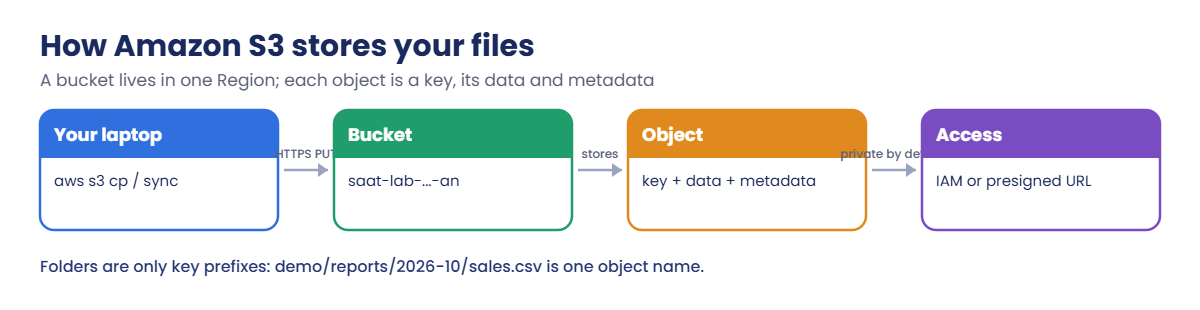
Here is the path a file takes when you upload it.
1The CLI signs a request
aws s3 cp uses your saat-admin credentials to sign an HTTPS PUT to the bucket’s Regional endpoint. No signature, no access.
2S3 stores the object
S3 encrypts the data, stores it across several Availability Zones and records the key, size, ETag and storage class. demo/reports/2026-10/sales.csv is one key, not three folders.
3You choose a storage class
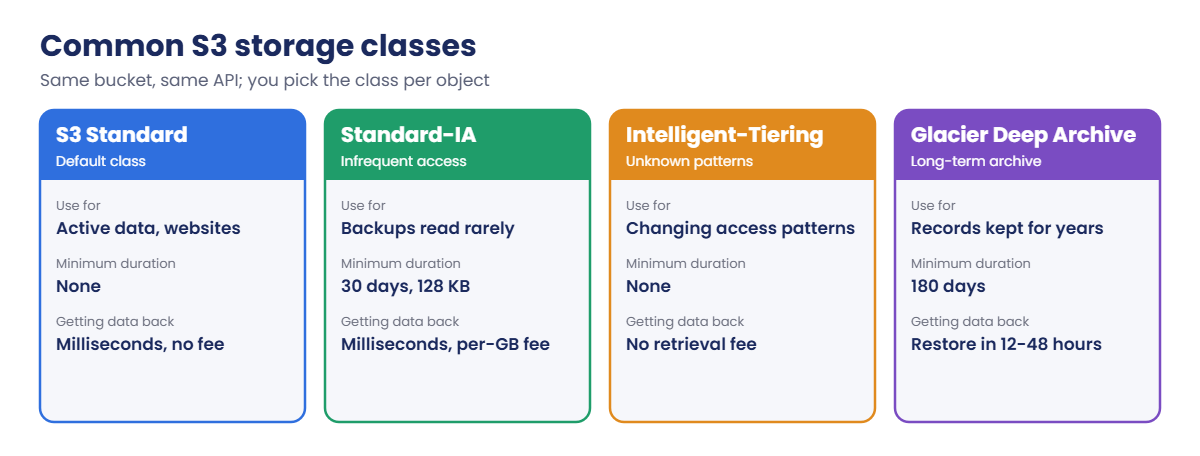
The class sets the monthly price and the cost of reading the data back. You can set it per object at upload time, or let lifecycle rules (Lesson 18) move objects later.
4Someone reads it
Only signed requests from principals with permission succeed. To give one person one file for a short time, you sign the URL for them: a presigned URL.
The storage classes you’ll meet most often:
Standard-IA charges for at least 30 days and at least 128 KB per object, so it suits larger backups that stay for a while, not thousands of tiny log files.
✅ Checkpoint: You can explain bucket, object, key and prefix, why new buckets are private, and when Standard-IA is a poor choice.
Hands-on lab: Amazon S3 basics from the CLI
Sign in and set up variables. The bucket name uses your account regional namespace, so it never clashes with anyone else’s:
cd C:\aws-lab
aws login --profile saat-admin
$env:AWS_PROFILE = 'saat-admin'
$acct = aws sts get-caller-identity --query Account --output text
$bucket = "saat-lab-$acct-ap-south-1-an"
$bucketYou should see something like this:
saat-lab-111122223333-ap-south-1-an1Create the bucket and check its defaults
Paste this whole block:
aws s3api create-bucket --bucket $bucket --bucket-namespace account-regional --region ap-south-1 --create-bucket-configuration LocationConstraint=ap-south-1
aws s3api put-bucket-tagging --bucket $bucket --tagging 'TagSet=[{Key=course,Value=saatvedha-aws},{Key=lesson,Value=16}]'
aws s3api get-public-access-block --bucket $bucket --query PublicAccessBlockConfiguration --output text
aws s3api get-bucket-encryption --bucket $bucket --query "ServerSideEncryptionConfiguration.Rules[0].ApplyServerSideEncryptionByDefault.SSEAlgorithm" --output textYou should see something like this:
{
"Location": "http://saat-lab-111122223333-ap-south-1-an.s3.amazonaws.com/"
}
True True True True
AES256All four Block Public Access settings are on and SSE-S3 (AES256) is the default. You did nothing to get that. If the CLI says Unknown options: --bucket-namespace, your CLI is older than the feature; run winget upgrade Amazon.AWSCLI and open a new window.
2Upload one file, then sync a folder
Paste this whole block:
New-Item -ItemType Directory -Force s3demo\reports\2026-10, s3demo\logs | Out-Null
Set-Content s3demo\reports\2026-10\sales.csv "date,store,amount`n2026-10-01,Pune,48200`n2026-10-01,Chennai,51750"
Set-Content s3demo\logs\app.log "2026-10-01 10:15:02 INFO app started"
Set-Content readme.txt "Lesson 16 test file"
aws s3 cp readme.txt "s3://$bucket/"
aws s3 sync .\s3demo "s3://$bucket/demo/"You should see something like this:
upload: .\readme.txt to s3://saat-lab-111122223333-ap-south-1-an/readme.txt
upload: s3demo\logs\app.log to s3://saat-lab-111122223333-ap-south-1-an/demo/logs/app.log
upload: s3demo\reports\2026-10\sales.csv to s3://saat-lab-111122223333-ap-south-1-an/demo/reports/2026-10/sales.csvRun the same sync again. It prints nothing, because nothing changed. sync only copies new or changed files, which is why teams use it for nightly backups.
3List and understand prefixes
Paste this whole block:
aws s3 ls "s3://$bucket/"
aws s3 ls "s3://$bucket/demo/"
aws s3 ls "s3://$bucket" --recursive --human-readable --summarizeYou should see something like this:
PRE demo/
2026-10-20 14:32:10 21 readme.txt
PRE logs/
PRE reports/
2026-10-20 14:32:12 38 Bytes demo/logs/app.log
2026-10-20 14:32:12 66 Bytes demo/reports/2026-10/sales.csv
2026-10-20 14:32:10 21 Bytes readme.txt
Total Objects: 3
Total Size: 125 BytesPRE means prefix. The console shows prefixes as folders, but the recursive list shows the truth: three objects with long names.
4Pick a storage class
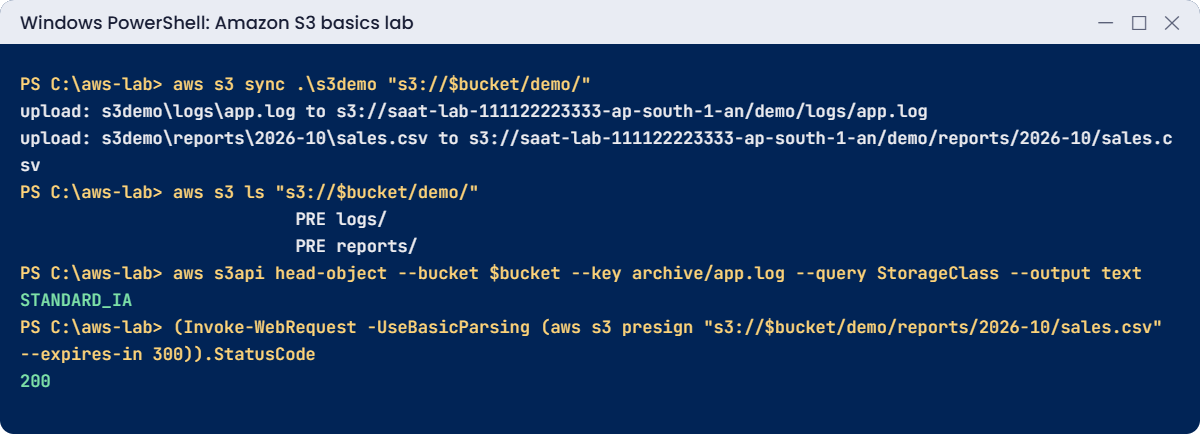
Paste this whole block:
aws s3 cp .\s3demo\logs\app.log "s3://$bucket/archive/app.log" --storage-class STANDARD_IA
aws s3api head-object --bucket $bucket --key archive/app.log --query StorageClass --output text
aws s3api head-object --bucket $bucket --key demo/logs/app.log --query StorageClass --output textYou should see this:
upload: s3demo\logs\app.log to s3://saat-lab-111122223333-ap-south-1-an/archive/app.log
STANDARD_IA
NoneNone is not an error. S3 doesn’t return a storage class for Standard objects, so no value means S3 Standard. This 38-byte file is billed as 128 KB in Standard-IA, which is exactly why tiny files don’t belong there.
5Download, then share one file safely
Paste this whole block:
aws s3 cp "s3://$bucket/demo/reports/2026-10/sales.csv" .\downloaded-sales.csv
Get-Content .\downloaded-sales.csv
$direct = "https://$bucket.s3.ap-south-1.amazonaws.com/demo/reports/2026-10/sales.csv"
try { Invoke-WebRequest -UseBasicParsing $direct | Out-Null } catch { $_.Exception.Message }
$url = aws s3 presign "s3://$bucket/demo/reports/2026-10/sales.csv" --expires-in 300
(Invoke-WebRequest -UseBasicParsing $url).StatusCodeYou should see something like this:
download: s3://saat-lab-111122223333-ap-south-1-an/demo/reports/2026-10/sales.csv to .\downloaded-sales.csv
date,store,amount
2026-10-01,Pune,48200
2026-10-01,Chennai,51750
The remote server returned an error: (403) Forbidden.
200The plain URL is refused because the bucket is private. The presigned URL works for 300 seconds, for that one object only, with your permissions. After five minutes the same link returns 403.
✅ Checkpoint: Your bucket exists with Block Public Access and AES256, sync copies only changes, archive/app.log is STANDARD_IA, the direct URL gives 403 and the presigned URL gives 200. Keep the bucket for the break lab.
Break It, Then Fix It
Two errors you’ll meet in your first month: one when creating buckets from scripts, and one when cleaning them up.
1Break it: create a bucket without a location
Try to create a second bucket but leave out the location constraint:
aws s3api create-bucket --bucket "saat-test-$acct-ap-south-1-an" --bucket-namespace account-regional --region ap-south-1You’ll get this error:
An error occurred (IllegalLocationConstraintException) when calling the CreateBucket operation: The unspecified location constraint is incompatible for the region specific endpoint this request was sent to.
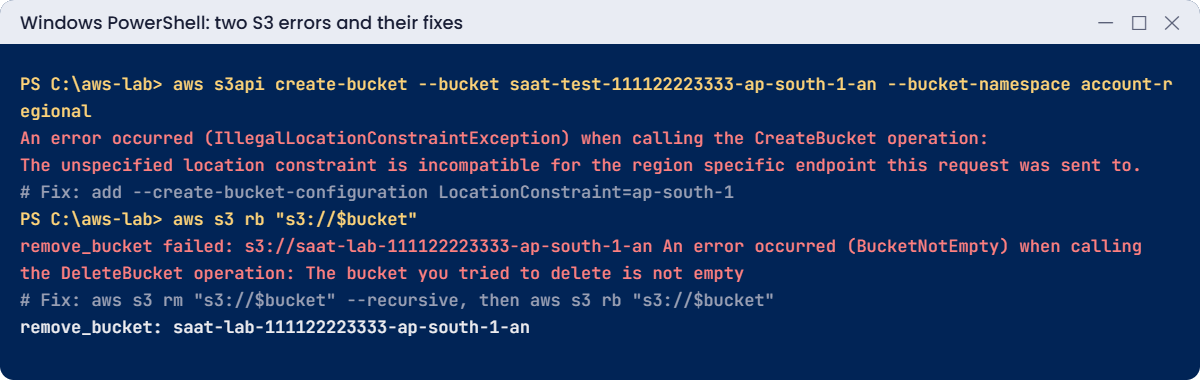
The low-level s3api create-bucket call assumes N. Virginia (us-east-1) unless you say otherwise, but you sent it to the Mumbai endpoint. Scripts copied from blog posts written for us-east-1 fail exactly like this.
Fix: always pass --create-bucket-configuration LocationConstraint=ap-south-1 with s3api, or use aws s3 mb, which adds it for you. You don’t need the second bucket, so leave it.
2Break it: delete a bucket that still has objects
Try to remove your lab bucket:
aws s3 rb "s3://$bucket"You’ll get this error:
remove_bucket failed: s3://saat-lab-111122223333-ap-south-1-an An error occurred (BucketNotEmpty) when calling the DeleteBucket operation: The bucket you tried to delete is not emptyS3 never deletes a bucket that still holds objects. That protects you, so read what is inside before you empty it. Fix: preview with --dryrun, empty it, then delete it:
aws s3 rm "s3://$bucket" --recursive --dryrun
aws s3 rm "s3://$bucket" --recursive
aws s3 rb "s3://$bucket"
Remove-Item -Recurse s3demo, readme.txt, downloaded-sales.csv
.\Find-LabResources.ps1The last lines look something like this:
delete: s3://saat-lab-111122223333-ap-south-1-an/readme.txt
remove_bucket: saat-lab-111122223333-ap-south-1-anaws s3 rb --force does both steps in one go. It is handy in a lab and dangerous in production. If versioning is on (Lesson 18), old versions stay behind and the bucket still won’t delete until they are removed too.
✅ Checkpoint: You fixed IllegalLocationConstraintException with a location constraint and saw BucketNotEmpty protect a bucket. The lesson 16 bucket and local files are gone.
This happened at work
The sync that deleted the archive
A hospital IT team copied scanned patient forms from a file server to S3 every night with aws s3 sync D:\scans s3://forms-archive/ --delete. The --delete flag kept the bucket an exact copy of the server. Nobody thought about what “exact copy” would mean on a bad day.
During a storage migration, an engineer pointed the D: drive at a new, still-empty volume for one evening. That night the job ran on time and removed about 300,000 objects from the bucket to match the empty drive. Versioning was off, so there was nothing to undo.
The forms were rebuilt from the old volume, which luckily still existed, after two tense days. The team removed --delete from every backup job, turned on versioning with a lifecycle rule to expire old versions after 60 days, and added a check that stops the job if the source folder has fewer files than the night before.
Common mistakes and troubleshooting
| Mistake | What happens | What to do |
|---|---|---|
| Forgetting the location constraint in s3api create-bucket | IllegalLocationConstraintException outside us-east-1 | Pass LocationConstraint or use aws s3 mb |
Using sync with --delete for backups | A wrong or empty source wipes the copy | Back up without --delete and turn on versioning |
| Treating prefixes as real folders | Scripts and permissions miss objects | Think in full keys; use --recursive and prefixes in policies |
| Tiny files in Standard-IA or Glacier | Each one is billed as at least 128 KB, plus minimum days | Keep small files in Standard or use Intelligent-Tiering |
| Making a bucket public to share one file | Data exposed to the whole internet | Use a presigned URL with a short expiry |
Running aws s3 rb --force in the wrong profile | A production bucket is emptied | Check aws sts get-caller-identity first and use --dryrun |
Interview questions
Click a question to open it. Each one is written the way an interviewer would ask it. Under it you will see why they ask it and one way you could answer, in your own words.
Fresher level
1. Can you explain in simple words the difference between a bucket and an object in S3?
Why they ask this: They want to check basic S3 vocabulary. Everything else in S3 is built on these two ideas.
How you might answer: A bucket is a container in one Region, with a name nobody else can use. An object is a file stored inside it, made up of its key, its data and its metadata.
2. A new team member asks, “Are S3 folders real?” What would you tell them?
Why they ask this: They want to see that you understand prefixes. This matters when you write policies, lifecycle rules and scripts.
How you might answer: I’d tell them no. Keys are just flat names, and the slashes are part of the key.
The console and the CLI show common prefixes as folders only to make things easier to browse.
3. A customer needs to download one private file from your bucket, but only for the next hour. How would you do that?
Why they ask this: They want to see that you can share data safely without making a bucket public. Public buckets are a common cause of data leaks.
How you might answer: I’d generate a presigned URL that expires in one hour. The bucket stays private, and the link works only for that one object until it expires.
2–5 years experience
4. What’s the difference between Standard-IA and Intelligent-Tiering, and when would you pick each?
Why they ask this: They want to see that you understand storage class trade-offs. The wrong choice can raise costs instead of lowering them.
How you might answer: I’d use Standard-IA for larger objects that I know are read rarely and kept for at least 30 days.
I’d use Intelligent-Tiering when the access pattern is unknown or changes. It moves objects automatically with no retrieval fees, for a small monitoring charge per object.
5. A colleague asks why you sometimes use aws s3 and sometimes aws s3api. How would you explain the difference?
Why they ask this: They want to see deeper CLI knowledge. Knowing when to drop to the API level helps with scripts and debugging.
How you might answer: aws s3 has high-level commands like cp, sync, ls and rb, and it handles multipart uploads and recursion for me. aws s3api maps one-to-one to the API operations.
So when I need full control over a parameter, like tagging, head-object or the location constraint, I use s3api.
6. A nightly sync job to S3 takes a little longer every week. What would you look at?
Why they ask this: They want to see practical troubleshooting. Slow jobs usually come from design, not from S3 itself.
How you might answer: I’d check how many objects there are and how long the source scan takes, and whether it lists the whole bucket every run. I’d also look at the network path, NAT versus a gateway endpoint, and the CLI concurrency settings.
Then I’d ask whether a smarter approach fits better, like date-based prefixes or S3 Batch Operations.
Senior level
7. You’re setting standards for S3 across 30 application teams. How would you design bucket naming and layout?
Why they ask this: They want to see platform standards that prevent problems before they happen. Security defaults matter as much as names.
How you might answer: I’d use the account regional namespace for bucket names with a standard prefix, and one bucket per application and environment, with mandatory tags. Block Public Access is on at account level, with default encryption using KMS where required.
Every bucket gets versioning plus lifecycle rules. An SCP denies creating buckets outside the account namespace.
8. Someone ran sync --delete against an empty source folder and wiped a bucket. How do you recover, and how do you stop it happening again?
Why they ask this: They want to see calm incident handling and real prevention. Fixing it once is not enough if the same job can run again tomorrow.
How you might answer: If versioning is on, I’d remove the delete markers to bring the objects back, with a script or S3 Batch Operations. Without versioning, I’d restore from AWS Backup or another copy.
To prevent it, I’d turn on versioning, use Object Lock for critical data, remove --delete from backup jobs, and check the source object count before every sync.
Quick quiz
Q1. What is an S3 object key?
- The encryption key
- The full name of the object, including any prefixes
- The bucket name
- An access key ID
Show answer
B — The key is the object’s full name, such as demo/reports/2026-10/sales.csv.
Q2. Why did the lab get IllegalLocationConstraintException?
- The bucket name was taken
- The location constraint was missing in a non-us-east-1 Region
- Block Public Access was on
- The CLI was old
Show answer
B — s3api create-bucket needs LocationConstraint outside us-east-1.
Q3. What does head-object show as StorageClass for a Standard object?
- STANDARD
- Nothing (None)
- DEFAULT
- An error
Show answer
B — S3 only returns StorageClass for non-Standard classes.
Q4. What is the safest way to give one person one private file for a short time?
- Make the bucket public
- A presigned URL with an expiry
- Email your access keys
- Turn off encryption
Show answer
B — A presigned URL grants temporary access to one object.
Q5. Why does aws s3 rb fail on a bucket with files in it?
- S3 never deletes buckets that still have objects
- The bucket is encrypted
- Your profile is wrong
- Buckets can’t be deleted
Show answer
A — You must empty the bucket first, or use --force in a lab.
Quick recap
- A bucket is Regional; an object is a key, data and metadata.
- Account regional namespace names end in -ACCOUNTID-REGION-an and can never clash with other accounts.
- New buckets are private and encrypted with SSE-S3 by default.
- sync copies only changes; be careful with
--delete. - Use presigned URLs to share, and empty a bucket before you delete it.
Next lesson
Lesson 17: S3 security: Block Public Access, bucket policies, encryption → You’ll write bucket policies, enforce encryption and TLS, and lock a bucket to your VPC endpoint.
Further reading: Amazon S3 basics
Want to go deeper into Amazon S3 basics? Read What is Amazon S3? and Namespaces for general purpose buckets. You can also see the full plan for this course on the AWS Cloud Administration course page.
