RDS vs EC2 for SQL Server
-
Phase 0: Before you start
-
Phase 1: The foundation
-
Phase 2: Operations and security
-
Phase 3: SQL Server on AWS
-
Phase 4: Troubleshooting step by step
-
Phase 5: Final project and career
This lesson starts the SQL Server phase of the course. The first decision on every SQL Server project is RDS vs EC2 SQL Server: let AWS run the database engine for you, or run SQL Server yourself on a Windows server. Pick wrong and you either fight RDS restrictions for years or do patching and failovers you didn’t need to.
You’ll list the SQL Server versions RDS offers, check which instance sizes each edition supports, compare real hourly prices with the AWS Price List API, and save a readiness script that finds blockers on an existing server. Then you’ll fix two mistakes people make while comparing.
| Time | You need | By the end you can |
|---|---|---|
| 40 minutes | Your laptop signed in as saat-admin. Optional: access to any existing SQL Server and the sqlcmd tool (winget install Microsoft.Sqlcmd). Cost: nothing; the Price List API and describe calls have no charge. | Explain what RDS manages and what it restricts, compare RDS, RDS Custom and EC2, check versions and orderable instance classes, price both options with the Price List API, and find migration blockers with T-SQL. |
What it is, in one line
RDS vs EC2 SQL Server is the choice between a managed database service where AWS runs the engine and a Windows server on EC2 where you run SQL Server yourself.
In Simple Words
A serviced apartment or your own flat
A serviced apartment comes with cleaning, repairs and security. You can’t knock down a wall or change the plumbing, and you pay a little more each month. That is RDS.
Your own flat lets you change anything you like, but when the geyser breaks at midnight, it’s your problem. That is SQL Server on EC2.
There’s also a serviced flat where you’re allowed to bring a few of your own fittings. That is RDS Custom.
Engineer's View
What RDS for SQL Server really gives and takes
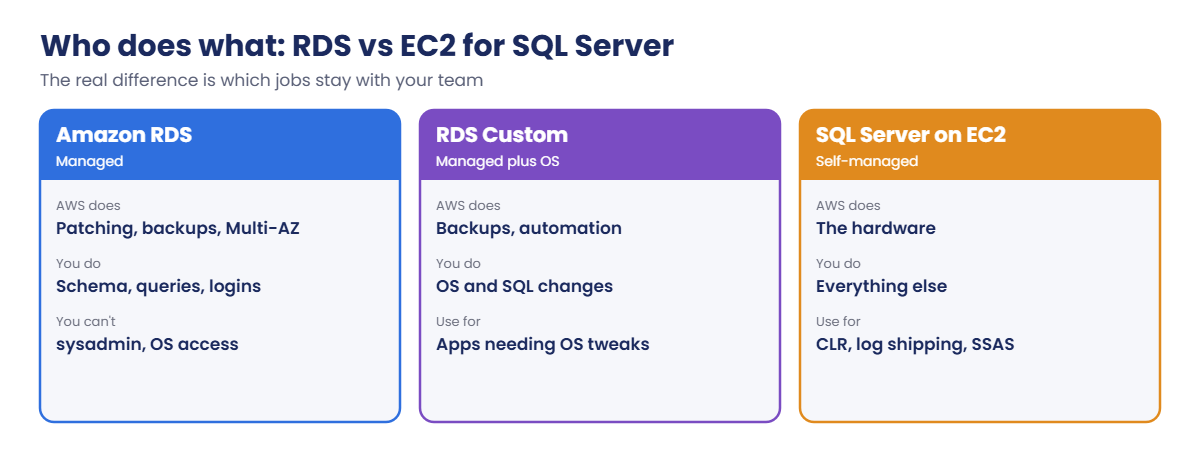
RDS runs SQL Server 2016, 2017, 2019, 2022 and 2025 in Express, Web, Standard and Enterprise editions. AWS handles OS and engine patching, automated backups with point-in-time restore, Multi-AZ failover, storage scaling and monitoring. The master user gets db_owner on user databases and broad server-level rights, but not sysadmin and no OS or RDP access.
Not supported on RDS includes log shipping, replication, FILESTREAM and FileTables, maintenance plans, xp_cmdshell, server-level triggers, Service Broker endpoints and the TRUSTWORTHY property; CLR isn’t supported on 2017 and later; SSAS isn’t available on 2022, and SSIS isn’t on 2025. Instances hold up to 30 databases (micro to large) or 100 (xlarge and up, Single-AZ). gp3 storage goes up to 64 TiB since June 2026, io2 to 64 TiB and 256,000 IOPS.
SQL Server on EC2 gives sysadmin and full control (Always On AGs, log shipping, any feature), with license-included Windows+SQL AMIs or your own licences. RDS Custom for SQL Server sits between: AWS automation with OS access for apps that need it. Express is limited to 10 GB per database and is only for small or test workloads.
How it works, step by step
The difference comes down to who does which job:
1List what you need
Features, number and size of databases, version and edition, and who needs which permissions.
2Look for blockers
Anything on the unsupported list rules RDS out for that workload, unless you can change the app.
3Compare total cost, not hourly price
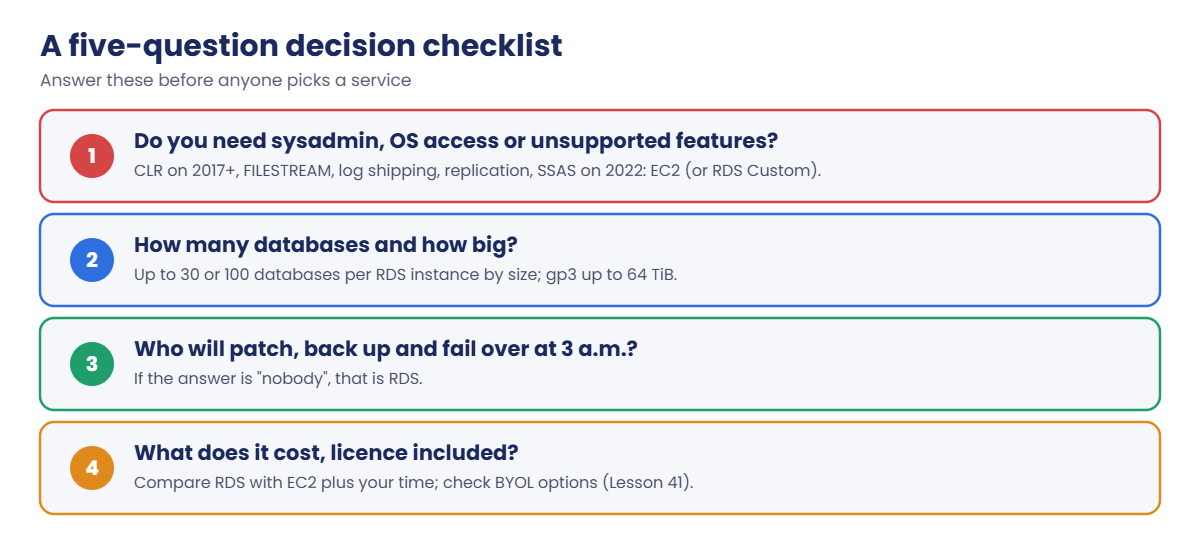
RDS costs more per hour than the same EC2 size, but includes work your team would otherwise do. Use this checklist:
Most companies end up with both: RDS for the many ordinary application databases, EC2 for the few that need sysadmin features. That’s the setup this phase teaches.
✅ Checkpoint: You can list what RDS manages, name five features RDS doesn’t support, and describe when RDS Custom or EC2 is the better choice.
Hands-on lab: RDS vs EC2 SQL Server, checked and priced
Sign in:
cd C:\aws-lab
aws login --profile saat-admin
$env:AWS_PROFILE = 'saat-admin'1See which SQL Server versions RDS offers
Paste this whole block:
foreach ($e in 'sqlserver-ex', 'sqlserver-web', 'sqlserver-se', 'sqlserver-ee') {
$latest = aws rds describe-db-engine-versions --engine $e --query "DBEngineVersions[-1].EngineVersion" --output text
"{0,-14} latest {1}" -f $e, $latest
}
aws rds describe-db-engine-versions --engine sqlserver-se --query "DBEngineVersions[-3:].EngineVersion" --output textYou should see something like this:
sqlserver-ex latest 17.00.4075.5.v1
sqlserver-web latest 17.00.4075.5.v1
sqlserver-se latest 17.00.4075.5.v1
sqlserver-ee latest 17.00.4075.5.v1
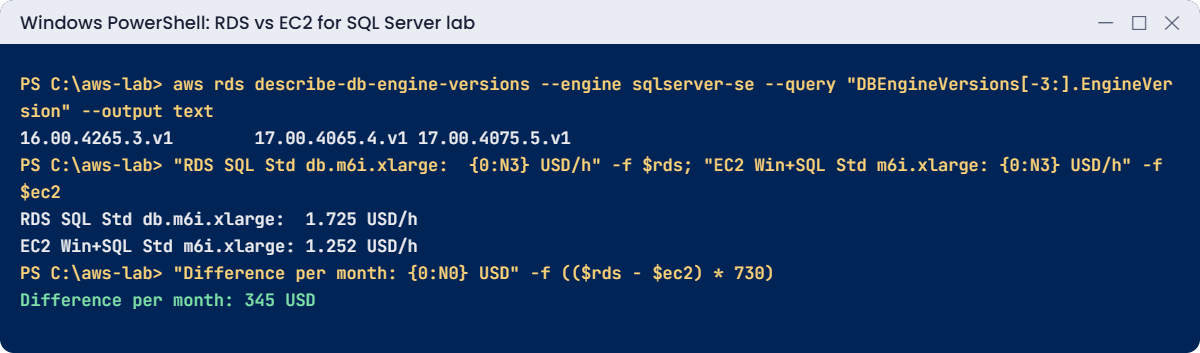
16.00.4265.3.v1 17.00.4065.4.v1 17.00.4075.5.v1Major version 16 is SQL Server 2022 and 17 is SQL Server 2025. The numbers after it are the cumulative update. RDS offers several, so you can match what you run today and upgrade later (Lesson 53).
2Check which sizes each edition supports
Paste this whole block:
$v22 = aws rds describe-db-engine-versions --engine sqlserver-ex --query "DBEngineVersions[?starts_with(EngineVersion, '16.00')] | [-1].EngineVersion" --output text
$exClasses = aws rds describe-orderable-db-instance-options --engine sqlserver-ex --engine-version $v22 --query "OrderableDBInstanceOptions[].DBInstanceClass" --output text
($exClasses -split '\s+' | Sort-Object -Unique) -join ' '
$seCount = aws rds describe-orderable-db-instance-options --engine sqlserver-se --engine-version ($v22) --query "length(OrderableDBInstanceOptions[?starts_with(DBInstanceClass, 'db.m6i')])"
"Standard edition db.m6i options: $seCount"You should see something like this:
db.t3.large db.t3.medium db.t3.micro db.t3.small db.t3.xlarge
Standard edition db.m6i options: 18Express runs only on small classes, which is why it suits labs and tiny apps, not production. You’ll use Express on db.t3.micro for the rest of this phase to keep costs low.
3Compare real prices with the Price List API
Paste this whole block. It defines a helper and prices the same size on RDS and on EC2 in Mumbai:
function Get-OnDemandPrice([string]$Service, [string[]]$Filters) {
$f = $Filters | ForEach-Object { $k, $val = $_ -split '=', 2; "Type=TERM_MATCH,Field=$k,Value=$val" }
$list = aws pricing get-products --region us-east-1 --service-code $Service --filters $f --max-items 1 --query PriceList --output json | ConvertFrom-Json
if (-not $list) { return $null }
$p = $list[0] | ConvertFrom-Json
$od = @($p.terms.OnDemand.PSObject.Properties.Value)[0]
[double](@($od.priceDimensions.PSObject.Properties.Value)[0].pricePerUnit.USD)
}
$rds = Get-OnDemandPrice AmazonRDS @('regionCode=ap-south-1', 'databaseEngine=SQL Server', 'databaseEdition=Standard', 'instanceType=db.m6i.xlarge', 'deploymentOption=Single-AZ', 'licenseModel=License included')
$ec2 = Get-OnDemandPrice AmazonEC2 @('regionCode=ap-south-1', 'instanceType=m6i.xlarge', 'operatingSystem=Windows', 'preInstalledSw=SQL Std', 'tenancy=Shared', 'capacitystatus=Used', 'licenseModel=No License required')
"RDS SQL Std db.m6i.xlarge: {0:N3} USD/h" -f $rds
"EC2 Win+SQL Std m6i.xlarge: {0:N3} USD/h" -f $ec2
"Difference per month: {0:N0} USD" -f (($rds - $ec2) * 730)You should see something like this (prices change, so yours may differ):
RDS SQL Std db.m6i.xlarge: 1.725 USD/h
EC2 Win+SQL Std m6i.xlarge: 1.252 USD/h
Difference per month: 345 USDRDS costs more per hour. The real question is whether about USD 345 a month is less than the cost of your team patching, backing up, monitoring and failing over that server, and of the outage when someone forgets. For one critical database it usually is.
Multi-AZ roughly doubles both sides.
4Save a readiness check for existing servers
Paste this whole block. Run the script now if you have a SQL Server; otherwise keep it for Lesson 42:
@'
-- Check-RdsReadiness.sql: run on the source SQL Server
SET NOCOUNT ON;
SELECT CAST(SERVERPROPERTY('ProductVersion') AS varchar(20)) AS version, CAST(SERVERPROPERTY('Edition') AS varchar(40)) AS edition;
SELECT COUNT(*) AS user_databases FROM sys.databases WHERE database_id > 4;
SELECT DB_NAME(database_id) AS db, CAST(SUM(size) * 8.0 / 1024 / 1024 AS decimal(10,2)) AS size_gb
FROM sys.master_files WHERE database_id > 4 GROUP BY database_id ORDER BY size_gb DESC;
SELECT name, value_in_use FROM sys.configurations WHERE name IN ('clr enabled', 'filestream access level', 'xp_cmdshell');
SELECT (SELECT COUNT(*) FROM sys.servers WHERE is_linked = 1) AS linked_servers,
(SELECT COUNT(*) FROM sys.server_triggers) AS server_triggers,
(SELECT COUNT(*) FROM sys.databases WHERE is_published = 1 OR is_merge_published = 1 OR is_distributor = 1) AS replication_dbs,
(SELECT COUNT(*) FROM msdb.dbo.log_shipping_primary_databases) AS log_shipping_dbs,
(SELECT COUNT(*) FROM msdb.dbo.sysmaintplan_plans) AS maintenance_plans;
'@ | Set-Content C:\aws-lab\Check-RdsReadiness.sql
# Example on a server you can reach with Windows login:
# sqlcmd -S YOURSERVER -E -i C:\aws-lab\Check-RdsReadiness.sql -WOn a typical older application server, you might see something like this:
version edition
13.0.6435.1 Standard Edition (64-bit)
user_databases
7
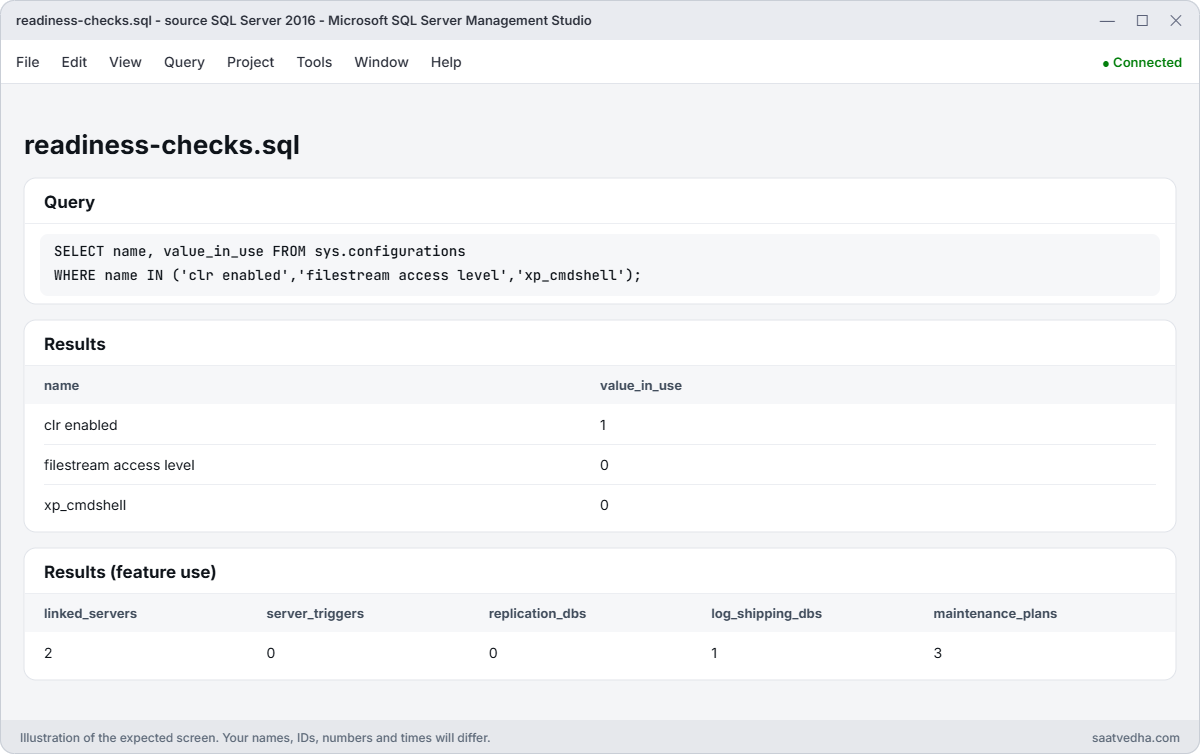
name value_in_use
clr enabled 1
filestream access level 0
xp_cmdshell 0
linked_servers server_triggers replication_dbs log_shipping_dbs maintenance_plans
2 0 0 1 3Here, CLR is on (check whether assemblies are used; RDS 2017+ won’t run them), one database uses log shipping (replace with RDS backups or DMS), and maintenance plans must become SQL Agent jobs or RDS features. Each line is a work item, not automatically a reason to stay on EC2.
✅ Checkpoint: You listed RDS SQL Server versions, saw which classes Express supports, priced RDS against EC2 for the same size, and saved Check-RdsReadiness.sql.
Break It, Then Fix It
Two mistakes that make comparisons wrong or slow down a project.
1Break it: guess a pricing attribute value
Ask for “Standard Edition” instead of the exact value:
$bad = Get-OnDemandPrice AmazonRDS @('regionCode=ap-south-1', 'databaseEngine=SQL Server', 'databaseEdition=Standard Edition', 'instanceType=db.m6i.xlarge', 'deploymentOption=Single-AZ', 'licenseModel=License included')
"price: [$bad]"You should see this:
price: []No error, just nothing, because the Price List API only matches exact attribute values. A spreadsheet built this way silently shows zero for RDS. Fix: ask the API which values exist:
aws pricing get-attribute-values --region us-east-1 --service-code AmazonRDS --attribute-name databaseEdition --query "AttributeValues[].Value" --output textYou should see something like this:
Developer Enterprise Express Standard Web2Break it: an edition on a size it doesn’t support
Try to create an Express instance on a large class. It fails before anything is created:
aws rds create-db-instance --db-instance-identifier saat-sql-test --engine sqlserver-ex --engine-version $v22 --db-instance-class db.r6i.8xlarge --license-model license-included --allocated-storage 20 --master-username saatadmin --manage-master-user-passwordYou’ll get this error:
An error occurred (InvalidParameterCombination) when calling the CreateDBInstance operation: RDS does not support creating a DB instance with the following combination: DBInstanceClass=db.r6i.8xlarge, Engine=sqlserver-ex, EngineVersion=16.00.4265.3.v1, LicenseModel=license-included. For supported combinations of instance class and database engine version, see the documentation.
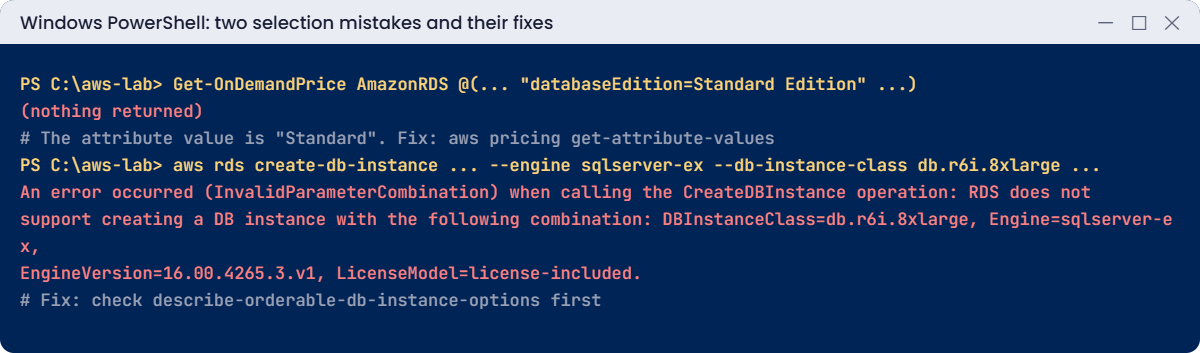
Each edition, version and class combination must be orderable in that Region. Infrastructure code that worked last year can fail after a version change for the same reason. Fix: check before you build, as in step 2:
aws rds describe-orderable-db-instance-options --engine sqlserver-ex --engine-version $v22 --db-instance-class db.t3.micro --query "length(OrderableDBInstanceOptions)"A number above zero means the combination exists:
2Nothing was created in this lesson, so there’s nothing to clean up. Keep Check-RdsReadiness.sql.
✅ Checkpoint: You found an exact pricing attribute value with get-attribute-values and an orderable combination with describe-orderable-db-instance-options.
This happened at work
The migration that hit a wall in week six
A retail company planned to move 22 SQL Server databases to RDS in eight weeks. Six weeks in, the team tried to migrate the warehouse system and found it used CLR assemblies for barcode processing, plus a linked server to an old Oracle box with an unusual driver.
CLR isn’t supported on RDS for SQL Server 2017 and later, and the app team couldn’t rewrite the code before the data centre contract ended. They built an EC2 server for that one system in a hurry, without the standards the RDS databases had, and fought backup and patching gaps for months.
The company now runs a readiness script like this one against every source server in week one, and decides RDS, RDS Custom or EC2 per database before any migration plan is written.
Common mistakes and troubleshooting
| Mistake | What happens | What to do |
|---|---|---|
| Choosing RDS without checking features | Blockers found mid-migration | Run a readiness check on every source server first |
| Comparing hourly prices only | EC2 looks cheaper than it is | Include patching, backups, HA and on-call time |
| Express for production | 10 GB per database, small classes only | Standard or Enterprise for production |
| Guessing pricing attribute values | Empty results, wrong spreadsheets | Use get-attribute-values |
| Assuming every class is available | InvalidParameterCombination at build time | Check orderable options per edition and version |
| Forgetting the 30 or 100 database limit | Consolidation plans fail | Plan instance sizes around database counts |
Interview questions
Click a question to open it. Each one is written the way an interviewer would ask it. Under it you will see why they ask it and one way you could answer, in your own words.
Fresher level
1. If your company moves a SQL Server database to RDS, what work does AWS take off your plate?
Why they ask this: They want to know you understand what a managed database really means. It shows whether you can explain the value of RDS to a team.
How you might answer: RDS handles the OS and engine patching, automated backups with point-in-time restore, Multi-AZ failover, storage scaling, monitoring and the hardware underneath.
So the DBA team can spend more time on queries and design, and less on keeping servers alive.
2. A DBA asks you for sysadmin rights on the new RDS SQL Server instance. What would you tell them?
Why they ask this: They are checking that you know the limits of RDS. Many migration problems start because someone assumed they’d have full control.
How you might answer: I’d explain that sysadmin isn’t available on RDS for SQL Server, and there’s no OS access either. The master user gets db_owner on user databases and some selected server permissions.
If they really need sysadmin, we’d have to talk about SQL Server on EC2 instead.
3. Before moving a SQL Server database to RDS, which features would you check, because RDS doesn’t support them?
Why they ask this: They want to see that you check for blockers before a migration. Finding an unsupported feature late can stop a project.
How you might answer: I’d check whether the database uses log shipping, replication, FILESTREAM, maintenance plans, xp_cmdshell or server-level triggers, because RDS doesn’t support them. I’d also check for CLR on SQL Server 2017 and later.
If any of these show up, I’d raise it early with the app team.
2–5 years experience
4. When would you choose to run SQL Server on EC2 instead of RDS?
Why they ask this: They want to see clear decision making. They are checking that you choose EC2 for real reasons, not out of habit.
How you might answer: I’d choose EC2 when we need sysadmin or OS access, or features RDS doesn’t support, like CLR on newer versions, log shipping, or SSAS on 2022. Custom high availability, such as Always On across Regions, is another reason.
Licensing can also decide it, for example bringing our own licences to dedicated hosts.
5. Can you explain what RDS Custom for SQL Server is, and when it helps?
Why they ask this: They are checking that you know there’s a middle option between RDS and EC2. It shows you know the full range of choices.
How you might answer: RDS Custom is a managed option that still automates backups and other tasks like RDS does, but it also gives you OS and database access. I’d use it for an app that needs some customization RDS doesn’t allow, when we still want AWS to handle the routine work.
6. Your manager asks if RDS or EC2 is cheaper for SQL Server. How would you compare them fairly?
Why they ask this: They want to see that you look at the full cost, not only the hourly price. People time is often the biggest hidden cost.
How you might answer: I’d include licence, compute, storage, Multi-AZ or Availability Group secondaries, and backup storage on both sides. Then I’d add the people time on EC2 for patching, backups, monitoring and failover testing.
Only then is the comparison fair, because EC2 often looks cheaper until you count that work.
Senior level
7. You’re asked to plan the move of 60 SQL Server databases to AWS. How would you design the database platform?
Why they ask this: They want to see architecture and planning at scale. They are checking that you match each database to the right option instead of forcing one answer.
How you might answer: I’d start with a readiness assessment for each database. Most would go to RDS Multi-AZ, consolidated by size and tier within the database limits, and the few with blockers would go to EC2 with Always On.
I’d use Managed AD for Windows authentication, standard parameter and option groups, and AWS Backup with cross-Region copies. For migration with low downtime, I’d use DMS.
8. A team insists they need SQL Server on EC2 “for performance”. How would you respond?
Why they ask this: They want to see good judgement and how you handle pushback. They are checking that you decide with data, not opinions.
How you might answer: I’d ask what exactly they need: IOPS and throughput, memory size, or a feature. RDS with io2 and gp3 storage now goes very high, so performance alone isn’t always a reason.
I’d benchmark both with the real workload, and pick EC2 only if there’s a concrete gap, because it adds a lot of operational work.
Quick quiz
Q1. Which feature does RDS for SQL Server 2022 not support?
- Automated backups
- Log shipping
- Multi-AZ
- TDE
Show answer
B — Log shipping isn’t supported on RDS.
Q2. Which role does the RDS master user not get?
- db_owner on user databases
- sysadmin
- CREATE LOGIN
- View server state
Show answer
B — RDS never gives sysadmin.
Q3. Why did the Price List query return nothing?
- Wrong Region
- The attribute value was not exact
- No permissions
- The API was down
Show answer
B — Use get-attribute-values to find exact values.
Q4. Why is Express a poor choice for production?
- It has no backups
- 10 GB per database and small classes only
- It can’t use SSL
- It isn’t supported on RDS
Show answer
B — Express limits are tight.
Q5. What sits between RDS and EC2 for SQL Server?
- Aurora
- RDS Custom for SQL Server
- Lambda
- DynamoDB
Show answer
B — RDS Custom gives automation plus OS access.
Quick recap
- RDS runs SQL Server for you; EC2 gives full control and full responsibility.
- RDS has no sysadmin and no log shipping, replication, FILESTREAM or CLR on 2017+.
- Check orderable classes per edition and version before building.
- Compare total cost, including your team’s time, not just hourly prices.
- Run a readiness check on source servers before planning a migration.
Next lesson
Lesson 41: SQL Server licensing on AWS → You’ll compare License Included and bring-your-own-licence options and see how they change instance choices and cost.
Further reading: RDS vs EC2 SQL Server
Want to go deeper into RDS vs EC2 SQL Server? Read Amazon RDS for Microsoft SQL Server and Features not supported and features with limited support. You can also see the full plan for this course on the AWS Cloud Administration course page.
