High Availability: RDS Multi-AZ for SQL Server
-
Phase 0: Before you start
-
Phase 1: The foundation
-
Phase 2: Operations and security
-
Phase 3: SQL Server on AWS
-
Phase 4: Troubleshooting step by step
-
Phase 5: Final project and career
Single-AZ RDS is one server. When AWS patches it, or its host fails, your database is down until it comes back. RDS SQL Server Multi-AZ keeps a synchronous standby in another Availability Zone and fails over to it automatically, usually in about a minute, behind the same endpoint.
You’ll create a Standard edition Multi-AZ instance, force a failover while a small client keeps writing, and measure exactly what the app sees. Then you’ll find two things that don’t survive a failover unless you plan for them.
| Time | You need | By the end you can |
|---|---|---|
| 100 minutes (about 40 of it creating the instance) | Lessons 42 to 53 done (saat-db-subnets across two AZs, Start-SqlLab.ps1, the Lesson 14 endpoint scripts), Windows PowerShell 5.1, signed in as saat-admin. Cost: about USD 3 if you finish within 90 minutes. Express doesn’t support Multi-AZ, so this uses Standard edition, and a Multi-AZ SQL Server instance can’t be stopped: you delete it at the end. | Explain Multi-AZ modes (AGs, mirroring, block level replication), create and check a Multi-AZ instance, force and measure a failover, write retrying clients, and handle what isn’t replicated. |
What it is, in one line
RDS SQL Server Multi-AZ keeps a synchronous standby copy in a second Availability Zone and moves the endpoint to it automatically during failures and maintenance.
In Simple Words
A spare driver in the passenger seat
A long-distance bus has two drivers. One drives; the other sits beside them watching every turn. If the first driver feels ill, the bus pulls over and the second takes the wheel within a minute.
Passengers feel a short stop, not a breakdown. The bus number, route and passengers stay the same; only the driver changed.
But anything the first driver kept in their own pocket, like a personal notebook of jobs, doesn’t move unless they shared it. That’s what Multi-AZ doesn’t copy unless you ask.
Engineer's View
How Multi-AZ works for SQL Server
RDS picks the technology by version: Always On availability groups for SQL Server 2017 and later Standard and Enterprise (recent builds), database mirroring for some older Standard versions, and block level replication for SQL Server 2022 Web edition. Express isn’t supported. EXEC msdb.dbo.rds_get_high_availability_option shows which one you have.
Commits are synchronous to the standby, so writes are a little slower but no committed data is lost on failover. The standby isn’t readable (use read replicas for that, on Enterprise), there’s one standby, and you can’t stop a Multi-AZ SQL Server instance. reboot-db-instance --force-failover tests a failover. The endpoint’s DNS record moves, so clients must reconnect and look it up again; RDS also exposes an AG listener endpoint for MultiSubnetFailover=True.
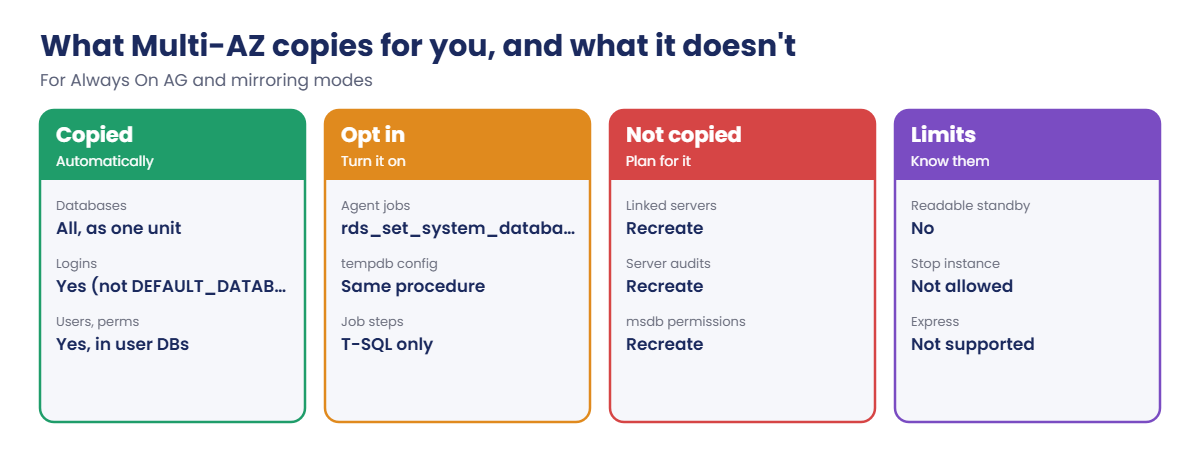
Logins, users and permissions are replicated. Agent jobs and tempdb settings replicate only if you turn on rds_set_system_database_sync_objects. Linked servers, server audits and msdb permissions don’t replicate at all.
Don’t set databases to SIMPLE recovery or rename them on Multi-AZ instances.
How it works, step by step
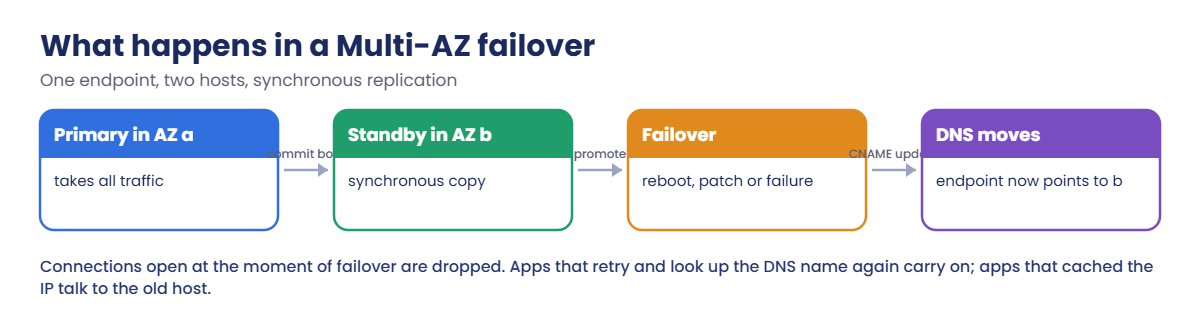
Here is what happens during a failover.
1Something triggers it
Host failure, AZ trouble, a patch, an instance class change, or your forced reboot. RDS checks the standby is fully in sync.
2The standby is promoted
The standby finishes recovery and becomes primary. Large open transactions make this slower, because they must be rolled back or forward.
3DNS moves and clients reconnect
The endpoint now resolves to the new primary. Open connections were dropped; clients that retry and resolve the name again carry on. The old primary becomes the new standby.
4Know what follows the failover
Not everything on the server is inside the availability group:
Test a failover after every change to jobs, linked servers or audits, not just once at go-live.
✅ Checkpoint: You can explain synchronous standby, why the endpoint moves by DNS, and what Multi-AZ copies, copies on request, and doesn’t copy.
Hands-on lab: fail over saat-sql-ha and measure it
Sign in and create the Multi-AZ instance (about 40 minutes):
cd C:\aws-lab
aws login --profile saat-admin
$env:AWS_PROFILE = 'saat-admin'
$v = Get-Content C:\aws-lab\saat-vpc.json | ConvertFrom-Json
aws rds create-db-instance --db-instance-identifier saat-sql-ha --engine sqlserver-se --license-model license-included --db-instance-class db.m6i.large --multi-az --allocated-storage 20 --storage-type gp3 --storage-encrypted --master-username saatadmin --manage-master-user-password --db-subnet-group-name saat-db-subnets --vpc-security-group-ids $v.DbSg --no-publicly-accessible --backup-retention-period 1 --tags Key=course,Value=saatvedha-aws Key=lesson,Value=54 --query "DBInstance.DBInstanceStatus" --output textYou should see this:
creating1Check the HA mode and create a database
Paste this whole block:
.\Start-SqlLab.ps1 -Db saat-sql-ha -LocalPort 11438
aws rds describe-db-instances --db-instance-identifier saat-sql-ha --query "DBInstances[0].[MultiAZ,AvailabilityZone,SecondaryAvailabilityZone,ListenerEndpoint.Address]" --output text
sqlcmd -S "127.0.0.1,11438" -U saatadmin -C -Q "EXEC msdb.dbo.rds_get_high_availability_option; CREATE DATABASE HaShop;"
sqlcmd -S "127.0.0.1,11438" -U saatadmin -C -d HaShop -Q "CREATE TABLE dbo.Pings (Id int IDENTITY PRIMARY KEY, At datetime2 DEFAULT SYSUTCDATETIME(), Note nvarchar(50)); SELECT recovery_model_desc FROM sys.databases WHERE name = 'HaShop';"You should see something like this:
Tunnel ready on 127.0.0.1,11438 for saatadmin (password is in SQLCMDPASSWORD for this window)
True ap-south-1a ap-south-1b saat-sql-ha.c1a2b3c4d5e6.ap-south-1.rds.amazonaws.com
high_availability_option
------------------------
Multi-AZ (AlwaysOn)
recovery_model_desc
-------------------
FULLSQL Server 2022 Standard uses an Always On availability group, with the standby in ap-south-1b. HaShop joined the group automatically and is in FULL recovery, which Multi-AZ needs.
2Fail over while a client keeps writing
Paste this whole block. A background writer opens a fresh connection and inserts a row every second for 4 minutes; 30 seconds in, you force a failover:
function Get-SqlPw([string]$Db) {
$a = aws rds describe-db-instances --db-instance-identifier $Db --query "DBInstances[0].MasterUserSecret.SecretArn" --output text
(aws secretsmanager get-secret-value --secret-id $a --query SecretString --output text | ConvertFrom-Json).password
}
$b = New-Object System.Data.SqlClient.SqlConnectionStringBuilder
$b['Data Source'] = '127.0.0.1,11438'; $b['Initial Catalog'] = 'HaShop'; $b['User ID'] = 'saatadmin'; $b['Password'] = (Get-SqlPw saat-sql-ha)
$b['Encrypt'] = $true; $b['TrustServerCertificate'] = $true; $b['Pooling'] = $false; $b['Connect Timeout'] = 5
$cs = $b.ConnectionString
function Get-Az { aws rds describe-db-instances --db-instance-identifier saat-sql-ha --query "DBInstances[0].AvailabilityZone" --output text }
function Invoke-Failover { aws rds reboot-db-instance --db-instance-identifier saat-sql-ha --force-failover | Out-Null; Start-Sleep 60; aws rds wait db-instance-available --db-instance-identifier saat-sql-ha; Start-Sleep 30 }
$writer = {
param($cs, $seconds)
$end = (Get-Date).AddSeconds($seconds)
while ((Get-Date) -lt $end) {
$t = Get-Date
try {
$cn = New-Object System.Data.SqlClient.SqlConnection $cs; $cn.Open()
$cm = $cn.CreateCommand(); $cm.CommandText = "INSERT dbo.Pings (Note) VALUES ('writer')"; [void]$cm.ExecuteNonQuery(); $cn.Close()
[pscustomobject]@{ At = $t; Ok = $true }
} catch { [pscustomobject]@{ At = $t; Ok = $false } }
Start-Sleep -Seconds 1
}
}
$before = Get-Az
$job = Start-Job -ScriptBlock $writer -ArgumentList $cs, 240
Start-Sleep 30
Invoke-Failover
$log = Receive-Job $job -Wait
$fails = @($log | Where-Object { -not $_.Ok })
$okCount = @($log | Where-Object { $_.Ok }).Count
if ($fails.Count) { "ok $okCount failed $($fails.Count) outage about $([int]($fails[-1].At - $fails[0].At).TotalSeconds + 1) s" } else { "ok $okCount failed 0" }
"AZ before $before after $(Get-Az)"
aws rds describe-events --source-type db-instance --source-identifier saat-sql-ha --duration 30 --query "Events[].Message" --output textYou should see something like this:
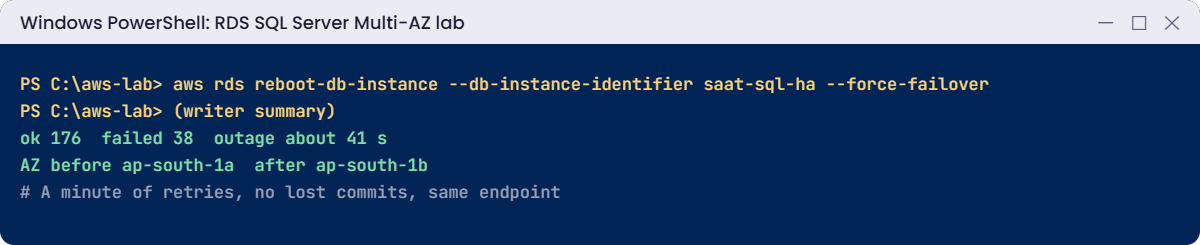
ok 176 failed 38 outage about 41 s
AZ before ap-south-1a after ap-south-1b
Multi-AZ instance failover started. Multi-AZ instance failover completed.The client couldn’t write for roughly 40 seconds, then carried on against the same endpoint, now in the other zone. Every row that was acknowledged before the failover is still there, because commits were synchronous. An app with retry logic sees a pause; one without it sees errors and may need a restart.
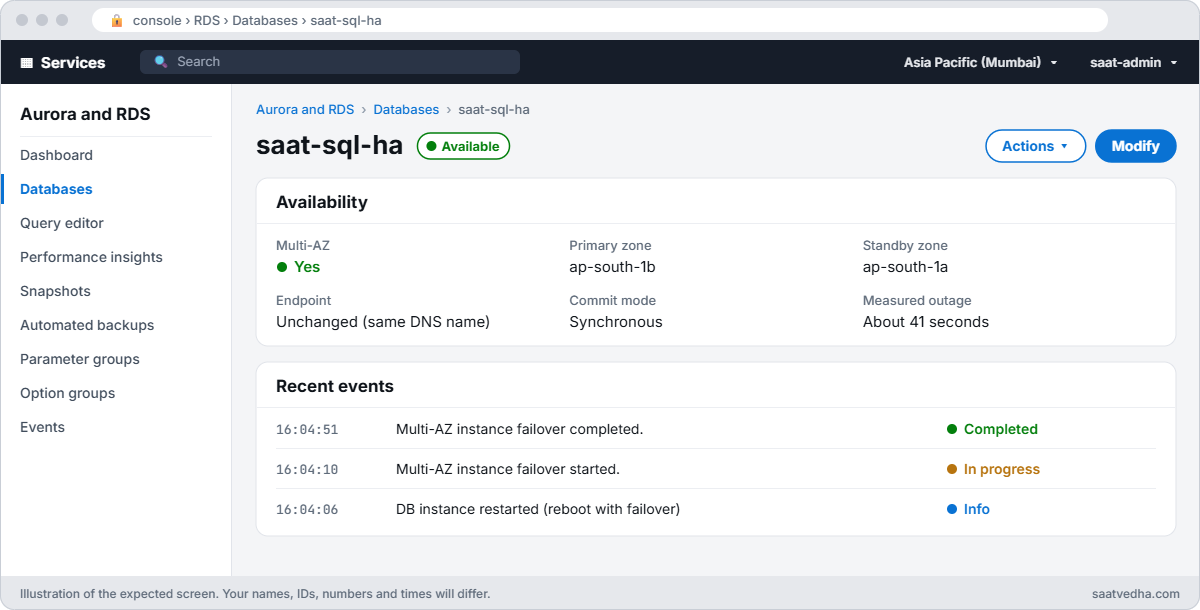
✅ Checkpoint: rds_get_high_availability_option shows Multi-AZ (AlwaysOn), the writer recovered by itself after the forced failover, and the AZ changed from one zone to the other.
Break It, Then Fix It
Two things that work on day one and fail on the first real failover.
1Break it: an app that cached the IP address
Open a second tunnel to the current primary’s IP instead of its DNS name, check it works, then fail over and try again:
$ep = aws rds describe-db-instances --db-instance-identifier saat-sql-ha --query "DBInstances[0].Endpoint.Address" --output text
$ip = (Resolve-DnsName $ep -Type A | Where-Object { $_.Type -eq 'A' } | Select-Object -First 1).IPAddress
$jump = aws ec2 describe-instances --filters "Name=tag:Name,Values=sqljump" "Name=instance-state-name,Values=running" --query "Reservations[0].Instances[0].InstanceId" --output text
@{ host = @($ip); portNumber = @('1433'); localPortNumber = @('11439') } | ConvertTo-Json | Set-Content tunnel-ip.json
Start-Process powershell -ArgumentList '-NoExit', '-Command', "aws ssm start-session --target $jump --document-name AWS-StartPortForwardingSessionToRemoteHost --parameters file://C:/aws-lab/tunnel-ip.json"
Start-Sleep 10
sqlcmd -S "127.0.0.1,11439" -U saatadmin -C -Q "SELECT COUNT(*) AS pings FROM HaShop.dbo.Pings"
Invoke-Failover
sqlcmd -S "127.0.0.1,11439" -U saatadmin -C -Q "SELECT COUNT(*) AS pings FROM HaShop.dbo.Pings"You’ll get something like this:
pings
-----------
176
Msg 976, Level 14, State 1, Server EC2AMAZ-NODE1, Line 1
The target database, 'HaShop', is participating in an availability group and is currently not accessible for queries. Either data movement is suspended or the availability replica is not enabled for read access.The IP still answers, but it now belongs to the standby, which can’t serve HaShop. Apps that cache DNS forever (some Java settings, hosts-file entries, IPs pasted into config) fail exactly like this after their first failover. Fix: always connect through the DNS name, keep DNS caching short, and retry on connection errors:
sqlcmd -S "127.0.0.1,11438" -U saatadmin -C -Q "SELECT COUNT(*) AS pings FROM HaShop.dbo.Pings"You should see something like this:
pings
-----------
176Close the tunnel window for port 11439 before going on.
2Break it: a SQL Agent job that stays behind
Create a clean-up job on the primary, fail over, and look for it:
sqlcmd -S "127.0.0.1,11438" -U saatadmin -C -Q "EXEC msdb.dbo.sp_add_job @job_name = N'saat-cleanup'; EXEC msdb.dbo.sp_add_jobstep @job_name = N'saat-cleanup', @step_name = N'trim', @subsystem = N'TSQL', @database_name = N'HaShop', @command = N'DELETE dbo.Pings WHERE At < DATEADD(day, -7, SYSUTCDATETIME())'; EXEC msdb.dbo.sp_add_jobserver @job_name = N'saat-cleanup'; SELECT name FROM msdb.dbo.sysjobs WHERE name = N'saat-cleanup';"
Invoke-Failover
sqlcmd -S "127.0.0.1,11438" -U saatadmin -C -Q "SELECT name FROM msdb.dbo.sysjobs WHERE name = N'saat-cleanup';"You’ll get something like this:
name
------------
saat-cleanup
name
------------
(0 rows affected)
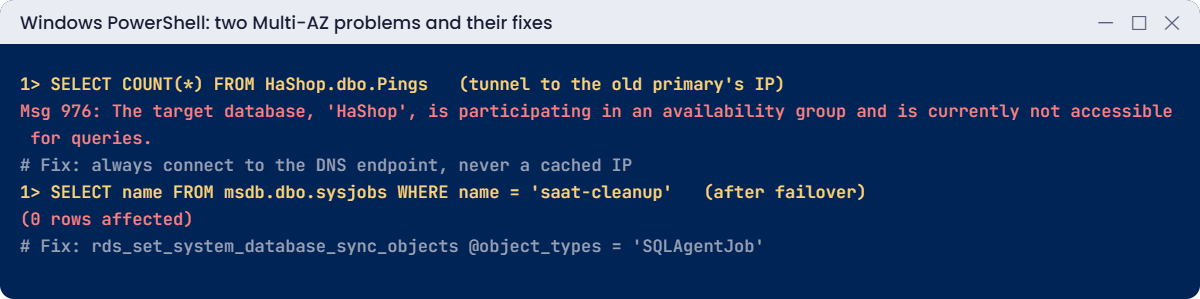
The job lived in msdb on the old primary, which isn’t part of the availability group. After failover the new primary has no such job, and nothing complains: the clean-up silently stops. Fix: turn on job sync, recreate the job, and prove it survives a failover:
sqlcmd -S "127.0.0.1,11438" -U saatadmin -C -Q "EXEC msdb.dbo.rds_set_system_database_sync_objects @object_types = 'SQLAgentJob'; SELECT * FROM msdb.dbo.rds_fn_get_system_database_sync_objects();"
sqlcmd -S "127.0.0.1,11438" -U saatadmin -C -Q "EXEC msdb.dbo.sp_add_job @job_name = N'saat-cleanup'; EXEC msdb.dbo.sp_add_jobstep @job_name = N'saat-cleanup', @step_name = N'trim', @subsystem = N'TSQL', @database_name = N'HaShop', @command = N'DELETE dbo.Pings WHERE At < DATEADD(day, -7, SYSUTCDATETIME())'; EXEC msdb.dbo.sp_add_jobserver @job_name = N'saat-cleanup';"
Start-Sleep 120
Invoke-Failover
sqlcmd -S "127.0.0.1,11438" -U saatadmin -C -Q "SELECT name FROM msdb.dbo.sysjobs WHERE name = N'saat-cleanup';"You should see something like this:
object_type
-----------
SQLAgentJob
name
------------
saat-cleanupNow the job follows the primary. Remember the same applies to linked servers and server audits, which never replicate: script them and recreate them after a failover.
Now clean up. A Multi-AZ SQL Server instance can’t be stopped, so it’s deleted:
aws rds delete-db-instance --db-instance-identifier saat-sql-ha --skip-final-snapshot --delete-automated-backups --query "DBInstance.DBInstanceStatus" --output text
Remove-Item tunnel-ip.json
.\Stop-SqlLab.ps1 -Db saat-sql-ha -KeepDbRunning✅ Checkpoint: You fixed a cached-IP failure by using the DNS endpoint and a lost Agent job by turning on job sync. saat-sql-ha is deleting, and the jump host and endpoints are gone.
This happened at work
The failover nobody noticed for a month
A healthcare billing company moved to RDS SQL Server Multi-AZ and celebrated: a host failure one night caused only a 50-second blip. Three weeks later, finance asked why the nightly claim reconciliation emails had stopped.
The reconciliation ran as a SQL Agent job created before Multi-AZ job sync was turned on. After the failover, the new primary had no job, and no one was alerted, because nothing failed; it simply never ran.
They turned on job sync, recreated every job from source control, and added a daily check that compares job lists against the repository. They now also run a forced failover every quarter and walk through a checklist of jobs, linked servers and audits.
Common mistakes and troubleshooting
| Mistake | What happens | What to do |
|---|---|---|
| Planning Multi-AZ on Express | Not supported | Standard, Enterprise, or Web (2022) edition |
| Caching the endpoint IP | Msg 976 or timeouts after failover | DNS name, short DNS caching, retries |
| No retry logic in apps | Errors or restarts after every failover | Retry connection errors with backoff |
| Agent jobs without sync | Jobs silently missing after failover | rds_set_system_database_sync_objects SQLAgentJob |
| Linked servers and audits created later | Missing on the new primary | Script and recreate them; test failovers |
| Huge open transactions | Slow failover recovery | Keep transactions short; batch big changes |
Interview questions
Click a question to open it. Each one is written the way an interviewer would ask it. Under it you will see why they ask it and one way you could answer, in your own words.
Fresher level
1. Can you explain in simple words what Multi-AZ gives you on RDS SQL Server?
Why they ask this: They want to check that you understand what high availability means on RDS and which failures it protects you from.
How you might answer: Multi-AZ keeps a synchronous standby copy in another Availability Zone. If the host, the AZ or maintenance takes the primary down, RDS fails over to the standby automatically, behind the same endpoint.
Because writes are synchronous, no committed data is lost in the failover.
2. A report team wants to run their queries on the Multi-AZ standby. What would you tell them?
Why they ask this: They want to see that you know the limits of Multi-AZ and can point people to the right feature instead.
How you might answer: I’d tell them the standby isn’t readable, it only waits to take over. For reports we need a read replica.
Read replicas on RDS SQL Server need Enterprise edition, so that’s a cost question to raise early.
3. How would you test that failover actually works on a Multi-AZ instance?
Why they ask this: They want to know you test HA instead of trusting it, and that you watch the app while you do it.
How you might answer: I run reboot-db-instance with --force-failover. While it runs, I watch the app and the RDS events.
In my lab I keep a small client writing during the failover, so I can see exactly how long the app is affected.
2–5 years experience
4. After a Multi-AZ failover, a nightly job stopped running. What happened?
Why they ask this: They want to see if you understand what lives outside the replicated databases. Agent jobs are a classic surprise after a failover.
How you might answer: Agent jobs live in msdb, which is outside the availability group. So unless job sync is on, the jobs simply don’t exist on the new primary.
I fix it by turning on sync with rds_set_system_database_sync_objects for SQLAgentJob, and then I check the jobs are there on both sides.
5. How would you make sure an app keeps working through a Multi-AZ failover?
Why they ask this: They want to see that you know HA is shared between the database and the client code, and what the app has to do.
How you might answer: The app must connect with the DNS endpoint, or a listener with MultiSubnetFailover=True, and must not cache DNS for long. It also needs connection retry with backoff.
I’d also ask the developers for idempotent writes and short transactions, so a retry doesn’t create duplicates.
6. Your team thinks Multi-AZ copies everything. What doesn’t it replicate?
Why they ask this: They want to see that you know the gaps, so nothing important goes missing after a failover.
How you might answer: It doesn’t replicate linked servers, server audits, msdb permissions or the DEFAULT_DATABASE setting on logins. Agent jobs only follow if sync is turned on.
I keep scripts for these server objects, so I can check and re-create them after a failover.
Senior level
7. How would you design HA and DR for a critical RDS SQL Server database?
Why they ask this: They want to see that you separate zone failures from Region failures, and that testing and alerting are part of the design.
How you might answer: I’d use Multi-AZ for zone failures, and cross-Region automated backups or replicas for a Region problem. The apps would use retrying clients, and I’d turn on job sync and script the server objects.
We’d run failover and DR tests every quarter, with CloudWatch alarms on failover events.
8. When would you choose Multi-AZ on RDS, and when would you build Always On on EC2 instead?
Why they ask this: They want to see that you can weigh managed convenience against control and explain it to the team.
How you might answer: I’d choose RDS when managed failover and patching matter most and its limits are fine for us. That’s most databases.
I’d go to EC2 when we need readable secondaries, more replicas, cross-Region availability groups, custom configuration, or a feature RDS blocks.
Quick quiz
Q1. Which edition can’t use Multi-AZ on RDS?
- Standard
- Enterprise
- Express
- Web 2022
Show answer
C — Express isn’t supported.
Q2. How does the endpoint follow a failover?
- IP stays the same
- DNS points to the new primary
- Clients get an email
- It doesn’t
Show answer
B — The DNS record moves.
Q3. Why did the IP tunnel get Msg 976?
- Wrong password
- It reached the standby
- TLS off
- Disk full
Show answer
B — The old IP now belongs to the secondary.
Q4. What keeps Agent jobs on both nodes?
- Nothing
- rds_set_system_database_sync_objects
- Backups
- Read replicas
Show answer
B — Job sync must be turned on.
Q5. Can you stop a Multi-AZ SQL Server instance?
- Yes
- No
- Only on weekends
- Only Express
Show answer
B — Delete it, or remove Multi-AZ first.
Quick recap
- Multi-AZ keeps a synchronous standby in another AZ behind one endpoint.
- Failover takes about a minute; apps must retry and use the DNS name.
- Logins and users replicate; Agent jobs need sync turned on.
- Linked servers, server audits and msdb permissions don’t replicate.
- Express can’t use Multi-AZ, and Multi-AZ SQL Server instances can’t be stopped.
Next lesson
Lesson 55: Always On availability groups on EC2 → You’ll see how to build a two-node availability group across AZs on EC2, and when it beats RDS.
Further reading: RDS SQL Server Multi-AZ
Want to go deeper into RDS SQL Server Multi-AZ? Read Multi-AZ deployments for Amazon RDS for SQL Server and Multi-AZ limitations, notes and recommendations. You can also see the full plan for this course on the AWS Cloud Administration course page.
