Billing Surprises: Find What Is Costing Money
-
Phase 0: Before you start
-
Phase 1: The foundation
-
Phase 2: Operations and security
-
Phase 3: SQL Server on AWS
-
Phase 4: Troubleshooting step by step
-
Phase 5: Final project and career
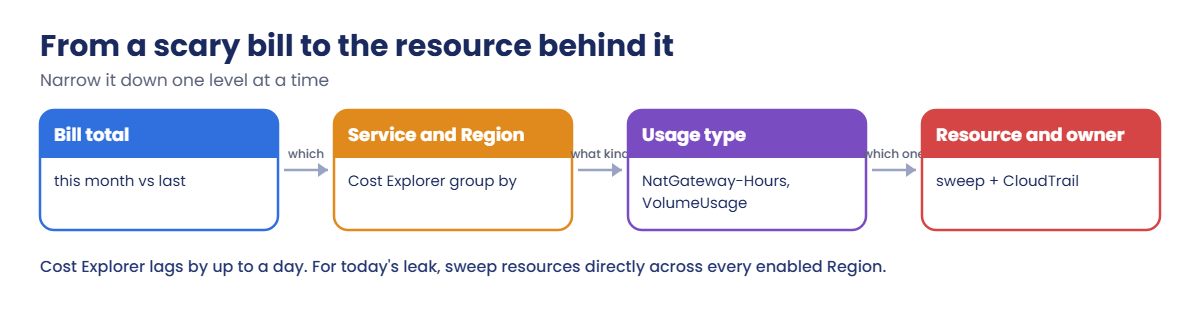
Every cloud engineer gets the message eventually: “Why is the AWS bill so high this month?” Tracing AWS unexpected charges is a narrowing exercise: from the total, to the service and Region, to the usage type, to the actual resource and whoever created it, then stopping it and putting an alarm in place.
You’ll query Cost Explorer by service, Region and usage type, set up Cost Anomaly Detection, and build Find-Spenders.ps1 to sweep every Region for things that cost money. Then you’ll create and hunt down two classic leaks: a NAT gateway that leaves its Elastic IP behind, and a volume hiding in another Region.
| Time | You need | By the end you can |
|---|---|---|
| 60 minutes | Lessons 4, 25, 36 and 56 done (tags, saat-trail, budgets, Find-Waste.ps1, Get-RecentChanges.ps1), signed in as saat-admin. Cost: about USD 0.05 (a NAT gateway for a few minutes, a tiny volume, and a few Cost Explorer API calls at USD 0.01 each). | Break down costs with Cost Explorer by service, Region and usage type, read usage type names, set up Cost Anomaly Detection, sweep all Regions for running and orphaned resources, and trace a resource to its creator. |
What it is, in one line
AWS unexpected charges are costs nobody planned, usually from resources left running or orphaned, sometimes in another Region, which you find by narrowing from service to usage type to resource.
In Simple Words
The electricity bill
Your electricity bill doubles. You don’t guess; you check which room’s meter jumped, then which appliance in that room. Usually it’s a heater someone left on in the spare room nobody goes into.
Cost Explorer is the meter per room (service and Region), usage types are the appliances, and the sweep script walks through every room, including the ones you never visit.
Then you fit a smart alert, so next time you hear about it in a day, not at the end of the month.
Engineer's View
Where AWS costs show up
Cost Explorer groups costs by service, Region, usage type, tag and more; data is usually up to a day behind, and each API call costs USD 0.01. Usage types name exactly what you paid for, with a Region prefix (APS3 is Mumbai): APS3-NatGateway-Hours, APS3-EBS:VolumeUsage.gp3, APS3-PublicIPv4:IdleAddress. Much of what surprises people lands under “EC2 – Other”: NAT gateways, EBS volumes and snapshots, public IPv4 addresses and data transfer.
Cost Anomaly Detection uses machine learning on your spending and emails or alerts when a service jumps beyond a threshold you set; it complements Budgets (Lesson 36), which compare against fixed amounts. Untagged resources are hard to assign, which is why the course tags everything.
For today’s leak, don’t wait for the bill: list NAT gateways, unused Elastic IPs, unattached volumes, running instances, databases and load balancers in every enabled Region, then use CloudTrail in that Region to see who created them. SCPs limiting Regions (Lesson 33) stop the “forgotten test in another Region” problem at the source.
How it works, step by step
Here is the narrowing path.
1Which service and Region?
Group the month’s cost by service, then by Region. Compare with last month to find the jump.
2Which usage type?
Filter to the service and group by usage type. The names tell you whether it’s hours, gigabytes, requests or addresses.
3Which resource, and who?
Find the resource in that Region (sweep script or console), then ask CloudTrail who created it and why it’s still there.
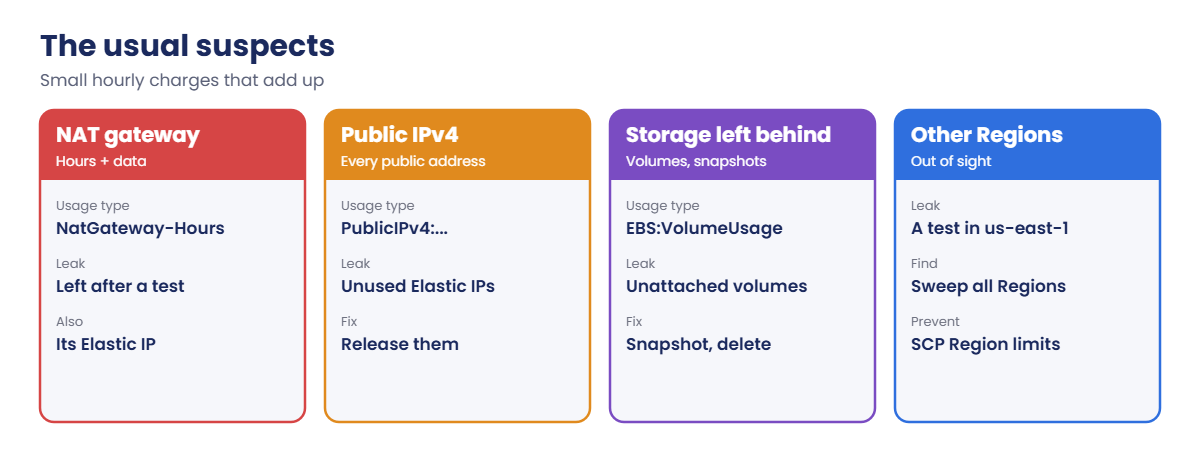
4Know the usual suspects
A short list explains most surprises:
Fix the leak today, then add the guardrail: a budget, an anomaly alert, a tag rule or a Region limit.
✅ Checkpoint: You can explain what a usage type is, why many surprises appear as “EC2 – Other”, and why you sweep all Regions for today’s leaks.
Hands-on lab: trace costs and hunt two leaks
Sign in and add the Cost Explorer helper:
cd C:\aws-lab
aws login --profile saat-admin
$env:AWS_PROFILE = 'saat-admin'
$v = Get-Content C:\aws-lab\saat-vpc.json | ConvertFrom-Json
$end = (Get-Date).ToString('yyyy-MM-dd'); $start = (Get-Date).AddDays(-30).ToString('yyyy-MM-dd')
function Get-CostBy([string]$Key, [string]$FilterFile) {
$extra = if ($FilterFile) { @('--filter', "file://$FilterFile") } else { @() }
$r = aws ce get-cost-and-usage --time-period "Start=$start,End=$end" --granularity MONTHLY --metrics UnblendedCost --group-by "Type=DIMENSION,Key=$Key" @extra --output json | ConvertFrom-Json
$r.ResultsByTime | ForEach-Object { $_.Groups } | Group-Object { $_.Keys[0] } | ForEach-Object { [pscustomobject]@{ Name = $_.Name; USD = [math]::Round(($_.Group | ForEach-Object { [double]$_.Metrics.UnblendedCost.Amount } | Measure-Object -Sum).Sum, 2) } } | Sort-Object USD -Descending | Select-Object -First 5 | Format-Table -AutoSize
}1See where the money went
Paste this whole block. It shows the top services and Regions for the last 30 days:
Get-CostBy SERVICE
Get-CostBy REGIONYou should see something like this:
Name USD
---- ---
Amazon Relational Database Service 4.82
EC2 - Other 3.16
Amazon Elastic Compute Cloud - Compute 2.40
Amazon Virtual Private Cloud 1.12
AWS Key Management Service 0.61
Name USD
---- ---
ap-south-1 11.48
global 0.49
ap-southeast-1 0.21Your numbers depend on how many labs you’ve run. The SQL Server lessons put RDS near the top; “EC2 – Other” is the one people don’t understand, so look inside it next.
2Look inside “EC2 – Other”
Paste this whole block:
'{ "Dimensions": { "Key": "SERVICE", "Values": ["EC2 - Other"] } }' | Set-Content ec2-other.json
Get-CostBy USAGE_TYPE ec2-other.jsonYou should see something like this:
Name USD
---- ---
APS3-EBS:VolumeUsage.gp3 1.02
APS3-NatGateway-Hours 0.94
APS3-PublicIPv4:InUseAddress 0.53
APS3-EBS:SnapshotUsage 0.33
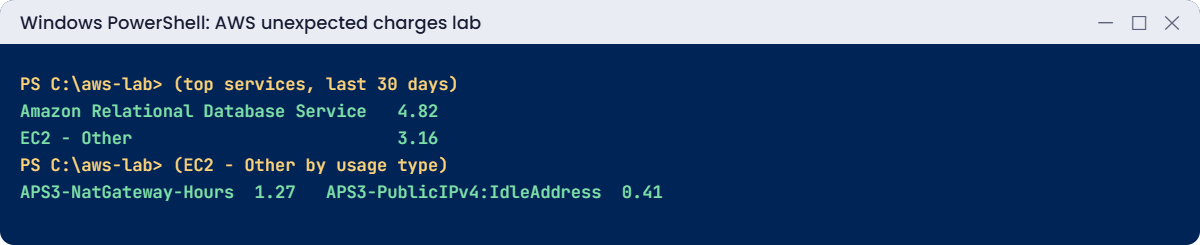
APS3-PublicIPv4:IdleAddress 0.21Now the charges have names: gp3 volumes, NAT gateway hours (Lesson 9), public IPv4 addresses in use and idle, and snapshots. “Idle address” means an Elastic IP attached to nothing, which is pure waste.
3Turn on Cost Anomaly Detection
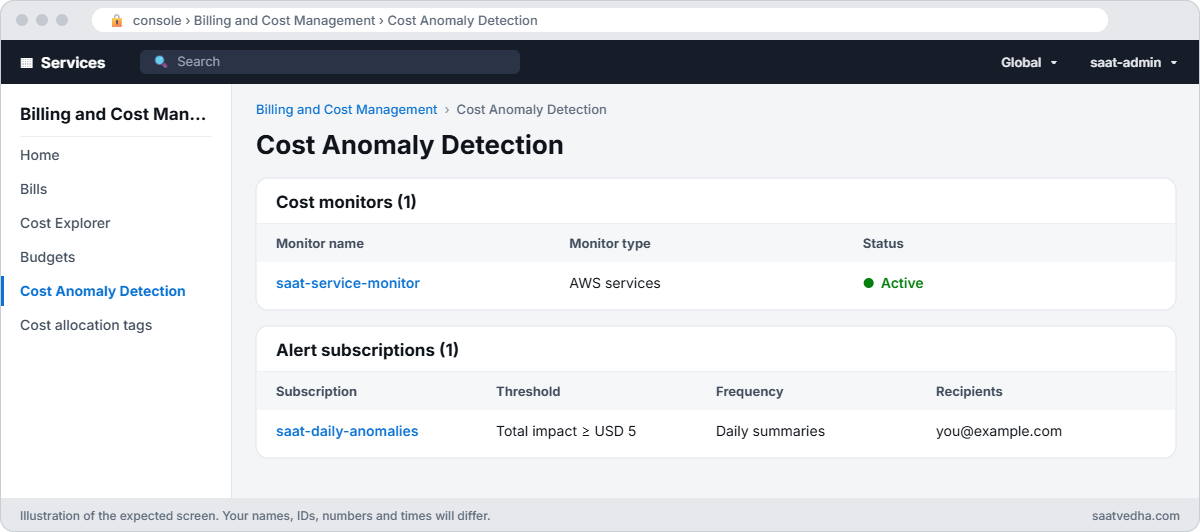
Paste this whole block, using your own email address. It reuses an existing services monitor if AWS already created one:
$email = 'you@example.com'
$mon = aws ce get-anomaly-monitors --query "AnomalyMonitors[?MonitorDimension=='SERVICE'].MonitorArn | [0]" --output text
if (-not $mon -or $mon -eq 'None') {
'{ "MonitorName": "saat-service-monitor", "MonitorType": "DIMENSIONAL", "MonitorDimension": "SERVICE" }' | Set-Content monitor.json
$mon = aws ce create-anomaly-monitor --anomaly-monitor file://monitor.json --query MonitorArn --output text
}
@{ SubscriptionName = 'saat-daily-anomalies'; MonitorArnList = @($mon); Subscribers = @(@{ Type = 'EMAIL'; Address = $email }); Frequency = 'DAILY'; ThresholdExpression = @{ Dimensions = @{ Key = 'ANOMALY_TOTAL_IMPACT_ABSOLUTE'; MatchOptions = @('GREATER_THAN_OR_EQUAL'); Values = @('5') } } } | ConvertTo-Json -Depth 6 | Set-Content sub.json
aws ce create-anomaly-subscription --anomaly-subscription file://sub.json --query SubscriptionArn --output textYou should see something like this:
arn:aws:ce::111122223333:anomalysubscription/1a2b3c4d-5e6f-7a8b-9c0d-e1f2a3b4c5d6From now on, if any service’s spending jumps by USD 5 or more beyond what’s normal for you, a daily email says which one. It stays on after this lesson.
4Sweep every Region for things that cost money
Paste this whole block. Find-Spenders.ps1 stays in C:\aws-lab; a full sweep takes a minute or two:
$fs = @'
param([string[]]$Regions)
if (-not $Regions) { $Regions = (aws ec2 describe-regions --query "Regions[].RegionName" --output text) -split '\s+' | Where-Object { $_ } }
$found = 0
foreach ($r in $Regions) {
$checks = @(
@('NAT gateway', (aws ec2 describe-nat-gateways --region $r --filter Name=state,Values=pending,available --query "NatGateways[].NatGatewayId" --output text)),
@('Unused Elastic IP', (aws ec2 describe-addresses --region $r --query "Addresses[?AssociationId==null].PublicIp" --output text)),
@('Unattached volume', (aws ec2 describe-volumes --region $r --filters Name=status,Values=available --query "Volumes[].[VolumeId,Size]" --output text)),
@('Running instance', (aws ec2 describe-instances --region $r --filters Name=instance-state-name,Values=running --query "Reservations[].Instances[].[InstanceId,InstanceType]" --output text)),
@('RDS instance', (aws rds describe-db-instances --region $r --query "DBInstances[].[DBInstanceIdentifier,DBInstanceStatus]" --output text)),
@('Load balancer', (aws elbv2 describe-load-balancers --region $r --query "LoadBalancers[].LoadBalancerName" --output text)))
foreach ($c in $checks) {
foreach ($line in (($c[1] | Out-String) -split '\r?\n')) {
if ($line.Trim() -and $line.Trim() -ne 'None') { '{0,-15} {1,-18} {2}' -f $r, $c[0], ($line -replace '\s+', ' ').Trim(); $found++ }
}
}
}
if ($found -eq 0) { "Nothing running or left behind in $($Regions.Count) Regions." }
'@
$fs | Set-Content C:\aws-lab\Find-Spenders.ps1
.\Find-Spenders.ps1You should see something like this:
Nothing running or left behind in 17 Regions.If anything shows up that you didn’t expect, that’s your leak. Running this before you log off each day is the cheapest habit in the cloud.
✅ Checkpoint: You’ve seen your top services, Regions and EC2 – Other usage types, Cost Anomaly Detection has a daily subscription, and Find-Spenders.ps1 swept every enabled Region.
Break It, Then Fix It
Two leaks that catch almost everyone at least once.
1Break it: the NAT gateway and its Elastic IP
Create a NAT gateway for a “quick test”, then delete it the way people usually do:
$alloc = aws ec2 allocate-address --domain vpc --tag-specifications 'ResourceType=elastic-ip,Tags=[{Key=course,Value=saatvedha-aws},{Key=lesson,Value=68}]' --query AllocationId --output text
$nat = aws ec2 create-nat-gateway --subnet-id $v.PublicA --allocation-id $alloc --query NatGateway.NatGatewayId --output text
aws ec2 wait nat-gateway-available --nat-gateway-ids $nat
.\Find-Spenders.ps1 -Regions ap-south-1
aws ec2 delete-nat-gateway --nat-gateway-id $nat | Out-Null
aws ec2 wait nat-gateway-deleted --nat-gateway-ids $nat
.\Find-Spenders.ps1 -Regions ap-south-1You’ll get something like this:
ap-south-1 NAT gateway nat-0a1b2c3d4e5f60718
ap-south-1 Unused Elastic IP 13.234.10.20The NAT gateway is gone, but its Elastic IP stayed allocated, now idle and still charged every hour, forever, until someone notices. In Cost Explorer this appears weeks later as PublicIPv4:IdleAddress. Fix: release the address too:
aws ec2 release-address --allocation-id $alloc
.\Find-Spenders.ps1 -Regions ap-south-1You should see this:
Nothing running or left behind in 1 Regions.2Break it: a leak in another Region
Create a small volume in Singapore, as a test in the “wrong” Region would, then check with the Mumbai-only tool from Lesson 36:
$vol = aws ec2 create-volume --region ap-southeast-1 --availability-zone ap-southeast-1a --size 1 --volume-type gp3 --tag-specifications 'ResourceType=volume,Tags=[{Key=course,Value=saatvedha-aws},{Key=lesson,Value=68}]' --query VolumeId --output text
.\Find-Waste.ps1
.\Find-Spenders.ps1
Start-Sleep 300
.\Get-RecentChanges.ps1 -Region ap-southeast-1 -Minutes 15You’ll get something like this:
No waste found in ap-south-1.
ap-southeast-1 Unattached volume vol-0abc1234def567890 1
Time Who Action Error
---- --- ------ -----
11:02:14 saat-admin ec2/CreateVolume
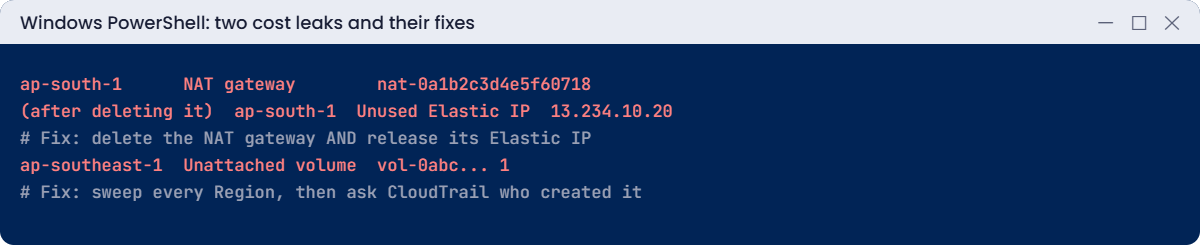
The single-Region check saw nothing; the all-Region sweep found it, and CloudTrail in that Region says who created it and when. Real leaks like this are often GPU instances or databases from a tutorial run in us-east-1. Fix: delete it (after checking with its owner, in real life):
aws ec2 delete-volume --region ap-southeast-1 --volume-id $vol
.\Find-Spenders.ps1 -Regions ap-southeast-1
Remove-Item ec2-other.json, monitor.json, sub.json -ErrorAction SilentlyContinueYou should see this:
Nothing running or left behind in 1 Regions.✅ Checkpoint: You released an Elastic IP left behind by a deleted NAT gateway and found a volume in another Region with an all-Region sweep plus CloudTrail. Nothing from this lesson is left running; the anomaly subscription stays on.
This happened at work
The USD 2,300 weekend experiment
A student team at a college ran a GPU tutorial in us-east-1 because the guide used that Region. They stopped the notebook but not the instance, and their dashboards only looked at Mumbai.
Three weeks later, the faculty account’s bill showed USD 2,300 under “Amazon Elastic Compute Cloud – Compute” in US East. Cost Explorer by Region found it in seconds; CloudTrail in us-east-1 showed which student’s role had launched it.
The instance was terminated the same hour, and AWS Support later reduced part of the charge as a one-time courtesy. The college now has an SCP that allows only Mumbai, a USD 50 budget per team, and Cost Anomaly Detection emails to the lab coordinator.
Common mistakes and troubleshooting
| Mistake | What happens | What to do |
|---|---|---|
| Looking only at your usual Region | Leaks elsewhere run for weeks | Group by Region; sweep all Regions |
| Deleting a NAT gateway but not its EIP | Idle IPv4 charges continue | Release the Elastic IP too |
| Waiting for the monthly bill | Weeks of waste | Budgets plus Cost Anomaly Detection |
| Ignoring “EC2 – Other” | NAT, EBS and IPv4 costs unexplained | Group it by usage type |
| Untagged test resources | Nobody knows who owns them | Tag everything; report untagged |
| Deleting without asking | Breaking something someone needs | Find the owner in CloudTrail first |
Interview questions
Click a question to open it. Each one is written the way an interviewer would ask it. Under it you will see why they ask it and one way you could answer, in your own words.
Fresher level
1. Your manager asks why the AWS bill went up this month. How would you find out what’s costing money?
Why they ask this: They want to see that you can go from a big number on the bill down to one resource and the person who created it.
How you might answer: I’d open Cost Explorer and group by service, then by Region and usage type. That tells me what kind of charge it is and where.
Then I find the actual resource in that Region, and check CloudTrail to see who created it.
2. You see a big line called “EC2 – Other” on the bill. What is that?
Why they ask this: They want to check that you know this confusing billing category, because it hides many common cost leaks.
How you might answer: It’s EC2-related charges that aren’t instance hours. That includes EBS volumes and snapshots, NAT gateways, public IPv4 addresses, data transfer and more.
So when it grows, I group by usage type to see which of those it is.
3. What’s the difference between AWS Budgets and Cost Anomaly Detection, and would you use both?
Why they ask this: They want to see that you know which alert catches which kind of problem.
How you might answer: Budgets alert when spending or the forecast passes a fixed amount that I set. Cost Anomaly Detection learns my normal spending and alerts on unusual jumps, even small ones.
Yes, I’d use both, because a budget won’t notice a jump that’s still under the limit.
2–5 years experience
4. The bill jumped, but Cost Explorer shows nothing new for today. Why might that be?
Why they ask this: They want to know you understand billing data is delayed, and that you have another way to find the cause.
How you might answer: Cost data can lag by up to a day, so today’s charges may not show yet. I don’t wait for it.
Instead I sweep the resources directly and check CloudTrail for anything created recently.
5. You deleted a NAT gateway to save money. What might still be costing you?
Why they ask this: They want to see that you know about leftovers that keep billing after the main resource is gone.
How you might answer: The Elastic IP that was attached to it stays behind, and an idle public IPv4 address still costs money. Some route tables may also still point to the deleted gateway.
So I release the Elastic IP and clean up those routes.
6. Someone ran up charges in a Region your company never uses. How would you stop that happening?
Why they ask this: They want to see that you prevent the problem with guardrails, and still check in case something slips through.
How you might answer: I’d add SCPs that deny actions outside our approved Regions. That stops new resources from being created there.
I’d also run sweeps across all Regions and keep cost reports grouped by Region, so anything left over shows up.
Senior level
7. You’re asked to set up cost governance for 40 AWS accounts. How would you design it?
Why they ask this: They want to see a full approach to cost across many teams: visibility, ownership, alerts and regular reviews.
How you might answer: I’d use Organizations with consolidated billing, mandatory tags enforced by tag policies, and CUR data in Athena with dashboards. Each account or team would get budgets, and anomaly detection would be on.
I’d add SCP Region limits and scheduled cleanup automation. Every month we’d review costs and rightsize with Compute Optimizer.
8. A developer left a large instance running for a month by mistake. What would you change afterwards?
Why they ask this: They want to see that you fix the process, not the person, so it doesn’t happen again to anyone.
How you might answer: I’d require tags with an owner on every resource, and add auto-stop schedules for non-production, like the one from Lesson 38. Budgets would alert the owner directly, and anomaly alerts would catch sudden jumps.
Then I’d run a blameless review, because anyone can forget an instance.
Quick quiz
Q1. Where do NAT gateway charges usually appear?
- RDS
- EC2 – Other
- S3
- IAM
Show answer
B — As NatGateway-Hours and data.
Q2. What was left after deleting the NAT gateway?
- A subnet
- Its Elastic IP
- A route table only
- Nothing
Show answer
B — Release it to stop idle IPv4 charges.
Q3. Why did Find-Waste.ps1 miss the Singapore volume?
- Bug
- It only checks Mumbai
- Volume was attached
- No permission
Show answer
B — Sweep all Regions.
Q4. What does APS3 in a usage type mean?
- A service
- The Mumbai Region
- An account
- A tag
Show answer
B — It is the Region prefix.
Q5. Which tool learns normal spending and alerts on jumps?
- Budgets
- Cost Anomaly Detection
- CloudTrail
- Config
Show answer
B — It uses machine learning.
Quick recap
- Narrow down: service, Region, usage type, resource, owner.
- “EC2 – Other” hides NAT, EBS, snapshots and public IPv4.
- Cost data lags; sweep all Regions for today’s leaks.
- Delete NAT gateways and release their Elastic IPs.
- Budgets plus Cost Anomaly Detection plus Region limits prevent surprises.
Next lesson
Lesson 69: Final project: build it, break it, fix it → You’ll build a small company’s stack on AWS from one template, then diagnose and fix 10 broken scenarios.
Further reading: AWS unexpected charges
Want to go deeper into AWS unexpected charges? Read Detecting unusual spend with AWS Cost Anomaly Detection and Analyzing your costs with AWS Cost Explorer. You can also see the full plan for this course on the AWS Cloud Administration course page.
