
Linux administration is the work of keeping Linux servers healthy: the machines behind websites, databases, payment systems, Kafka clusters and most of the cloud. When one of them fills its disk at 2 a.m. or refuses to boot after a patch, a Linux admin is the person who gets the call.
This course takes you from the very start to the work senior admins do. You begin with where Linux came from (Unix at Bell Labs in 1969, the GNU Project in 1983 and Linus Torvalds’ kernel in 1991) and how the Red Hat, Debian and SUSE families split. Then you build real skills one lab at a time: users and permissions, systemd, networking with nmcli and netplan, packages, scripting, SELinux, LVM storage, kernel patching, Kafka, Zabbix and backups.
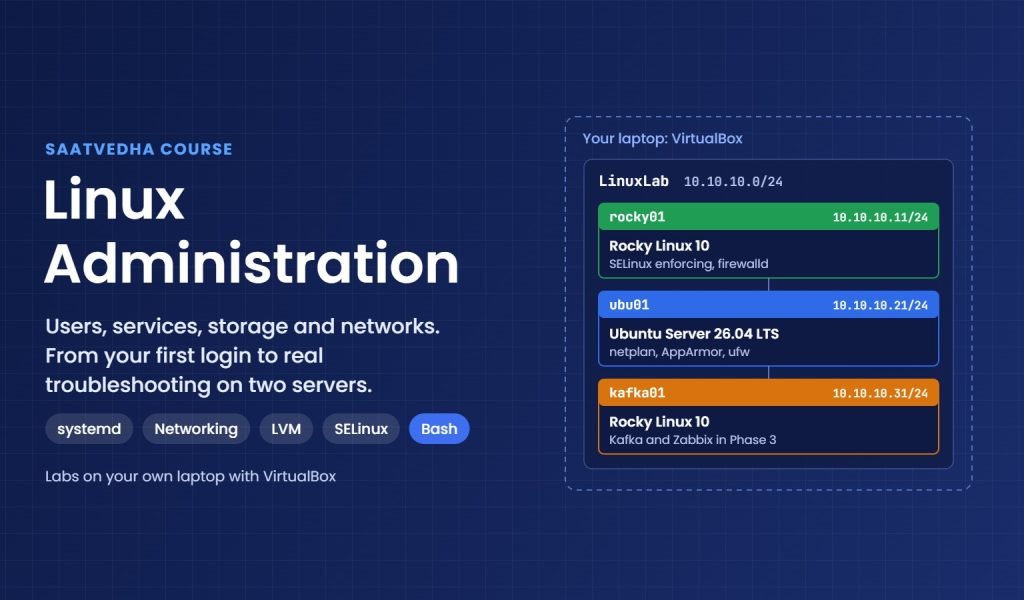
Every lab runs on two VirtualBox machines on your own laptop: Rocky Linux 10 for the Red Hat family and Ubuntu Server 26.04 LTS for the Debian family. When RHEL, Oracle Linux or an older version does something differently, the lesson tells you.
A big part of the course is troubleshooting. A whole phase answers what to check, where to check it and how to fix it for the problems admins meet every week, like disks that look full but aren’t, services that won’t start and routes that vanish after a reboot. Every lesson also has a “Break It, Then Fix It” lab, so you see the real error in your lab before you meet it at work.
What you need: a laptop with 8 GB of RAM and a CPU from about 2013 or later, VirtualBox, and the Rocky Linux 10 and Ubuntu Server 26.04 ISO files. Lesson 2 walks you through the setup.
Who This Course Is For
- Freshers who want a first job as a Linux or system administrator
- Support and NOC engineers who want to fix servers instead of only raising tickets
- Windows, storage or network admins who now look after Linux servers too
- Working Linux admins who want to fill gaps on systemd, LVM, SELinux and RHEL 10
- Anyone preparing for the RHCSA (EX200) exam
What You Will Learn
By the end of this course, you will be able to:
- Explain how Linux grew out of Unix and GNU, and pick the right distribution for a job
- Manage users, sudo, permissions and ACLs safely
- Build exact commands with pipes, grep, awk and find, and use the Command Builder
- Run services with systemd and set up networking with nmcli and netplan
- Create, grow and snapshot LVM storage without downtime
- Patch kernels, tune sysctl and run apps like Kafka and Zabbix
- Troubleshoot step by step: what to check, where, and in what order
Why Learn Linux Administration?
Linux runs most of the world’s servers, nearly all of the public cloud and every Android phone. Banks, telecoms and SaaS companies all need people who can keep those servers running, and the same skills carry over to AWS, Azure, containers and storage work.
Admins who can find why a disk is full or why a service won’t start, without guessing, are always in demand. Those are the skills this course builds, one lab at a time.
- Get hired for Linux admin, support and infrastructure roles
- Fix storage, network and service problems by checking, not guessing
- Understand what a command does before you press Enter
- Build a base for cloud, containers, DevOps and SAN work
- Prepare for the RHCSA (EX200) exam
Course Meta Information
Further reading: Linux administration
Official documentation: Rocky Linux documentation, Red Hat Enterprise Linux 10 documentation and Ubuntu Server documentation.
Daily commands in one place: the SaatVedha Command Builder. Next step after this course: our SAN Storage and AWS Cloud Administration courses, which build on the same Linux skills.
-
Phase 0: Before you start
-
Phase 1: The origins and OS architecture
-
Phase 2: Day-to-day administration and the command builder
-
Phase 3: Enterprise infrastructure and storage
-
Phase 4: Troubleshooting step by step
-
Phase 5: Final project and career