Final project: build it, break it, fix it
-
Phase 0: Before you start
-
Phase 1: The origins and OS architecture
-
Phase 2: Day-to-day administration and the command builder
-
Phase 3: Enterprise infrastructure and storage
-
Phase 4: Troubleshooting step by step
-
Phase 5: Final project and career
This Linux final project puts the whole course on two servers. You’ll rebuild the SaatShop web shop end to end on rocky01 and ubu01 (users and sudo, LVM, Nginx with PHP-FPM and MariaDB, the NFS share, firewalls, SELinux, central logs, the snapshot backup and a monitoring check), prove each layer with one command, and then let a script break it ten different ways while you find and fix each fault.
Nothing here is new on its own. What’s new is doing it all together, in order, and working out which layer failed from a symptom alone, which is what the job looks like on most days. You can run it on the course VMs as earlier lessons left them, or from fresh snapshots if you want the full rebuild.
Where this lesson fits
Lesson 81 of 82 in Linux Administration · Phase 5: Final project and career · Before this: Lesson 80, the commands cheat sheet · Next: Lesson 82, interview questions and RHCSA prep
| Time | You need | By the end you can |
|---|---|---|
| 4 to 6 hours, best over two or three sittings | rocky01 and ubu01 (kafka01 and ad01 can stay off), 8 GB laptop is enough | Build and verify SaatShop across two servers, keep it watched with a timer, and diagnose and fix ten real faults from their symptoms |
What it is, in one line
The final project builds SaatShop across rocky01 and ubu01, proves every layer with a check script, then breaks it ten ways so you practise fixing faults from their symptoms.
In Simple Words
The apprentice at the two-wheeler garage
An apprentice in a two-wheeler garage spends months on single jobs: brakes one week, the carburettor the next, then wiring. On his last day the owner gives him a scooter in parts and says “make it run”. When it runs, the owner sends him for tea, quietly loosens one thing, and asks him to find out why it won’t start, again and again with a different fault each time.
Building SaatShop is putting the scooter together, and break-saatshop.sh is the owner with the spanner.
Engineer's View
What you’re building, and where each piece comes from
SaatShop is a small PHP shop on rocky01 with its database on its own volume, its shared files and central logs on ubu01, and a nightly backup that ubu01 pulls. Every name below is the one the earlier lessons used, so their commands work unchanged.
| Layer | What exists when you’re done | Server | Lessons |
|---|---|---|---|
| Users and sudo | priya (1001), arjun (1002), group webteam (2001), service account appsvc, /etc/sudoers.d/webteam | rocky01 | 15, 16 |
| Storage | vg_data on sdb + sdd: lv_app 4.25G XFS on /srv/app, lv_logs 1.5G ext4 on /srv/logs, lv_db 2G XFS on /var/lib/mysql, all in fstab by UUID | rocky01 | 44, 45, 56 |
| Web and database | Nginx, PHP-FPM, MariaDB on 127.0.0.1; app in /srv/app/saatshop, settings in /etc/saatshop/db.ini, health.php | rocky01 | 56 |
| Shared files | ubu01:/srv/nfs/share mounted on /mnt/share (autofs on /nfs/share) | both | 47 |
| Firewall and SELinux | firewalld: ssh, http; ufw on ubu01: SSH, 514 from rocky01, 2049 from the lab network; SELinux enforcing with httpd_sys_content_t on the app | both | 34, 41, 47, 56 |
| Central logs | rsyslog on rocky01 forwards everything to ubu01 TCP 514 | both | 29 |
| Backups | bkpsvc with backup-gate.sh and the pre/post scripts (lv_db snapshot under a read lock); ubu01’s backup-rocky01.timer pulls at 01:30 | both | 62, 63 |
| Monitoring | saat-health.sh, plus the new saatshop-check.sh and its 5-minute timer (this lesson); Zabbix from Lesson 61 is optional | rocky01 | 39, 61 |
The break script assumes all of that exists on rocky01, runs only there, and refuses to start a scenario whose objects are missing (it names the lesson to go back to). It keeps what it changed in /var/lib/break-saatshop, allows one scenario at a time, and reset puts everything back.
How it works, step by step
Build in layers from the bottom up, and don’t start a layer until the one below it has passed its check. The diagram below shows the finished system and the three paths between the servers that most faults travel along.
1Bottom first: accounts and disks
Users, groups and volumes have no dependencies, and everything above needs them. A database installed before its volume is mounted writes into the root file system, which is exactly the mistake Lesson 56 avoided by creating lv_db first.
2Then the services, then the network between servers
Nginx, PHP-FPM and MariaDB come next, then the firewall rules and the paths to ubu01: the NFS mount, log forwarding, and the SSH path the backup server uses to pull. Each path needs a rule on both ends.
3Prove each layer with one command
For every layer pick one command whose output proves it works, such as curl on health.php for the web layer or vgs vg_data for storage. That command is your evidence now and your first check later when something breaks.
4Turn the proofs into a check that runs by itself
saatshop-check.sh collects those proofs into one script that a timer runs every five minutes. It prints one OK or FAIL line per check and exits 0 or 2, so a person, a timer or Zabbix can all read it.
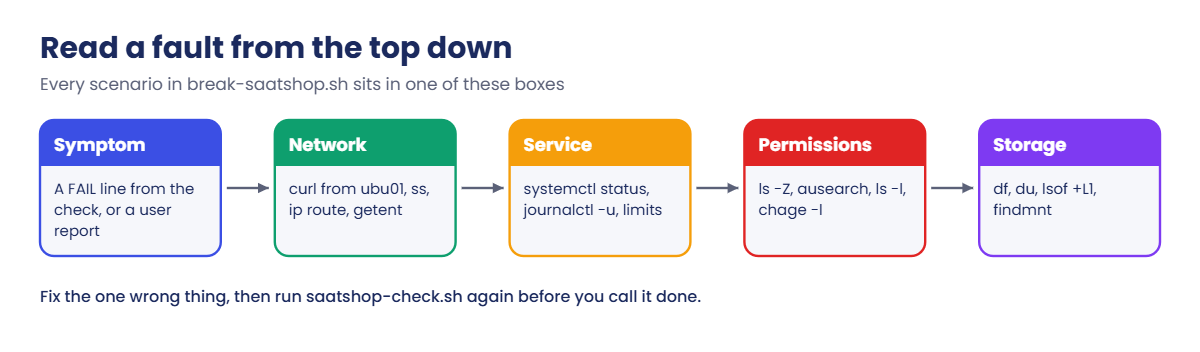
5Read a fault from the top down
When a check fails, start where the user is and move down one layer at a time: can the network reach the service, is the service running, may it read its files, is there room on the disk. The picture below shows that path with the commands for each step, and every scenario in Break It fits one of its boxes.
6Fix, prove, write it down
After a fix, run the same check that failed and see it pass. Then write four lines in your notes: the symptom, the cause, the fix, and what would have caught it sooner. Those notes are what you’ll talk about in interviews (Lesson 82).
The break script changes real settings on rocky01: fstab, /etc/hosts, a route, a firewall rule, a unit drop-in, a user’s expiry date. Take snapshots of both VMs before you start, and run sudo break-saatshop.sh reset when you’re done with each scenario.
Hands-on lab: build and verify SaatShop on rocky01 and ubu01
Before you run any command, double-check it
Read every command twice before you press Enter. Check the target: the server name, the user, the disk or device name, the path and the sizes. These commands are for learning and were tested in our lab, not on your system. At work, run the read-only commands first, follow your change process, make sure a backup exists, and ask a second person to check anything that changes or deletes data. You run them at your own risk.
Steps 2 to 6 each check one layer. On the course VMs as they are, run the check, and build only what’s missing using the lesson named in the step. For a full rebuild, use the fresh path in step 1 and build each stage from its lessons before you run its check.
Commands run on rocky01 as student unless the step says ubu01.
1Choose your starting point and take snapshots
On the laptop, with both VMs shut down, snapshot the state you have now:
VBoxManage snapshot rocky01 take before-l81 --description "course state before the final project"
VBoxManage snapshot ubu01 take before-l81 --description "course state before the final project"
VBoxManage snapshot rocky01 listYou should see something like this (your list is longer):
Name: base (UUID: 3c1d2e4f-5a6b-4c7d-8e9f-0a1b2c3d4e5f)
...
Name: before-l81 (UUID: 9f8e7d6c-5b4a-4392-8170-6f5e4d3c2b1a) *The star marks the current snapshot. Now pick one path:
| Path | Start from | What you do |
|---|---|---|
| As they are | before-l81 on both VMs | Run each check below and fix whatever fails, using the lesson named in the step |
| Fresh rebuild | Restore “base” (Lesson 2) on both VMs | Attach two new 5 GB disks to rocky01 on SATA ports 1 and 2 (they show up as sdb and sdc; use those wherever this lesson says sdb and sdd), then build stage by stage: Lessons 15-16, 44, 56, 29 and 47 (with the ufw rules from 34), 62-63, 39, then step 6 here |
The fresh path needs the Lesson 33 SSH key from ubu01 on rocky01 and the hardening drop-in again, because “base” is older than both. Expect it to take a full day; that is the point of it.
✅ Checkpoint: Both VMs have a before-l81 snapshot and you know which path you’re on.
2Stage 1: users, groups and sudo
Run this on rocky01:
id priya; id arjun; id appsvc
getent group webteam
sudo visudo -cYou should see something like this:
uid=1001(priya) gid=1001(priya) groups=1001(priya),2001(webteam)
uid=1002(arjun) gid=1002(arjun) groups=1002(arjun),2001(webteam)
uid=991(appsvc) gid=991(appsvc) groups=991(appsvc)
webteam:x:2001:priya,arjun
/etc/sudoers: parsed OK
/etc/sudoers.d/ad-linux-admins: parsed OK
/etc/sudoers.d/bkpsvc: parsed OK
/etc/sudoers.d/saatops: parsed OK
/etc/sudoers.d/webteam: parsed OKOn the fresh path you’ll see only webteam (and bkpsvc after stage 5); ad-linux-admins and saatops come from Lessons 54 and 64, which SaatShop doesn’t need. Missing something? These lines rebuild stage 1, and Lesson 16 step 4 has the webteam rule:
sudo groupadd -g 2001 webteam
sudo useradd -m -u 1001 -c "Priya Nair" -G webteam priya
sudo useradd -m -u 1002 -c "Arjun Rao" -G webteam arjun
sudo useradd -r -s /sbin/nologin appsvc
sudo visudo -f /etc/sudoers.d/webteam✅ Checkpoint: priya and arjun are in webteam (GID 2001), appsvc exists and visudo -c parses every file.
3Stage 2: volumes and mounts
Run this on rocky01:
sudo vgs vg_data
sudo lvs vg_data
df -hT /srv/app /srv/logs /var/lib/mysql
sudo findmnt --verify | tail -n 1You should see something like this:
VG #PV #LV #SN Attr VSize VFree
vg_data 2 3 0 wz--n- 9.99g 2.24g
LV VG Attr LSize Pool Origin Data% Meta% Move Log Cpy%Sync Convert
lv_app vg_data -wi-ao---- 4.25g
lv_db vg_data -wi-ao---- 2.00g
lv_logs vg_data -wi-ao---- 1.50g
Filesystem Type Size Used Avail Use% Mounted on
/dev/mapper/vg_data-lv_app xfs 4.2G 117M 4.1G 3% /srv/app
/dev/mapper/vg_data-lv_logs ext4 1.5G 28K 1.4G 1% /srv/logs
/dev/mapper/vg_data-lv_db xfs 2.0G 178M 1.8G 9% /var/lib/mysql
0 parse errors, 0 errors, 0 warningsTwo PVs, three LVs and 2.24 GiB unallocated, which the Lesson 63 backup needs for its 512 MiB snapshot of lv_db. On the fresh path, build it like this, then add the three UUID lines to fstab as in Lesson 44 and run sudo mount -a and sudo restorecon -Rv /srv/app /srv/logs /var/lib/mysql:
sudo pvcreate /dev/sdb /dev/sdd
sudo vgcreate vg_data /dev/sdb /dev/sdd
sudo lvcreate -n lv_app -L 4.25G vg_data && sudo mkfs.xfs /dev/vg_data/lv_app
sudo lvcreate -n lv_logs -L 1.5G vg_data && sudo mkfs.ext4 /dev/vg_data/lv_logs
sudo lvcreate -n lv_db -L 2G vg_data && sudo mkfs.xfs -L dbdata /dev/vg_data/lv_db
sudo mkdir -p /srv/app /srv/logs /var/lib/mysqlTry it yourself: build the PV, VG, LV and fstab steps in the Command Builder.
✅ Checkpoint: vgs shows 3 LVs and 2.24g free, df shows all three mounts, and findmnt --verify ends with 0 errors.
4Stage 3: the web shop
Run this on rocky01:
systemctl is-active nginx php-fpm mariadb
curl -s http://rocky01.saatlab.test/health.php
ls -Z /srv/app/saatshop/health.php
getenforce; sudo firewall-cmd --list-servicesYou should see something like this:
active
active
active
OK db=up orders=5
unconfined_u:object_r:httpd_sys_content_t:s0 /srv/app/saatshop/health.php
Enforcing
dhcpv6-client http ntp sshFive orders, the web content label, SELinux enforcing and http allowed. On the fresh path, Lesson 56 steps 2 to 8 build all of it (skip its step 1, lv_db already exists), and ~/saatshop.sql recreates the database. ntp only appears if you did Lesson 40.
✅ Checkpoint: All three services are active and health.php says “OK db=up orders=5”.
5Stage 4: the share and the central logs
On rocky01, run this:
findmnt -n -o SOURCE,FSTYPE /mnt/share
ls /mnt/share
logger -t l81 "final project check"You should see something like this:
ubu01:/srv/nfs/share nfs4
README.txt from-rocky01.txtOn ubu01, run this:
sudo ufw status | grep -E '514|2049'
sudo tail -n 1 /var/log/remote/rocky01/l81.logYou should see something like this:
514/tcp ALLOW 10.10.10.11
2049/tcp ALLOW 10.10.10.0/24
2026-10-27T10:31:05+05:30 rocky01 l81: final project checkThe share is mounted with NFSv4 and the test line crossed from rocky01 to ubu01 through TCP 514. Lessons 47 and 29 build these two paths; each needs its ufw rule on ubu01 (Lesson 34).
✅ Checkpoint: /mnt/share lists two files and ubu01 holds the l81 test line.
6Stage 5: the nightly backup
On ubu01, check the timer and run the job once:
systemctl list-timers backup-rocky01.timer --no-pager | head -n 2
sudo systemctl start backup-rocky01.service
journalctl -u backup-rocky01.service -n 2 -o cat --no-pagerYou should see something like this:
NEXT LEFT LAST PASSED UNIT ACTIVATES
Wed 2026-10-28 01:41:09 IST 15h Tue 2026-10-27 01:37:12 IST 9h ago backup-rocky01.timer backup-rocky01.service
backup-post: backup result recorded: ok
backup-rocky01: OK: /srv/backup/rocky01/2026-10-27 (158M)The job froze MariaDB, took the lv_db snapshot, pulled /etc, /srv/app, the metadata and the database copy, then removed the snapshot. On the fresh path, Lesson 62 steps 3 to 7 and Lesson 63 step 5 and 6 build it in that order.
✅ Checkpoint: The job ends with “backup-rocky01: OK” and the timer shows its next run at about 01:30.

7Stage 6: add the SaatShop check and its timer
On rocky01, write the check script to your home folder (paste the whole block):
cat > ~/saatshop-check.sh <<'EOF'
#!/bin/bash
# /usr/local/bin/saatshop-check.sh (SaatVedha Linux course, Lesson 81)
# Checks every layer SaatShop needs on rocky01. Exit 0 = all OK, 2 = something failed.
set -uo pipefail
URL=http://rocky01.saatlab.test/health.php
META=/var/local/backup-meta
fails=0
ok() { printf 'OK %-7s %s\n' "$1" "$2"; }
bad() { printf 'FAIL %-7s %s\n' "$1" "$2"; fails=$((fails + 1)); }
# 1. The page that users and monitoring ask for, by its real name
if out=$(curl -fsS -m 5 "$URL" 2>&1) && [[ $out == OK* ]]; then
ok web "$out"
else
bad web "$URL: ${out:-no answer}"
fi
# 2. The three services behind it
for s in nginx php-fpm mariadb; do
state=$(systemctl is-active "$s" 2>/dev/null)
if [[ $state == active ]]; then ok service "$s active"; else bad service "$s $state"; fi
done
# 3. Mounts and space (timeout, because a dead NFS server makes df hang)
for m in /srv/app /srv/logs /var/lib/mysql /mnt/share; do
if ! findmnt -n "$m" >/dev/null; then bad mount "$m is not mounted"; continue; fi
use=$(timeout 5 df -P "$m" 2>/dev/null | awk 'NR==2 {sub("%", "", $5); print $5}')
if [[ -z $use ]]; then bad space "$m did not answer in 5 s"
elif (( use >= 90 )); then bad space "$m ${use}% used"
else ok space "$m ${use}% used"; fi
done
# 4. ubu01 holds the NFS share, the central logs and the backups
if timeout 3 bash -c '</dev/tcp/10.10.10.21/22' 2>/dev/null; then
ok network "ubu01 10.10.10.21:22 reachable"
else
bad network "ubu01 10.10.10.21:22 not reachable"
fi
# 5. Last good backup (backup-post.sh touches last-ok after every good run)
if [[ -f $META/last-ok ]]; then
age=$(( ($(date +%s) - $(stat -c %Y "$META/last-ok")) / 3600 ))
if (( age <= 26 )); then ok backup "last good run ${age} h ago"; else bad backup "last good run ${age} h ago"; fi
else
bad backup "no good run recorded in $META"
fi
# 6. The general health script from Lesson 39, for information
if [[ -x /usr/local/bin/saat-health.sh ]]; then
printf 'INFO %-7s %s\n' health "$(/usr/local/bin/saat-health.sh -q -n -p 22,80)"
fi
if (( fails == 0 )); then
echo "SAATSHOP: OK"
logger -t saatshop-check "SAATSHOP: OK"
exit 0
fi
echo "SAATSHOP: FAIL ($fails failed)"
logger -t saatshop-check -p user.warning "SAATSHOP: FAIL ($fails failed)"
exit 2
EOF
bash -n ~/saatshop-check.sh && sudo install -o root -g root -m 0755 ~/saatshop-check.sh /usr/local/bin/It checks the page users ask for (by its real name), the three services, space on the four SaatShop mounts with a 5-second limit (a dead NFS server makes df hang), the path to ubu01, the age of the last good backup, and prints saat-health.sh’s summary from Lesson 39 for information. install creates a new file in /usr/local/bin, so it gets the right SELinux label (bin_t), not the label of your home folder. Now the unit and the timer:
sudo tee /etc/systemd/system/saatshop-check.service >/dev/null <<'EOF'
[Unit]
Description=SaatShop end-to-end check (Lesson 81)
After=network-online.target
Wants=network-online.target
[Service]
Type=oneshot
ExecStart=/usr/local/bin/saatshop-check.sh
EOF
sudo tee /etc/systemd/system/saatshop-check.timer >/dev/null <<'EOF'
[Unit]
Description=Run the SaatShop check every 5 minutes
[Timer]
OnCalendar=*:0/5
Persistent=true
[Install]
WantedBy=timers.target
EOF
sudo systemctl daemon-reload
sudo systemctl enable --now saatshop-check.timer
sudo /usr/local/bin/saatshop-check.sh; echo "exit $?"You should see something like this:
Created symlink '/etc/systemd/system/timers.target.wants/saatshop-check.timer' → '/etc/systemd/system/saatshop-check.timer'.
OK web OK db=up orders=5
OK service nginx active
OK service php-fpm active
OK service mariadb active
OK space /srv/app 3% used
OK space /srv/logs 1% used
OK space /var/lib/mysql 9% used
OK space /mnt/share 38% used
OK network ubu01 10.10.10.21:22 reachable
OK backup last good run 9 h ago
INFO health RESULT: OK (0 critical, 0 warning, 0 unknown)
SAATSHOP: OK
exit 0Try it yourself: build a service and timer pair in the Command Builder.
✅ Checkpoint: The check prints SAATSHOP: OK with exit 0, and systemctl list-timers saatshop-check.timer shows a run every five minutes.
8Install break-saatshop.sh and take the “built” snapshot
On rocky01, paste the whole block:
cat > ~/break-saatshop.sh <<'SCRIPT_END'
#!/bin/bash
# /usr/local/sbin/break-saatshop.sh (SaatVedha Linux course, Lesson 81)
# Puts one realistic fault into the SaatShop lab on rocky01, and takes it out again.
# sudo break-saatshop.sh list what each scenario looks like from outside
# sudo break-saatshop.sh N inject scenario N (1-10)
# sudo break-saatshop.sh random inject a scenario without saying which
# sudo break-saatshop.sh status which scenarios are active
# sudo break-saatshop.sh reset [N] undo scenario N, or every active one
set -euo pipefail
STATE=/var/lib/break-saatshop
UBU=10.10.10.21
BADGW=10.10.10.254
SYMPTOM=(""
"Monitoring says a SaatShop file system is almost full"
"Another file system is filling up, but nobody can find the files"
"Nothing looks wrong yet. Reboot rocky01 and watch the console"
"The 5-minute SaatShop check has stopped running"
"The health page is broken, but the shop page still opens"
"SaatShop works on rocky01 itself, but not from ubu01"
"rocky01 can no longer talk to ubu01 (share, logs, backups)"
"The check fails on the web test, yet Nginx looks fine"
"The shop hangs, then times out, for everyone"
"Tonight's backup of rocky01 failed (run the job on ubu01)")
fail() { echo "break-saatshop: $*" >&2; exit 1; }
say() { echo "break-saatshop: $*"; }
need_mount() { mountpoint -q "$1" || fail "$1 is not a mount point ($2)"; }
need_file() { [[ -e $1 ]] || fail "$1 not found ($2)"; }
active_list() {
local f out=""
for f in "$STATE"/active-*; do [[ -e $f ]] && out+="${f##*-} "; done
echo "${out% }"
}
saved() { cat "$STATE/active-$1"; }
# 1. A forgotten dump file fills the database volume
break_1() {
need_mount /var/lib/mysql "lv_db, Lesson 56"
local f avail
f=/var/lib/mysql/saatshop-full-$(date -d '6 days ago' +%F).sql
avail=$(df -Pk /var/lib/mysql | awk 'NR==2 {print $4}')
(( avail > 40960 )) || fail "/var/lib/mysql already has less than 40 MiB free"
echo "$f" > "$STATE/active-1"
fallocate -l "$(( avail - 20480 ))K" "$f"
touch -d '6 days ago' "$f"
}
undo_1() { local f; f=$(saved 1); [[ -n $f ]] && rm -f -- "$f"; return 0; }
# 2. A writer keeps a deleted log open on /srv/logs
break_2() {
need_mount /srv/logs "lv_logs, Lesson 44"
local f=/srv/logs/saatshop-audit.log avail
avail=$(df -Pk /srv/logs | awk 'NR==2 {print $4}')
(( avail > 81920 )) || fail "/srv/logs already has less than 80 MiB free"
touch "$STATE/active-2"
fallocate -l "$(( avail - 40960 ))K" "$f"
systemd-run --quiet --unit=saatshop-audit --description="SaatShop audit writer" \
/bin/bash -c "exec 3>>$f; exec sleep infinity"
sleep 1
rm -f "$f"
}
undo_2() {
systemctl stop saatshop-audit.service 2>/dev/null || true
systemctl reset-failed saatshop-audit.service 2>/dev/null || true
rm -f /srv/logs/saatshop-audit.log
}
# 3. An fstab line for a disk that is not there, without nofail
break_3() {
local uuid
uuid=$(cat /proc/sys/kernel/random/uuid)
echo "$uuid" > "$STATE/active-3"
cp -a /etc/fstab "$STATE/fstab.before-3"
mkdir -p /srv/archive
printf '%s\n' "# SaatShop invoice archive LUN (CHG-2026-1027)" \
"UUID=$uuid /srv/archive xfs defaults 0 0" >> /etc/fstab
systemctl daemon-reload
}
undo_3() {
local uuid; uuid=$(saved 3)
[[ -n $uuid ]] && sed -i "/$uuid/d; /CHG-2026-1027/d" /etc/fstab
systemctl daemon-reload
rmdir /srv/archive 2>/dev/null || true
}
# 4. The check script loses its execute bit
break_4() {
local f=/usr/local/bin/saatshop-check.sh
need_file "$f" "Lesson 81, stage 6"
stat -c %a "$f" > "$STATE/active-4"
chmod 0644 "$f"
}
undo_4() { local m; m=$(saved 4); chmod "${m:-755}" /usr/local/bin/saatshop-check.sh; }
# 5. health.php gets a label from a home folder
break_5() {
local f=/srv/app/saatshop/health.php
need_file "$f" "Lesson 56"
[[ $(getenforce) == Enforcing ]] || fail "SELinux is not enforcing, so this scenario would show nothing"
touch "$STATE/active-5"
chcon -t admin_home_t "$f"
}
undo_5() { restorecon /srv/app/saatshop/health.php; }
# 6. HTTP disappears from the permanent firewall rules
break_6() {
local zone
zone=$(firewall-cmd --get-zone-of-interface=enp0s3 2>/dev/null || firewall-cmd --get-default-zone)
firewall-cmd --quiet --permanent --zone="$zone" --query-service=http \
|| fail "http is not open in zone $zone (Lesson 56)"
echo "$zone" > "$STATE/active-6"
firewall-cmd --quiet --permanent --zone="$zone" --remove-service=http
firewall-cmd --quiet --reload
}
undo_6() {
local zone; zone=$(saved 6)
firewall-cmd --quiet --permanent --zone="${zone:-public}" --add-service=http || true
firewall-cmd --quiet --reload
}
# 7. A host route to ubu01 through a gateway that does not exist
break_7() {
local con
con=$(nmcli -g GENERAL.CONNECTION device show enp0s3)
[[ -n $con ]] || fail "no NetworkManager connection is active on enp0s3"
echo "$con" > "$STATE/active-7"
nmcli connection modify "$con" +ipv4.routes "$UBU/32 $BADGW"
ip route replace "$UBU/32" via "$BADGW" dev enp0s3
}
undo_7() {
local con; con=$(saved 7)
nmcli connection modify "${con:-enp0s3}" -ipv4.routes "$UBU/32 $BADGW" 2>/dev/null || true
ip route del "$UBU/32" via "$BADGW" dev enp0s3 2>/dev/null || true
}
# 8. A new /etc/hosts line sends the web name to the wrong address
break_8() {
touch "$STATE/active-8"
cp -a /etc/hosts "$STATE/hosts.before-8"
sed -i '1i 10.10.10.12 rocky01.saatlab.test # new web VIP (CHG-2026-1031)' /etc/hosts
}
undo_8() { sed -i '/^10\.10\.10\.12[[:space:]]\+rocky01\.saatlab\.test/d' /etc/hosts; }
# 9. Nginx gets a tiny open-files limit while clients keep connecting
break_9() {
local d=/etc/systemd/system/nginx.service.d
systemctl is-active --quiet nginx || fail "nginx is not running (Lesson 56)"
[[ -e $d/50-tuning.conf ]] && fail "$d/50-tuning.conf already exists, move it away first"
touch "$STATE/active-9"
mkdir -p "$d"
printf '%s\n' "# copied from the old web server build (CHG-2026-1029)" \
"[Service]" "LimitNOFILE=64" > "$d/50-tuning.conf"
systemctl daemon-reload
systemctl restart nginx
cat > "$STATE/clients.py" <<'EOF'
# Keeps about 400 idle client connections open to Nginx (Lesson 81, scenario 9)
import socket, time
conns = []
def alive(s):
try:
return s.recv(1, socket.MSG_PEEK | socket.MSG_DONTWAIT) != b""
except BlockingIOError:
return True
except OSError:
return False
while True:
keep = []
for s in conns:
if alive(s):
keep.append(s)
else:
s.close()
conns = keep
while len(conns) < 400:
try:
conns.append(socket.create_connection(("127.0.0.1", 80), timeout=2))
except OSError:
break
time.sleep(5)
EOF
systemd-run --quiet --unit=saatshop-clients --description="SaatShop busy-hour clients" \
/usr/bin/python3 "$STATE/clients.py"
}
undo_9() {
systemctl stop saatshop-clients.service 2>/dev/null || true
systemctl reset-failed saatshop-clients.service 2>/dev/null || true
rm -f /etc/systemd/system/nginx.service.d/50-tuning.conf "$STATE/clients.py"
rmdir /etc/systemd/system/nginx.service.d 2>/dev/null || true
systemctl daemon-reload
systemctl restart nginx
}
# 10. The backup account expires
break_10() {
id bkpsvc >/dev/null 2>&1 || fail "user bkpsvc not found (Lesson 62)"
getent shadow bkpsvc | cut -d: -f8 > "$STATE/active-10"
chage -E "$(date -d yesterday +%F)" bkpsvc
}
undo_10() { local e; e=$(saved 10); chage -E "${e:--1}" bkpsvc; }
inject() {
local n=$1 now
now=$(active_list)
[[ -z $now ]] || fail "scenario $now is still active. Run: sudo break-saatshop.sh reset"
"break_$n"
logger -t break-saatshop "a scenario was injected"
if [[ ${2:-} == quiet ]]; then
say "a random scenario is now active."
else
say "scenario $n is now active."
fi
say "symptom: ${SYMPTOM[$n]}"
say "start with: sudo /usr/local/bin/saatshop-check.sh"
if [[ $n == 7 ]]; then say "work from the VirtualBox console or your laptop SSH (port 2211), not through ubu01"; fi
}
reset_one() {
local n=$1
[[ $n =~ ^([1-9]|10)$ ]] || fail "no scenario $n"
if [[ ! -e $STATE/active-$n ]]; then say "scenario $n is not active"; return 0; fi
"undo_$n"
rm -f "$STATE/active-$n"
logger -t break-saatshop "scenario $n reset"
say "scenario $n undone"
}
[[ $EUID -eq 0 ]] || fail "run me with sudo"
[[ $(hostname -s) == rocky01 ]] || fail "this script is for rocky01 only (this is $(hostname -s))"
install -d -m 0700 "$STATE"
case ${1:-} in
list) for i in {1..10}; do printf '%2d %s\n' "$i" "${SYMPTOM[$i]}"; done ;;
status) now=$(active_list); say "active: ${now:-none}" ;;
random) inject $(( RANDOM % 10 + 1 )) quiet ;;
reset)
if [[ -n ${2:-} ]]; then
reset_one "$2"
else
now=$(active_list)
[[ -n $now ]] || say "nothing to reset"
for n in $now; do reset_one "$n"; done
fi ;;
[1-9]|10) inject "$1" ;;
*) sed -n '3,8p' "$0"; exit 1 ;;
esac
SCRIPT_END
bash -n ~/break-saatshop.sh && sudo install -o root -g root -m 0750 ~/break-saatshop.sh /usr/local/sbin/
sudo /usr/local/sbin/break-saatshop.sh listYou should see this:
1 Monitoring says a SaatShop file system is almost full
2 Another file system is filling up, but nobody can find the files
3 Nothing looks wrong yet. Reboot rocky01 and watch the console
4 The 5-minute SaatShop check has stopped running
5 The health page is broken, but the shop page still opens
6 SaatShop works on rocky01 itself, but not from ubu01
7 rocky01 can no longer talk to ubu01 (share, logs, backups)
8 The check fails on the web test, yet Nginx looks fine
9 The shop hangs, then times out, for everyone
10 Tonight's backup of rocky01 failed (run the job on ubu01)The list shows symptoms, not causes, because that’s all you get from a ticket. Read the script once now (each scenario is a short break_N function with its undo_N under it), then try not to look at it again while you play. Shut both VMs down and take the snapshot you’ll come back to:
VBoxManage snapshot rocky01 take l81-built
VBoxManage snapshot ubu01 take l81-built✅ Checkpoint: The script lists ten scenarios and both VMs have an l81-built snapshot.
Break It, Then Fix It
Now the owner gets the spanner. For each scenario: inject it, run sudo /usr/local/bin/saatshop-check.sh, work from the symptom, and open the hint only when you’re stuck. When the check passes again, run sudo break-saatshop.sh reset so the script also cleans up anything you didn’t.
For a real test, ask a friend to run sudo break-saatshop.sh random while you look away. If rocky01 gets into a state you can’t fix, restore l81-built.
1Scenario 1: a file system is almost full
sudo break-saatshop.sh 1The check says:
FAIL space /var/lib/mysql 99% used
INFO health RESULT: CRITICAL (1 critical, 0 warning, 0 unknown)
SAATSHOP: FAIL (1 failed)Hint
The web page still works, so MariaDB is fine for now. Look for big files in the datadir, and check who owns them: MariaDB’s own files belong to mysql.
Solution
sudo find /var/lib/mysql -maxdepth 1 -type f -size +100M -exec ls -lh {} +-rw-r--r--. 1 root root 1.8G Oct 21 10:20 /var/lib/mysql/saatshop-full-2026-10-21.sqlA 1.8G .sql file owned by root, six days old: someone ran a dump into the datadir instead of the backup folder. It isn’t part of the database, so it can go (at work: ask, compress it and move it to the backup server first). Never delete ib_logfile0, ibdata1 or anything owned by mysql to make room.
sudo rm /var/lib/mysql/saatshop-full-2026-10-21.sql
df -h /var/lib/mysqlLessons 25 and 67 cover the search; the Command Builder task big-files builds the find line.
2Scenario 2: space is used but the files are invisible
sudo break-saatshop.sh 2The check says:
FAIL space /srv/logs 97% usedBut du disagrees:
sudo du -sh /srv/logs20K /srv/logsHint
When df and du disagree, a deleted file is usually still open in a running process (Lesson 66).
Solution
sudo lsof +L1 /srv/logs
ps -o pid,unit,cmd -p 2741COMMAND PID USER FD TYPE DEVICE SIZE/OFF NLINK NODE NAME
sleep 2741 root 3w REG 253,3 1395654656 0 12 /srv/logs/saatshop-audit.log (deleted)
PID UNIT CMD
2741 saatshop-audit.service sleep infinityThe audit writer still holds the deleted log on file descriptor 3. Restarting or stopping the service that holds it gives the space back; here it’s a leftover writer, so stop it. If you can’t stop a real service, sudo truncate -s 0 /proc/2741/fd/3 empties the file in place.
sudo systemctl stop saatshop-audit.service
df -h /srv/logs3Scenario 3: nothing wrong, until the reboot
sudo break-saatshop.sh 3The check passes. Reboot rocky01 and watch the VirtualBox console:
sudo systemctl rebootAfter about 90 seconds you’ll see something like this:
[ TIME ] Timed out waiting for device /dev/disk/by-uuid/5f0c...
[DEPEND] Dependency failed for /srv/archive.
You are in emergency mode. After logging in, type "journalctl -xb" to view
system logs, "systemctl reboot" to reboot, or "exit" to continue bootup.Hint
A mount that isn’t optional and whose disk never appears stops the boot. Look at the newest lines of /etc/fstab, and next time run findmnt --verify before any reboot.
Solution
Log in with the root password from Lesson 2 at the console, then:
tail -n 3 /etc/fstab
vi /etc/fstab # comment out the /srv/archive line, or add nofail to it
systemctl daemon-reload
findmnt --verify | tail -n 1
systemctl defaultThe new line names a LUN that was never presented. Any data or SAN disk the server can boot without should have nofail (Lessons 43 and 70). systemctl default carries on to the normal target without another reboot.
4Scenario 4: the check has stopped running
sudo break-saatshop.sh 4Run the check by hand:
sudo /usr/local/bin/saatshop-check.sh
systemctl status saatshop-check.service --no-pager | grep -E 'Active|Process'You’ll get something like this:
sudo: /usr/local/bin/saatshop-check.sh: command not found
Active: failed (Result: exit-code) since Tue 2026-10-27 11:25:01 IST; 2min ago
Process: 3302 ExecStart=/usr/local/bin/saatshop-check.sh (code=exited, status=203/EXEC)Hint
The file is there, so “command not found” from sudo means something else. 203/EXEC is systemd’s code for “couldn’t execute the program” (Lesson 68).
Solution
ls -l /usr/local/bin/saatshop-check.sh
sudo journalctl -u saatshop-check.service -n 2 -o cat --no-pager-rw-r--r--. 1 root root 2287 Oct 27 10:46 /usr/local/bin/saatshop-check.sh
saatshop-check.service: Unable to locate executable '/usr/local/bin/saatshop-check.sh': Permission denied
saatshop-check.service: Failed at step EXEC spawning /usr/local/bin/saatshop-check.sh: Permission deniedThe execute bit is gone. Put it back, run the unit once and clear the failed state:
sudo chmod 0755 /usr/local/bin/saatshop-check.sh
sudo systemctl start saatshop-check.service
sudo systemctl reset-failed saatshop-check.serviceA monitoring check that silently stops is worse than one that fails. Zabbix (Lesson 61) can alert when the saatshop-check journal line hasn’t appeared for 15 minutes.
5Scenario 5: the health page is broken
sudo break-saatshop.sh 5The check says:
FAIL web http://rocky01.saatlab.test/health.php: curl: (22) The requested URL returned error: 404Yet the shop page works:
curl -sI http://rocky01.saatlab.test/ | head -n 1HTTP/1.1 200 OKHint
The file exists, so 404 is odd. Read the SaatShop error log, then compare the file’s label with index.php (Lesson 41).
Solution
sudo tail -n 1 /var/log/nginx/saatshop.error.log
ls -Z /srv/app/saatshop/*.php2026/10/27 11:31:40 [crit] 1289#1289: *412 stat() "/srv/app/saatshop/health.php" failed (13: Permission denied), client: 10.10.10.11, server: rocky01.saatlab.test, request: "GET /health.php HTTP/1.1", host: "rocky01.saatlab.test"
unconfined_u:object_r:admin_home_t:s0 /srv/app/saatshop/health.php
unconfined_u:object_r:httpd_sys_content_t:s0 /srv/app/saatshop/index.phphealth.php carries admin_home_t, the label of files in /root, the usual result of editing a copy there and moving it back. Nginx can’t even stat it, so try_files falls through to its =404. sudo ausearch -m AVC -ts recent shows the getattr denial. Restore the label from the Lesson 56 rule; never setenforce 0:
sudo restorecon -v /srv/app/saatshop/health.php6Scenario 6: it works here, not from ubu01
sudo break-saatshop.sh 6On rocky01 the check passes. On ubu01, run this:
curl -sS -m 5 http://rocky01.saatlab.test/health.phpYou’ll get something like this:
curl: (7) Failed to connect to rocky01.saatlab.test port 80 after 2 ms: Could not connect to serverHint
A failure in 2 ms is an answer, not silence: something on rocky01 rejected the connection. Local tests on rocky01 never pass through its own firewall. Compare the allowed services with what Lesson 56 opened.
Solution
sudo firewall-cmd --list-services
sudo firewall-cmd --permanent --add-service=http
sudo firewall-cmd --reloaddhcpv6-client ntp ssh
success
successhttp was gone from the permanent rules, so a reload or reboot removed it. The lesson for monitoring: check from where users are. A Zabbix web scenario run from ubu01 would have caught this; saatshop-check.sh on rocky01 can’t.
7Scenario 7: rocky01 can’t reach ubu01
sudo break-saatshop.sh 7The check says:
FAIL space /mnt/share did not answer in 5 s
FAIL network ubu01 10.10.10.21:22 not reachableHint
Work from the console or your laptop SSH session. Ask the kernel how it would send a packet to ubu01 and compare with how it reaches 10.10.10.1 (Lessons 30 and 69).
Solution
ping -c 2 10.10.10.21
ip route get 10.10.10.21
nmcli -g ipv4.routes connection show enp0s3From 10.10.10.11 icmp_seq=1 Destination Host Unreachable
From 10.10.10.11 icmp_seq=2 Destination Host Unreachable
10.10.10.21 via 10.10.10.254 dev enp0s3 src 10.10.10.11 uid 1000
cache
10.50.0.0/16 10.10.10.1, 10.10.10.21/32 10.10.10.254ubu01 is on the same subnet, yet a host route sends it through 10.10.10.254, which doesn’t exist, so ARP fails and every packet to ubu01 dies. A /32 always beats the connected /24. Remove it from the profile (so it doesn’t return at boot) and from the running table:
sudo nmcli connection modify enp0s3 -ipv4.routes "10.10.10.21/32 10.10.10.254"
sudo ip route del 10.10.10.21/32 via 10.10.10.254 dev enp0s3
ls /mnt/shareThe NFS mount comes back on its own within a minute, because the client keeps retrying on a hard mount.
8Scenario 8: the web test fails, Nginx looks fine
sudo break-saatshop.sh 8The check says:
FAIL web http://rocky01.saatlab.test/health.php: curl: (7) Failed to connect to rocky01.saatlab.test port 80 after 3071 ms: Could not connect to serverBut by IP it works:
curl -s http://10.10.10.11/health.phpOK db=up orders=5Hint
By IP it works, by name it doesn’t, so the name resolves somewhere else. Ask the resolver the way programs do (Lesson 76).
Solution
getent hosts rocky01.saatlab.test
grep -n 'rocky01' /etc/hosts10.10.10.12 rocky01.saatlab.test
1:10.10.10.12 rocky01.saatlab.test # new web VIP (CHG-2026-1031)
5:10.10.10.11 rocky01.saatlab.test rocky01/etc/hosts is read top to bottom and the first match wins, so a new line for a “web VIP” that doesn’t exist yet hides the real one. dig would have shown the right answer from DNS, which is why getent is the better test. Remove the line (and ask the change owner what they meant):
sudo sed -i '/CHG-2026-1031/d' /etc/hosts
getent hosts rocky01.saatlab.test9Scenario 9: everything hangs, then times out
sudo break-saatshop.sh 9The check says:
FAIL web http://rocky01.saatlab.test/health.php: curl: (28) Operation timed out after 5002 milliseconds with 0 bytes receivedHint
Nginx is active, but is it accepting connections? Read the main Nginx error log (not the SaatShop one) and look at the worker’s limits (Lesson 75).
Solution
sudo tail -n 2 /var/log/nginx/error.log
grep 'open files' /proc/$(pgrep -f 'nginx: worker' | head -n 1)/limits
systemctl cat nginx | grep -B 2 LimitNOFILE2026/10/27 11:48:12 [crit] 1290#1290: accept4() failed (24: Too many open files)
2026/10/27 11:48:12 [crit] 1289#1289: accept4() failed (24: Too many open files)
Max open files 64 64 files
# copied from the old web server build (CHG-2026-1029)
[Service]
LimitNOFILE=64A drop-in limits each worker to 64 open files, and a busy hour of a few hundred clients uses them up, so new connections wait in the queue until curl gives up. A restart alone helps for a few seconds. Remove the drop-in (or set a sane value like 8192, as in Lesson 75), then reload systemd and restart:
sudo rm /etc/systemd/system/nginx.service.d/50-tuning.conf
sudo systemctl daemon-reload
sudo systemctl restart nginx
systemctl show nginx -p LimitNOFILEThe busy clients keep running until you reset, and the check now passes while they do.
10Scenario 10: tonight’s backup failed
sudo break-saatshop.sh 10On ubu01, run the job:
sudo systemctl start backup-rocky01.service
journalctl -u backup-rocky01.service -n 3 -o cat --no-pagerYou’ll get something like this:
Job for backup-rocky01.service failed because the control process exited with error code.
See "systemctl status backup-rocky01.service" and "journalctl -xeu backup-rocky01.service" for details.
Your account has expired; please contact your system administrator.
Connection closed by 10.10.10.11 port 22
backup-rocky01: FAIL: pre-script failed on rocky01, nothing copiedHint
Key login succeeded, then PAM’s account check said no. Look at the account, not the key (Lessons 15 and 62).
Solution
sudo journalctl -u sshd --since "15 min ago" --no-pager | grep bkpsvc | tail -n 1
sudo chage -l bkpsvc | grep 'Account expires'Oct 27 12:02:41 rocky01 sshd-session[3518]: pam_unix(sshd:account): account bkpsvc has expired (account expired)
Account expires : Oct 26, 2026Someone set an expiry date on the backup account, maybe a script that treats every account like a person’s. Service accounts get no expiry; they get a narrow sudo rule and a forced command instead, which bkpsvc already has. Clear it and run the job again:
sudo chage -E -1 bkpsvcsaatshop-check.sh would have shown this too, but only after 26 hours, when the last good backup is too old. An alert on the backup job itself is faster.
✅ Checkpoint: After each scenario, sudo /usr/local/bin/saatshop-check.sh says SAATSHOP: OK again and sudo break-saatshop.sh status says active: none.
This happened at work
The 403 that took two and a half hours
I was a junior on the infrastructure team of a railway freight operator in Thiruvananthapuram when this happened, and I was the one on call. At about 5:40 on a Monday morning the rake booking portal, where cement and container customers book wagons, started returning 403 Forbidden for every page. The night shift had restored the web folder from Sunday’s backup after a bad deployment, and the restore job had reported success.
I did what I’d seen people do. I restarted Nginx, then PHP-FPM, then rebooted the VM, then started reinstalling Nginx while the operations manager called every twenty minutes, because the 8 a.m. booking window for the Kochi port trains was coming. Not once did I read the Nginx error log properly; I saw “Permission denied”, checked chmod, saw 755, and moved on.
Our senior engineer arrived at 8:10, ran ls -Z on the web root and ausearch -m AVC -ts today, and had the cause in two minutes: the restore had extracted the files into /root and moved them into place, so every file had admin_home_t. One restorecon -Rv and the portal was back at 8:14.
What changed afterwards mattered more than the fix. The team lead started a monthly “break day” on a staging copy of the portal, where a senior breaks one thing with a script and a junior fixes it while everyone watches, then we write up the symptom and the cause. The restore runbook got a restorecon step, and the portal check got an SELinux denial count.
I’ve run those break days myself since, and break-saatshop.sh is the same idea.
Common mistakes and troubleshooting
| Mistake | What happens | What to do instead |
|---|---|---|
| Restarting things before reading the logs | The fault comes back, and the evidence (error lines, open files) is lost | Run the check, read the one log for the failed layer, then change something |
| Testing only from the server itself | Firewall and routing faults stay invisible | Test from ubu01 or the laptop too, the way users come in |
Fixing with setenforce 0, chmod 777 or by disabling the firewall | The symptom goes, the server is left open | Find the label, owner or rule that’s wrong and fix that one thing |
| Rebooting after fstab or network edits without a check | Emergency mode, or a server you can’t reach | findmnt --verify, nmcli changes from the console |
| Deleting files to free space without checking who owns them | Database files or audit logs gone | Check owner and age first, and lsof +L1 when df and du disagree |
| Forgetting to reset a scenario | The next scenario’s symptoms mix with the old one | Run sudo break-saatshop.sh status and reset before each new one |
Interview questions
Click a question to open it. Each one is written the way an interviewer would ask it. Under it you will see why they ask it and one way you could answer, in your own words.
Fresher level
1. Tell me about a project you built on Linux from start to finish.
Why they ask this: They want to hear real hands-on work told clearly, in order, with names of tools and what you checked at each stage.
How you might answer: I built a small PHP shop across two servers: Nginx, PHP-FPM and MariaDB on Rocky Linux, with the database on its own LVM volume, an NFS share and central syslog on an Ubuntu server, and a nightly backup the Ubuntu box pulls over SSH with an LVM snapshot of the database.
For each layer I had one proof command, like curl on the health page and vgs for space, and I put them into a check script that a systemd timer runs every five minutes.
2. A web page shows 404 for one file that you can see with ls. What would you check?
Why they ask this: They’re checking that you read the error log and know that Linux permissions are more than rwx.
How you might answer: I’d read the Nginx error log for that request first. If it says “Permission denied” while the mode looks fine, I check the SELinux label with ls -Z and the audit log with ausearch -m AVC.
A file moved from a home folder keeps a label like admin_home_t, which the web server can’t read, and restorecon -v fixes it using the policy rule.
2–5 years experience
3. df says a volume is 97% full, du says it holds 20 KB. Walk me through it.
Why they ask this: A classic. They want lsof +L1, the reason it happens, and a safe fix.
How you might answer: A file was deleted while a process still had it open, so the space isn’t freed until that process closes it. sudo lsof +L1 /mountpoint shows the process, PID and file descriptor.
I restart or reload the owning service, which is the clean fix. If I can’t, I truncate it through /proc/PID/fd/N, but only for a log I’m sure can be lost.
4. Your monitoring checks the shop from the shop server itself. Is that good enough?
Why they ask this: They’re looking for an understanding of where checks run and what each one can and can’t see.
How you might answer: It’s good for services, disks and local errors, but it can’t see the firewall or routing in front of the server, because local traffic never crosses them. I’ve seen http removed from firewalld while the local check stayed green.
So I’d keep the local check and add an external one, a Zabbix web scenario or a simple curl from another host, so I know what users see.
Senior level
5. How would you run fault-injection drills for an on-call team without risking production?
Why they ask this: Seniors are expected to design safe practice, not only fix faults.
How you might answer: I’d use a staging copy built from the same automation as production, and a script with numbered, reversible scenarios that keeps state and has a reset, like the one I wrote for my lab. One fault at a time, a time limit, and a write-up afterwards.
The faults should come from our real incidents: full disks, expired accounts, labels after restores. Later, carefully, some of them can move to production during quiet hours with the owners watching.
6. After a restore, the app is back but you’re not sure it’s complete. How do you prove it?
Why they ask this: They want verification habits: checks, data validation, and not trusting a green job status.
How you might answer: I’d run the same end-to-end check the monitoring uses, then compare data: row counts and the newest order in the database against the backup report, and file counts and checksums for the app folder.
I’d also check what restores often break, like SELinux labels, owners and fstab entries, and do a reboot test if the restore touched system files. Only then would I tell the business it’s done.
Quick quiz
Q1. A file system is 97% full but du shows almost nothing in it. Which command finds the cause?
df -ilsof +L1findmnt --verifylvs
Show answer
B — A deleted file still held open uses space that du can’t see; lsof +L1 lists such files.
Q2. health.php gives 404 while index.php in the same folder works. ls -Z shows admin_home_t on health.php. What’s the fix?
chmod 777 health.phpsetenforce 0restorecon -v health.php- Reinstall Nginx
Show answer
C — restorecon puts back the label from the semanage rule; the other two open the server up.
Q3. SaatShop works from rocky01 but ubu01 gets “Could not connect” in 2 ms. Where do you look first?
- MariaDB
- rocky01’s firewall rules
- The NFS share
- The backup timer
Show answer
B — A fast rejection points at the firewall, and local tests never pass through it.
Q4. Why does a /32 route to ubu01 via 10.10.10.254 break traffic although ubu01 is on the same subnet?
- /32 routes are ignored
- The most specific route wins, and that gateway doesn’t exist
- ARP is disabled on /24
- NetworkManager blocks it
Show answer
B — Longest prefix match picks the /32 over the connected /24, and ARP for .254 fails.
Q5. The backup fails with “Your account has expired” after a key login. What do you change?
- Generate a new SSH key
chage -E -1 bkpsvc- Open port 22
- Remove the forced command
Show answer
B — The key worked; PAM’s account check refused an expired account.
Quick recap
- The Linux final project builds SaatShop in layers: accounts, volumes, services, paths between servers, backup, monitoring.
- Each layer has one proof command, and saatshop-check.sh runs them all every five minutes with a timer.
- break-saatshop.sh injects ten reversible faults one at a time; reset undoes them and status shows what’s active.
- Read a fault from the top down: network, service, permissions and labels, storage.
- Fix the one wrong thing, prove it with the same check, and write down symptom, cause, fix and prevention.
Next lesson
Lesson 82: Linux interview questions and RHCSA prep → You’ll work through a large bank of interview questions by topic and level, do a timed practical round on rocky01, and map the RHCSA EX200 objectives for RHEL 10 to this course.
Further reading: Linux final project
Want to go deeper into Linux final project? Red Hat’s RHEL 10 documentation covers each layer in depth, and the Nginx documentation, MariaDB knowledge base and the systemd systemd.timer(5) page explain the pieces this project joins together. You can also see the full plan for this course on the Linux Administration course page.
