du and df don’t match: deleted files still held open
-
Phase 0: Before you start
-
Phase 1: The origins and OS architecture
-
Phase 2: Day-to-day administration and the command builder
-
Phase 3: Enterprise infrastructure and storage
-
Phase 4: Troubleshooting step by step
-
Phase 5: Final project and career
A du df mismatch is the moment df says a file system is nearly full, but du, adding up every file it can find, comes to far less. The most common cause is a big file someone deleted while a running process still had it open: the name is gone, so du can’t see it, but the blocks stay in use until that process lets go, so df still counts them.
You’ll recreate this on a small test file system on rocky01, find the hidden file with lsof +L1 and /proc, and get the space back in the three ways you’ll use at work: restart or reload the service, truncate the open file when a restart isn’t allowed, or let logrotate do it properly. Then you’ll meet the other reasons du and df disagree, so you don’t blame a deleted file for every gap.
Where this lesson fits
Lesson 66 of 82 in Linux Administration · Phase 4: Troubleshooting step by step · Before this: Lesson 65, the Linux troubleshooting method · Next: Lesson 67, no space left on device with free space
| Time | You need | By the end you can |
|---|---|---|
| About 60 minutes | rocky01 with lsof (installed in Lesson 23), the rsyslog rule for /var/log/saatapp.log from Lesson 29, and about 1 GB of space left on the root file system | Explain why du and df disagree, find the process holding a deleted file, get the space back safely, and spot the other causes of a gap |
What it is, in one line
du adds up the files it can reach by name, df asks the file system how many blocks are in use, so a deleted file that a process still holds open is counted by df and invisible to du.
In Simple Words
The library book that left the catalogue
In a college library, the librarian removes a book’s card from the catalogue because it’s going to be thrown away. But a student still has that book open at a reading table. The shelf space it came from can’t be given to a new book until the student hands it back, even though nobody can find it in the catalogue any more.
Someone counting the catalogue cards says the library has plenty of room. Someone walking the shelves and the reading tables says it’s full. Both are right.
du counts catalogue cards (file names), df counts shelf space (blocks), and the student at the table is the process holding the file open.
Engineer's View
Names, inodes and open handles
A file on Linux is an inode (the size, owner, permissions and the list of data blocks) plus one or more names in directories that point to it. rm calls unlink(), which removes one name and lowers the inode’s link count. The kernel frees the inode and its blocks only when the link count is 0 and no process has the file open. Until then the file lives on, without a name, and the process can keep reading and writing it.
du walks the directory tree and adds up the files it finds by name. df asks the file system (the statfs() call) how many blocks are used and free. Most gaps between the two come from one of these:
| Cause | What you see | How to check |
|---|---|---|
| Deleted file still open | df high, du low | sudo lsof +L1, ls -l /proc/PID/fd |
| Files hidden under a mount point | df of the parent higher than du of it | Bind-mount the parent elsewhere and run du there |
| Reserved blocks (ext4, 5% by default) | Size minus Used is more than Avail | sudo tune2fs -l DEVICE | grep -i reserved |
| File system metadata (journal, inode tables, XFS log) | A small fixed gap on an empty file system | Normal; compare with a fresh file system of the same size |
| Sparse files | ls -l shows a big size, du shows little | du --apparent-size against plain du |
| du crossing into other mounts | du higher than df | Always use du -x to stay on one file system |
| Snapshots | btrfs or ZFS snapshots hold old blocks; LVM snapshots use space in the VG, not in df | btrfs subvolume list, zfs list -t snapshot, lvs Data% |
lsof +L1 lists open files whose link count is less than 1, which is the “deleted but open” case, and it’s much faster on a busy server than lsof | grep deleted. lsof is in Ubuntu Server’s standard packages and a dnf install lsof away on a Rocky minimal install. On Ubuntu 26.04, du and df come from the Rust rewrite of coreutils (uutils); the options in this lesson are the same, but check the column layout before you parse their output in a script.
How it works, step by step
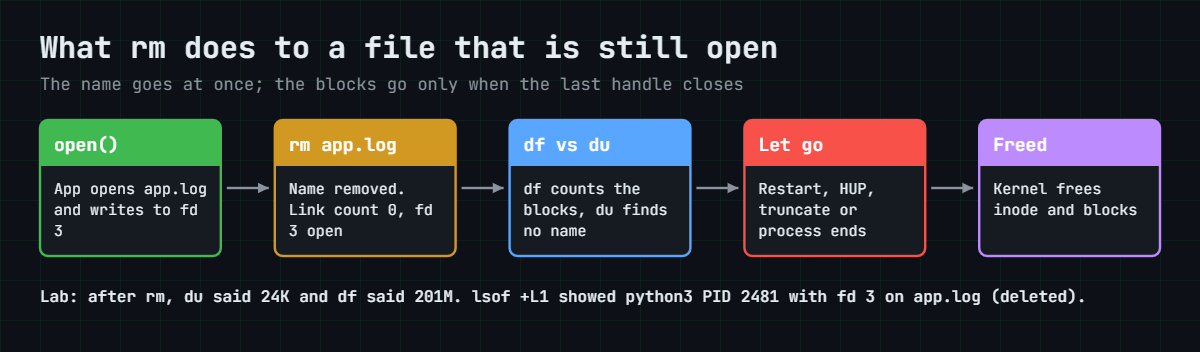
Here’s the life of a log file that gets deleted while its program is still writing to it. The diagram below follows the same five stages.
1A process opens the file
The app calls open() on app.log and gets back a file descriptor, a small number such as 3. From now on it writes to fd 3, not to the name. The inode has one name (link count 1) and one open handle.
2Someone removes the name
rm app.log removes the directory entry and the link count drops to 0. Because fd 3 is still open, the kernel keeps the inode and every block. The app has no idea anything happened and keeps writing, so the hidden file can even grow.
3du and df stop agreeing
du walks the folder, finds no app.log and doesn’t count it. df asks the file system, which still has those blocks marked as used. That’s the whole mismatch: one tool counts names, the other counts blocks.
4Find who holds it
sudo lsof +L1 shows the command, PID, file descriptor and size of every open file with no name left, and the NAME column ends in “(deleted)”. The same facts sit in /proc: every process has a folder /proc/PID/fd with one symbolic link per open file, and a deleted one points to its old path with ” (deleted)” added. That’s handy on a server without lsof.
5Make the process let go
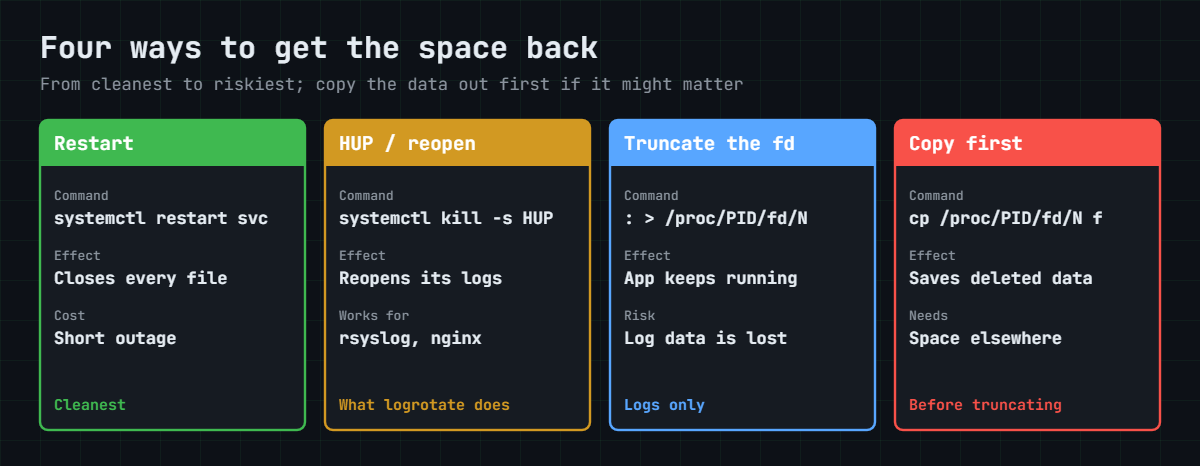
The space comes back when the last handle closes. Restarting the service closes every file it had. Many daemons reopen their log files on a signal instead, which is gentler: rsyslog on SIGHUP, Nginx with nginx -s reopen.
When neither is allowed, you can empty the deleted file through the handle with : > /proc/PID/fd/N, and the blocks are freed while the process keeps running. The picture below compares the four options.
6Stop it happening again
The real fix is to never rm a log that a program still writes to. To empty a live log, truncate it in place with : > app.log or truncate -s 0 app.log, which keeps the same inode, so the program writes into a file that still has a name. Better still, let logrotate rotate it with a postrotate signal (as in Lesson 29), or with copytruncate for programs that can’t reopen their logs.
Truncating only works cleanly when the program opened the file in append mode (O_APPEND), which almost every logger does. A program that writes at its own remembered offset carries on at, say, byte 200 million, and the file becomes sparse: ls shows the old size again while du shows almost nothing. Break-It 1 shows this, and it’s also the known weakness of copytruncate.
Keep the other causes in mind before you go hunting. A gap of about 5% on a new ext4 file system is the reserved blocks. du bigger than df means du wandered into another mount, so add -x. A big gap with nothing in lsof +L1 often means files were written into a folder before a volume was mounted on top of it, which you’ll find in Break-It 2.
Hands-on lab: hide 200 MiB in a deleted file and get it back
Before you run any command, double-check it
Read every command twice before you press Enter. Check the target: the server name, the user, the disk or device name, the path and the sizes. These commands are for learning and were tested in our lab, not on your system. At work, run the read-only commands first, follow your change process, make sure a backup exists, and ask a second person to check anything that changes or deletes data. You run them at your own risk.
You’ll do all the filling on a 512 MiB test file system kept in a file, /var/tmp/lab66.img, mounted through a loop device, so nothing in vg_data or on the root file system gets near full. Work on rocky01 as student, and take a snapshot first (VBoxManage snapshot rocky01 take before-l66 on the laptop). Outputs that came from running these steps for real were only adjusted for user, PID and device numbers; yours will differ in those.
1Build a test file system you can fill
Run this on rocky01:
mkdir -p ~/lab66
truncate -s 512M /var/tmp/lab66.img
mkfs.ext4 -q -L lab66 /var/tmp/lab66.img
sudo mkdir -p /mnt/lab66
sudo mount -o loop /var/tmp/lab66.img /mnt/lab66
sudo chown student:student /mnt/lab66
df -h /mnt/lab66You should see something like this:
Filesystem Size Used Avail Use% Mounted on
/dev/loop0 488M 24K 452M 1% /mnt/lab66truncate -s 512M makes an empty sparse file, mkfs.ext4 formats it, and -o loop tells mount to attach it to the first free loop device, /dev/loop0 here. Keep test images in /var/tmp. On Ubuntu 26.04 /tmp is a tmpfs in RAM, so a 512 MiB image there would eat half your VM’s memory.
✅ Checkpoint: df shows /dev/loop0 mounted on /mnt/lab66, about 488M in size.
2Start an app that keeps its log open
Create the program (paste this whole block):
cat > ~/lab66/writer66.py <<'EOF'
#!/usr/bin/env python3
# writer66.py: a small "app" that keeps its log file open, like a real service
import os, sys, time
path = sys.argv[1]
mode = sys.argv[2] if len(sys.argv) > 2 else "a"
log = open(path, mode)
line = "2026-10-27 11:05:00 INFO batch 0042 settled, filler " + "x" * 971 + "\n"
for i in range(200 * 1024):
log.write(line)
log.flush()
print(f"writer66: PID {os.getpid()} wrote 200 MiB to {path}", flush=True)
n = 0
while True:
n += 1
log.write(time.strftime("%Y-%m-%d %H:%M:%S") + f" INFO heartbeat {n}\n")
log.flush()
time.sleep(5)
EOF
python3 -m py_compile ~/lab66/writer66.py && echo syntax okStart it in the background:
mkdir -p /mnt/lab66/app
python3 ~/lab66/writer66.py /mnt/lab66/app/app.log &You should see something like this:
[1] 2481
writer66: PID 2481 wrote 200 MiB to /mnt/lab66/app/app.logThe program opens app.log in append mode, writes 200 MiB of log lines, and then adds a heartbeat line every five seconds, holding the file open the whole time, like a Java app or a database with a debug log switched on. Write down your PID; the rest of the lab uses 2481.
✅ Checkpoint: writer66 printed its PID and “wrote 200 MiB”.
3Check that du and df agree, and read df properly
Run this:
ls -lh /mnt/lab66/app/app.log
du -sh /mnt/lab66
df -h /mnt/lab66
sudo tune2fs -l $(findmnt -no SOURCE /mnt/lab66) | grep -E 'Block count|Reserved block count|Block size'You should see something like this:
-rw-r--r--. 1 student student 201M Oct 27 14:53 /mnt/lab66/app/app.log
201M /mnt/lab66
Filesystem Size Used Avail Use% Mounted on
/dev/loop0 488M 201M 252M 45% /mnt/lab66Block count: 131072
Reserved block count: 6553
Block size: 4096du and df both say 201M, so right now there’s no mystery. Look at df’s own numbers though: 488M minus 201M is 287M, yet Avail is 252M. The difference is the reserved blocks, 6553 blocks of 4 KiB, about 25.6 MiB (5%), which only root can use.
That gap is normal on every ext4 file system and isn’t a du/df problem.
Try it yourself: find the biggest folders on any file system in the Command Builder.
✅ Checkpoint: du and df both show about 201M, and you can explain why Avail is less than Size minus Used.
4Delete the log the wrong way
Run this:
rm /mnt/lab66/app/app.log
ls -l /mnt/lab66/app
du -sh /mnt/lab66
df -h /mnt/lab66You should see this:
total 0
24K /mnt/lab66
Filesystem Size Used Avail Use% Mounted on
/dev/loop0 488M 201M 252M 45% /mnt/lab66The folder is empty and du counts 24K, but df still shows 201M used. This is the ticket you’ll get at work: “I deleted the big log and the disk is still full.” The writer is still running and still writing heartbeats into a file nobody can see.
✅ Checkpoint: du says 24K and df still says 201M used.
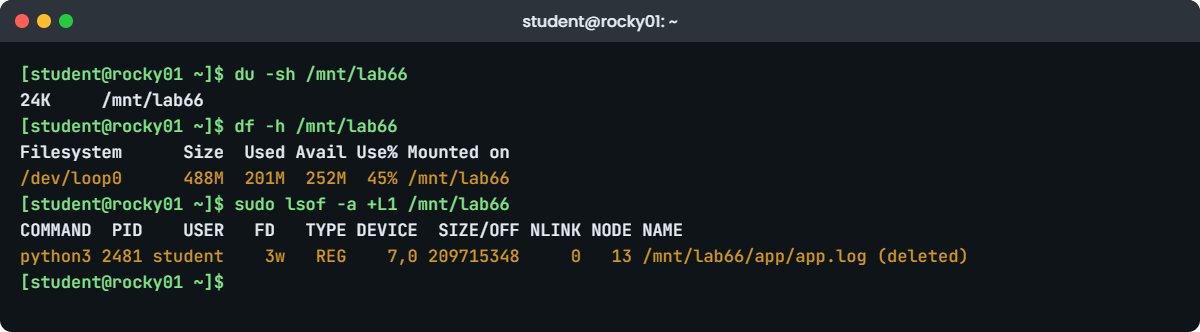
5Find the ghost with lsof +L1
Run this:
sudo lsof -a +L1 /mnt/lab66You should see something like this:
COMMAND PID USER FD TYPE DEVICE SIZE/OFF NLINK NODE NAME
python3 2481 student 3w REG 7,0 209715348 0 13 /mnt/lab66/app/app.log (deleted)+L1 selects open files with a link count below 1, -a means “and”, and the path limits it to this file system. NLINK 0 and “(deleted)” confirm it. FD 3w is file descriptor 3, open for writing, and SIZE/OFF is the hidden file’s size, 200 MiB plus a few heartbeat lines.
Run plain sudo lsof +L1 on a whole server; on rocky01 you may also see a few lines like /memfd:... (deleted), which are in-memory files used by systemd and others, not disk space.
Try it yourself: build the deleted-but-open files command in the Command Builder.
✅ Checkpoint: lsof shows python3 with PID 2481 (yours), FD 3w and NLINK 0.
6Look inside /proc and save a copy
Run this (use your PID):
ls -l /proc/2481/fd
tail -n 1 /proc/2481/fd/3
find /proc/[0-9]*/fd -lname '*(deleted)' -printf '%p -> %l\n' 2>/dev/null | grep lab66You should see something like this:
lrwx------. 1 student student 64 Oct 27 14:53 0 -> /dev/pts/0
lrwx------. 1 student student 64 Oct 27 14:53 1 -> /dev/pts/0
lrwx------. 1 student student 64 Oct 27 14:53 2 -> /dev/pts/0
l-wx------. 1 student student 64 Oct 27 14:53 3 -> /mnt/lab66/app/app.log (deleted)
2026-10-27 14:53:44 INFO heartbeat 4
/proc/2481/fd/3 -> /mnt/lab66/app/app.log (deleted)fd 0, 1 and 2 are the terminal, and fd 3 points to the deleted file. You can read it through that link as if it still had a name: tail printed the latest heartbeat. The find line is the “no lsof” way, the same command the Command Builder task gives you.
Because the data is still there, you can rescue it before you throw it away:
cp /proc/2481/fd/3 /var/tmp/app.log.saved
ls -lh /var/tmp/app.log.savedYou should see something like this:
-rw-r--r--. 1 student student 201M Oct 27 14:55 /var/tmp/app.log.savedCopy to a different file system, never to the one that’s full. The same trick saves an important file that someone deleted by mistake, as long as a process still has it open.
✅ Checkpoint: /var/tmp/app.log.saved is 201M and ends with a heartbeat line.
7Free the space without stopping the app
Pretend this app can’t be restarted until the weekend. Empty the deleted file through the open handle:
Run this:
: > /proc/2481/fd/3
df -h /mnt/lab66
sudo lsof -a +L1 /mnt/lab66
sleep 6; sudo lsof -a +L1 /mnt/lab66You should see something like this:
Filesystem Size Used Avail Use% Mounted on
/dev/loop0 488M 28K 452M 1% /mnt/lab66
COMMAND PID USER FD TYPE DEVICE SIZE/OFF NLINK NODE NAME
python3 2481 student 3w REG 7,0 0 0 13 /mnt/lab66/app/app.log (deleted)
COMMAND PID USER FD TYPE DEVICE SIZE/OFF NLINK NODE NAME
python3 2481 student 3w REG 7,0 37 0 13 /mnt/lab66/app/app.log (deleted): is the shell’s “do nothing” command, so : > /proc/2481/fd/3 opens the file for writing with truncation and closes it, which sets its size to 0. df dropped from 201M to 28K at once, and the app carried on: six seconds later the hidden file holds 37 bytes, one new heartbeat at the start. sudo truncate -s 0 /proc/2481/fd/3 does the same. You need sudo when the process belongs to another user.
Only truncate a file you are sure can be lost, such as a debug log, and only when the program writes in append mode. Truncating a database file, a queue file or anything the program reads back will corrupt it.
✅ Checkpoint: df shows 28K used while writer66 is still running.
8Get space back from a real service: rsyslog
Now the same mistake on a real daemon, with the local3 log from Lesson 29.
Run this on rocky01:
logger -p local3.info -t saatapp "order 1050 placed"
sudo ls -l /var/log/saatapp.log
sudo rm /var/log/saatapp.log
logger -p local3.info -t saatapp "order 1051 placed"
sudo lsof +L1 | grep saatappYou should see something like this:
-rw-------. 1 root root 1843 Oct 27 15:01 /var/log/saatapp.log
rsyslogd 1108 root 9w REG 253,0 1843 0 17305822 /var/log/saatapp.log (deleted)rsyslogd still has the deleted file open on fd 9 (DEVICE 253,0 is rl-root), and “order 1051” was written into that hidden file, where nobody will ever read it. Tell rsyslog to reopen its files with SIGHUP, which is what the postrotate line in your Lesson 29 logrotate file does:
sudo systemctl kill -s HUP rsyslog
logger -p local3.info -t saatapp "order 1052 placed"
sudo ls -l /var/log/saatapp.log
sudo tail -n 1 /var/log/saatapp.log
sudo lsof +L1 | grep -c saatappYou should see something like this:
-rw-r--r--. 1 root root 62 Oct 27 15:02 /var/log/saatapp.log
Oct 27 15:02:10 rocky01 saatapp[3120]: order 1052 placed
0rsyslog closed the deleted file (freeing its blocks) and created a new saatapp.log with the next message. The new file gets rsyslog’s own default permissions rather than the 0600 that logrotate used, so check them with ls -l if the log is sensitive. sudo systemctl restart rsyslog works too and is what most runbooks say; the HUP is lighter because rsyslog keeps running and its forwarding connection to ubu01 stays up. The message logged between the rm and the HUP is gone for good, which is one more reason to never rm a live log.
✅ Checkpoint: lsof +L1 no longer shows saatapp.log, and the new /var/log/saatapp.log contains order 1052.
9Stop the app and confirm nothing is held
Run this:
kill %1
sudo lsof -a +L1 /mnt/lab66
df -h /mnt/lab66You should see something like this:
[1]+ Terminated python3 ~/lab66/writer66.py /mnt/lab66/app/app.log
Filesystem Size Used Avail Use% Mounted on
/dev/loop0 488M 28K 452M 1% /mnt/lab66When a process ends, the kernel closes all its files, so stopping or restarting the holder is the cleanest fix of all. lsof printed nothing because no deleted file is open on /mnt/lab66 any more. Keep the test file system mounted for the Break-It section, and delete the saved copy with rm /var/tmp/app.log.saved.
✅ Checkpoint: lsof prints nothing for /mnt/lab66 and df shows it nearly empty.
Break It, Then Fix It
Both exercises use /mnt/lab66 from the lab, and the second one ends with the full cleanup. Neither touches lv_app, lv_logs or anything else later lessons need.
1Truncate a log the app doesn’t open in append mode
Start the writer again, this time in plain write mode, and empty its log the “safe” way:
python3 ~/lab66/writer66.py /mnt/lab66/app/app2.log w &
sleep 3
truncate -s 0 /mnt/lab66/app/app2.log
ls -lh /mnt/lab66/app/app2.log
sleep 6
ls -lh /mnt/lab66/app/app2.log
du -h /mnt/lab66/app/app2.log
df -h /mnt/lab66You’ll get this:
-rw-r--r--. 1 student student 0 Oct 27 15:10 /mnt/lab66/app/app2.log
-rw-r--r--. 1 student student 201M Oct 27 15:10 /mnt/lab66/app/app2.log
4.0K /mnt/lab66/app/app2.log
Filesystem Size Used Avail Use% Mounted on
/dev/loop0 488M 32K 452M 1% /mnt/lab66The file “grew back” to 201M within six seconds. Without append mode the program keeps its own write position, about 200 MiB into the file, and its next heartbeat lands there. Everything before it is a hole that takes no blocks, so du says 4.0K and df is fine, but ls, backup tools and anyone who opens the file in less see 200 MiB of zero bytes.
This is how a “truncated” log can make a backup job slow or a log shipper send garbage.
Fix: see both sizes, then restart the writer so it starts at offset 0.
du -h --apparent-size /mnt/lab66/app/app2.log
ls -ls /mnt/lab66/app/app2.log
kill %1; rm /mnt/lab66/app/app2.logYou should see something like this:
201M /mnt/lab66/app/app2.log
4 -rw-r--r--. 1 student student 209715274 Oct 27 15:10 /mnt/lab66/app/app2.log--apparent-size reports what ls reports; plain du reports blocks on disk, and the 4 at the start of ls -ls is the same 4 KiB. For a program like this the right fix is a restart (or a config change to append mode), not a truncate. logrotate’s copytruncate has the same weakness.
✅ Checkpoint: You can explain why ls says 201M and du says 4.0K for the same file.
2Files hidden under a mount point
Write a file into a folder, then mount something on top of that folder:
mkdir /mnt/lab66/archive
dd if=/dev/zero of=/mnt/lab66/archive/old-batch.dat bs=1M count=120 status=none
sudo mount -t tmpfs -o size=64M lab66cover /mnt/lab66/archive
du -sh /mnt/lab66
df -h /mnt/lab66
findmnt -R /mnt/lab66You’ll get this:
24K /mnt/lab66
Filesystem Size Used Avail Use% Mounted on
/dev/loop0 488M 121M 332M 27% /mnt/lab66
TARGET SOURCE FSTYPE OPTIONS
/mnt/lab66 /dev/loop0 ext4 rw,relatime,seclabel
└─/mnt/lab66/archive lab66cover tmpfs rw,relatime,seclabel,size=65536kdf says 121M used, du finds 24K, and lsof +L1 would show nothing, because no file is deleted. The 120 MiB file is still there, in the archive folder on the ext4 file system, but the tmpfs mounted on top covers it. On real servers this happens when a volume fails to mount at boot (or mounts late), an app writes into the empty mount point on the root file system, and the volume is mounted over it later.
Fix: bind-mount the parent somewhere else, where nothing is mounted on top, and look there.
sudo mkdir -p /mnt/lab66-raw
sudo mount --bind /mnt/lab66 /mnt/lab66-raw
du -sh /mnt/lab66-raw/archive
ls -lh /mnt/lab66-raw/archive
sudo umount /mnt/lab66-rawYou should see this:
121M /mnt/lab66-raw/archive
total 120M
-rw-r--r--. 1 student student 120M Oct 27 15:14 old-batch.datA bind mount shows one file system again at a second place, without the mounts that sit on top of it. For the root file system on a real server, the same check is sudo mount --bind / /mnt/rootview and then sudo du -xsh /mnt/rootview/srv/*. Move or delete what you find, then unmount the view.
Clean up everything from this lesson:
sudo umount /mnt/lab66/archive
sudo umount /mnt/lab66
sudo rmdir /mnt/lab66-raw /mnt/lab66
rm /var/tmp/lab66.img
losetup -a✅ Checkpoint: du of /mnt/lab66-raw/archive showed the hidden 121M, and after cleanup losetup -a prints nothing (mount -o loop frees the loop device on unmount).
This happened at work
The month-end batch and the 38 GB debug log
A colleague of mine, Ritu, was the on-call engineer at a pension fund administrator in Delhi when this happened. It was 11 p.m. on the last day of the month, with the pension credit batch running for about three lakh pensioners, and the batch server’s /var hit 100%. The bank file for the payouts had to be written to /var/batch/out before 2 a.m.
The junior on shift had already found the culprit, he thought: a 38 GB debug log from the payout engine, switched on during a test the week before. He deleted it with rm. df still said 100%. He then deleted three months of archived reports to make room, and df moved by 2 GB.
The batch failed at its next write with “No space left on device”.
Ritu ran du -xsh /var, which said 41 GB on a 80 GB file system, and then sudo lsof +L1. The payout engine’s JVM still had the deleted log open on fd 214, size 38 GB and growing. Restarting the engine mid-batch would have meant rerunning the whole credit file from the start, so she checked with the app team that the debug log was not needed, confirmed it was written in append mode, and ran sudo truncate -s 0 /proc/PID/fd/214. df dropped to 51% at once, and the batch was restarted from its last checkpoint at 12:40 a.m.
The next week the team switched debug logging off by default, moved the engine’s logs to their own logical volume, added a logrotate rule with a size limit, and put “never rm a log a process is writing; truncate it or rotate it” in the runbook. Their monitoring now runs lsof +L1 every 15 minutes and alerts when deleted-but-open files add up to more than 1 GB.
Common mistakes and troubleshooting
| Mistake | What happens | What to do instead |
|---|---|---|
| Deleting a live log with rm | The name goes, the space stays, and new log lines vanish into the hidden file | Truncate it in place with : > file or let logrotate rotate it |
| Deleting more files when df doesn’t drop | Real data is lost and the space still doesn’t come back | Run sudo lsof +L1 as soon as du and df disagree |
Using lsof | grep deleted on a busy server | It takes minutes and lists every thread, memfd and library | Use lsof +L1, or lsof -a +L1 /mountpoint |
| Truncating a file that isn’t a disposable log | Database or queue files are corrupted | Restart or stop the holder; truncate only logs you can lose |
| Truncating a log the program doesn’t append to | The file becomes sparse and ls shows the old size again | Restart the program, or fix it to open its log in append mode |
Running du without -x | du adds up other mounted file systems and disagrees the other way | Use du -xsh or du -xh --max-depth=1 |
| Treating the 5% ext4 reserve as missing space | Time wasted chasing a gap that is by design | Check tune2fs -l; lower it with tune2fs -m 1 only on data volumes |
Interview questions
Click a question to open it. Each one is written the way an interviewer would ask it. Under it you will see why they ask it and one way you could answer, in your own words.
Fresher level
1. df says /var is 100% full, but du -sh /var shows only 40%. What is the most likely reason and how do you check?
Why they ask this: The classic first question on disk space. They want to hear “deleted file still open” and the right command, not “reboot it”.
How you might answer: Most likely a large file was deleted while a process still has it open, so df still counts its blocks but du can’t see a name. I check with sudo lsof +L1, which lists open files with no links left and shows the command, PID, FD and size.
Then I restart or reload that service so it closes the file, and df drops straight away. If lsof shows nothing, I look for files hidden under a mount point and check the reserved blocks.
2. What is the difference between deleting a log with rm and emptying it with truncate?
Why they ask this: They’re checking that you understand inodes and open files, and that you know the safe habit.
How you might answer: rm removes the name; if a program has the file open, the inode and its blocks stay until the program closes it, and the program keeps writing into a file nobody can see. truncate -s 0 or : > file keeps the same inode and name and sets the size to zero.
So for a log that is being written, I truncate or let logrotate handle it. I only rm a log once nothing has it open, which I can check with lsof.
2–5 years experience
3. You find a Java app holding a 30 GB deleted log, and the business won’t allow a restart until midnight. What are your options?
Why they ask this: They want options with their risks, not one magic command.
How you might answer: First I confirm it’s a log, not data, and that the app writes it in append mode, by asking the app team and looking at the logging config. If the content might matter, I copy it out through /proc/PID/fd/N to another file system.
Then I free the space with sudo truncate -s 0 /proc/PID/fd/N. If it isn’t append mode, the file turns sparse but the space is still freed. I note it in the ticket and restart at midnight so the handle is closed properly, and I fix the log rotation so it doesn’t come back.
4. After someone truncated a log, ls -l shows it at 20 GB again a minute later, but df looks fine. What happened?
Why they ask this: This checks understanding of file offsets, sparse files and apparent size, which trips up many experienced admins.
How you might answer: The program didn’t open the file in append mode, so after the truncate it carried on writing at its old offset, about 20 GB in. The file is now sparse: du -h shows only the blocks in use, while du --apparent-size and ls show 20 GB.
Disk space is fine, but backups and log shippers may read gigabytes of zeros. The proper fix is restarting the program so it starts at offset 0, and switching it to append mode or rotating with a signal instead of copytruncate.
Senior level
5. du and df disagree on a server and lsof +L1 shows nothing. Walk me through the other causes you’d check.
Why they ask this: Seniors should know the less common causes and how to prove each one quickly.
How you might answer: I’d check whether files are hidden under a mount point: sudo mount --bind / /mnt/rootview and du -xsh on the folders that are mount points. Then the reserved blocks with tune2fs -l on ext4, and whether du was run with -x. On btrfs or ZFS I’d look at snapshots, which hold blocks that no current file owns.
I’d also check for processes in other mount namespaces, such as containers, which plain lsof on the host may still show but with paths that look different. Finally, a file system error can leave blocks marked used, which an fsck or xfs_repair in a maintenance slot would find.
6. How would you prevent deleted-but-open files from causing outages across a fleet?
Why they ask this: They want monitoring and standards, not only the fix.
How you might answer: I’d add a monitoring check that sums the size of lsof +L1 entries per file system and alerts above a threshold, alongside the usual df alerts. Every service gets a logrotate rule that either signals the service to reopen its logs or uses copytruncate where the app writes in append mode.
I’d also put application logs on their own volume so a runaway log can’t fill / or /var, and make “truncate, don’t rm, a live log” part of the runbook and onboarding, with this exact lab as the training.
Quick quiz
Q1. Why can df show a file system as full when du shows it nearly empty?
- du is slower than df
- A deleted file is still held open by a process, so its blocks are still in use
- df counts files twice
- du ignores files owned by root
Show answer
B — du counts files by name; df counts used blocks. A deleted but open file has blocks and no name.
Q2. Which command lists open files that have been deleted?
lsof -ilsof +L1df -idu -x
Show answer
B — +L1 selects open files whose link count is below 1.
Q3. A service can’t be restarted, but its deleted 20 GB debug log must go. What frees the space while it keeps running?
rm -f /proc/PID/fd/Nsudo truncate -s 0 /proc/PID/fd/Nsynckill -STOP PID
Show answer
B — Truncating through the open handle empties the hidden file. You cannot rm a /proc fd link.
Q4. What does sudo systemctl kill -s HUP rsyslog do here?
- Stops rsyslog for good
- Makes rsyslog close and reopen its log files, releasing a deleted one
- Deletes old logs
- Reloads systemd units
Show answer
B — rsyslog reopens its output files on SIGHUP, which is what logrotate’s postrotate uses.
Q5. On a fresh ext4 file system, Size minus Used is bigger than Avail. Why?
- A deleted file is open
- About 5% of blocks are reserved for root
- The disk is failing
- du was run without -x
Show answer
B — ext4 reserves 5% by default; tune2fs -l shows the reserved block count.
Quick recap
- A du df mismatch means du (names) and df (blocks) count different things.
- rm removes a name; the blocks are freed only when no name and no open handle is left.
- Find the holder with
sudo lsof +L1orls -l /proc/PID/fdand look for “(deleted)”. - Get the space back by restarting or reloading the holder (SIGHUP for rsyslog), or, as a last resort,
: > /proc/PID/fd/Nfor a log you can lose. - Truncate live logs instead of deleting them, and know that a non-append writer leaves a sparse file.
- Other gaps: files under a mount point (check through a bind mount), ext4 reserved blocks, du without
-x, snapshots.
Next lesson
Lesson 67: “No space left on device” with free space → You’ll fill a small file system with tiny files until it runs out of inodes while df -h still shows free space, and work through the other causes of that error: reserved blocks, quotas, a full tmpfs /tmp and more.
Further reading: du df mismatch
Want to go deeper into du df mismatch? Read the man7.org pages for du, df, unlink(2) and proc_pid_fd(5), and the lsof project page for the full option list. You can also see the full plan for this course on the Linux Administration course page.
