Ansible for Linux admins
-
Phase 0: Before you start
-
Phase 1: The origins and OS architecture
-
Phase 2: Day-to-day administration and the command builder
-
Phase 3: Enterprise infrastructure and storage
-
Phase 4: Troubleshooting step by step
-
Phase 5: Final project and career
Ansible for Linux admins means writing down the changes you make on servers as plain YAML files and letting one machine apply them over SSH to ten, a hundred or a thousand servers, the same way every time. There is nothing to install on the servers themselves: Ansible needs SSH, Python (which every Rocky and Ubuntu server already has) and an account with sudo.
So far in this course you’ve typed every command on every VM by hand. In this lesson ubu01 becomes the Ansible control node: you’ll install ansible-core from apt, build an inventory of rocky01 and kafka01, run ad-hoc commands across both, and write a playbook that creates an ops group and two users, installs packages, drops a sudo rule and a login message, and keeps chronyd running. Run it twice and the second run changes nothing, which is the whole point.
Where this lesson fits
Lesson 64 of 82 in Linux Administration · Phase 3: Enterprise infrastructure and storage · Before this: Lesson 63, consistent MariaDB backups · Next: Lesson 65, the Linux troubleshooting method
| Time | You need | By the end you can |
|---|---|---|
| About 75 minutes | ubu01 with the Lesson 33 SSH key, rocky01, and kafka01 from Lesson 58 (student with sudo on both, your key installed) | Install Ansible, build an inventory, run ad-hoc commands, write and dry-run an idempotent playbook, and fix the two errors every beginner meets |
What it is, in one line
Ansible logs in to your servers over SSH, compares each one with what your playbook says it should look like, and changes only what is different.
In Simple Words
The wedding caterer’s checklist
A caterer handling five weddings on the same night doesn’t phone each kitchen and describe the menu from memory. He writes one checklist: 400 plates, two kinds of sweets, the paneer dish, tea at 10 p.m. Each kitchen supervisor walks through the list and only acts on what is missing: if the sweets are already packed, he ticks the line and moves on.
If the caterer reads the list out again an hour later, nobody cooks a second batch. The checklist is the playbook, the list of kitchens is the inventory, and a supervisor ticking lines that are already done is what Ansible calls idempotence.
Engineer's View
The pieces of Ansible you’ll use every day
ansible-core is the engine: the ansible, ansible-playbook, ansible-doc and ansible-inventory commands plus the ansible.builtin collection of modules. The separate “ansible” package adds hundreds of community collections on top. On Ubuntu 26.04 the universe repository has ansible-core 2.20.1; PyPI’s current releases in October 2026 are 2.21.5, with 2.22 in release candidates.
| Piece | What it is | In this lesson |
|---|---|---|
| Control node | The machine you run Ansible from; needs Python 3.12 to 3.14 for ansible-core 2.20 | ubu01, Python 3.14 |
| Managed nodes | Servers Ansible configures; need SSH and Python 3.9 to 3.14, nothing else | rocky01 and kafka01, Python 3.12 from Rocky 10 |
| Inventory | The list of hosts and groups, with variables such as the SSH user | ~/ansible/inventory.ini, group rocky |
| Module | A small program for one job, copied to the host and run there; it returns JSON | ansible.builtin.user, group, dnf, copy, template, service |
| Ad-hoc command | One module on many hosts from the command line | ansible all -m ping |
| Playbook | A YAML file of plays; each play maps hosts to an ordered list of tasks | ~/ansible/baseline.yml |
| become | Run tasks with sudo; -K asks for the sudo password | become: true and -K |
Use the full module names (ansible.builtin.dnf rather than dnf) so a collection with a module of the same name can never take its place. For packages on mixed fleets there is ansible.builtin.package, and on Ubuntu you’d use ansible.builtin.apt. The modules need Python bindings on the host: the dnf module uses the python3-dnf libraries that come with Rocky’s own Python, which is one reason the inventory pins ansible_python_interpreter=/usr/bin/python3.
How it works, step by step
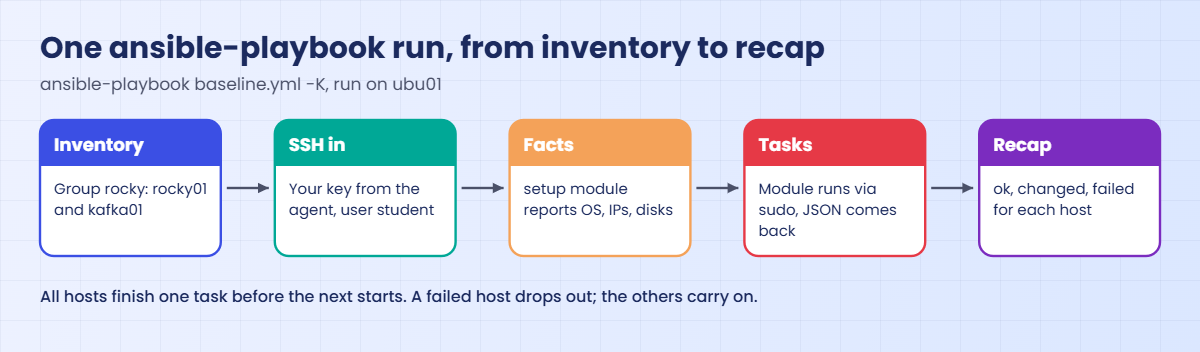
Follow one ansible-playbook run from ubu01. Every step happens over the same SSH you already use, with the same key.
1Read the inventory and pick the hosts
Ansible reads ansible.cfg in the current folder, finds inventory.ini, and expands the play’s hosts: rocky into rocky01 and kafka01, with their variables (address, SSH user, Python path). --limit rocky01 narrows that to one host, which is how you try a change on one server first.
2Connect and gather facts
Ansible opens SSH to each host in parallel (five at a time by default, the forks setting) and runs the setup module, which reports facts: OS, version, IP addresses, memory, mounted disks. Templates and conditions can use these, so the login message you’ll write prints each server’s own IP and OS version. The diagram below shows the whole run.
3Run each task on every host, in order
For each task, Ansible copies the module to the host, runs it with Python (through sudo when become: true), reads the JSON it returns and deletes it. All hosts finish a task before any host starts the next one. A host that fails a task drops out of the rest of the play, and the others carry on.
4Each module decides whether to change anything
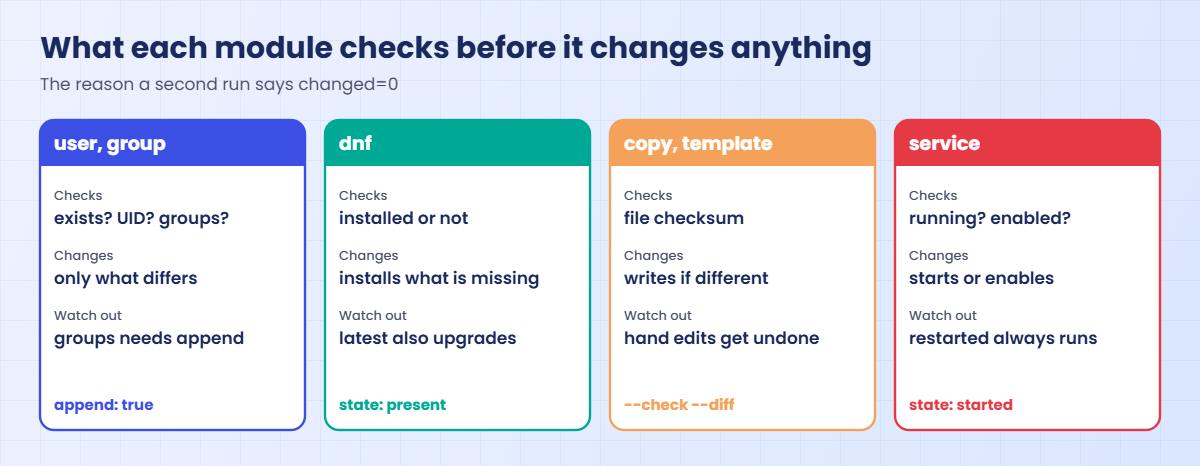
The user module reads /etc/passwd and /etc/group first; the dnf module asks the RPM database; copy and template compare checksums; service asks systemd. If the host already matches, the task reports “ok”. Only a real change reports “changed”, and that is what makes a second run safe.
5Idempotence is a property of each task
A playbook is only as safe to re-run as its worst task. Modules that describe a state (present, started, this content) are idempotent by design; command and shell run whatever you give them and report “changed” every time, so keep them for read-only checks or guard them with creates or changed_when.
The cards below show what the modules in today’s playbook check before they change anything, and the one setting in each that bites people.
6Dry runs, diffs and documentation
--check asks every module what it would change without changing it, and --diff shows the line-by-line change for files. Together they are the review step before a real run on production. A few modules can’t predict their result in check mode and say so; for the built-in ones you’ll use here, check mode is reliable.
ansible-doc is the offline manual: ansible-doc ansible.builtin.user lists every option with its default, and the EXAMPLES section at the end is usually the fastest way to write a new task. For building ad-hoc commands and short playbooks by filling in a form, try the Ansible tab of the Command Builder.
Hands-on lab: manage rocky01 and kafka01 from ubu01 with an idempotent playbook
Before you run any command, double-check it
Read every command twice before you press Enter. Check the target: the server name, the user, the disk or device name, the path and the sizes. These commands are for learning and were tested in our lab, not on your system. At work, run the read-only commands first, follow your change process, make sure a backup exists, and ask a second person to check anything that changes or deletes data. You run them at your own risk.
Everything runs on ubu01 as student, in the folder ~/ansible. Ansible changes rocky01 and kafka01, so take snapshots of both first (VBoxManage snapshot rocky01 take before-l64 and the same for kafka01). You’ll need student’s sudo password on rocky01 and kafka01 for the steps with -K.
1Install ansible-core on ubu01
Run this:
sudo apt update
sudo apt install -y --no-install-recommends ansible-core
ansible --versionYou should see something like this:
ansible [core 2.20.1]
config file = None
configured module search path = ['/home/student/.ansible/plugins/modules', '/usr/share/ansible/plugins/modules']
ansible python module location = /usr/lib/python3/dist-packages/ansible
ansible collection location = /home/student/.ansible/collections:/usr/share/ansible/collections
executable location = /usr/bin/ansible
python version = 3.14.3 (main, Feb 4 2026, 09:21:18) [GCC 15.2.0] (/usr/bin/python3)
jinja version = 3.1.6
pyyaml version = 6.0.3 (with libyaml v0.2.5)ansible-core comes from Ubuntu’s universe repository. Without --no-install-recommends, apt would also pull in the big “ansible” package with every community collection, which you don’t need for the builtin modules. “config file = None” is normal: you’ll create one in the next step.
Python 3.14 is within what ansible-core 2.20 supports on a control node.
✅ Checkpoint: ansible --version prints core 2.20.x and Python 3.14.
2Build the project folder and the inventory
Paste this whole block:
mkdir -p ~/ansible/templates && cd ~/ansible
cat > ansible.cfg <<'EOF'
# ~/ansible/ansible.cfg (SaatVedha Linux course, Lesson 64)
[defaults]
inventory = inventory.ini
EOF
cat > inventory.ini <<'EOF'
# ~/ansible/inventory.ini (SaatVedha Linux course, Lesson 64)
[rocky]
rocky01 ansible_host=10.10.10.11
kafka01 ansible_host=10.10.10.31
[rocky:vars]
ansible_user=student
ansible_python_interpreter=/usr/bin/python3
EOF
ansible-inventory --graph
ansible --version | head -n 2You should see this:
@all:
|--@ungrouped:
|--@rocky:
| |--rocky01
| |--kafka01
ansible [core 2.20.1]
config file = /home/student/ansible/ansible.cfgAnsible reads ansible.cfg from the folder you run it in, which keeps every project’s settings with the project; here it only says where the inventory is. The inventory puts both Rocky servers in a group called rocky, gives each its IP (so it works even when DNS is down), and sets two variables for the whole group: the SSH user and the Python on the hosts. Without ansible_python_interpreter, ansible-core 2.20 finds a Python by itself and prints a warning that a later Python install could change its choice.
✅ Checkpoint: ansible-inventory --graph shows rocky01 and kafka01 under @rocky, and the config file is ~/ansible/ansible.cfg.
3Load your key and ping both servers
Ansible uses your normal SSH key. Load it into the agent, accept kafka01’s host key once, then ping:
eval "$(ssh-agent -s)"; ssh-add
ssh -o StrictHostKeyChecking=accept-new student@10.10.10.31 hostname
ansible all -m pingYou should see something like this:
Agent pid 2215
Identity added: /home/student/.ssh/id_ed25519 (student@ubu01)
kafka01.saatlab.test
rocky01 | SUCCESS => {
"changed": false,
"ping": "pong"
}
kafka01 | SUCCESS => {
"changed": false,
"ping": "pong"
}The ping module isn’t ICMP ping: it logs in over SSH, runs a tiny Python module and returns “pong”, so SUCCESS proves SSH, the key, the user and Python all work. If kafka01 says “UNREACHABLE” with “Host key verification failed”, the ssh line before it didn’t run; if it says “Permission denied (publickey)”, your key isn’t in kafka01’s authorized_keys (Lesson 58 installed it).
✅ Checkpoint: Both hosts answer “pong”.
4Run ad-hoc commands across both servers
Run these one at a time:
ansible all -a "uptime"
ansible all -m ansible.builtin.shell -a "df -h / | tail -n 1"
ansible all -a "systemctl is-active chronyd"
ansible kafka01 -b -K -m ansible.builtin.user -a "name=tempcheck state=absent"You should see something like this:
rocky01 | CHANGED | rc=0 >>
16:42:10 up 5:12, 2 users, load average: 0.08, 0.05, 0.01
kafka01 | CHANGED | rc=0 >>
16:42:10 up 3:47, 1 user, load average: 0.41, 0.33, 0.30
rocky01 | CHANGED | rc=0 >>
/dev/mapper/rl-root 17G 3.4G 14G 20% /
kafka01 | CHANGED | rc=0 >>
/dev/mapper/rl-root 17G 2.6G 15G 16% /
rocky01 | CHANGED | rc=0 >>
active
kafka01 | CHANGED | rc=0 >>
active
BECOME password:
kafka01 | SUCCESS => {
"changed": false,
"name": "tempcheck",
"state": "absent"
}Without -m, Ansible uses the command module, which runs a program directly and doesn’t understand pipes; that’s why the df line needs the shell module. command and shell always say CHANGED, because Ansible can’t know what your command did. The last line is different: the user module checked that tempcheck doesn’t exist, found nothing to do and said SUCCESS with “changed”: false. -b (become) runs it with sudo and -K asks for the sudo password once for all hosts.
Find the modules you’ll use in the playbook, and read one manual page:
ansible-doc -l ansible.builtin | grep -E '\.(user|group|service|copy|template) '
ansible-doc ansible.builtin.useransible.builtin.copy Copy files to remote locations
ansible.builtin.group Add or remove groups
ansible.builtin.service Manage services
ansible.builtin.template Template a file out to a target host
ansible.builtin.user Manage user accountsIn the user page, search for append (type /append in the pager). It explains that groups without append: true replaces all of a user’s other groups, which matters in the next step. Press q to leave.
✅ Checkpoint: uptime, df and chronyd come back from both servers, and the user module reports “changed”: false for tempcheck.
5Write the playbook and its template
Still in ~/ansible, create the login message template and the playbook (paste the whole block):
cat > templates/motd.j2 <<'EOF'
{{ inventory_hostname }} ({{ ansible_facts['default_ipv4']['address'] }}) - SaatLab {{ ansible_facts['distribution'] }} {{ ansible_facts['distribution_version'] }}
Managed by Ansible from ubu01. Changes made by hand will be overwritten.
Ops contact: the saatops group
EOF
cat > baseline.yml <<'EOF'
---
# ~/ansible/baseline.yml (SaatVedha Linux course, Lesson 64)
- name: Baseline for the SaatLab Rocky servers
hosts: rocky
become: true
vars:
ops_group: saatops
ops_gid: 3001
ops_users:
- { name: kiran, uid: 3101 }
- { name: divya, uid: 3102 }
base_packages:
- chrony
- tmux
- tree
tasks:
- name: Ops group exists
ansible.builtin.group:
name: "{{ ops_group }}"
gid: "{{ ops_gid }}"
state: present
- name: Ops users exist and belong to the ops group
ansible.builtin.user:
name: "{{ item.name }}"
uid: "{{ item.uid }}"
groups: "{{ ops_group }}"
append: true
shell: /bin/bash
state: present
loop: "{{ ops_users }}"
- name: Ops group may run read-only checks with sudo
ansible.builtin.copy:
dest: /etc/sudoers.d/saatops
content: |
# Managed by Ansible (Lesson 64). Changes made by hand will be overwritten.
%saatops ALL=(root) /usr/bin/systemctl status *, /usr/bin/journalctl *
owner: root
group: root
mode: "0440"
validate: /usr/sbin/visudo -cf %s
- name: Base packages are installed
ansible.builtin.dnf:
name: "{{ base_packages }}"
state: present
- name: Login message says who manages this server
ansible.builtin.template:
src: templates/motd.j2
dest: /etc/motd
owner: root
group: root
mode: "0644"
- name: Time sync runs now and after every boot
ansible.builtin.service:
name: chronyd
state: started
enabled: true
EOF
ansible-playbook --syntax-check baseline.ymlYou should see this:
playbook: baseline.ymlRead the playbook from the top. One play targets the rocky group with become: true. The vars section keeps the data (group name and GID, users with fixed UIDs so files keep their owners across servers, the package list) apart from the tasks, so next month you add a user by adding one line.
The sudoers task uses validate: /usr/sbin/visudo -cf %s, so Ansible checks the new file with visudo before it puts it in place and a typo can never lock you out of sudo (Lesson 16).
The template uses facts gathered from each host: ansible_facts['default_ipv4']['address'] and the distribution name and version. Every task has a name that says what the server should look like, not what to do, because that’s what you’ll read in the output.
✅ Checkpoint: --syntax-check prints “playbook: baseline.yml” with no error.
6Run the playbook
Run it with -K and type student’s sudo password once:
ansible-playbook baseline.yml -KYou should see something like this:
BECOME password:
PLAY [Baseline for the SaatLab Rocky servers] **********************************
TASK [Gathering Facts] *********************************************************
ok: [kafka01]
ok: [rocky01]
TASK [Ops group exists] ********************************************************
changed: [rocky01]
changed: [kafka01]
TASK [Ops users exist and belong to the ops group] *****************************
changed: [rocky01] => (item={'name': 'kiran', 'uid': 3101})
changed: [kafka01] => (item={'name': 'kiran', 'uid': 3101})
changed: [rocky01] => (item={'name': 'divya', 'uid': 3102})
changed: [kafka01] => (item={'name': 'divya', 'uid': 3102})
TASK [Ops group may run read-only checks with sudo] ****************************
changed: [rocky01]
changed: [kafka01]
TASK [Base packages are installed] *********************************************
changed: [kafka01]
changed: [rocky01]
TASK [Login message says who manages this server] ******************************
changed: [rocky01]
changed: [kafka01]
TASK [Time sync runs now and after every boot] *********************************
ok: [rocky01]
ok: [kafka01]
PLAY RECAP *********************************************************************
kafka01 : ok=7 changed=5 unreachable=0 failed=0 skipped=0 rescued=0 ignored=0
rocky01 : ok=7 changed=5 unreachable=0 failed=0 skipped=0 rescued=0 ignored=0 Five tasks changed something on each host: the group, both users (one line per loop item), the sudoers file, the packages (tmux and tree were missing; chrony was already there) and the login message. chronyd was already running and enabled, so that task says ok. The recap is the line to read: changed=5 and failed=0 on both. Check one result by hand: ansible all -a "id kiran" should show groups=3101(kiran),3001(saatops) on both servers.
✅ Checkpoint: PLAY RECAP shows failed=0 and unreachable=0 for rocky01 and kafka01.
7Run it again and get changed=0
Run the same command again:
ansible-playbook baseline.yml -KYou should see something like this (the end of the output):
PLAY RECAP *********************************************************************
kafka01 : ok=7 changed=0 unreachable=0 failed=0 skipped=0 rescued=0 ignored=0
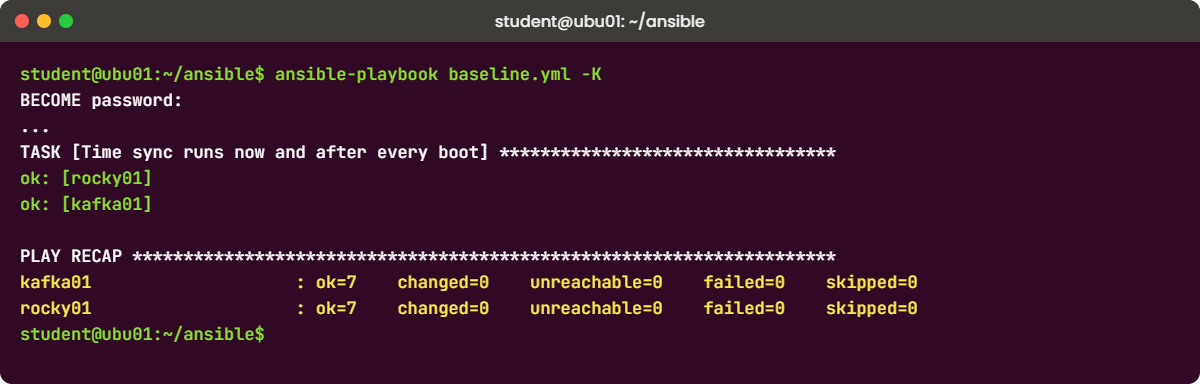
rocky01 : ok=7 changed=0 unreachable=0 failed=0 skipped=0 rescued=0 ignored=0 Same playbook, same servers, nothing to do: every task found its target state already in place. This is what lets you run the same playbook every night against every server, or after any manual change, as a check that nothing has drifted. A task that shows “changed” on every run is a bug to fix, usually a command or shell task that needs changed_when or a better module.
✅ Checkpoint: The second run shows changed=0 for both hosts.
8Preview a change with --check --diff, then apply it
Change one line of the template, and ask Ansible what would happen on rocky01 only:
sed -i 's/Ops contact: the saatops group/Ops contact: saatops group, extension 4417/' templates/motd.j2
ansible-playbook baseline.yml -K --check --diff --limit rocky01You should see something like this (the end of the output):
TASK [Login message says who manages this server] ******************************
--- before: /etc/motd
+++ after: /home/student/.ansible/tmp/ansible-local-4127x8m2qv1d/tmpk3l9w0zj/motd.j2
@@ -1,3 +1,3 @@
rocky01 (10.10.10.11) - SaatLab Rocky 10.2
Managed by Ansible from ubu01. Changes made by hand will be overwritten.
-Ops contact: the saatops group
+Ops contact: saatops group, extension 4417
changed: [rocky01]
TASK [Time sync runs now and after every boot] *********************************
ok: [rocky01]
PLAY RECAP *********************************************************************
rocky01 : ok=7 changed=1 unreachable=0 failed=0 skipped=0 rescued=0 ignored=0 The diff shows the one line that would change in /etc/motd on rocky01, and the recap says changed=1, but nothing has been written: ssh rocky01 cat /etc/motd still shows the old line. This is how you review a change before it touches production, and --limit is how you try it on one server before all of them. Now apply it to both:
ansible-playbook baseline.yml -K
ssh rocky01 cat /etc/motdrocky01 (10.10.10.11) - SaatLab Rocky 10.2
Managed by Ansible from ubu01. Changes made by hand will be overwritten.
Ops contact: saatops group, extension 4417✅ Checkpoint: The check run showed a diff without changing the file, the real run reported changed=1 per host, and /etc/motd on rocky01 has the new line.
Break It, Then Fix It
Neither failure below needs a snapshot, because Ansible stops before it changes anything. Both are the first two errors almost everyone meets in their first week with Ansible.
1Forget the sudo password
Run the playbook without -K:
ansible-playbook baseline.ymlYou’ll get this error:
PLAY [Baseline for the SaatLab Rocky servers] **********************************
TASK [Gathering Facts] *********************************************************
[ERROR]: Task failed: Missing sudo password
fatal: [rocky01]: FAILED! => {"changed": false, "msg": "Task failed: Missing sudo password"}
[ERROR]: Task failed: Missing sudo password
fatal: [kafka01]: FAILED! => {"changed": false, "msg": "Task failed: Missing sudo password"}
PLAY RECAP *********************************************************************
kafka01 : ok=0 changed=0 unreachable=0 failed=1 skipped=0 rescued=0 ignored=0
rocky01 : ok=0 changed=0 unreachable=0 failed=1 skipped=0 rescued=0 ignored=0 The play says become: true, so even fact gathering runs through sudo. On rocky01 and kafka01, student’s sudo rule needs a password, Ansible had none to give, sudo answered “a password is required”, and Ansible reported “Missing sudo password” on every host. A wrong password gives “Incorrect sudo password” instead.
Fix: give the password with -K for interactive runs.
ansible-playbook baseline.yml -KFor runs nobody types into (a CI pipeline, a nightly job), don’t put the password in a file in plain text. Use a dedicated automation account with a sudo rule that doesn’t ask for a password, as bkpsvc got in Lesson 62, or keep the password in an encrypted file with ansible-vault.
✅ Checkpoint: With -K the playbook runs again and the recap shows changed=0, failed=0.
2Break the YAML indentation
Add one space in front of gid, the kind of slip an editor makes when you paste:
sed -i 's/^ gid: "{{ ops_gid }}"/ gid: "{{ ops_gid }}"/' baseline.yml
ansible-playbook --syntax-check baseline.ymlYou’ll get this error:
[ERROR]: YAML parsing failed: While parsing a block mapping did not find expected key.
Origin: /home/student/ansible/baseline.yml:21:10
19 ansible.builtin.group:
20 name: "{{ ops_group }}"
21 gid: "{{ ops_gid }}"
^ column 10In YAML, indentation is the structure: name, gid and state must start in the same column to belong to the same module. One extra space makes gid look like the start of something new inside name’s value, and the parser gives up. ansible-core 2.20 prints the file, line and column with the lines around it, so read the caret, not only the message. Tabs cause the same kind of error, because YAML doesn’t allow them for indentation.
Fix: remove the space and check again.
sed -i 's/^ gid: "{{ ops_gid }}"/ gid: "{{ ops_gid }}"/' baseline.yml
ansible-playbook --syntax-check baseline.ymlplaybook: baseline.ymlSet your editor to insert spaces instead of tabs for YAML (in vim: :set expandtab shiftwidth=2), and run --syntax-check before every commit. Teams usually add ansible-lint to catch style problems too.
✅ Checkpoint: --syntax-check prints “playbook: baseline.yml” again.
This happened at work
The playbook that took everyone’s sudo away
My team lead tells this one from her time at a temple trust in Vadodara, whose donation portal ran on fourteen Linux servers. Two days before Navratri, the busiest donation week of the year, a new volunteer admin needed an account everywhere, and an engineer wrote a quick playbook to add her to a new group called donations-ops. He tested it on a single server, saw “changed” and ran it on all fourteen.
Ten minutes later nobody on the team could use sudo on any server. The user task had groups: donations-ops but no append: true, so Ansible did what it was told: it made donations-ops the only supplementary group of every user in the loop, and the loop held the whole admin list, which removed everyone from wheel. His test server hadn’t shown it because he’d logged in there as root.
Logging in still worked, so the team first suspected sudoers and spent half an hour reading /etc/sudoers.d. id showed the real cause in one line. They got root through the hosting provider’s serial console on each server, put wheel back with usermod -aG wheel, and had the portal’s admin side working again by late evening.
The rules that came out of it were short: every user task sets append: true unless the play exists to set an exact group list, every change runs first with --check --diff and the diff goes into the ticket, the first real run uses --limit on one server, and a break-glass root password for each server sits sealed in the trust’s safe.
Common mistakes and troubleshooting
| Mistake | What happens | What to do instead |
|---|---|---|
groups: in the user module without append: true | Every other supplementary group, including wheel, is removed | Set append: true, and review with --check --diff |
Using shell for things a module can do | “changed” on every run, no check mode, no idempotence | Use user, dnf, copy, template, service; keep shell for read-only checks |
| Running a new playbook on every server at once | A mistake reaches the whole fleet in one run | --check --diff first, then --limit one host, then the rest |
| Tabs or mixed indentation in YAML | “YAML parsing failed” with a line and column | --syntax-check and an editor that inserts spaces |
| Putting the sudo password in the inventory in plain text | Anyone who can read the repo has root on every server | -K for people, a NOPASSWD automation account or ansible-vault for jobs |
Short module names like dnf instead of ansible.builtin.dnf | A collection with the same module name can be picked instead | Use full names in playbooks |
| Fixing a server by hand after Ansible manages it | The next run puts the old setting back, or the fix is lost | Change the playbook and run it |
Interview questions
Click a question to open it. Each one is written the way an interviewer would ask it. Under it you will see why they ask it and one way you could answer, in your own words.
Fresher level
1. What do you need on a Linux server before Ansible can manage it?
Why they ask this: A basic check that you know Ansible is agentless and what it relies on.
How you might answer: Nothing Ansible-specific. The server needs SSH that the control node can reach, an account with a key the control node can use, sudo rights for tasks that need root, and Python 3, which Rocky and Ubuntu already have.
On the control node I install ansible-core, write an inventory with the host and its SSH user, and test with ansible host -m ping.
2. What is idempotence in Ansible, and how do you show it?
Why they ask this: They want the definition and proof, not only the word.
How you might answer: It means running the same playbook again changes nothing if the server already matches it. Modules like user, dnf and template check the current state first and only change what differs.
I show it by running the playbook twice: the first run reports changes, the second reports changed=0 for every host. If a task says changed every time, it’s usually a command or shell task that needs changed_when or a proper module.
2–5 years experience
3. You need to add a user to a group on 200 servers without breaking anything. Walk me through it.
Why they ask this: They’re checking safe rollout habits and knowledge of the append trap.
How you might answer: I’d write a user task with groups set to the new group and append: true, because without append the module removes every other group, including wheel or sudo. Then I’d run it with --check --diff against the group and read what would change.
Next a real run with --limit on one or two servers, a check with id that the user and the admin accounts still have their groups, and then the rest, maybe in batches with serial if the change is risky. The playbook goes into Git so the change is reviewed and repeatable.
4. An ad-hoc command works but your playbook fails with “Missing sudo password”. Why, and how do you fix it properly?
Why they ask this: They want to see you understand become and how credentials are handled.
How you might answer: The playbook has become: true, so even fact gathering runs through sudo, and my account needs a password for sudo on those servers. My ad-hoc command didn’t use -b, so it never needed one. Interactively, I add -K and type the password once.
For scheduled or CI runs I wouldn’t store the password in plain text. I’d use a dedicated automation account with a narrow NOPASSWD sudo rule, or keep the become password in ansible-vault.
Senior level
5. How would you structure Ansible for a team managing a few hundred Rocky and Ubuntu servers?
Why they ask this: Seniors should talk about repo layout, roles, inventory design, testing and access control.
How you might answer: One Git repository with an inventory per environment, grouped by role and location, and group_vars and host_vars for the data. Reusable work goes into roles (users, hardening, monitoring agent, backup client) with their own defaults, and short playbooks combine roles for each server type.
Changes go through pull requests with ansible-lint and a syntax check in CI, then --check --diff against staging, then production in batches with serial. Runs happen from a controlled place, such as AWX or a CI runner, with vaulted secrets and a dedicated automation account, so who changed what is logged.
6. When would you not use Ansible to make a change on a server?
Why they ask this: They want judgement: the limits of configuration management and the risks of automation.
How you might answer: When the change is a one-off emergency on a single server and writing a play would take longer than the outage allows, I fix it by hand and then put it into the playbook afterwards so the next run doesn’t undo it. And for things another system owns, like Kubernetes objects or database schema migrations, I use that system’s tool.
I’d also be careful with tasks that can lock everyone out, sudoers, SSH config, firewall and network changes, and only run them with validate, --check --diff, a limited first host and console access ready.
Quick quiz
Q1. What does ansible all -m ping test?
- ICMP reachability
- SSH login, the user, and Python on each host
- Only DNS
- That the sudo password is correct
Show answer
B — The ping module logs in over SSH and runs a small Python module that answers “pong”.
Q2. A playbook’s second run shows changed=0 on every host. What does that tell you?
- Nothing ran
- The hosts already matched the playbook, so no task had to change anything
- Ansible could not connect
- Check mode was on
Show answer
B — That is idempotence: every module found the target state already in place.
Q3. What happens if a user task sets groups: saatops without append: true?
- The user is added to saatops and keeps other groups
- The user’s supplementary groups become only saatops
- The task fails
- Nothing changes
Show answer
B — Without append, the list replaces all supplementary groups, which can remove wheel or sudo.
Q4. Which options show what a playbook would change in files without changing them?
--syntax-check--check --diff-K--limit
Show answer
B — Check mode predicts changes and diff prints line-by-line differences for files.
Q5. The playbook fails at Gathering Facts with “Missing sudo password”. What is the usual fix?
- Remove become from the play
- Run with
-K - Reinstall ansible-core
- Use the shell module
Show answer
B — become runs every task through sudo; -K asks for the sudo password once.
Quick recap
- Ansible is agentless: a control node with ansible-core manages servers over SSH, using the Python they already have.
- The inventory lists hosts and groups with variables; ansible.cfg in the project folder points to it.
- Ad-hoc commands run one module on many hosts; command and shell always report changed, real modules check first.
- A playbook maps hosts to tasks; use full module names, vars for data, validate for sudoers, and
append: truefor groups. - A second run with changed=0 proves idempotence;
--check --diffand--limitare your review and rollout steps. - become needs
-Kwhen sudo asks for a password, and YAML indentation errors come with a line and column.
Next lesson
Lesson 65: The Linux troubleshooting method → Phase 4 starts here: you’ll learn a step-by-step way to find what changed and which layer is broken, using journalctl -b -1, last and the package history, before you touch anything.
Further reading: Ansible for Linux admins
Want to go deeper into Ansible for Linux admins? Start with the Getting started with Ansible guide, then building an inventory, ad-hoc commands, check mode and diff, and the module pages for ansible.builtin.user and ansible.builtin.dnf. You can also see the full plan for this course on the Linux Administration course page.
