Access Control Lists: setfacl, getfacl, default ACLs and the mask
-
Phase 0: Before you start
-
Phase 1: The origins and OS architecture
-
Phase 2: Day-to-day administration and the command builder
-
Phase 3: Enterprise infrastructure and storage
-
Phase 4: Troubleshooting step by step
-
Phase 5: Final project and career
A Linux ACL (Access Control List) lets you give rights on a file or folder to a particular user or group, on top of the single owner and single group you learned in Lesson 17. When the answer to “who needs access?” doesn’t fit into owner, one group and everyone else, an ACL is how you say it without creating yet another group.
In this lesson you’ll give arjun read-only access to /srv/projects/reports while the rest of webteam keeps full rights, make the rule apply to files that don’t exist yet, and meet the ACL mask, the part that quietly takes rights away when someone runs chmod.
Where this lesson fits
Lesson 19 of 82 in Linux Administration · Phase 1: The origins and OS architecture · Before this: Lesson 18, special permissions · Next: Lesson 20, processes and signals
| Time | You need | By the end you can |
|---|---|---|
| About 55 minutes | rocky01 with priya, arjun, webteam and /srv/projects (mode 2770) from Lessons 15, 17 and 18. ubu01 works the same way. | Read getfacl output, grant and remove ACL entries, set default ACLs, explain the mask and back up ACLs |
What it is, in one line
A Linux ACL is a list of extra “this user or this group gets these rights” entries attached to a file or folder, checked by the kernel along with the normal owner, group and other bits.
In Simple Words
The guest list at the society gate
In most housing societies the watchman lets residents in and keeps outsiders out. That rule is simple and covers almost everyone.
Then your cousin comes to stay for a month. You don’t make him a resident, you add his name to the register at the gate with a note: “may enter, may not park”. The watchman checks the register before the usual rules, and the note decides what your cousin can do.
An ACL is that register, kept next to each file.
Engineer's View
POSIX ACLs on Linux
The kernel stores the ACL as an extended attribute (system.posix_acl_access, and system.posix_acl_default for folders). XFS on Rocky and ext4 on Ubuntu support ACLs out of the box, with no mount option needed. The tools are getfacl and setfacl from the acl package.
| Entry in getfacl | Meaning |
|---|---|
user::rw- | The owner (same as the owner bits) |
user:arjun:r-- | A named user: extra rights for arjun |
group::rw- | The owning group (webteam here) |
group:auditors:r-- | A named group |
mask::rw- | The most any named user, named group or the owning group can get |
other::--- | Everyone else (same as the other bits) |
default:user:arjun:r-x | On a folder only: copied to new files and folders created inside it |
The kernel checks entries in a fixed order and stops at the first one that matches: owner, then named users, then all the group entries (the owning group and named groups, where any match that grants the rights is enough), then other. A named user entry wins even if that user is also in a group with more rights, which is what makes “read-only for arjun” possible inside a group-writable folder.
Once a file has an ACL, the group digit of the mode is the mask. ls -l shows the mask in the group position and adds a + after the mode, and chmod g=... changes the mask instead of the owning group’s entry.
| Task | Command |
|---|---|
| Add or change an entry | setfacl -m u:arjun:rX dir |
| Add a default entry for new files | setfacl -d -m u:arjun:rX dir |
| Remove one entry | setfacl -x u:arjun file |
| Remove all default entries | setfacl -k dir |
| Remove the whole ACL | setfacl -b file |
| Save and restore a tree | getfacl -R dir > acl.txt and setfacl --restore=acl.txt |
How it works, step by step
Here is what happens when arjun tries to append to /srv/projects/reports/oct-sales.txt after you’ve given him read-only access. The kernel reads the ACL and walks down it until something matches, as the diagram below shows.
1Is arjun the owner?
The owner is priya, so the user:: entry doesn’t apply. If he were the owner, the owner entry alone would decide and the rest would be skipped.
2Is there a named entry for arjun?
Yes, user:arjun:r--. The kernel uses it and doesn’t look at the group entries at all, so his membership of webteam (which has rw-) makes no difference. r is allowed, w isn’t, so the append fails with “Permission denied”.
3The mask caps the middle entries
Before a named user, a named group or the owning group entry is used, it’s ANDed with the mask. With mask::rw- nothing is lost. With mask::r--, even an entry that says rw- only gives r--, and getfacl prints #effective:r-- next to it to warn you.
4chmod moves the mask
On a file with an ACL, chmod 640 sets the mask to r--, not the owning group. That’s the source of the classic puzzle: getfacl shows an entry that should work and the user is still refused. setfacl recalculates the mask to cover all entries every time you add one, unless you use -n.
5Default ACLs shape new files
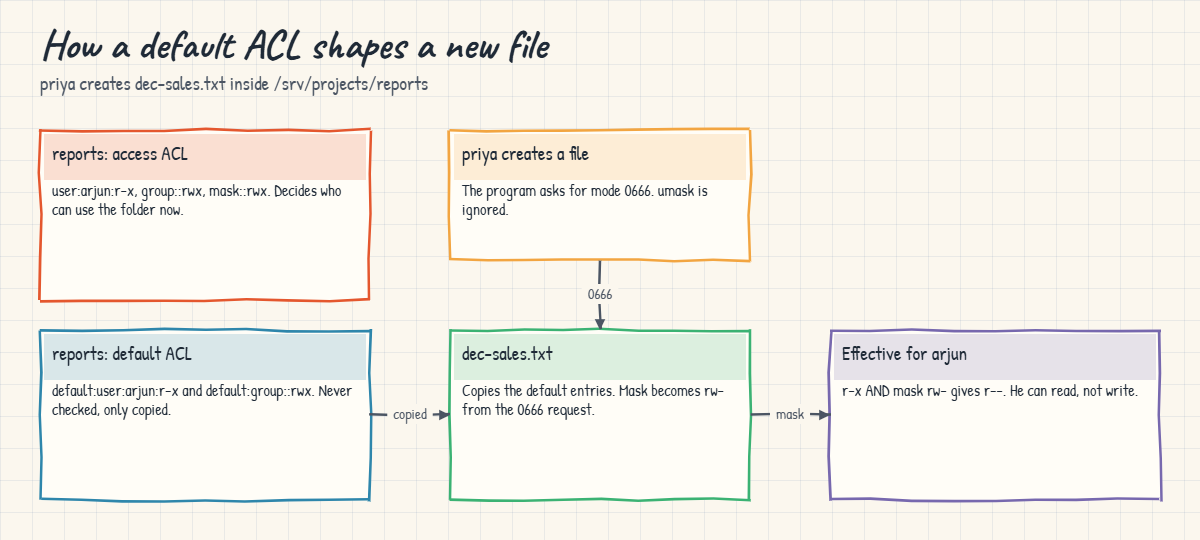
An ACL on a folder controls who can use the folder. A default ACL on the same folder isn’t checked for access at all; the kernel copies it onto each new file and subfolder at the moment they’re created. When a folder has a default ACL, the creator’s umask is ignored and the mode the program asked for (usually 0666 for files) sets the new file’s mask.
The picture below follows a new file, dec-sales.txt, from the folder’s default ACL to arjun’s effective rights. Note that it only applies to files created inside the folder: a file moved in from elsewhere on the same file system keeps whatever ACL it had.
So when should you reach for an ACL? Groups are easier to read and audit, so they stay the first choice when a set of people need the same rights. ACLs earn their place for exceptions: one extra user, one read-only team, an auditor group that needs to read one tree for a month, or a service account that needs access to another team’s folder.
ACLs travel only if the tool knows about them. cp -a and rsync -aA keep them, plain cp doesn’t, and with tar you need --acls on both create and extract. NFS shares need care too: NFSv4 has its own ACL format, so test what a share keeps before you rely on it.
ACLs are not the same as SELinux. ACLs extend the normal permissions; SELinux is a second, separate check that can still deny access after the ACL allows it. Lesson 41 covers SELinux.
Hands-on lab: read-only reports for arjun
Before you run any command, double-check it
Read every command twice before you press Enter. Check the target: the server name, the user, the disk or device name, the path and the sizes. These commands are for learning and were tested in our lab, not on your system. At work, run the read-only commands first, follow your change process, make sure a backup exists, and ask a second person to check anything that changes or deletes data. You run them at your own risk.
The plan: webteam keeps editing the monthly sales reports, and arjun, who joined from the web side, may read them but not change the numbers. You’ll do it with an ACL and leave /srv/projects/reports in place for later lessons. Take a snapshot of rocky01 first.
As before, sudo -iu priya opens a shell as priya and exit comes back. If getfacl isn’t found, install the acl package: sudo dnf install acl on Rocky or sudo apt install acl on Ubuntu.
1Check the tools and the starting point
Run this:
getfacl --version
ls -ld /srv/projectsYou should see something like this:
getfacl 2.3.2drwxrws---. 3 root webteam 89 Oct 27 11:40 /srv/projectsThe dot after the mode means “SELinux label, no ACL”. When a file gets an ACL, that dot becomes a +.
✅ Checkpoint: getfacl prints a version and /srv/projects is drwxrws--- root webteam.
2priya creates the reports folder
Run this:
sudo -iu priya
mkdir /srv/projects/reports
chmod 2770 /srv/projects/reports
echo "Oct sales: 1,240 orders" > /srv/projects/reports/oct-sales.txt
chmod 660 /srv/projects/reports/oct-sales.txt
ls -ld /srv/projects/reports
ls -l /srv/projects/reports
exitYou should see something like this:
drwxrws---. 2 priya webteam 27 Oct 27 11:42 /srv/projects/reports
total 4
-rw-rw----. 1 priya webteam 24 Oct 27 11:42 oct-sales.txtThe folder and the file got group webteam from the SGID bit you set in Lesson 18, and the modes give the whole team read and write.
✅ Checkpoint: reports is drwxrws--- and oct-sales.txt is -rw-rw----, both with group webteam.
3See the problem: arjun can change the numbers
Run this:
sudo -iu arjun
echo "arjun: checked" >> /srv/projects/reports/oct-sales.txt
cat /srv/projects/reports/oct-sales.txt
exitYou should see this:
Oct sales: 1,240 orders
arjun: checkedarjun is in webteam, so the group bits let him write. Taking him out of the group would also take away his access to the rest of /srv/projects, which he still needs, and making a new group for “everyone except arjun” doesn’t scale.
✅ Checkpoint: arjun’s line was added to oct-sales.txt.
4Read the ACL before you change it
Run this:
getfacl /srv/projects/reportsYou should see this:
getfacl: Removing leading '/' from absolute path names
# file: srv/projects/reports
# owner: priya
# group: webteam
# flags: -s-
user::rwx
group::rwx
other::---
Without extra entries, getfacl shows the normal mode in ACL form. The flags line -s- is the SGID bit. The first line is only a notice that the paths in the output are relative, which is what lets you restore them somewhere else later.
✅ Checkpoint: You can match each getfacl line to a part of drwxrws---.
5Give arjun read-only access
Run this:
sudo setfacl -R -m u:arjun:rX /srv/projects/reports
getfacl -R /srv/projects/reports
ls -ld /srv/projects/reports
ls -l /srv/projects/reportsYou should see something like this:
getfacl: Removing leading '/' from absolute path names
# file: srv/projects/reports
# owner: priya
# group: webteam
# flags: -s-
user::rwx
user:arjun:r-x
group::rwx
mask::rwx
other::---
# file: srv/projects/reports/oct-sales.txt
# owner: priya
# group: webteam
user::rw-
user:arjun:r--
group::rw-
mask::rw-
other::---
drwxrws---+ 2 priya webteam 27 Oct 27 11:42 /srv/projects/reports
total 4
-rw-rw----+ 1 priya webteam 39 Oct 27 11:43 oct-sales.txt-R walks the whole tree and -m modifies (adds) an entry. Capital X gives x on folders, so arjun can enter them, but not on plain files. setfacl also created the mask:: lines for you, and both listings now end their modes with a +.
Try it yourself: build read-only and read-write ACL commands in the Command Builder.
✅ Checkpoint: getfacl shows user:arjun:r-x on the folder and user:arjun:r-- on the file.
6Test as arjun
Run this:
sudo -iu arjun
cat /srv/projects/reports/oct-sales.txt
echo "arjun: again" >> /srv/projects/reports/oct-sales.txt
touch /srv/projects/reports/arjun.txt
exitYou’ll get this:
Oct sales: 1,240 orders
arjun: checked
-bash: /srv/projects/reports/oct-sales.txt: Permission denied
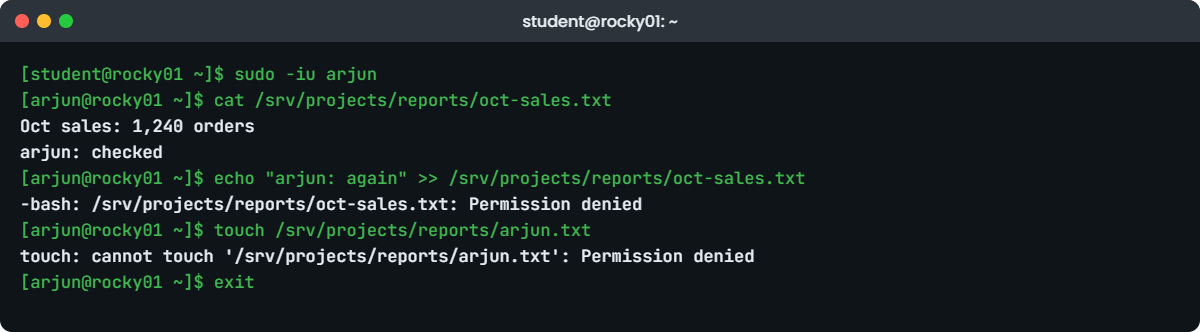
touch: cannot touch '/srv/projects/reports/arjun.txt': Permission deniedHe can read but can’t append or create files, even though webteam has rw on both. The named entry for arjun matched first, so his group membership was never checked. priya and the rest of the group still have full rights.
✅ Checkpoint: cat works, while the append and the touch both give “Permission denied”.
7Add a default ACL for new files
First see the gap. priya adds November’s file and arjun tries it:
sudo -iu priya
echo "Nov sales: draft" > /srv/projects/reports/nov-sales.txt
chmod 660 /srv/projects/reports/nov-sales.txt
getfacl -p /srv/projects/reports/nov-sales.txt
exit
sudo -iu arjun
echo "arjun: edited" >> /srv/projects/reports/nov-sales.txt && echo "arjun wrote to nov-sales.txt"
exitYou’ll get this:
# file: /srv/projects/reports/nov-sales.txt
# owner: priya
# group: webteam
user::rw-
group::rw-
other::---
arjun wrote to nov-sales.txtThe -m from step 5 only touched files that existed then. Fix the new file and add a default entry so it doesn’t happen again:
sudo setfacl -R -m u:arjun:rX /srv/projects/reports
sudo setfacl -R -d -m u:arjun:rX /srv/projects/reports
getfacl /srv/projects/reportsYou should see this:
getfacl: Removing leading '/' from absolute path names
# file: srv/projects/reports
# owner: priya
# group: webteam
# flags: -s-
user::rwx
user:arjun:r-x
group::rwx
mask::rwx
other::---
default:user::rwx
default:user:arjun:r-x
default:group::rwx
default:mask::rwx
default:other::---
Now priya creates December’s file without any chmod, and arjun tries it:
sudo -iu priya
echo "Dec sales: draft" > /srv/projects/reports/dec-sales.txt
ls -l /srv/projects/reports
getfacl -p /srv/projects/reports/dec-sales.txt
exit
sudo -iu arjun
cat /srv/projects/reports/dec-sales.txt
echo "arjun: edited" >> /srv/projects/reports/dec-sales.txt
exitYou should see something like this:
total 12
-rw-rw----+ 1 priya webteam 17 Oct 27 11:50 dec-sales.txt
-rw-rw----+ 1 priya webteam 31 Oct 27 11:48 nov-sales.txt
-rw-rw----+ 1 priya webteam 39 Oct 27 11:43 oct-sales.txt
# file: /srv/projects/reports/dec-sales.txt
# owner: priya
# group: webteam
user::rw-
user:arjun:r-x #effective:r--
group::rwx #effective:rw-
mask::rw-
other::---
Dec sales: draft
-bash: /srv/projects/reports/dec-sales.txt: Permission denieddec-sales.txt got arjun’s entry from the default ACL. The default entry says r-x, but the program asked for 0666, so the mask became rw- and arjun’s effective right is r--. Notice also that the file is 660 even though priya’s umask would normally give 644: with a default ACL, the umask is ignored.
✅ Checkpoint: dec-sales.txt has a + and arjun can read it but not write to it.
8Back up the ACLs and restore them
Run this:
cd /srv/projects
sudo getfacl -R reports > ~/reports-acl.txt
head -n 10 ~/reports-acl.txt
sudo setfacl -b reports/oct-sales.txt
ls -l reports/oct-sales.txt
sudo setfacl --restore=$HOME/reports-acl.txt
ls -l reports/oct-sales.txt
cdYou should see something like this:
# file: reports
# owner: priya
# group: webteam
# flags: -s-
user::rwx
user:arjun:r-x
group::rwx
mask::rwx
other::---
default:user::rwx-rw-rw----. 1 priya webteam 39 Oct 27 11:43 reports/oct-sales.txt
-rw-rw----+ 1 priya webteam 39 Oct 27 11:43 reports/oct-sales.txtsetfacl -b removed the whole ACL (the + disappeared) and --restore put it back from the saved text. Because the paths in the file are relative, run the restore from the same folder you ran getfacl in. Save a file like this before any big permission change at work.
✅ Checkpoint: oct-sales.txt shows a + again after the restore, and ~/reports-acl.txt is kept as your backup.
Break It, Then Fix It
Three ways ACLs go wrong on real servers. All of them leave getfacl looking almost right, which is why they waste so much time.
1Tighten a file with chmod 600
Someone decides the October report is sensitive and runs this:
sudo chmod 600 /srv/projects/reports/oct-sales.txt
ls -l /srv/projects/reports/oct-sales.txt
sudo -iu arjun cat /srv/projects/reports/oct-sales.txt
getfacl /srv/projects/reports/oct-sales.txtYou’ll get this:
-rw-------+ 1 priya webteam 39 Oct 27 11:43 /srv/projects/reports/oct-sales.txt
cat: /srv/projects/reports/oct-sales.txt: Permission denied
getfacl: Removing leading '/' from absolute path names
# file: srv/projects/reports/oct-sales.txt
# owner: priya
# group: webteam
user::rw-
user:arjun:r-- #effective:---
group::rw- #effective:---
mask::---
other::---
The group digit 0 went into the mask, so arjun’s entry and the whole webteam group are now worth nothing. The entries are still listed, which makes people think the ACL is fine; the #effective comments are the clue.
Fix: restore the mask (or set the mode back with chmod 660).
sudo setfacl -m m::rw /srv/projects/reports/oct-sales.txt
getfacl -c /srv/projects/reports/oct-sales.txt
sudo -iu arjun cat /srv/projects/reports/oct-sales.txtgetfacl: Removing leading '/' from absolute path names
user::rw-
user:arjun:r--
group::rw-
mask::rw-
other::---
Oct sales: 1,240 orders
arjun: checked✅ Checkpoint: The mask is rw- again, no #effective comments remain and arjun can read the file.
2Move a file in from another folder
priya drafts a summary in another folder and moves it into reports:
sudo -iu priya
mkdir /srv/projects/drafts
echo "Q3 board summary" > /srv/projects/drafts/q3-summary.txt
chmod 660 /srv/projects/drafts/q3-summary.txt
mv /srv/projects/drafts/q3-summary.txt /srv/projects/reports/
ls -l /srv/projects/reports
exit
sudo -iu arjun
echo "arjun: changed" >> /srv/projects/reports/q3-summary.txt && echo "write worked"
exitYou’ll get something like this:
total 16
-rw-rw----+ 1 priya webteam 17 Oct 27 11:50 dec-sales.txt
-rw-rw----+ 1 priya webteam 31 Oct 27 11:48 nov-sales.txt
-rw-rw----+ 1 priya webteam 39 Oct 27 11:43 oct-sales.txt
-rw-rw----. 1 priya webteam 17 Oct 27 12:02 q3-summary.txt
write workedA move within one file system only renames the file, so it keeps its old (empty) ACL and the default ACL never gets a say. No + (only the SELinux dot), and arjun is back to plain group rights. Copying the file in instead would have created a new file with the default entries.
Fix: re-apply the access entry to the tree, then check.
sudo setfacl -R -m u:arjun:rX /srv/projects/reports
ls -l /srv/projects/reports/q3-summary.txt
sudo -iu arjun bash -c 'echo x >> /srv/projects/reports/q3-summary.txt'
sudo rmdir /srv/projects/drafts-rw-rw----+ 1 priya webteam 32 Oct 27 12:02 /srv/projects/reports/q3-summary.txt
bash: line 1: /srv/projects/reports/q3-summary.txt: Permission denied✅ Checkpoint: q3-summary.txt shows a + and arjun can no longer write to it.
3Mistype the user name
Run this:
sudo setfacl -m u:arjn:r /srv/projects/reports/oct-sales.txtYou’ll get this error:
setfacl: Option -m: Invalid argument near character 3setfacl looks the name up when it parses the entry, and “character 3” is where the unknown user name starts. The message never says “no such user”, so people stare at the colons. The same message appears for a missing group.
Fix: check the name, then run it with the right one.
getent passwd arjun
sudo setfacl -m u:arjun:r /srv/projects/reports/oct-sales.txtarjun:x:1002:1002:Arjun Rao:/home/arjun:/bin/bash✅ Checkpoint: getent shows arjun and the setfacl runs without an error.
This happened at work
The auditors who could see the folder but not the files
A colleague of mine was on the Linux team at a power distribution company in Kolkata when the statutory auditors arrived for the year-end review. They’d been given read access to the billing exports through an ACL for a named auditors group, tested by the admin a week earlier, and on the first morning they couldn’t open a single file.
The first check was getfacl, and it looked perfect: group:auditors:r-- on every file. So the team re-added the auditors’ accounts to the group, made them log in again and even restarted the Samba service that shared the folder, and nothing changed.
The next person to look read the whole output and saw #effective:--- on the auditors line. Two nights earlier, a hardening script from a security scan had run chmod -R o-rwx,g-rwx on all data folders to “remove group access”, which set the mask to nothing on every file that had an ACL.
They put the mask back with setfacl -R -m m::rX on that tree, and the auditors were in before lunch. The script was changed to skip paths listed as ACL-managed, and the team’s runbook now says to read the #effective column before touching anything else.
Common mistakes and troubleshooting
| Mistake | What happens | What to do instead |
|---|---|---|
| Using chmod on files that have ACLs | The group digit changes the mask and named entries silently lose rights | Use setfacl for ACL files, and check #effective in getfacl afterwards |
| Setting only an access ACL on a folder | Files created later don’t include the new entry | Add a default ACL too: setfacl -d -m |
| Using x instead of capital X with -R | Every data file becomes executable for that user | Use rX so only folders get x |
| Copying with plain cp or tar | The copy has no ACL and access quietly changes | Use cp -a, rsync -aA or tar --acls |
| Ignoring the + in ls -l | You read the group column as group rights when it’s the mask | When you see +, run getfacl before deciding anything |
| Using ACLs for whole teams | Dozens of named entries nobody can audit | Use groups for teams and keep ACLs for the few exceptions |
Interview questions
Click a question to open it. Each one is written the way an interviewer would ask it. Under it you will see why they ask it and one way you could answer, in your own words.
Fresher level
1. What is an ACL, and when would you use one instead of normal permissions?
Why they ask this: They want to know you understand what ACLs add and that you don’t reach for them by default.
How you might answer: An ACL adds extra entries for named users or groups to a file, on top of the owner, group and other bits. I’d use one for an exception, like giving one user read-only access inside a team folder, where creating a new group would be messy.
For a whole team needing the same access, a normal group is simpler to read and audit.
2. You see a + at the end of the mode in ls -l. What does it mean and how do you see the details?
Why they ask this: This checks that you can spot an ACL and know the command to read it.
How you might answer: The + means the file has an ACL. I’d run getfacl on it to see the named entries, the mask and any default entries. I’d also remember that the group column in ls now shows the mask, not the owning group’s rights.
2–5 years experience
3. getfacl shows user:arjun:r-- on a file but arjun still gets Permission denied. What’s going on?
Why they ask this: They want to hear about the mask, and whether you check the path as well as the file.
How you might answer: First I’d look for an #effective comment next to his entry, because a mask of --- or -w- cancels his r. That usually comes from a chmod on the file after the ACL was set, and setfacl -m m::r or the right chmod fixes it.
If the mask is fine I’d check every folder on the path with namei -l or getfacl, because he needs x on each one, and then SELinux.
4. How do you make sure files created later in a folder get the same ACL?
Why they ask this: They’re checking default ACLs and whether you know their limits.
How you might answer: I set a default ACL on the folder with setfacl -d -m u:arjun:rX, usually with -R so subfolders get it too. New files then copy those entries when they’re created.
It doesn’t help for files moved in from elsewhere on the same file system, because a move keeps the old ACL, so for shared folders I tell people to copy rather than move, or re-apply with setfacl -R -m.
Senior level
5. A team asks for twelve users with different rights on one share. ACLs or groups? Walk me through how you decide.
Why they ask this: They want design thinking: auditability, change effort and what happens when people join and leave.
How you might answer: I’d first sort the twelve into the few kinds of access they need, usually two or three, like edit, read and none. Each kind becomes a group, ideally managed in AD or IdM so joiners and leavers are handled there, and the folder gets those groups through the owning group plus one or two named group ACL entries.
I’d keep named user entries for short-lived exceptions with a ticket and an end date, because twelve user entries per file can’t be reviewed sensibly at audit time.
6. How would you move a directory tree with ACLs to a new server without losing them?
Why they ask this: They want a method that preserves ACLs and a way to prove it worked.
How you might answer: I’d use rsync -aAX over SSH, which keeps permissions, ACLs and extended attributes, or tar with --acls --xattrs on both ends. Before the move I’d save getfacl -R output as a backup and so I have something to compare against.
After the copy I’d run getfacl -R on the new side and diff the two files. The users and groups must have the same names and IDs on both servers, otherwise the entries point at the wrong people.
Quick quiz
Q1. Which command shows a file’s ACL?
- lsattr
- getfacl
- stat
- ls -Z
Show answer
B — getfacl prints the owner, group, named entries, mask and default entries.
Q2. What does the + in -rw-rw----+ tell you?
- The file is immutable
- The file has SUID
- The file has an ACL
- The file is a link
Show answer
C — ls replaces the SELinux dot with a + when the file has an ACL.
Q3. A file has user:arjun:rw-. Someone runs chmod 640 on it. What can arjun do now?
- Read and write
- Read only
- Nothing
- Write only
Show answer
B — The group digit 4 becomes the mask (r--), so arjun’s rw- is cut to r--.
Q4. Which setfacl option sets entries that new files in a folder will inherit?
- -R
- -b
- -d
- -x
Show answer
C — -d works on the default ACL, which is copied to new files and folders.
Q5. arjun is in webteam (group rwx) and the folder also has user:arjun:r-x. Can he create files there?
- Yes, through the group
- No, his named entry decides
- Only as root
- Only if the mask is rwx
Show answer
B — The kernel uses the first matching entry type; a named user entry stops it before the group entries.
Quick recap
- An ACL adds named user and named group entries to a file or folder; getfacl reads them and setfacl changes them.
- The kernel checks owner, then named users, then groups, then other, and stops at the first match, so a named entry can restrict someone inside a group.
- The mask caps named entries and the owning group; on an ACL file, chmod’s group digit sets the mask.
- Default ACLs (setfacl -d) are copied to new files, but not to files moved in on the same file system.
- Back up with
getfacl -R, restore withsetfacl --restore, and copy withcp -aorrsync -aA. - /srv/projects/reports now gives webteam full rights and arjun read-only, including future files.
Next lesson
Lesson 20: Processes and signals → You’ll see what a process is, find the one using your CPU, stop it the polite way first, and keep jobs running after you log out.
Further reading: Linux ACL
Want to go deeper into Linux ACL? Read acl(5) for the full check order and mask rules, and the man pages for setfacl and getfacl. The RHEL 10 documentation and the Ubuntu Server documentation cover the distribution side.
You can also see the full plan for this course on the Linux Administration course page.
