ZooKeeper quorums for older Kafka clusters

A ZooKeeper quorum is the majority of servers in a ZooKeeper ensemble that must agree before anything is written, and every Kafka cluster older than 4.0 depends on one. Kafka 3.x keeps its broker list, topic settings and controller election in ZooKeeper, so when the ensemble loses its majority the cluster can’t change anything, even though the brokers are still running. Plenty of companies still run these clusters, because leaving ZooKeeper is a planned migration and not a package update.

In this lesson you’ll install Kafka 3.9.2 (the last 3.x release and the bridge to KRaft) next to the Lesson 58 cluster on kafka01, run a three-member ZooKeeper ensemble from it, read its state with four-letter words and the AdminServer, and attach one ZooKeeper-mode broker. Then you’ll break the quorum on purpose, walk through how a cluster like this moves to KRaft, and put the Lesson 58 cluster back the way Lesson 60 expects it.

Where this lesson fits

Lesson 59 of 82 in Linux Administration · Phase 3: Enterprise infrastructure and storage · Before this: Lesson 58, Apache Kafka on Linux with KRaft · Next: Lesson 60, Kafka security with SSL and SASL

TimeYou needBy the end you can
About 90 minuteskafka01 from Lesson 58 (4 GB RAM; the Lesson 58 cluster is stopped while you work), ubu01 or your laptop to SSH inBuild and check a three-member ZooKeeper ensemble, tell leader from follower, fix myid and quorum problems, and explain the ZooKeeper to KRaft migration steps

What it is, in one line

ZooKeeper is a small group of servers that keeps one shared, ordered record for a Kafka 3.x cluster, and a change only counts once more than half of those servers have written it down.

In Simple Words

Three brothers and one khata

Three brothers run a cloth shop in Chandni Chowk, and each keeps a copy of the khata, the shop’s ledger. The eldest reads every new entry aloud, the other two copy it, and a credit sale counts only when at least two of the three books have it. If one brother is at a wedding in Agra, the other two carry on, and he copies the missed pages when he gets back.

If two brothers are away, the one left behind can’t write new credit sales, because one book out of three proves nothing. The counter staff still sell from the stock on display, but nothing new can be agreed until a second brother returns.

The brothers are ZooKeeper servers, the eldest is the leader, the khata is ZooKeeper’s data, and the counter staff are the Kafka brokers.

Engineer's View

What ZooKeeper does for Kafka 3.x

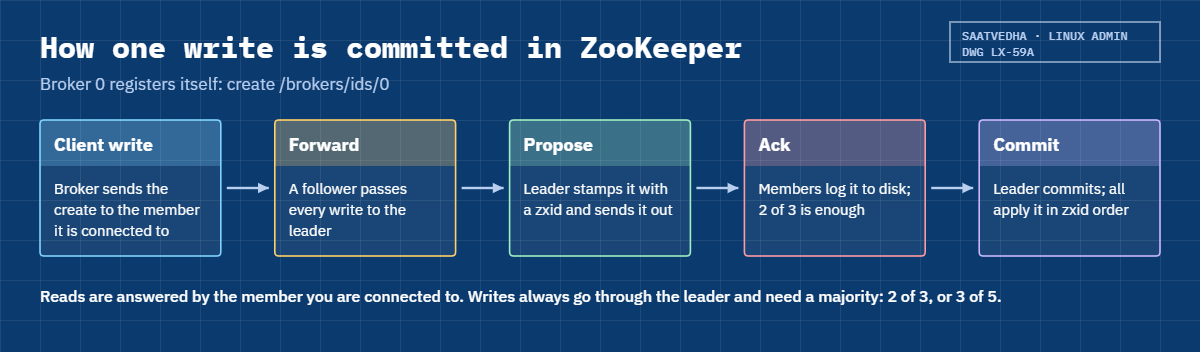
A ZooKeeper ensemble is a set of servers that hold a small tree of nodes called znodes, much like a file system kept in memory and logged to disk. One server is the leader; the others are followers that copy every change. Writes go through the leader and are committed with the ZAB protocol once a majority has logged them to disk, so every server applies changes in the same order, numbered by a zxid.

Ensemble sizeMajority neededServers that can fail
110 (fine for a laptop, never for work)
321
431 (no better than 3, and slower)
532
743 (rare; every write waits for more disks)

Kafka 3.x keeps these in ZooKeeper: live brokers as ephemeral znodes under /brokers/ids (they vanish when a broker’s session ends), the active controller in /controller, topic and partition assignments under /brokers/topics, topic and broker configs under /config, ACLs, and the cluster ID in /cluster/id. The messages themselves never touch ZooKeeper.

ItemIn this lab
Kafka release3.9.2 (21 February 2026), the last 3.x release; it ships the ZooKeeper 3.8.4 jars and scripts
Memberszk1, zk2, zk3 on kafka01, all three on one VM (a lab shortcut)
Ports per memberClient 2181/2182/2183, follower-to-leader 2888/2889/2890, leader election 3888/3889/3890, AdminServer 8081/8082/8083 on 127.0.0.1
Config files/etc/zookeeper/zoo1.cfg to zoo3.cfg (zoo.cfg is the usual name in a standalone ZooKeeper install)
IdentityA file called myid in each dataDir holding 1, 2 or 3
Kafka brokerOne Kafka 3.9.2 broker in ZooKeeper mode, broker.id 0, port 9392

Kafka 4.0 (March 2025) removed ZooKeeper, so a 4.x broker has no ZooKeeper mode at all. To reach 4.x, a ZooKeeper-based cluster first moves to 3.9 and migrates its metadata to KRaft controllers while ZooKeeper is still running; only after that does the version upgrade happen. Three members on one VM give you the real quorum maths but no protection at all against losing the VM, so at work each member gets its own server, ideally in a different rack.

How it works, step by step

Follow one ensemble from its config files to its first committed write.

1zoo.cfg and myid tell each server who it is

Every member has the same list of server.N=host:peerPort:electionPort lines, so they all know the whole ensemble. The only thing that tells a server which line is its own is the myid file in its dataDir. tickTime (2000 ms here) is the basic time unit: initLimit=10 gives a follower 10 ticks to connect and sync with a new leader, and syncLimit=5 drops a follower that falls 5 ticks behind.

2Leader election, then every write goes through the leader

At start each server votes for the member with the newest data (the highest zxid), and when zxids are equal, the highest myid wins. Once a candidate has a majority of votes it becomes leader and the others follow. A client such as a Kafka broker may connect to any member; reads are answered locally, but writes are forwarded to the leader, which commits them when a majority has logged them.

The diagram below follows one write.

ZooKeeper quorum: how one write is committed by the leader and a majority

3Sessions and ephemeral znodes

Each client holds a session with a timeout (Kafka’s zookeeper.session.timeout.ms defaults to 18 seconds) and keeps it alive with heartbeats. A broker registers itself as an ephemeral znode, /brokers/ids/0 for broker 0, which ZooKeeper deletes when the session expires. That’s how the Kafka controller learns a broker has died, and why a long garbage-collection pause or a slow ZooKeeper disk can make a healthy broker look dead.

4Four-letter words and the AdminServer

Every member answers short text commands on its client port: srvr (version, zxid, mode), stat (the same plus connected clients), ruok (is the process alive) and mntr (metrics for monitoring). Since ZooKeeper 3.5 only srvr is enabled by default and everything else needs 4lw.commands.whitelist. The AdminServer gives the same information as JSON over HTTP, on port 8080 unless you change it.

5Why Kafka had to leave ZooKeeper

With ZooKeeper, one broker is elected controller and loads the whole cluster’s metadata from ZooKeeper whenever it takes over, which got slow on clusters with hundreds of thousands of partitions. It also meant running, patching, securing and monitoring a second distributed system next to Kafka. KRaft moves that metadata into Kafka’s own Raft log on dedicated controllers, which is the cluster you built in Lesson 58.

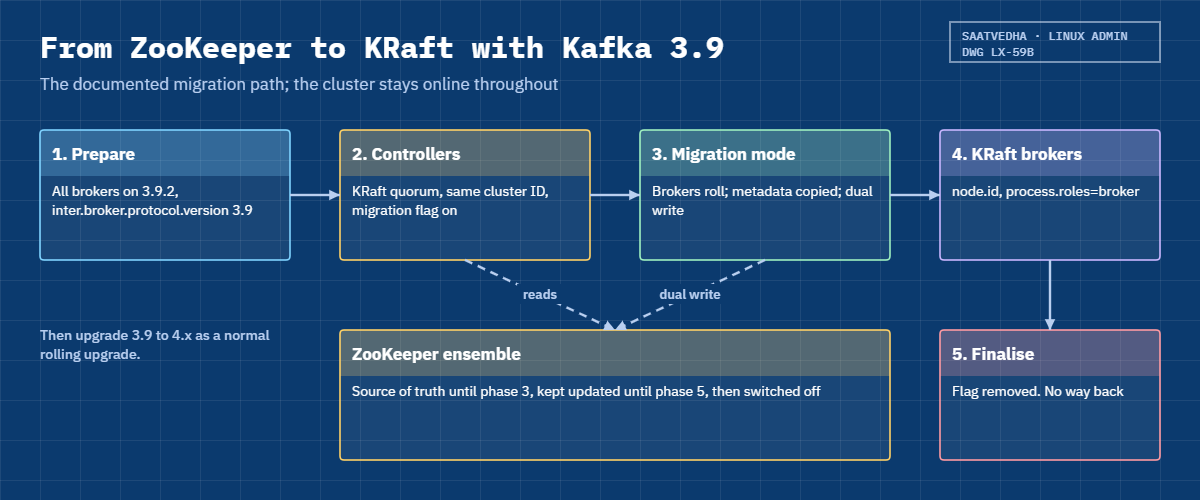
The picture below shows the migration path Kafka 3.9 gives you. The order matters, and the last step can’t be undone.

ZooKeeper quorum: the five phases of the migration from ZooKeeper to KRaft in Kafka 3.9

6The ZooKeeper to KRaft migration, phase by phase

The official procedure, in the Kafka 3.9 operations docs, has five phases. Rehearse it on a copy of the cluster and keep a copy of the ZooKeeper data before you start.

PhaseWhat you changeCan you go back?
1. PrepareEvery broker on the latest 3.9 release (3.9.2) with inter.broker.protocol.version=3.9; check that no feature you use is unsupported in KRaftYes, nothing has moved yet
2. Provision controllersNew KRaft controllers (process.roles=controller) formatted with the cluster ID from /cluster/id, plus zookeeper.metadata.migration.enable=true and zookeeper.connect. Their node.id must not clash with any broker.idYes, remove the controllers
3. Brokers into migration modeOn each ZooKeeper broker add the migration flag, controller.quorum.bootstrap.servers, controller.listener.names and a CONTROLLER entry in the protocol map; rolling restart. The active controller logs “Completed migration of metadata from Zookeeper to KRaft” and then writes to bothYes, with ZooKeeper clean-up steps from the docs
4. Brokers to KRaftReplace broker.id with node.id (same number), add process.roles=broker, remove zookeeper.connect and the migration flag; rolling restartYes, with two more rolling restarts
5. FinaliseRemove the migration flag and zookeeper.connect from the controllers and restart them one by oneNo. ZooKeeper is no longer updated

After phase 5 the cluster is a normal KRaft cluster on 3.9, and the upgrade to 4.x follows the usual rolling-upgrade steps. ZooKeeper can be switched off once nothing else uses it. Plan for clients and tools too: old scripts that still pass --zookeeper to kafka-topics.sh broke back in Kafka 3.0, and anything that reads znodes directly stops seeing updates after finalisation.

Hands-on lab: a three-member ZooKeeper ensemble with Kafka 3.9.2

Before you run any command, double-check it

Read every command twice before you press Enter. Check the target: the server name, the user, the disk or device name, the path and the sizes. These commands are for learning and were tested in our lab, not on your system. At work, run the read-only commands first, follow your change process, make sure a backup exists, and ask a second person to check anything that changes or deletes data. You run them at your own risk.

Everything runs on kafka01 as student over SSH. Kafka 3.9.2 goes into its own folder, /opt/kafka_2.13-3.9.2, and the /opt/kafka link from Lesson 58 is never touched, so the two versions can’t mix. Take a snapshot first (VBoxManage snapshot kafka01 take before-l59), because it’s the easiest way back if anything goes wrong.

1Make room on kafka01

Three ZooKeeper members and a broker need about 1.5 GB, so stop the Lesson 58 cluster for now:

sudo systemctl stop kafka@1 kafka@2 kafka@3
systemctl is-active kafka@1 kafka@2 kafka@3
free -h

You should see something like this:

inactive
inactive
inactive
               total        used        free      shared  buff/cache   available
Mem:           3.6Gi       418Mi       2.6Gi       8.0Mi       806Mi       3.2Gi
Swap:          3.9Gi          0B       3.9Gi

“inactive” (not “failed”) means each node stopped cleanly on SIGTERM. The units stay enabled, so if kafka01 reboots in the middle of this lesson the Lesson 58 cluster comes back on its own; stop it again if that happens. The last part of Break It, Then Fix It starts it again for Lesson 60.

✅ Checkpoint: All three kafka@ units are inactive and “available” memory is above 3 GB.

2Install Kafka 3.9.2 next to Kafka 4.4

3.9.2 is an archived release, so it comes from archive.apache.org (slower than the main mirror):

cd /tmp
curl -fLO https://archive.apache.org/dist/kafka/3.9.2/kafka_2.13-3.9.2.tgz
curl -fLO https://archive.apache.org/dist/kafka/3.9.2/kafka_2.13-3.9.2.tgz.sha512
EXPECTED=$(sed 's/.*://' kafka_2.13-3.9.2.tgz.sha512 | tr -d ' \n' | tr 'A-F' 'a-f' | grep -oE '^[0-9a-f]{128}')
ACTUAL=$(sha512sum kafka_2.13-3.9.2.tgz | cut -d' ' -f1)
[ "$EXPECTED" = "$ACTUAL" ] && echo "SHA512 OK" || echo "SHA512 MISMATCH, do not use this file"
sudo tar -xzf kafka_2.13-3.9.2.tgz -C /opt
sudo chown -R root:root /opt/kafka_2.13-3.9.2
ls /opt/kafka_2.13-3.9.2/libs | grep -i zookeeper
readlink /opt/kafka

You should see something like this (curl progress cut):

SHA512 OK
zookeeper-3.8.4.jar
zookeeper-jute-3.8.4.jar
/opt/kafka_2.13-4.4.0

Kafka 3.x ships ZooKeeper inside its tarball: the jars in libs and the scripts zookeeper-server-start.sh and zookeeper-shell.sh in bin. Many companies instead run a separate Apache ZooKeeper install, where you’d use zkServer.sh status to read the mode; it runs the same srvr command you’ll use below. The link still points at 4.4.0, so every Lesson 58 command keeps working.

✅ Checkpoint: The hash printed SHA512 OK, the libs folder has zookeeper-3.8.4.jar, and /opt/kafka still points at kafka_2.13-4.4.0.

3Create the zookeeper user, myid files and three configs

Paste this whole block:

sudo dnf install -y nmap-ncat
sudo useradd --system --home-dir /var/lib/zookeeper --no-create-home --shell /usr/sbin/nologin zookeeper
sudo mkdir -p /etc/zookeeper
for n in 1 2 3; do
  sudo mkdir -p /var/lib/zookeeper/zk$n /var/log/zookeeper/zk$n
  echo "$n" | sudo tee /var/lib/zookeeper/zk$n/myid >/dev/null
  sudo tee /etc/zookeeper/zoo$n.cfg >/dev/null <<EOT
# /etc/zookeeper/zoo$n.cfg  (SaatVedha Linux course, Lesson 59)
tickTime=2000
initLimit=10
syncLimit=5
dataDir=/var/lib/zookeeper/zk$n
clientPort=$((2180 + n))
clientPortAddress=10.10.10.31
maxClientCnxns=60
admin.enableServer=true
admin.serverAddress=127.0.0.1
admin.serverPort=$((8080 + n))
autopurge.snapRetainCount=3
autopurge.purgeInterval=24
server.1=10.10.10.31:2888:3888
server.2=10.10.10.31:2889:3889
server.3=10.10.10.31:2890:3890
EOT
done
sudo chown -R zookeeper:zookeeper /var/lib/zookeeper /var/log/zookeeper
grep -H -E '^(clientPort|admin.serverPort)=' /etc/zookeeper/zoo*.cfg
sudo cat /var/lib/zookeeper/zk1/myid /var/lib/zookeeper/zk2/myid /var/lib/zookeeper/zk3/myid

You should see this:

/etc/zookeeper/zoo1.cfg:clientPort=2181
/etc/zookeeper/zoo1.cfg:admin.serverPort=8081
/etc/zookeeper/zoo2.cfg:clientPort=2182
/etc/zookeeper/zoo2.cfg:admin.serverPort=8082
/etc/zookeeper/zoo3.cfg:clientPort=2183
/etc/zookeeper/zoo3.cfg:admin.serverPort=8083
1
2
3

The three files differ only in dataDir and the two ports, and all of them carry the same three server lines. On separate servers every member would use 2181, 2888 and 3888; here each member needs its own ports because they share one IP address. clientPortAddress keeps clients on the lab network address, and the AdminServer listens only on 127.0.0.1. The autopurge lines clean old snapshots and transaction logs once a day, which a forgotten ensemble otherwise piles up until the disk fills.

✅ Checkpoint: grep shows ports 2181 to 2183 and 8081 to 8083, and the three myid files hold 1, 2 and 3.

ZooKeeper quorum lab: srvr output showing leader and followers on kafka01
Example output on kafka01: three ZooKeeper members started under systemd, with zk3 elected leader.

4Run the ensemble under systemd

Create a template unit, start all three members and ask each one for its mode:

sudo tee /etc/systemd/system/zookeeper@.service >/dev/null <<'EOF'
# /etc/systemd/system/zookeeper@.service  (SaatVedha Linux course, Lesson 59)
[Unit]
Description=ZooKeeper member %i for the Kafka 3.9 lab
Wants=network-online.target
After=network-online.target

[Service]
Type=simple
User=zookeeper
Group=zookeeper
Environment="KAFKA_HEAP_OPTS=-Xms256m -Xmx256m"
Environment="LOG_DIR=/var/log/zookeeper/zk%i"
ExecStart=/opt/kafka_2.13-3.9.2/bin/zookeeper-server-start.sh /etc/zookeeper/zoo%i.cfg
SuccessExitStatus=143
Restart=on-failure
RestartSec=10

[Install]
WantedBy=multi-user.target
EOF
sudo systemctl daemon-reload
sudo systemctl enable --now zookeeper@1 zookeeper@2 zookeeper@3
sleep 10
for n in 1 2 3; do echo "zk$n: $(echo srvr | nc 10.10.10.31 $((2180 + n)) | grep Mode)"; done
echo srvr | nc 10.10.10.31 2183

You should see something like this:

Created symlink '/etc/systemd/system/multi-user.target.wants/zookeeper@1.service' → '/etc/systemd/system/zookeeper@.service'.
Created symlink '/etc/systemd/system/multi-user.target.wants/zookeeper@2.service' → '/etc/systemd/system/zookeeper@.service'.
Created symlink '/etc/systemd/system/multi-user.target.wants/zookeeper@3.service' → '/etc/systemd/system/zookeeper@.service'.
zk1: Mode: follower
zk2: Mode: follower
zk3: Mode: leader
Zookeeper version: 3.8.4-9316c2a7a97e1666d8f4593f34dd6fc36ecc436c, built on 2024-02-12 22:16 UTC
Latency min/avg/max: 0/0.0/0
Received: 1
Sent: 0
Connections: 1
Outstanding: 0
Zxid: 0x100000000
Mode: leader
Node count: 5
Proposal sizes last/min/max: -1/-1/-1

zk3 won the first election because all three started with no data, so the zxids were equal and the highest myid won. The zxid 0x100000000 means epoch 1 (the high 32 bits), transaction 0: every new leader starts a new epoch, so you can tell from the zxid how many leader changes the ensemble has had. Node count 5 is the empty tree ZooKeeper creates for itself.

Each member logs to /var/log/zookeeper/zkN/server.log.

✅ Checkpoint: Two members say follower and one says leader.

5Four-letter words and the AdminServer

Ask for something other than srvr:

echo ruok | nc 10.10.10.31 2181; echo
echo stat | nc 10.10.10.31 2181; echo

You’ll get this:

ruok is not executed because it is not in the whitelist.
stat is not executed because it is not in the whitelist.

Only srvr is enabled by default (zkServer.sh needs it). Allow the four that monitoring uses, then restart one member at a time, followers first and the leader last, checking the mode after each:

for n in 1 2 3; do echo '4lw.commands.whitelist=srvr,stat,ruok,mntr' | sudo tee -a /etc/zookeeper/zoo$n.cfg >/dev/null; done
for n in 1 2 3; do
  sudo systemctl restart zookeeper@$n; sleep 10
  echo "zk$n: $(echo srvr | nc 10.10.10.31 $((2180 + n)) | grep Mode)"
done
echo ruok | nc 10.10.10.31 2181; echo
echo mntr | nc 10.10.10.31 2182 | grep -E 'server_state|znode_count|synced_followers|file_descriptor'
curl -s http://127.0.0.1:8082/commands/ruok

You should see something like this:

zk1: Mode: follower
zk2: Mode: follower
zk3: Mode: follower
imok
zk_server_state	leader
zk_znode_count	5
zk_synced_followers	2
zk_max_file_descriptor_count	524288
zk_open_file_descriptor_count	71
{
  "command" : "ruok",
  "error" : null
}

When zk3, the old leader, restarted, zk1 and zk2 elected zk2 (the higher myid of the two), and zk3 came back as a follower, so the ensemble never lost its majority. On the leader, zk_synced_followers 2 is the number worth alerting on: below 1 in a three-member ensemble means one more failure stops all writes. The AdminServer answered on 127.0.0.1:8082; curl -s http://127.0.0.1:8082/commands lists every command it knows.

✅ Checkpoint: ruok answers imok, mntr on zk2 shows leader with 2 synced followers, and the AdminServer returns JSON with “error” : null.

6Attach a ZooKeeper-mode Kafka 3.9.2 broker

Create the broker’s folders, config and unit, start it and look at what it wrote into ZooKeeper:

sudo -u kafka mkdir -p /var/lib/kafka/legacy-zk
sudo mkdir -p /var/log/kafka/legacy /etc/kafka39
sudo chown kafka:kafka /var/log/kafka/legacy
sudo tee /etc/kafka39/server.properties >/dev/null <<'EOF'
# /etc/kafka39/server.properties  (SaatVedha Linux course, Lesson 59: ZooKeeper-mode lab broker)
broker.id=0
listeners=PLAINTEXT://10.10.10.31:9392
advertised.listeners=PLAINTEXT://10.10.10.31:9392
log.dirs=/var/lib/kafka/legacy-zk
zookeeper.connect=10.10.10.31:2181,10.10.10.31:2182,10.10.10.31:2183
num.partitions=1
offsets.topic.replication.factor=1
transaction.state.log.replication.factor=1
transaction.state.log.min.isr=1
log.retention.hours=24
EOF
sudo tee /etc/systemd/system/kafka39.service >/dev/null <<'EOF'
# /etc/systemd/system/kafka39.service  (SaatVedha Linux course, Lesson 59)
[Unit]
Description=Kafka 3.9.2 broker in ZooKeeper mode (lab)
After=zookeeper@1.service zookeeper@2.service zookeeper@3.service

[Service]
Type=simple
User=kafka
Group=kafka
Environment="KAFKA_HEAP_OPTS=-Xms512m -Xmx512m"
Environment="LOG_DIR=/var/log/kafka/legacy"
ExecStart=/opt/kafka_2.13-3.9.2/bin/kafka-server-start.sh /etc/kafka39/server.properties
SuccessExitStatus=143
Restart=on-failure
RestartSec=10

[Install]
WantedBy=multi-user.target
EOF
sudo systemctl daemon-reload
sudo systemctl start kafka39
sleep 20
sudo grep -m1 'started (kafka.server.KafkaServer)' /var/log/kafka/legacy/server.log
ZS=/opt/kafka_2.13-3.9.2/bin/zookeeper-shell.sh
$ZS 10.10.10.31:2181 ls /brokers/ids 2>/dev/null | tail -n 1
$ZS 10.10.10.31:2181 get /controller 2>/dev/null | tail -n 1
$ZS 10.10.10.31:2181 get /cluster/id 2>/dev/null | tail -n 1

You should see something like this:

[2026-10-27 15:12:40,881] INFO [KafkaServer id=0] started (kafka.server.KafkaServer)
[0]
{"version":2,"brokerid":0,"timestamp":"1793094158412","kraftControllerEpoch":-1}
{"version":"1","id":"Fz3mQe8URq2Yv0bK1xWJtA"}

Broker 0 registered itself as /brokers/ids/0, won the controller election (/controller says brokerid 0), and generated a cluster ID, because the cluster was new. kraftControllerEpoch -1 means no KRaft controller has ever taken over; during a migration that number changes, which is how ZooKeeper brokers know a KRaft controller is in charge. Now create a topic and see it appear as a znode:

/opt/kafka_2.13-3.9.2/bin/kafka-topics.sh --bootstrap-server 10.10.10.31:9392 --create --topic legacy-orders --partitions 1 --replication-factor 1
$ZS 10.10.10.31:2183 ls /brokers/topics 2>/dev/null | tail -n 1
Created topic legacy-orders.
[legacy-orders]

The topic was created through the broker, written by the controller into ZooKeeper through the leader, and read back from zk3, a different member. In Kafka 3.x every tool talks to the brokers with --bootstrap-server; only zookeeper-shell.sh and admin scripts for ZooKeeper itself still connect to port 2181.

✅ Checkpoint: server.log shows “[KafkaServer id=0] started”, /brokers/ids is [0], and legacy-orders is listed under /brokers/topics.

7Lose the leader and watch a new election

Find the current leader, stop it, and check that Kafka can still change metadata:

for n in 1 2 3; do echo srvr | nc 10.10.10.31 $((2180 + n)) | grep -q leader && L=$n; done; echo "leader is zk$L"
sudo systemctl stop zookeeper@$L
sleep 5
for n in 1 2 3; do echo "zk$n: $(echo srvr | nc -w 2 10.10.10.31 $((2180 + n)) 2>/dev/null | grep Mode)"; done
/opt/kafka_2.13-3.9.2/bin/kafka-topics.sh --bootstrap-server 10.10.10.31:9392 --create --topic legacy-returns --partitions 1 --replication-factor 1
sudo systemctl start zookeeper@$L
sleep 10
echo "zk$L: $(echo srvr | nc 10.10.10.31 $((2180 + L)) | grep Mode)"

You should see something like this:

leader is zk2
zk1: Mode: follower
zk2:
zk3: Mode: leader
Created topic legacy-returns.
zk2: Mode: follower

With zk2 gone, zk1 and zk3 were still two of three, so they elected zk3 within a second or two and writes carried on: the new topic was created while one member was down. zk2 came back as a follower and caught up from the leader. This is the failure a three-member ensemble is built for, and it’s why you patch and restart ZooKeeper members one at a time.

✅ Checkpoint: A new leader was elected, legacy-returns was created with one member down, and the stopped member rejoined as a follower.

Break It, Then Fix It

Take a snapshot first (VBoxManage snapshot kafka01 take before-l59-break). The ensemble and the kafka39 broker from the lab should still be running, with the Lesson 58 cluster stopped. The last step here puts kafka01 back the way Lesson 60 needs it.

1A member with no myid file

A clean-up script “tidies” zk2’s data folder and moves the myid file away:

sudo systemctl stop zookeeper@2
sudo mv /var/lib/zookeeper/zk2/myid /var/lib/zookeeper/zk2/myid.old
sudo systemctl start zookeeper@2
sleep 5
systemctl status zookeeper@2 --no-pager | grep Active:
sudo journalctl -u zookeeper@2 -n 40 --no-pager | grep -E 'Caused by|status=' | tail -n 2

You’ll get this error:

     Active: activating (auto-restart) (Result: exit-code) since Tue 2026-10-27 15:31:07 IST; 4s ago
Oct 27 15:31:07 kafka01 zookeeper-server-start.sh[7514]: Caused by: java.lang.IllegalArgumentException: myid file is missing
Oct 27 15:31:07 kafka01 systemd[1]: zookeeper@2.service: Main process exited, code=exited, status=2/INVALIDARGUMENT

The config lists three servers, so ZooKeeper knows it is part of an ensemble and refuses to guess which one it is. It exits with code 2, and systemd retries every 10 seconds. The other two members are still a majority, so Kafka doesn’t notice yet, which is how a half-broken ensemble survives unnoticed for weeks.

Fix: write the right number back, owned by zookeeper, and remove the stray file.

echo 2 | sudo -u zookeeper tee /var/lib/zookeeper/zk2/myid
sudo rm /var/lib/zookeeper/zk2/myid.old
sudo systemctl restart zookeeper@2
sleep 10
echo srvr | nc 10.10.10.31 2182 | grep Mode
2
Mode: follower

✅ Checkpoint: zookeeper@2 is active and reports Mode: follower.

2Two members with the same myid

Someone rebuilds zk3 by copying zk2’s folder, so zk3’s myid now says 2:

echo 2 | sudo -u zookeeper tee /var/lib/zookeeper/zk3/myid
sudo systemctl restart zookeeper@3
sleep 8
sudo grep -E 'ERROR' /var/log/zookeeper/zk3/server.log | tail -n 3
sudo journalctl -u zookeeper@3 -n 20 --no-pager | grep 'status=' | tail -n 1

You’ll get this error:

[2026-10-27 15:36:22,147] ERROR Leaving listener thread for address 10.10.10.31:3889 after 3 errors. Use zookeeper.electionPortBindRetry property to increase retry count. (org.apache.zookeeper.server.quorum.QuorumCnxManager)
[2026-10-27 15:36:22,148] ERROR As I'm leaving the listener thread, I won't be able to participate in leader election any longer: 10.10.10.31:3889 (org.apache.zookeeper.server.quorum.QuorumCnxManager)
[2026-10-27 15:36:22,150] ERROR Exiting JVM with code 14 (org.apache.zookeeper.util.ServiceUtils)
Oct 27 15:36:22 kafka01 systemd[1]: zookeeper@3.service: Main process exited, code=exited, status=14/n/a

With myid 2, the zk3 process read the server.2 line and tried to open zk2’s election port 3889, which zk2 already holds (“Address already in use” appears a few lines above these). On one VM that fails loudly. On separate servers it doesn’t: both machines think they are server 2, connections between members keep getting replaced, and one of them never joins properly, which is much harder to diagnose.

That’s why rebuild runbooks must write myid by hand and check it.

Fix: give zk3 its own number again.

echo 3 | sudo -u zookeeper tee /var/lib/zookeeper/zk3/myid
sudo systemctl restart zookeeper@3
sleep 10
for n in 1 2 3; do echo "zk$n: $(echo srvr | nc 10.10.10.31 $((2180 + n)) | grep Mode)"; done
3
zk1: Mode: leader
zk2: Mode: follower
zk3: Mode: follower

Your leader may be a different member, depending on which ones restarted when. What matters is one leader and two followers.

✅ Checkpoint: All three members answer, one as leader and two as followers.

3Lose the quorum

Patch night: two members are stopped at the same time.

sudo systemctl stop zookeeper@1 zookeeper@2
sleep 5
echo srvr | nc 10.10.10.31 2183; echo
echo ruok | nc 10.10.10.31 2183; echo
/opt/kafka_2.13-3.9.2/bin/zookeeper-shell.sh 10.10.10.31:2183 ls /brokers/ids 2>&1 | grep -E 'Connecting|KeeperErrorCode'

You’ll get this:

This ZooKeeper instance is not currently serving requests
imok
Connecting to 10.10.10.31:2183
KeeperErrorCode = ConnectionLoss for /brokers/ids

One member out of three is not a majority, so zk3 stops serving clients and keeps trying to hold an election (“Cannot open channel to 1 at election address” fills its log). Look at ruok: it still says imok, because it only checks that the process is alive. A health check built on ruok stays green through a complete ZooKeeper outage.

The Kafka broker keeps serving the partitions it already leads, but nothing that needs metadata can change: no new topics, no leader moves, and a broker that restarts now can’t register.

Fix: bring back one member, which restores the majority.

sudo systemctl start zookeeper@1
sleep 10
echo srvr | nc 10.10.10.31 2183 | grep Mode
sleep 20
/opt/kafka_2.13-3.9.2/bin/zookeeper-shell.sh 10.10.10.31:2183 ls /brokers/ids 2>/dev/null | tail -n 1
sudo systemctl start zookeeper@2

You should see something like this:

Mode: leader
[0]

Two of three again, so a leader was elected and broker 0 re-registered once its ZooKeeper session was working. Starting zk2 makes the ensemble whole. Monitor zk_server_state and zk_synced_followers from mntr, or srvr on each member, instead of ruok.

✅ Checkpoint: /brokers/ids shows [0] again and all three members are running.

4Clean up: put the Lesson 58 cluster back

Stop the legacy lab, keep it installed but disabled, and start the KRaft cluster:

sudo systemctl stop kafka39
sudo systemctl disable --now zookeeper@1 zookeeper@2 zookeeper@3
sudo systemctl start kafka@1 kafka@2 kafka@3
sleep 30
systemctl is-active kafka@1 kafka@2 kafka@3
/opt/kafka/bin/kafka-metadata-quorum.sh --bootstrap-server 10.10.10.31:9092 describe --status | grep -E 'LeaderId|MaxFollowerLag:'

You should see something like this:

Removed '/etc/systemd/system/multi-user.target.wants/zookeeper@1.service'.
Removed '/etc/systemd/system/multi-user.target.wants/zookeeper@2.service'.
Removed '/etc/systemd/system/multi-user.target.wants/zookeeper@3.service'.
active
active
active
LeaderId:               2
MaxFollowerLag:         0

The ZooKeeper lab stays on disk (/opt/kafka_2.13-3.9.2, /etc/zookeeper, /var/lib/zookeeper, /etc/kafka39 and /var/lib/kafka/legacy-zk), so you can start it again later with sudo systemctl start zookeeper@1 zookeeper@2 zookeeper@3 kafka39, after stopping the Lesson 58 cluster.

✅ Checkpoint: The three kafka@ units are active and the KRaft quorum has a leader with follower lag 0.

This happened at work

The patch night that froze the solar dashboards

My team lead tells this one from her time at a solar energy company in Gurugram. Every inverter on their plants in Rajasthan sent readings through a Kafka 3.6 cluster with a three-member ZooKeeper ensemble, and the operations dashboard showed live generation for every plant. On a Saturday night patch run, the dashboards stopped updating new plants and a restarted broker wouldn’t come back, although every ZooKeeper health check was green.

The on-call engineer’s first move was to restart the other brokers, which made things worse, because they couldn’t register either and partitions lost their leaders. Then someone ran srvr by hand and got “This ZooKeeper instance is not currently serving requests” from the only member that was up. The patch tool had grouped servers by name, and two of the three ZooKeeper members sat in the same group, so they had been rebooted together and one was stuck at a firmware prompt.

The health check was the other half of the story: it sent ruok and alerted only if the answer wasn’t imok, so a lone member without a quorum looked perfectly healthy. Getting the second member back took about 25 minutes, and the dashboards caught up from Kafka once the brokers re-registered.

The team put each ZooKeeper member in its own patch group with a check of Mode between them, replaced the ruok check with mntr’s server state and synced follower count, and made a rule that no runbook may stop more than one member. The incident also got the KRaft migration onto the plan: three months later they were on 3.9, and ZooKeeper was switched off by the end of the year.

Common mistakes and troubleshooting

MistakeWhat happensWhat to do instead
Running 2 or 4 ZooKeeper members2 can’t lose any member; 4 loses no more than 3 and every write waits for an extra diskUse 3, or 5 when you must survive two failures
Copying a member’s data folder to build anotherDuplicate myid: the ensemble misbehaves or the new member fails to startWrite myid by hand on each server and check it against the server.N lines
Health checks that only send ruokimok even with no quorum; outages look greenAlert on mntr zk_server_state and zk_synced_followers, or srvr Mode on every member
Patching or restarting two members at onceQuorum lost; no metadata changes, brokers can’t re-registerOne member at a time, check Mode, leader last
Old runbooks with kafka-topics.sh --zookeeper“zookeeper is not a recognized option” since Kafka 3.0Use --bootstrap-server with every Kafka tool
ZooKeeper data on the same busy disk as Kafka logsSlow fsyncs, expired sessions, brokers that look deadGive ZooKeeper its own disk (dataLogDir for the transaction log)
Upgrading a ZooKeeper cluster straight to Kafka 4.x4.x brokers can’t use ZooKeeper; the cluster won’t startUpgrade to 3.9, migrate to KRaft, finalise, then upgrade

Interview questions

Click a question to open it. Each one is written the way an interviewer would ask it. Under it you will see why they ask it and one way you could answer, in your own words.

Fresher level

1. Why does a ZooKeeper ensemble usually have three or five servers and never four?

Why they ask this: They want to see that you understand majority quorums rather than repeating a rule.

How you might answer: A write needs a majority, more than half of the members. With three, the majority is two, so one can fail; with five, three, so two can fail.

Four needs three for a majority, so it still survives only one failure, like three, but every write waits for one more server. Odd numbers give you the most failures survived for the number of servers you run.

2. What is the myid file, and what goes wrong if it’s missing or duplicated?

Why they ask this: A basic operations question: they’re checking you know how a member finds its own identity.

How you might answer: myid sits in the dataDir and holds the number that matches one of the server.N lines in zoo.cfg, so the server knows which entry is itself. If it’s missing in a multi-server config, ZooKeeper refuses to start with “myid file is missing”.

If two servers have the same number, they both claim the same identity. In my lab on one VM the second one failed to bind the election port and exited with code 14; on separate hosts it causes flapping connections and a member that never joins, which is worse.

2–5 years experience

3. Every ZooKeeper server answers ruok with imok, yet Kafka can’t create topics. What is going on, and how do you check?

Why they ask this: They want to see that you know ruok only checks liveness, and that you can read real quorum state.

How you might answer: ruok only tells me the process is running. I’d run echo srvr | nc host 2181 on each member: if they say “This ZooKeeper instance is not currently serving requests”, the ensemble has lost its majority.

Then I’d find out why the other members are down or cut off, check the election ports 2888 and 3888 between them, and bring back enough members for a majority. Afterwards I’d switch monitoring to mntr’s zk_server_state and zk_synced_followers.

4. Walk me through patching a three-member ZooKeeper ensemble behind a production Kafka cluster.

Why they ask this: They’re testing whether you can keep the quorum alive during routine maintenance.

How you might answer: First I check all three are healthy and find the leader with srvr. Then I patch and reboot one follower, wait until it reports Mode: follower again and the leader shows two synced followers, and only then move to the next follower.

The leader goes last, so there is only one election. Throughout, I watch the Kafka brokers for ZooKeeper session expiries, and I never let any automation take two members down together.

Senior level

5. You own a Kafka 3.5 cluster on ZooKeeper and the business wants Kafka 4.x. How do you get there?

Why they ask this: They want the order of steps, the point of no return, and evidence that you’d plan rollback.

How you might answer: Kafka 4.x has no ZooKeeper mode, so first I upgrade the brokers to the latest 3.9 release and set inter.broker.protocol.version to 3.9. Then I provision KRaft controllers formatted with the existing cluster ID and the migration flag, put the brokers into migration mode with a rolling restart, and wait for “Completed migration of metadata from Zookeeper to KRaft”.

Next the brokers are restarted as KRaft brokers, and only after a soak period do I finalise by removing the migration settings from the controllers, because after that I can’t go back. Then the 3.9 to 4.x upgrade is a normal rolling upgrade. I’d rehearse all of it on a copy of the cluster and keep a ZooKeeper data backup until finalisation.

6. When would you run five ZooKeeper members instead of three, and what does it cost you?

Why they ask this: Seniors should weigh availability against latency and operations effort.

How you might answer: Five survive two failures, so I’d use five when I need to patch one member while still tolerating an unplanned failure, or when the members are spread across three sites. With three, a planned reboot plus one surprise means an outage.

The cost is that every write waits for three disks instead of two, so latency rises a little, and there are more servers to patch and monitor. For a cluster that’s about to migrate to KRaft I’d rather put that effort into the migration.

Quick quiz

Q1. How many members can fail in a five-member ZooKeeper ensemble while it keeps accepting writes?

  1. One
  2. Two
  3. Three
  4. Four
Show answer

B — The majority of five is three, so two can fail.

Q2. Which file tells a ZooKeeper server which server.N line is its own?

  1. zoo.cfg
  2. myid in its dataDir
  3. /etc/hosts
  4. meta.properties
Show answer

B — myid holds the number; zoo.cfg lists every member.

Q3. A lone surviving member answers ruok with imok. What does that prove?

  1. The ensemble has a quorum
  2. The process is running, nothing more
  3. Kafka is healthy
  4. It is the leader
Show answer

B — ruok checks liveness only; srvr or mntr show whether it is serving.

Q4. Which four-letter word is enabled by default from ZooKeeper 3.5 on?

  1. ruok
  2. stat
  3. mntr
  4. srvr
Show answer

D — Only srvr is on by default; the rest need 4lw.commands.whitelist.

Q5. What is the last step of a ZooKeeper to KRaft migration that you can still undo?

  1. Provisioning controllers
  2. Moving brokers to KRaft mode
  3. Finalising the controllers
  4. None of them
Show answer

B — After finalisation ZooKeeper is no longer updated, so there is no way back.

Quick recap

  • Kafka 3.x stores brokers, controller, topics, configs and ACLs in ZooKeeper; Kafka 4.0 removed ZooKeeper completely.
  • An ensemble needs a majority: 3 members survive 1 failure, 5 survive 2. Each member finds itself through the myid file.
  • Read the real state with srvr (Mode) or mntr (zk_server_state, zk_synced_followers); ruok only proves the process is alive.
  • Restart or patch one member at a time, followers first and the leader last.
  • To reach 4.x: upgrade to 3.9, provision KRaft controllers with the same cluster ID, migrate brokers, finalise, then upgrade.

Next lesson

Lesson 60: Kafka security: SSL truststores, keystores and SASL → You’ll build a small CA with keytool, give each Lesson 58 node a keystore, and move the cluster to SASL_SSL with SCRAM users in rolling restarts.

Further reading: ZooKeeper quorum

Want to go deeper into ZooKeeper quorum? Read the ZooKeeper 3.8 Administrator’s Guide (configuration, four-letter words, AdminServer), the Kafka 3.9 KRaft operations page with the full ZooKeeper to KRaft migration and revert steps, the Kafka 3.9.2 release announcement, and the downloads page for archived releases and checksums. You can also see the full plan for this course on the Linux Administration course page.

Scroll to Top

This website uses cookies

We use a few cookies to keep this site working. If you allow it, we also use Google Analytics to count visits so we can improve our lessons. You can accept all, deny the optional ones, or choose what to allow.