The Linux boot process, from power button to login

The Linux boot process is the chain of hand-offs between pressing the power button and seeing a login prompt: the firmware (UEFI or BIOS) starts GRUB2, GRUB2 loads the kernel and the initramfs, the initramfs finds your real root disk, and systemd starts every service until it reaches the default target. When a server doesn’t come back after patching, your first job is to work out which hand-off failed.

In this lesson you’ll trace each stage on rocky01 and ubu01, read what GRUB passed to the kernel, look inside the initramfs, time the boot with systemd-analyze and read the logs of the previous boot. Then you’ll break the default target on purpose and get the VM back, which is the same skill you need when a real server boots into rescue mode.

Where this lesson fits

Lesson 9 of 82 in Linux Administration · Phase 1: The origins and OS architecture · Before this: Lesson 8, Linux architecture · Next: Lesson 10, the Linux file system hierarchy

TimeYou needBy the end you can
About 75 minutesrocky01 and ubu01 from Lesson 2, VirtualBox console access (not only SSH), and a snapshot before the Break-It partName every stage of the boot, find which one is slow or broken, and change or override the default systemd target

What it is, in one line

Linux boots as a relay race: firmware, then GRUB2, then the kernel with its initramfs, then systemd, and each runner only starts when the previous one hands over the baton.

In Simple Words

Opening a shop in the morning

Picture a big electronics shop in the morning. The security guard arrives first, checks the building is safe and opens the shutter. He doesn’t know anything about selling, he only knows where the manager’s keys are kept.

The manager takes the keys, reads the day’s plan from the notice board and calls in a small advance team. They switch on the lights and open the stockroom, and only then does the full staff walk in: billing counters, the delivery desk, the repair corner. When everyone is in place the board on the door flips to “OPEN”.

The guard is the firmware, the manager is GRUB2, the advance team is the kernel with its initramfs, the floor supervisor who calls in the staff is systemd, and the “OPEN” board is the default target.

Engineer's View

Each stage, and where it lives

StageWhat it doesWhere to look on Rocky 10Where to look on Ubuntu 26.04
Firmware (UEFI or BIOS)Tests hardware, then starts the boot loader. UEFI reads its boot entries from NVRAM and loads an .efi file from the EFI system partition (FAT32)/boot/efi/EFI/rocky/, efibootmgr/boot/efi/EFI/ubuntu/, efibootmgr
shim and GRUB2shim (signed by Microsoft) checks GRUB’s signature for Secure Boot. GRUB shows the menu, then loads the kernel and initramfs into memory and passes the kernel command line/boot/grub2/grub.cfg, BLS entries in /boot/loader/entries/, grubby/boot/grub/grub.cfg, built by update-grub from /etc/default/grub
KernelUnpacks itself, sets up memory and CPUs, starts built-in drivers, unpacks the initramfs into RAM and runs its /init/boot/vmlinuz-6.12.0-211.16.1.el10_2.0.1.x86_64/boot/vmlinuz-7.0.0-15-generic
initramfsA small temporary root file system. It loads the storage drivers and LVM, finds the real root, mounts it on /sysroot and switches to it/boot/initramfs-$(uname -r).img, built by dracut/boot/initrd.img-$(uname -r), also built by dracut on 26.04
systemd (PID 1)Mounts file systems from fstab, starts services in parallel, follows dependencies until the default target is reacheddefault multi-user.targetdefault graphical.target (no desktop installed, so it behaves like multi-user)

Two changes catch people who learned on older versions. Ubuntu switched its initramfs tool from initramfs-tools to dracut in the 25.10 cycle, so on 26.04 you inspect the image with lsinitrd, the same command as Rocky, and lsinitramfs is only there if initramfs-tools is installed (it is on 24.04 and older). And Rocky, like RHEL since version 8, keeps one small file per kernel in /boot/loader/entries/ (the Boot Loader Specification), so you change kernel arguments with grubby rather than by editing grub.cfg.

Lesson 50 covers both tools.

systemd targets replaced the old SysV runlevels. The names still map: runlevel 1 is rescue.target, 3 is multi-user.target, 5 is graphical.target, and emergency.target is even more minimal than rescue (only the root file system, mounted read-only).

How it works, step by step

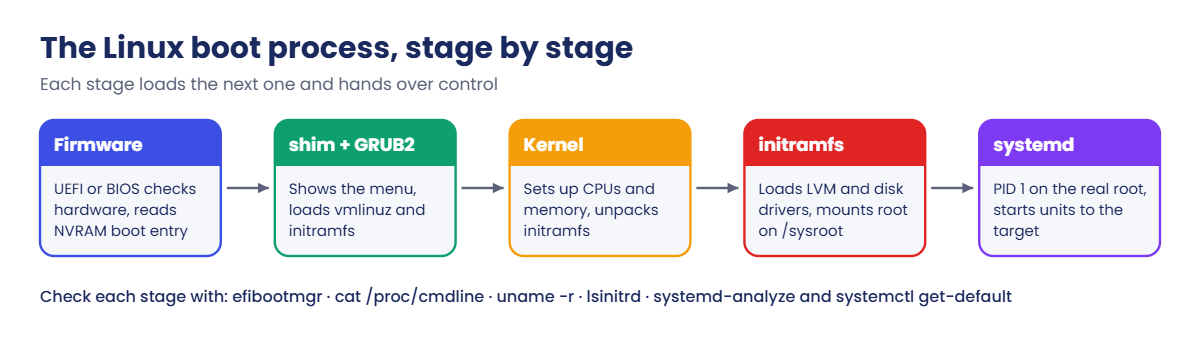
This is the whole relay on rocky01, which boots with UEFI. The diagram after these steps shows the five runners.

1Firmware finds a boot entry

VirtualBox’s UEFI firmware checks the hardware, reads the BootOrder variable from NVRAM and tries the first entry, “Rocky Linux”, which points at \EFI\rocky\shimx64.efi on the EFI system partition (/dev/sda1). On an older BIOS machine the firmware instead reads the first 446 bytes of the disk (the MBR), which holds the tiny first stage of GRUB.

2shim and GRUB2 pick a kernel

shim starts grubx64.efi, and GRUB reads its configuration and the BLS entries from /boot (/dev/sda2). It shows the menu for 5 seconds, then loads the chosen vmlinuz file and its matching initramfs file into memory and jumps to the kernel with a command line such as root=/dev/mapper/rl-root ro rd.lvm.lv=rl/root.

3The kernel starts and unpacks the initramfs

The kernel sets up memory, CPUs and the drivers built into it. It can’t mount the root file system yet, because that sits on LVM and needs drivers that live as modules on that very disk. So it unpacks the initramfs (a compressed cpio archive) into RAM and runs its /init, which on both distributions is systemd.

Linux boot process stages: firmware, GRUB2, kernel, initramfs, systemd

4initramfs finds the real root

Inside the initramfs, systemd and udev load the SATA and device-mapper modules, activate the LVM volumes named by rd.lvm.lv= and mount /dev/mapper/rl-root on /sysroot. If this step can’t find the disk you land in the dracut emergency shell, which is the classic “dracut-initqueue timeout” message after a storage change.

5switch-root and the real systemd

Once /sysroot is mounted, systemd switches root: the real disk becomes /, the initramfs memory is freed, and /usr/lib/systemd/systemd from your real disk carries on as PID 1.

6systemd walks to the default target

systemd looks at default.target, which is a link to multi-user.target on rocky01 and graphical.target on ubu01, and works backwards through dependencies: sysinit.target (mounts, swap, udev), then basic.target (sockets, timers), then the services that multi-user.target wants, such as sshd, chronyd and firewalld. Independent units start in parallel, which is why boots are fast and why the order in the log looks shuffled.

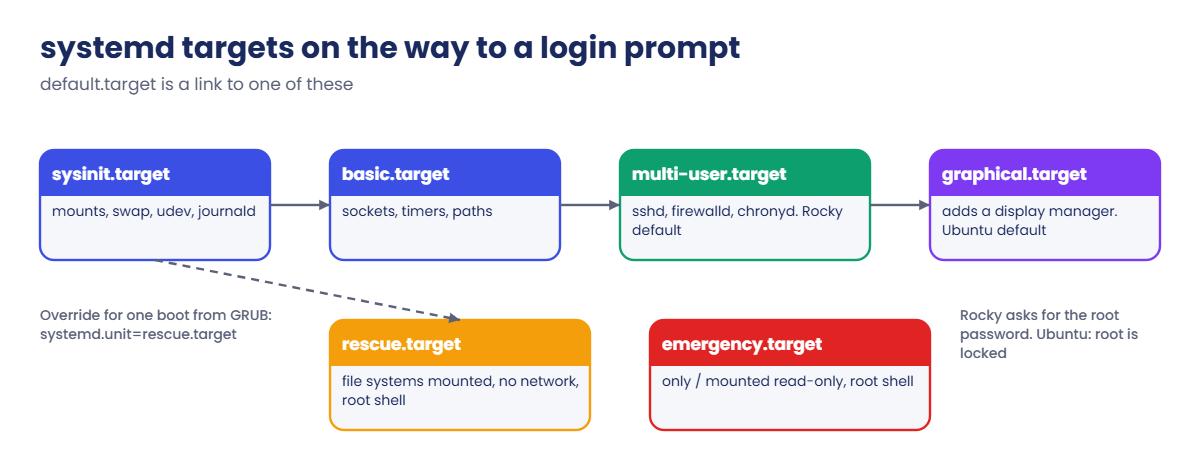
The diagram below shows those targets and the two emergency exits, rescue and emergency, that you’ll use in the Break-It part.

Linux boot process: systemd targets from sysinit to multi-user and graphical, with rescue and emergency

You can override the target for one boot by adding systemd.unit=rescue.target (or emergency.target, or multi-user.target) to the kernel line in GRUB, or change it permanently with systemctl set-default. Rescue mode still mounts your file systems but starts almost no services and no network, so SSH is gone and you need the console.

On Rocky, rescue and emergency mode ask for the root password, which is why the lab set one during install. On Ubuntu the root account is locked, so both modes refuse with “the root account is locked” and you get in through GRUB instead. That difference shows up in Lesson 70 too, with a broken fstab.

Hands-on lab: trace your own server's boot

Before you run any command, double-check it

Read every command twice before you press Enter. Check the target: the server name, the user, the disk or device name, the path and the sizes. These commands are for learning and were tested in our lab, not on your system. At work, run the read-only commands first, follow your change process, make sure a backup exists, and ask a second person to check anything that changes or deletes data. You run them at your own risk.

Steps 1 to 8 only read information. Step 9 needs one reboot of ubu01, so close anything you have open on it first. Keep the VirtualBox console window for both VMs handy, because you’ll want to watch them boot.

1Did this VM boot with UEFI or BIOS?

Run this on both VMs:

[ -d /sys/firmware/efi ] && echo UEFI || echo BIOS

You should see this on rocky01:

UEFI

The kernel creates /sys/firmware/efi only when the firmware started it in UEFI mode. rocky01 was built with EFI enabled. ubu01 prints UEFI or BIOS depending on whether “Enable EFI” was ticked in VirtualBox when you created it, and both are fine for this course.

✅ Checkpoint: You know the boot mode of each VM.

2Read the firmware’s boot entries

Run this on rocky01 (install it with sudo dnf install -y efibootmgr if it’s missing):

sudo efibootmgr

You should see something like this:

BootCurrent: 0004
Timeout: 0 seconds
BootOrder: 0004,0000,0001,0002,0003
Boot0000* UiApp	FvVol(7cb8bdc9-f8eb-4f34-aaea-3ee4af6516a1)/FvFile(462caa21-7614-4503-836e-8ab6f4662331)
Boot0001* UEFI VBOX CD-ROM VB2-01700376 	PciRoot(0x0)/Pci(0x1,0x1)/Ata(Secondary,Master,0x0){auto_created_boot_option}
Boot0002* UEFI VBOX HARDDISK VB5f3e9a21-7c8d4b16 	PciRoot(0x0)/Pci(0xd,0x0)/Sata(0,65535,0){auto_created_boot_option}
Boot0003* EFI Internal Shell	FvVol(7cb8bdc9-f8eb-4f34-aaea-3ee4af6516a1)/FvFile(7c04a583-9e3e-4f1c-ad65-e05268d0b4d1)
Boot0004* Rocky Linux	HD(1,GPT,3f2a6c1e-9b7d-4e21-8c5a-0d4f6b2e9a17,0x800,0x12c000)/\EFI\rocky\shimx64.efi

BootCurrent says which entry started this boot (0004), and BootOrder is the order the firmware tries them. Entry 0004 points at partition 1 of the GPT disk and the file \EFI\rocky\shimx64.efi, which is /boot/efi/EFI/rocky/shimx64.efi once Linux is running. The other entries are VirtualBox’s own menu, the CD drive, the raw disk and the EFI shell.

On a BIOS VM, the same command gives:

EFI variables are not supported on this system.

✅ Checkpoint: You found the Rocky Linux entry and its shimx64.efi path.

3What did GRUB pass to the kernel?

Run this on both VMs:

cat /proc/cmdline

You should see something like this on rocky01:

BOOT_IMAGE=(hd0,gpt2)/vmlinuz-6.12.0-211.16.1.el10_2.0.1.x86_64 root=/dev/mapper/rl-root ro crashkernel=2G-64G:256M,64G-:512M resume=/dev/mapper/rl-swap rd.lvm.lv=rl/root rd.lvm.lv=rl/swap rhgb quiet

And on ubu01:

BOOT_IMAGE=/vmlinuz-7.0.0-15-generic root=/dev/mapper/ubuntu--vg-ubuntu--lv ro

BOOT_IMAGE is the kernel file GRUB loaded, root= is the file system that becomes / after the initramfs, and ro mounts it read-only at first so it can be checked (systemd remounts it read-write later). The rd.lvm.lv= entries tell Rocky’s initramfs which LVM volumes to switch on, crashkernel= reserves memory for kdump (Rocky picks the value, so yours may differ), and rhgb quiet hide most boot messages behind a progress screen.

✅ Checkpoint: You can point at the root= value on each VM.

4Look inside the initramfs

Run this on rocky01:

ls -lh /boot/vmlinuz-$(uname -r) /boot/initramfs-$(uname -r).img
sudo lsinitrd -m

You should see something like this (shortened):

-rw-------. 1 root root 38M Oct 27 09:58 /boot/initramfs-6.12.0-211.16.1.el10_2.0.1.x86_64.img
-rwxr-xr-x. 1 root root 15M Oct 20 18:20 /boot/vmlinuz-6.12.0-211.16.1.el10_2.0.1.x86_64

Image: /boot/initramfs-6.12.0-211.16.1.el10_2.0.1.x86_64.img: 38M
========================================================================
Early CPIO image
========================================================================
(a few lines of CPU microcode files)
========================================================================
Version: dracut-107-4.el10

dracut modules:
systemd
systemd-initrd
systemd-udevd
i18n
lvm
dm
kernel-modules
rootfs-block
udev-rules
dracut-systemd
usrmount
base
fs-lib
shutdown
========================================================================

The kernel file is about 15 MB and its initramfs about 38 MB. The dracut modules list shows what the initramfs can do: lvm and dm are why it can find rl-root, and the systemd modules are why systemd is already running before your real disk is mounted. The early CPIO part holds CPU microcode that the kernel loads first.

On ubu01 (26.04 builds its initramfs with dracut too):

ls -lh /boot/initrd.img-$(uname -r)
sudo lsinitrd -m | head -n 20

The name differs (initrd.img-7.0.0-15-generic) but the tool and the layout are the same. On Ubuntu 24.04 and older you’d use lsinitramfs /boot/initrd.img-$(uname -r) from initramfs-tools instead.

✅ Checkpoint: lsinitrd listed lvm among the dracut modules on rocky01.

5Who is PID 1?

Run this:

ps -p 1 -o pid,comm
ls -l /sbin/init

You should see something like this on rocky01:

    PID COMMAND
      1 systemd
lrwxrwxrwx. 1 root root 22 Oct 20 18:31 /sbin/init -> ../lib/systemd/systemd

The kernel starts /sbin/init as process 1, and on both distributions that’s a link to systemd. PID 1 is special: if it dies, the kernel panics, and every orphaned process gets adopted by it.

✅ Checkpoint: ps shows systemd as PID 1.

6Which target does each VM boot into?

Run this on both VMs:

systemctl get-default

You should see this on rocky01:

multi-user.target

And on ubu01:

graphical.target

The Rocky installer set multi-user.target because you chose a server with no desktop. Ubuntu Server leaves systemd’s own default, graphical.target, but with no display manager installed it reaches the same state as multi-user. Both answers are normal, and this is the first thing to check when a server boots into the wrong mode.

✅ Checkpoint: You know the default target of both VMs.
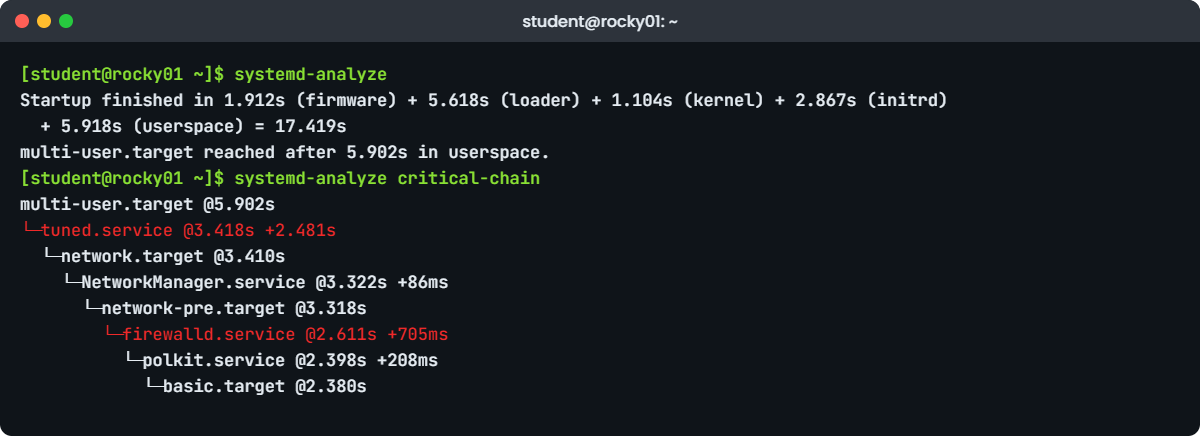
Linux boot process lab: systemd-analyze time and critical-chain on rocky01
Example systemd-analyze output on rocky01. Your times will differ.

7How long did the boot take?

Run this on both VMs:

systemd-analyze

You should see something like this on rocky01:

Startup finished in 1.912s (firmware) + 5.618s (loader) + 1.104s (kernel) + 2.867s (initrd) + 5.918s (userspace) = 17.419s
multi-user.target reached after 5.902s in userspace.

And on ubu01:

Startup finished in 1.734s (kernel) + 2.912s (initrd) + 7.388s (userspace) = 12.034s
graphical.target reached after 7.351s in userspace.

Each part maps to a runner in the relay. On rocky01, “loader” is mostly the 5-second GRUB menu, which is why a 17-second boot feels slow in a VM. If your output has no (firmware) and (loader) parts, as on ubu01 here, the boot loader didn’t report its timings to systemd, which is normal with BIOS VMs and with Ubuntu’s GRUB.

✅ Checkpoint: You can say which stage took the longest on each VM.

8Which units were slow, and which ones mattered?

Run this on rocky01:

systemd-analyze blame | head -n 8
systemd-analyze critical-chain

You should see something like this:

2.481s tuned.service
1.204s NetworkManager-wait-online.service
 933ms dracut-initqueue.service
 705ms firewalld.service
 612ms lvm2-monitor.service
 377ms initrd-switch-root.service
 208ms polkit.service
 186ms chronyd.service

The time when unit became active or started is printed after the "@" character.
The time the unit took to start is printed after the "+" character.

multi-user.target @5.902s
└─tuned.service @3.418s +2.481s
  └─network.target @3.410s
    └─NetworkManager.service @3.322s +86ms
      └─network-pre.target @3.318s
        └─firewalld.service @2.611s +705ms
          └─polkit.service @2.398s +208ms
            └─basic.target @2.380s
              └─dbus-broker.service @2.342s +36ms
                └─dbus.socket @2.329s
                  └─sysinit.target @2.321s

blame lists units by how long they took to start, but many of them ran in parallel, so the top of blame isn’t always the reason the boot was slow. critical-chain shows the chain that the target waited for: here multi-user.target waited for tuned, which waited for the network, which waited for firewalld. NetworkManager-wait-online took 1.2 seconds but isn’t on the chain, so it didn’t delay the login prompt.

✅ Checkpoint: You found the slowest unit on your critical chain.

9Read the logs of the previous boot

Reboot ubu01, log in again, then run:

journalctl --list-boots
journalctl -b -1 -n 4 --no-pager

You should see something like this:

IDX BOOT ID                          FIRST ENTRY                 LAST ENTRY
 -1 8d41f0c2a7b94e6d9c35b1e27a0f6d58 Tue 2026-10-27 10:01:12 IST Tue 2026-10-27 11:20:45 IST
  0 b27e5c9a14d84f6aa0c3e8d1f9b65a72 Tue 2026-10-27 11:21:03 IST Tue 2026-10-27 11:26:40 IST

Oct 27 11:20:44 ubu01 systemd[1]: Reached target reboot.target - System Reboot.
Oct 27 11:20:44 ubu01 systemd[1]: Shutting down.
Oct 27 11:20:45 ubu01 systemd-shutdown[1]: Syncing filesystems and block devices.
Oct 27 11:20:45 ubu01 kernel: reboot: Restarting system

Index 0 is the current boot and -1 the one before. -b -1 with -n 4 shows the last four lines of the previous boot, which is where you look when a server rebooted on its own: a clean shutdown ends like this, while a crash or power cut ends mid-sentence. Ubuntu keeps the journal on disk in /var/log/journal, which is why this works on ubu01. Try it on rocky01 in the Break-It part.

✅ Checkpoint: You can see two boots in the list and the shutdown lines of the previous one.

Break It, Then Fix It

Take a VirtualBox snapshot of both VMs now (Machine, Take Snapshot, name it “before-boot-lab”). Failure 1 leaves a VM without SSH, so you need its console window.

1Make rocky01 boot into rescue mode

Run this on rocky01:

sudo systemctl set-default rescue.target
sudo systemctl reboot

You should see something like this before it reboots:

Removed '/etc/systemd/system/default.target'.
Created symlink '/etc/systemd/system/default.target' → '/usr/lib/systemd/system/rescue.target'.

SSH never comes back, because rescue.target starts no network and no sshd. On the VirtualBox console you’ll see this:

You are in rescue mode. After logging in, type "journalctl -xb" to view
system logs, "systemctl reboot" to reboot, or "exit"
to continue bootup.
Give root password for maintenance
(or press Control-D to continue):

Pressing Control-D doesn’t help here, because the default target itself is rescue, so systemd has nothing else to continue to and shows the prompt again.

Fix: type the root password you set in Lesson 2, then put the default back and reboot:

systemctl set-default multi-user.target
systemctl reboot

✅ Checkpoint: rocky01 boots normally, SSH works and systemctl get-default prints multi-user.target.

2The same mistake on ubu01, where root is locked

Run this on ubu01:

sudo systemctl set-default rescue.target
sudo systemctl reboot

You’ll get this on the console:

You are in rescue mode. After logging in, type "journalctl -xb" to view
system logs, "systemctl reboot" to reboot, or "exit"
to continue bootup.

Cannot open access to console, the root account is locked.
See sulogin(8) man page for more details.

Press Enter to continue.

Ubuntu ships with no root password, so the rescue shell refuses to open, and Enter only brings the same message back. You go round the problem at the GRUB stage instead, by overriding the target for one boot.

Fix, part 1: reset the VM (Machine, Reset in VirtualBox). As it starts, open the GRUB menu: press Esc on a UEFI VM, or hold Shift on a BIOS VM. Highlight the first Ubuntu entry, press e, find the line that starts with linux and add this at the end of it:

systemd.unit=multi-user.target

Press Ctrl+X (or F10) to boot. This change lives only in memory for this one boot.

Fix, part 2: log in over SSH, check, and put Ubuntu’s default back:

systemctl get-default
sudo systemctl set-default graphical.target

The first command shows the problem and the override:

rescue.target
Note: found "multi-user.target" on the kernel command line, which overrides the default unit.

✅ Checkpoint: After a normal reboot, ubu01 comes up with SSH and systemctl get-default prints graphical.target.

3Ask rocky01 for the previous boot’s logs

Run this on rocky01:

journalctl -b -1

You’ll get this:

Specifying boot ID or boot offset has no effect, no persistent journal was found.

Rocky, like RHEL 7 to 10, keeps the journal in /run/log/journal, which lives in RAM and disappears on every reboot. So after an unexpected reboot, the evidence is gone unless rsyslog copied it to /var/log/messages. Ubuntu creates /var/log/journal at install, which is why step 9 worked there.

Fix: create the folder, move the current journal to disk, then reboot once and try again:

sudo mkdir -p /var/log/journal
sudo journalctl --flush
sudo systemctl reboot

After the reboot:

journalctl --list-boots

✅ Checkpoint: rocky01 lists two boots and journalctl -b -1 shows the previous boot’s messages.

This happened at work

Ninety seconds on every reboot

I was on a weekend patching rota for an HR and payroll SaaS company in London, with 40 RHEL 9 VMs to patch and reboot before Monday’s payroll cut-off. The first batch went fine, but the second batch, the payroll calculation servers, took almost two minutes each to answer on SSH again, and the slot was tight.

The obvious guess was slow storage, and someone suggested raising the VMs’ CPUs before the next reboot. Instead I ran systemd-analyze on one of them: kernel and initrd were fine, but userspace took 71 seconds. systemd-analyze critical-chain put NetworkManager-wait-online.service right in the chain, at just over a minute.

nmcli connection show explained it. Months earlier the servers had a second NIC for a backup VLAN, and when that VLAN was retired, the virtual NIC was removed but its NetworkManager profile, set to DHCP and autoconnect, stayed. Each boot, NetworkManager waited the full timeout for a DHCP answer that would never come, and the payroll service was set to start after network-online.target.

We deleted the stale profile on all 12 payroll servers and boots dropped to about 20 seconds. The bigger change went into the build checklist: when a NIC or VLAN is removed, delete its connection profile too, and every patch run now saves systemd-analyze output before and after so the next slow boot stands out at once.

Common mistakes and troubleshooting

MistakeWhat happensWhat to do instead
Changing the default target over SSH to “test” somethingThe server reboots into rescue mode with no network, and you need console access to recoverUse systemctl isolate or the GRUB systemd.unit= option for one boot, never set-default on a remote server without console access
Reading the top of systemd-analyze blame as the causeYou tune a service that ran in parallel and didn’t delay anythingCheck systemd-analyze critical-chain to see what the target waited for
Expecting journalctl -b -1 to work on RockyNo logs of the crash you’re investigatingMake the journal persistent with /var/log/journal on every RHEL-family server you build
Using lsinitramfs on Ubuntu 26.04“command not found”, because 26.04 uses dracutUse lsinitrd on both Rocky and Ubuntu 26.04
Editing /boot/grub2/grub.cfg by hand on RockyYour change is lost at the next kernel updateUse grubby --update-kernel=ALL --args=... (Lesson 50)
Planning on the root password for rescue mode on UbuntuThe rescue shell says the root account is lockedUse the GRUB entry editor or the recovery menu entry, and keep console access ready

Interview questions

Click a question to open it. Each one is written the way an interviewer would ask it. Under it you will see why they ask it and one way you could answer, in your own words.

Fresher level

1. Walk me through what happens when a Linux server boots, from power on to the login prompt.

Why they ask this: They want the stages in the right order and a sentence on what each one does. This is one of the most common Linux interview questions.

How you might answer: The firmware, UEFI or BIOS, checks the hardware and starts the boot loader, which on most servers is GRUB2 (through shim on UEFI with Secure Boot). GRUB loads the kernel and the initramfs into memory and passes the kernel command line, such as root=.

The kernel starts its drivers and runs the initramfs, which loads the storage and LVM drivers, mounts the real root on /sysroot and switches to it. Then systemd runs as PID 1 and starts services until it reaches the default target, usually multi-user.target on a server.

2. How do you check and change which target a server boots into?

Why they ask this: A practical question. They’re checking you know systemctl and the target names.

How you might answer: I check with systemctl get-default and change it with sudo systemctl set-default multi-user.target, which updates the default.target link in /etc/systemd/system.

For a single boot I add systemd.unit=rescue.target or another target to the kernel line from the GRUB menu, so nothing changes permanently.

2–5 years experience

3. A VM takes three minutes to come back after a reboot. How do you find out why?

Why they ask this: They want a data-driven approach rather than guessing, and the difference between blame and critical-chain.

How you might answer: I run systemd-analyze first to see which stage is slow: firmware, loader, kernel, initrd or userspace. If it’s userspace, systemd-analyze critical-chain shows the units the default target waited for, which is more useful than blame because blame includes units that ran in parallel.

Common causes I’ve seen are NetworkManager-wait-online waiting on a dead NIC profile, a missing disk in fstab waiting 90 seconds, or a service with a long start timeout. Then I check that unit’s log with journalctl -b -u UNIT.

4. A server rebooted unexpectedly overnight. What do you check first?

Why they ask this: They’re looking for whether you know where previous-boot evidence lives and the persistent journal gap on RHEL.

How you might answer: I run journalctl --list-boots and journalctl -b -1 -n 50 to see how the previous boot ended: a clean shutdown sequence means someone or something rebooted it, while logs that stop mid-line point to a crash or power loss. I also check last -x for shutdown records.

On RHEL-family servers the journal isn’t persistent by default, so I fall back to /var/log/messages, and I make sure /var/log/journal exists on every build so next time the evidence is there. If kdump is configured, I check /var/crash for a vmcore too.

Senior level

5. After a storage migration, a server drops to the dracut emergency shell. How do you approach it?

Why they ask this: This tests understanding of the initramfs stage and safe recovery. Seniors should know the image is host-specific.

How you might answer: The dracut shell means the initramfs couldn’t find or mount the root device, so I check from the shell with lvm lvs, blkid and cat /proc/cmdline whether the root= and rd.lvm.lv values still match the disks, and whether the new storage driver (for example a different HBA or virtio) is even in the image.

If the driver is missing, I boot the rescue kernel entry or rescue media, chroot into the system and rebuild the initramfs with dracut -f for that kernel, adding the driver if needed. Then I keep the old kernel and image as a fallback until the server has booted cleanly twice.

6. How would you set up a fleet so that boot problems are quick to diagnose and recover from?

Why they ask this: They want design thinking: console access, persistent logs, fallback kernels and standard checks.

How you might answer: Every server gets out-of-band console access (iLO, iDRAC or the hypervisor console), a persistent journal, a root password or a documented break-glass method, and at least two kernels installed so GRUB has a fallback. kdump is configured where the vendor will ask for crash dumps.

In the patching runbook I capture systemd-analyze, systemctl get-default and systemctl --failed before and after each reboot, so a slow or broken boot is caught on the first server instead of the fortieth.

Quick quiz

Q1. What is the correct order of the Linux boot process?

  1. GRUB2, firmware, systemd, kernel
  2. Firmware, GRUB2, kernel and initramfs, systemd
  3. Kernel, firmware, GRUB2, systemd
  4. Firmware, systemd, GRUB2, kernel
Show answer

B — The firmware starts GRUB2, GRUB2 loads the kernel and initramfs, and the kernel hands over to systemd as PID 1.

Q2. Why does the kernel need an initramfs on rocky01?

  1. To show the boot menu
  2. Because the drivers for LVM and the disk live as modules on the very disk it needs to mount
  3. To store the journal
  4. To check the root password
Show answer

B — The initramfs carries the storage and LVM modules into RAM so the kernel can find and mount rl-root.

Q3. Which command shows the chain of units the default target waited for during boot?

  1. systemd-analyze blame
  2. systemd-analyze critical-chain
  3. systemctl list-units
  4. journalctl -b
Show answer

B — blame lists every unit’s start time, including parallel ones. critical-chain shows the units that held up the target.

Q4. On Ubuntu 26.04, which command lists the contents of the initramfs?

  1. lsinitramfs
  2. lsinitrd
  3. mkinitrd
  4. dracut-catimages
Show answer

B — Ubuntu moved to dracut, so lsinitrd works there as on Rocky. lsinitramfs belongs to initramfs-tools, used up to 24.04.

Q5. ubu01 is stuck at “the root account is locked” in rescue mode. What gets you in?

  1. Press Control-D repeatedly
  2. Edit the kernel line in GRUB and add systemd.unit=multi-user.target
  3. Type the student password
  4. Reinstall Ubuntu
Show answer

B — Ubuntu’s root account has no password, so you override the target for one boot from GRUB, log in normally and fix the default.

Quick recap

  • The Linux boot process is a relay: firmware (UEFI or BIOS), shim and GRUB2, the kernel with its initramfs, then systemd as PID 1.
  • GRUB passes the kernel command line, which you can read in /proc/cmdline and override for one boot from the GRUB menu.
  • Both Rocky 10 and Ubuntu 26.04 build the initramfs with dracut, so lsinitrd works on both.
  • systemd-analyze times each stage, and critical-chain shows what the default target really waited for.
  • Rocky defaults to multi-user.target and Ubuntu Server to graphical.target; a wrong default lands you in rescue mode, where Rocky asks for the root password and Ubuntu refuses because root is locked.
  • Make the journal persistent on RHEL-family servers, or journalctl -b -1 has nothing to show.

Next lesson

Lesson 10: The Linux file system hierarchy → You’ll walk through /, from /etc and /var to /proc, /sys and /dev, see why /bin is now a link into /usr, and find out why /tmp behaves differently on Rocky and Ubuntu.

Further reading: Linux boot process

Want to go deeper into Linux boot process? Read Red Hat’s kernel and boot loader guide for RHEL 10, the systemd man pages for bootup(7), systemd-analyze(1) and systemd.special(7), and the Ubuntu Server documentation. You can also see the full plan for this course on the Linux Administration course page.

Scroll to Top

This website uses cookies

We use a few cookies to keep this site working. If you allow it, we also use Google Analytics to count visits so we can improve our lessons. You can accept all, deny the optional ones, or choose what to allow.